How to Remove Negative Seller Feedback on Amazon (2026)
R
RenéFreelance Amazon Editor
|
17 min read
A buyer leaves a 1-star seller rating that reads like a product review, or names a different seller, or complains about an FBA delivery you never touched. Amazon will take some of that feedback down, strike some of it through, and leave the rest exactly where it is. The difference matters more than most sellers think: on amazon.com, every 1 or 2-star seller rating on a seller-fulfilled order counts as an order defect, and the Order Defect Rate has to stay below 1%. This guide covers the six reasons Amazon removes seller feedback, the two cases where it strikes feedback through instead, the deadlines that close the window for good, the exact Feedback Manager steps, what you are and are not allowed to say to the buyer, and a worked example of what one approved removal does to a 400-order account.
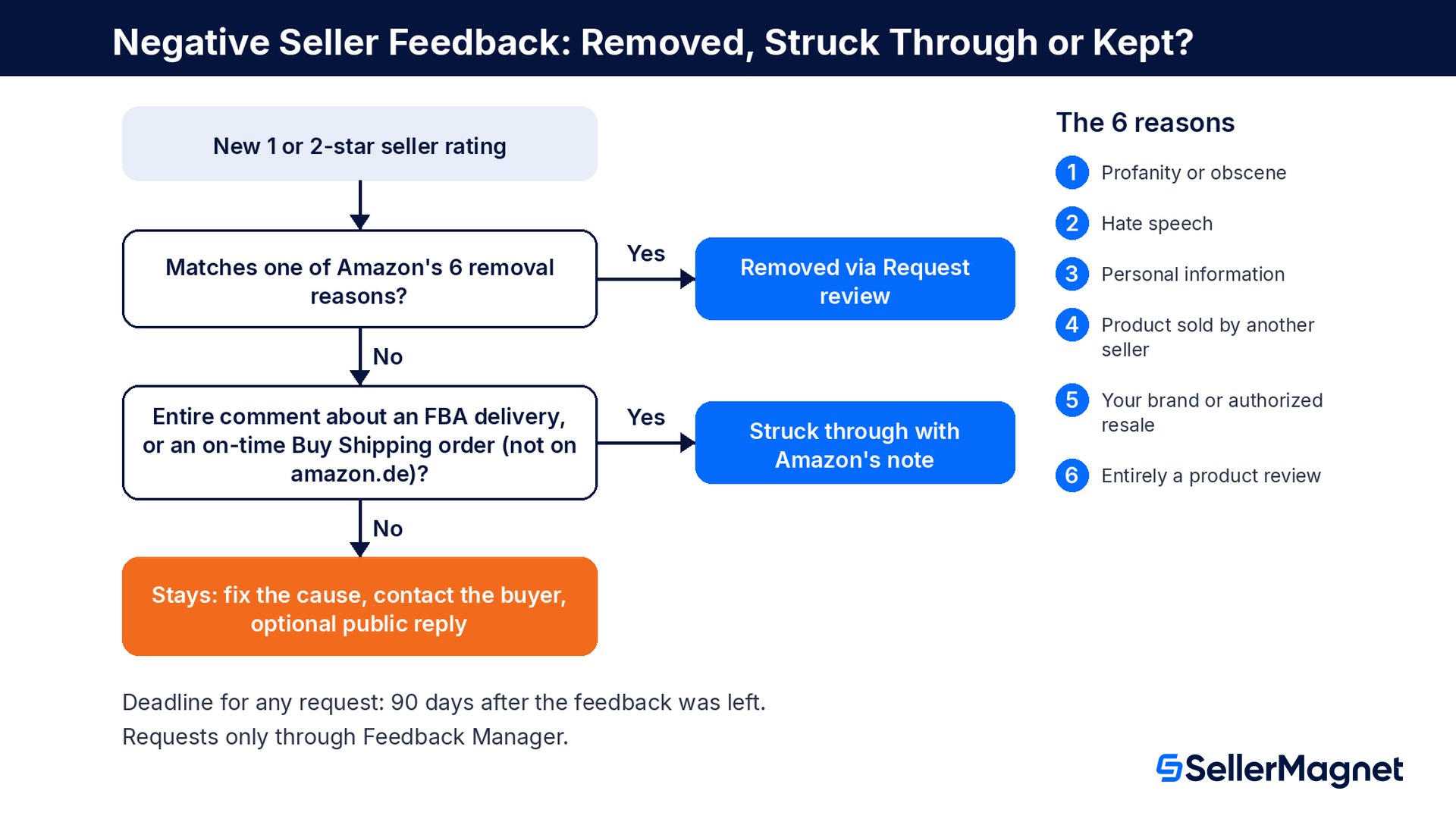
You can only get negative seller feedback removed on Amazon if it breaks one of six rules: it contains profanity, hate speech or personal information, it is about a product sold by another seller or a product you are the brand owner or authorized reseller of, or the whole comment is a product review. Feedback that is only about an FBA delivery, or, on amazon.com and amazon.co.uk, about a late order you shipped on time with Buy Shipping, is struck through instead. Request removal in Feedback Manager by selecting Request review next to the order ID, choosing the reason and adding evidence, within 90 days of the feedback. Never ask through Contact Us, and never ask the buyer to delete the rating; you may contact them to solve the problem, and they can remove it themselves within 60 days.
Seller feedback or product review: which one are you looking at?
Amazon runs two separate rating systems, and most failed removal requests start with mixing them up. Seller feedback rates the buyer's experience with you as a seller on one order: shipping, packaging, customer service, whether the item matched its listing. A product review rates the product itself and sits on the product detail page for every seller of that ASIN. Amazon's own policy page says that if you receive seller feedback that is really about the product, you use the removal option in Feedback Manager, and if a product review talks about your service instead of the product, you use the Report button under the review.
Seller feedback
Product review
What it rates
Your service on one order (shipping, packaging, customer service, item as described)
The product itself, for every seller of the ASIN
Where it shows
Your seller profile and your offer listings, as a percentage positive
The product detail page, as star ratings and written reviews
Scale
1 to 5 stars: 4 to 5 positive, 3 neutral, 1 to 2 negative
1 to 5 stars
Counts toward ODR
Yes, 1 and 2-star ratings on seller-fulfilled orders (amazon.com ODR page)
No
How to challenge it
Feedback Manager, Request review, within 90 days
Report button under the review on the product page
What are the 6 reasons Amazon removes seller feedback?
Amazon's starting position is blunt: it does not remove feedback that complies with its policies. Its help page then lists exactly six situations where it will remove feedback, and if a request is granted, the feedback stops counting toward both your feedback rating and your Order Defect Rate. Everything outside this list, including feedback you find unfair, stays.
#
Removal reason (Amazon's wording, shortened)
Typical example
1
Profanity, obscenities or language commonly understood as inappropriate in public forums
An insult or swear word aimed at the seller
2
Hate speech
Hatred toward people based on race, ethnicity, nationality, gender, religion, age, disability or similar
3
Personally identifiable information
The comment names a full name, an email address or a phone number
4
References a product sold by a different seller
The buyer rated you for an order they placed with someone else
5
Related to a product you are the brand owner or authorized reseller of
A complaint about the product's design or quality on a brand you own or resell with authorization
6
The entire comment is a product review
"The blender is too loud and the lid feels cheap" with nothing about the order or service
Two limits on rule 6 catch most sellers. If the comment mixes a product review with anything about your service ("slow shipping and the blender is too loud"), Amazon will not remove it. And Amazon's UK page spells out a second limit: comments about the accuracy of the product description or the condition of the item are kept, because the seller is responsible for delivering what the listing describes, new products undamaged and complete, used products as described. A rating about a scratched item, a missing part or a wrong size is service feedback, not a product review.
Source: Can Amazon remove buyer feedback?, an official Amazon Seller Central help page. The same six reasons appear on the amazon.co.uk and amazon.de versions of the page.
When does Amazon strike feedback through instead of deleting it?
There is a second, softer outcome. In two cases Amazon leaves the comment visible but strikes it through and adds a note that takes the blame off you. A struck-through rating no longer counts against you, and the note tells shoppers why. The FBA case appears on every store page we checked; the Buy Shipping case is listed on the amazon.com and amazon.co.uk pages and on the French, Italian, Spanish, Swedish and Polish stores' pages, but not on the amazon.de page.
Case
Condition (all of it must apply)
Note Amazon adds
Order fulfilled by Amazon (FBA)
The entire comment relates explicitly to the delivery experience of an FBA order
"This item was fulfilled by Amazon, and we take responsibility for this fulfillment experience."
Order shipped with Buy Shipping
The entire comment is about a delayed or undelivered order that you shipped on time using Buy Shipping
"The fulfillment issues associated with this order were not due to the seller."
"Entire comment" is the catch
Amazon's UK page states that if any part of the comment concerns the condition of the product as listed (New, Used) or a service you provided or arranged instead of Amazon, the feedback and its negative rating stay unchanged. "Arrived three days late" on an FBA order can be struck through; "arrived late and it was used, not new" cannot.
How long do you have? The 3, 60 and 90-day deadlines
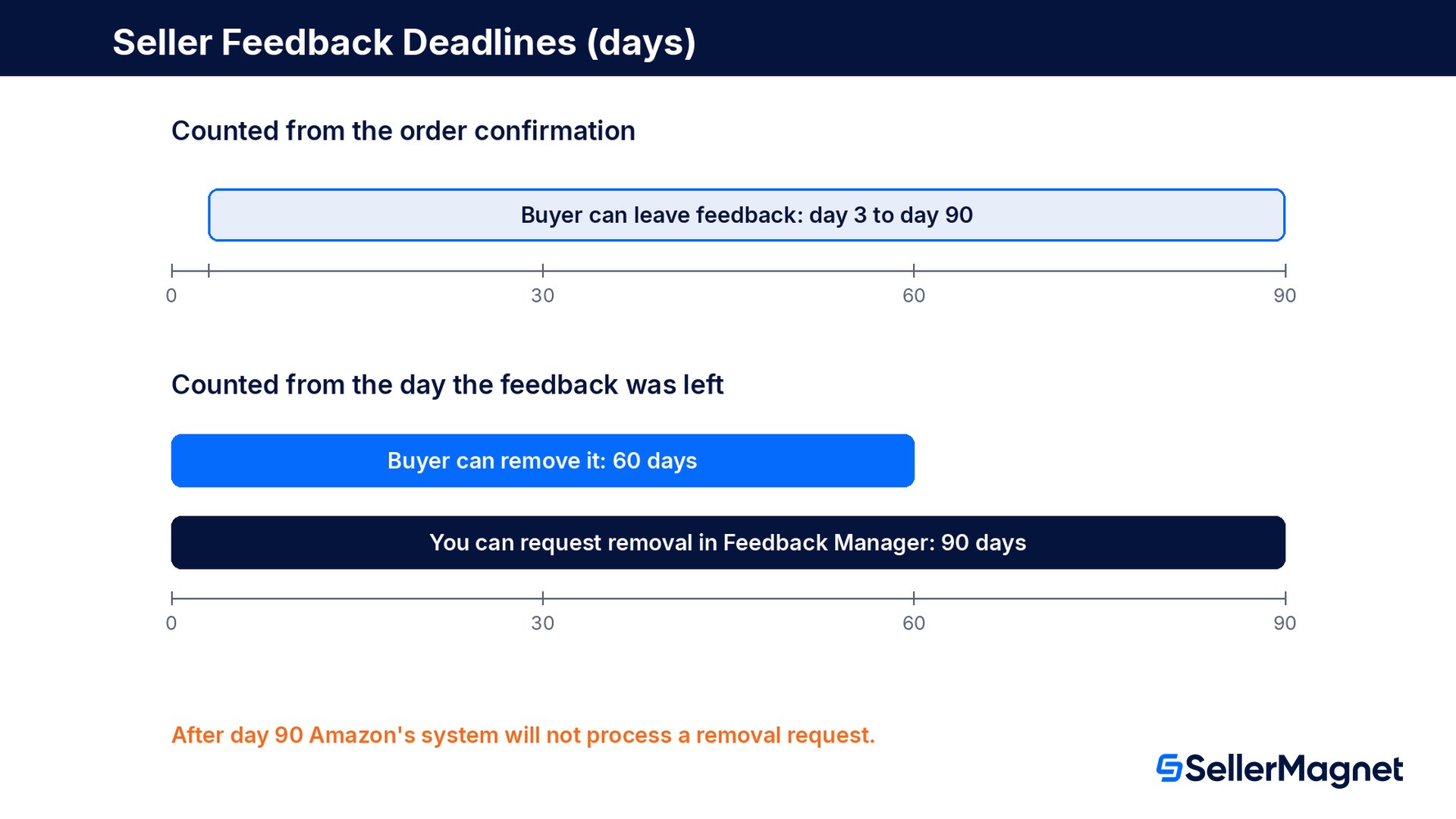
Feedback has a short, fixed life cycle, and two of its clocks run against you. The buyer can leave feedback from 3 days after the order is confirmed, for up to 90 days. Once it is posted, the buyer has 60 days to remove it, and you have 90 days from the date the feedback was left to file a removal request. After that, Amazon's system will not process a request at all, however clearly the feedback breaks the rules.
Clock
Length
Starts
What closes
Buyer can leave feedback
3 to 90 days
Order confirmed
The feedback link on the buyer's Your Orders page
Buyer can remove feedback
60 days
Feedback left
The buyer's own option to delete it
You can request removal
90 days
Feedback left
Feedback Manager will not accept the request
Withdrawn feedback leaves ODR
up to 48 hours
Buyer removes it
Delay before the ODR updates
Sources: About Feedback Manager and Order Defect Rate, official Amazon Seller Central help pages. The 90-day and 60-day rules read the same on the amazon.co.uk and amazon.de versions of the Feedback Manager page.
How do you request feedback removal in Feedback Manager?
Amazon is explicit that Feedback Manager is the only channel. Its help page warns that contacting Amazon's support teams through Contact Us, or any other method, to ask for a removal may lead to account deactivation. Inside Feedback Manager the request is called a feedback review.
Request a feedback review (removal) in Seller Central
Open Feedback Manager - In Seller Central, go to Feedback Manager, the tool where you view seller ratings, contact customers, post public replies and dispute feedback.
Find the order - In the Recent feedback table, locate the order ID of the rating you want reviewed.
Select Request review - Select Request review in the Actions column next to that order ID.
Choose the reason - In the pop-up, pick the reason from the drop-down that matches Amazon's removal policy for this case, for example that the comment is entirely a product review.
Add your evidence and submit - Use Comments to explain, briefly and factually, why the feedback does not meet Amazon's policies, then select Submit. The request appears in the Manage Review Requests tab as Under review.
Status in Manage Review Requests
What it means
What you can do
Under review
The case is queued for review
Nothing; you cannot reopen it while it is under review
Approved
The feedback has been removed from your account
Nothing; approved cases cannot be reopened
Denied
Amazon kept the feedback
Select Appeal Decision and appeal before the deadline shown; after it passes, the case cannot be reopened
Source: Request feedback review and About Feedback Manager, official Amazon Seller Central help pages. Write the comment as a short policy argument, not a complaint about the buyer: quote the part of the comment that is a product review, name the different seller's order, or point to the Buy Shipping label and its on-time ship date.
Never ask for removal through Contact Us
Amazon's own wording: you can request feedback removal only via Feedback Manager, and contacting support teams through Contact Us or any other method to request it may lead to account deactivation. Opening a support case about a single rating is never worth that risk.
Can you ask the buyer to remove negative feedback?
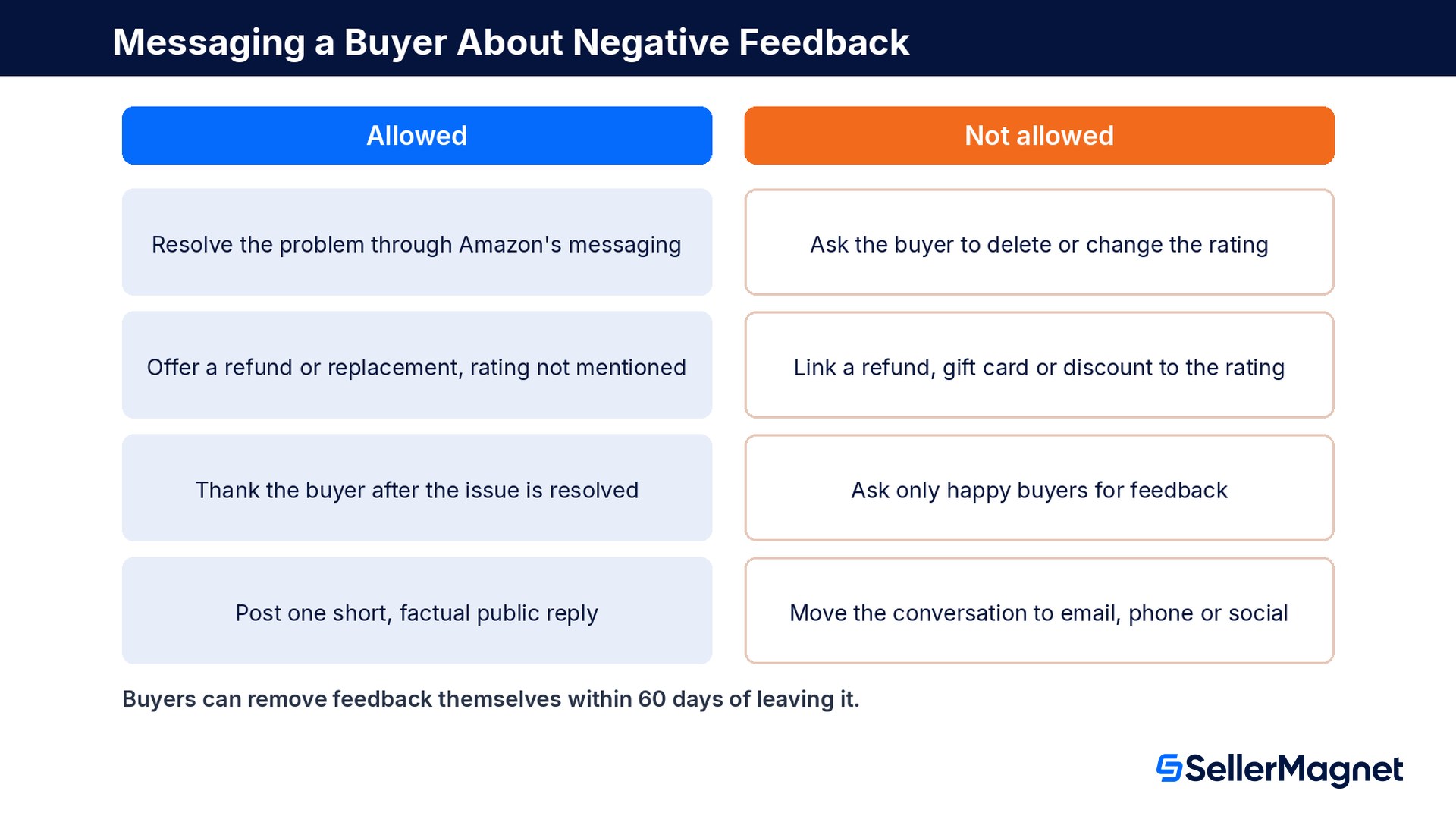
You may contact the buyer, and Amazon encourages it, but only to solve the problem. Amazon's help page on resolving feedback says pressuring or incentivizing a buyer to remove or change negative feedback violates its policies, and its communication guidelines list a request to update or delete a non-favorable review or seller feedback as a prohibited message, whether it is sent before or after the customer service. The buyer can still remove the feedback on their own within 60 days, and many do once the issue is fixed.
Allowed
Not allowed
Contacting the buyer through Buyer-Seller Messaging or Contact customer in Feedback Manager to resolve the issue
"If we have resolved the issue you were facing, can you delete your feedback?" (Amazon's own example of a violating message)
Offering a refund or replacement to fix the problem, without mentioning the rating
Offering a refund, gift card, discount or free product in exchange for changing or removing the feedback
A thank-you after the fix: "We want to thank you for the feedback you provided for our business and we hope we have resolved any issue you were facing to your satisfaction."
Asking only satisfied buyers for feedback, or asking unhappy buyers to contact you instead of leaving feedback
Posting one short, professional public reply in Feedback Manager
Moving the conversation to email, phone or social media outside Amazon
Sources: Resolve or respond to buyer feedback, Communication guidelines and Answers to questions about reviews, official Amazon Seller Central help pages. If a buyer threatens negative feedback unless you refund or replace, Amazon asks you to report it through the Report Abuse link on your Account Health dashboard rather than give in. A public reply does not change your rating, you cannot edit it after posting, and if you delete it you cannot post a second one; if the buyer removes the feedback, your reply disappears with it.
How does negative feedback hit your ODR and feedback score?
Negative seller feedback works on two numbers at once. The first is the feedback score shoppers see on your offers: positive ratings (4 and 5 stars) divided by all ratings, shown for 30 days, 90 days, 365 days and lifetime, and rounded to a whole percentage. The second is the Order Defect Rate, which Amazon uses to decide whether you may keep selling. On amazon.com, Amazon's ODR page says ODR applies only to seller-fulfilled orders and counts every order with one or more of three defects over a 60-day period: negative feedback (1 and 2-star seller reviews), A-to-z Guarantee claims and credit card chargebacks. The policy is an ODR below 1%; above it, Amazon may suspend Fulfilled by Merchant selling privileges or deactivate seller-fulfilled offers.
Negative feedback is order-correlated: Amazon counts it by the date of the order, not the date the rating arrived, so the ODR number can differ from what shoppers see.
An order with two defects (say negative feedback and an A-to-z claim) counts once, because ODR is the share of orders with one or more defects.
Feedback that a buyer withdraws stops counting toward ODR, though it can take up to 48 hours to disappear from the metric.
An approved removal takes the feedback out of both your feedback rating and your ODR.
Worked example: what one approved removal is worth
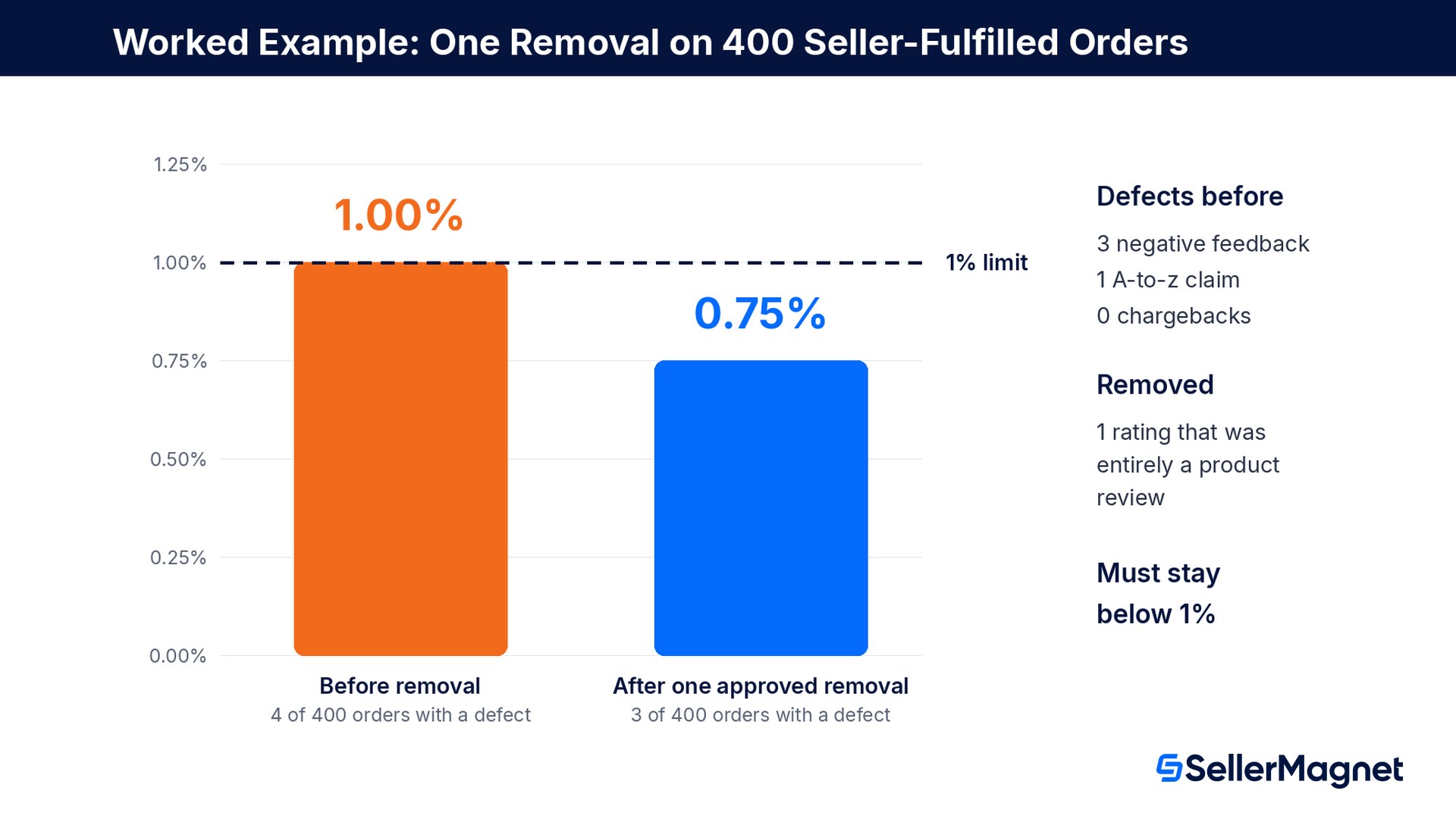
Take a seller-fulfilled account with 400 orders in the current 60-day ODR window. Three orders received 1 or 2-star seller feedback, and one other order has an A-to-z claim that was granted against the seller. That is 4 defective orders out of 400, an ODR of 1.00%. Amazon's target is below 1%, so 1.00% is already over the line. One of the three negative ratings reads "cheap plastic, the handle snapped after a week" on a product the seller is the brand owner of, with nothing about shipping or service: it qualifies twice, as a pure product review and as feedback on a product the seller owns the brand of. The seller files a feedback review within 90 days, Amazon approves it, and the account drops to 3 defective orders, an ODR of 0.75%.
Before removal
After one approved removal
Orders in the 60-day window
400
400
Orders with negative feedback
3
2
Orders with an A-to-z claim
1
1
Orders with a chargeback
0
0
Defective orders
4
3
Order Defect Rate
1.00%
0.75%
Below Amazon's 1% target?
No
Yes
The margin is thin. At 400 orders, the account can carry at most 3 defective orders and stay below 1%; a fourth defect in the window puts it back at 1.00%. The same removal also helps the public number: with 108 positive ratings out of 120, the feedback score is 90.0% and displays as 90%; removing one negative rating leaves 108 out of 119, 90.8%, which displays as 91%. The two other negative ratings in the example (a late delivery the seller shipped with its own carrier and a wrong size) do not qualify, so the right move there is to fix the cause and contact the buyers to resolve it, not to file a request that will be denied.
Common mistakes that get removal requests denied
Filing feedback that is unfair but within the rules. A harsh, honest comment about slow shipping on an FBM order is not on the list of six reasons and will be denied.
Requesting removal of a mixed comment. If a rating complains about the product and also about your shipping or service, Amazon keeps it, even if most of it is a product review.
Treating item condition or listing accuracy as a product review. "Arrived scratched" or "not as described" is about what you delivered, so it counts as service feedback.
Missing the 90-day window. The clock starts when the feedback is left, and Feedback Manager refuses requests after day 90; check new feedback weekly.
Opening a Contact Us case or asking account managers to remove feedback, which Amazon says may lead to account deactivation.
Asking the buyer to delete or update the rating, or linking a refund to it. That turns one negative rating into a policy violation on your account.
Arguing in the public reply. The reply cannot be edited, does not change the rating, and is read by every shopper who opens your seller profile.
Checklist: handling a new negative seller rating
Note the date the feedback was left and put the 90-day removal deadline in your calendar.
Classify it: seller feedback or product review, and check whether the comment is entirely about the product, an FBA delivery, or an on-time Buy Shipping order.
Match it against the six removal reasons and the two strike-through cases, word for word; if nothing fits, do not file a request.
If it fits, file Request review in Feedback Manager with the matching reason and one or two factual sentences of evidence.
Whether or not it fits, contact the buyer through Amazon to resolve the actual problem, without mentioning removal or offering anything for the rating.
If the request is denied and you have new evidence, use Appeal Decision before the deadline shown in Manage Review Requests.
Post at most one short, professional public reply if the issue was resolved but the rating stays.
Track the effect on ODR in Account Health two days after a removal or a buyer withdrawal.
How to get more positive feedback within Amazon's rules
Removal only cleans up the rare rating that breaks the rules. The bigger lever is the share of happy buyers who leave a rating at all, because most satisfied customers never do. Amazon's Request a review button on the Order Details page asks for both a product review and seller feedback for the order in the same email, in standardized language translated into the buyer's preferred language. It can be used once per order, 5 to 30 days after the delivery date, and Amazon treats any additional review request for that order as an unsolicited message. For seller-fulfilled orders, the other lever is avoiding the late deliveries behind many 1-star ratings; our guide to Amazon's on-time delivery rules covers the handling-time side.
Ask every buyer the compliant way, automatically.Review Requester automates Amazon's own Request a review action, the same as clicking the button in Seller Central, so each request asks for a product review and seller feedback in Amazon's standardized email. It sends at most one request per order, waits at least 5 days after the order, lets you choose a daily send time and exclude products, and skips refunded orders by default. No custom messages and no incentives, only Amazon's standard request. For seller-fulfilled orders, SellerMagnet's opt-in late-shipment alerts warn you at 12 and 24 hours, before a late order turns into a 1-star rating. Setup details are in the Review Requester documentation.
Only in six cases: profanity or obscene language, hate speech, personal information, a product sold by a different seller, a product you are the brand owner or authorized reseller of, or a comment that is entirely a product review. Feedback that complies with Amazon's policies stays.
How do I request removal of seller feedback on Amazon?
Open Feedback Manager in Seller Central, find the order ID in the Recent feedback table, select Request review in the Actions column, choose the matching reason, add a short factual comment and select Submit. Track the result in the Manage Review Requests tab.
How long do I have to request feedback removal?
90 days from the date the feedback was left. Amazon's system will not process requests after that, so check new feedback at least weekly.
Does FBA feedback count against me?
If the entire comment is about the delivery of an order fulfilled by Amazon, Amazon strikes it through and adds a note that it takes responsibility for the fulfillment experience. On amazon.com, Order Defect Rate also applies only to seller-fulfilled orders. If any part of the comment is about the item's condition or a service you provided, the rating stays.
Can I ask a buyer to remove negative feedback?
No. You may contact the buyer through Amazon to resolve their problem, but asking them to delete or change the feedback, or offering a refund or anything else in exchange, violates Amazon's policies. The buyer can remove it on their own within 60 days of leaving it.
How much does negative feedback affect my ODR?
Each seller-fulfilled order with 1 or 2-star seller feedback counts as one defective order in the 60-day ODR window, alongside A-to-z claims and chargebacks; an order with several defects counts once. On 400 orders, 4 defective orders already make 1.00%, which is not below Amazon's 1% target.
What happens if Amazon denies my removal request?
The case shows as Denied in Manage Review Requests. Select Appeal Decision and submit an appeal before the deadline shown; once that deadline has passed, the case cannot be reopened.
Should I reply publicly to negative feedback?
Only briefly and professionally, explaining how you resolved the problem. The reply does not change your rating, cannot be edited once posted, and if you delete it you cannot post another one.
Stop Juggling Tools. SellerMagnet Combines Everything You Need.