Amazon Seller University 2026: The Free Training Hub
R
RenéFreelance Amazon Editor
|
15 min read
Seller University is Amazon's own free training hub, built into Seller Central under Learn, and most sellers only ever see it when a banner points them to one specific course after a policy change. That is a narrower use than the hub is built for: Amazon's learning and compliance teams publish new, free courses there every few months, often on exactly the processes that cause listing deactivations, stranded inventory, or rejected compliance notifications when a seller has never seen the underlying rule explained end to end. This guide covers what Seller University actually contains, the course categories it is organized into, the pattern of real course releases announced on Amazon's own seller forums over the past several months (product compliance, cross-border logistics, product labeling), how to find it inside Seller Central, and a worked, clearly labelled example of what skipping the compliance training on a required process can cost in storage fees and lost sales while a listing sits deactivated. Every claim below is sourced from Amazon's own Seller Central help pages, its seller forums News and Announcements posts, and its public sell.amazon.com and sell.amazon.in learning pages, checked on 13 November 2026.
Amazon Seller University is a free training hub inside Seller Central, under Learn, with self-guided video and written courses on onboarding, listings, fulfillment, advertising and compliance. Amazon adds new courses every few months, often matching recent policy or process changes such as product compliance verification, cross-border logistics or labeling. It is optional to use, but the underlying Amazon rules it teaches are not optional to follow.
What is Seller University, and what is it not?
Amazon describes Seller University as a comprehensive learning hub designed to help a seller succeed at every stage of the selling journey, built with resources from the same teams that create Amazon's tools and policies rather than outside training content. It sits inside Seller Central under the Learn menu, and a seller reaches it directly at sellercentral.amazon.com/learn, where every course is organized by topic rather than by seller experience level alone, so a 5-year seller and a seller who registered last week browse the same catalog and pick the courses relevant to what they are actually doing. It is not a certification exam, a paid consulting service, or a one-time onboarding checklist that disappears once completed; courses stay available to revisit at any time, and Amazon's own description explicitly frames it as something to use whenever a question comes up, not only during a seller's first weeks. It is also not the same thing as the general sell.amazon.com/learn public marketing pages aimed at people who have not yet registered as a seller; Seller University proper lives inside the logged-in Seller Central account and is built for active sellers working through real account tasks, while the public pages are aimed at prospective sellers deciding whether to start.
Where it lives
What it covers
Seller Central menu
Learn > Seller University (sellercentral.amazon.com/learn)
Format
Short videos and written guides, organized into self-guided courses by topic
Who builds it
The Amazon teams that build the matching tool or policy, not third-party trainers
Who it is for
Any active seller, new or established, looking up a specific process or policy
Cost
Free, with no separate sign-up beyond an existing Seller Central account
The course categories Seller University is organized into
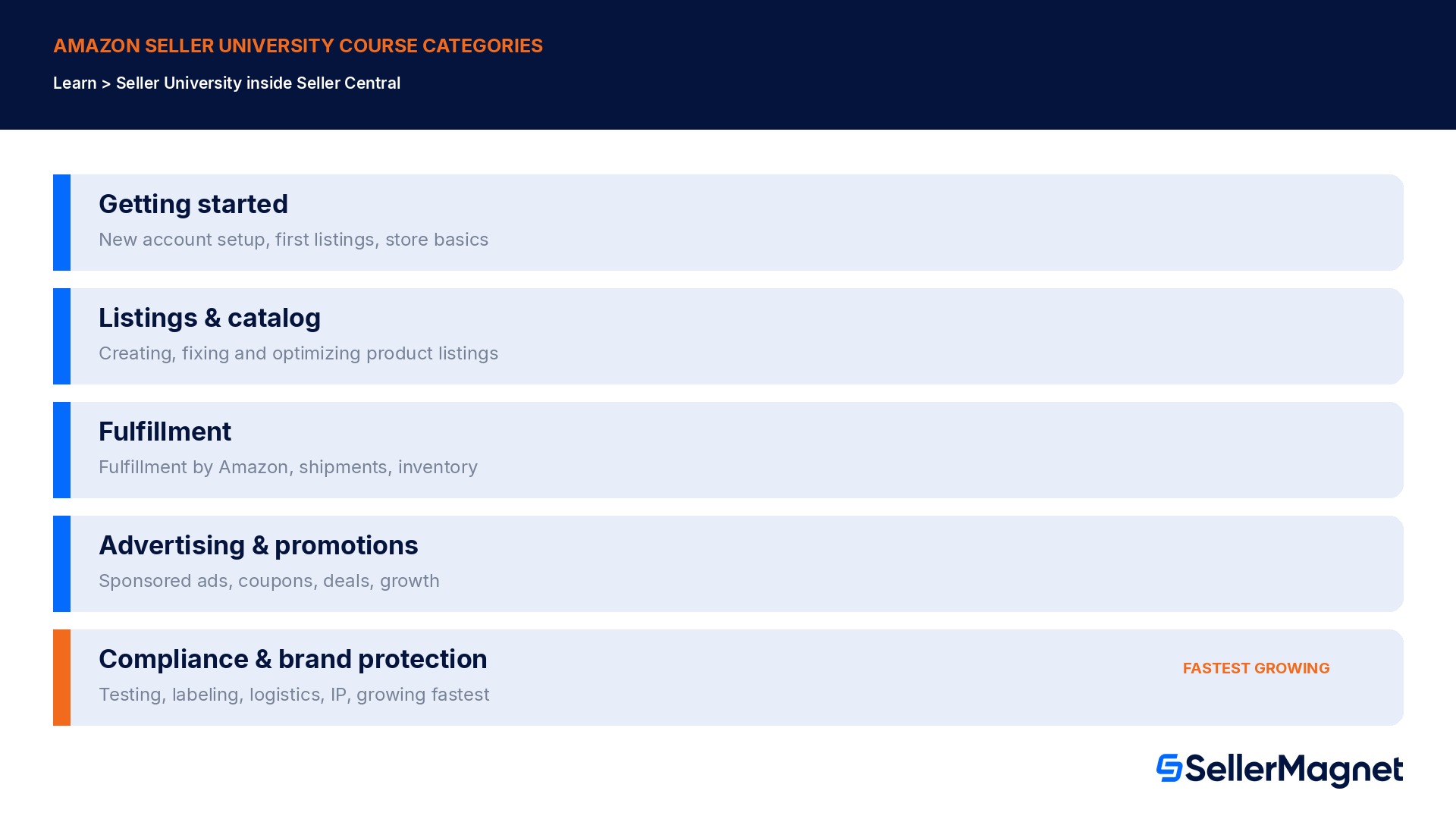
Amazon's own description of the catalog groups courses around the practical stages of running an Amazon business rather than around abstract subjects: getting a new account and first listings set up, managing and optimizing listings once live, shipping and fulfillment including Fulfillment by Amazon, growing sales through advertising and promotions, and a compliance and brand-protection category that has grown the fastest in course count over the past year as Amazon has layered more mandatory verification steps into selling specific product types. A seller troubleshooting a single listing issue, launching Fulfillment by Amazon for the first time, or looking to grow through advertising will find Amazon's own course recommendations point directly at the matching category rather than requiring a search through an undifferentiated list, and each course page links out to the exact Seller Central tool or report it is teaching, so finishing a course and immediately opening the tool it covers is a single click rather than a separate navigation step.
The category that grows fastest tells you where Amazon expects mistakes
Compliance and brand-protection is the category Amazon has added the most new courses to recently, which tracks with how many 2026 policy changes (product compliance verification, labeling, cross-border logistics eligibility) carry a real risk of listing deactivation or stranded inventory for a seller who has not seen the exact required steps. Checking that category first, even before a problem appears, is cheaper than learning the steps for the first time during an active deactivation.
Amazon keeps adding courses, usually tied to a real policy change
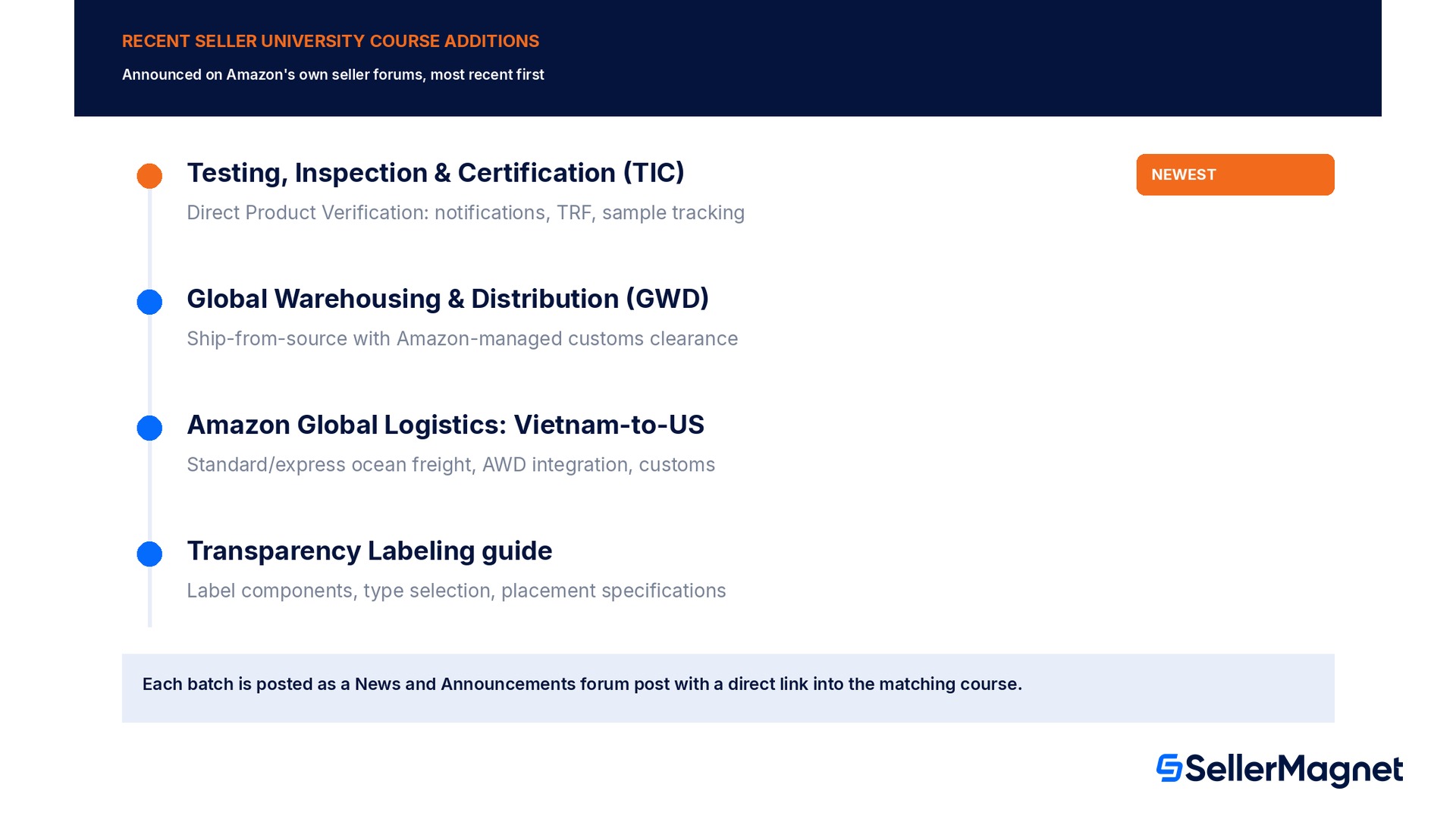
Seller University is not a static library finished once and left alone; Amazon's own News and Announcements forum regularly posts when new courses go live, and the pattern in recent posts is that new courses track real operational changes rather than being added at random. One recent announcement introduced a Testing, Inspection and Certification course covering the Direct Product Verification process: how to review a compliance notification, identify the compliance type involved, select a TIC service provider, create a Test Request Form, submit samples, and track verification progress, the exact sequence a seller needs for a product subject to mandatory testing. Another added a Global Warehousing and Distribution course explaining how that fulfillment model ships from a source location with Amazon managing customs clearance, cross-border transportation and inventory allocation, alongside a separate course on an Amazon Global Logistics ocean freight service from Vietnam to the US covering standard and express shipping options and customs clearance guidance. A fourth recent addition, a Transparency Labeling guide, walks through label components, label type selection, printing method comparison and label placement specifications, directly addressing one of the more common reasons a shipment gets held at receiving: a label that is technically present but placed or printed in a way that fails the scanning verification Amazon's receiving process checks for.
Course added
What it teaches
Matches this kind of change
Testing, Inspection and Certification (TIC): Direct Product Verification
Reviewing compliance notifications, selecting a TIC provider, submitting a Test Request Form, tracking verification
Mandatory product testing requirements
Global Warehousing and Distribution (GWD)
Shipping from source with Amazon managing customs clearance, cross-border transport and inventory allocation
Cross-border fulfillment model changes
Amazon Global Logistics: Vietnam-to-US ocean freight
Standard vs. express shipping, inbound placement, AWD integration, customs clearance
New freight lane / logistics option
Transparency Labeling guide
Label components, label type selection, printing method, placement specifications
Scan-verification labeling requirements
The forum post is the fastest way to know a course was added
Amazon publishes each new course batch as a short News and Announcements forum post with direct links straight into the matching Seller University module (moduleId links), so a seller who checks that forum category periodically sees new releases before stumbling into the matching problem. The posts consistently close with the same instruction: navigate to Learn and select Seller University in Seller Central to access the courses at any time, which is also the fastest way to confirm a course is really live rather than relying on a forum post alone.
How do I actually open Seller University inside Seller Central?
Access does not require a separate application, a special permission grant, or a subscription; every seller with an active Seller Central account already has it. Inside Seller Central, the path is Learn in the main navigation, then Seller University, or a seller can go directly to sellercentral.amazon.com/learn while logged into the account. From there, the catalog is browsable by category, searchable by keyword, and individual course pages carry a direct moduleId link that can be bookmarked or shared with a team member who needs the same training, which matters for a seller who delegates compliance tasks to a virtual assistant or an in-house team member: sending the direct course link is faster and more precise than describing the process from memory. Some marketplaces also run supplementary live formats; Amazon India, for example, runs free daily YouTube live trainings on weekdays led by Amazon-certified trainers, in addition to the on-demand Seller University catalog, though the core self-guided course library described in this guide is the consistent baseline across marketplaces.
Worked example: what skipping the matching course can cost while a listing sits deactivated
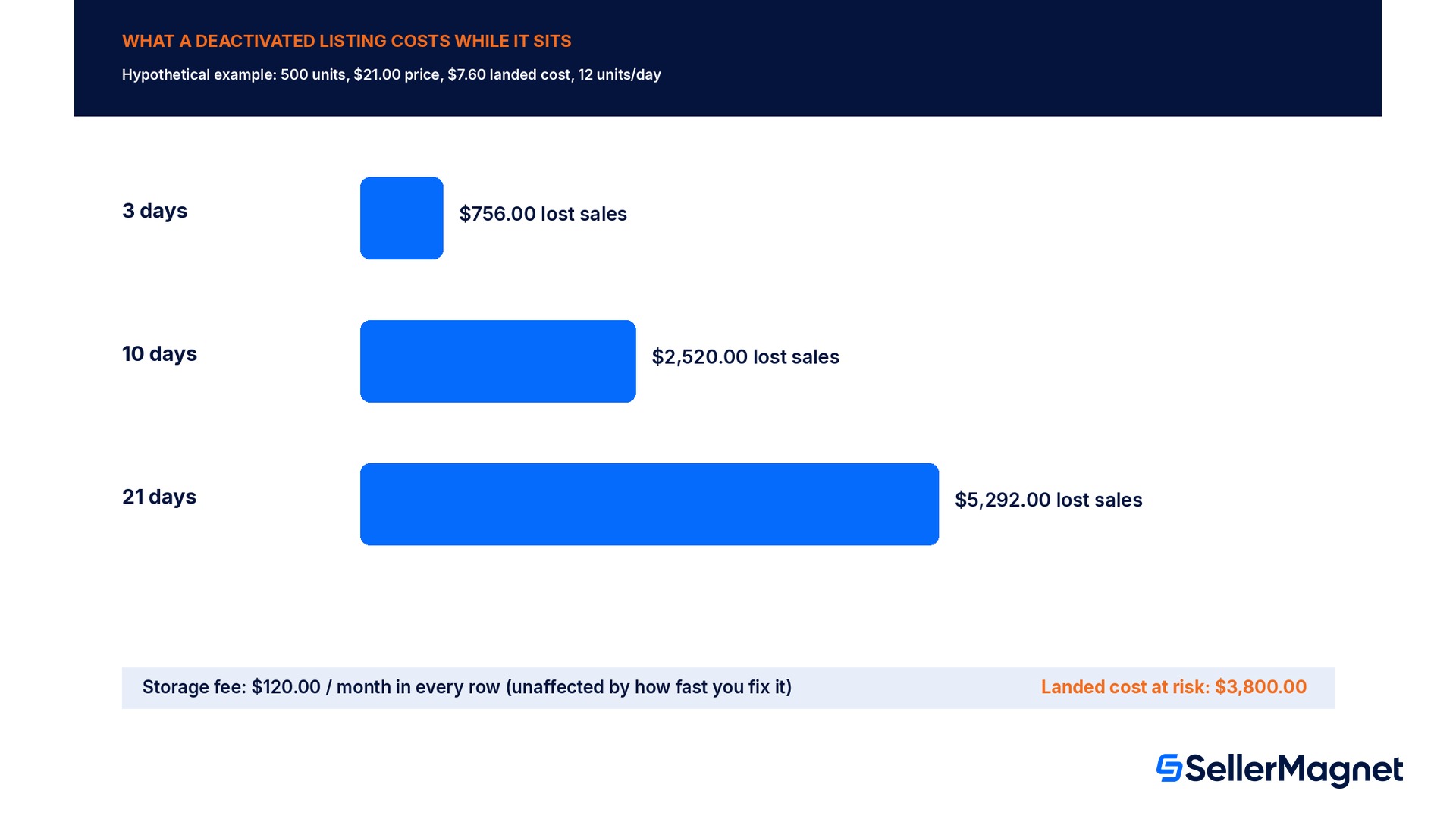
The figures below are a hypothetical example, not real seller data, built to show the mechanics of the cost, not a published Amazon figure for any specific seller. Take a 500-unit FBA shipment of a standard-size item that sells at $21.00 with a landed cost of $7.60 per unit and a normal velocity of 12 units a day. The product becomes subject to a mandatory compliance verification step the seller has never seen explained, and because the required Test Request Form and sample submission were not completed correctly on the first attempt, the listing is deactivated while the seller re-reads the requirement from scratch rather than from a course that already walked through the exact steps. At a tenth of a cubic foot per unit, the 500 units occupy 50 cubic feet; at Amazon's own published peak (October-December) storage rate of $2.40 per cubic foot per month for standard-size inventory, the monthly storage charge is $120.00, billed on the stored volume regardless of whether the listing is live. That storage charge keeps accruing every month the inventory sits deactivated, exactly like stranded inventory does, while the lost-sales side of the ledger grows with every extra day: 3 days of deactivation at the 12-units-a-day velocity is $756.00 in lost sales (36 units at $21.00), 10 days is $2,520.00 (120 units), and 21 days, roughly 3 weeks spent relearning the compliance process without the course, is $5,292.00 in lost sales on top of the recurring $120.00 storage charge, with the full $3,800.00 landed cost of the batch (500 units at $7.60) still at risk if the compliance issue is never resolved and the units end up requiring removal.
Days deactivated
Lost sales at normal velocity
Monthly storage fee (unaffected either way)
Landed cost still at risk
3 days
$756.00 (36 units)
$120.00
$3,800.00
10 days
$2,520.00 (120 units)
$120.00
$3,800.00
21 days
$5,292.00 (252 units)
$120.00
$3,800.00
The course itself costs nothing; the knowledge gap is what is expensive
The $21.00 price, 500-unit batch, $7.60 landed cost and 12-unit daily velocity above are a planning example chosen to show the mechanics, not a published Amazon baseline, and a seller should run the same math against the real SKU and real velocity at stake. What does not change between any seller's numbers is the shape of the problem: Seller University's compliance courses are free and available before a notification ever arrives, while the lost-sales and storage-fee columns above only start accruing after a listing is already deactivated, which is exactly the gap the course is built to close.
What is a practical way to use Seller University before it is needed?
Waiting for a deactivation notice to discover the matching course puts a seller in the worst position to absorb new information: under time pressure, with revenue already at risk, and reading the requirement for the first time while also trying to fix the immediate problem. A more durable approach treats Seller University as a periodic check rather than an emergency reference: reviewing the compliance and brand-protection category every few months catches new course releases before the matching policy change becomes an active problem, since Amazon's own announcement pattern shows new compliance courses typically arrive close to when the underlying requirement starts being enforced. For a seller running more than a handful of SKUs, assigning one team member to monitor the News and Announcements forum category and forward relevant course links to whoever owns compliance for that product line turns an individual habit into a process that survives staff turnover, and costs nothing beyond the time already being spent reading forum announcements that otherwise go unread.
Using Seller University across a team, not just one account owner
Many Amazon accounts are not run by one person reading every policy update personally; a virtual assistant handles listings, a separate hire handles shipments, and the account owner only sees a problem once it has already escalated into a deactivation or a support case. Seller University's course-level links make it practical to assign specific courses to the specific person who actually performs that task, rather than funneling every policy change through the account owner first. A seller onboarding a new team member to handle FBA shipments, for example, can point them directly at the fulfillment-category courses before they touch a live shipment, the same way a seller handing compliance notifications to a new hire can point them at the Testing, Inspection and Certification course before the first notification lands in their queue rather than after a submission has already gone wrong. Because the courses are free and reusable, there is no seat limit or per-user cost to work around: the practical limit is only whether someone on the team actually opens the link, which is why treating course assignment as a deliberate step in onboarding a task, rather than an assumption that the new hire already knows the process, closes a gap that otherwise surfaces as a mistake on a live account.
Where SellerMagnet fits once a course has been completed
Amazon builds and maintains Seller University itself; no third-party tool, including SellerMagnet, replaces or certifies its courses. Where SellerMagnet fits is after the training: once a seller understands a compliance, fulfillment or listing process from the matching course, Listing Optimizer and the Fee Calculator turn that understanding into the actual numbers for a specific SKU, the same way the worked example above turns a general training gap into a dollar figure, and Profit Dashboard tracks whether a deactivation or stranded-inventory incident actually happened on a watched SKU so a seller catches the problem on day 1 rather than day 21 of the worked example above. A seller who has already read SellerMagnet's own guides on stranded inventory, FBA storage fees or transparency labeling will recognize several of the exact processes Seller University's own recent course additions cover; using both together, Amazon's own course for the compliance steps and SellerMagnet's tools for tracking the dollar impact on a specific SKU, covers more ground than either alone.
Mistakes that make Seller University less useful than it should be
Only opening it once, during initial account setup. New courses are added every few months, often tied to real policy changes; a seller who never returns after onboarding misses every course added since.
Assuming a banner link covers the whole catalog. Amazon often links to one specific course from a policy notice; browsing the full Learn > Seller University catalog surfaces related courses the notice did not link to directly.
Treating the training as optional in a way that includes the underlying rule. The course is optional to take; the Amazon policy or process it teaches is not optional to follow once it applies to a seller's account.
Not bookmarking or sharing the direct course link with the team member who actually does the task. Every course carries a direct moduleId link; sending that link is faster and more precise than re-explaining the process from memory.
Ignoring the News and Announcements forum category where new course releases are posted. That is the fastest way to see a new compliance course before, rather than after, the matching requirement starts being enforced.
Assuming every marketplace's Seller University experience is identical. Some marketplaces, such as India, add supplementary live training formats on top of the core on-demand catalog described in this guide.
Checklist for making Seller University part of a regular routine
How to use Amazon Seller University before a compliance problem forces the issue
Open Learn > Seller University inside Seller Central - No separate application or permission is needed beyond an active Seller Central account; sellercentral.amazon.com/learn works directly.
Start with the compliance and brand-protection category - Amazon has added the most new courses here recently, matching 2026 policy changes with real deactivation risk.
Check the News and Announcements forum category periodically - New course releases are posted there with direct moduleId links before most sellers notice the underlying policy has changed.
Bookmark or forward the direct course link to whoever owns the task - A direct link to the exact course is faster and more precise than re-explaining a process from memory.
Re-run the relevant course after a deactivation or compliance notice, not just before one - Courses stay available to revisit at any time; using one to confirm the correct process after an incident prevents a repeat.
Pair the training with SKU-level tracking - Use the Fee Calculator and Profit Dashboard to see whether a learned process is actually preventing deactivations and stranded inventory on the SKUs that matter.
Is Amazon Seller University free?
Yes. It is built into Seller Central under Learn, with no separate fee or subscription beyond an existing Seller Central selling account.
Where do I find Seller University in Seller Central?
Go to Learn in the main Seller Central navigation, then select Seller University, or go directly to sellercentral.amazon.com/learn while logged into the account.
Does Amazon add new courses over time?
Yes. Amazon's seller forums regularly announce new course batches, often matching recent policy or process changes, such as product compliance verification, cross-border logistics and product labeling courses added in recent months.
Is Seller University the same as a certification?
No. It is a self-guided training library of videos and written guides, not a certification exam or a paid consulting service, and courses stay available to revisit at any time.
Do Seller University courses replace reading Amazon's policy pages?
They explain the practical steps of a process, built by the teams who create the matching tool or policy, but the underlying Amazon policy pages remain the authoritative rules a seller's account is actually held to.
Is Seller University available in every Amazon marketplace the same way?
The core self-guided catalog is consistent across marketplaces, though some, such as India, add supplementary live training formats like daily YouTube sessions on top of the on-demand courses.
Stop Juggling Tools. SellerMagnet Combines Everything You Need.