Stranded Inventory on Amazon: Why It Happens and How to Fix It Fast
R
RenéFreelance Amazon Editor
|
15 min read
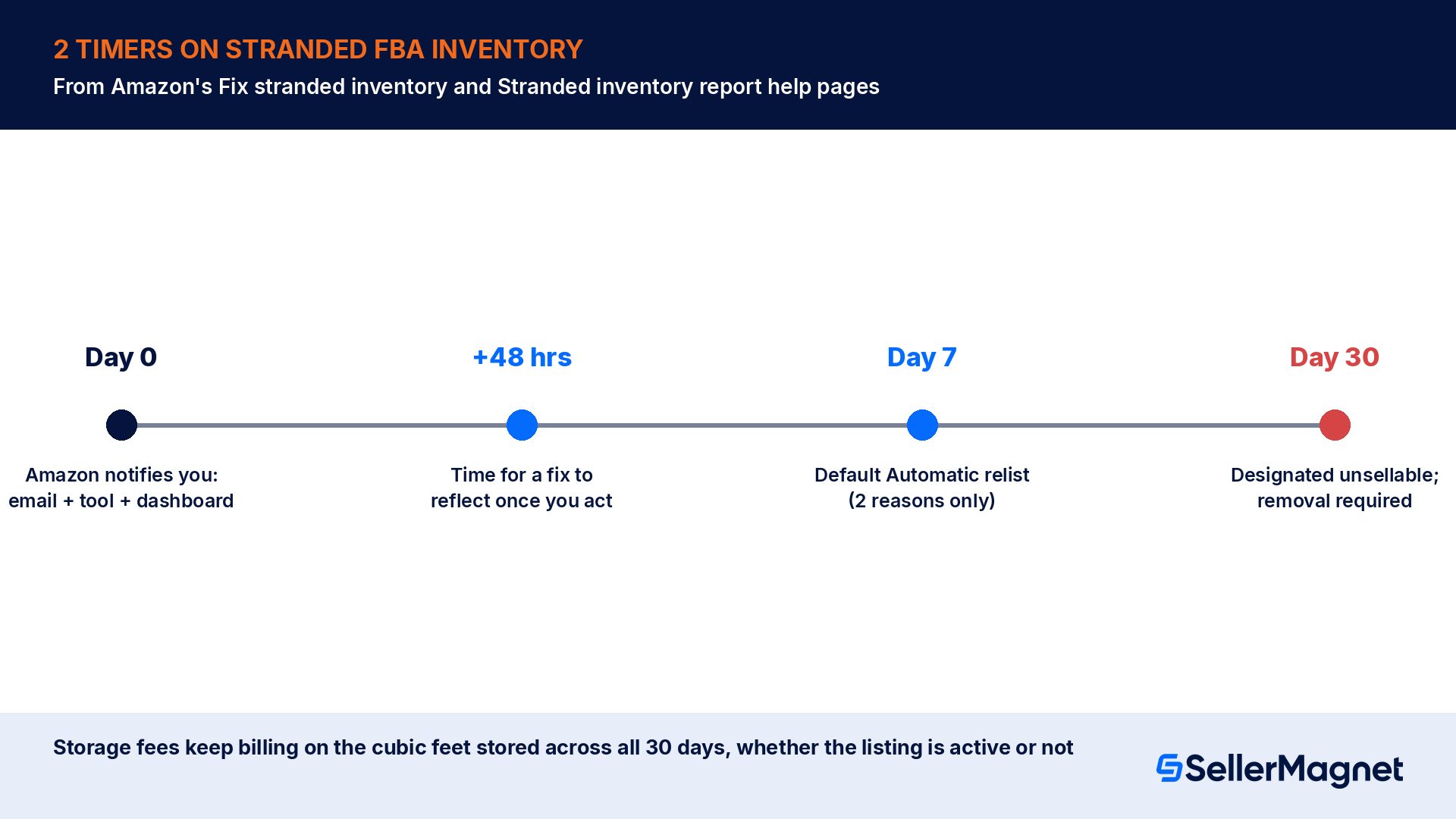
Stranded inventory is the quiet kind of loss. Nothing looks broken in Manage All Inventory, the units show up in your fulfillment center balance, and yet nothing sells, because Amazon has no active offer to attach the stock to. Every day it sits there you pay the same storage fee you would pay for inventory that is turning over normally, and you earn nothing against it. Amazon gives every stranded unit 2 timers: a short one, about 48 hours, for your fix to take effect once you act, and a long one, 30 days from the first notice, after which the inventory is designated unsellable and you are required to remove it. This guide walks through what Amazon's own help pages say about why inventory gets stranded, which reasons resolve themselves and which do not, how to read the Fix Stranded Inventory page correctly, and what both timers really cost in a worked example. Every Amazon rule and number below is quoted from the Amazon.com (US) Seller Central help pages as checked on 17 October 2026; other marketplaces can differ.
Stranded inventory on Amazon is FBA stock in a fulfillment center with no active offer attached, so it cannot be sold even though it keeps accruing storage fees. Fix it from Inventory > Inventory Planning > Fix Stranded Inventory, not Manage inventory, by relisting, creating a new listing, changing to FBA, or ordering a removal, depending on the Stranded reason shown. Amazon designates it unsellable if you take no action within 30 days of its notice.
What is stranded inventory, and why can Manage inventory lie to you about it?
Amazon's Fix stranded inventory help page defines stranded inventory as FBA inventory in fulfillment centers that does not have an associated active offer and is not available for sale on Amazon, and says it requires either reactivating the listing or removing the inventory. Inventory can become stranded due to a variety of reasons, the same page notes, for example the listing is suppressed or was never created. The practical trap sits on the next help page, Resolve stranded inventory issues, under the heading More accurate and up-to-date: sometimes a listing shows as Active in Manage inventory while it shows as Stranded on Fix stranded inventory, and Fix stranded inventory has the most accurate and up-to-date information. If you are reconciling inventory from Manage inventory alone, you can miss stranded units entirely.
The Stranded inventory report help page adds the financial framing directly: the listing for a product might have been suppressed or might have never been created, resulting in stored inventory that is accumulating storage fees but cannot be sold because the listing is not active. That single sentence is the whole problem. Storage fees are charged on physical volume in the fulfillment center, not on whether a unit is currently sellable, so stranding a product does not pause the meter.
The 2 timers: 48 hours to take effect, 30 days to lose it for good
Amazon runs 2 separate clocks on stranded inventory, and conflating them is the most common planning mistake. The first is operational: on the Fix stranded inventory page, Amazon's note says if you address the cause for the stranded inventory yourself, allow 48 hours for the updates to reflect. That is the lag between you clicking Relist or Create new listing and the fulfillment center releasing the inventory for sale again.
The second clock is the one with real financial consequences. The Stranded inventory report help page states it as an Important note: Amazon will notify you when you have stranded inventory, and if you do not, or cannot, create a listing for your stranded inventory or order its removal within 30 days of this notice, it will be designated unsellable. Once that happens, the units become what Amazon's Business Solutions Agreement calls Unsuitable Units, and you are required to remove them under the Required removals policy. Amazon notifies you about stranded inventory 3 ways, per the Fix stranded inventory page: by email, via the Fix stranded inventory tool itself, and under the Notification section of your Inventory Dashboard on that same page. None of those channels pauses the storage fee while you decide what to do.
30 days counts from the notice, not from when you noticed
The clock on the Stranded inventory report starts when Amazon sends the notice, not when you log in and see it. A seller who checks Fix Stranded Inventory only once a month can lose most of that 30-day window before acting at all.
Which reasons actually strand inventory, and how does each one resolve?
Resolve stranded inventory issues lists dozens of specific Stranded reason values with their own Additional information and fix. Most sellers only ever meet a handful of them. The table below groups the reasons that show up most often in a typical catalog, with the exact action Amazon's help page names for each.
Stranded reason
What Amazon says caused it
Fix, per Amazon's help page
Listing closed
The end date for this listing has passed or the listing has been closed.
Click Relist, then Save and finish. Eligible for Automatic relist after 7 days by default.
Item discontinued
This ASIN violates FBA policy or has chronic damage or defect problems.
Create a removal order, then delete the listing from Manage inventory. Also eligible for Automatic relist, which is the wrong outcome here; opt out of auto action for this reason.
Missing SKU
The FBA and Manage inventory SKUs or ASINs for this listing do not match.
Create new listing with price and quantity 0, Save and finish, then click Change to FBA once it becomes available (up to 24 hours).
Missing price
There is no price for your listing.
Click Edit to update your listing and add a price in the Price column.
Seller-fulfilled
The fulfillment channel is set to Seller-fulfilled, so FBA inventory cannot be sold through it.
Click Change to FBA. Eligible for Automatic change to FBA after 5 days by default.
Future listing sell date
The Start selling date or Offer start date is set in the future.
Click Edit listing and change the date.
Blocked listing
The ASIN is restricted for intellectual property, quality or safety concerns.
File an appeal, or create a removal order and delete the listing. Not covered by any automatic action.
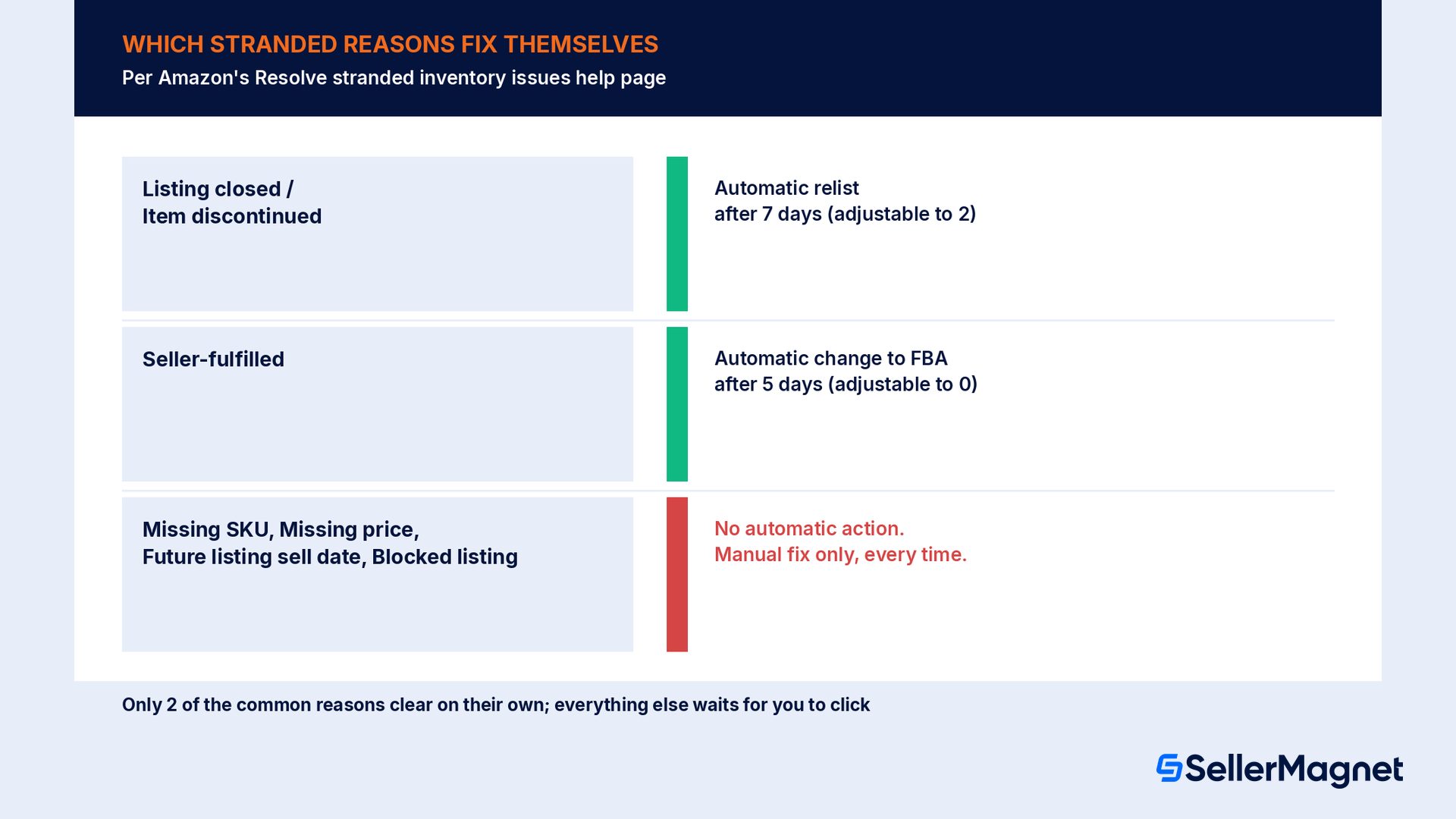
Read the pattern across those 7 rows: only 2 of them (Listing closed, Item discontinued) are covered by Automatic relist, and only 1 (Seller-fulfilled) is covered by Automatic change to FBA. Missing SKU, Missing price, Future listing sell date and Blocked listing all need a manual click from you, every time, no matter how long the inventory sits. Amazon's bulk tooling helps once you know this: Bulk relist handles up to 25 items at once for relist-eligible reasons, and Bulk Fix Stranded Inventory lets you download a report, add the missing Price, ASIN, SKU or Condition fields, and reactivate many SKUs in one pass.
A separate cluster of reasons has nothing to do with listing mechanics and everything to do with compliance, and these are the ones sellers most often fix wrong. Restricted ASIN, Trademark misuse, Product recall and Food safety investigation all point to an intellectual property, safety or policy hold rather than a data error, and Amazon's help page is explicit that submission of documentation does not guarantee reinstatement. Dangerous goods (upload documents and wait for review) has its own stated turnaround: the Dangerous goods team reviews uploaded documents within 2 business days, Monday to Friday, excluding public holidays, so a weekend upload effectively loses those 2 non-business days before the clock even starts. Trying to relist through the normal Edit flow on any of these reasons wastes the 48-hour reflection window on a change Amazon will reject; read the Additional information column first and route straight to an appeal, a removal order, or the specific document upload it names.
Can automatic actions fix stranded inventory without you clicking anything?
Resolve stranded inventory issues describes 2 automatic actions, and both ship with defaults that are slower than they need to be. Automatic relist automatically relists inventory that has been stranded for 7 days under the reasons Listing closed or Item discontinued, and Amazon says you can adjust this in Edit automatic-action settings, down to as little as 2 days. Automatic change to FBA automatically changes the fulfillment channel to FBA for inventory stranded for 5 days under the reason Merchant fulfilled, and that one can be set to change fulfillment channels in less than one day if you set it to 0 days.
Tighten the FBA auto-switch to 0 or 1 day. Amazon's own tip: this prevents accidentally stranding inventory via bulk upload templates or APIs, which is a common cause with catalog feeds.
Use intentional stranding for planned closures. To close a listing for vacation or product evaluation, close it in Manage inventory and set Automatic relist for the number of days you actually want it closed, rather than leaving the reactivation to chance.
Opt out per listing where auto-action is wrong. The drop-down arrows next to each row on Fix Stranded Inventory carry an Opt out of auto action choice, useful for a restricted ASIN you are intentionally keeping closed.
Set a future Start selling date to hold inventory on purpose. Amazon's note says this avoids automatic reactivation entirely, which matters if you manage expiration dates by stranding inventory deliberately.
One setting applies at the account level and is easy to miss if you sell in more than one Amazon store: Amazon's guidance says all sellers are expected to update their stranded auto-removal settings to remove stranded inventory automatically, and if you operate in multiple stores, you must configure the auto-removal settings separately in each one. A seller who tightened Automatic change to FBA on Amazon.com and assumes the same setting carries over to a second marketplace account is still running the slower default there.
The 2 system-generated SKUs that confuse almost every seller once
Two Stranded reasons do not come from anything you did in Seller Central. Amazon's Fix stranded inventory page explains that when a unit in your FBA shipment arrives without proper labeling or with unexpected product identifiers, Amazon creates a merchant SKU for you so the units are not lost. The first format is Amazon.Found.Bxxxxxxxxx, created when a product is not labeled correctly and is received as non-labeled inventory for the same ASIN; you fix it by creating a listing for that exact merchant SKU, after which the inventory becomes subject to virtual tracking. The second is FBAXXXXXXX.Missing# (for example, FBA15FVJ3R13.missing1), created during an inbound shipment investigation when units arrive without a valid, scannable FNSKU barcode, with the number at the end incrementing for each unique ASIN that needed a new mapping in that shipment.
Amazon's prevention advice for both is specific: ensure every unit has a scannable FNSKU barcode matching the shipping plan, verify the FBA Label Service preference during shipment creation if you use it, never send units with damaged or unscannable barcodes, and never place scannable product barcodes (UPC, EAN, ASIN) on the outside of shipping cartons, since that causes receiving errors. A warehouse team that mixes up carton labels and unit labels is the most common real-world cause.
Worked example: what 1 stranded ASIN costs at 2, 7 and 30 days
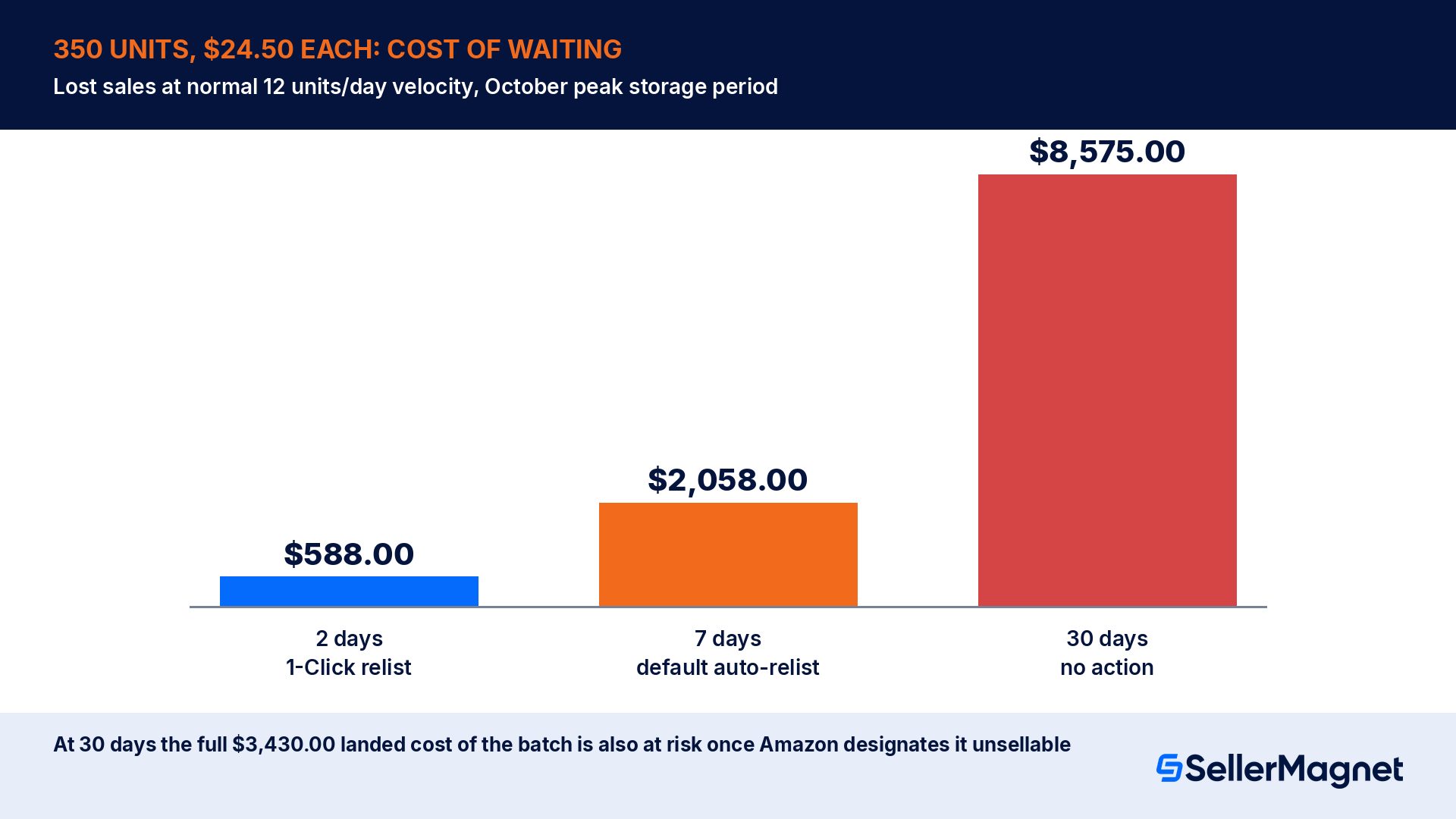
The figures below are a hypothetical example, not real seller data, recomputed from the rates on Amazon's own Monthly inventory storage fees help page. A 350-unit FBA shipment of a standard-size item sells at $24.50 with a landed cost of $9.80 per unit and a normal velocity of 12 units a day. It gets suppressed and stranded in October, inside the October to December peak storage period, where the Below 22 weeks base rate for standard-size, non-dangerous goods is $2.40 per cubic foot. At 0.12 cubic feet per unit, the 350 units occupy 42 cubic feet, for a monthly storage charge of $100.80, which is billed on the volume stored and does not care whether the listing is active.
Days stranded before fixed
Lost sales at normal velocity
Storage fee for the month
What happens at that point
2 days
$588.00 (24 units)
$100.80 (unaffected either way)
Fixed with 1-Click relist before any automatic action would have fired
7 days
$2,058.00 (84 units)
$100.80 (unaffected either way)
Automatic relist fires today, but only for Listing closed or Item discontinued; every other reason is still stranded
30 days
$8,575.00 at risk (full 350 units)
$100.80 (unaffected either way)
No action taken: the batch is designated unsellable, forcing a $3,430.00 landed-cost removal or disposal decision
The $100.80 column is deliberately identical in all 3 rows: that is the cost of the mistake you cannot avoid by reacting faster, because Amazon bills the cubic feet, not the sales. What you control is the other column. A fix inside 2 days costs $588.00 in missed sales and nothing else. Waiting for the default 7-day Automatic relist, when the reason even qualifies for it, costs $2,058.00, which is 3.5 times more for 5 extra days of inaction. Ignoring it for 30 days does not just multiply the lost-sales line to $8,575.00 at risk; it crosses into the unsellable designation, which turns a sales problem into a $3,430.00 inventory write-off decision, since the Required removals policy requires you to remove the Unsuitable Units rather than leave them billing storage forever.
Common mistakes with stranded inventory
Checking Manage inventory and concluding everything is fine. Amazon's own help page says a listing can show Active there while it shows Stranded on Fix Stranded Inventory, and the second page is the accurate one.
Assuming Automatic relist covers every reason. It only covers Listing closed and Item discontinued by default. Missing SKU, Missing price, Blocked listing and most other reasons sit stranded indefinitely without a manual click.
Leaving Automatic change to FBA at the 5-day default on a feed-driven catalog. Bulk uploads and APIs can flip a SKU to Seller-fulfilled by mistake; a 0 or 1-day setting catches it fast, per Amazon's own tip.
Treating the 30-day notice as a soft deadline. It is not graded on when you log in; it counts from when Amazon sent it, and it ends in a mandatory removal, not a warning.
Relisting in bulk when you actually needed to edit the listing first. Amazon's note on Bulk relist is explicit: you cannot make catalog or listing changes for any of the affected listings in a bulk action, so a SKU that needs an edit should go through Edit or Relist individually.
Re-sending inventory of an ASIN that is already stranded. Amazon's warning is direct: adding an ASIN with stranded inventory to a new shipment triggers an alert and the shipment will not be processed.
The stranded inventory fix checklist
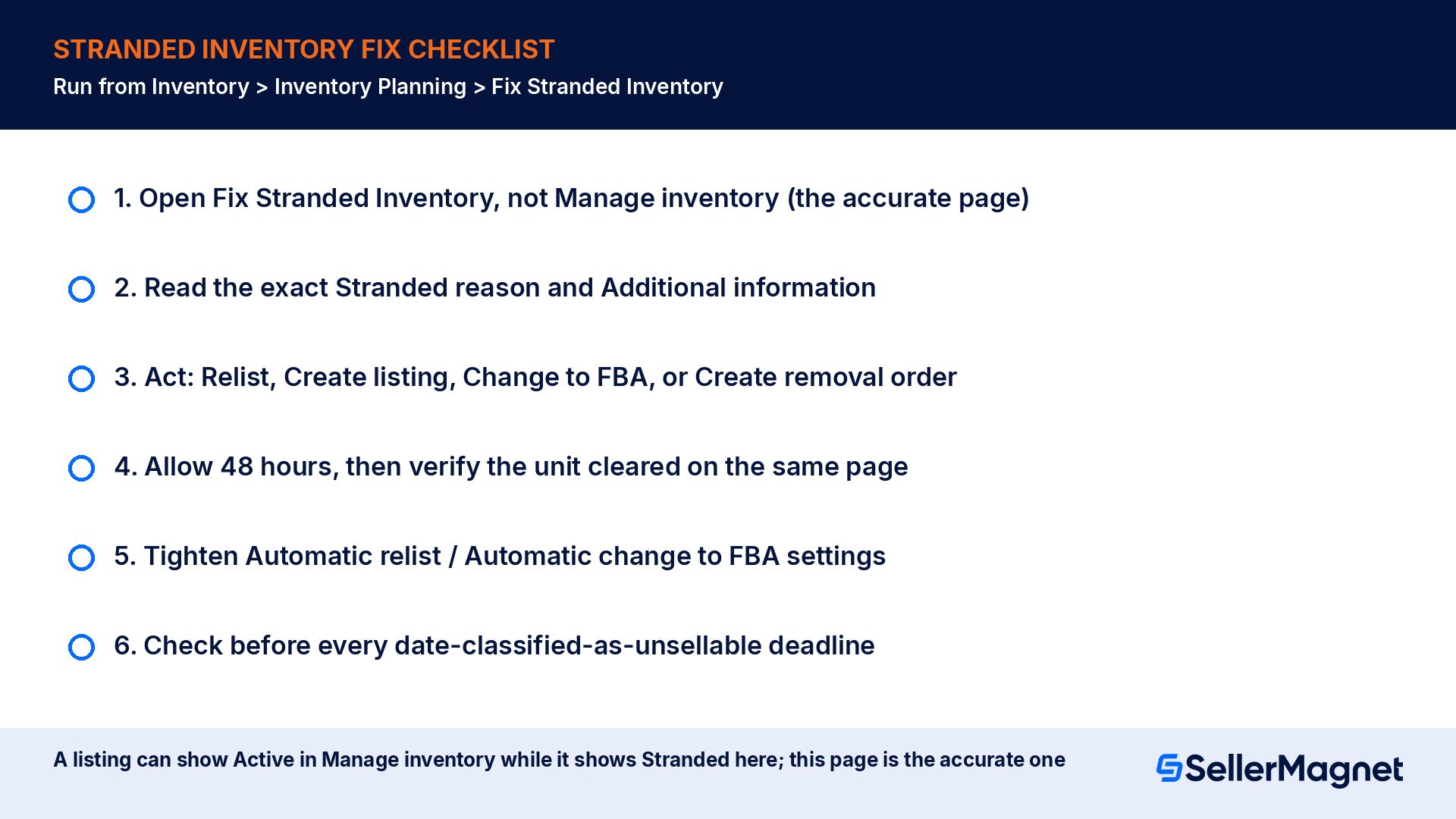
Run this from Inventory > Inventory Planning > Fix Stranded Inventory, which Amazon says is more accurate than Manage inventory, on a fixed schedule rather than only after an email notification.
How to fix Amazon FBA stranded inventory
Open the accurate page - Go to Inventory > Inventory Planning > Fix Stranded Inventory, not Manage inventory, since Amazon says this page holds the more accurate status.
Read the Stranded reason and Additional information - Each row names the exact cause and the exact next step Amazon expects, from Relist to Create removal order.
Act with the matching tool - Use 1-Click relist or 1-Click change to FBA for single items, Bulk relist (up to 25) for simple cases, and Edit or Relist when the listing itself needs a change first.
Allow 48 hours and verify - Amazon's own guidance is to allow 48 hours for an update to reflect, then return to Fix Stranded Inventory to confirm the unit is no longer listed as stranded.
Tighten your automatic-action settings - Set Automatic relist down from 7 days where appropriate and Automatic change to FBA down to 0 or 1 day, and opt out per listing where auto-action is wrong for that SKU.
Check before every 30-day deadline passes - Treat the date-classified-as-unsellable field on the Stranded inventory report as a hard date, and resolve or remove before it, not after.
How SellerMagnet shortens the time inventory sits stranded
The slowest part of fixing stranded inventory is noticing it in the first place. SellerMagnet's Offer Watch checks your whole connected catalog automatically for new sellers, Buy Box losses, undercuts and suppressed listings, on a daily, every-8-hours or hourly schedule, which catches the suppression that leads to stranding before the 30-day clock has run far. The Analytics Dashboard's inventory forecast shows days of stock left and an expected stockout date from your real sales velocity, so a sudden flat line on an ASIN that should be selling stands out against your own history rather than waiting for an email. If stranded stock was eventually removed or lost before you caught it, Lost & Found scans up to 2 years of Seller Central data for lost, damaged and unreturned inventory, tracks each claim type's deadline for you, and prepares the claim; you still review and file it yourself.
What does stranded inventory mean on Amazon?
Stranded inventory is FBA stock sitting in a fulfillment center with no active offer attached, so it cannot be sold even though it is physically there. Amazon's help page lists a suppressed or never-created listing as a typical cause. It still accrues the normal monthly storage fee while stranded.
How long do I have before stranded inventory becomes unsellable?
Amazon's Stranded inventory report page states that if you do not create a listing or order removal within 30 days of its notice, the inventory is designated unsellable. That 30-day window counts from the notice date shown on the report, not from when you happen to check it.
Why does my listing show Active in Manage inventory but Stranded elsewhere?
Amazon's own help page addresses this directly: a listing can show Active in Manage inventory while showing Stranded on Fix Stranded Inventory, and Fix Stranded Inventory has the more accurate, up-to-date information. Treat that page, not Manage inventory, as the source of truth for stranded stock.
Can I make Automatic relist faster than the default 7 days?
Yes. Amazon's help page says Automatic relist can be set to relist in as little as 2 days, adjustable in Edit automatic-action settings. It still only applies to the Listing closed and Item discontinued stranded reasons; every other reason needs a manual action.
Do I keep paying storage fees while inventory is stranded?
Yes. Monthly storage fees are charged on the cubic feet your inventory occupies in the fulfillment center, regardless of whether an active offer exists. The Stranded inventory report page states explicitly that stranded stock keeps accumulating storage fees while it cannot be sold.
What are the Amazon.Found.B... and FBA...Missing# SKUs I never created?
Both are system-generated when units arrive at a fulfillment center with a labeling problem. Amazon.Found.Bxxxxxxxxx covers non-labeled inventory for a known ASIN; FBAXXXXXXX.Missing# covers units without a valid, scannable FNSKU during an inbound investigation. Fix both by creating a listing for the exact merchant SKU Amazon generated.
What happens if I ignore stranded inventory for 30 days?
The units are designated unsellable, becoming Unsuitable Units under the Amazon Services Business Solutions Agreement, and the Required removals policy requires you to remove them. At that point the loss is no longer just unsold sales; it is the landed cost of the batch plus a mandatory removal or disposal decision.
Does Amazon tell me when I have stranded inventory?
Yes, 3 ways: by email, inside the Fix Stranded Inventory tool itself, and under the Notification section of the Inventory Dashboard on that same page. None of these notifications pauses the storage fee meter, so acting the day you see one is cheaper than acting the day you remember to check.
Stop Juggling Tools. SellerMagnet Combines Everything You Need.