Amazon Seller Central Two-Factor Authentication 2026: Setup and Recovery
R
RenéFreelance Amazon Editor
|
16 min read
Amazon's own Seller Central help pages are blunt about this one: two-step verification, often shortened to 2SV or called two-factor authentication, is not optional. "All Seller Central users must have two-step verification enabled to access their account," the official two-step verification FAQ states, and adds that "Selling Partner Support can't make exceptions for this requirement." Every seller already has it turned on, whether they set it up carefully or clicked through the prompt in a hurry the first time Seller Central asked. The setup choices made that day, which device is primary, which is the backup, whether a second real device even exists, decide how fast a seller gets back into their own account the day a phone is lost, a number changes, or an authenticator app disappears with a factory reset. This guide works from Amazon's own Two-Step Verification and Two-step verification FAQ help pages (US store) to walk through exactly how the primary/backup device rules work, what the account recovery process actually involves if both fail, and the setup mistakes that turn a lost phone into a multi-day lockout instead of a 30-second backup-code login.
Two-step verification on Amazon Seller Central is mandatory, with no exceptions. At setup you register a primary device, an authenticator app, SMS phone or voice phone, and a different backup device of a different type or number. Losing access to both devices means going through Amazon's Two-Step Verification Account Recovery, which needs identity documents and can take up to 48 hours.
What two-step verification actually is, and why it is not optional
Two-step verification adds a second check on top of a password: after entering the normal Seller Central username and password, a code is required from a device chosen in advance, delivered by SMS text, a voice call, or generated inside an authenticator app. Amazon's own help page frames the reasoning plainly: it is "your best protection against unauthorized access to your seller account, even if your password gets stolen and especially if you use the same password across multiple sites." The requirement is not a recommendation a seller can skip by declining a prompt. Every existing Seller Central user who had not yet enabled it was prompted to activate it on their next sign-in, and the two-step verification FAQ is explicit that all users must have it enabled to access their account, with Selling Partner Support unable to make exceptions. There is a toggle to turn two-step verification off on the Advanced Security Settings page, but doing so does not remove the second check: a mobile one-time password is still required at sign-in, sent to whatever device is registered, and a seller with no registered device at that point is simply routed into the mobile device registration flow before they can continue. In practical terms, there is no version of using Seller Central without some form of second-factor code.
The primary and backup device rule that trips most sellers up
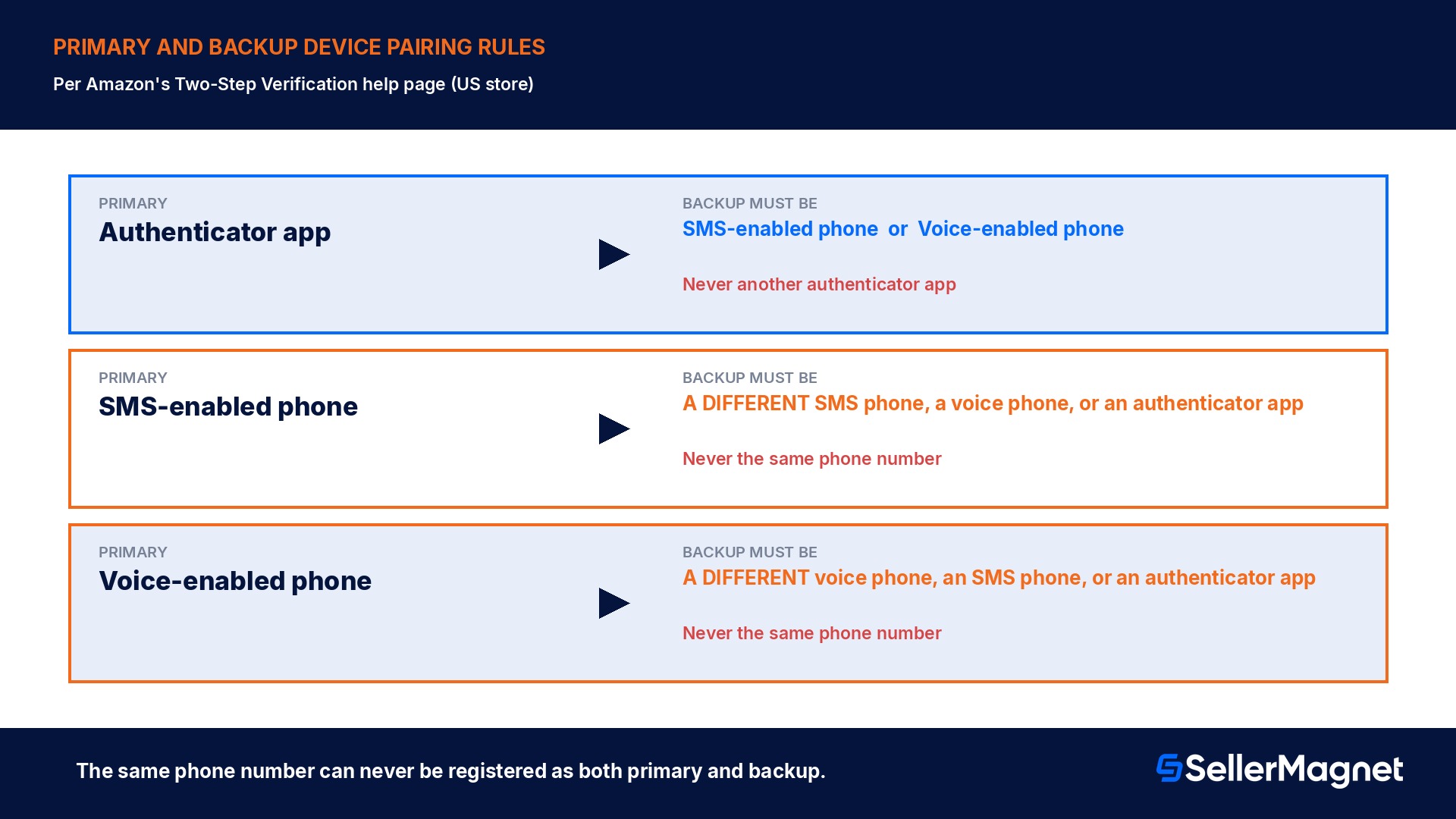
Setting up two-step verification for the first time requires naming two different devices: a primary method for receiving codes, and a backup method that takes over if the primary device is ever unreachable. The 3 channels available are an authenticator app, a voice call to a mobile or landline phone, and an SMS text message to a mobile phone, and Amazon's own help page lists exactly which combinations are allowed. An authenticator app can be the primary method, but it can never be paired with a second authenticator app as the backup; the backup in that case has to be an SMS-enabled phone or a voice-enabled phone. Going the other way, if the primary method is a phone (SMS or voice), the backup can be a different phone of either type or an authenticator app, but it specifically cannot be the exact same phone number used for the primary method. Sellers with only one personal device available are pointed toward a practical workaround: use an authenticator app as the primary method, since it works without any network connection, and register an SMS- or voice-enabled phone as the backup. A seller with no second phone number at all and no way to install an authenticator app is told to consider the phone number of a trusted spouse, family member, or friend as the backup, specifically someone who could plausibly be nearby if the primary method ever becomes unreachable, because a mobile phone itself is not a strict requirement for two-step verification; a landline capable of receiving a voice call satisfies the requirement too.
Primary method
Allowed backup methods
Never allowed as backup
Authenticator app
SMS-enabled phone, or voice-enabled phone
A second authenticator app
SMS-enabled phone
A different SMS phone, a voice phone, or an authenticator app
The same phone number
Voice-enabled phone
A different voice phone, an SMS phone, or an authenticator app
The same phone number
Why email never works as a verification method
A question that comes up constantly from new users is why Seller Central never offers to send the one-time code to an email inbox the way plenty of other logins do. Amazon's own FAQ answers this directly: authenticator apps, SMS text, and phone calls are considered meaningfully more secure than email, and given how frequently email accounts themselves get compromised, Amazon chose not to support sending two-step codes by email at all. The logic matters because it defines what the second factor is actually supposed to prove: the whole point of a code sent to "a device you have physical access to" is that it requires something beyond knowledge of a password. An email inbox, reachable from any browser anywhere with its own password, does not meet that bar; if the email account were the second factor, compromising the email account alone would be enough to compromise Seller Central too, which defeats the purpose of having two independent factors in the first place.
Shared logins and multi-user accounts: why each sign-in needs its own setup
Two-step verification is tied to the individual sign-in used to access an account, not to the seller account as a whole, and that single fact changes how a team should be set up. If multiple people currently sign in to the same Seller Central account using the same username and password, Amazon's own guidance is to stop doing that and set up individual user permissions instead, through User Management, so each person has their own login and can enable two-step verification on it separately. Sharing one login across a team carries 2 distinct risks the FAQ names outright. The first is a straightforward security exposure: anyone who ever had those shared credentials, including someone who has since left the company, retains access to the seller account and whatever buyer account and payment details are tied to the same login, until the credentials are changed. The second is an availability risk that is easy to miss until it actually happens: whoever first set up two-step verification on that shared login is the only person who automatically has access to both the primary and backup devices, so if that person is out of the office, unreachable, or simply asleep when a code is needed, everyone else sharing the login is locked out of Seller Central until they return. Individual logins with individual two-step verification setups remove both problems at once: a departing team member's access is revoked with their own login, not the whole account's, and no single person's phone becomes a single point of failure for the entire team's access.
Trusted devices, and the browser habits that quietly reset them
After a successful two-step verification sign-in, Seller Central offers a "Don't ask for codes on this device" option, which skips the code prompt on future sign-ins from that same browser and device. It is a convenience feature, not a permanent one, and Amazon's own help page lists the everyday actions that can silently reset it, forcing a fresh code prompt with no warning: blocking cookies in the browser, clearing the cache or deleting cookies, updating the operating system, device, or any installed app including the browser itself, switching to a different browser than the one originally used to register the trusted device, running a browser toolbar that touches browser settings, using incognito or anonymous browsing mode, connecting through a proxy or VPN, logging out of the seller mobile app, which can reset the trusted status on that device, or simply accessing Seller Central from a different network or a changed IP address. None of these triggers are something Amazon can see in advance or compensate for, which is exactly why the FAQ states plainly that support cannot help with issues this setting causes. A team sharing one login multiplies how often these resets happen, since any one person's browser update or VPN use resets the trusted status that everyone else relied on too. A seller who wants to clear every trusted device deliberately, for example after suspecting unauthorized access, can select "Require codes on all devices" in Advanced Security Settings, which clears the setting everywhere at once; there is no option to clear it for a single specific device.
What happens when both devices are actually gone
The scenario two-step verification is built to prevent is an attacker getting in with a stolen password alone; the scenario it occasionally creates for a legitimate seller is losing access to both the primary and backup device at the same time, for example a phone that is lost or stolen while the backup was a second number on the same handset. Amazon's first recommended move if a device is lost or stolen is to contact the mobile carrier immediately and have the line blocked or suspended, then attempt to sign in to Seller Central and click "Didn't receive the code?" at the bottom of the verification page, which lists whatever backup method was registered at setup. If that backup method is also unreachable, and there is no way to regain access to either device, the only remaining path is the Two-Step Verification Account Recovery process. Amazon's own help page is specific about what that involves: it requires submitting documentation to verify identity, and the review itself can take up to 48 hours to complete. Once identity is verified, Amazon disables two-step verification on the account, which lets the seller sign back in, and then requires setting it up again from the beginning on the very next sign-in, this time using devices the seller actually has access to. Selling Partner Support, per the FAQ, cannot override this verification process or speed it up; the 48-hour window and the document check are not a formality that can be waived for an urgent case.
Support cannot speed this up
Selling Partner Support cannot override the Account Recovery process. Identity documents and the up-to-48-hour review apply to every seller, regardless of urgency.
What a lockout actually costs: 3 setup scenarios compared
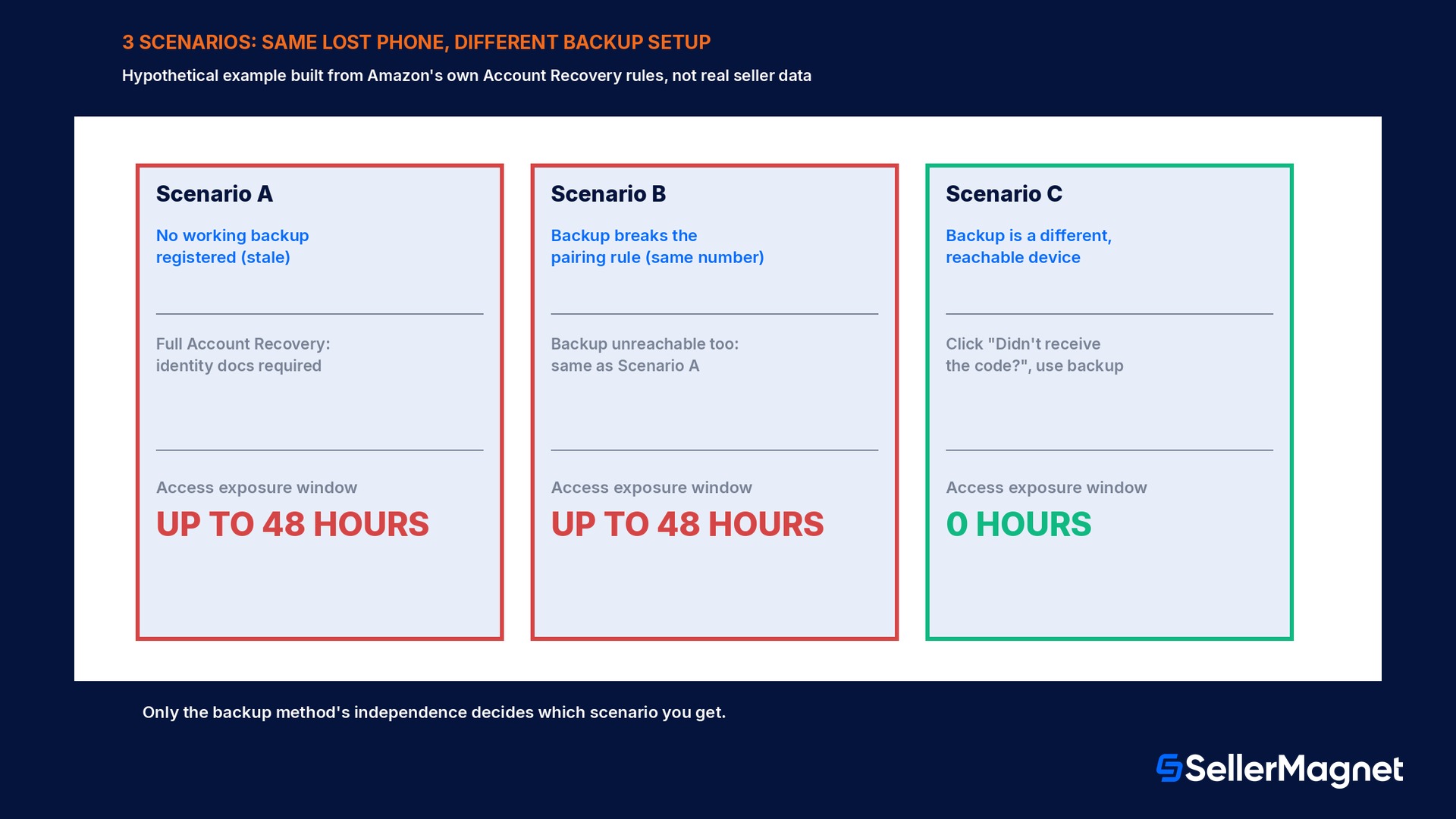
The numbers below are a hypothetical worked example built directly from Amazon's own stated recovery mechanics, not a real seller's data, to make the exposure window concrete rather than abstract. In every scenario the same event happens: the seller's primary device, a phone running an authenticator app, is lost. Scenario A: no backup method was ever registered at setup, which Amazon's own flow does not actually allow to happen at initial enrollment, but is the real-world equivalent of a backup method that has since gone stale, for example a backup phone number that was cancelled months ago and never updated. With no reachable backup, the seller has no choice but to start the full Account Recovery process: submit identity documents and wait, per Amazon's own help page, up to 48 hours, then set up two-step verification again from scratch before touching Seller Central at all. Scenario B: a backup method exists on paper, but it breaks Amazon's own pairing rule, say, the same phone number was mistakenly registered for both the primary SMS method and the backup voice method. Clicking "Didn't receive the code?" sends the backup request to a number tied to the same unreachable phone, so in practice this scenario behaves identically to Scenario A, a full Account Recovery cycle, because the backup was never truly independent. Scenario C: the backup method is a different device entirely, for example a landline voice call registered to a different phone than the lost one, set up correctly from day one. The seller clicks "Didn't receive the code?", the code arrives on the landline within minutes, and access to Seller Central continues uninterrupted; there is no recovery process to go through at all, because the backup method did exactly the job it was designed for.
The gap between Scenario C and Scenarios A and B is not a difference in Amazon's rules, every seller is subject to the exact same Account Recovery process and the same up-to-48-hour window if both methods genuinely fail. The gap is entirely in whether the backup method registered at setup, and never revisited since, is still a real, reachable, independently-numbered device today. A seller who registered a backup 2 phones and 1 provider ago, without ever updating it in Advanced Security Settings, has effectively been running on Scenario A or B without realizing it, right up until the moment the primary device fails and the stale backup turns out not to help at all.
Setup mistakes that turn a lost phone into a multi-day lockout
Letting the backup device go stale. A backup phone number that was cancelled, a SIM that was swapped, or an authenticator app on a device that was traded in months ago all pass the setup check on day one and then fail silently the day they are actually needed.
Registering the same phone number twice. Amazon's pairing rules explicitly forbid using the same number for both primary and backup; a seller who finds a way around the initial check by using 2 SIMs in 1 phone, for example, has not actually created an independent backup.
Assuming turning 2SV off removes the code prompt. Disabling two-step verification on the Advanced Security Settings page still leaves a mandatory one-time password at sign-in; it does not restore password-only access.
Sharing one login across a whole team with no individual sign-ins. Whoever first enabled two-step verification on a shared login becomes the only person who can actually receive codes; everyone else is locked out the moment that person is unreachable.
Expecting support to make an exception for an urgent situation. Selling Partner Support cannot override the Account Recovery process, waive the identity document requirement, or speed past the up-to-48-hour review window, no matter how time-sensitive the business reason.
Not updating Advanced Security Settings after switching phones or carriers. The backup method registered at initial setup is not automatically refreshed when a device or number changes; it has to be updated manually while the old device is still reachable.
Treating email as a fallback option. Amazon does not support email as a two-step verification channel under any circumstance, so there is no email-based workaround to fall back on if both registered devices fail.
Not expecting trusted-device status to reset. Clearing a browser cache, switching browsers, using a VPN, or simply updating an operating system can silently reset the "don't ask for codes on this device" setting with no warning beforehand.
Setup checklist: get this right once, not during a lockout
How to set up two-step verification correctly on Seller Central
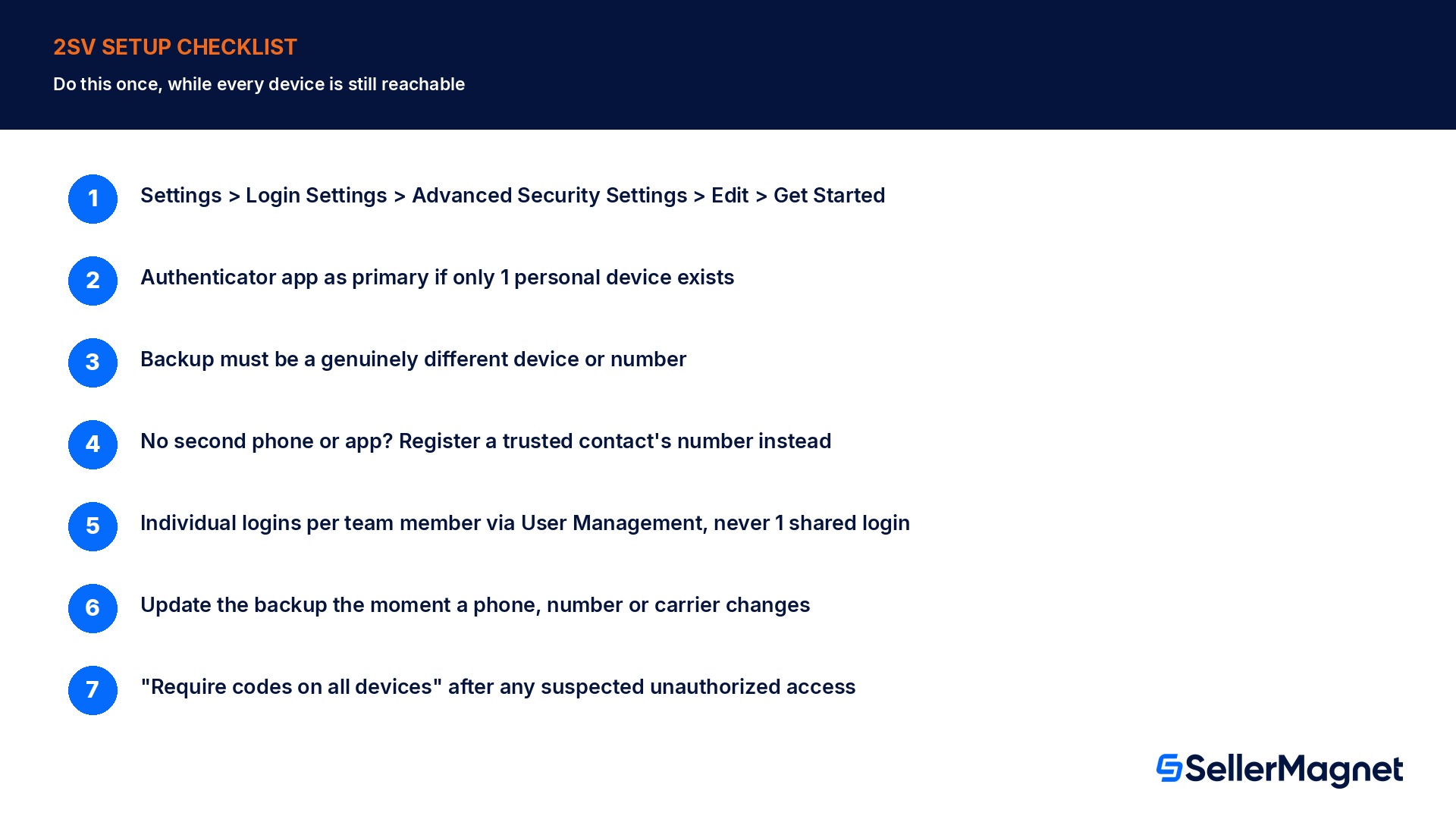
Go to Settings, then Login Settings, then Advanced Security Settings - Click Edit, then Get Started to begin or review two-step verification setup; the same flow is reachable from the Amazon retail site's own Advanced Security Settings page.
Pick an authenticator app as the primary method if only 1 personal device is available - It works without network access and is Amazon's own recommended default; download one from the Apple App Store, Google Play Store, or Windows Store.
Register a backup method of a genuinely different type or number - An authenticator app's backup must be an SMS- or voice-enabled phone; a phone's backup must be a different number, never the same one used for the primary method.
If no second phone or app is available, register a trusted contact's number - A spouse, family member, or friend's phone number, someone reachable if the primary method ever fails, is Amazon's own fallback suggestion; a mobile phone is not a strict requirement, a landline that takes voice calls works too.
Set up individual logins for every team member through User Management - A shared login makes 1 person's phone a single point of failure for everyone else's access; separate logins mean separate, independent two-step verification setups.
Update the backup method the moment a phone, number, or carrier changes - The registered backup does not update itself; revisit Advanced Security Settings while the old device is still reachable, not after it is already gone.
Use "Require codes on all devices" after any suspected unauthorized access - This clears every trusted-device exemption at once; there is no way to clear just one device, so a full reset is the only option if something looks wrong.
What SellerMagnet can and cannot do about this
Two-step verification setup and account recovery both happen entirely inside Amazon's own Seller Central settings and support process; no third-party tool, including SellerMagnet, can enable, bypass, or speed up any part of it, and none should claim otherwise. Where SellerMagnet's Alerts actually help is on the other side of a lockout: once access returns, whether after a quick backup-code login or a 48-hour Account Recovery, alerts on listing status, pricing changes, and Buy Box ownership flag exactly what moved while nobody could respond, instead of a seller having to manually re-check every ASIN from scratch.
The Account Health monitoring guide covers the broader set of signals worth watching after any period of lost access, since an account health issue that started during a lockout window is easy to miss if nothing was tracking it while the seller could not sign in at all. Treating two-step verification setup as a one-time task to get right now, while every device is still reachable, is the only real mitigation; nothing monitors or shortens Amazon's own recovery process once both devices are already gone.
Is two-step verification really mandatory for every Seller Central account?
Yes. Amazon's own two-step verification FAQ states that all Seller Central users must have it enabled to access their account, and that Selling Partner Support cannot make exceptions to this requirement for anyone.
Can I turn two-step verification off if I find it inconvenient?
You can toggle it off on the Advanced Security Settings page, but a mandatory one-time password at sign-in still applies; turning the setting off does not restore plain password-only access.
Can my backup method be another authenticator app?
No. If your primary method is an authenticator app, Amazon requires the backup to be an SMS-enabled phone or a voice-enabled phone, never a second authenticator app.
Why can't Amazon send my verification code by email?
Amazon does not support email as a two-step verification channel at all, specifically because email accounts are compromised often enough that using one as the second factor would undercut the security the second factor is supposed to add.
What happens if I lose access to both my primary and backup device?
You have to go through Two-Step Verification Account Recovery, which requires submitting identity documents and can take up to 48 hours; once approved, Amazon disables two-step verification so you can sign back in, then requires you to set it up again from scratch.
Does Selling Partner Support have a faster path for an urgent lockout?
No. The FAQ states plainly that Selling Partner Support cannot override the Account Recovery verification process, regardless of how urgent the situation is.
If several people use the same Seller Central login, does each of them need separate two-step verification?
Amazon recommends against sharing one login at all; instead, set up individual logins per person through User Management so each person's two-step verification is independent, rather than everyone depending on whoever first set it up.
Why did I suddenly get asked for a code again on a device I marked as trusted?
Trusted-device status resets from ordinary actions like clearing a browser cache, switching browsers, using a VPN, updating your operating system, or signing out of the seller mobile app; Amazon's own help page confirms support cannot help with resets caused this way.
Stop Juggling Tools. SellerMagnet Combines Everything You Need.