A seller opens a support ticket about a stuck reimbursement, waits two days for a templated reply, and only later finds out that another seller solved the exact same issue in a public thread a month earlier. Amazon's own guidance draws a clear line between its three help channels, and most of the time lost on Seller Central comes from picking the wrong one. This guide works through what the Amazon Seller Forums actually are, how they differ from help content and support, the 11 categories Amazon organizes them into, the mechanics (voting, drafts, mentions, locked threads, warnings) straight from Amazon's own FAQ, and a worked scenario for choosing the right channel on a real problem.
Amazon Seller Forums is a community discussion space on Seller Central, moderated by Amazon Community Managers and organized into 11 categories. It is best for crowd-sourced advice, best practices and policy discussion, not account-specific or time-sensitive issues, which Amazon's own guidance routes to seller support instead. Most discussions are publicly readable, but posting, voting and full participation require an active Amazon selling account.
What Is Amazon Seller Forums?
Amazon's own Seller Forums FAQ describes it as a community space for selling partners to build connections with other sellers, share information and experiences, and discuss topics related to selling in Amazon's store. It is moderated by Amazon Community Managers, who participate in discussions, share content, and answer questions directly.
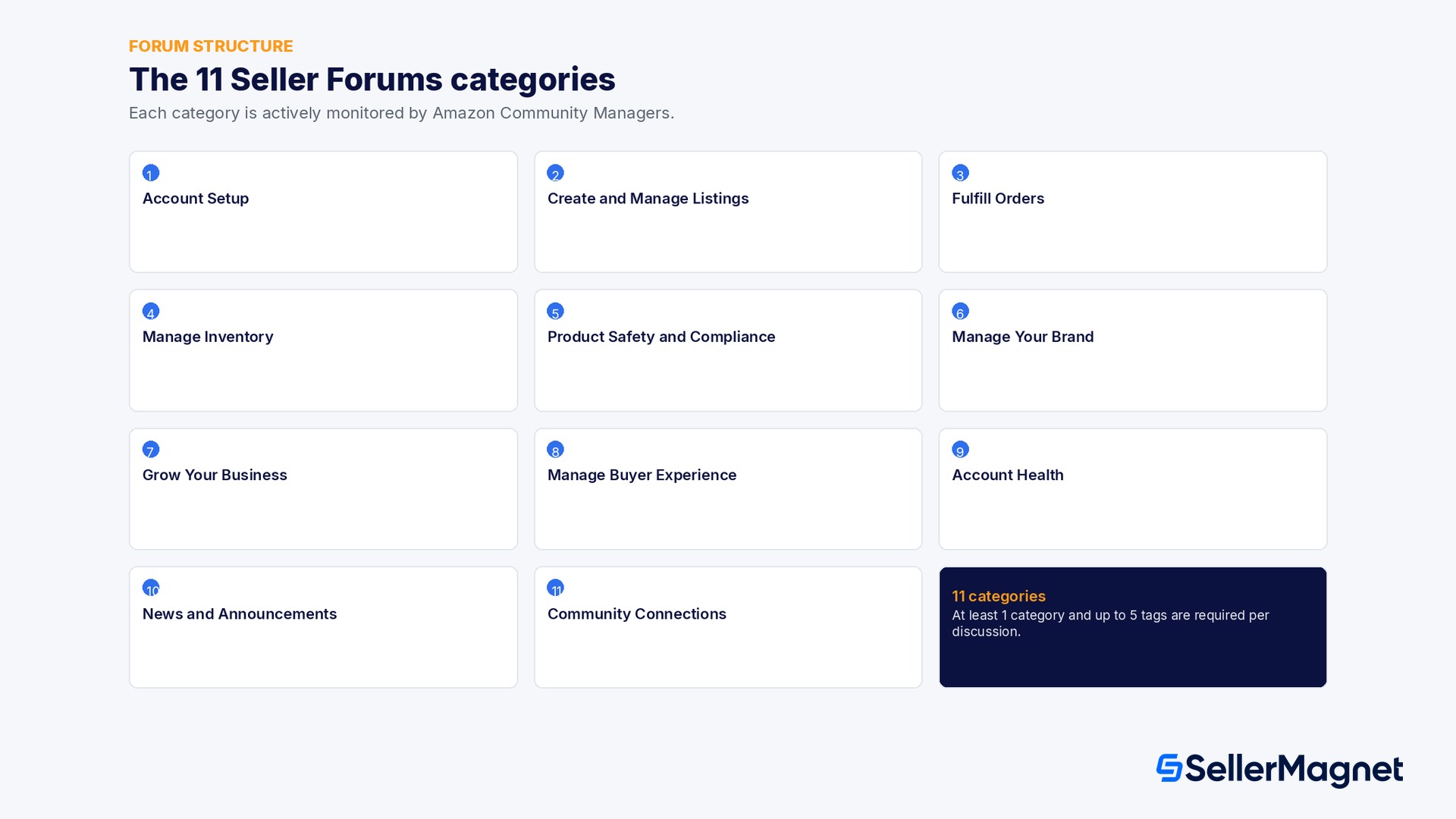
The forums are organized into 11 categories so sellers can find relevant discussions quickly: Account Setup, Create and Manage Listings, Fulfill Orders, Manage Inventory, Product Safety and Compliance, Manage Your Brand, Grow Your Business, Manage Buyer Experience, Account Health, News and Announcements, and Community Connections.
The Account Health category is where most policy-related threads land; our Account Health Rating guide covers the score those threads usually discuss.
Forums vs. Help Content vs. Support: Which One Do You Need?
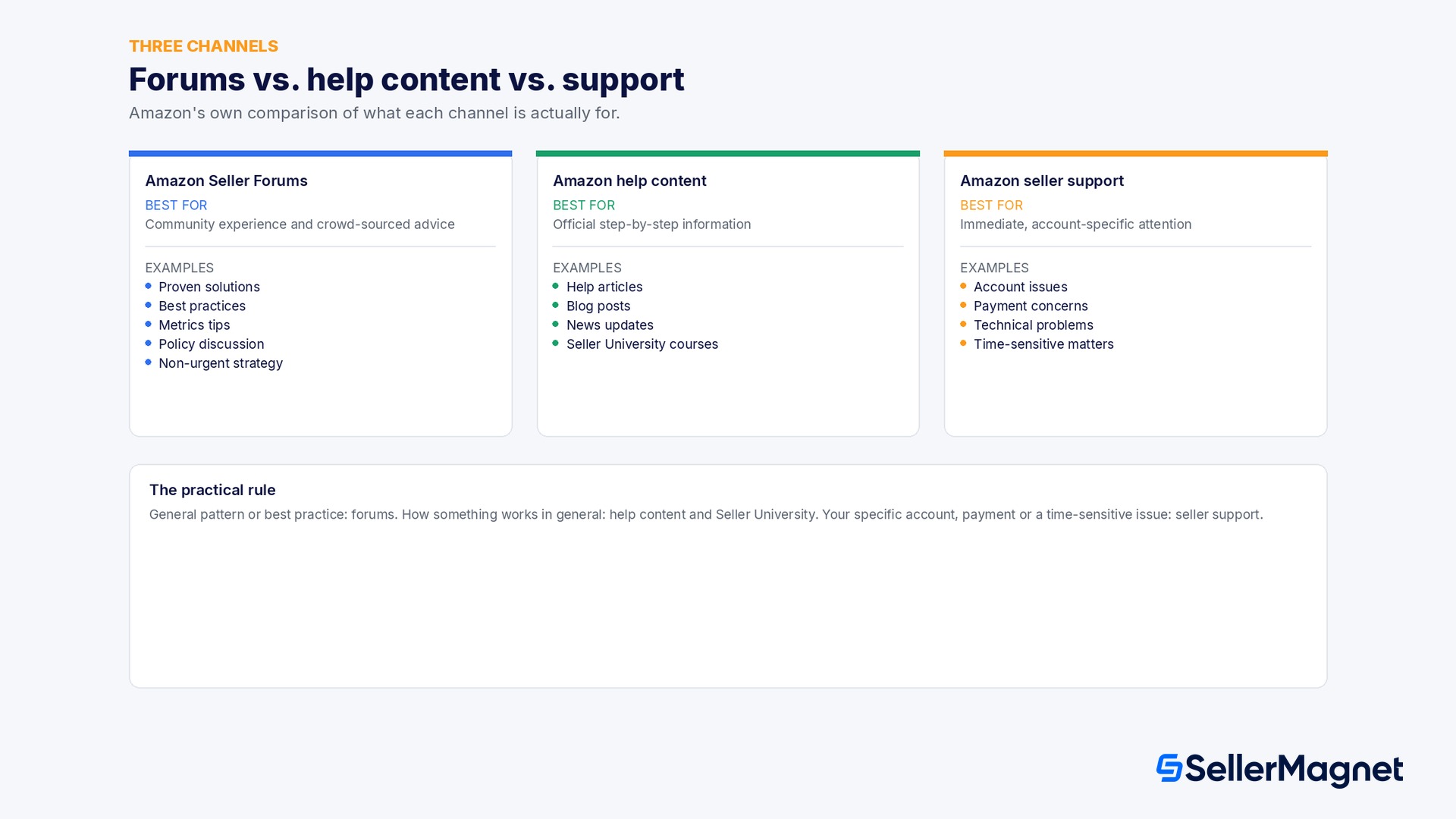
Amazon's own comparison is specific about when to use each of its three help channels, and picking the wrong one is the most common way sellers waste time on a solvable problem.
Channel
Best for
Examples
Amazon Seller Forums
Community experience and crowd-sourced advice
Proven solutions, best practices, metrics tips, policy discussion, non-urgent strategy
Amazon help content
Official step-by-step information
Help articles, blog posts, news updates, Seller University courses
The practical rule from Amazon's own wording: if the question is about how something generally works, help content and Seller University courses are the faster route. If it is about your specific account, an open case with seller support is the right channel. The forums sit in between: they are where a policy nuance or a best practice gets explained by someone who has actually lived through it.
Who Can Read and Post on the Forums?
Access splits into two tiers. Most forum discussions are publicly readable by anyone, including people without a Seller Central account. Posting a new discussion, replying, voting, and reaching non-public discussions all require an active Amazon selling account, referred to in Amazon's own terms as a selling partner.
Open Amazon Seller Forums
Log in to Seller Central - Go to sellercentral.amazon.com and sign in to your account.
Open Get help and resources - Select Help in the upper right corner, then Get help and resources.
Open Forums - In the right column under Support tools, select Forums.
Also on the Amazon Seller mobile app
Amazon added Seller Forums to the Amazon Seller mobile app (iOS and Android), so a seller can search for an answer or post a question without opening a desktop browser.
How the Forum Mechanics Actually Work
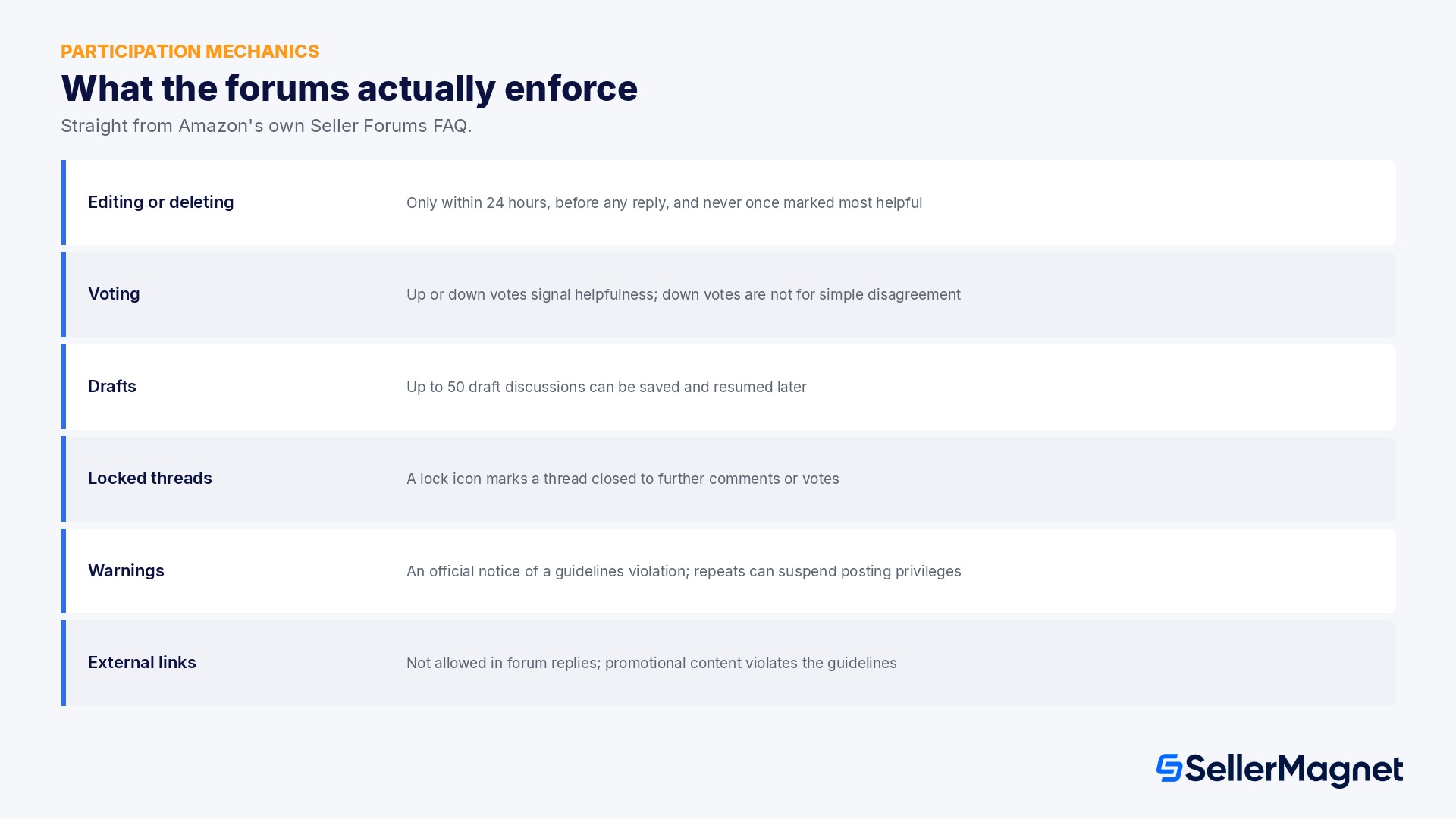
Amazon's own Forums FAQ documents the mechanics in detail, and a few of them change how a seller should actually use the forums rather than just browse them.
Mechanic
How it works, per Amazon's FAQ
Categories and tags
At least 1 category and up to 5 tags are required to start a discussion; they power search and filtering.
Duplicate titles
Forums blocks a duplicate discussion title and instead surfaces existing threads that may already answer it.
Voting
Up votes and down votes signal helpfulness; down votes are not meant for simple disagreement.
Most helpful reply
The original poster can mark one reply as most helpful, which surfaces it for later searchers.
Editing or deleting a post
Only possible within 24 hours, before anyone has replied, and never once a reply is marked most helpful.
Drafts
Up to 50 draft discussions can be saved and resumed later from the Draft discussions section.
@Mentions
Typing @ and a username pulls up a selectable list to mention another selling partner in a post or reply.
Locked threads
A lock icon marks a thread closed to further comments or votes, shown to Amazon by the original poster's request or a guideline violation.
Warnings
An official notice of a Seller Forums Guidelines violation; repeat violations can suspend posting privileges.
A Worked Scenario: Picking the Right Channel
The numbers below walk through one realistic scenario using Amazon's own stated purpose for each channel, not a guaranteed response time Amazon publishes anywhere.
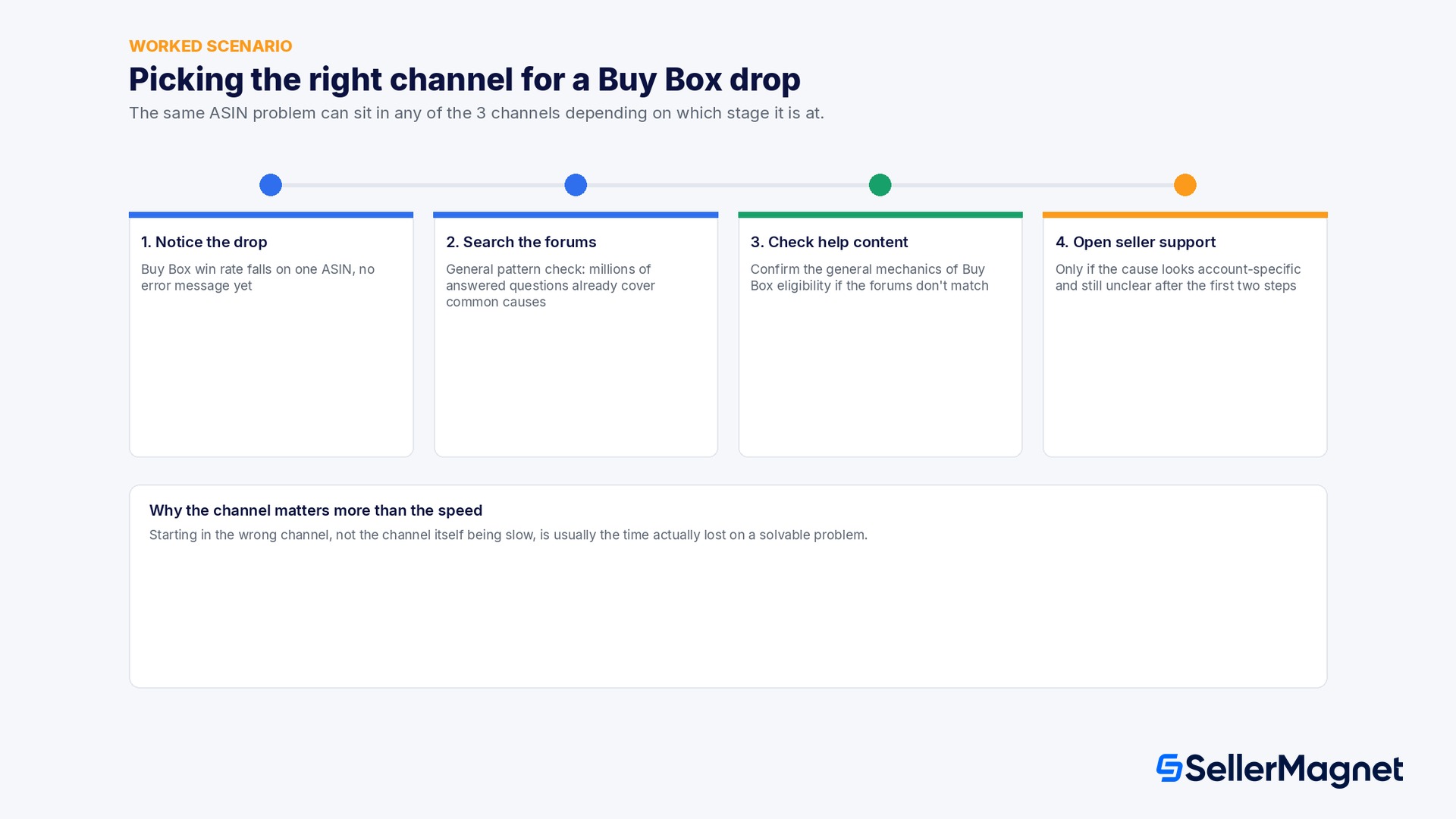
A seller notices a sudden drop in Buy Box win rate on one ASIN. That is a metrics question with no account-specific error message yet, which Amazon's own comparison table places squarely under Amazon Seller Forums: searching for the ASIN's symptoms first, since the forums contain, in Amazon's own words, millions of answered questions, is the fastest starting point.
If the search turns up nothing and the seller suspects a genuine account-level cause, for example a sudden pricing error or a suppressed listing tied to their own catalog, that moves the same problem into help content first (to confirm the general mechanics of Buy Box eligibility), and then seller support if the account-specific cause still is not visible.
The same ASIN problem can sit in any of the three channels depending on which stage it is at: forums for the general pattern, help content for the mechanics, support for the account-specific fix. Starting in the wrong channel is usually the time actually lost, not the channel itself being slow.
Catching the drop itself before a forum search is even needed is its own topic; our Rank and Buy Box alerts guide covers how that detection works.
A Buy Box drop is exactly the kind of signal that is faster to catch in a dashboard than to notice by accident in a forum thread.
SellerMagnet's repricing and analytics tools track Buy Box win rate and pricing changes per ASIN automatically, so the metrics question that sends a seller searching the forums shows up on your own dashboard first.
Our Amazon Buy Box guide covers the eligibility mechanics behind the scenario above in more depth.
Best Practices Amazon's Own Guidance Recommends
Amazon's own guidance splits best practices by the role a seller is playing in a given thread.
Asking for help: search first, since the forums contain millions of answered questions; keep the title and description specific; stay on topic and professional.
Reading an interesting discussion: check whether the question is already answered before replying; stay on the original topic; add something that was not already said.
Helping others: be welcoming and constructive; share what actually worked, not a guess; never post external links or promotional content, which violates the guidelines.
No external links or promotion
Amazon's own best-practice guidance for helping other sellers explicitly rules out posting external links or promotional content in a forum reply; a helpful answer stays inside what the forums themselves allow.
Forums by Country
Discussions differ by marketplace. The country selector above the Start a discussion button lets a seller browse forums for other Amazon stores, but posting in another country's forum requires being registered to sell there; browsing other countries' forums is otherwise read-only.
Is Amazon Seller Forums the same as Amazon seller support?
No. Forums are for community advice and best practices; seller support is for account-specific, time-sensitive issues that need Amazon to act on your account directly.
Can I read the forums without a Seller Central account?
Yes, most discussions are publicly readable. Posting, replying, voting, and non-public discussions require an active selling account.
How many categories do the forums have?
11: Account Setup, Create and Manage Listings, Fulfill Orders, Manage Inventory, Product Safety and Compliance, Manage Your Brand, Grow Your Business, Manage Buyer Experience, Account Health, News and Announcements, and Community Connections.
Can I edit or delete my own forum post?
Only within 24 hours, before anyone has replied, and never once it has been marked a most helpful reply.
How do I mention another seller in a post?
Type the @ symbol followed by their username; a selectable list of matching usernames appears.
Can I post links to my own website in a forum reply?
No. Amazon's own guidelines rule out external links or promotional content in forum posts.
What happens if a thread is locked?
A lock icon appears next to the title and no further comments or votes are accepted. Threads are locked at the original poster's request or for a guidelines violation.
Is Seller Forums available on mobile?
Yes, through the Amazon Seller mobile app on both iOS and Android, in addition to Seller Central on desktop.
Stop Juggling Tools. SellerMagnet Combines Everything You Need.