Amazon Virtual Multipacks 2026: What Sellers Must Check
R
RenéFreelance Amazon Editor
|
15 min read
A new ASIN with a VMP_ prefix shows up in Manage All Inventory, a price already attached, a title Amazon wrote, and the seller never clicked a single button to create it. That is not a catalog error. Since late October 2026 Amazon has been running a pilot that automatically builds new multi-unit offers, called virtual multipacks, out of existing single-pack FBA inventory for a limited set of brand-owned ASINs, and the next wave of those listings goes live for customers on November 11, 2026 unless the brand reviews, edits or deletes them first. Amazon's own Seller Central help pages lay out exactly what a virtual multipack is, how it differs from both a manually-listed multipack and a bundle, which SKU prefixes to look for, how editing actually works without silently breaking the listing, and why deleting one is a one-way decision during the pilot. This guide works through that documentation end to end: what a virtual multipack actually is, the October 28 to November 11 rollout timeline, why the default pricing is margin-neutral at creation while its image sync is the one thing confirmed to need manual checking, the editing rule that breaks a listing if ignored, and a worked example separating what Amazon's own documentation confirms from what a seller has to verify directly in their own account.
A virtual multipack is a new Amazon-created listing, prefixed VMP_, that sells several units of an existing single-pack FBA product as one offer without any new packaging, new UPC or new inventory; it ships from the same single-pack stock already sitting in FBA. Amazon is piloting it automatically on selected brand-owned ASINs, with the next wave of listings live for customers on November 11, 2026 after an October 28 to November 10 review window, and there is no way to opt in or out of the selection itself. The one rule that matters most: edit a virtual multipack only through the dedicated Edit Virtual Multipack page, because edits through any other Seller Central tool break the listing, and deleting one during the pilot cannot be undone.
What is a virtual multipack, in Amazon's own words?
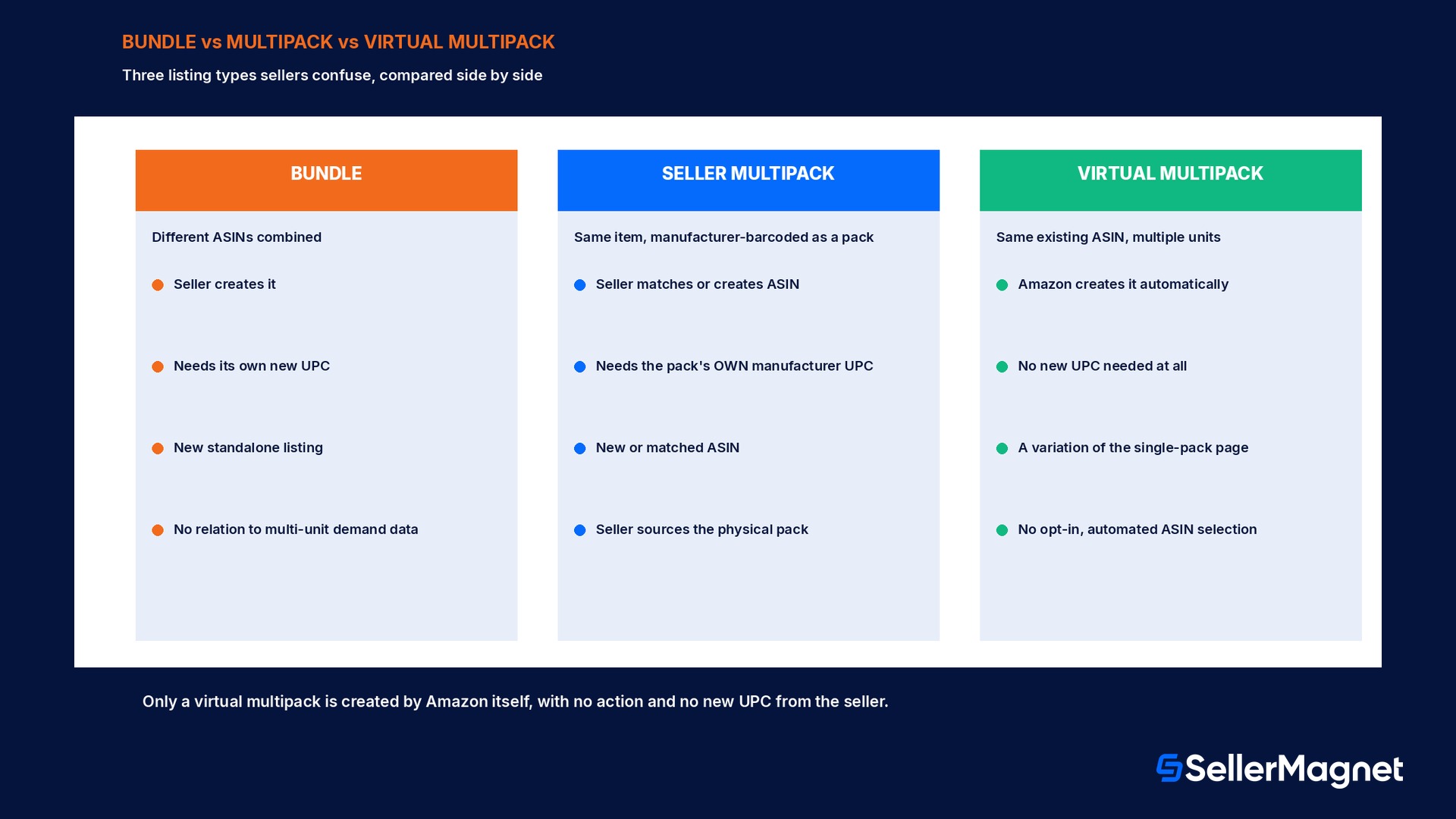
Amazon's Seller Central help page defines a virtual multipack as a listing that combines multiple units of an existing single-pack FBA product into one offer, fulfilled with the same single-pack inventory a seller already has in Amazon's warehouses. Nothing changes about how the product ships: no new box, no shrink-wrap, no manufacturer repack, and critically, no new UPC has to be sourced, because Amazon is not creating a new physical product, only a new way to sell the existing one in a larger quantity per order. The help page draws a specific line against two listing types sellers already know: unlike a bundle, which combines two or more different ASINs into one purchase, a virtual multipack always contains multiple units of the identical ASIN; and unlike a seller-created multipack (several manufacturer-barcoded units sold as one retail unit under its own UPC), a virtual multipack needs no separate manufacturer UPC at all, because Amazon generates its own distinct ASIN and SKU for the multipack offer and links it as a variation of the single-pack detail page. Two SKU prefixes identify a virtual multipack in Manage All Inventory: VMP_ for the general pilot, and VMP_DC_ specifically for the distribution-center case-pack variant of the same mechanism, which Amazon's help page describes as currently editable through the identical Edit Virtual Multipack system.
Listing type
Combines
New UPC needed
Who creates it
Where it shows up
Bundle
Two or more DIFFERENT ASINs
Yes, its own identifier
The seller
A new standalone listing
Seller-created multipack
Multiple units of the SAME item, manufacturer-barcoded as a pack
Yes, the pack's own manufacturer UPC
The seller, matching or creating the ASIN
A new or matched ASIN
Virtual multipack (pilot)
Multiple units of the SAME existing single-pack ASIN
No, Amazon assigns the ASIN/SKU
Amazon, automatically, on selected ASINs
A variation of the single-pack detail page
The rollout timeline: October 28 to November 11, 2026
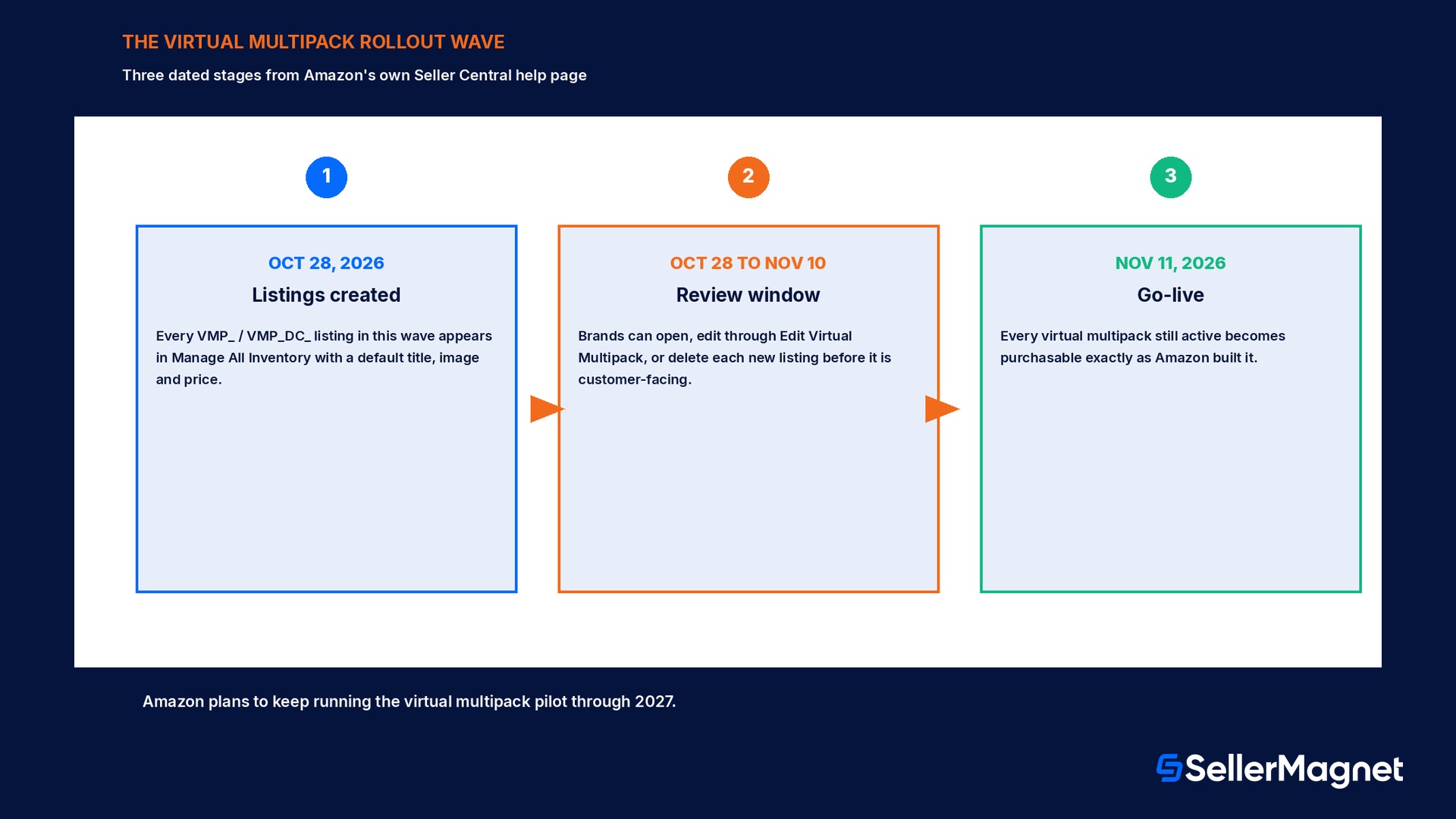
Amazon's help page lays out the current wave in three dated stages. By October 28, 2026, every virtual multipack listing in this wave was created and made visible in Manage All Inventory under its VMP_ or VMP_DC_ SKU, with Amazon's own generated title, main image and a default price already attached. From October 28 through November 10, 2026, brands have a review window to open each new listing, correct or delete it, before anything is customer-facing. On November 11, 2026, every virtual multipack still active goes live for customers to purchase exactly as Amazon built it, whether a human at the brand ever looked at it or not. Amazon selected the ASINs entirely through an automated process based on multi-unit purchase demand; its FAQ is explicit that there is no option to manually join or opt into the pilot, and that this holds even for sellers who already have some ASINs in the pilot and want more added. Amazon also states it validates every virtual multipack it creates to confirm the detail page generated correctly, and if it detects an error, it removes the affected listing from both Manage All Inventory and the pilot automatically, without the seller needing to request anything.
The default price Amazon sets, and the one thing confirmed not to sync
Amazon's own FAQ settles the fee question cleanly: there are no additional fees for virtual multipacks. A virtual multipack sale is charged the fulfillment fee PER UNIT, so a 2-pack is charged exactly 2 times the single-pack fulfillment fee, a 3-pack exactly 3 times, with no separate weight or dimensions calculation on the new ASIN. The referral fee works the same way, as a straight percentage of whatever the multipack's price happens to be. That means the per-unit margin on a freshly created virtual multipack matches the single-pack margin at the moment of creation, because every fee line scales in step with the linear price multiple Amazon sets by default. A brand can also set a standing discount on the Edit Virtual Multipack page, meant to be applied automatically whenever the single-pack price changes. Whether the BASE multipack price itself re-syncs to a new single-pack price, and how fast, is inconsistent even across Amazon's own published help pages, so do not assume either direction without checking the account directly. The one sync behavior confirmed consistently across Amazon's documentation: the virtual multipack's IMAGE does not update automatically when the single-pack ASIN's main image changes, so a rebranded or refreshed single-pack listing can leave its virtual multipack showing an outdated photo indefinitely until someone edits it by hand.
Worked example: what stays certain, and what you have to check yourself
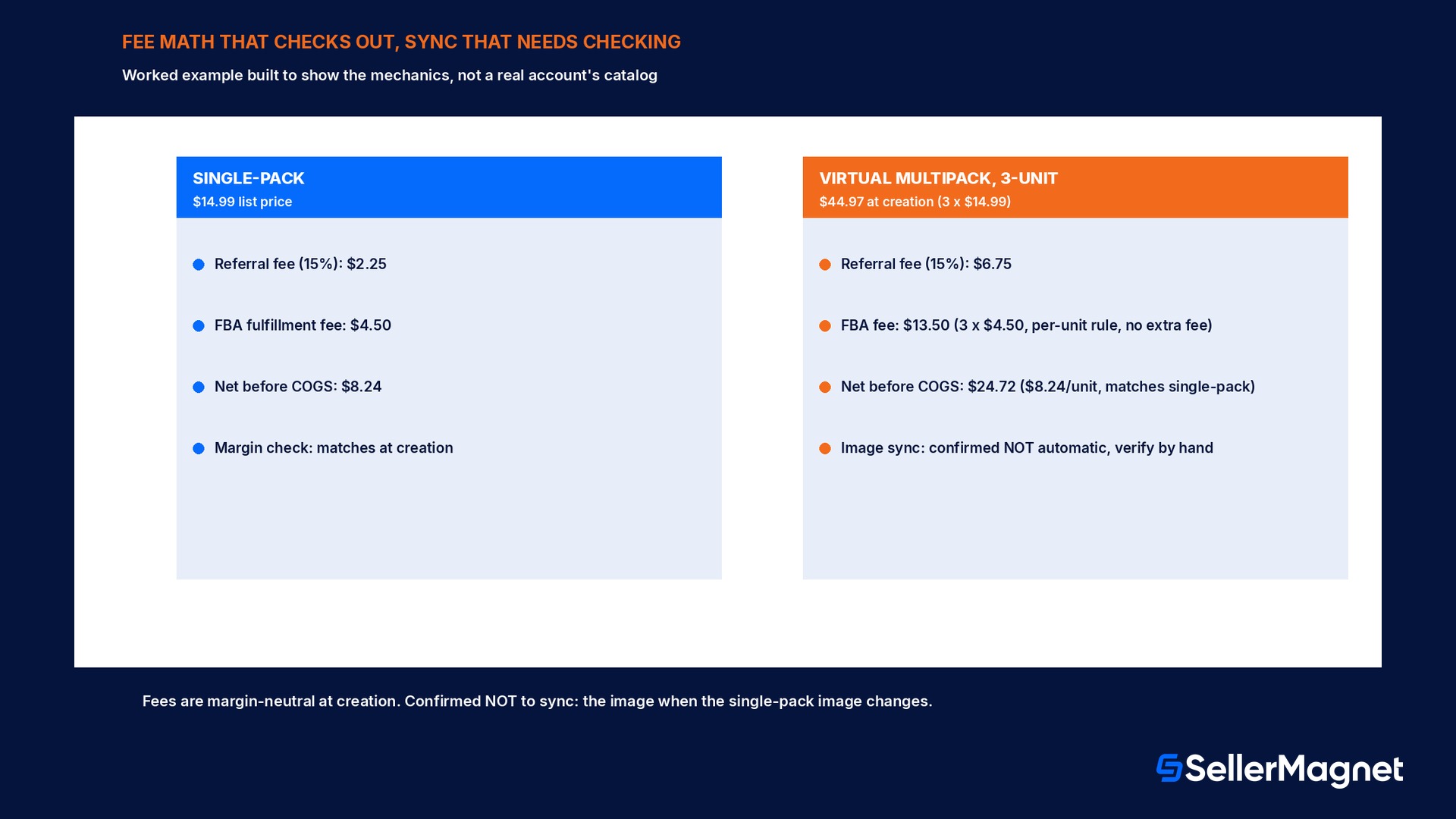
Take a single-pack ASIN selling at $14.99 with a 15% referral fee and a $4.50 FBA fulfillment fee, a per-unit net before cost of goods of $14.99 minus $2.25 referral minus $4.50 FBA, or $8.24. Amazon's pilot creates a 3-unit virtual multipack at the default $44.97 (3 times $14.99): referral fee becomes $6.75 (15% of $44.97), FBA fee becomes $13.50 (3 times $4.50, per Amazon's own per-unit fee rule, confirmed with no extra charge), for a net of $24.72, or exactly $8.24 per unit. At creation, nothing is lost, the margin is mathematically identical because every line scaled together, and that part is certain. What is not certain from Amazon's own documentation alone is what happens to the BASE multipack price days or weeks later if the single-pack price moves on a routine repricing update, since Amazon's own published help pages describe that sync differently in different places. What IS certain: if the single-pack ASIN gets a new main image, the virtual multipack keeps showing the old one. The safe process either way is the same: open Edit Virtual Multipack on the VMP_ SKU right after any single-pack price or image change and confirm what it actually shows, rather than assuming it already matches.
Line
Single-pack ($14.99)
Virtual multipack at creation (3-unit, $44.97)
Certain vs. needs checking
List price
$14.99
$44.97 (3 x $14.99, Amazon default)
Base price sync behavior varies by source, verify in account
Referral fee (15%)
$2.25
$6.75
Certain: a straight percentage of whatever price the multipack actually shows
FBA fulfillment fee
$4.50
$13.50 (3 x $4.50, Amazon's per-unit rule, no extra fee)
Certain: confirmed in Amazon's own FAQ, no weight/dimensions surprise
Main image
Current single-pack image
Set at multipack creation
Certain: does NOT auto-update when the single-pack image changes
Does a virtual multipack double-count your inventory?
No, and this is one of the most reassuring facts in Amazon's own documentation: a virtual multipack draws from the exact same single-pack FBA inventory a brand already has, not a separate pool. Selling one 3-unit virtual multipack order consumes 3 units of the underlying single-pack FNSKU from stock, the same as if 3 customers had each bought one unit separately. Nothing needs to be shipped in, repacked, or relabeled for the multipack offer to exist, and no duplicate inventory record gets created anywhere in the account. The practical effect worth watching is on velocity and forecasting rather than on stock accuracy: if a virtual multipack starts selling well, it can draw down single-pack inventory noticeably faster than the historical single-unit sales rate alone would suggest, because every multipack order now pulls 2, 3 or more units at once instead of one. A brand running an inventory forecast off last month's single-unit sell-through, before a virtual multipack existed, can walk straight into an unexpected stockout once the multipack starts contributing meaningful volume. The fix is simple but easy to miss: once a VMP_ SKU is live and selling, recompute the days-of-stock-left forecast using combined demand across the single-pack ASIN AND every virtual multipack variation drawing from it, not the single-pack sales history alone.
How do I edit one without breaking it?
Amazon's documentation is unusually direct on this point: a virtual multipack can only be edited safely through the dedicated Edit Virtual Multipack page inside Seller Central, reached from Manage All Inventory. Editing the price, title, images or description through any other route, a different Seller Central listing page, a flat-file inventory template, a feed, or the Selling Partner API, is stated to break the virtual multipack listing. That single rule is the most common way sellers damage one of these listings without meaning to, by treating a VMP_ SKU like any other and pushing a routine bulk price or content update through the same feed process used for everything else in the catalog. Before any bulk pricing tool, repricer integration or catalog feed touches a VMP_ or VMP_DC_ SKU, it needs to be excluded from that process and handled through the Edit Virtual Multipack page by itself.
Is deleting one safe to undo?
A brand that decides a virtual multipack is not worth keeping can delete it from the three-dot or hamburger menu next to the listing on Manage All Inventory. Amazon's help page states plainly that a virtual multipack listing deleted during this pilot cannot be reactivated later. That makes deletion a different decision than it looks like at first: it is not a toggle a brand can flip back on once the margin is corrected or a MAP conflict is resolved, it is closer to discontinuing the ASIN permanently. Where the price or fee math genuinely does not work and cannot be fixed through the Edit Virtual Multipack page, deletion is still the right call, but it should be the LAST step after confirming the edit path cannot fix it, not the first reaction to seeing an unfamiliar VMP_ SKU appear.
Deleting is permanent
A virtual multipack deleted during this pilot cannot be reactivated later, per Amazon's own help page.
Mistakes that cost sellers margin or the listing itself
Letting a bulk pricing feed or repricer integration touch a VMP_ SKU, which breaks the listing per Amazon's own stated rule; exclude VMP_ and VMP_DC_ SKUs from any automated catalog process until it is confirmed safe.
Repricing the single-pack ASIN or updating its image without ever revisiting the virtual multipack through Edit Virtual Multipack; Amazon's own documentation does not consistently guarantee the base price syncs, and the image is confirmed NOT to sync at all.
Deleting a virtual multipack as a first reaction to an unfamiliar SKU, when editing the price or content through the Edit Virtual Multipack page would have fixed the actual problem without losing the listing permanently.
Missing the November 10 review-window deadline (for this wave) because nobody filtered Manage All Inventory for VMP_ and noticed the new listings in time.
Confusing a virtual multipack with a manually-created multipack or a bundle when troubleshooting a catalog issue, and following the wrong rule set (UPC sourcing rules that do not apply here) instead of the Edit Virtual Multipack path.
Review-window checklist
How to review a new virtual multipack before it goes live
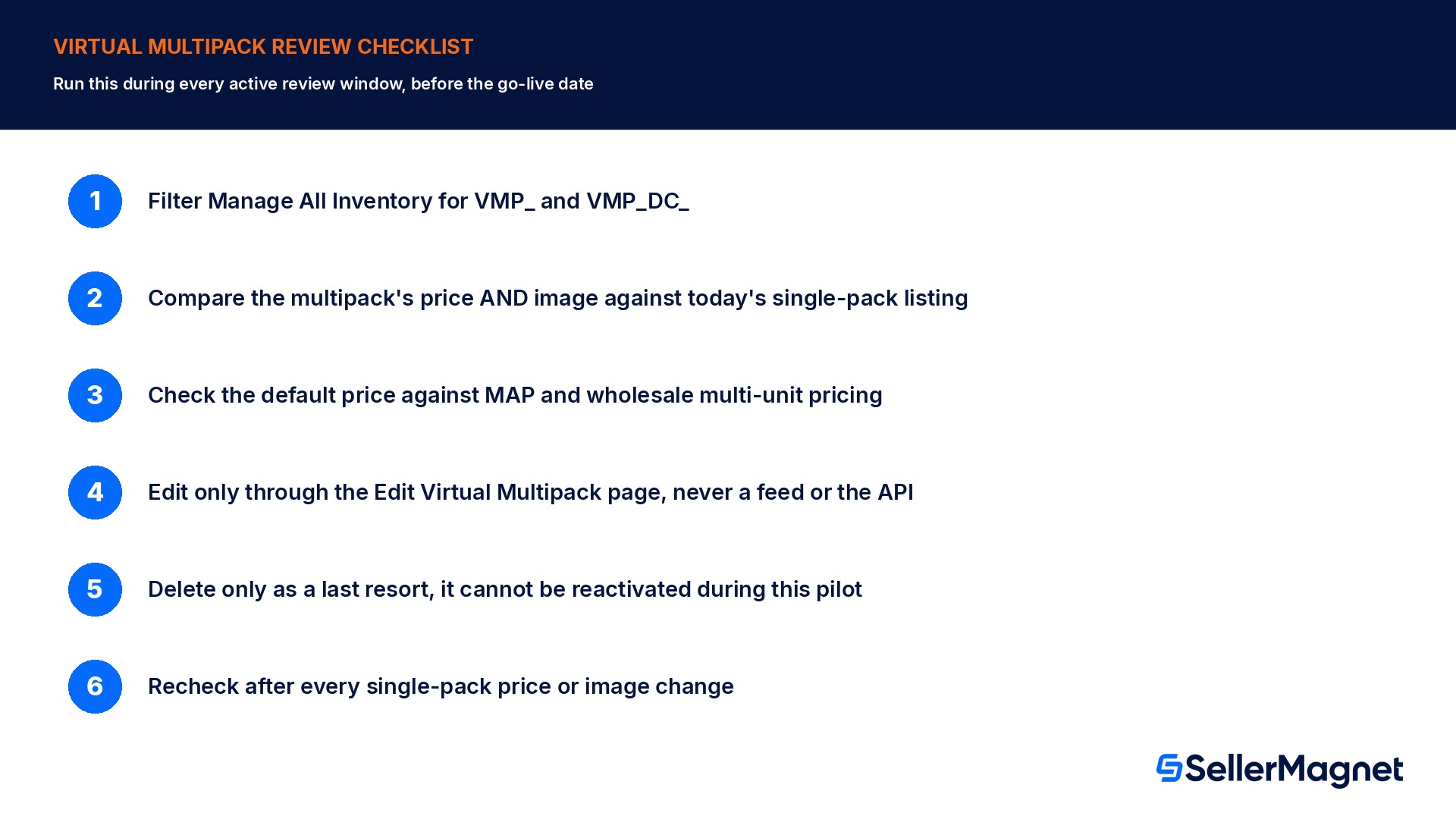
Filter for VMP_ - In Manage All Inventory, filter the SKU column for VMP_ to list every virtual multipack Amazon created, including the VMP_DC_ distribution-center variant.
Check the price AND image against today's single-pack listing - Open Edit Virtual Multipack and compare the multipack's shown price and photo against the single-pack ASIN's CURRENT price and image, rather than assuming either one carried forward automatically.
Check MAP and wholesale conflicts - Compare the Amazon-set default price against any MAP policy or wholesale multi-unit pricing the brand already enforces elsewhere.
Edit through the right page only - Make any price, title, image or description correction through the Edit Virtual Multipack page; never through a bulk feed, template or the API.
Delete only as a last resort - If the pricing gap cannot be fixed through an edit, delete it, knowing it cannot be reactivated later during this pilot.
Recheck after every single-pack price or image change - Amazon says it plans to keep running the pilot through 2027, so repeat this check whenever the single-pack price or image changes, not only when a new VMP_ SKU first appears.
Where SellerMagnet fits
The Repricer's price history and the Analytics Dashboard's net-profit-per-order view (A5.1) together show the exact moment a single-pack price moved, useful for confirming whether a connected virtual multipack actually followed it, since Amazon's own interface gives no single screen that flags the two apart. The Fee Calculator recomputes referral fee and FBA fulfillment fee for any price in seconds, handy for confirming the per-unit multipack fee math matches what this guide describes before editing anything. The inventory forecast (A5.8) recomputes days-of-stock-left and expected stockout date from the COMBINED sales velocity of the single-pack ASIN and every virtual multipack variation drawing from it, once a VMP_ SKU starts selling.
A virtual multipack is treated by Amazon's own catalog as a variation of the single-pack ASIN, the same relationship covered in the listing variations guide; the UPC and quantity rules that DO apply to a seller-created multipack are covered separately in the multipack IPQ guide, and the ASIN-combining rules for a true bundle of different products are covered in the bundle policy guide. None of those three rule sets is the one that governs a virtual multipack Amazon creates automatically; this guide and Amazon's own Edit Virtual Multipack documentation are the only correct reference for that specific listing type.
What is an Amazon virtual multipack?
A listing Amazon creates automatically that sells several units of an existing single-pack FBA product as one offer, fulfilled from the exact same single-pack inventory a brand already has. It needs no new UPC, no repackaging and no additional stock, and shows up as a variation of the single-pack detail page.
Can I opt into or request the virtual multipack pilot?
No. Amazon's own FAQ states that ASINs are selected for the pilot through an automated process based on multi-unit purchase demand, with no option to manually join or request it, and this restriction applies even to sellers who already have some ASINs enrolled and want additional ones added to the same account.
How is a virtual multipack different from a bundle?
A bundle combines two or more DIFFERENT ASINs into a single purchase, and a seller has to build it themselves with its own new UPC. A virtual multipack always contains multiple units of the SAME existing ASIN, needs no separate UPC at all, and is created by Amazon automatically rather than by any action from the seller.
How do I edit a virtual multipack's price or content?
Only through the dedicated Edit Virtual Multipack page inside Seller Central, reached from Manage All Inventory. Amazon's own documentation states directly that editing the price, title, images or description through any other Seller Central page, a flat-file inventory template, a feed, or the Selling Partner API will break the virtual multipack listing entirely.
What happens if I delete a virtual multipack?
It cannot be reactivated later during this pilot, according to Amazon's own help page, which states this plainly and without exception. Treat deletion as a last resort reserved for a problem that genuinely cannot be fixed through the Edit Virtual Multipack page, not as the first reaction to an unfamiliar VMP_ or VMP_DC_ SKU appearing in the catalog.
Do virtual multipacks carry extra Amazon fees?
No. Amazon's own FAQ states there are no additional fees for virtual multipacks: the fulfillment fee is simply charged per unit, so a 2-pack costs exactly 2 times the single-pack fulfillment fee. The margin matches the single-pack margin at creation; what needs checking afterward is whether the price and image still match the single-pack ASIN.
How long will the virtual multipack pilot run?
Amazon states it plans to keep running the pilot through 2027, with the VMP_DC_ distribution-center case-pack variant already operating under the same Edit Virtual Multipack system described throughout Amazon's help documentation for this program, alongside the general VMP_ pilot covering standard single-pack to multipack conversions on selected brand-owned ASINs.
Stop Juggling Tools. SellerMagnet Combines Everything You Need.