Amazon Outlet for Sellers 2026: Eligibility and Deal Pricing
R
RenéFreelance Amazon Editor
|
16 min read
Amazon's "Amazon Outlet" help page (US store, help ID GHLYT4TPVCY2MJE3) describes a clearance-style promotion that lives entirely inside the FBA Inventory tool: Amazon surfaces a list of a seller's own eligible ASINs that it recommends for an Outlet deal, the seller submits a price for one of those ASINs, and if Amazon approves the submission the item runs as a featured deal on the public Outlet page for a fixed 2-week window. Nothing about Outlet requires an application, a separate program enrollment or a fee: eligibility is assessed automatically against a short list of account- and ASIN-level conditions, and a seller only interacts with it by reviewing recommendations and submitting a price twice a week, which is how often Amazon processes new deal submissions. This guide walks through exactly which ASINs qualify, how the maximum deal price is actually bounded, what happens if a deal is approved but Amazon later cancels it, and the 60-day cooldown that runs in both directions, so a seller can tell in advance whether an inventory-age or rating problem is the reason a product is not showing up as a recommendation.
Amazon Outlet turns FBA Inventory recommendations into 2-week clearance deals: Amazon suggests eligible ASINs, the seller submits a price at or below Amazon's own maximum, submissions are processed twice a week, and a 60-day cooldown applies both before a deal can start and after one ends.
What is Amazon Outlet?
Outlet is not a program a seller applies to join. It is a recommendation engine built into the FBA Inventory page: Amazon reviews a seller's own FBA catalog against demand and inventory-age signals and flags specific ASINs as recommended for an Outlet deal. A seller filters the FBA Inventory page to see only the flagged ASINs, picks one, and submits a deal price through a pop-up window on that same page. If Amazon approves the submission, the ASIN is featured on the public-facing Outlet page for a fixed 2-week run, and the item's displayed price automatically switches to the approved deal price for the duration, then reverts to the seller's regular price the moment the deal ends. Because the recommendation list changes as Amazon reassesses eligibility, an ASIN visible today is not guaranteed to still be suggested tomorrow, and not every technically eligible ASIN will ever be suggested at all.
This matters for how a seller should actually plan around Outlet: there is no request form, no calendar a seller controls, and no way to nominate an ASIN that Amazon has not already flagged. The FBA Inventory page is the only entry point, reached by opening the Filters banner, choosing the Recommendation dropdown and selecting "Create outlet deal". That one filter is the entire discovery mechanism; there is no separate Outlet dashboard for browsing every technically eligible ASIN a seller owns, only the subset Amazon is actively recommending right now. A seller who keeps checking that filter regularly, rather than once, will see the recommendation list shift as Amazon's own demand and inventory-age assessment runs in the background.
The 9-point eligibility list
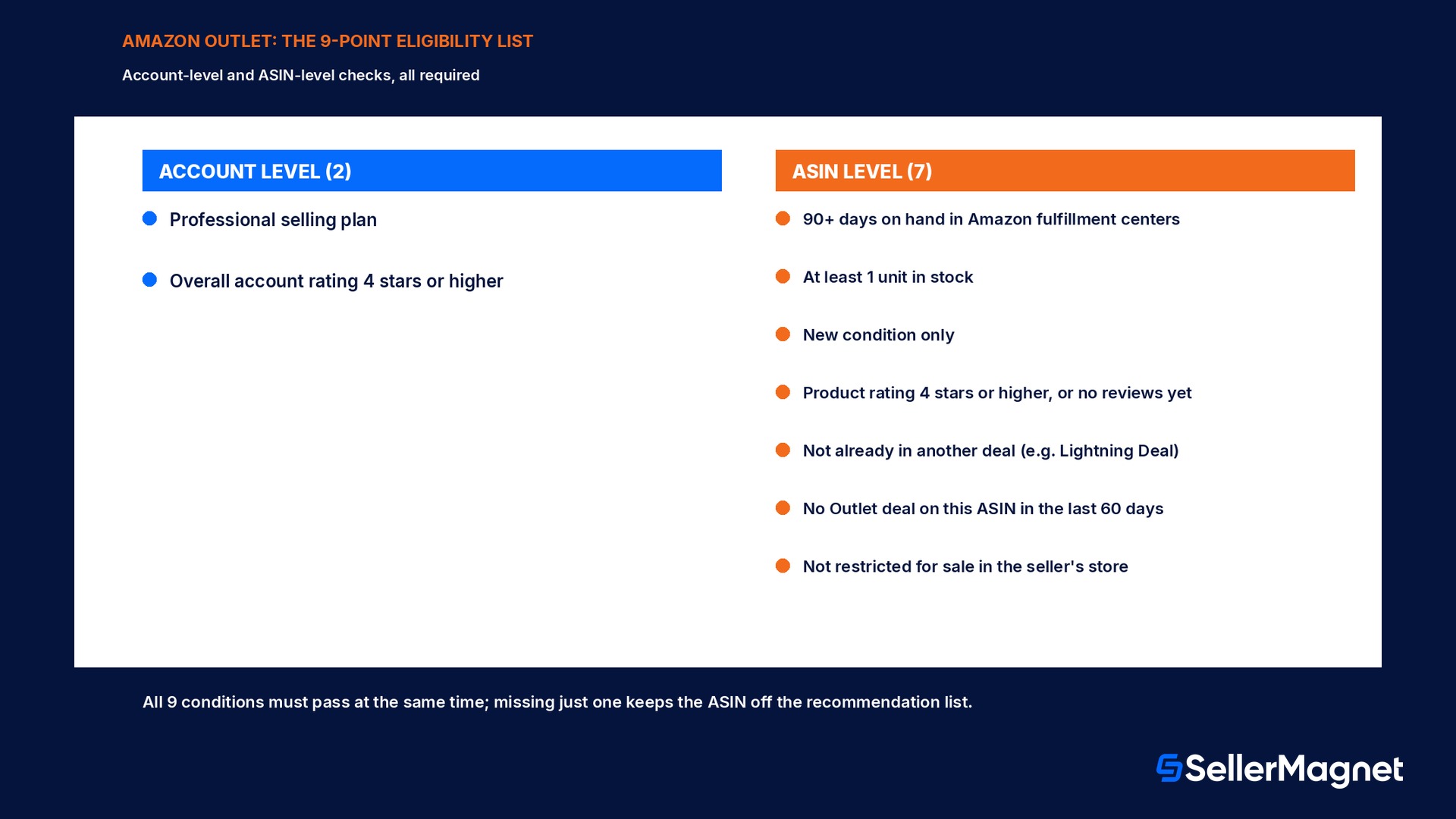
Amazon's help page lists the eligibility conditions as subject to change, but the current list has 9 parts, split across the account and the ASIN. At the account level, Outlet requires a Professional selling plan and an overall customer rating of at least 4 stars; sellers on an Individual plan, or with a rating below the bar, will not see any Outlet recommendations regardless of their inventory. At the ASIN level, the product needs to have been sitting in Amazon's fulfillment centers for at least 90 days with at least 1 unit on hand, be listed in new condition, and carry a product rating of at least 4 stars or have no reviews yet. The remaining 3 conditions are about exclusivity and history: the ASIN cannot already be enrolled in another deal promotion such as a Lightning Deal, it cannot have appeared as an Outlet deal in the last 60 days, and it cannot be restricted for sale in the seller's store.
Professional selling plan
Overall customer rating of at least 4 stars
Inventory in Amazon fulfillment centers for at least 90 days
At least 1 unit of inventory on hand
New condition only
Product rating of at least 4 stars, or no reviews yet
Not already enrolled in another deal promotion such as a Lightning Deal
Has not appeared as an Outlet deal in the past 60 days
Not restricted for sale in the seller's store
Why Outlet is an FBA-only, inventory-age-driven mechanic
The 90-day on-hand requirement and the FBA Inventory page entry point both point to the same underlying purpose: Outlet exists to help move FBA stock that has been sitting in a fulfillment center long enough to start accumulating storage costs, not to run general-purpose promotions on fast-moving new arrivals. A seller already tracking inventory age for long-term storage fee exposure, or watching an aged-inventory surcharge building on a slow SKU, is looking at the same underlying signal Amazon's Outlet recommendation engine is likely weighing. That overlap is also the practical reason Outlet recommendations cluster on older, slower stock rather than appearing evenly across a catalog: an ASIN that turns over inside a few weeks rarely accumulates the 90 days of on-hand history Outlet checks for in the first place.
How is the maximum Outlet deal price calculated?
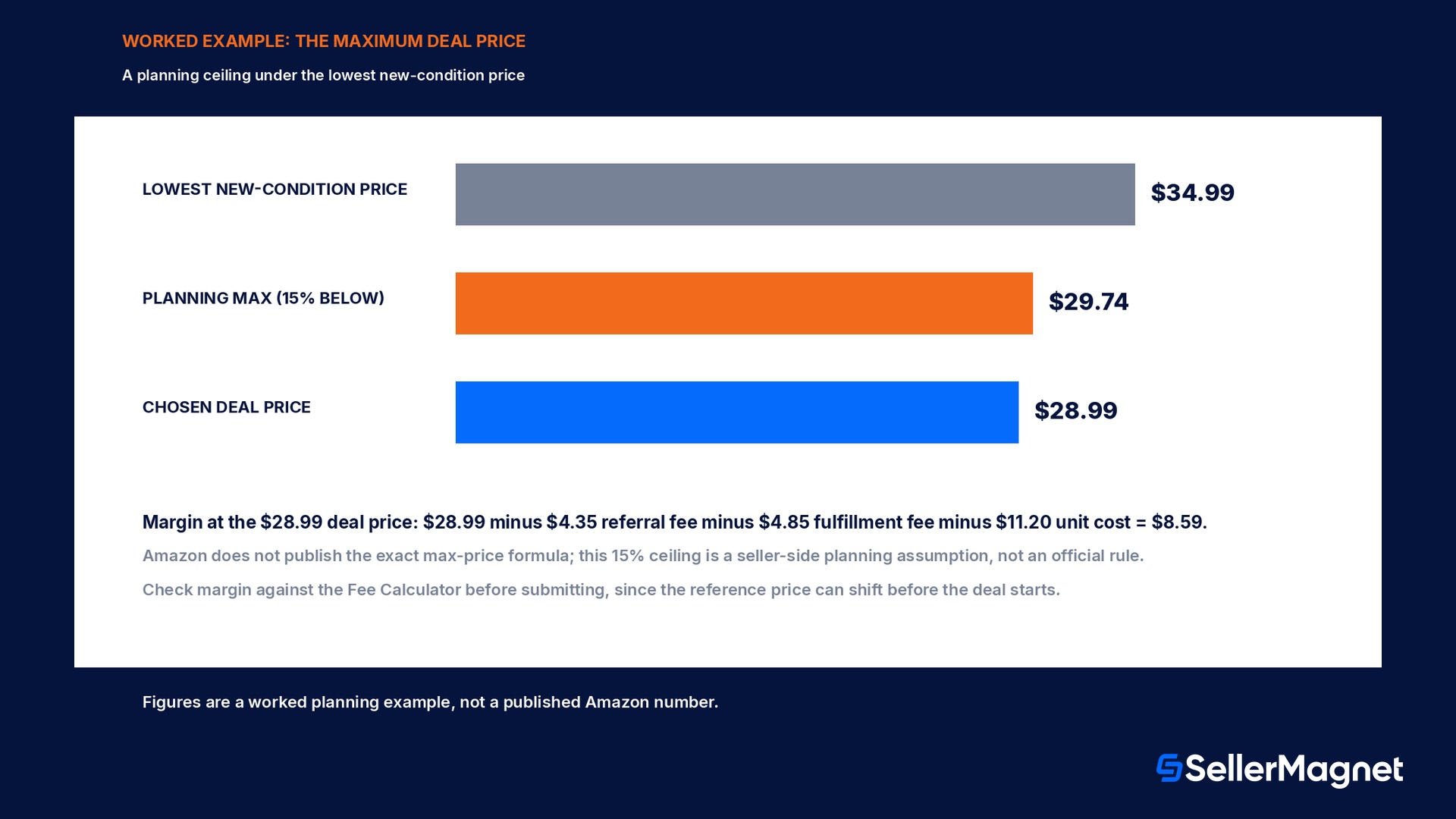
A submitted deal price has to be less than or equal to a maximum price that Amazon calculates by looking at the lowest price currently listed for that ASIN in new condition; Amazon does not publish the exact formula behind that ceiling, and the help page notes the maximum deal price can itself move if the ASIN's current sale price changes before the deal starts. A worked planning example: an ASIN's lowest new-condition price right now is $34.99. Using a 15% planning margin below that reference as a rough ceiling, a seller might estimate a maximum workable deal price near $29.74, then submit something at or below that, for example $28.99. At that $28.99 price, with a 15% referral fee ($4.35), a $4.85 FBA fulfillment fee and a $11.20 unit cost, the per-unit margin on the deal works out to $8.59.
Value
Lowest current new-condition price
$34.99
Planning max price (15% below reference)
$29.74
Chosen deal price
$28.99
Referral fee (15%)
$4.35
FBA fulfillment fee
$4.85
Unit cost
$11.20
Margin at the deal price
$8.59
Amazon can cancel an approved deal without notice
If the product's regular sale price rises above the approved Outlet deal price while the deal is scheduled or running, Amazon may cancel it without advance notice. A seller running other pricing automation (a repricer, a promotion, a price change) during an active Outlet deal window should treat the deal price as a hard floor until the 2-week run ends.
Submission, processing and the deal window
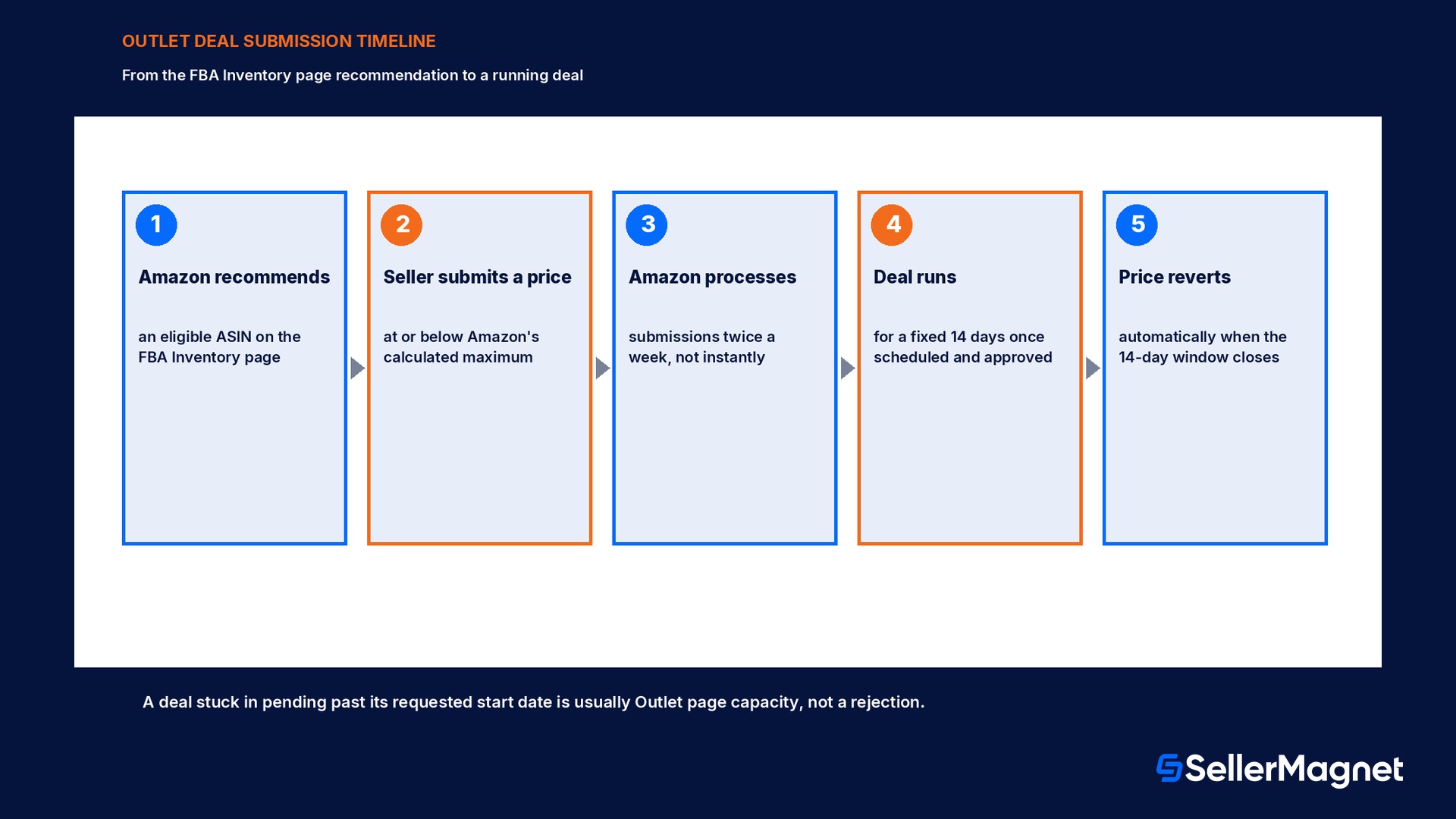
A deal is created from the FBA Inventory page: filter by the "Create outlet deal" recommendation, open the action menu next to an eligible ASIN, enter a price in the pop-up window, and review the proposed start and end dates before submitting. Amazon processes submissions 2 times per week, not instantly, and a successful submission sits in pending status until Amazon schedules it; pending deals can stay pending past their originally requested start date if the Outlet page has limited capacity at that moment, so an ASIN passing its intended start date without going live is not necessarily a rejection. Once scheduled and running, the deal lasts a fixed 14 days (2 weeks) and the ASIN's displayed price automatically switches to the deal price for that window, then reverts automatically once the window closes, with no manual price change needed on either end.
How to submit an Outlet deal, step by step
How to submit an Outlet deal, step by step
Open the FBA Inventory page - In Seller Central, go to Inventory > Manage FBA Inventory.
Filter for the Outlet recommendation - Open the Filters banner and choose "Create outlet deal" from the Recommendation dropdown; only Amazon-flagged ASINs show up here.
Pick an eligible ASIN - Choose one of the recommended ASINs from the filtered list.
Open the deal action - Open the action menu next to that ASIN and select the Outlet deal option.
Set a price at or under the maximum - Enter a price in the pop-up window, checking it against the Fee Calculator first so the margin at that price is known before submitting.
Review dates and submit - Check the proposed start and end dates, then submit; Amazon processes submissions twice a week, not instantly.
Confirm the status, do not assume - Check the Outlet Deals report for Submitted, Running or Ended status rather than assuming the deal is live once the requested start date passes.
Why does the 60-day cooldown run in both directions?
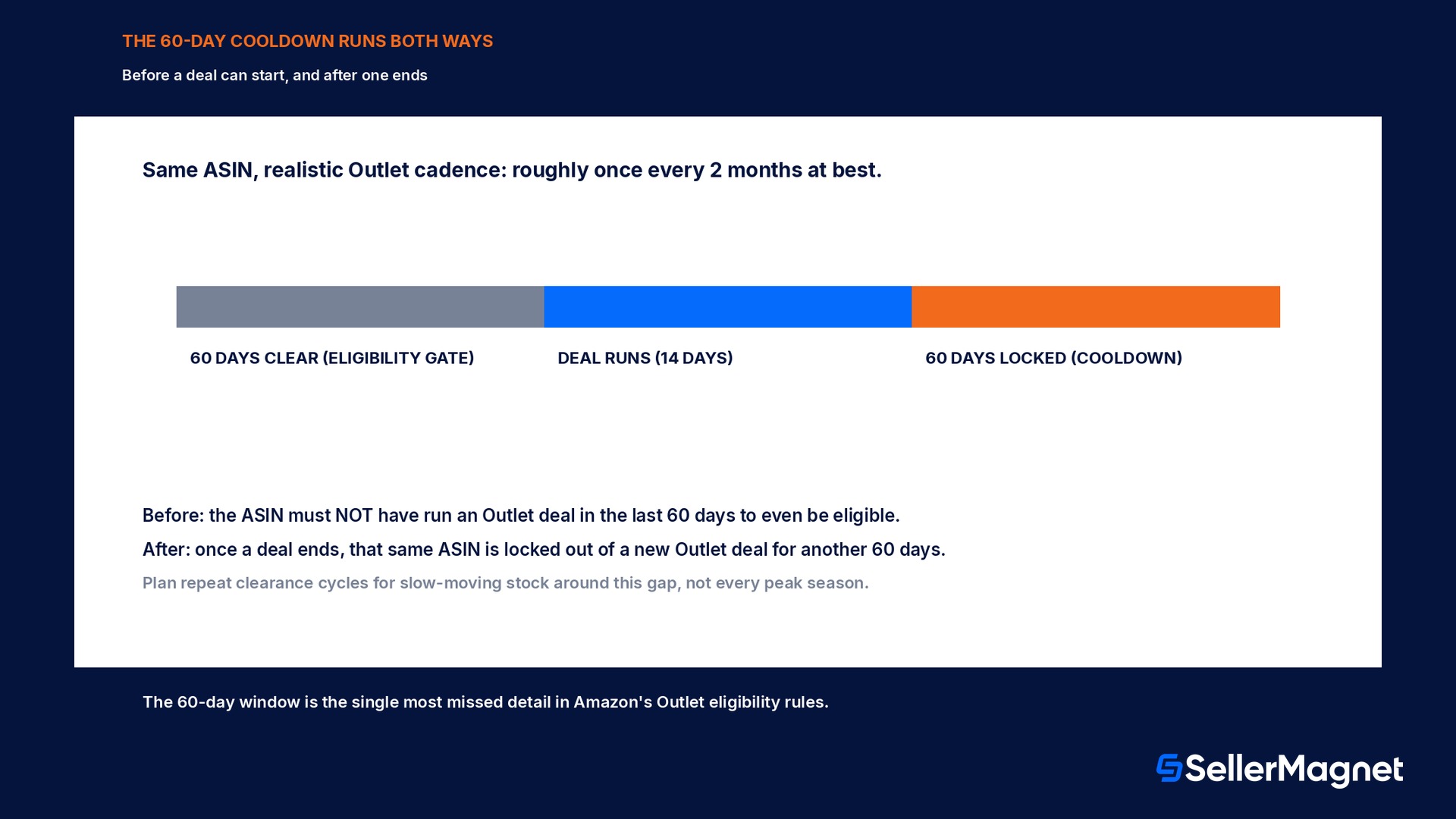
The same 60-day window shows up twice in the eligibility rules, and it is easy to mix the two up. Before a deal can even be submitted, the ASIN must NOT have run as an Outlet deal in the last 60 days, that is the eligibility gate. After a deal finishes running, that same ASIN is then locked out of a new Outlet deal for another 60 days before it can be submitted again. In practice this means a single ASIN can realistically carry at most a handful of Outlet deals across a year, roughly every 60 days at best, and a seller planning repeat clearance cycles around slow-moving stock should build that 60-day gap into the inventory and pricing calendar rather than expecting Outlet to be available for the same ASIN every peak season.
Why an eligible ASIN still never gets suggested
Meeting every item on the 9-point list is necessary but not sufficient. Amazon's own help page states it evaluates ASIN eligibility regularly, so a product suggested today may not be suggested tomorrow even with nothing changed on the seller's side, and not every eligible product is suggested at all. The recommendation itself also factors in demand and inventory age beyond the flat 90-day minimum, so aged, slow-selling inventory is generally more likely to surface as a recommendation than fresh, fast-turning stock that happens to also clear the eligibility bar. A seller who wants to improve the odds can update product settings (price, images, content) the help page says may help the recommendation; that is a nudge, not a guarantee.
A second, separate reason an otherwise-eligible ASIN never shows up: Outlet page capacity. Amazon's FAQ on the help page explicitly ties a stuck pending deal to "limited capacity on the Outlet deals page" rather than to anything wrong with the submission, which means the Outlet page itself has a finite number of deal slots running at any moment across the whole marketplace, not just per seller. A seller comparing two of their own ASINs, one that keeps getting recommended and one that never does despite both clearing the 9-point list, is most likely watching Amazon's own prioritization inside that limited slot count rather than a hidden tenth eligibility rule.
Outlet vs Lightning Deals and coupons: the practical differences
Outlet is easy to confuse with Amazon's other deal types because all of them end in a lower displayed price for a limited time, but the mechanics do not overlap. A Lightning Deal or a coupon is something a seller actively creates and submits for a specific ASIN and schedule of their own choosing, through a separate deals-creation flow, and those deal types carry their own listed deal fees on top of the standard referral and fulfillment fees. Outlet has no separate listing fee and no seller-chosen schedule: the ASIN has to already be on Amazon's recommended list, the price just has to clear the maximum-price rule, and the 2-week run length and processing cadence are fixed by Amazon, not configurable per deal. The one rule that connects them directly is exclusivity: an ASIN already enrolled in a Lightning Deal or another deal type cannot also be submitted for an Outlet deal at the same time, so a seller running a Lightning Deal calendar should expect the matching ASIN to drop out of Outlet eligibility for as long as that other deal is active.
Outlet availability outside the US store
Amazon publishes the Outlet help page for multiple stores, including the UK, Germany, France, Italy and Spain, with largely the same mechanic: FBA Inventory-page recommendations, a fixed 2-week run, twice-weekly processing. One eligibility detail does differ by store: the French-store version of the same help page lists a minimum product rating of 3 stars (or no reviews) rather than the 4-star bar used on the US page, so a seller running the same ASIN across multiple EU marketplaces should check the local help page for that store rather than assuming the US eligibility numbers carry over exactly.
Preparing for an Outlet recommendation before it appears
Because a seller cannot request an Outlet deal directly, the only real lever is making sure nothing on the eligibility list is quietly failing when a recommendation would otherwise appear. The account-level bar (Professional plan, 4-star-or-higher overall rating) is usually stable and known in advance, so the practical checks worth running regularly are at the ASIN level: on-hand age against the 90-day minimum, whether the ASIN is already running inside a Lightning Deal or coupon window, and whether that same ASIN already used up an Outlet deal in the last 60 days. All 3 of those change on their own schedule independent of anything a seller actively does, which is exactly why a periodic check of the FBA Inventory page's "Create outlet deal" filter, rather than a one-time check, is the only way to catch an ASIN the moment it clears all 3 and becomes recommendation-eligible.
The deal-price side is also worth preparing ahead of time rather than deciding it on the spot when a recommendation appears. Because the maximum deal price is tied to the ASIN's current lowest new-condition price, and that reference price itself moves with ordinary repricing activity, a seller who already knows their break-even price in the Fee Calculator (unit cost, referral fee percentage for that category, and the FBA fulfillment fee for that size tier) can decide in advance whether a deal at or near Amazon's likely maximum would still clear a positive margin, instead of working that out under time pressure once a 2-week clock on a live recommendation is already running. Tracking on-hand age against the 90-day minimum in an inventory planner makes it easier to see which SKUs are approaching Outlet eligibility before the recommendation itself appears.
Does an Outlet deal affect Buy Box or price history?
Amazon's own help page frames Outlet purely as a price change applied automatically for the deal window, with no mention of a separate Buy Box mechanic or a price-history exemption; the ASIN's displayed price simply becomes the deal price for 2 weeks, like any other price change, and that price feeds into the same price-history and Featured-Offer calculations Amazon uses everywhere else. A seller running automated repricing on the same ASIN should treat the Outlet deal price as the floor for that window rather than letting a repricer push the price below it, since an unrelated price drop during the deal would not undo the deal itself but could leave margin on the table if the repricer undercuts a price that was already set at the bottom of what the seller considered acceptable.
What if my account or product rating is the blocker?
The 2 rating thresholds, 4 stars on the account and 4 stars (or no reviews) on the product, are the most common reason an otherwise-aged, otherwise-eligible ASIN never shows up on the Outlet recommendation list. Neither rating moves quickly: an account rating is an average across recent feedback, and a product rating is an average across every review on that ASIN, so a single bad week will not usually push either one below 4 stars, but a sustained run of negative feedback or reviews will. The only durable fix is operational, not a workaround: resolve the service issues driving the feedback (shipping damage, slow responses, inaccurate listings) and, on the review side, build a steady, policy-compliant flow of new reviews so a handful of old 1- and 2-star reviews stop dragging the product average down. Neither Outlet nor any other Amazon program offers a way to bypass either rating requirement.
Common mistakes
Assuming a 4-star-or-better account rating alone is enough: the 90-day on-hand inventory clock and the product's own rating (not just the account's) are separate, both-must-pass conditions.
Submitting a deal price right at the estimated maximum without margin for the fact Amazon's real max-price formula is not published and can shift if the ASIN's current sale price changes before the deal starts.
Re-running the same ASIN through Outlet every month: the 60-day cooldown applies both before and after a deal, so the realistic cadence for one ASIN is closer to every 2 months, not every peak.
Treating a submission stuck in pending past its requested start date as a rejection, when the help page explicitly attributes that to limited Outlet page capacity at that moment, not a declined deal.
Running other price automation during a live Outlet deal: if the regular price rises above the approved deal price, Amazon can cancel the deal without advance notice.
Pre-submission checklist
Professional selling plan active on the account
Account rating 4 stars or higher
ASIN has 90+ days on hand in Amazon fulfillment centers, 1+ unit in stock, new condition
Product rating 4 stars or higher, or no reviews yet
Not currently in another deal (Lightning Deal etc.) and no Outlet deal in the last 60 days
Deal price set at or below Amazon's calculated maximum, with margin verified via the Fee Calculator
Frequently asked questions
Does Amazon charge a fee to run an Outlet deal?
No separate Outlet fee is listed: the ASIN's standard referral and FBA fulfillment fees still apply at the deal price, same as at the regular price, unlike paid promotions such as Lightning Deals that carry their own separate deal fee.
Can an FBM (merchant-fulfilled) listing run an Outlet deal?
The eligibility list is scoped around inventory sitting in Amazon's fulfillment centers for at least 90 days, which describes FBA inventory specifically; the help page's examples and the FBA Inventory page entry point both point to an FBA-only mechanic, so a merchant-fulfilled-only ASIN would not have the fulfillment-center inventory history Outlet checks for.
What happens if I do not like the deal once it is scheduled?
The help page's own cancellation example only describes Amazon cancelling a deal if the item's regular sale price rises above the agreed deal price; it does not describe a seller-initiated cancellation path once a submission is approved and scheduled, so the price submitted at creation should be treated as final before clicking submit.
Where can I check the status of a deal I submitted?
The Outlet Deals report shows the status of every submission: Submitted, Running or Ended. A deal only appears on the public Outlet page once its status reads Running; Submitted or Ended deals will not be visible there even if the originally requested dates have already passed.
Can I run an Outlet deal on the same ASIN in 2 different marketplaces at once?
Eligibility and the recommendation list are evaluated per store, and the help page is published separately per marketplace with at least one store-specific difference already confirmed (the 3-star vs 4-star product-rating bar). An ASIN sold in multiple EU stores should be checked against each store's own Outlet help page rather than assumed to share one global eligibility status.
Does an Outlet deal count toward the 2026 extended holiday return window?
The Amazon Outlet help page does not mention return-window rules at all; a unit sold during an Outlet deal is still a normal Amazon.com order and follows whichever return policy, including any seasonal extended-return period, already applies to that order on the date it was purchased, with no Outlet-specific exception described anywhere on the page.
Stop Juggling Tools. SellerMagnet Combines Everything You Need.