Amazon Fulfillment Programs Portal 2026: FBA Programs in One Hub
R
RenéFreelance Amazon Editor
|
16 min read
Most sellers discover an Amazon fulfillment program the hard way: a forum post, a webinar slide, or a help page they only found while searching for something else. In 2026 Amazon finally built a single screen for this inside Seller Central, called the fulfillment programs portal, that lists what you are already enrolled in next to what you could enroll in today. This guide covers what the portal actually shows, the one program on it most sellers have never used, and a full walkthrough of the program behind it with the richest content, Amazon Global Logistics, including the exact onboarding steps and the one fee a wrong setting silently adds to every unit you ship.
The Amazon fulfillment programs portal is a 2026 Seller Central screen that lists FBA programs you can discover and enroll in, split into My programs for what you already use and Discover programs for what you don't. It currently shows FBA Subscribe & Save, FBA Onsite, Seller Fulfilled Prime, and Global Shipping Services. Global Shipping Services is powered by Amazon Global Logistics, a freight-booking tool that moves inventory from China to Amazon facilities in the US, UK and four EU countries by ocean or air, with no subscription fee, only transportation charges per shipment.
What the fulfillment programs portal actually is
Amazon's own description is narrow and specific: the fulfillment programs portal lets you discover, enroll in, and manage available FBA programs, and it introduces services that can help you be more successful on Amazon while simplifying and automating functions for the programs you already use. It is a discovery and management layer, not a new program in itself; every program it lists still has its own enrollment rules, fees and eligibility behind it.
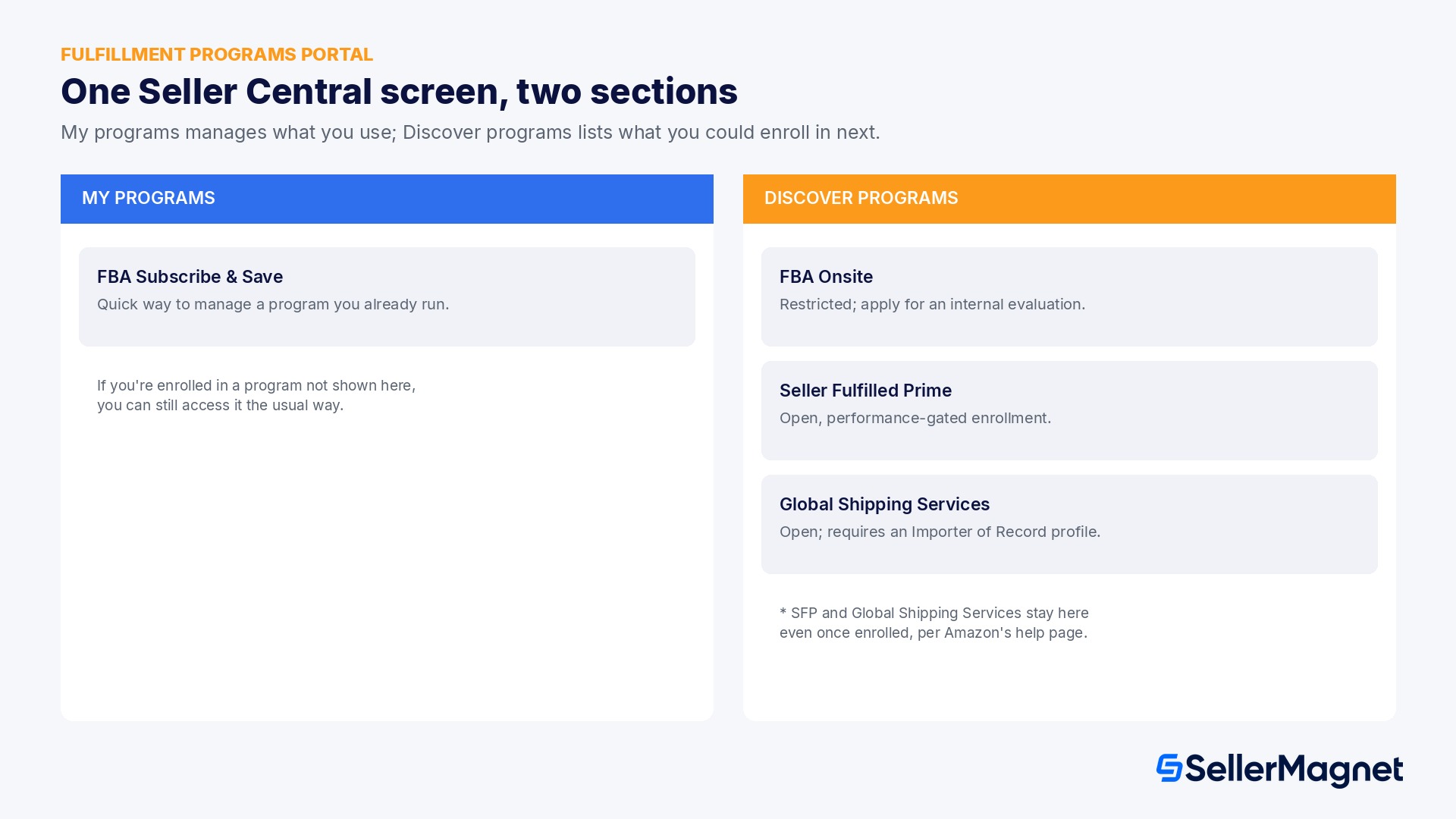
The portal is split into two sections. My programs is a quick way to manage the programs you are already enrolled in. Discover programs summarizes programs you are not yet using and links out to learn more and enroll. Amazon's help page lists four programs on the portal today: FBA Subscribe & Save, FBA Onsite, Seller Fulfilled Prime, and Global Shipping Services, with a direct note that if you are enrolled in programs that do not appear on the page, you can still access them the usual way, through their own dedicated Seller Central screens.
Two programs sit in Discover even if you already use them
Amazon's help page carries one specific caveat: if you are enrolled in Seller Fulfilled Prime and Global Shipping Services, they will appear in Discover programs for now, and will be available under My programs at a later time. If you already run either program and the portal still shows it as something to discover, that is expected behavior, not a sign your enrollment is missing.
The four programs at a glance
Two of the four are already deep topics on their own and this guide does not re-explain them: FBA Subscribe & Save lets eligible FBA products enroll in recurring, discounted deliveries (see our Amazon Subscribe & Save guide), and Seller Fulfilled Prime lets a seller display the Prime badge while shipping orders themselves under Amazon's own delivery standards (our Seller Fulfilled Prime guide covers eligibility and the delivery-speed requirement in full). FBA Onsite is the smallest of the four: Amazon's own getting-started page for it describes a service where Amazon handles pickup, delivery, customer service and returns for products stored and picked at the seller's own facility, but the same page states plainly that it is a restricted program limited to selected sellers, with an application for internal evaluation rather than open self-enrollment. That leaves Global Shipping Services as the one program on the portal with real, open, documented mechanics and zero coverage anywhere else on this blog, so the rest of this guide is a full walkthrough of it.
Program
What it does
Enrollment
FBA Subscribe & Save
Recurring discounted delivery for eligible FBA products
Open to eligible FBA listings
FBA Onsite
Amazon runs pickup, delivery, support and returns from the seller's own facility
Restricted; invite-only internal evaluation
Seller Fulfilled Prime
Prime badge on self-fulfilled orders meeting Amazon's delivery standards
Open, performance-gated
Global Shipping Services (Amazon Global Logistics)
Books ocean/air freight from China to an Amazon facility
Open, requires Importer of Record setup
Global Shipping Services: what Amazon Global Logistics actually books
Global Shipping Services is the portal's label for Amazon Global Logistics, a freight-booking tool inside Seller Central's Send to Amazon workflow. Amazon's own program page describes it as covering pickup at origin, export declaration, cross-border ocean and air freight transportation, destination customs clearance, and delivery to Amazon fulfillment centers or Amazon Warehousing and Distribution facilities (see our Amazon Warehousing and Distribution Europe guide for what happens to inventory once it lands in an AWD facility). Today it only runs one corridor: from China to the US, UK, Germany, France, Italy and Spain. A seller sourcing from any other country, or shipping into any other destination, still needs their own freight forwarder; Amazon Global Logistics does not cover those lanes yet.
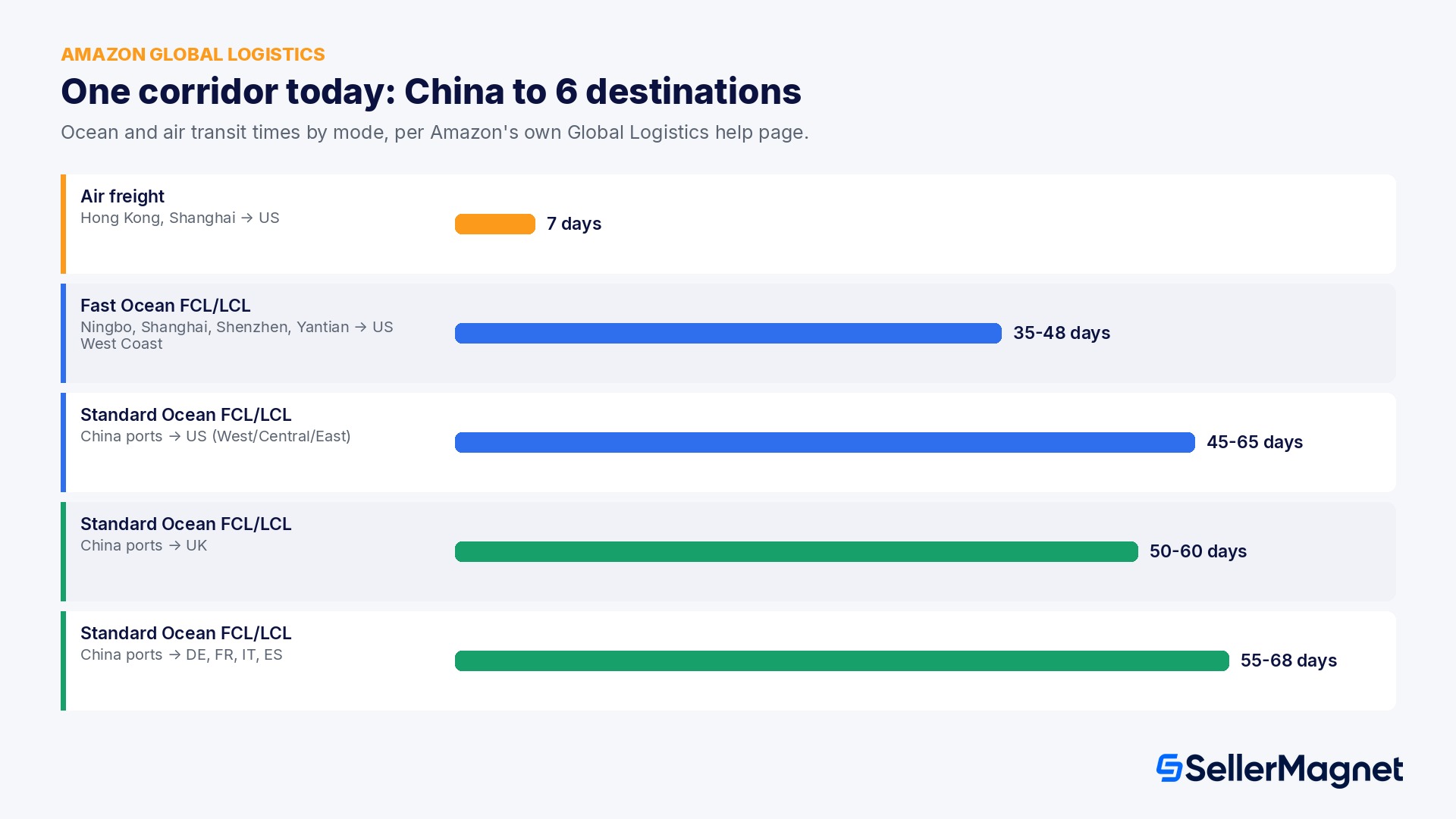
The service menu has four cargo modes: Standard Ocean, in full container load (FCL) or less than container load (LCL); Fast Ocean, a quicker FCL/LCL option from a smaller set of ports; and Air freight, available only from Hong Kong or Shanghai to the US, which Amazon's own transit table puts at seven days door to an Amazon fulfillment center, far faster than any ocean option. Standard Ocean FCL/LCL into the US runs 45 to 65 days depending on the destination region and port; the same service into the UK and the four EU countries runs 50 to 68 days. Fast Ocean FCL/LCL to the US West Coast cuts that to 35 to 48 days from a narrower set of origin ports (Ningbo, Shanghai, Shenzhen, Yantian).
Amazon does not publish a freight rate card
Amazon Global Logistics quotes a price only when you request an estimate inside Seller Central against a specific shipment; there is no published per-container or per-kilogram rate table on any official Amazon page, so treat any outside source quoting a fixed AGL rate as an estimate, not an Amazon-confirmed number. The one cost commitment Amazon does publish directly is structural, not a rate: there is no signup cost and no subscription fee to use Amazon Global Logistics, and you only pay transportation fees on the shipments you actually book.
Onboarding: Importer of Record, power of attorney, and the paperwork that actually blocks sellers
Before you can book a single shipment, Amazon Global Logistics requires you to set up an Importer of Record (IOR) profile, because someone has to be the legal importer and declarant for every unit crossing the border. You, or a third-party shipper acting on your behalf, take on that role, while Amazon Global Logistics coordinates the inspections, loading and transfer from your warehouse to the destination facility, and handles export and import customs clearance through Amazon-assigned customs brokers. Amazon's own onboarding guide lays out the setup in a fixed order.
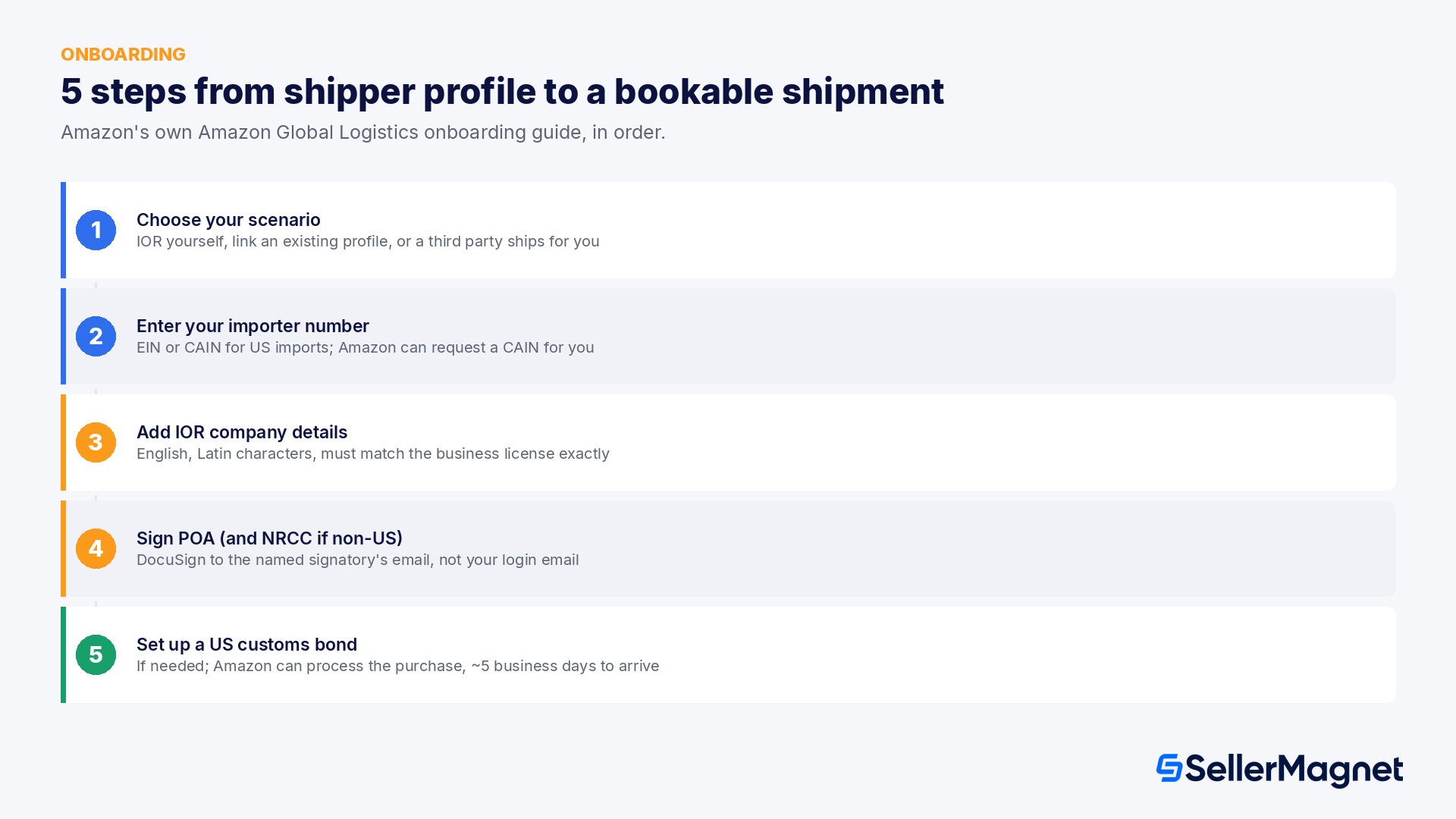
Choose your enrollment scenario. Pick the option for a seller who will be the Importer of Record with no existing profile, the option to link an existing Shipper Central account, or the option for a seller who is not the importer of record and only needs to create FBA shipments for a shipper to book.
Enter or request your importer number. For a US import, you need an Employer Identification Number (EIN) or a Customs Assigned Importer Number (CAIN); if you have neither, Amazon can request a CAIN for you during setup.
Add the IOR's company details in English, in Latin characters, matching the business license exactly down to capitalization and spacing; a mismatch gets the account rejected and delays creation.
Sign the power of attorney (POA). A company officer signs it by email through DocuSign. If the IOR entity is based outside the US, a second officer must separately sign a Non-Resident Corporate Certification (NRCC); the POA signer and the NRCC signer cannot be the same person unless the company genuinely has only one officer.
Set up a US continuous customs bond if importing into the US and you don't already have one, which guarantees payment of import duties, taxes and fees to US Customs and Border Protection; Amazon can process this purchase for you, and the bond itself typically arrives about five business days after the application.
Two onboarding details catch sellers off guard every time. First, the POA and NRCC e-signature requests go to the specific signatory emails you enter, not to the Seller Central login email, so the account administrator setting this up needs to warn the actual signing officers to expect a DocuSign email, and to check spam if it does not arrive. Second, once a POA is submitted, its details cannot be amended; a wrong signatory email means creating an entirely new IOR with a new POA, not editing the old one.
How do I set up Amazon Global Logistics in Seller Central?
Set up Amazon Global Logistics onboarding
Pick your enrollment scenario - Choose the option for an Importer of Record with no existing profile, the option to link an existing Shipper Central account, or the option for a third party shipper booking on your behalf.
Enter or request your importer number - For US imports, provide your EIN or CAIN, or ask Amazon to request a CAIN for you during setup if you have neither.
Add the IOR company details in English - Match the business license exactly, in Latin characters, down to capitalization and spacing, or the account is rejected and creation is delayed.
Sign the POA, and the NRCC if non-US-resident - A company officer signs the power of attorney by DocuSign; a second officer signs the Non-Resident Corporate Certification for non-US-resident entities.
Set up a US customs bond if needed - Amazon can process a continuous customs bond purchase for you if importing into the US without one already; it typically arrives about five business days after the application.
The placement option inside the booking changes your fee, not just your route
Amazon Global Logistics is not just a freight booking: the same Send to Amazon flow also asks how your inbound shipment gets placed once it reaches the Amazon network, and that choice carries its own separate fee, on top of the freight cost itself. Amazon's own Amazon Global Logistics help page lists the placement options directly alongside the freight modes.
Placement option
What happens
FBA inbound placement service fee
Minimal shipment splits
Inbound inventory to a single fulfillment center, without splitting the shipment
Fee applies (size tier and weight dependent)
Amazon Managed Placement (AMP)
Inbound to one location; Amazon divides the inventory across multiple fulfillment centers
No fee
Ship to Amazon Warehousing and Distribution (AWD)
Inventory ships to an AWD facility, then replenishes into fulfillment centers over time
No separate fee; covered inside AWD pricing
Extra-large (heavy bulky) shipment
Inbound to a single fulfillment center for extra-large bulky cargo
No fee
Minimal shipment splits is the only one of the four that carries its own placement fee, and this blog's own FBA fee reduction guide, sourced from Amazon's FBA inbound placement service fee page, already has the real numbers: on a minimal split, a Large standard-size unit in the 15 to 20 lb band runs $0.55 to $1.90 per unit, and a Large Bulky unit in the 42-plus to 50 lb band runs $5.50 to $6.50 per unit; both drop to $0 on an Amazon-optimized or AMP-style split. SellerMagnet's own Fee Audit tool can flag which of your shipments actually carried a placement fee, so you are not relying on memory to know which setting was used last time.
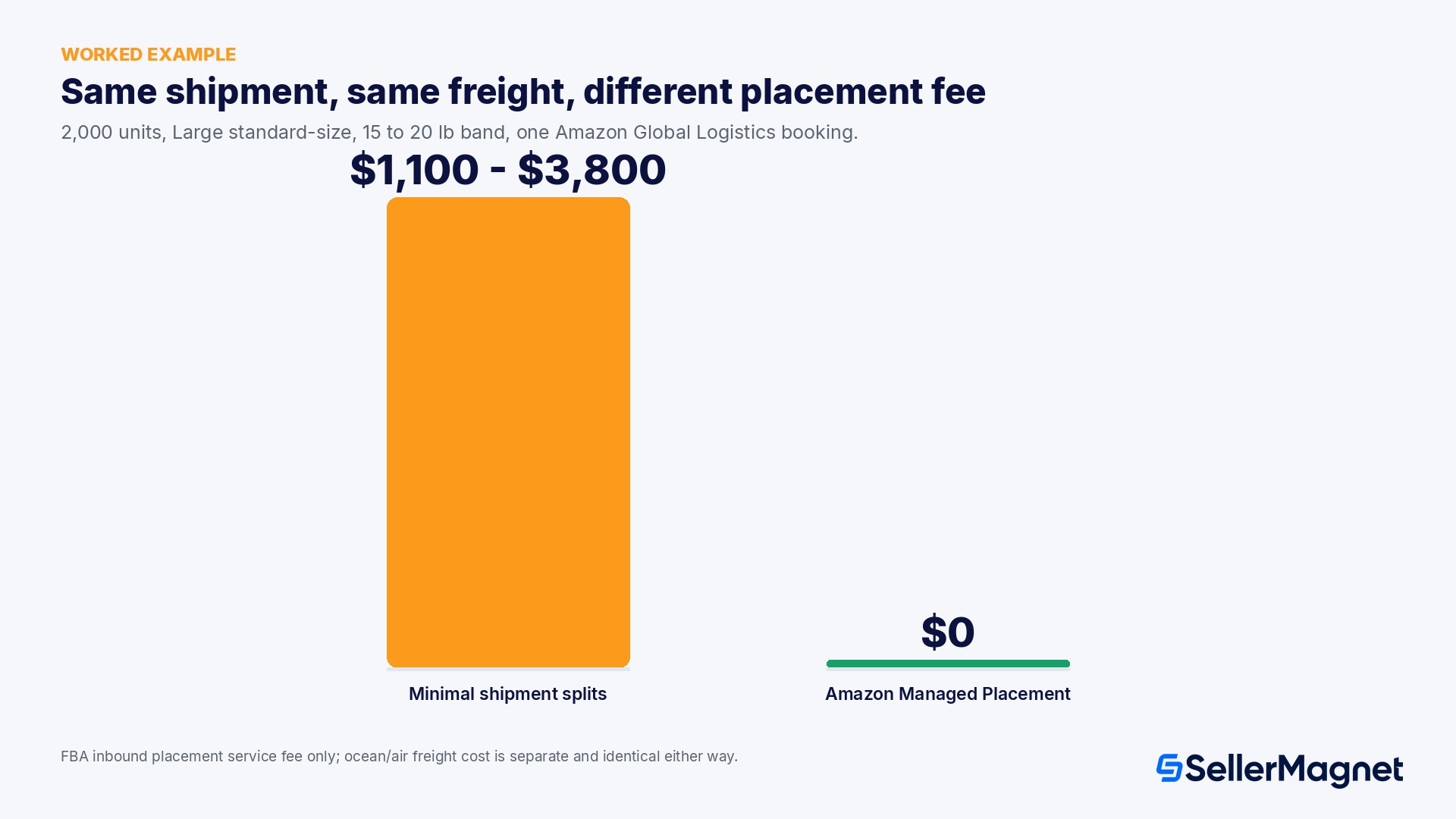
Worked example: the placement choice inside one AGL booking
Take a seller using Amazon Global Logistics to book a Standard Ocean FCL shipment of 2,000 units from Ningbo to a US West Coast fulfillment center, each unit a Large standard-size product in the 15 to 20 lb band. The ocean freight cost is identical no matter which placement option is chosen next, because that cost is set by the carrier, the container, and the lane. The placement option is a second, independent decision in the same booking flow.
Minimal shipment splits: every one of the 2,000 units is billed the $0.55 to $1.90 per-unit inbound placement service fee for this band, so the placement fee alone adds $1,100 to $3,800 to this one shipment, before the freight invoice.
Amazon Managed Placement: the same 2,000 units move through the same AGL booking for $0 in placement fees, because Amazon divides the inventory across multiple fulfillment centers instead of holding it at one.
The trade-off is not free: Minimal shipment splits exists because some sellers need inventory concentrated at one location, for example to match a specific regional demand pattern or a time-sensitive restock; AMP's $0 fee comes with giving up control over exactly where each unit lands.
This fee is decided inside the same screen, every shipment
Because the placement option is chosen per shipment, not once for the account, a seller who defaults to the same setting every time either pays an avoidable placement fee on shipments that did not need concentrated placement, or gives up placement control on shipments that genuinely needed it. SellerMagnet's Inventory Management view can show which fulfillment centers currently hold which ASINs, so checking which option a shipment actually needs, rather than reusing the last booking's setting, is the single cheapest decision in this entire workflow.
A separate Importer of Record for every EU destination country
A single IOR profile does not automatically cover every Amazon Global Logistics destination. Amazon's own EU onboarding guide states that a dedicated Importer of Record is required for shipments to each of the following destination countries: the United Kingdom, Germany, France, Italy, and Spain. A seller planning to inbound into three of those five markets through Amazon Global Logistics sets up three separate IOR profiles, each with its own POA and, where the entity is non-resident, its own NRCC, not one profile reused across countries. Inside the EU, customs procedures also run on the Economic Operators Registration and Identification (EORI) number: once an IOR is set up for an EU destination, that EORI number is the identifier used in all customs exchanges with EU Customs administrations for that import, separate from the EIN or CAIN used for US imports.
This matters for timeline planning as much as for compliance: every one of those IOR profiles goes through the same POA/NRCC DocuSign cycle, and a seller who waits until a container is already booked to start a second country's IOR setup risks the freight arriving before the customs paperwork is approved. Starting every destination country's IOR profile at the same time, even for a market a seller only plans to use occasionally, removes that bottleneck later.
When is Amazon Global Logistics worth using instead of your own forwarder?
Amazon Global Logistics is not automatically the cheaper or faster option; it is Amazon's own built-in alternative to arranging freight independently, and the two make sense in different situations. Booking through Seller Central removes the step of comparing and negotiating with outside forwarders, consolidates the freight invoice and the FBA fees on one Amazon bill, and builds the customs clearance and the delivery to the exact fulfillment center or AWD facility into a single booking flow with one tracked shipment status. An independent freight forwarder, by contrast, can quote across a wider pool of carriers and routes, including origins and destinations Amazon Global Logistics does not yet serve, and a seller already running a high volume of containers a year typically has more price leverage negotiating directly than taking Amazon's one quoted rate per shipment.
A newer or lower-volume FBA seller sourcing from China gains the most from Amazon Global Logistics: no forwarder relationship to build, one Seller Central booking flow, and Amazon's own customs brokers handling clearance on both ends.
A seller already sourcing from outside China, or shipping into a destination outside the US/UK/Germany/France/Italy/Spain corridor, cannot use Amazon Global Logistics at all yet and needs an independent forwarder regardless of volume.
A high-volume seller with an existing forwarder relationship and negotiated rates should compare an Amazon Global Logistics quote against their current rate on the same lane before switching, since Amazon does not publish a rate card and the per-shipment quote is the only way to compare.
Can Amazon Global Logistics ship dangerous goods?
Amazon Global Logistics prohibits dangerous goods by default, with one narrow exception that official EU-store guidance states explicitly: specific Section II lithium batteries. GSS Air Freight accepts only UN3481 batteries packed with or contained in equipment (packing instructions PI 966 and PI 967) and UN3091 lithium metal batteries packed with or contained in equipment (PI 969 and PI 970). GSS Ocean Freight accepts the exact same four packing-instruction categories. Standalone lithium-ion and lithium-metal cells, classified UN3480 and UN3090, are prohibited outright, in or out of equipment, on both GSS Air and GSS Ocean. Every other dangerous good is prohibited from the GSS Freight program entirely; a seller with any hazmat-classified product should confirm its exact UN number against this list before assuming Amazon Global Logistics can move it.
What is the Amazon fulfillment programs portal?
A 2026 Seller Central screen that lets sellers discover and enroll in FBA programs from one place, split into My programs (what you use) and Discover programs (what you could enroll in), currently listing FBA Subscribe & Save, FBA Onsite, Seller Fulfilled Prime, and Global Shipping Services.
Why do Seller Fulfilled Prime and Global Shipping Services show up under Discover programs even though I'm enrolled?
Amazon's own help page states this is expected: both programs sit in Discover programs for now and will move to My programs at a later time, regardless of your actual enrollment status.
What is Global Shipping Services?
The portal's name for Amazon Global Logistics, a freight-booking service that moves inventory from China to Amazon fulfillment centers or AWD facilities in the US, UK, Germany, France, Italy or Spain by ocean or air, handling pickup, export, customs and delivery end to end.
Does Amazon Global Logistics cost anything to sign up for?
No. Amazon's own FAQ states there is no signup cost and no subscription fee; you only pay transportation fees on the shipments you actually book.
What do I need before starting Amazon Global Logistics onboarding?
An Importer of Record profile for your company, a company officer able to sign a power of attorney by DocuSign, and, for non-US-resident companies, a second officer to sign the Non-Resident Corporate Certification; US imports also need an EIN or CAIN and typically a continuous customs bond.
Is FBA Onsite open to every seller?
No. Amazon's own getting-started page describes it as a restricted program limited to selected sellers, with an application for internal evaluation rather than open self-enrollment.
Which placement option should I pick inside an Amazon Global Logistics booking?
Amazon Managed Placement carries no FBA inbound placement service fee but gives Amazon control over which fulfillment centers receive the inventory; Minimal shipment splits concentrates inventory at one location for a per-unit fee that varies by size tier and weight band. Pick concentrated placement only when the shipment genuinely needs it.
Can Amazon Global Logistics ship dangerous goods?
Only four specific lithium battery packing-instruction categories (UN3481 and UN3091, packed with or contained in equipment) on GSS Air and GSS Ocean; standalone lithium cells (UN3480, UN3090) and every other dangerous good are prohibited from the program.
Does Amazon publish its Amazon Global Logistics freight rates?
No. Amazon only provides a price when you request an estimate for a specific shipment inside Seller Central; there is no public per-container or per-kilogram rate card, so outside estimates should be treated as unverified.
Do I need a separate Importer of Record for each EU country I ship into?
Yes. Amazon's own EU onboarding guide states a dedicated Importer of Record is required for shipments to each of the United Kingdom, Germany, France, Italy, and Spain, each with its own POA and, for non-resident entities, its own NRCC.
What identification number do EU customs procedures use for Amazon Global Logistics imports?
The Economic Operators Registration and Identification (EORI) number, used as the identifier in all customs procedures when exchanging information with EU Customs administrations, separate from the EIN or CAIN used for US imports.
Is Amazon Global Logistics always cheaper than an independent freight forwarder?
Not necessarily. It removes the step of sourcing a forwarder and consolidates billing and tracking, which suits newer or lower-volume sellers, but Amazon does not publish a rate card, and a high-volume seller with negotiated forwarder rates should compare a specific quote before switching.
Stop Juggling Tools. SellerMagnet Combines Everything You Need.