FREEASIN Converter, Fee Calculator and more free tools, no signup required
Amazon Custom 2026: Sell Personalized Products
Amazon Basics SellerMagnet Tools

Amazon Custom 2026: Sell Personalized Products

|
15 min read
A customer types a name into a text box, uploads a logo, or picks a color from a dropdown, and a few days later a one-of-a-kind version of your product ships out, made to their exact spec. That is Amazon Custom: a free feature set, open to any Professional seller, that turns a normal listing into one customers can personalize, configure, or assemble before they buy. It is not Amazon Handmade, it is not a gift-wrap checkbox, and it is not the same mechanic as a Virtual Bundle. This guide covers exactly what Amazon's own program page and customization program terms say about who can register, what you can and cannot offer, the hard limits on how many customization options a listing can carry, and the specific behaviors Amazon calls out as misuse that can get the feature pulled with no path back.
Amazon Custom is a free feature set for Professional sellers that lets customers personalize, configure, or assemble a product before buying it, through text, images, logos, or preset option lists built into the listing. Registration requires Amazon's approval, every customized order must be fulfilled by the seller rather than FBA, and each product can use up to 5 customization surfaces with 15 customizations per surface and 100 options total. Custom products cannot be returned for a change of mind, only refunded or replaced within 30 days if they arrive damaged, defective, or materially different from what the customer ordered.

What is Amazon Custom?

Amazon's own program page describes Amazon Custom in one line: it lets you offer customers exactly what they want, letting them customize, personalize, or configure your products to their specifications on demand. Once a seller is registered and approved, Custom features are available free on eligible listings, and the seller decides which customizations to offer on which products. Products built this way appear in their normal Amazon department and also surface in a dedicated Amazon Custom store, where shoppers go specifically to browse customizable items, so a well-built Custom listing gets a second discovery channel on top of normal search.
The program exists because a meaningful slice of demand on Amazon is not for a generic item at all, it is for a specific, one-off version of that item: a name engraved into a keychain, a company logo stitched onto a polo shirt, a phone case assembled from a customer-picked color and a customer-uploaded photo. Amazon's own framing calls this turning your passion into profit, helping customers commemorate moments or meet specific needs, while sellers set their own prices and keep standard Amazon fees as the only cost of running it.
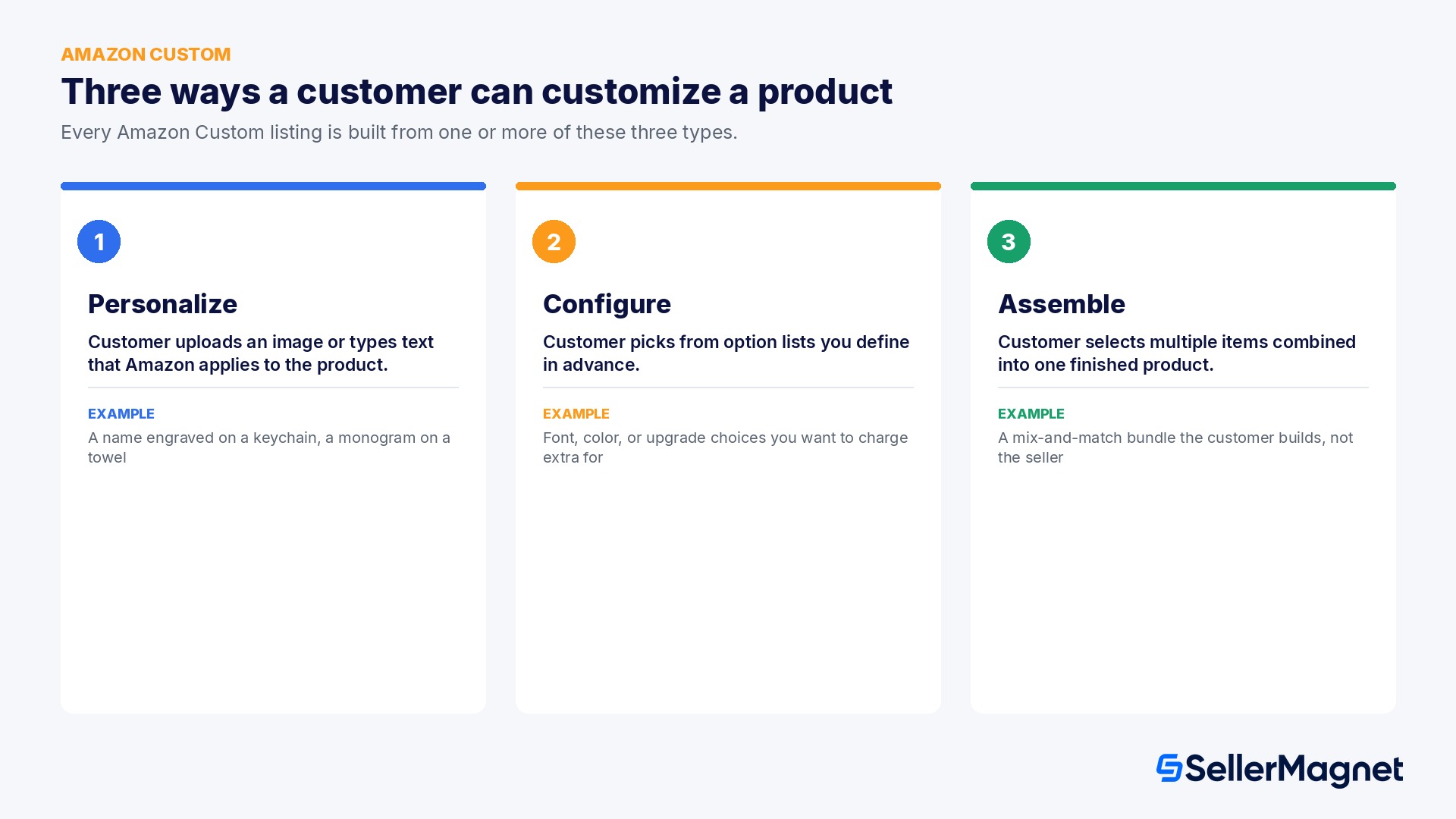
The three Amazon Custom customization types: personalize, configure, assemble

How to register for Amazon Custom

  1. Confirm or upgrade to a Professional selling plan - Amazon Custom registration is only available to Professional sellers; upgrade under Manage Your Services in Seller Central first if you are on the free Individual plan.
  2. Register and wait for approval - Request access to the Custom feature set in Seller Central. Amazon's program page states approvals are typically emailed within an hour.
  3. Build the base ASIN and configure customizations - Use Add Products to create the listing, then add customization fields within the 5 surfaces / 15 per surface / 100 options limits, and use the bulk tools once a base ASIN exists.
  4. Fulfill every order yourself - Customized orders route to Manage Orders or Order Reports; produce or assemble to the customer's spec, then ship using Fulfilled by Merchant, since FBA cannot fulfill these orders.

The three customization types

Every Amazon Custom listing is built from one or more of exactly three customization types, and the difference between them matters for both how you build the listing and how customers experience it.
Type What the customer does Typical use
Personalize Uploads an image or types text that Amazon's listing then applies to the product A name or short message engraved, printed, or embroidered onto an otherwise fixed product
Configure Picks from option lists the seller defines in advance, for example font, color, or size Upgrade paths and accessory choices the seller wants to charge extra for
Assemble Selects multiple items that get combined into one finished product or pack Mix-and-match bundles where the customer, not the seller, decides the final combination
A single listing can combine more than one type. A customizable phone case, for example, could let a customer configure the case color from a preset list and then personalize it with an uploaded photo in the same purchase flow, so the two types are not mutually exclusive on one product.

Who can register, and what does it cost?

Amazon Custom requires a Professional selling plan. A seller on the free Individual plan cannot register for Custom until they upgrade, which Amazon's own FAQ confirms happens under Manage Your Services in Seller Central; for where that menu actually sits in the redesigned dashboard, see our New Seller Central guide. The one documented exception: sellers approved into Amazon Handmade have their monthly Professional fee waived, so a Handmade seller gets Custom access without that specific monthly cost.
  • Custom features themselves are free with a Professional plan. Standard Amazon monthly subscription and selling fees still apply exactly as they do on any other listing, there is no separate Custom-specific fee layer on top.
  • Registration is a request for approval, not an automatic unlock. Amazon's program page states approvals are typically emailed within an hour of registering, but every seller still goes through that approval gate before gaining access to the customization listing tools.
  • Custom listings can be enabled in almost any category you are already authorized to sell in. Tablets and video game consoles cannot use Custom features at all, including refurbished units of either. Personal computers, laptops, and computer towers are off-limits under the general Custom feature set too, but can be sold with customizations under a separate, stricter Customization computer policy Amazon maintains specifically for that category.

Hard limits on every customizable listing

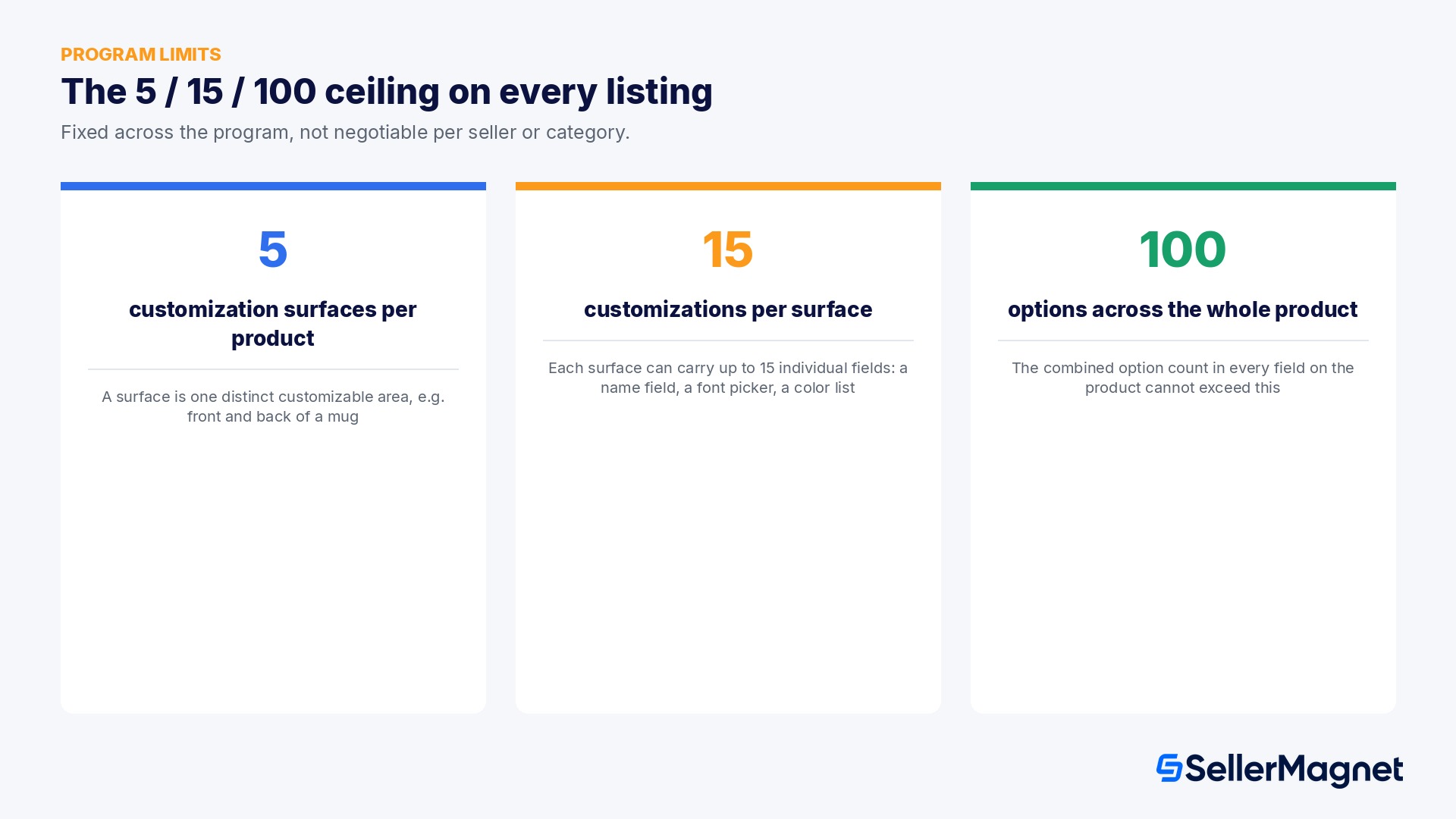
Amazon caps how elaborate a single customizable listing can get, and the numbers are fixed across the program rather than negotiable per seller or per category.
Limit What it means
5 customization surfaces A surface is one distinct area of the product a customer can customize, for example the front and back of a mug count as two separate surfaces
15 customizations per surface Each surface can carry up to 15 individual customization fields, such as a name field, a font picker, and a color list on the same surface
100 options total Across the whole product, the combined option count in every customization field cannot exceed 100
Amazon Custom program limits: surfaces, customizations per surface, and total options
In practice this means a seller designing a heavily customizable product, a multi-panel photo collage mug with several font and color choices on each panel, needs to plan the option structure before building the listing, because hitting the 100-option ceiling with a sprawling color or font list leaves no room for anything else on that product. Amazon's bulk tools help once the structure is set: after you create a base ASIN, Amazon's help documentation covers enabling bulk customizations so you are not editing every option one listing at a time.

Why can't FBA fulfill a customized order?

This is the rule that catches the most sellers by surprise, because it runs against the default assumption that FBA is always the preferred fulfillment path. Amazon's own FAQ is direct about it: due to the customization aspect of these products, all orders must be fulfilled by the seller using Fulfilled by Merchant tools and services. FBA cannot be used for Custom orders at all, full stop, regardless of category or product type.
  • The logic is operational rather than arbitrary: a customer-specific order (a name, a photo, a chosen option set) has to be made or assembled after the order is placed, and Amazon's fulfillment centers are built around pre-made, pre-stocked inventory, not pre-order assembly to spec.
  • This makes Amazon Custom one of the few mainstream programs where a seller cannot simply toggle fulfillment method; it structurally requires an FBM operation capable of production, personalization, or assembly on a per-order basis.
  • Shipping and production time have to be set honestly in the listing. Amazon's guidance specifically calls out stating clear production and delivery times as a way to strengthen your performance metrics, because a customer expecting standard delivery speed on a made-to-order item is the fastest way to generate a late-shipment or order-defect complaint that was entirely avoidable with a clearer expectation up front.

The customization data rule most sellers never read

Beyond the product mechanics, Amazon's Customization program terms spell out exactly what a seller can and cannot do with the images, text, logos, and other content a customer submits as part of an order, Amazon's terms label this customization data.
  • You may use a customer's (or any third party's) customization data solely to fulfill that specific order. You may not retain it after the order is fulfilled.
  • You are responsible for verifying that submitted customization data does not infringe third-party intellectual property, trademark, or copyright, and does not violate Amazon's restricted products or offensive-and-controversial-materials policies, even though the content itself came from the customer, not from you.
  • Separately from your retention and verification duties, Amazon's terms grant Amazon the right to let customers share images of the finished, customized product through Amazon's own websites and apps.
A customer's upload is still your compliance problem
If a buyer uploads a logo, image, or text that turns out to infringe someone else's trademark or copyright, Amazon's terms place the verification responsibility on the seller, not the customer who submitted it. Build a lightweight review step into your fulfillment process rather than treating every upload as automatically safe to print.

Five things Amazon explicitly calls misuse

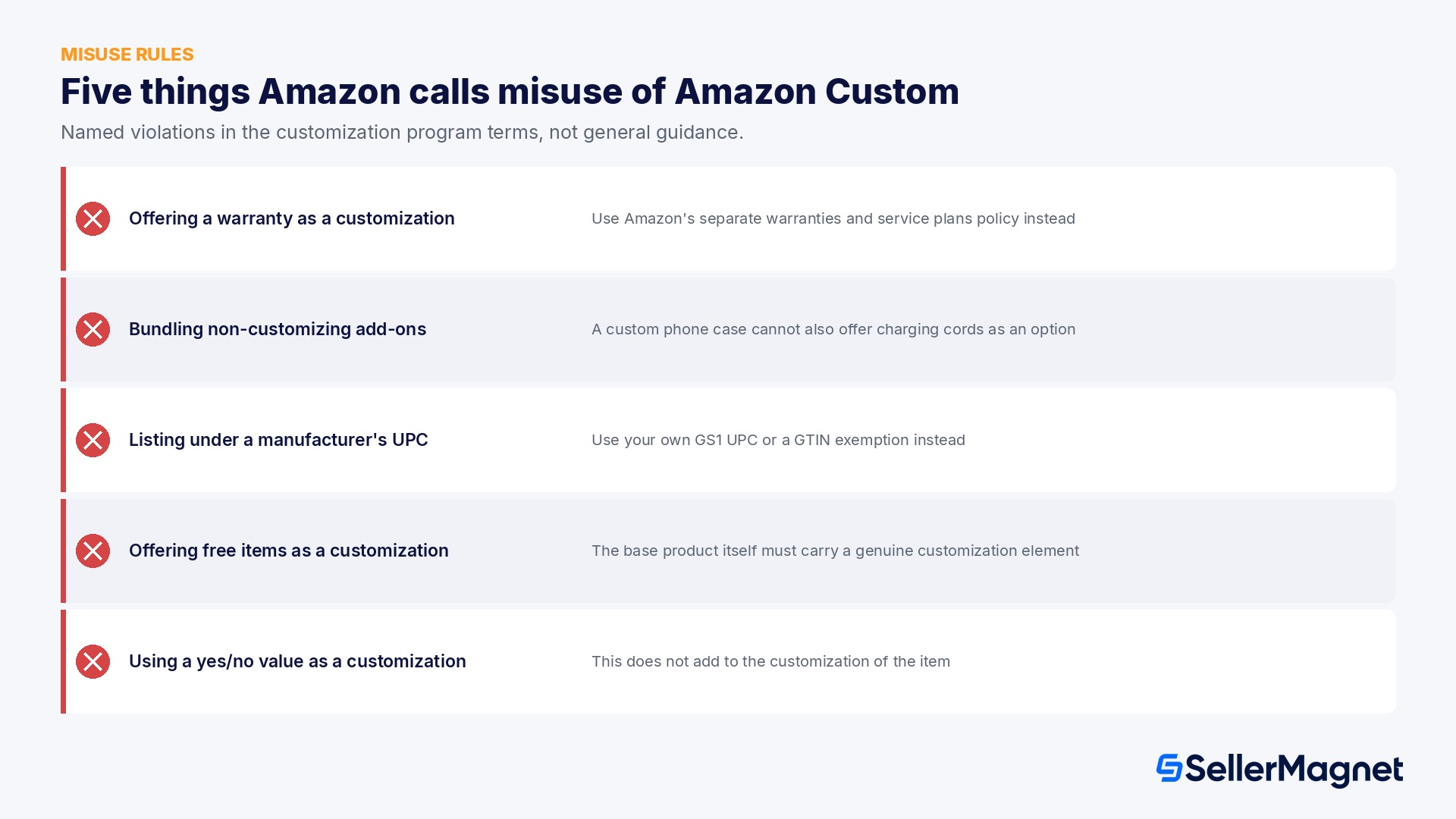
Amazon's customization program terms list specific behaviors as prohibited misuse of the custom feature, not general guidance but named violations, and the terms state plainly that violations and misuse of the custom feature might result in loss of the feature set with the inability to reinstate. These are worth reading literally, because each one maps to a listing pattern sellers try fairly often.
Prohibited behavior Amazon's example
Offering a warranty as a customization option Your own, a third party's, or a manufacturer's warranty cannot be sold as a Custom choice; use Amazon's separate warranties and service plans policy instead
Bundling non-customizing add-ons A custom phone case cannot also offer charging cords or other off-the-shelf accessories as a customization option, since they do not further customize the item
Listing under a manufacturer's UPC Customization fundamentally changes the manufacturer's item, so you need your own GS1-certified UPC or a GTIN exemption, never the original maker's barcode
Offering free items as a customization A car stereo listing cannot offer a free air freshener as a customization choice; the base product itself must carry an element of customization
Using a yes/no value as a customization A text or configuration field whose only choices are yes and no does not add to the customization of the item and is not allowed
Five behaviors Amazon treats as misuse of Amazon Custom
Several of these exist specifically to stop sellers from using the Custom listing flow as a backdoor around other Amazon systems: a warranty belongs in the warranties and service plans flow, a bundled accessory belongs in an actual bundle or Virtual Bundle listing, and a GTIN exemption request belongs in the standard catalog process. Amazon Custom is meant for products that are genuinely different once a customer's input is applied, not a second checkout path for things better handled elsewhere.

What can customers return?

The return policy for customized products is one of the clearest trade-offs in the program, and it is worth stating to customers directly in the listing, since it is different from the return rights buyers expect on a normal Amazon order.
  • Custom products are not returnable for a simple change of mind. Once a customer has specified a name, image, or configuration and the order ships, there is no standard return window the way there is for an off-the-shelf item.
  • They may still be refunded or replaced within 30 days of delivery, specifically for three documented situations: the product arrives damaged, the product arrives defective, or the product is materially different from what the customer actually ordered.
  • "Materially different from what was ordered" is the category sellers have the most control over: a customization fulfillment error, the wrong name engraved, the wrong photo printed, a missing option the customer paid for, falls squarely in that bucket and is the kind of mistake a simple pre-ship proof step catches before it becomes a refund.

How much is a personalization upsell actually worth?

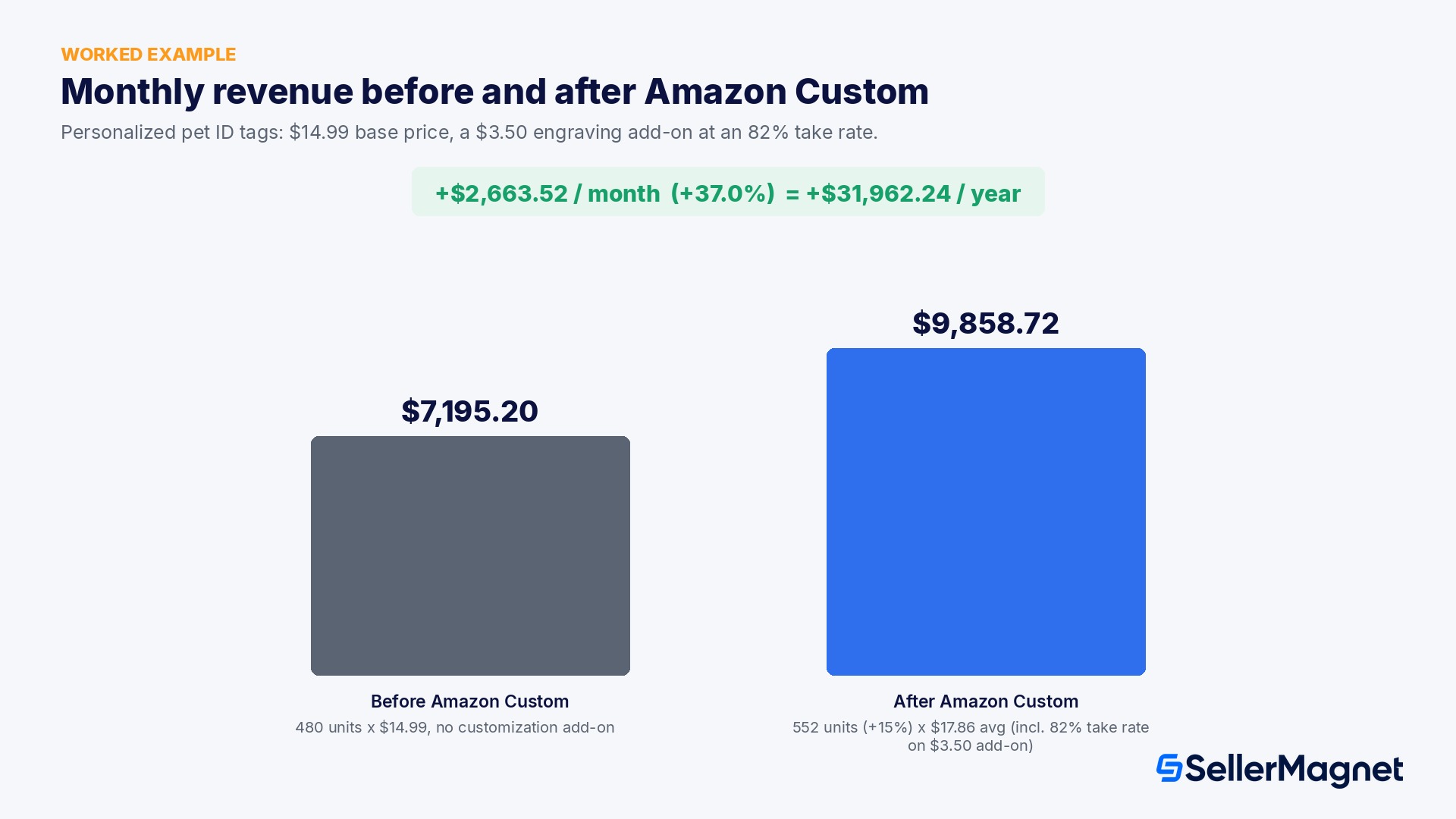
Take a seller running a personalized pet ID tag listing at a $14.99 base price, selling 480 units a month before enabling Amazon Custom. Without any customization option, monthly revenue on that listing is simply 480 units times $14.99, or $7,195.20.
After registering for Amazon Custom and adding a Personalize field (engraved pet name and a phone number) priced at a $3.50 add-on, two things typically move at once: the listing starts ranking for searches like "personalized dog tag" that a plain, non-customizable listing never reaches, and a share of buyers take the add-on because it is the actual reason they searched in the first place. Assume a realistic, modest case: unit volume rises 15% to 552 units a month, and 82% of those buyers choose the $3.50 engraving option.
Units/month Base price Avg. customization revenue/unit Monthly revenue
Before Amazon Custom 480 $14.99 $0.00 $7,195.20
After Amazon Custom 552 $14.99 $2.87 (82% take rate x $3.50) $9,858.72
Worked example: monthly revenue before and after enabling Amazon Custom
The average customization revenue per unit is the $3.50 add-on multiplied by the 82% take rate, or $2.87, added to the $14.99 base price for an effective average selling price of $17.86. Multiplied by 552 units, that is $9,858.72 a month, a gain of $2,663.52 over the pre-Custom baseline, a 37.0% increase. Annualized, that gap is $31,962.24, with no new fee layer involved: standard referral fees still apply to the full sale price including the customization add-on, and the only operational change is that every one of those 552 orders now has to be personalized and shipped FBM instead of pulled pre-made from FBA stock.
The math only works if fulfillment keeps up
The 37.0% revenue gain in this example assumes every order ships on time at the stated production lead time. A personalization program that cannot keep pace with order volume trades a revenue increase for a late-shipment-rate and order-defect problem instead, since FBA's buffer against fulfillment delays is not available on these orders.

Building a Custom listing that actually converts

Make customizable listings compliant with Amazon's standard product listing guidelines in addition to the customization program terms; a Custom listing is not exempt from the rules that apply to every other listing, including the same completeness and accuracy signals covered in our Amazon Listing Quality Score guide.
  • Sell in new condition only, and state your production and delivery timeline clearly, since customers understand customization takes time but still need an honest number to plan around.
  • Include the actual customization-relevant keywords, Amazon specifically names "customizable" and "personalized", so shoppers searching with intent to customize can actually find the listing; the same backend-keyword discipline covered in our Amazon Backend Search Terms guide still applies to the visible title and bullets on a Custom listing.
  • Show images that accurately depict what the product looks like after customization, not only the blank, uncustomized base product; a shopper deciding whether to pay for engraving wants to see an engraved example, not a guess. Amazon's broader product image requirements still apply on top of this.
Discovery is also structurally different for Custom listings. Beyond normal category and search placement, customizable products surface in Amazon's dedicated Custom store, a destination shoppers specifically browse when they already know they want something personalized rather than off-the-shelf. A listing that is well-tagged for customization intent gets found in both places; one that is not built with that keyword and image guidance in mind loses the advantage the dedicated store is meant to provide.
Running Custom and standard listings side by side gets harder to track by hand as the catalog grows. SellerMagnet's Listing Studio can help draft the customization-focused titles, bullets, and keyword sets Amazon's own guidance asks for (the "customizable" and "personalized" terms, an accurate after-customization description) across a catalog of Custom ASINs, and the Listing Builder's live Amazon preview lets you check how a customization-ready listing will actually look before it goes live. All screenshots in SellerMagnet materials use demo data, never a real seller's live account.

Common mistakes that cost sellers the feature or the sale

  • Promising FBA-speed delivery on a made-to-order Custom listing, which turns a personalization upsell into a late-shipment-rate problem the moment order volume rises.
  • Treating a customer's uploaded logo or image as automatically safe to print without checking it against Amazon's restricted-products and intellectual-property policies, the verification duty sits with the seller, not the buyer who uploaded it.
  • Listing a customizable version of a product under the original manufacturer's UPC instead of a seller-owned GS1 UPC or a GTIN exemption, which Amazon's terms treat as a straightforward misuse case.
  • Padding a Custom listing with an off-the-shelf add-on (a charging cable, a free gift) that does not actually customize the product, instead of keeping every optional field tied to genuine personalization, configuration, or assembly.
  • Burning through the 100-option ceiling on color or font variety alone, leaving no room to add a second genuinely useful customization field later without restructuring the whole listing.

A short checklist before you register

  • Confirm you are on a Professional selling plan, or budget the upgrade, before registering for Amazon Custom.
  • Decide upfront which type, Personalize, Configure, Assemble, or a combination, actually fits the product, rather than defaulting to the most complex option.
  • Plan your surface, customization, and option counts against the 5/15/100 ceiling before building the listing in Seller Central.
  • Confirm your FBM fulfillment capacity can hit the production and delivery time you are about to promise in the listing.
  • Write a one-step review process for customer-submitted text, images, or logos before the listing goes live, not after the first complaint.
  • Use your own GS1 UPC or a GTIN exemption; never carry over the manufacturer's original barcode onto a customized ASIN.

Is Amazon Custom the same as Amazon Handmade?

No. Amazon Custom is a feature set any Professional seller can register for to add personalization, configuration, or assembly options to eligible listings. Amazon Handmade is a separate, curated program for handcrafted goods with its own application; approved Handmade sellers do get their monthly Professional fee waived, which also gives them Custom access without that specific cost.

Does Amazon Custom cost extra?

Custom features are free with a Professional selling plan. Standard Amazon monthly subscription fees and normal selling fees still apply exactly as they would on any other listing; there is no separate Custom program fee.

Can FBA fulfill Amazon Custom orders?

No. Amazon's own FAQ states that due to the customization aspect of these products, all orders must be fulfilled by the seller using Fulfilled by Merchant tools and services. This applies to every customized order regardless of category.

How many customization options can one listing have?

Up to 5 customization surfaces per product, up to 15 customizations per surface, and up to 100 options across the whole product. These limits are fixed by the program and are not category-specific.

Can a customer return a customized product?

Not for a simple change of mind. Customized products may be refunded or replaced within 30 days of delivery only if they arrive damaged, defective, or materially different from what the customer actually ordered.

What happens if I misuse the Custom feature?

Amazon's program terms state that violations and misuse of the custom feature might result in loss of the feature set with the inability to reinstate, so a single serious violation can permanently remove Custom access from the affected listings.

Stop Juggling Tools. SellerMagnet Combines Everything You Need.

Join a smarter way to manage your Amazon store.

Recommended Articles

Amazon Custom 2026: Sell Personalized Products
Amazon Basics SellerMagnet Tools

Amazon Custom 2026: Sell Personalized Products

What Amazon's own program page and customization program terms say about registering for Amazon Custom: the 5/15/100 option limits, why FBA cannot fulfill custom orders, and the rules that get the feature revoked.

Read more
Amazon Manage Your Customer Engagement (MYCE) 2026 Guide
Amazon Updates Amazon Basics Advertising & PPC

Amazon Manage Your Customer Engagement (MYCE) 2026 Guide

Eligibility, the 5 audience segments and how each is defined, the 3 campaign types, the exact Tailored Audiences unlock numbers, and a worked example of what one campaign does to a real segment.
Read more
Amazon Prime Exclusive Discounts 2026: Price Rules, Fees and Eligibility
Amazon Updates Advertising & PPC Amazon Basics

Amazon Prime Exclusive Discounts 2026: Price Rules, Fees and Eligibility

How Amazon's Prime Exclusive Price Discounts work in 2026: the 15%, 60-day and 30-day price rules, eligibility, the fee formula with its $5,000 cap, and a worked example.
Read more
Amazon Case Log 2026: The Official Rules for Contacting Seller Support
Amazon Basics SellerMagnet Tools

Amazon Case Log 2026: The Official Rules for Contacting Seller Support

What Amazon's own Case Log guidelines say about opening, reopening and escalating a Seller Central support case, why you sometimes only see chat or phone, and the mistakes that get a case closed without a real answer.
Read more
Amazon Grade and Resell 2026: One Program, One Fee
FBM Inventory Management SellerMagnet Tools

Amazon Grade and Resell 2026: One Program, One Fee

Amazon merged Restore to New and Sell as Used into one Grade and Resell program, and extended the Sell as Used processing fee to Restore to New units. What it costs, with a worked example.
Read more
Amazon Two-Step Verification 2026: Setup, Backup Methods and Recovery
Amazon Basics SellerMagnet Tools

Amazon Two-Step Verification 2026: Setup, Backup Methods and Recovery

How Amazon's mandatory Two-Step Verification works on Seller Central: primary and backup method pairing rules, the setup steps, and the documented account-recovery process if you lose access to both devices.

Read more

Ready to grow your Amazon business?

Used on nearly 800 Amazon projects to automate pricing, track profits and scale faster.

14-day free trial • Cancel anytime