Amazon Two-Step Verification 2026: Setup, Backup Methods and Recovery
R
RenéFreelance Amazon Editor
|
16 min read
You lose your phone, or you switch numbers and forget to update Seller Central, and the next time you try to log in you are staring at a screen asking for a code from a device you no longer have. Amazon has required Two-Step Verification on every Seller Central account since it became mandatory, so this is not an edge case; it is the single most common way sellers accidentally lock themselves out of their own account. This guide covers exactly how Amazon's own help pages say Two-Step Verification works, how to set up a primary and backup method correctly the first time, and the documented account-recovery path for when both methods fail anyway.
Amazon Two-Step Verification (2SV) is a mandatory Seller Central login security step: after your password, Amazon sends a one-time code to a primary device (SMS, voice call, or an authenticator app) and asks for a different backup method in case the primary one is unavailable. If you lose access to both devices, Amazon's account-recovery process asks for identity documents and states it can take up to 48 hours to complete, after which 2SV must be set up again from scratch on devices you actually have access to.
What Two-Step Verification actually requires
Amazon's help page defines it simply: Two-Step Verification is an extra layer of security added when you use your email address to sign in. You enter your normal password first, then a second code sent to a device you designated in advance. The part sellers underestimate is that Amazon requires two separate devices on file from the start, not one: a primary method that handles every sign-in, and a backup method you only touch when the primary one is unreachable. All Seller Central users must have Two-Step Verification enabled to access their account; there is no opt-out for an active seller account, only a choice of which methods to add.
Why does Amazon require two separate devices instead of one?
A single device on file is a single point of failure, and Seller Central accounts carry enough control over live listings, pricing, and payouts that Amazon treats a lost phone as a security event, not an inconvenience. The backup method exists specifically so a lost, stolen, or dead primary device never becomes a locked account on its own; Amazon's own help pages frame Two-Step Verification as protection against someone else guessing or phishing your password, and the second device is what stops a stolen password alone from being enough to sign in. The requirement is also account-wide rather than per-feature: once 2SV is on, it applies to every sign-in, from the main dashboard to the mobile app, not just to sensitive actions like changing your bank details.
This is also why Amazon does not let the backup method duplicate the primary one. Two SMS numbers that both ring the same phone, or two authenticator apps installed on the same handset, defeat the purpose of a backup entirely; if that one device is unreachable, both methods fail at the same time. The pairing table below is Amazon's way of enforcing genuine redundancy at setup time, before a seller discovers the gap during an actual lockout.
Primary and backup methods: what pairs with what
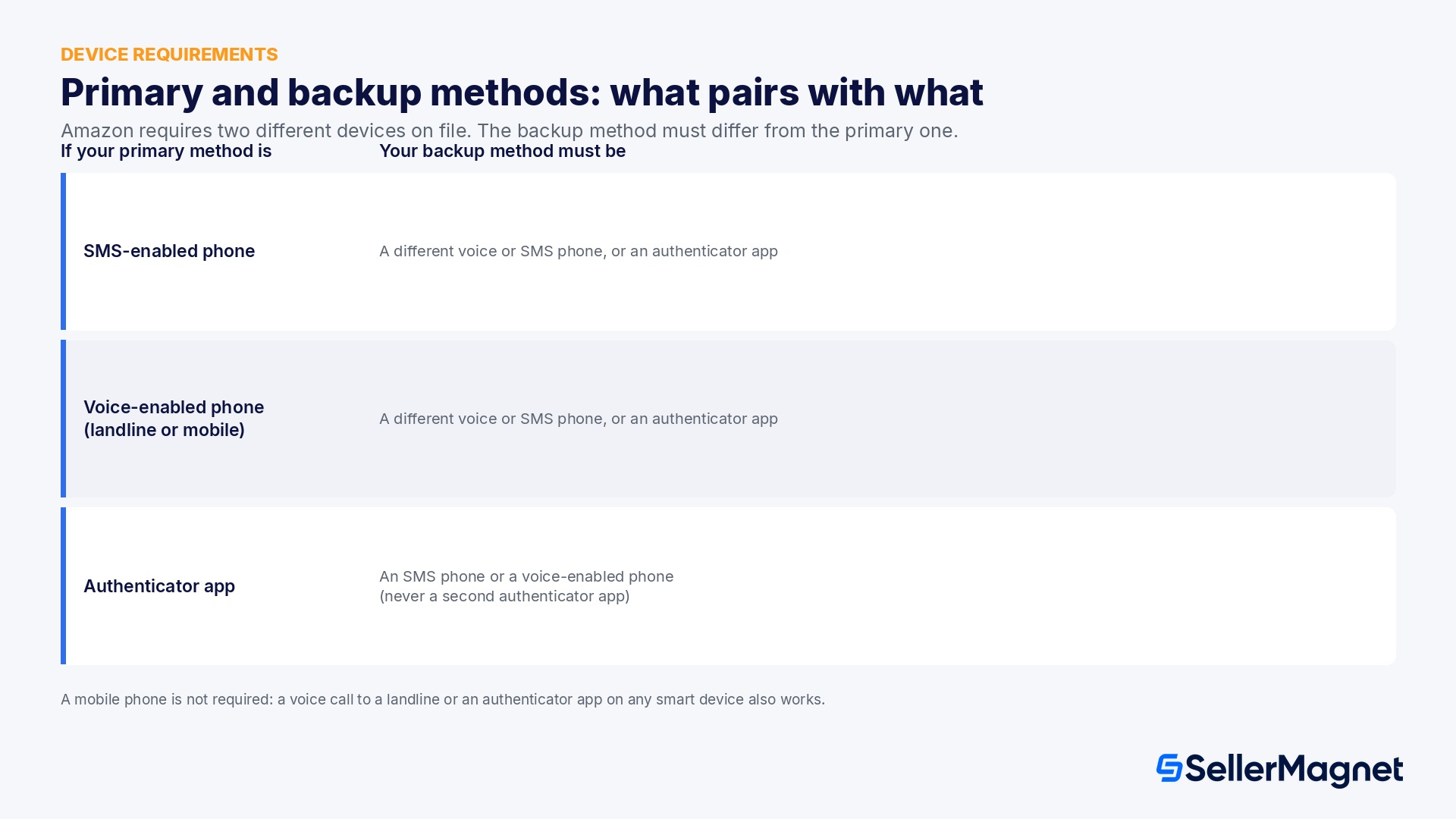
Amazon's own device-requirements table restricts which combination of primary and backup method you can register, and the rule that trips people up most is the authenticator-app restriction: an authenticator app can be your primary method or your backup method, but never both at once, and you also cannot use the same phone number for both your primary and backup method.
If your primary method is
Your backup method must be
SMS-enabled phone (text message)
A different voice-enabled phone, a different SMS-enabled phone, or an authenticator app
Voice-enabled phone (landline or mobile)
A different voice-enabled phone, a different SMS-enabled phone, or an authenticator app
Authenticator app
An SMS-enabled phone or a voice-enabled phone (never a second authenticator app)
A mobile phone is not a strict requirement. Amazon's help page explicitly notes that if you do not own a cell phone, you can still complete Two-Step Verification using an authenticator app on any smart device, or a voice call to a landline telephone. If you have no second phone number of your own and no second device for an app, Amazon's own suggestion is to register the phone number of a spouse, family member, or trusted colleague as the backup, specifically someone you could reasonably reach if you lost access to your primary method.
Choosing between SMS, voice call, and an authenticator app
Amazon treats all three delivery methods as equally valid, so the right choice for your primary method comes down to which one fails least often in your own situation, not which one Amazon prefers. Each has a different, predictable failure mode worth planning around before you pick one.
Method
Where codes arrive
Most common failure
Best used as
SMS text message
Your phone's messaging app
Carrier delay, roaming abroad, a full inbox
Primary, for a number you keep for years
Voice call
A spoken code read out on a landline or mobile
Voicemail picking up instead of you, poor signal
Backup for a landline-based office line
Authenticator app
A rotating 6-digit code inside the app itself
A lost or wiped phone with no exported backup key
Primary for sellers comfortable saving a backup key offline
An authenticator app is the only method of the three that keeps working with no signal and no carrier at all, which makes it the strongest primary choice for sellers who travel between countries or warehouses. Its one real weakness is recovery: the app itself has no way to resend a lost code, so losing the phone it runs on without having saved the setup key offline means the account falls back on the backup method entirely. SMS and voice calls, by contrast, recover themselves automatically the moment you have a working phone on the same number again, which is why pairing an app as primary with a phone number as backup, rather than two apps or two phones you might lose together, tends to cover both failure modes at once.
How to enable Two-Step Verification, step by step
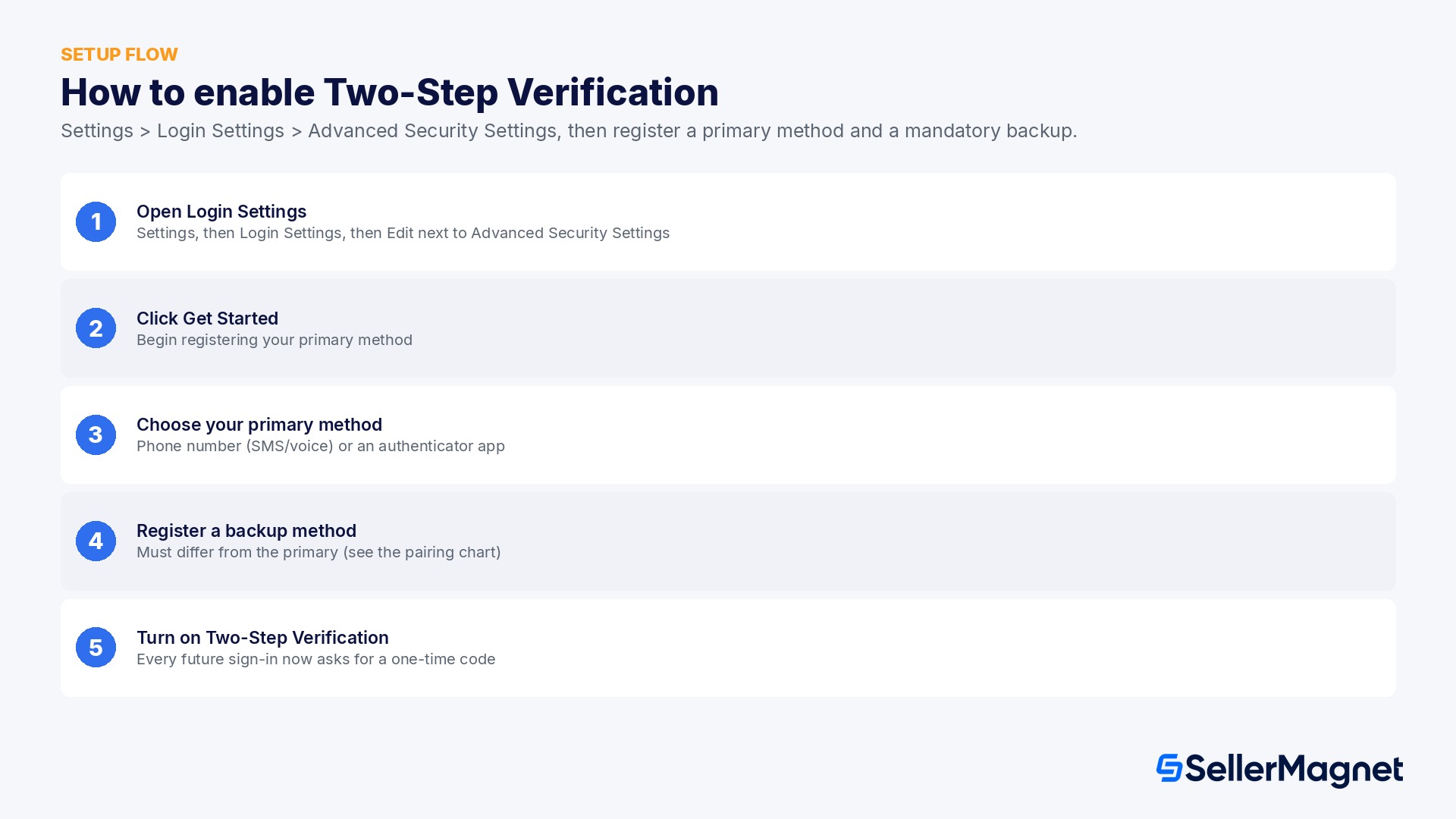
The setup flow runs from Seller Central's own Login Settings page and asks for a primary method first, then a mandatory backup.
Enable Amazon Seller Central Two-Step Verification
Open Login Settings - In Seller Central, go to Settings, then Login Settings, then click Edit next to Advanced Security Settings.
Click Get Started - On the Advanced Security Settings page, click Get Started to begin registering a primary method.
Choose your primary method - Select Phone Number (SMS or voice call) or Authenticator App, then follow the on-screen instructions to receive and enter a verification code.
Register a backup method - Choose a backup method different from your primary (see the pairing table above), enter the phone number if applicable, and verify it with a sent code.
Turn on Two-Step Verification - Click the Turn on 2-Step Verification button to finish. Every future sign-in now asks for the password plus a one-time code.
Source: Two-Step Verification and the Two-step verification FAQ, official Amazon Seller Central help pages. If you are prompted to register a device as an existing user who has not yet enabled it, the prompt itself walks you through the same Get Started flow at your next sign-in; there is no separate setup page to search for.
What happens when you cannot receive your code
On the sign-in screen, the link labeled Didn't receive the code? switches you to your saved backup method instead of your primary one. This is the normal, documented path for a dead phone battery, a trip abroad without signal, or a temporary carrier issue, and it works as long as you still have access to at least one of your two saved devices.
If you changed your primary phone number, update it in Seller Central only after you have successfully signed in using your backup method; you cannot change a device you cannot currently verify.
A code that never arrives by SMS is often a browser cache issue first; Amazon's own troubleshooting step is to clear your cache before trying a voice call to the same number instead.
An incorrect country code on the saved phone number is a common, invisible cause of codes silently failing to arrive.
If your authenticator app stops generating valid codes (a new phone, a wiped device), your backup method is the only other way in; there is no way to re-link an authenticator app without first signing in.
When both methods fail: the account-recovery process
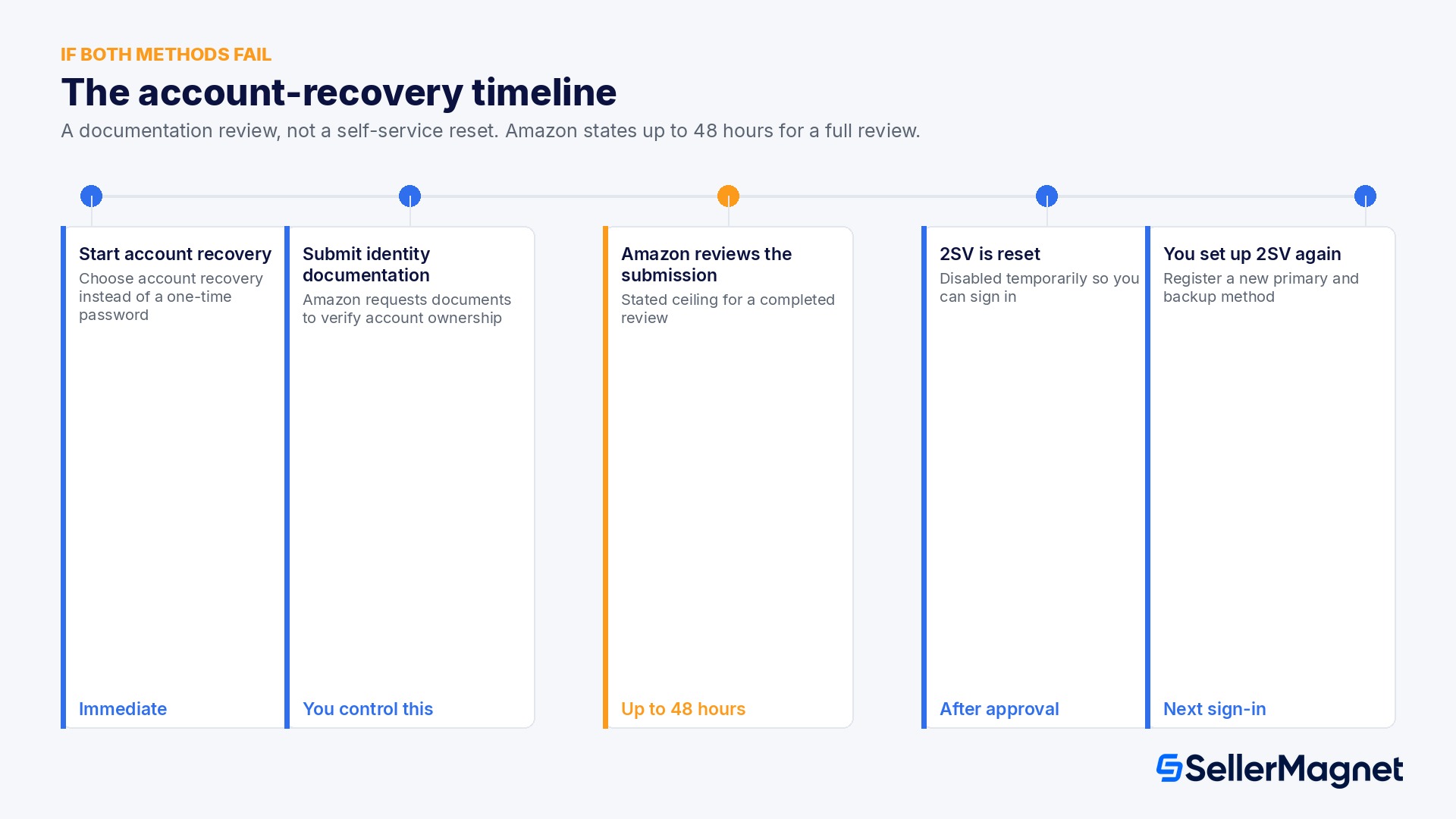
If you cannot reach either your primary or your backup device, there is no code-based way around Two-Step Verification. Amazon's stated path at that point is the Two-Step Verification account-recovery process, and it is explicitly a documentation review, not a self-service reset.
Step
What happens
Typical timing
Start account recovery
From the sign-in screen, choose the account-recovery option instead of entering a one-time password
Immediate
Submit identity documentation
Amazon requests documents to verify you are the legitimate account owner
You control this; faster submission moves the review along sooner
Amazon reviews the submission
Amazon's help page states the verification process can take up to 48 hours to complete
Up to 48 hours after a complete submission
Two-Step Verification is reset
Once verified, 2SV is disabled on the account temporarily so you can sign in
Immediate after approval
You set up 2SV again
On your next sign-in, you register a new primary and backup method, this time using devices you actually control
At your next sign-in
The practical read: the 48-hour figure is Amazon's own stated ceiling for a completed review, not a guaranteed turnaround, and the clock only starts once your documentation is actually submitted. A seller who registers a real backup method up front never needs this path at all; a seller who skips it discovers the 48-hour number at the worst possible time, usually mid-order-cycle.
Turning 2SV off does not remove the code step
Amazon's own FAQ is explicit on this: although you can toggle Two-Step Verification off on the Advanced Security Settings page, you will still be required to resolve a mobile one-time password at sign-in. If you have no saved Two-Step Verification device at all when you attempt to sign in, you are redirected into the device-registration process before you can proceed. There is effectively no way to run a Seller Central account without at least one verified device on file.
A locked-out login is an operations outage, not just an inconvenience. SellerMagnet's Notification Center tracks your account-level signals from outside Seller Central, so pricing, inventory and Buy Box monitoring keep running even on the day your own login happens to be stuck in account recovery. For the score Amazon itself watches once you are back in, see our Amazon Account Health Rating guide, and for the menu layout behind Login Settings, our New Seller Central guide.
Common ways sellers end up locked out
Almost every Two-Step Verification lockout traces back to one of a small handful of avoidable patterns. Recognizing the pattern in advance is the cheapest fix there is, since every one of these is preventable with the backup-method setup covered above.
The phone-upgrade gap: a seller gets a new phone, restores apps from a backup, and only discovers the authenticator app did not carry its secret keys over when the next sign-in asks for a code it can no longer generate.
The number port, forgotten: a seller switches carriers or countries and ports an old number to a new SIM, but the backup method on file still points at a number that now belongs to someone else or is simply dead.
The shared-device trap: a primary and backup method that both live on devices the same person carries together (a phone and a tablet in the same bag, or two SIMs in one dual-SIM phone) fail together the moment that one bag is lost or stolen.
The departed employee: a 2SV device was registered on a staff member's personal phone, and nobody updated it before that person left the company, so the account's second factor walked out the door with them.
The long-dormant backup: a backup phone number was correct on the day it was registered but the SIM lapsed from non-use months later, so it silently stopped receiving anything long before anyone tried to rely on it.
A yearly check costs five minutes
None of the five patterns above need new tooling to prevent: open Login Settings twice a year, confirm both the primary and backup method still ring or receive a text, and update whichever one has gone quiet. The cost of catching a dead backup method on a Tuesday afternoon is a five-minute check; the cost of discovering it during an actual lockout is the 48-hour recovery process.
Multi-user accounts: every login needs its own backup, not a shared one
A Seller Central account with several logins, the owner, a virtual assistant, an in-house PPC manager, a bookkeeper, does not share one Two-Step Verification setup across everyone. Amazon's requirement that all Seller Central users have Two-Step Verification enabled applies per login, so each individual user registers their own primary and backup method the first time they sign in, tied to devices they personally control.
Never register a team member's 2SV on the account owner's personal phone as a shortcut; it means the owner has to be physically present every time that teammate signs in, which defeats the point of giving them their own login.
When a contractor or agency's engagement ends, remove their user from Seller Central the same day, which also retires their 2SV registration; a departed contractor's phone should never remain a working path into the account.
For a seasonal hire or a short-term contractor, prefer an authenticator app tied to a work device you can reclaim over a personal phone number you cannot, so offboarding does not depend on them cooperating.
Keep a simple internal record of who holds which login and which device their 2SV is registered to; when three or four people share account access, this is the fastest way to know whose device needs updating after a phone change.
The operational risk of multi-user 2SV is not the setup itself, which Amazon handles the same way for every user, but the offboarding gap: a seller who adds users faster than they remove them accumulates stale 2SV devices that nobody is tracking. Treating device cleanup as part of the same checklist as removing a departing teammate's Seller Central access, rather than a separate afterthought, closes that gap for good.
A lockout does not have to mean an operations blackout
The practical damage from a Two-Step Verification lockout rarely comes from the sign-in screen itself; it comes from everything that silently keeps running, or stops running, while you are shut out. Repricing rules, inventory reorder points, and Buy Box share do not pause because you cannot log in, and a lockout that lands during a peak sales window can cost far more in missed decisions than the 48 hours of recovery time itself.
Price and Buy Box changes keep happening on the marketplace side regardless of whether you can see them, so a monitoring layer that alerts you by email or push notification outside Seller Central is the only way to stay aware during a lockout.
Inventory does not wait either: a reorder deadline that falls inside your recovery window needs to be visible somewhere you can actually reach, not only inside the account you are locked out of.
The fastest way back to normal after a recovery is a clear, current snapshot of where every listing, price, and stock level stood right before the lockout, so you are reacting to real changes instead of reconstructing the last two days from memory.
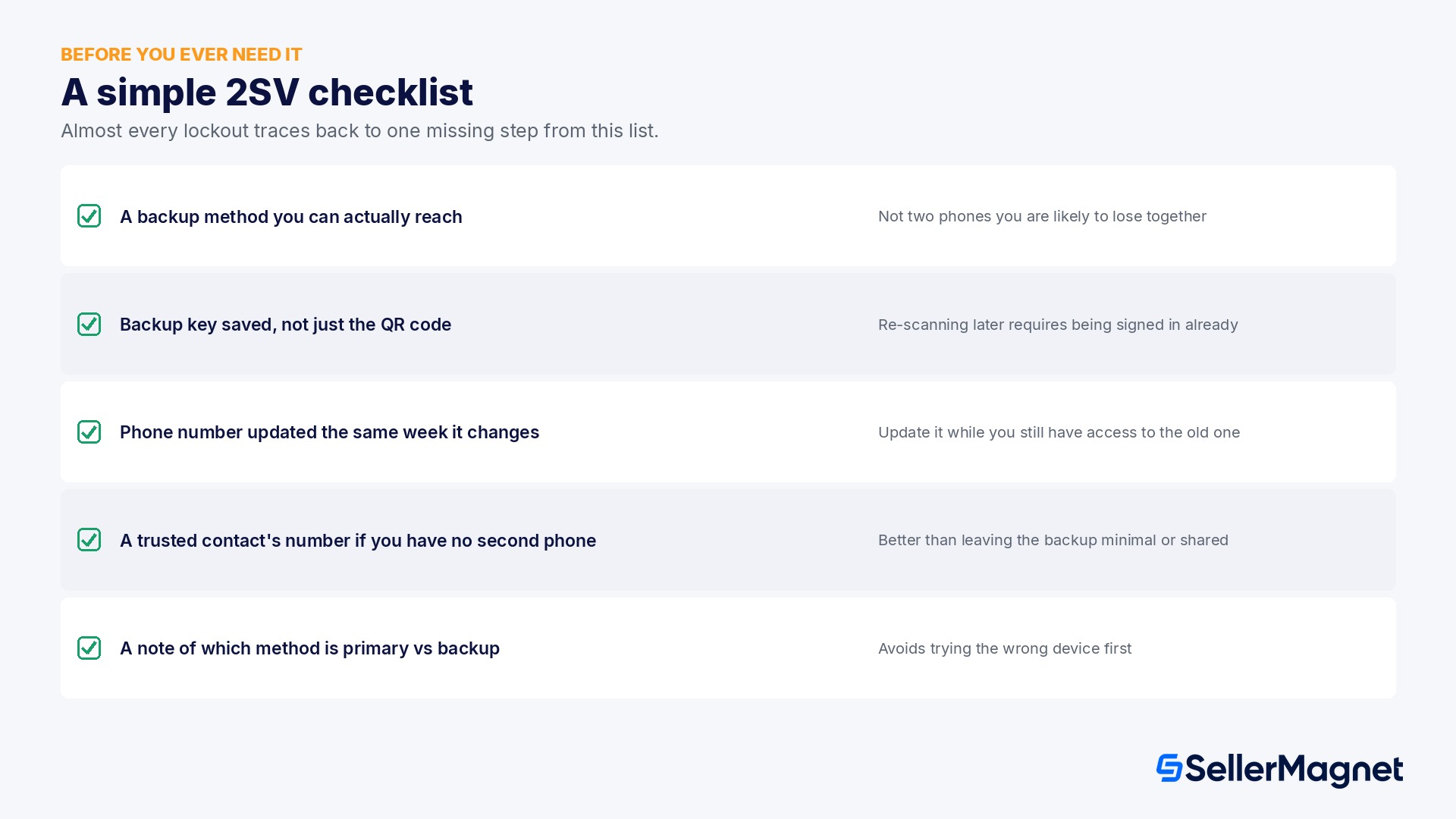
A simple checklist before you ever need it
Almost every lockout story traces back to one missing step from this list, set up months before the actual lockout.
Register a backup method that is genuinely different from your primary: a second phone number you control, or an authenticator app paired with a phone number, never two phones you are likely to lose together (for example, a work phone and its backup charger kept in the same bag).
If you use an authenticator app as your primary method, write down or screenshot the backup key shown during setup (not just the QR code), since re-scanning a barcode later requires being signed in already.
Update your saved phone number in Seller Central the same week you change carriers or numbers, while you still have access to the old one.
If you are a solo seller with no second trusted phone, register a trusted family member or colleague's number as your backup rather than leaving the field minimal or shared with your primary.
Keep a note of which method is primary and which is backup; several real lockouts happen because a seller tries the wrong device first and assumes both have failed.
This applies the same way on every marketplace
The exact help pages referenced here are the US versions, but Amazon runs the identical Two-Step Verification mechanics, the same primary-plus-backup requirement, and the same account-recovery path on every Seller Central marketplace (amazon.de, amazon.co.uk, amazon.ca and the rest). If you manage one unified account across several marketplaces, your 2SV devices cover the whole account, not one storefront, so a lockout on one marketplace is a lockout everywhere.
Is Two-Step Verification mandatory for Amazon sellers?
Yes. Amazon's own FAQ states that all Seller Central users must have Two-Step Verification enabled to access their account; there is no way to opt an active seller account out of it entirely.
Can I use the same phone number for my primary and backup method?
No. Amazon's device-requirements table explicitly requires a different phone number for the backup method than the primary, and an authenticator app cannot serve as both your primary and backup method at the same time.
What happens if I lose access to both my primary and backup device?
You go through Amazon's Two-Step Verification account-recovery process, which requires submitting identity documentation and can take up to 48 hours to complete. Once Amazon verifies you, 2SV is reset and you register new devices at your next sign-in.
Does turning off Two-Step Verification in Advanced Security Settings remove the extra login step?
No. Amazon's FAQ states that even with 2SV toggled off there, you still have to resolve a mobile one-time password at sign-in, and with no saved device at all you are redirected into setup before you can proceed.
Can I use an authenticator app without owning a mobile phone?
Yes, Amazon's help page notes an authenticator app can run on any smart device or tablet, and a voice call to a landline telephone is also accepted, so a mobile phone is not a strict requirement for Two-Step Verification.
What should I do immediately after changing my phone number?
Sign in using your current working method first, then update the changed number in Seller Central right away. Amazon's help page is explicit that you need access to at least one of your saved devices to make the change, so updating it before the old number stops working is the only safe order of operations.
Does Two-Step Verification cover every user on a multi-user Seller Central account?
Amazon's FAQ states the requirement applies to all Seller Central users, which covers every individual login on the account, not only the primary account owner, so each user needs their own saved primary and backup method.
Should I remove a departing employee's Two-Step Verification device immediately?
Yes. Removing their Seller Central user access also retires their registered 2SV device, and leaving it in place after they leave means a phone you no longer control still has a path into the account.
Is an authenticator app safer than SMS for Two-Step Verification?
Both are accepted equally by Amazon; an authenticator app keeps working without signal or a carrier, but recovers more slowly if you lose the phone without a saved backup key, while SMS and voice calls recover automatically once you have a working phone on the same number again.
What should I monitor while my account is stuck in Two-Step Verification recovery?
Pricing, Buy Box status and inventory reorder points keep changing on Amazon's side even while you cannot sign in, so a monitoring layer outside Seller Central is the only way to track them until the recovery process finishes.
Stop Juggling Tools. SellerMagnet Combines Everything You Need.