Amazon Grade and Resell 2026: One Program, One Fee
R
RenéFreelance Amazon Editor
|
15 min read
Amazon has quietly merged two separate FBA return-recovery services into one program, and the merger comes with a real cost most sellers have not budgeted for. "Restore to New" (what used to be called Refurbishment) and "Sell as Used" (the original Grade and Resell service) are now both filed under a single program name, Grade and Resell, inside your Automated value recovery settings. The part that actually changes your numbers: the Sell as Used processing fee of $1.50 to $4.10 per unit, which used to apply only when a return was graded and relisted as Used, now also applies to every unit successfully restored to New condition. In the US that starts September 30, 2026; in the EU store it already started August 3, 2026. If you are enrolled in Restore to New and have not reviewed your settings, this guide walks through exactly what changed, what it costs on a real volume of returns, and what to check before the fee lands on your first invoice.
This is not the same topic as our general FBA returns, grading and reselling guide, which explains how the program works day to day. This post is scoped to the 2026 change only: the name consolidation, the new fee on Restore to New, and the numbers behind deciding whether to keep both services enabled, drop one, or opt out entirely.
Amazon's Grade and Resell program now covers both Restore to New (formerly Refurbishment) and Sell as Used under one name. The Sell as Used processing fee of $1.50 to $4.10 per unit now also applies to Restore to New items, effective September 30, 2026 in the US and August 3, 2026 in the EU, charged only when a unit is successfully relisted.
What actually changed, in plain terms
Before this update, Amazon's FBA return-recovery options for unfulfillable customer returns were two distinct names with two distinct cost profiles. Refurbishment restored an eligible return to New condition, with no dedicated processing fee, and the restored unit went back into your normal New inventory at your existing price. Grade and Resell, by contrast, meant grading a return into one of four Used conditions (Like New, Very Good, Good, Acceptable) and relisting it as Used at a price you set, with a processing fee of $1.50 to $4.10 per unit, charged only on successful relisting.
Amazon has now renamed Refurbishment to Restore to New, folded it under the single Grade and Resell program name alongside Sell as Used (the new name for what used to be called FBA Grade and Resell on its own), and applied the Sell as Used fee table to Restore to New units as well. Your existing enrollment and settings carry over automatically; nothing about how the program is used, enrolled in, or opted out of has changed mechanically, only the name and the fee that now reaches a service that used to be free.
Old names and fees
New names and fees (2026)
Restoring a return to New condition
Called Refurbishment, no processing fee
Called Restore to New, same $1.50-$4.10 fee as Sell as Used
Grading and relisting as Used
Called FBA Grade and Resell, $1.50-$4.10 fee per unit
Called Sell as Used, same fee, unchanged
Program name in Seller Central
Two separate service names
One program, Grade and Resell, with two services inside it
Enrollment
Opt in per service, per ASIN or full catalog
Unchanged: opt in per service, per ASIN or full catalog
When the fee actually lands, by store
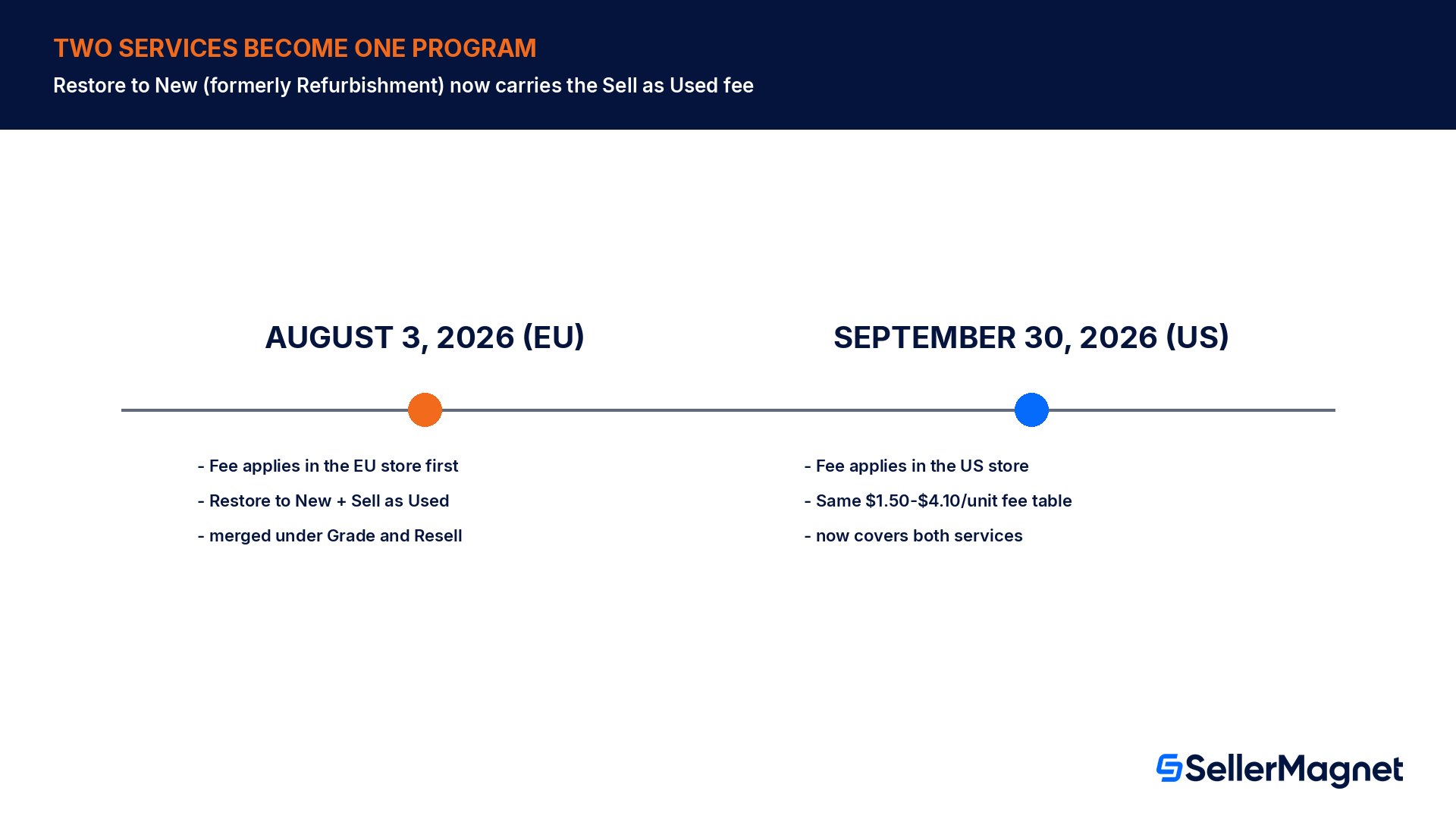
The effective date is not the same everywhere. Amazon's US help page states the Sell as Used processing fee begins applying to successfully restored Restore to New items effective September 30, 2026. The EU store version of the same help page states the Grade and Resell processing fee begins applying to items graded into a sellable-as-used condition effective August 3, 2026, an earlier date, since the EU rollout of this consolidation happened first. If you sell in both regions, check each marketplace's own Automated unfulfillable settings and help page rather than assuming one date covers every store you operate in.
The fee is retroactive to your existing enrollment, not just new sign-ups
If you were already enrolled in Restore to New (under its old name, Refurbishment) before this change, your enrollment and settings carry over automatically into the new consolidated program. That also means the new fee applies to your existing Restore to New units once the effective date passes, with no action required on your part to "activate" the new fee. If you want to avoid it, you have to actively change your settings before the date, not wait and see what shows up on the invoice.
Worked example: 1,000 returns a month, before and after
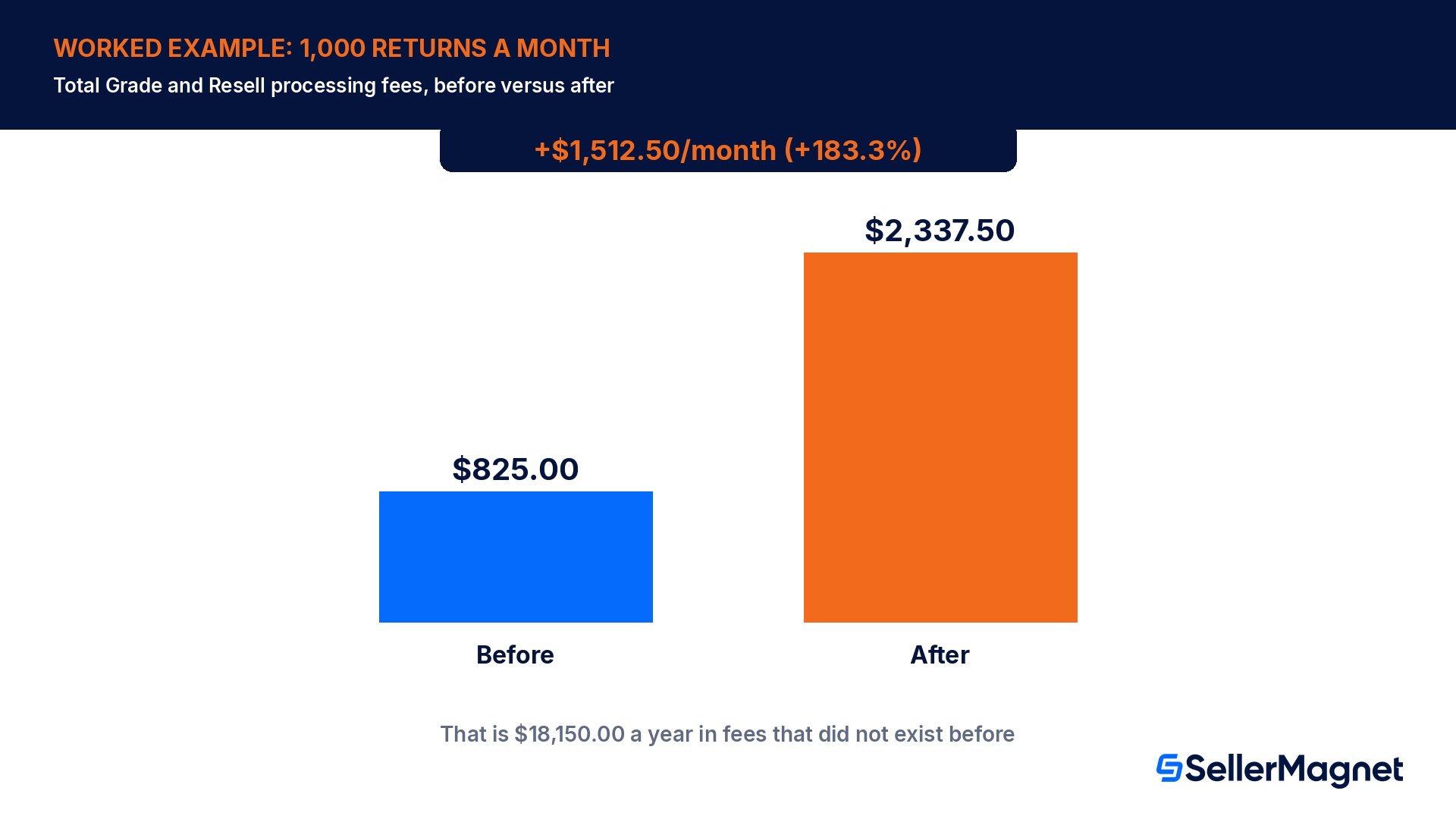
Take a seller processing 1000 unfulfillable FBA customer returns a month, enrolled in both Restore to New and Sell as Used. Based on typical grading outcomes, 550 units (55%) pass the second-pass check and are restored to New condition, 300 units (30%) cannot be restored but are gradeable and relisted as Used, and the remaining 150 units are graded Unsellable and fall back to normal unfulfillable inventory handling (no processing fee either way on those). The worked example uses a flat $2.75 per-unit processing fee, a representative mid-band figure inside Amazon's published $1.50 to $4.10 range, which varies by size, weight, sort type and store.
Before the change
After the change
Restore to New units (550 units)
$0.00 (no fee)
$1,512.50
Sell as Used units (300 units)
$825.00
$825.00
Total monthly processing fees
$825.00
$2,337.50
The change adds $1,512.50 a month in processing fees that did not exist before, purely from the 550 Restore to New units that used to cost nothing, a 183.3% increase on this seller's total Grade and Resell processing cost. Scaled to a full year, that is $18,150.00 in fees that simply did not exist under the old Refurbishment service.
The fee only hits units that are actually relisted
Nothing changes about the 150 units graded Unsellable in this example; they were never charged a processing fee before and still are not, since the fee only applies at the moment a unit is successfully relisted, either restored to New or graded and sold as Used. A higher Unsellable rate in your own catalog lowers your exposure to this fee, for better or worse, since it also means less value recovered overall.
Why Amazon frames this as one fee, not two
Amazon's own explanation for the change is that consolidating Restore to New under Grade and Resell removes an inconsistency: two services doing closely related work, recovering value from unfulfillable returns instead of removing or disposing of them, were charging differently for essentially the same operational steps (second-pass grading, relisting, inventory routing). Amazon states there is no additional or separate fee introduced; both Restore to New and Sell as Used now use the identical processing fee structure, and you are only charged once, when an item is successfully relisted, never for a failed restoration attempt or an item routed to Unsellable.
That framing is accurate as far as it goes: there genuinely is no second, separate fee layered on top of the existing one. What it leaves out is that Restore to New previously had no processing fee attached to it at all, so for any seller who was using Restore to New specifically because it was the free way to recover value from a return, "no new fee" is the wrong read; the fee did not exist on this service and now it does.
How eligibility and enrollment work under the merged program
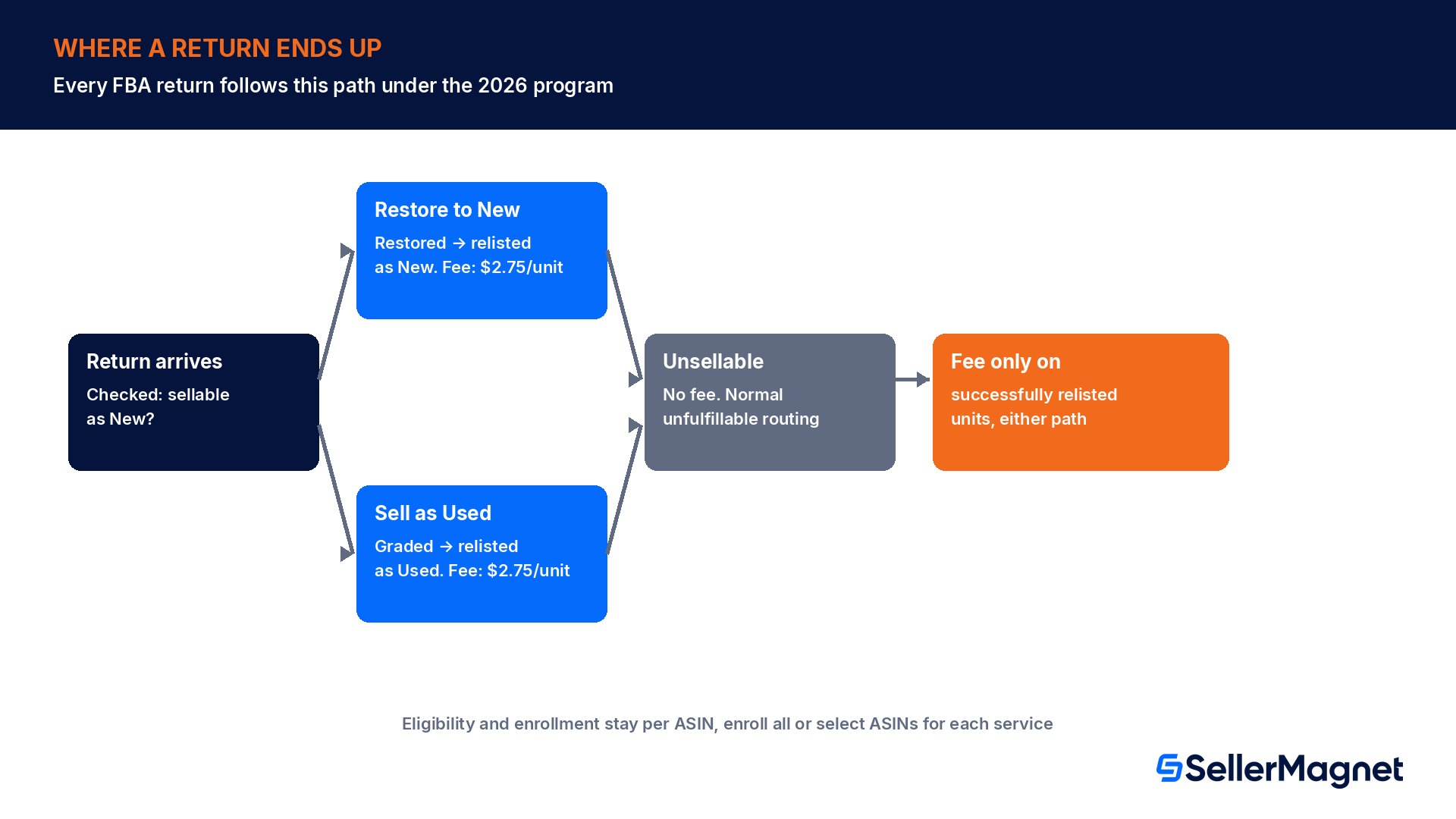
Eligibility is determined at the ASIN level, and nothing about this mechanic changed in the consolidation. From your Automated value recovery settings, you can enroll either Restore to New, Sell as Used, or both, and for each service independently choose to enroll your entire eligible catalog or hand-pick specific ASINs. For Sell as Used specifically, you also set your own used-grade pricing as a recovery percentage of the item's new price for each of the four used conditions. Every FBA return is first evaluated as sellable as New or not; only returns that fail that first check are routed into whichever of the two value-recovery services you have enabled.
Sellable as New on first evaluation: goes straight back to normal New inventory, no grading or fee involved at all.
Fails the sellable-as-new check, enrolled in Restore to New: goes through a second-pass grading check to see if it can still be restored; if yes, relisted as New at your existing price, now with the processing fee.
Cannot be restored, enrolled in Sell as Used: graded into one of four Used conditions and relisted at your own recovery-percentage price, with the same processing fee as before.
Cannot be restored and not eligible for, or not relisted via, Sell as Used: graded Unsellable, no fee, routed to your normal unfulfillable inventory settings (liquidate, donate, dispose, or return to you).
One detail worth confirming for your own account: Amazon notes that units cannot be added to Restore to New or Sell as Used through restocking or a manual removal order. Only eligible customer-returned units that land in your unfulfillable inventory, located in a fulfillment center enabled for the program, flow into either service automatically through the Automated unfulfillable settings. If a Grade and Resell unit is itself later returned by a second customer and is still eligible under your settings, it is automatically resubmitted for re-grading rather than routed straight to Unsellable, so the same per-unit fee can, in principle, apply more than once to the same physical unit across its lifetime if it keeps getting returned and keeps passing the eligibility check.
Where this sits next to removal, disposal and liquidation
Grade and Resell was never your only option for unfulfillable returns; it exists alongside removal orders, disposal and Amazon's liquidation program as one more way to handle stock that cannot go straight back into sellable New inventory. The reason Grade and Resell usually beats removal or disposal on a pure dollar basis is that a removal fee or disposal fee recovers nothing at all, while a successfully restored or graded unit still earns you most of its sale price. The new processing fee narrows that gap without closing it: a restored unit still nets you the full New-condition sale price minus a flat, predictable per-unit fee, which for almost any item above a modest price point still beats a removal fee that returns zero revenue.
Where the math genuinely shifts is on low-value items sitting near the bottom of the published fee range. A product that sells for only a few dollars more than the Restore to New processing fee itself may now be close to a wash once the fee applies, where it clearly was not before. That is exactly the kind of SKU worth checking individually rather than assuming the program-wide average still holds for every item in a diverse catalog.
Should you keep Restore to New enabled?
The honest answer depends on what the alternative actually costs you, not on whether the new fee feels unwelcome. Compare the per-unit Restore to New processing fee against your removal or disposal fee for the same item, and against what the item would have sold for new had it never been returned at all. A unit restored to New and relisted at full price, minus the processing fee, is very often still the better outcome than paying a removal fee for stock you cannot resell at all, or a disposal fee that recovers nothing. The fee changes the margin on Restore to New, not necessarily which option wins.
Pull your own Restore to New volume and success rate for the last 90 days from Seller Central before assuming the example numbers above apply to your catalog.
Multiply that monthly restored-unit count by a representative processing fee inside the $1.50 to $4.10 range for your typical size and weight tier.
Compare that monthly cost against your removal or disposal fee for the same SKUs if Restore to New were turned off entirely.
Check whether any specific ASINs are worth excluding from Restore to New (low resale value, high removal cost already acceptable) using the ASIN-level enrollment option instead of an all-or-nothing catalog decision.
Re-run the comparison again after the first invoice that includes the new fee, since actual grading outcomes and fee bands can differ from a 90-day estimate.
Common mistakes sellers make with this change
Assuming "no new fee was introduced" means no cost changes, when the real change is an existing fee reaching a service that was previously free.
Checking only the US effective date when also selling in the EU store, where the same change already landed on an earlier date.
Opting out of Restore to New entirely without first comparing the new processing fee against the removal or disposal fee for the same inventory.
Assuming the fee applies to every return routed into Restore to New, rather than only the units that are actually, successfully relisted.
Treating this as the same topic as the general grading and reselling mechanics, instead of specifically re-checking enrollment settings before the effective date in your own store.
Checklist before the fee reaches your account
Confirmed which effective date applies to each store you sell in, September 30, 2026 for the US or August 3, 2026 for the EU.
Pulled your own Restore to New volume and success rate for the last 90 days from Seller Central.
Modeled the new monthly processing cost against your removal or disposal fee for the same SKUs.
Decided per ASIN, not just for the whole catalog, whether Restore to New still makes sense once the fee applies.
Checked the first post-change invoice against the modeled estimate once the effective date passes.
How SellerMagnet fits into the decision
Modeling this change by hand means pulling return volume from one report and fee bands from a help page and doing the math yourself for every size tier you sell. The Analytics Dashboard tracks true net profit per order after every Amazon fee, so a new processing fee reaching Restore to New units shows up directly in the real per-order margin instead of staying buried until the invoice arrives. For a quick, single-ASIN sanity check before deciding whether to keep an item enrolled, the free Fee Calculator checks a product's current Amazon fees against Amazon's own published schedule, the same kind of check worth running on a SKU you are weighing against removal versus Restore to New. Returns that end up fully unrecoverable are a different cost entirely, covered in our returnless resolutions guide, and aging stock that never gets returned at all but still sits too long is covered in our aged inventory surcharge guide; reviewing all three together gives a fuller picture of what a return actually costs end to end.
What is the Amazon Grade and Resell program in 2026?
Grade and Resell is now the single program name covering two value-recovery services for FBA unfulfillable returns: Restore to New (formerly called Refurbishment) and Sell as Used (the original Grade and Resell service). Both remain separately opt-in through your Automated value recovery settings, and your existing enrollment carries over automatically into the merged name with no action required from you to keep using either service.
Did Restore to New have a processing fee before this change?
No. Restore to New, under its previous name Refurbishment, had no dedicated processing fee attached to it at all; a restored unit simply went back into New inventory at your existing price. The existing Sell as Used fee now applies to Restore to New items as well, which is the real cost change hiding behind this otherwise mostly cosmetic consolidation.
How much is the new processing fee?
Amazon's published range is $1.50 to $4.10 per unit, based on the item's size, weight, sort type and the store it sells in. It is the exact same fee table Sell as Used has used all along; nothing new was invented, it is simply now also charged on every successfully restored Restore to New unit.
When does the fee take effect?
September 30, 2026 in the US store, per Amazon's own US help page. The EU store version of the same program already applied the fee starting August 3, 2026, an earlier date, so check each marketplace you actually sell in separately rather than assuming one single date covers every store you operate.
Do I need to re-enroll to be affected by this change?
No. If you were already enrolled in Restore to New under its old name, Refurbishment, your settings and enrollment carry over automatically into the consolidated Grade and Resell program. The new fee applies to that existing enrollment once the effective date passes in your store, with no action needed on your part to trigger it.
Am I charged the fee if a return cannot be restored or graded?
No. The processing fee only applies at the moment a unit is successfully relisted, either restored to New condition or graded and sold as Used. Items graded Unsellable after both checks fail are never charged this fee at all, and instead fall back to your normal unfulfillable inventory settings for liquidation, donation, disposal or return.
Can I enroll only some ASINs instead of my whole catalog?
Yes. Both Restore to New and Sell as Used can be enrolled at the full-catalog level or for specific, hand-picked ASINs, independently of each other. That lets you keep each service enabled only where the economics still make sense for a given product, rather than making one all-or-nothing decision for your entire catalog.
Should I turn off Restore to New now that it has a fee?
Not automatically. Compare the new per-unit processing fee against your removal or disposal fee for the same SKUs first. A unit restored to New and relisted at full price, minus the processing fee, is very often still a better outcome than paying a removal fee for stock that cannot otherwise be resold at all.
Does this change affect how returns are evaluated before grading?
No. Every FBA return is still first checked for whether it is sellable as New; only returns that fail that initial check are routed into Restore to New or Sell as Used at all. The consolidation changed the program name and fee structure, not the underlying evaluation and grading workflow that decides which path a given return takes.
Stop Juggling Tools. SellerMagnet Combines Everything You Need.