Starting in November 2026, Amazon began emailing US sellers that a new number would start showing up on the Manage Shipments page: an estimated lead time, telling a seller roughly how many days it will take a specific FBA shipment to be received and then become Prime eligible. It is a useful number and a confusing one at the same time, because Amazon's own example in that rollout email uses two very different figures for what sounds like the same shipment: five days in January, twelve days during the holiday season. This guide works through exactly what the estimate covers, which shipments actually get one, the specific day ranges Amazon publishes for each stage of the journey, and when a shipment has genuinely gone wrong versus when it is just inside a wider, legitimate range.
Amazon's FBA estimated lead time feature, rolling out from November 2026 on the Manage Shipments page, shows US sellers how many days an eligible shipment is expected to take to be received and become Prime eligible. It only covers sortable shipments sent directly to FBA, and shipments replenished to FBA from AWD or GWD. Amazon publishes the estimate in two stages: a check-in estimate once the shipment is Delivered, and a Prime-eligibility estimate once it enters Receiving, each visible on the Shipment events tab. Typical stage durations are 2 to 5 days (Delivered to Checked in), up to 1 additional day (Checked in to Receiving) and 6 to 15 days (Receiving to Prime eligible); weather and peak-season disruptions widen those ranges further, and Amazon's own example shows a 5-day January shipment taking 12 days at peak.
What does Amazon's estimated lead time feature actually show?
The feature started with a plain-language email from the Fulfillment by Amazon team in November 2026, which told sellers that Amazon was "rolling out estimated lead times for your Fulfillment by Amazon (FBA) shipments," and that the estimates "show how long it takes for your shipment to be received and become Prime eligible." The email is explicit that the rollout is gradual, reaching sellers "over the coming weeks" rather than appearing for every account on the same day, so a seller who has not seen the number yet on an otherwise eligible shipment has not necessarily done anything wrong. Amazon's own Seller Central help page for shipment tracking confirms the same feature in its documentation, describing it as part of the Shipment summary page alongside carrier updates and ASIN updates, surfaced specifically on the Shipment events tab that tracks a shipment from creation to closure. The number itself is not a single fixed estimate attached to a shipment the moment it is created; Amazon publishes it in two separate steps, each tied to a status change the shipment has already reached, which is the detail that explains why a brand-new shipment does not show a Prime-eligibility date on day one.
Which shipments actually get an estimate?
Eligibility is narrower than "any FBA shipment," and Amazon's own rollout email names the exact scope: estimated lead times are only available for shipments to the United States, and within that, only three shipment types qualify. The first is a sortable shipment sent directly to FBA, meaning a standard inbound shipment that goes straight into Amazon's regular fulfillment network rather than through an intermediate storage step. The second and third are shipments replenished from Amazon Warehousing and Distribution (AWD) to FBA, and shipments replenished from Global Warehousing and Distribution (GWD) to FBA, covering sellers who stage inventory in one of those two bulk-storage programs before it moves into the standard FBA network. A shipment outside this list, an international inbound shipment, a non-sortable shipment, or one that never passes through AWD or GWD on its way to FBA, simply will not show an estimated lead time at all; this is a feature gap rather than a processing delay, so it is worth checking the shipment type before assuming the number is missing in error.
Shipment type
Gets an estimate?
Sortable shipment sent directly to FBA (US)
Yes
Shipment replenished from AWD to FBA (US)
Yes
Shipment replenished from GWD to FBA (US)
Yes
Non-sortable shipment
No
International inbound shipment (outside the US)
No
The three-stage clock Amazon actually publishes
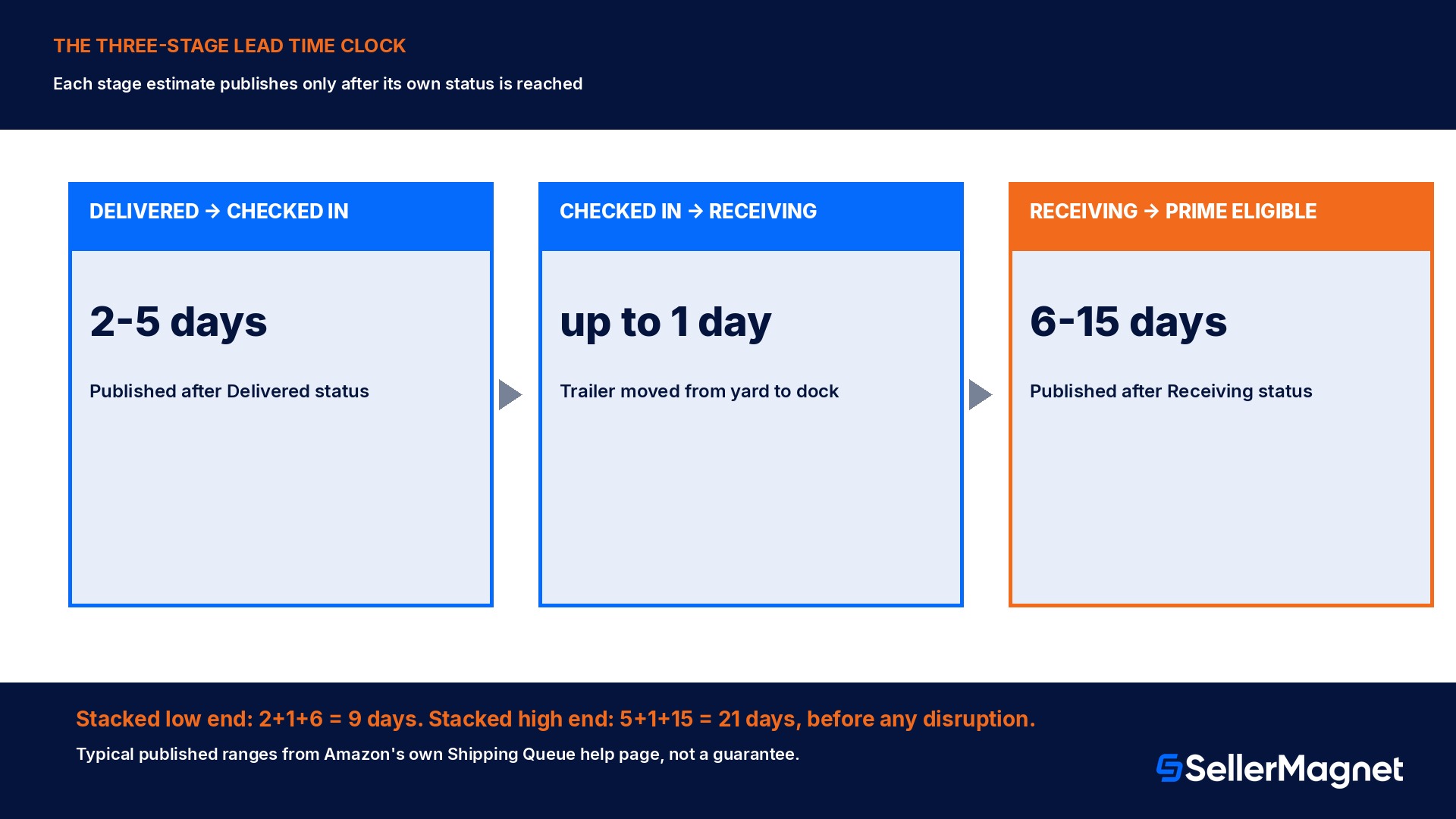
Amazon's Shipping Queue help page breaks the estimate into three named stages, each with its own typical duration, rather than a single number for the whole journey, and reading them as three separate clocks rather than one total explains most of the confusion sellers report about the feature. The first stage, Delivered to Checked in, typically takes 2 to 5 days once the carrier has dropped the shipment at the fulfillment center's facility yard, based on current processing times at that specific ship facility; this check-in estimate is published only after the shipment enters Delivered status, not before. The second stage, Checked in to Receiving, typically takes up to 1 additional day once the trailer has been moved from the yard to the dock door and is ready to be unloaded. The third and by far the widest stage, Receiving to Prime eligibility, typically takes 6 to 15 days once units have been scanned in at the first Amazon facility, because units become available for sale as soon as they are received, but Prime eligibility only follows once they have been transferred to, and stowed at, their final fulfillment centers; this Prime-eligibility estimate is published only after the shipment enters Receiving status. Stacking the low end of each published range (2 plus 1 plus 6) gives 9 days from Delivered to Prime eligible, and stacking the high end (5 plus 1 plus 15) gives 21 days, which is the real width Amazon's own per-stage numbers already imply before any weather or peak-season disruption is added on top.
A worked example: Amazon's own January-versus-peak illustration
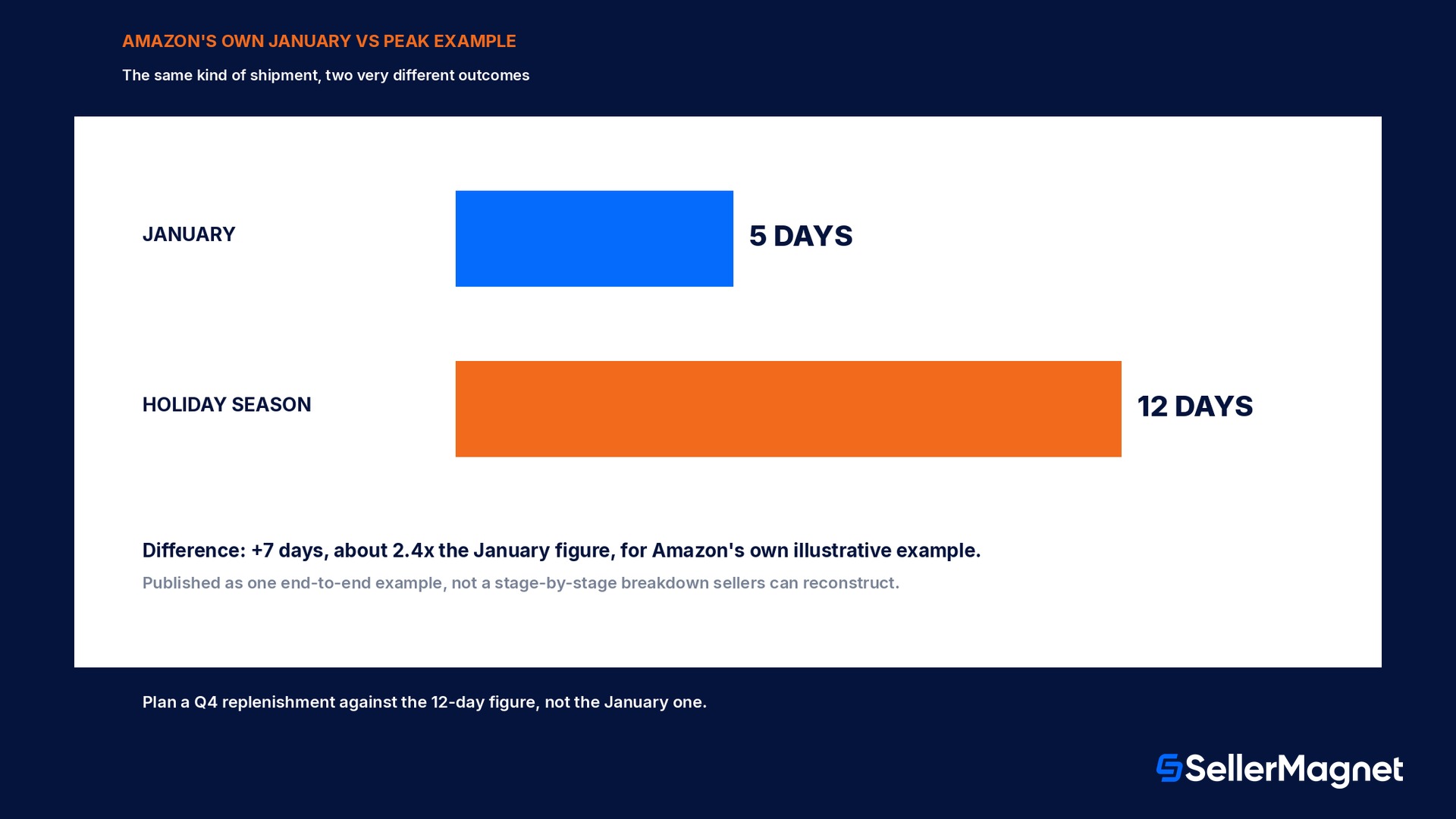
Amazon's own rollout email uses a single worked example to make the point that the estimate is personalized by destination and time of year rather than a fixed number: "a shipment that takes five days in January may take 12 days during the holiday season." Taken at face value, that is 7 additional days for what the email frames as the same kind of shipment to the same kind of destination. Amazon does not publish separately which of the three stages above absorbs most of that extra 7 days, so the honest reading is that the 5-day and 12-day figures are illustrative end-to-end examples from Amazon itself, not a breakdown a seller can reconstruct stage by stage; a seller planning an actual holiday-season replenishment should treat the 12-day figure as the more realistic planning assumption for that specific shipment rather than carrying a January-based expectation into Q4 and then reading the slower result as a problem with the shipment.
The delay scenarios Amazon names explicitly, and what "Longer processing" means
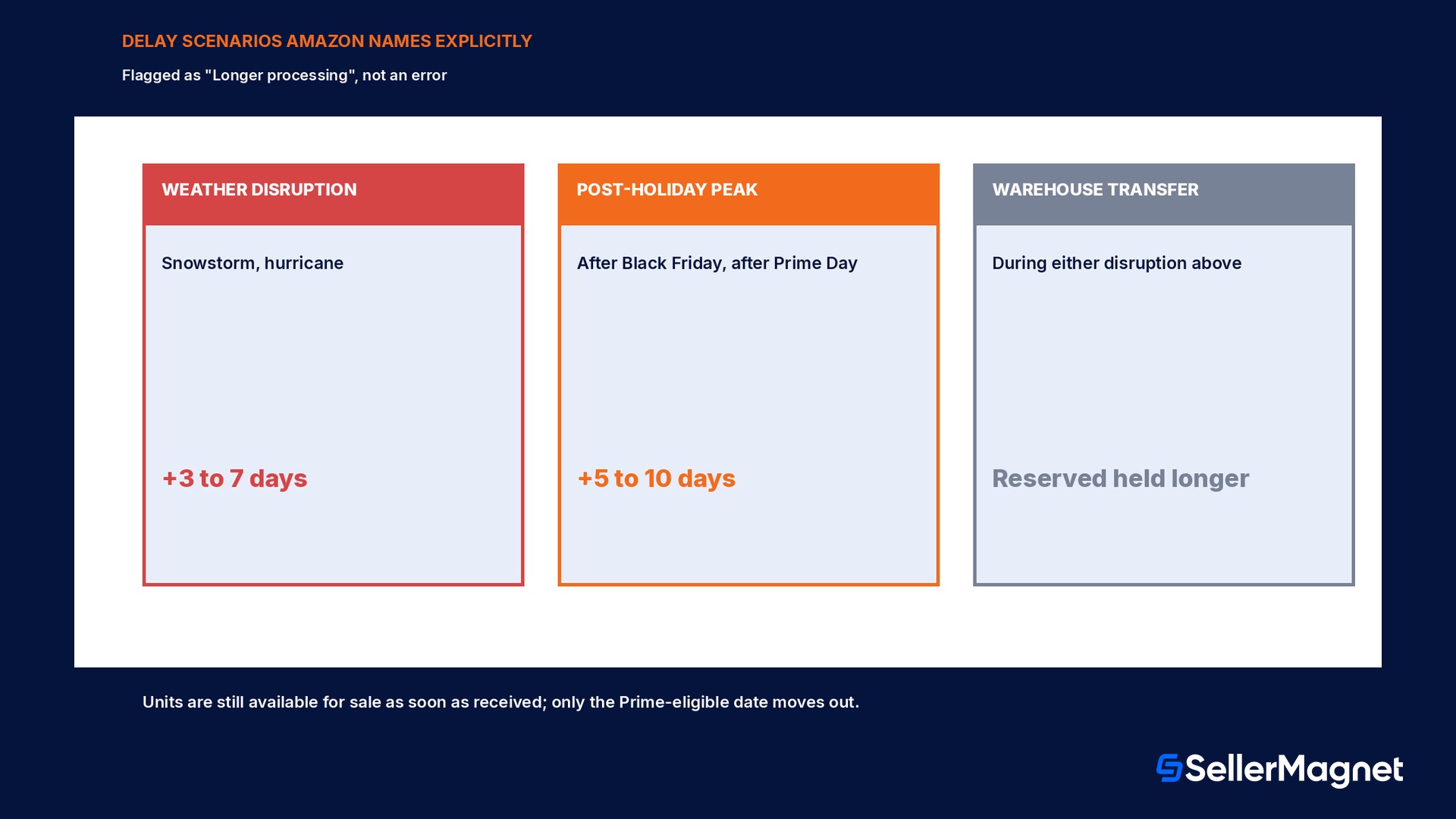
Beyond the personalized date, Amazon's help page lists named disruption scenarios and attaches a day range to each one, rather than leaving "it's just slow right now" unexplained. A weather-related disruption, named examples being a snowstorm or a hurricane, can extend processing by an additional 3 to 7 days beyond the standard timeline for that shipment. A post-holiday peak period, named examples being the period after Black Friday or after Prime Day, can extend processing by an additional 5 to 10 days due to the sheer volume moving through fulfillment centers at the same time. A warehouse transfer happening during either kind of disruption can also leave units sitting in Reserved status longer than usual while they wait for transfer to their final fulfillment center. When any of this happens, Amazon does not leave the shipment showing a stale or broken date; the status instead displays as "Longer processing" with an updated estimated timeline attached, and Amazon states plainly that units still become available for sale as soon as they are received at the first facility even while this is happening, with only the Prime-eligibility date pushed out by the transfer delay.
Disruption
Extra time added
Weather disruption (snowstorm, hurricane)
+3 to 7 days
Post-holiday peak period (after Black Friday, after Prime Day)
+5 to 10 days
Warehouse transfer during either disruption
Reserved status held longer, no fixed added figure published
When has a shipment actually gone wrong, versus when is it just slow?
Amazon's own help page gives two specific, checkable thresholds for when a delayed shipment is worth escalating, rather than leaving that judgment to a seller's gut feeling about how long is too long. The first threshold is a shipment that exceeds its own updated estimated timeline by more than 5 business days; this is the UPDATED timeline, meaning the one shown after a "Longer processing" flag has already adjusted for a known disruption, not the original estimate from before the disruption was flagged. The second threshold is a shipment status that has not updated at all for more than 10 days after delivery, which points at a tracking or sync problem rather than a normal processing delay. Both thresholds come with the same caveat attached directly below them: Amazon cannot manually expedite receiving for any shipment, during a disruption period or otherwise, and most delays resolve on their own once normal processing capacity returns, so contacting support changes the information a seller has about the shipment, not the actual processing speed. A separate, narrower case the same help page calls out is a shipment that never shows as Delivered at all, which can happen when the shipment is missing a tracking ID or the carrier's signals never sync with the fulfillment center; in that specific case, Amazon states it is unable to provide an estimated check-in time at all, which is a different problem from a shipment that has a date and is simply running past it.
Amazon cannot manually expedite receiving
This applies even once a shipment has passed both contact-support thresholds above. A support case changes what a seller knows about a shipment's status; it does not move the shipment through the queue any faster.
Why do some shipments never show a Delivered status, or an estimate, at all?
The lead-time clock above only starts once a shipment reaches Delivered status, and Amazon's own shipment status definitions explain the two paths that actually trigger that status change, which matters because a shipment that never reaches Delivered will never show a check-in estimate either. If a seller uses the Amazon Partnered Carrier program or Amazon Global Logistics, the shipment's status updates automatically once Amazon has received tracking information from that carrier, with no manual step needed from the seller at all. If the seller is using a non-partnered carrier instead, the shipment only updates to Shipped once the seller has entered valid tracking information themselves in the Carrier updates tab of the Shipment summary page, or in the Tracking details step of the Send to Amazon workflow; Amazon's help page states plainly that it is unable to update a shipment to Delivered status at all if a tracking ID was never provided, regardless of whether the truck physically arrived. The older Mark as shipped button sellers may remember from an earlier version of Seller Central has been removed entirely for this reason; shipment status is now driven only by tracking information, which makes entering that tracking ID correctly, and as early as possible, a direct precondition for the estimate ever appearing rather than a separate administrative chore.
Why a shipment eventually stops tracking even if it is not fully received
A shipment does not track its lead-time estimate forever. Amazon's help page defines a Closed status that triggers under either of two conditions, whichever comes first: Amazon has confirmed all units received in the shipment against the quantity the seller originally shipped, or the shipment has simply been open for more than 45 days for a domestic shipment, or more than 75 days for an international one, counted from the shipment's creation date. Once a shipment reaches Closed, Amazon will still continue receiving units against it if a dock slot was already confirmed before the deadline, but the seller cannot ship any additional units against that same shipment ID afterward; practically, this is why Amazon's own guidance is to send the full planned quantity for a shipment as soon as possible after creating it, rather than trickling additional units in over several weeks and assuming the same shipment record will stay open to receive them. For a seller tracking a slow shipment against the 9-to-21-day Prime-eligibility window described above, the 45-or-75-day Closed threshold is a useful backstop fact to know, since it marks the point past which the shipment record itself stops being a meaningful thing to keep checking, separate from whatever units inside it have or have not sold through yet.
Where can you actually find the number?
The estimate lives on the Shipment summary page for a specific shipment, reached from the Shipping Queue (Inventory menu, then Shipments in Seller Central), specifically on the Shipment events tab that tracks the shipment step by step from creation to closing. A seller will not see a Prime-eligibility date the moment a shipment is created; the check-in estimate appears only after the shipment's status changes to Delivered, and the Prime-eligibility estimate appears only after its status changes to Receiving, so checking back at those two specific status changes, rather than expecting a complete timeline on day one, is the practical way to actually use the feature.
Common mistakes sellers make with the new estimate
The most common mistake is reading a single shipment's slower-than-usual result as proof something is broken, when Amazon's own published ranges (2 to 5 days, up to 1 day, 6 to 15 days) are wide enough that a shipment landing at the slow end of every stage is still inside normal, not disrupted, processing. The second is carrying a January-level expectation into Q4 planning and then treating the resulting 12-day outcome from Amazon's own example as a failure rather than the seasonally expected number. The third is contacting support the moment a shipment looks slow rather than checking whether it has actually crossed one of the two named thresholds (more than 5 business days past the UPDATED estimate, or no status change for more than 10 days), since Amazon's own answer either way is the same, it cannot manually expedite receiving. The fourth is assuming every FBA shipment gets an estimate at all; a shipment that is not a sortable direct-to-FBA, AWD-to-FBA, or GWD-to-FBA shipment to the United States simply will not show one, which is a scope gap, not a bug to report.
What SellerMagnet does and does not cover here
SellerMagnet does not create or control Amazon's own estimated lead times; they are a Seller Central feature that lives entirely inside Amazon's own Shipment summary pages, and the day ranges and disruption rules on this page come directly from Amazon's own help documentation. Where SellerMagnet is genuinely useful is the planning step that sits right before a shipment is even created: the Inventory forecast shows days of stock left, an expected stockout date, and units to send, calculated from a seller's own real sales velocity over a lookback window from 7 to 365 days. Lining that stockout date up against Amazon's own published lead-time ranges, including the wider peak-season figures from this page, is what actually turns a 6-to-15-day receiving window (or a 12-day peak-season outcome) into a concrete "send it by this date" decision, rather than reacting to a slow-looking shipment after it is already in transit.
A seller specifically managing how much inventory Amazon will even accept into a fulfillment center in the first place, a separate constraint from how long an accepted shipment takes to process, should read the FBA Capacity Manager guide instead.
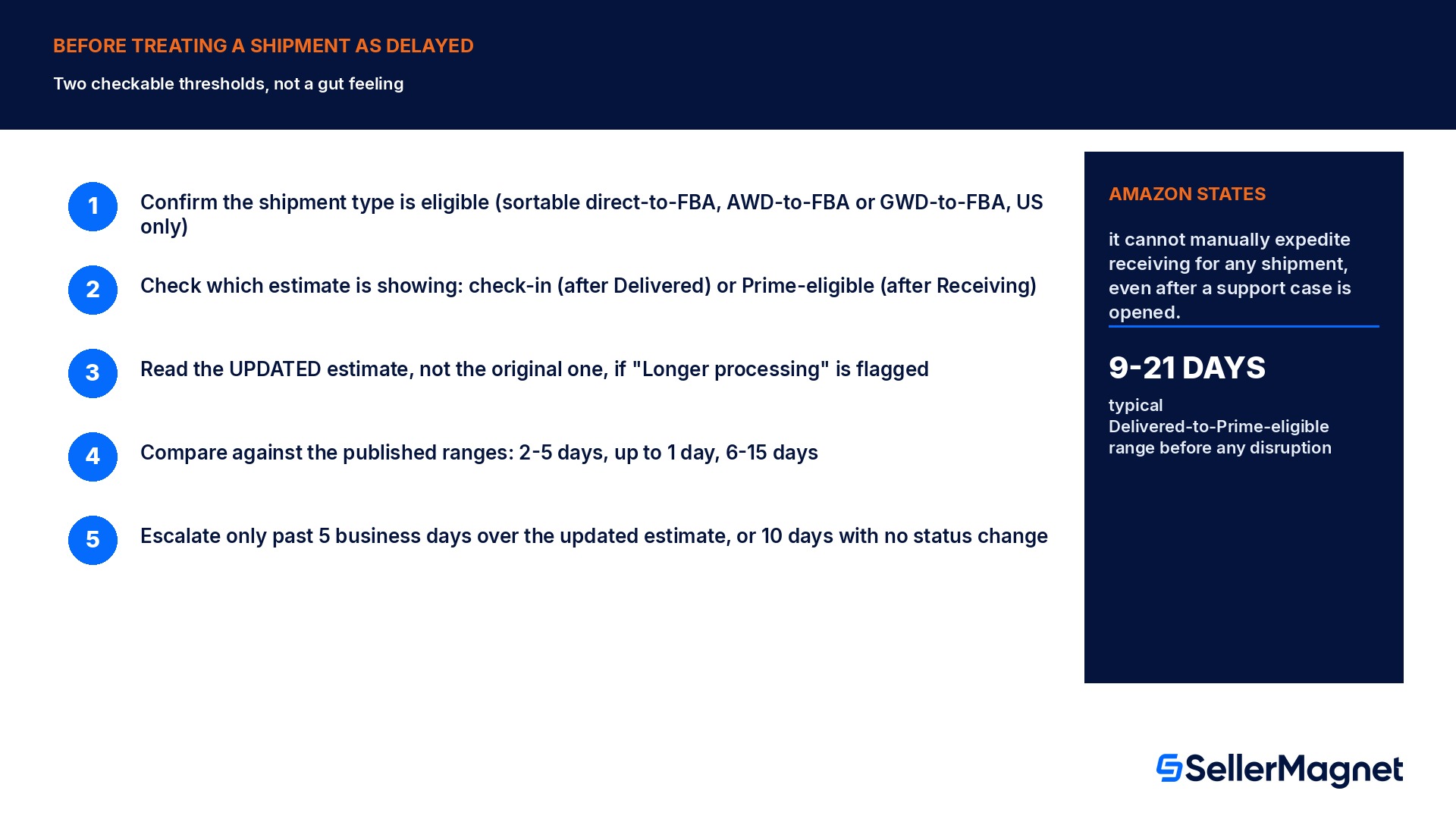
Checklist before treating a shipment as delayed
How to read an FBA estimated lead time correctly
Confirm the shipment type is actually eligible - Only sortable direct-to-FBA, AWD-to-FBA and GWD-to-FBA shipments to the United States get an estimate at all.
Check which of the two estimates is showing - A check-in estimate appears after Delivered status; a Prime-eligibility estimate appears only after Receiving status, not before.
Read the UPDATED estimate, not the original one - A "Longer processing" flag means the timeline shown has already adjusted for a known disruption.
Compare against the published stage ranges first - 2 to 5 days Delivered to Checked in, up to 1 day Checked in to Receiving, 6 to 15 days Receiving to Prime eligible.
Only escalate past one of the two named thresholds - More than 5 business days past the updated estimate, or no status change for more than 10 days after delivery.
Plan the NEXT shipment around the slow one, not the other way round - Line up a stockout date against the realistic peak-season range so the next send goes out early enough.
What is Amazon's FBA estimated lead time feature?
A number shown on the Manage Shipments page, rolling out gradually from November 2026, that estimates how many days an eligible FBA shipment will take to be received and then become Prime eligible. It is personalized by destination and time of year, and Amazon states plainly that it reflects typical timelines, not a guarantee.
Which shipments actually get an estimated lead time?
Only three types, and only to the United States: sortable shipments sent directly to FBA, shipments replenished from Amazon Warehousing and Distribution (AWD) to FBA, and shipments replenished from Global Warehousing and Distribution (GWD) to FBA. A non-sortable or international shipment will not show one at all.
How long does it typically take for a shipment to become Prime eligible?
Amazon publishes three stage ranges: 2 to 5 days from Delivered to Checked in, up to 1 additional day from Checked in to Receiving, and 6 to 15 days from Receiving to Prime eligible. Stacked together, that is roughly 9 to 21 days end to end before any weather or peak-season disruption.
Why did my shipment that normally takes 5 days take 12 days this time?
That exact comparison is Amazon's own rollout example: a shipment that takes 5 days in January may take 12 days during the holiday season, about 7 extra days. Post-holiday peak periods alone can add 5 to 10 days on top of the normal range due to the volume moving through fulfillment centers.
When should I actually contact Seller Support about a slow shipment?
Only once the shipment exceeds its own UPDATED estimated timeline by more than 5 business days, or its status has not changed at all for more than 10 days after delivery. Amazon states it cannot manually expedite receiving for any shipment even after a case is opened, so this changes information, not speed.
Can I get Amazon to speed up a shipment stuck in Receiving?
No. Amazon's own help page states directly that it cannot manually expedite the receiving progress for any shipment, since units may need to be transferred to other fulfillment centers closer to customers first. Most delays resolve on their own once normal processing capacity returns.
Where exactly do I find the estimated lead time?
On the Shipment summary page for a specific shipment, under the Shipment events tab, reached from the Shipping Queue (Inventory menu, then Shipments). The check-in estimate appears only after the shipment reaches Delivered status; the Prime-eligibility estimate appears only after it reaches Receiving status.
My shipment never shows as Delivered at all. What does that mean?
Usually a missing tracking ID, or a sync gap between the carrier and the fulfillment center. Amazon states it is unable to provide an estimated check-in time in that specific case, which is a different, earlier problem than a shipment that has a date and is simply running past it.
Stop Juggling Tools. SellerMagnet Combines Everything You Need.