Amazon FBA Capacity Manager 2026: How Bidding for Extra Fulfillment Center Space Really Works
R
RenéFreelance Amazon Editor
|
16 min read
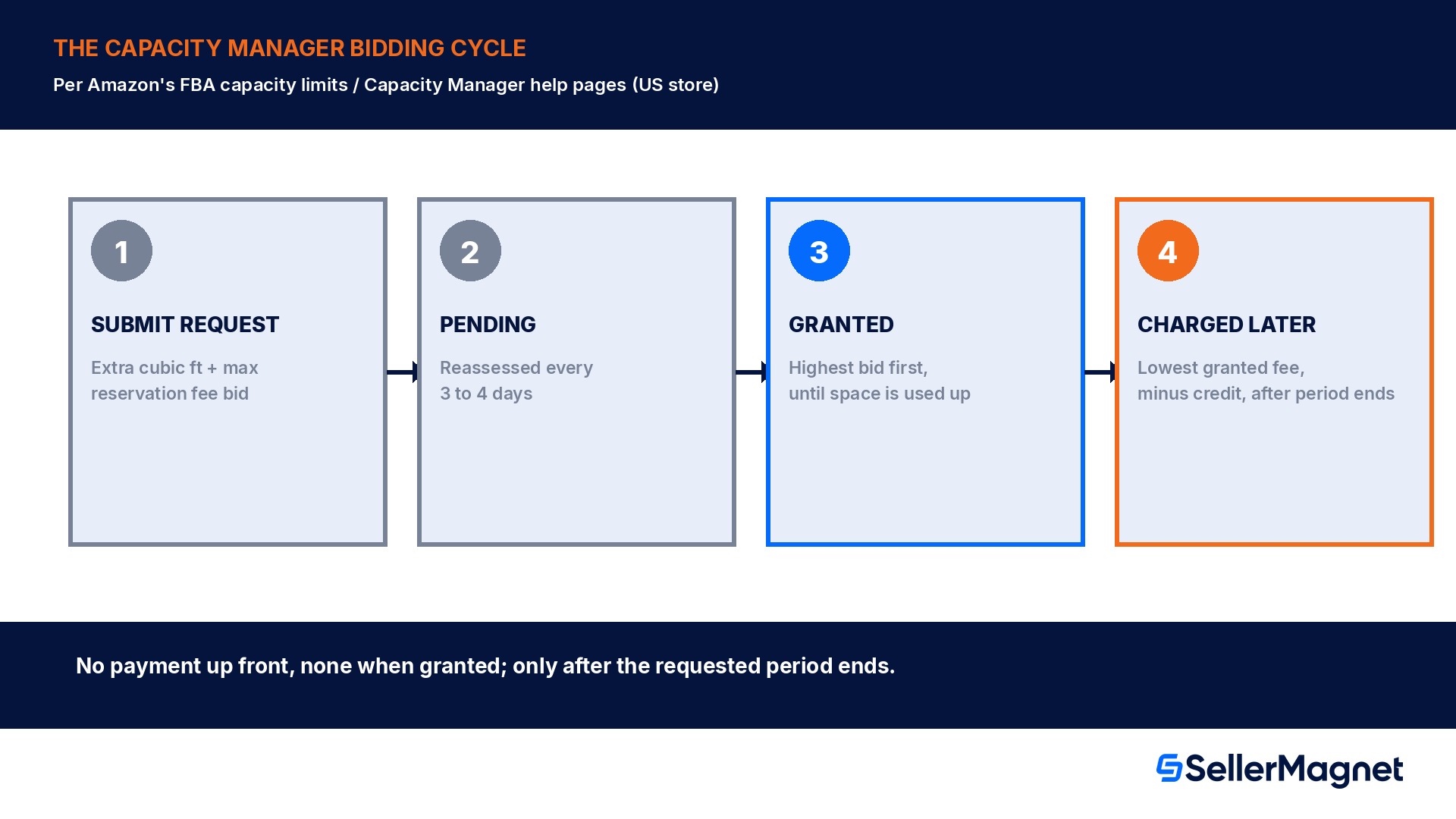
Amazon's "FBA capacity limits" help page (US store) explains Capacity Manager as the tool a seller uses to request more FBA storage space than their current capacity limit allows, by bidding a reservation fee for it. It works nothing like a normal purchase: there is no price list, no upfront payment, and no guaranteed yes. A seller names how much extra capacity they want, for which future period, and the maximum reservation fee they would pay for it; Amazon then assesses fulfillment center capacity regularly, about every 3 to 4 days according to the US help page, and grants pending requests starting with the highest reservation fee per cubic foot and working down until the available capacity for that period is fully allocated. Granted sellers do not necessarily pay the fee they bid: everyone granted in the same week pays the lowest reservation fee among that week's granted requests, and whatever balance remains after the period can be offset by a performance credit worth $0.15 for every dollar of FBA sales generated using the extra space. This guide works from Amazon's own Capacity Manager and FBA capacity limits help pages, cross-referenced against the Q4 2026 peak readiness playbook that actively points sellers at Capacity Manager for holiday-season space right now, to walk through exactly how the bidding, grants and charges work, and how to size a request before November and December sales decide the answer for you.
Amazon's Capacity Manager lets a seller request extra FBA storage capacity for a future period by bidding a maximum reservation fee per cubic foot. Amazon grants pending requests roughly every 3 to 4 days, highest reservation fee first, and charges the lowest fee granted that week, minus a $0.15-per-dollar performance credit earned on FBA sales made with the extra space, only after the period ends. No payment is required up front.
Capacity Manager vs your normal capacity limit
Every FBA seller already has a capacity limit, an estimated or confirmed ceiling on how many units of each storage type (standard-size, oversize, apparel, and so on) they can have on hand plus in transit to Amazon's fulfillment centers at once; sending more than that limit blocks new FBA shipments. The FBA capacity limits guide covers how that base limit is set and announced. Capacity Manager is a separate, voluntary tool layered on top of that limit: it is for a seller who already has a capacity limit (confirmed or estimated) for a future period and wants more room for products they expect to sell quickly, generally those that would otherwise sell out in under 4 weeks. Nothing about Capacity Manager changes the base limit calculation; it only lets a seller buy a chance at extra headroom, on top of whatever Amazon has already announced, for a price the seller sets themselves rather than one Amazon publishes. A request can only be created for a future period that already has a confirmed or estimated limit announced; it cannot be submitted retroactively for the current period.
How the bidding mechanic actually works
A Capacity Manager request has 2 numbers in it: how much additional capacity the seller wants, for which storage type and which future period, in monthly increments; and the maximum reservation fee per cubic foot the seller is willing to pay for that capacity if it becomes available. The maximum amount that can be requested, in a given storage type and period, varies with how much space is actually available in Amazon's network for that type and period, so the ceiling is not fixed and is not published in advance. No upfront payment accompanies the request; it sits in pending status until Amazon either grants or declines it. Amazon states its own criterion for granting requests is "completely objective": fulfillment center capacity is assessed regularly, about every 3 to 4 days on the US help page, and pending requests are granted starting with whichever has the highest reservation fee per cubic foot and continuing down the list in descending order of bid until all the capacity allocated for that period is used up. A request that does not rank high enough compared with the others competing for the same period and storage type stays pending, and if Amazon cannot grant it before the expiration date the seller sets when creating the request, it simply stops being considered.
You may pay less than you bid, never more
If your request is granted, the reservation fee you actually owe is the lowest reservation fee among every request granted that same week, for that storage type and period, not necessarily the number you originally entered. Amazon's own "lowest reservation fee guarantee" can also reduce an already-granted fee later. Your bid can only cap what you might pay, never set it in stone above that cap.
When you are actually charged, and what early access means
Being granted a request costs nothing at the moment it happens; Amazon's help page is explicit that "no reservation fee charges will be applied to your account at the time your request is granted." The charge, net of any performance credit earned, lands after the requested period ends; Amazon's own example states that additional capacity granted for 1 to 31 October would see any resulting reservation fee charged in early November. A granted request also comes with a practical logistics benefit: the extra capacity may be available up to 1 month before the requested period actually starts, so a seller can create shipments and get inventory physically positioned in Amazon's network in time to use it the moment the period opens, rather than having the capacity sit unused for the first days or weeks. Where a seller holds granted increases for 2 adjacent periods of different sizes, for example 100 cubic feet for September and 500 cubic feet for October, Amazon gives access to the greater of the two figures during the earlier period, so in that example the seller gets the full 500 cubic feet of early access during September, not only the September-specific 100.
Performance credits: how the $0.15-per-dollar offset is actually calculated
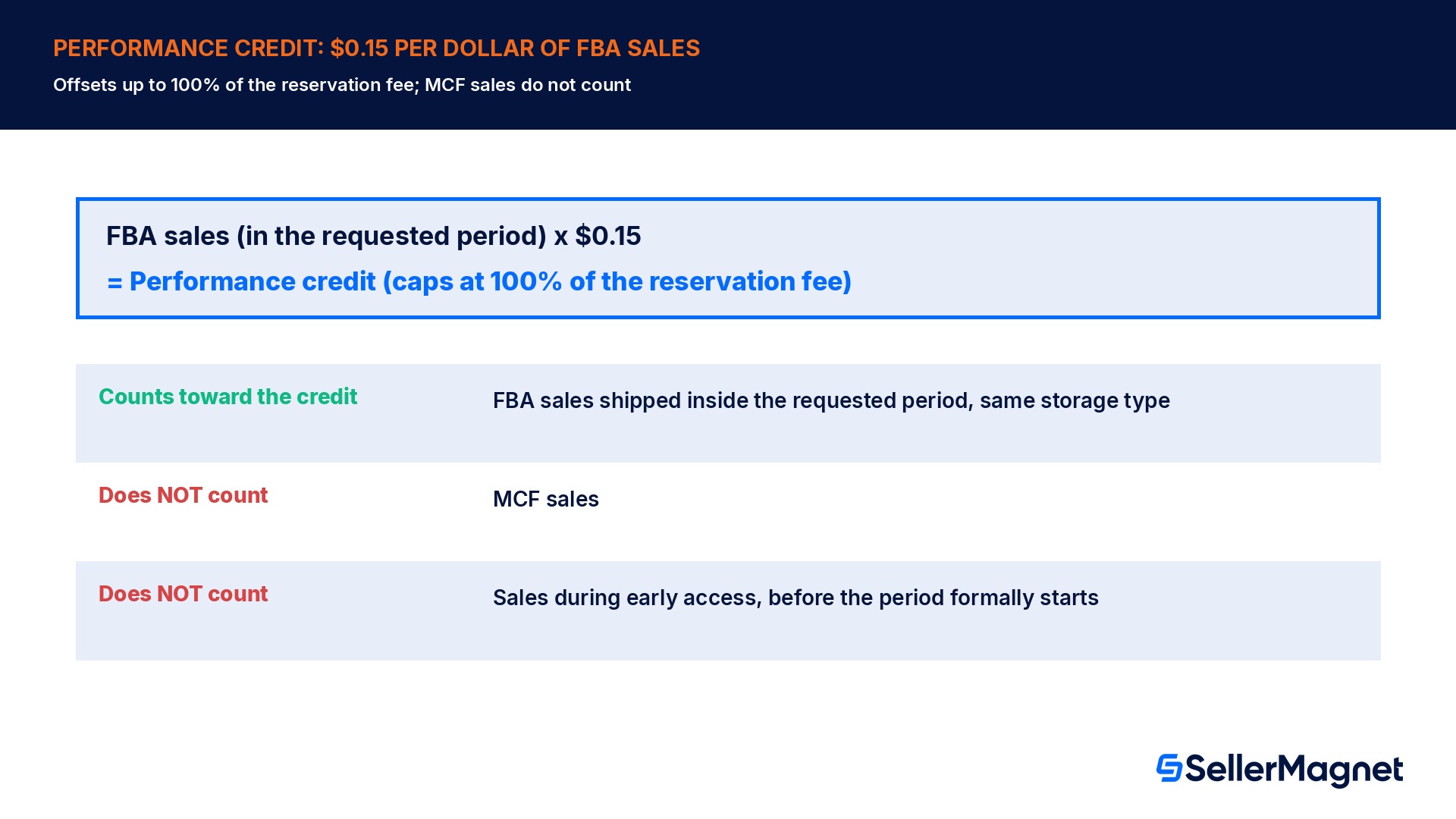
Every seller whose request is granted and who then generates sales using that extra capacity earns a performance credit, calculated at a fixed rate of $0.15 for every dollar of qualifying sales. Amazon designed the credit specifically so that productive use of the extra space can offset up to 100% of the reservation fee, down to paying nothing at all for the extra capacity if sales are strong enough. The calculation only counts FBA sales, generated on units shipped between the start and end date of the requested period, for ASINs in the storage type the increase applies to (for example, standard-size storage), and it is prorated by the percentage of a seller's total capacity limit that the additional capacity represents; MCF sales are explicitly excluded from the credit calculation even though MCF capacity shows up elsewhere in a seller's Capacity Monitor. Granted early-access capacity used before the requested period formally begins is also excluded from the credit calculation for that earlier window. In short, the credit rewards selling through the extra space during the exact period it was granted for, not simply having the capacity on hand.
What you cannot request, and the one hard exclusion
Capacity Manager works on top of a seller's existing capacity limit, so the same prerequisite applies: a request can only be created for a storage type and period that already has a confirmed or estimated limit announced by Amazon; there is no path to request capacity for a storage type with no base limit yet. One category is excluded outright rather than merely capped: Amazon's help page states plainly that "the storage types for Dangerous Goods are excluded in Capacity Manager, as you cannot request additional space for Dangerous Goods (Flammable/Aerosol) with this tool." Beyond that, the request can be cancelled at any point while it is still in pending status, and resubmitted with a higher reservation fee to improve its odds, which is the main lever a seller actually controls once a request has been sitting in pending without being granted.
Checking and managing an open request
Amazon recommends checking pending Capacity Manager requests on a weekly basis and comparing the maximum reservation fee per cubic foot submitted against the reservation fees of requests that have already been granted for the same period and storage type, since that comparison is the clearest signal of whether a given bid is realistic. A request's status moves from pending to either granted, with an email notification and an updated, higher limit visible in the Capacity Monitor, or it simply remains pending until the seller-set request expiration date passes, at which point it stops being considered without further action. A granted limit increase does not shrink if Amazon's own estimated capacity limit for that period later falls; it is additive and holds for the full period requested. If the estimated capacity limit instead rises on its own, Amazon reduces the Capacity-Manager-granted portion by the amount of that increase, so the seller's total reserved capacity stays the same rather than stacking on top of a now-larger base limit, or cancels the request outright if the base-limit increase is larger than what was granted.
Worked example: bidding, the lowest-fee rule, and the credit payback
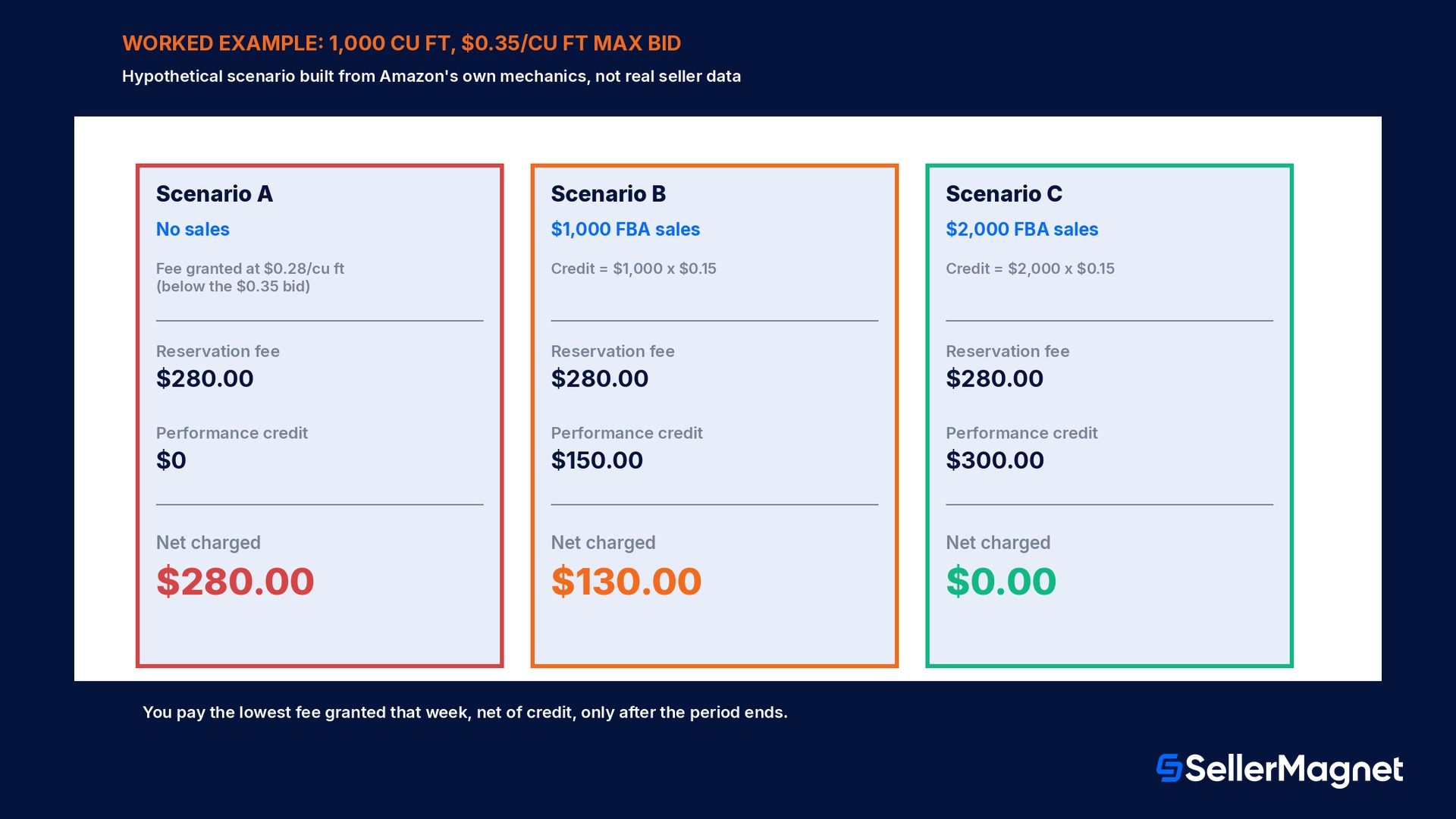
The figures below are a hypothetical example built directly from the mechanics on Amazon's own help pages, not real seller data, to show how the reservation fee, the lowest-granted-fee rule and the performance credit interact across 3 outcomes for the same request. A seller requests 1,000 extra cubic feet of standard-size storage for a 2-month holiday period and sets a maximum reservation fee of $0.35 per cubic foot for that period. Scenario A: Amazon grants the request, and that week's lowest granted reservation fee for the same storage type and period turns out to be $0.28 per cubic foot, below the seller's $0.35 bid; the seller's fee resets down to $0.28, for a maximum possible charge of 1,000 x $0.28 = $280.00 if no sales are made using the extra space. Scenario B: the seller generates $1,000 of qualifying FBA sales using the extra capacity during the period; the performance credit is $1,000 x $0.15 = $150.00, leaving a balance of $280.00 - $150.00 = $130.00 charged after the period ends. Scenario C: the seller generates $2,000 of qualifying FBA sales during the period; the credit is $2,000 x $0.15 = $300.00, which exceeds the $280.00 fee, so the reservation fee is fully offset and nothing is charged for the extra capacity at all.
To size a real request, 3 inputs matter most: the extra cubic footage actually needed for the products expected to sell out early, the maximum reservation fee the seller is genuinely willing to risk paying if sales underperform, and a realistic estimate of how much FBA revenue that extra inventory will generate inside the exact requested period, since only sales inside that window count toward the credit. A seller who bids high to improve the odds of being granted, but then cannot sell through the extra space inside the period, pays close to their full granted fee with no credit to offset it; a seller who undersizes the request avoids that risk but may simply run out of stock mid-period instead.
Capacity Manager vs. AWD: 2 different answers to "I need more room"
Capacity Manager and Amazon Warehousing and Distribution (AWD) solve a similar problem, extra room for inventory, in structurally different ways, and a seller planning for peak season benefits from knowing which one actually fits. Capacity Manager buys more headroom inside standard FBA itself: the inventory still sits in regular FBA fulfillment centers, counts against the same capacity limit (plus whatever extra was granted), and the only new cost is the reservation fee, net of the performance credit, charged after the period ends. AWD instead moves inventory into a separate bulk, long-term storage network with its own fee schedule (storage, inbound processing, outbound processing and transportation, billed continuously, not as a one-off bid), and automatically trickles stock into FBA fulfillment centers as it is needed, rather than requiring the seller to already have it inside standard FBA capacity. The AWD vs FBA US cost guide covers how AWD's own fee schedule compares to FBA storage in detail. In practice, Capacity Manager suits a seller who already has inventory flowing through standard FBA and needs a short, targeted amount of extra space for specific fast-selling SKUs during one or two months; AWD suits a seller who wants to hold a larger bulk buffer further in advance and let Amazon manage the drip-feed into FBA over a longer stretch. The two are not mutually exclusive: a seller can use AWD to hold the bulk of a peak-season buffer while still bidding through Capacity Manager for incremental standard-FBA headroom on the specific ASINs expected to sell out fastest.
Mistakes sellers make with Capacity Manager
Assuming the bid is the final price. The amount actually charged is the lowest reservation fee granted that week across all sellers for the same storage type and period, which can be well below the original bid; bidding high mainly improves the odds of being granted, it does not set the final fee.
Expecting an immediate yes or no. Amazon reassesses capacity roughly every 3 to 4 days, not instantly on submission; a request can sit in pending status for days before it is granted, declined by expiration, or never addressed if it never ranks high enough.
Thinking a payment is due when the request is granted. No reservation fee charge applies at the moment of a grant; the charge, net of performance credits, only lands after the requested period ends.
Forgetting MCF sales do not count toward the credit. Only FBA sales on units shipped inside the requested period, for ASINs in the relevant storage type, earn the $0.15-per-dollar performance credit; MCF sales and early-access-period sales before the period formally starts are excluded.
Trying to use it for Dangerous Goods. Dangerous Goods (Flammable/Aerosol) storage types are excluded from Capacity Manager entirely; there is no bid high enough to request that capacity through this tool.
Not comparing bids against already-granted fees. Amazon recommends a weekly check of pending requests against the reservation fees of requests already granted for the same period; skipping that check means flying blind on whether a bid is realistic.
Over-bidding for inventory that will not sell through in the window. The performance credit only offsets the fee if sales actually happen inside the requested period; a request granted for stock that moves slowly leaves the seller paying close to the full granted fee with nothing to offset it.
Leaving early access unused. Granted capacity can be available up to a month before the period starts specifically so inventory can be pre-positioned; a shipment that arrives only after the period begins wastes that early-access window.
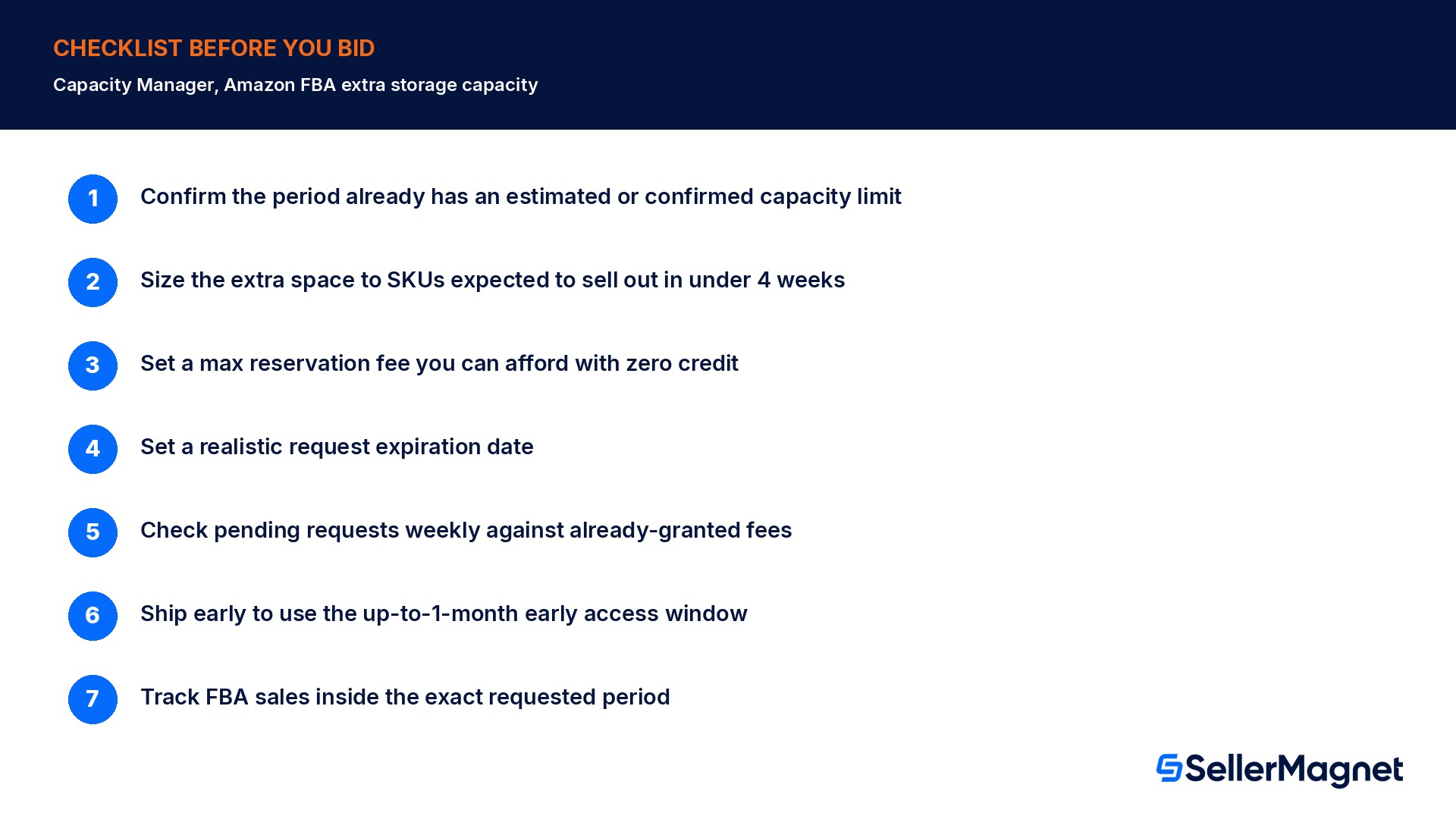
Checklist before you submit a Capacity Manager request
How to request extra FBA capacity through Capacity Manager
Confirm the period already has an estimated or confirmed capacity limit - Capacity Manager only works on top of a limit Amazon has already announced for that future period and storage type; it has no path to request space with no base limit.
Size the extra cubic footage to fast-selling SKUs only - Amazon designs Capacity Manager for products expected to sell out in under 4 weeks; request extra space for that inventory, not as a general buffer.
Set a maximum reservation fee you can actually afford if sales underperform - You may pay the lowest fee granted that week, which can be below your bid, but never above it; budget for paying the full amount you bid with zero credit.
Set a realistic request expiration date - If Amazon cannot grant the request before the expiration date you set, it stops being considered with no charge.
Check pending requests weekly against already-granted fees - Compare your maximum reservation fee per cubic foot with the fees of requests already granted for the same storage type and period to judge whether your bid is realistic.
Ship early to use the early-access window - A granted request can be available up to a month before the period starts; create shipments early enough to have inventory positioned in time.
Track FBA sales inside the exact requested period - Only FBA sales on units shipped between the period's start and end date count toward the $0.15-per-dollar performance credit; MCF sales do not.
Where SellerMagnet fits before you bid
Amazon's own Capacity Manager page is where a request is actually created and tracked. SellerMagnet's inventory forecast sits next to that decision: it shows days of stock left, expected stockout date and units to send per ASIN from real sales velocity (lookback 7 to 365 days), which is the input that actually tells a seller whether a product is on track to sell out in under 4 weeks, the exact threshold Amazon designs Capacity Manager around, before committing to a reservation fee bid.
Once a request is granted and the period starts, the open question becomes whether sales inside that window will generate enough performance credit to offset the fee. SellerMagnet's Analytics Dashboard tracks net profit per order, product and marketplace after Amazon fees, shipping, COGS, VAT and refunds, so a seller can watch FBA sales accumulate against the requested period in close to real time, rather than discovering the final reservation fee balance only after the period has already closed.
What exactly does Capacity Manager let me do?
It lets you request additional FBA storage capacity, beyond your existing confirmed or estimated limit, for a future period and storage type, by naming how much extra space you want and the maximum reservation fee per cubic foot you would pay for it if it is available.
Do I pay the reservation fee I bid?
Not necessarily. If your request is granted, you pay the lowest reservation fee granted that week across all sellers for the same storage type and period, which can be lower than what you bid, though never higher than your maximum.
When is the fee actually charged?
No charge applies when a request is granted. The reservation fee, minus any performance credit earned, is charged after the requested period ends; Amazon's own example charges an October-period fee in early November.
How does the performance credit work?
You earn $0.15 for every dollar of qualifying FBA sales generated on units shipped inside the requested period, for ASINs in the relevant storage type, prorated by the share of your total limit the extra capacity represents. The credit can offset up to 100% of the reservation fee. MCF sales do not count.
How often does Amazon decide which requests get granted?
Amazon assesses fulfillment center capacity regularly, about every 3 to 4 days according to the US help page, and grants pending requests starting with the highest reservation fee per cubic foot until the period's available capacity is fully allocated.
Can I get the extra capacity before the requested period starts?
Yes. A granted request's capacity may be available up to a month before the period begins, so inventory can be shipped in and positioned ahead of time; the exact rule gives early access to the greater of the current and next period's granted increase.
What can I not request through Capacity Manager?
A period and storage type with no existing confirmed or estimated capacity limit, and Dangerous Goods (Flammable/Aerosol) storage types, which are excluded from Capacity Manager entirely regardless of bid.
What happens if my request never gets granted?
It stays in pending status, with no charge, until the request expiration date you set passes, at which point it stops being considered. You can cancel a pending request at any time and resubmit it with a higher reservation fee to improve its chances.
Stop Juggling Tools. SellerMagnet Combines Everything You Need.