Amazon Voice of the Customer Dashboard 2026 Explained
R
RenéFreelance Amazon Editor
|
14 min read
Last updated: Nov 28, 2026
A seller who has never opened the Voice of the Customer page in Seller Central usually finds out it exists only when an account health warning points there. The page itself looks simple: a list of offers, each with a color next to it. What that color actually measures, and what the numbers underneath it mean, is not explained anywhere near as clearly as the warning that sent the seller looking for it. Voice of the Customer tracks a metric called the NCX rate (negative customer experience rate) for every offer with a recent sale, scores each one as Excellent, Good, Fair, Poor or Very poor against similar offers, and breaks the underlying complaints into root causes pulled from returns, refunds, customer service contacts, buyer-seller messages, seller feedback, A-to-z claims and product reviews. None of this is the same thing as the Order Defect Rate or the Account Health Rating, even though it feeds into how Amazon judges an account overall. This guide works through what CX Health actually measures, how the NCX rate, NCX Return Rate and NCX Review Rate are each calculated, where the 7 feedback sources come from, a worked example turning raw order and complaint counts into the 3 metrics, and the mistakes that waste the time a seller spends looking at the dashboard without using what it shows.
The Voice of the Customer dashboard in Amazon Seller Central scores each offer's CX Health (Excellent to Very poor) by comparing its NCX rate, the share of orders with a reported product or listing issue, against similar offers. Feedback comes from returns, refunds, customer service contacts, buyer-seller messages, seller feedback, A-to-z claims and product reviews. NCX Return Rate and NCX Review Rate are narrower versions of the same idea, counting only returns or negative reviews tied to a reported issue, and only data from after January 2024.
What does the Voice of the Customer page actually show?
The Voice of the customer page is a hub for using customer feedback to find and fix problems with specific offers, not a general account health screen. For every offer that has had a recent sale, Amazon shows a CX Health rating (Excellent, Good, Fair, Poor or Very poor, or Insufficient feedback when there is not enough customer comment data to support a rating), the comments customers left, the issues those comments point to, and suggested fixes for each one. CX Health and NCX rates are only shown on offers with a recent sale; a brand-new offer with no orders yet will not appear. If a listing is deleted from the Manage Inventory page, it can keep showing on Voice of the Customer for a few months afterward, carrying the last CX Health rating and feedback it had before deletion. The last updated date shown for each offer is the most recent date there was either an order or a negative customer experience report against it.
This is a product and listing signal, not the Account Health Rating
Voice of the Customer measures customer experience at the offer level: a specific product, from a specific seller, with its own CX Health rating. The Account Health Rating and the Order Defect Rate are account-wide performance metrics calculated separately. The two are related in that unresolved NCX issues tend to generate the returns, refunds and claims that also move Order Defect Rate, but Voice of the Customer itself is diagnostic, aimed at finding and fixing a specific product or listing problem, not a standalone policy enforcement score.
How are NCX rate, NCX Return Rate and NCX Review Rate calculated?
CX Health is determined by comparing an offer's NCX rate against those of similar offers, so the single number underneath every rating is the NCX rate itself: the number of orders for which a customer reported a product or listing issue, divided by the offer's total orders. Amazon pulls that reported-issue signal from 7 places: returns, refunds, customer service contacts, buyer-seller messaging, seller feedback, A-to-z claims, and product reviews. Two narrower metrics sit alongside the overall NCX rate for extra detail. NCX Return Rate is the number of orders returned for a reported product or listing issue, divided by total orders, counting only the subset of returns that are NCX-related, not every return the offer has. NCX Review Rate is the number of 1 and 2 star reviews that reported a product or listing issue, divided by total orders, again counting only the NCX-related subset of negative reviews, not every negative review. Both of the narrower metrics are newer than the overall NCX rate and are calculated only from feedback received after January 2024, so an offer's history before that date does not factor into either one.
Metric
What it counts
Divided by
Data window
NCX rate
Orders with any reported product or listing issue (7 sources)
Total orders
All available history
NCX Return Rate
Orders returned for a reported product or listing issue only
Total orders
Feedback received after Jan 2024 only
NCX Review Rate
1 and 2 star reviews that reported a product or listing issue only
Total orders
Feedback received after Jan 2024 only
What does each CX Health rating actually mean?
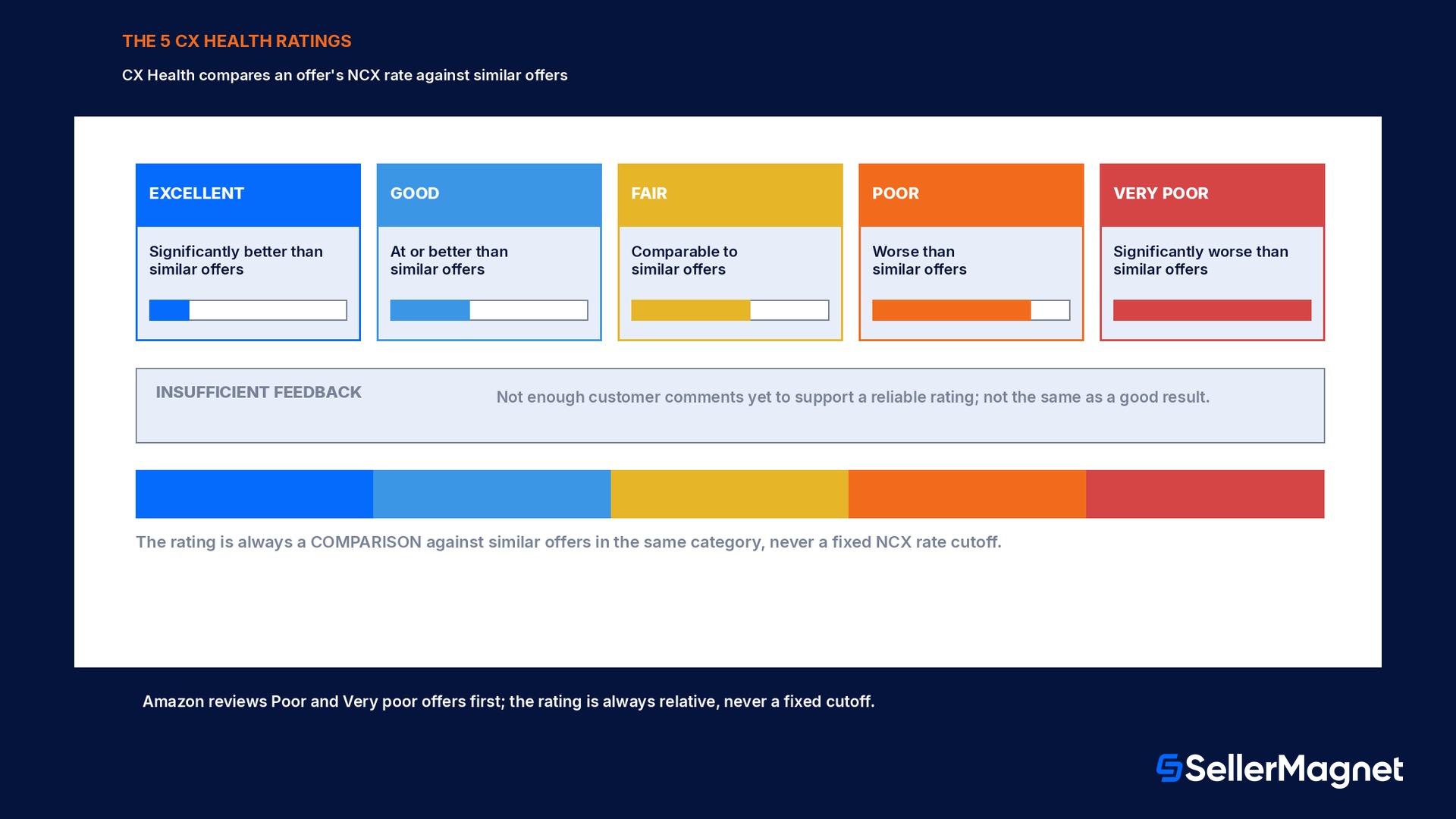
CX Health turns the NCX rate into a 5-step rating by comparing an offer against similar offers, so the same raw NCX rate can read differently depending on what is typical for that product category. Amazon's own guidance is to review every offer rated Poor or Very poor first, since those are the ones performing worse, or significantly worse, than comparable offers. An offer with too few customer comments to support a reliable comparison shows Insufficient feedback instead of a color rating, which is not the same as a good result, it simply means the sample is too small yet.
CX Health rating
What it means
Excellent
Performing significantly better than similar offers
Good
Performing well, at or better than similar offers
Fair
Performing comparably to similar offers
Poor
Performing worse than similar offers
Very poor
Performing significantly worse than similar offers
Insufficient feedback
Not enough customer comments yet to support a rating
Where do the 7 feedback sources actually come from?
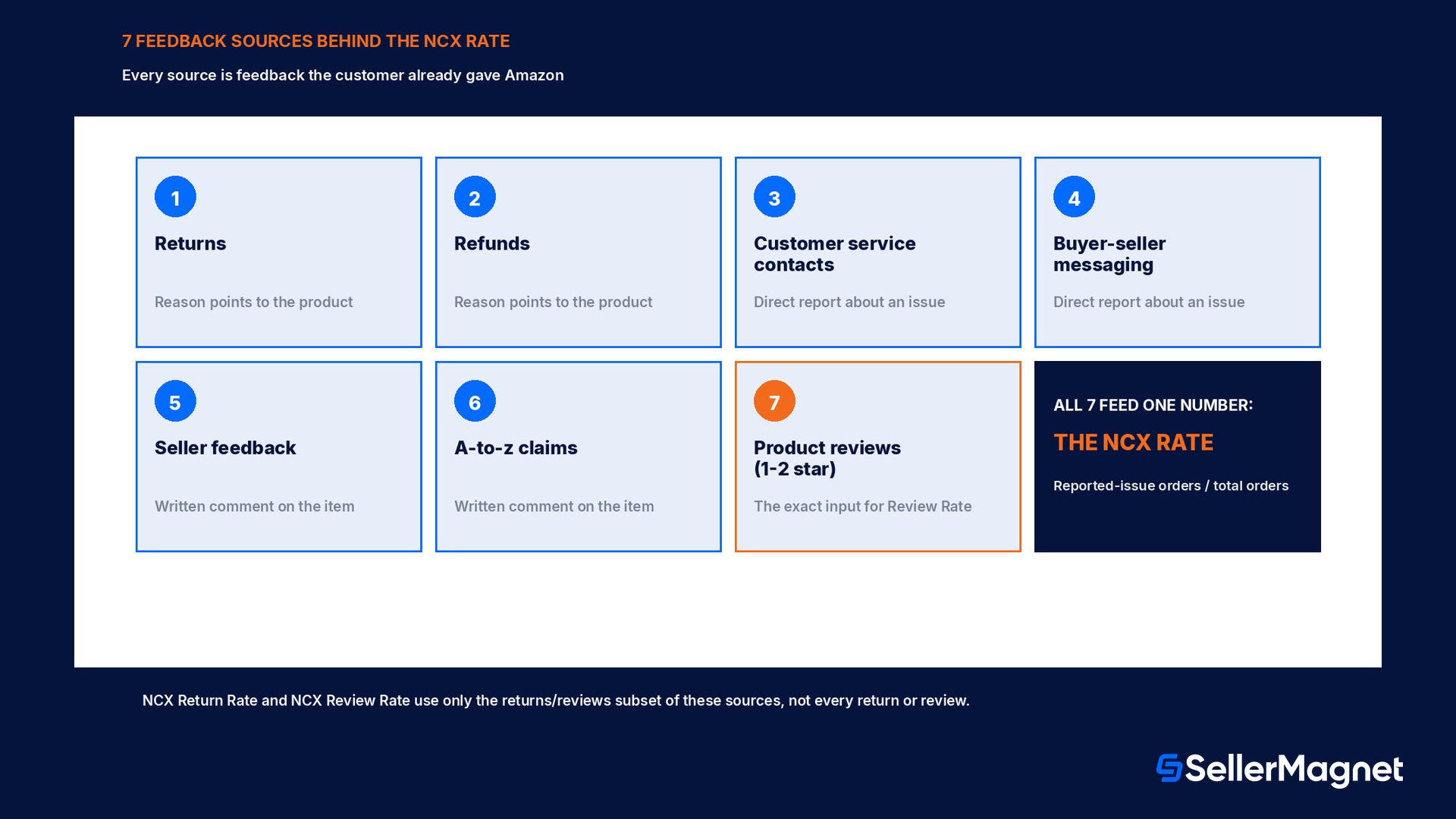
Each of the 7 inputs behind the NCX rate is feedback a customer already gave Amazon through an existing channel, not a new survey or a separate complaint form. Returns and refunds register an NCX issue when the customer's stated reason points to the product or listing itself (damaged, defective, not as described) rather than a simple change of mind. Customer service contacts and buyer-seller messages register one when a customer reaches out about a product or listing problem directly. Seller feedback and A-to-z claims register one when the written comment describes a product issue rather than a shipping or service complaint unrelated to the item itself. Product reviews register one specifically through the 1 and 2 star reviews that describe a product or listing problem, which is also the exact input behind the NCX Review Rate. Because every source already ties back to items sourced by the seller's own business, a seller enrolled in the manufacturer barcode program may see feedback on the dashboard for units it did not personally sell, since Amazon cannot always separate the barcode-sharing sellers behind one listing.
What do the root cause insights actually add?
Knowing an offer has a high NCX rate is different from knowing why, which is what the root cause layer is built to close. Amazon applies a machine-learning summarization pass to the customer comments behind each issue, grouping them into the specific driving factors rather than leaving a seller to read every comment manually. The example Amazon itself gives is a 'damaged item' issue that the dashboard breaks down further into distinct drivers such as product packaging problems, product spoilage and already-damaged products arriving that way, each counted separately so a seller can see which driver is actually the biggest contributor before deciding what to fix. Paired with each root cause, the dashboard gives a tailored suggested action, pointing to the specific help page or training video relevant to that defect rather than a generic 'improve your listing' note.
Worked example: turning order and complaint counts into the 3 metrics
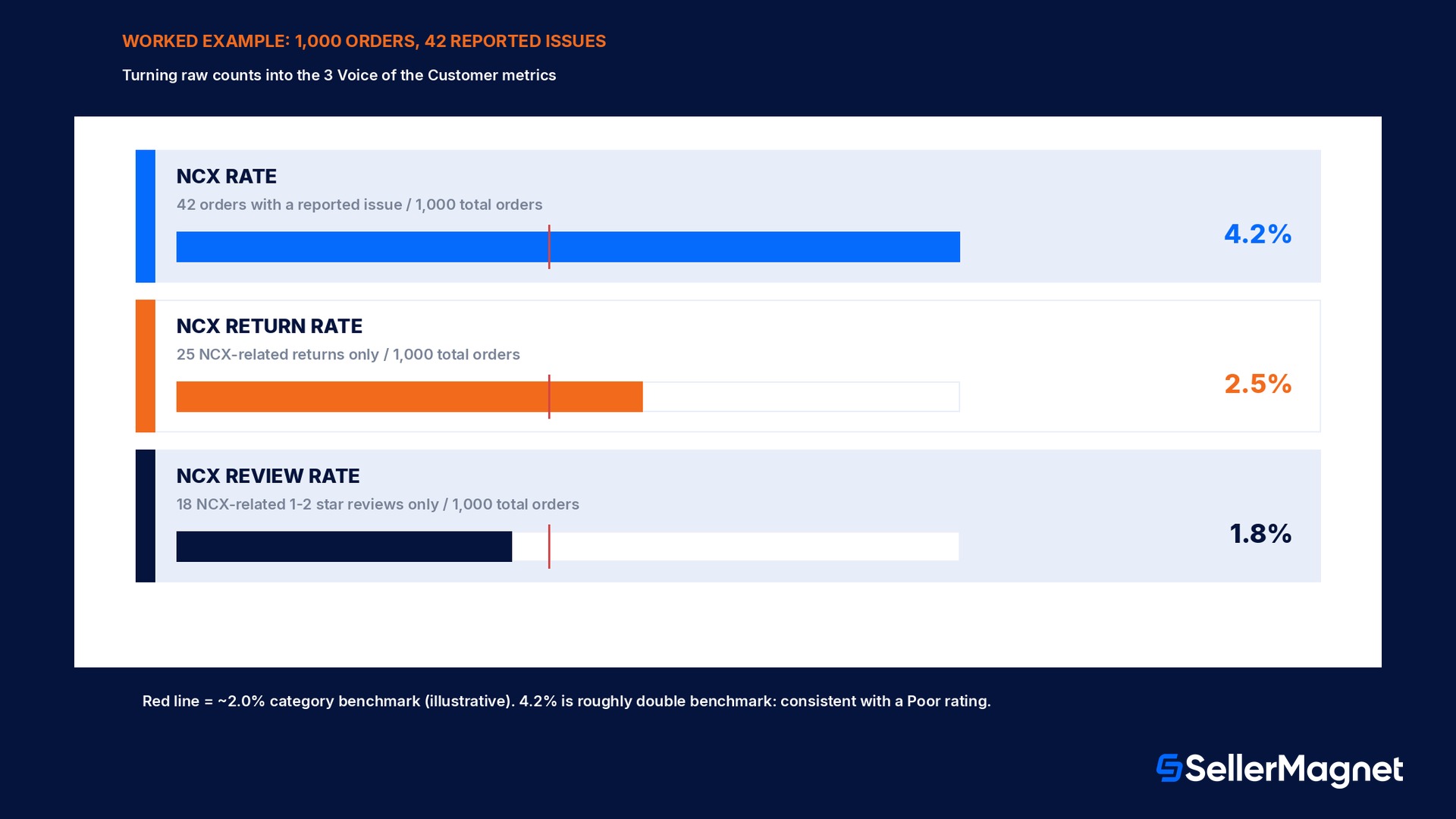
Take an offer with 1,000 orders in the period Voice of the Customer is showing (illustrative numbers for walking through the math, not an Amazon-published benchmark). Of those 1,000 orders, 42 generated a reported product or listing issue across the 7 sources, giving an NCX rate of 42 divided by 1,000, or 4.2%. Of the 42 NCX issues, 25 were returns where the stated reason pointed to the product or listing itself, giving an NCX Return Rate of 25 divided by 1,000, or 2.5%; the offer's other, non-NCX returns (a buyer who simply changed their mind, for example) are not counted in this narrower figure. Of the same 1,000 orders, 18 produced a 1 or 2 star review that specifically reported a product or listing problem, giving an NCX Review Rate of 18 divided by 1,000, or 1.8%; ordinary negative reviews that complain about shipping speed or price rather than the product itself do not count toward this figure. If the benchmark NCX rate for similar offers in this category sits around 2.0%, this offer's 4.2% rate is roughly double the comparable rate, which is consistent with a Poor or Very poor CX Health rating rather than Fair, even though 4.2% on its own might look like a small number out of context.
Metric
Count
Total orders
Result
NCX rate
42 orders with a reported issue
1,000
4.2%
NCX Return Rate
25 NCX-related returns only
1,000
2.5%
NCX Review Rate
18 NCX-related 1-2 star reviews only
1,000
1.8%
Category benchmark (illustrative)
-
-
~2.0%
The counts above are a planning illustration, not Amazon's own thresholds
Amazon does not publish a fixed NCX rate cutoff for each CX Health band; the rating always comes from comparing an offer against similar offers at the time, which shifts by category and over time. The math pattern above, reported-issue orders divided by total orders for the overall rate, and the same division restricted to only NCX-tagged returns or reviews for the 2 narrower rates, is what stays constant and is the part worth checking against a real dashboard.
How Amazon says to actually improve a rating
Amazon's own guidance starts with reading the comments behind the lowest-rated offers first, since that is where the specific defect is named. Once a problem is identified, the fix is usually one of a short list: removing damaged, defective or mislabeled inventory from the offer, correcting the product detail page where the listing itself (not the unit) is the source of confusion, or reviewing the linked help page or training video for that specific defect type to catch a process issue before the next batch of orders ships. CX Health and the NCX rate are both based on an offer's historical performance, so Amazon is explicit that a fix made today can take several weeks to show up in the numbers, depending on the offer's order volume; a seller checking the dashboard the day after a fix and seeing no change yet has not necessarily done anything wrong.
Mistakes that waste a look at the Voice of the Customer dashboard
Reading CX Health as an absolute score rather than a relative one. The same NCX rate can be Fair in one category and Poor in another, because the rating always compares against similar offers, not a fixed number.
Treating NCX Return Rate or NCX Review Rate as the offer's overall return rate or review rate. Both are deliberately narrower, counting only the subset tied to a reported product or listing issue, so they will always read lower than the raw return or review numbers elsewhere in Seller Central.
Expecting a fix to show up in the metrics the next day. CX Health and the NCX rate are historical performance measures; Amazon states it can take several weeks, scaled to the offer's order volume, before an action taken shows up in the rating.
Ignoring an Insufficient feedback rating as if it were a pass. It means there is not enough comment data yet to support a rating, not that the offer is performing well.
Confusing Voice of the Customer with the Account Health Rating or Order Defect Rate. Voice of the Customer is an offer-level diagnostic tool; the other two are account-wide performance scores calculated on a different basis.
Not checking for shared feedback under the manufacturer barcode program. A seller in that program may see NCX feedback tied to units it did not personally sell, since the comments are tied to the item, not always to a single seller.
Where SellerMagnet fits around a Voice of the Customer defect
Voice of the Customer itself lives entirely inside Seller Central; no third-party tool, including SellerMagnet, edits CX Health ratings or the NCX rate. What a seller can do once the dashboard has named a defect is act on the data behind it faster. SellerMagnet's Analytics shows every FBA return next to Amazon's own warehouse condition and the buyer's stated reason side by side, which is the same product versus listing distinction the NCX Return Rate is built around, making it faster to see whether a spike in returns is really a packaging or quality defect rather than a change-of-mind pattern. Review Requester automates Amazon's own neutral Request a Review action on eligible orders, which does not remove or alter any existing negative review but keeps the flow of standard, policy-compliant review requests running once a product issue behind the NCX Review Rate has actually been fixed.
Competitor Tracker inside SellerMagnet's alerts also watches rating drops and new negative reviews on tracked ASINs, so a seller catches the early signal on their own listings between the (sometimes multi-week) lag before a fix shows up in the official CX Health rating itself.
Checklist for working a Voice of the Customer defect
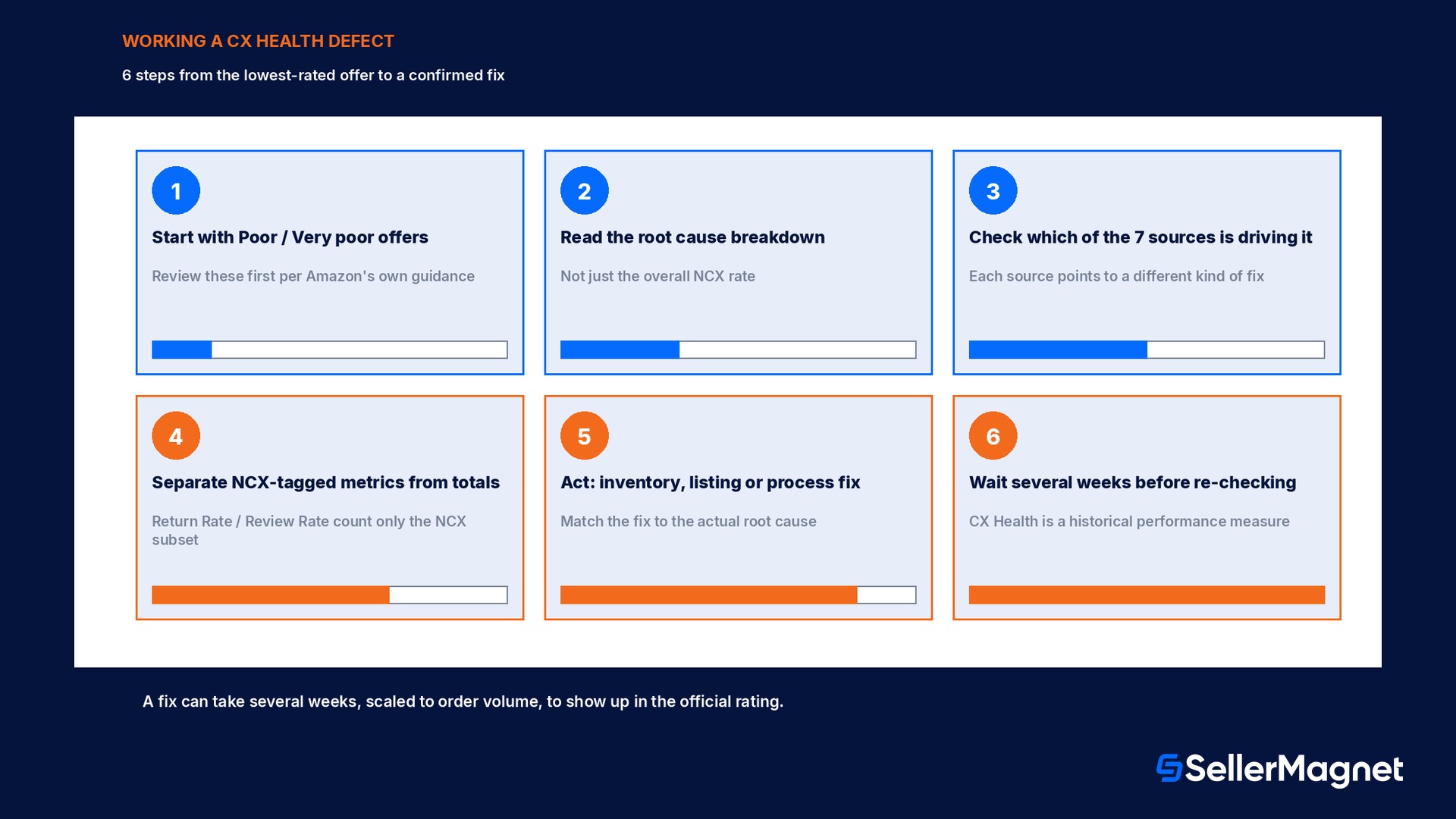
How to read and act on a Voice of the Customer CX Health defect
Start with offers rated Poor or Very poor - Amazon's own guidance is to review these first; Fair and Good offers are performing in line with, or better than, comparable offers already.
Read the root cause breakdown, not just the overall NCX rate - The dashboard splits a broad issue like 'damaged item' into specific drivers (packaging, spoilage, damaged products); the fix is different for each one.
Check which of the 7 feedback sources is driving it - Returns, refunds, customer service contacts, buyer-seller messages, seller feedback, A-to-z claims and product reviews each point to a different kind of fix.
Separate an NCX-tagged metric from the offer's overall numbers - NCX Return Rate and NCX Review Rate only count the subset tied to a reported product or listing issue, not every return or negative review.
Act on the suggested fix: inventory, listing or a process change - Remove damaged or mislabeled stock, correct the product detail page, or review the linked help resource for that specific defect type.
Wait for the historical window to catch up before re-checking - Amazon states it can take several weeks, depending on order volume, for a real fix to move the rating; check again on a schedule, not daily.
What is the NCX rate on Amazon?
The negative customer experience rate: the number of orders for which a customer reported a product or listing issue, divided by the offer's total orders, pulled from returns, refunds, customer service contacts, buyer-seller messages, seller feedback, A-to-z claims and product reviews.
What is the difference between NCX rate and NCX Return Rate?
NCX rate counts reported issues from all 7 feedback sources. NCX Return Rate counts only the subset of returns tied to a reported product or listing issue, not the offer's total returns, and only from feedback received after January 2024.
Why does my offer show Insufficient feedback instead of a CX Health color?
There are not enough customer comments yet to support a reliable comparison against similar offers. It is not a rating of good performance, just a sample-size gap.
How long does it take for a fix to show up in CX Health?
Amazon states it can take several weeks, depending on the offer's order volume, since both CX Health and the NCX rate are based on historical performance.
Is Voice of the Customer the same as the Account Health Rating?
No. Voice of the Customer is an offer-level diagnostic for product and listing issues. The Account Health Rating and Order Defect Rate are separate, account-wide performance scores.
Does a deleted listing still show on Voice of the Customer?
It can, for a few months, carrying the last CX Health rating and feedback it had before deletion.
Stop Juggling Tools. SellerMagnet Combines Everything You Need.