A seller buys a shipping label from whatever site is fastest at 11 p.m., ships the order a day later than planned, and only notices the on time delivery rate dip two weeks afterward. What that seller never opened is a free tool Amazon already owns: Veeqo. Amazon acquired the UK shipping and inventory platform in 2021, and it now sits quietly inside Seller Central's shipping menu, offering the same discounted Buy Shipping rates Amazon uses internally, plus account health protections that a label bought anywhere else does not carry. This guide works through what Veeqo actually is, the specific protections tied to buying a label through it, the three real pricing tiers, and a worked example of the one benefit every seller can use immediately: Veeqo Credits.
Veeqo is Amazon's own free shipping software, acquired in 2021, that lets a seller manage orders and print discounted shipping labels across Amazon, eBay, Etsy, Shopify, Walmart and other channels from one place. Buying Amazon labels through Veeqo and shipping on time protects your on time delivery rate, order defect rate and valid tracking rate, and adds A-to-z Guarantee claims protection that a label bought elsewhere does not carry. The shipping features are free for unlimited orders; paid tiers starting at $19 a month add inventory management and demand forecasting.
What Is Veeqo, and Why Does Amazon Own a Shipping Company?
Veeqo was founded in the UK in 2013 by an ecommerce seller and acquired by Amazon in 2021. Amazon's own FAQ is direct about the relationship: Veeqo is an Amazon-owned company, but it operates as a separate business with its own support team and help center. For a seller, the practical effect is that Veeqo gets to offer Amazon's Buy Shipping rates (the same discounted UPS, FedEx, USPS, DHL and OnTrac rates Amazon negotiates for its own shipments) across every sales channel a seller connects, not just Amazon orders.
Amazon's own Veeqo page lists the connected channels as Amazon, eBay, Etsy, Shopify, Walmart, WooCommerce, TikTok Shop and Rithum, among others. A seller does not need an Amazon account at all to use Veeqo; it works as standalone multichannel shipping software for any connected store. The one feature built specifically for Amazon sellers is the A-to-z Guarantee claims protection covered below, which needs an active Amazon account to apply.
Not the same as Amazon Buy Shipping alone
Amazon Buy Shipping (used directly inside Seller Central's Manage Orders) already gives Amazon sellers the discounted carrier rates for Amazon orders. Veeqo layers two things on top: the same rates across every other channel a seller sells on, and a shared inventory and order view so a seller is not logging into five different dashboards to ship five channels' worth of orders.
What Account Health Protections Does Shipping Through Veeqo Actually Unlock?
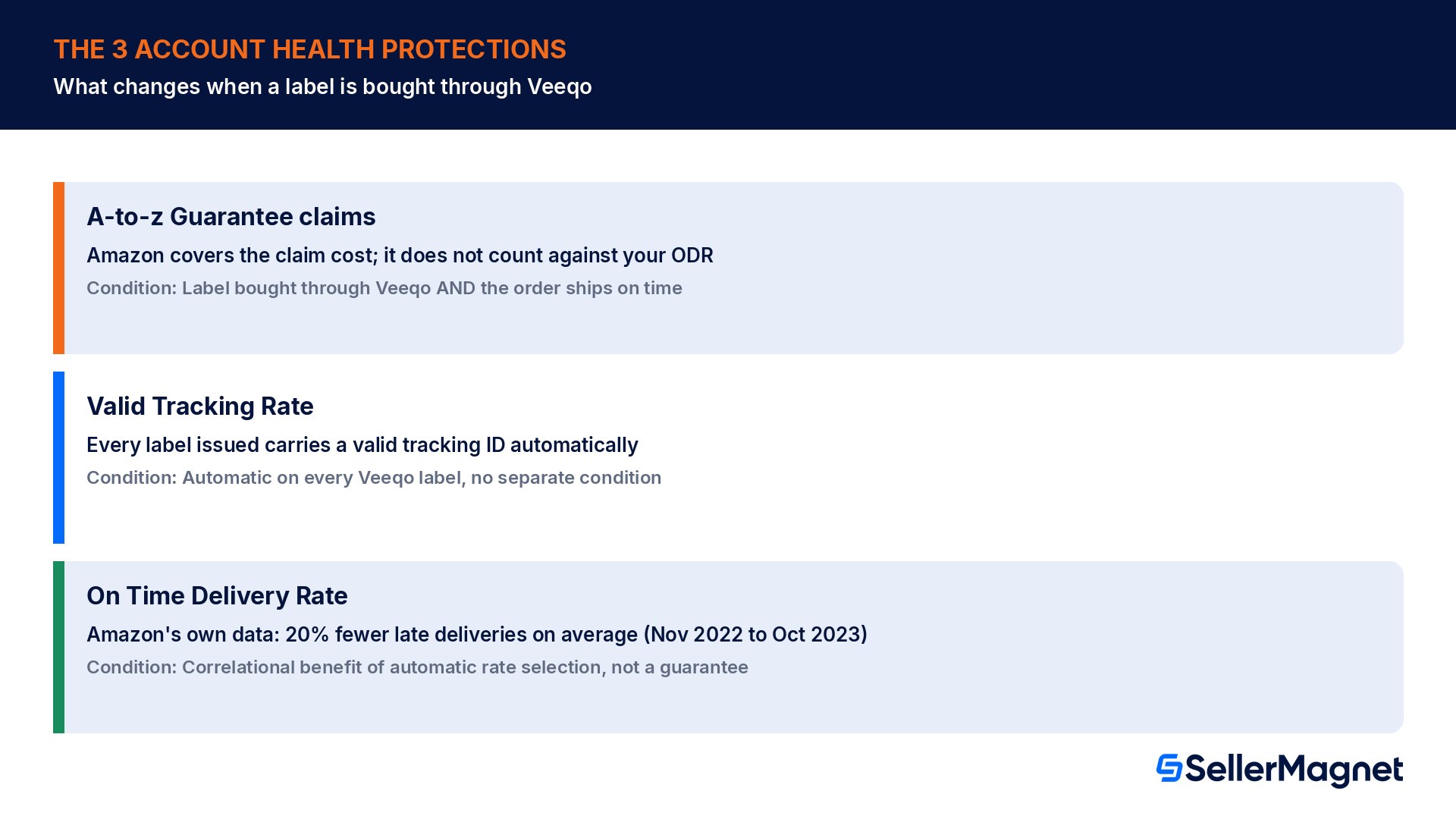
Amazon's own Veeqo help page is specific about what changes when a label is bought through Veeqo rather than a third-party shipping site, and the conditions attached to each protection matter more than the headline claim. The OTDR rule changes guide covers what counts against on time delivery in the first place; this is what reduces the risk of tripping it.
Protection
What it covers
Condition to earn it
A-to-z Guarantee claims protection
Amazon covers the cost of a customer's delivery-problem claim, and it does not affect your Order Defect Rate
Purchase the shipping label through Veeqo AND ship on time
Valid Tracking Rate (VTR)
Every label purchased sends a valid tracking ID automatically
Automatic on every Veeqo label, no separate condition
On Time Delivery Rate (OTDR)
Amazon's own data: sellers who bought labels through Veeqo saw 20% fewer late deliveries on average (internal data, Nov 2022 to Oct 2023)
Correlational benefit of Veeqo's automatic rate selection and bulk shipping, not a guarantee
The A-to-z Guarantee line is the one worth reading twice. It is not automatic just because a seller has a Veeqo account; Amazon's own wording ties the protection to actually buying the label through Veeqo and shipping on time for that specific order. A seller who connects Veeqo but keeps buying labels from a separate carrier portal out of habit gets none of this, even though the account itself is set up correctly.
Amazon's data point is not a guarantee
The 20% fewer late deliveries figure is Amazon's own aggregate finding across its seller base in a specific 12 month window, not a promised outcome for any one seller. Read it as evidence that Veeqo's automatic rate selection and bulk shipping tend to reduce late labels, not as a number that applies seller by seller.
The Three Pricing Tiers
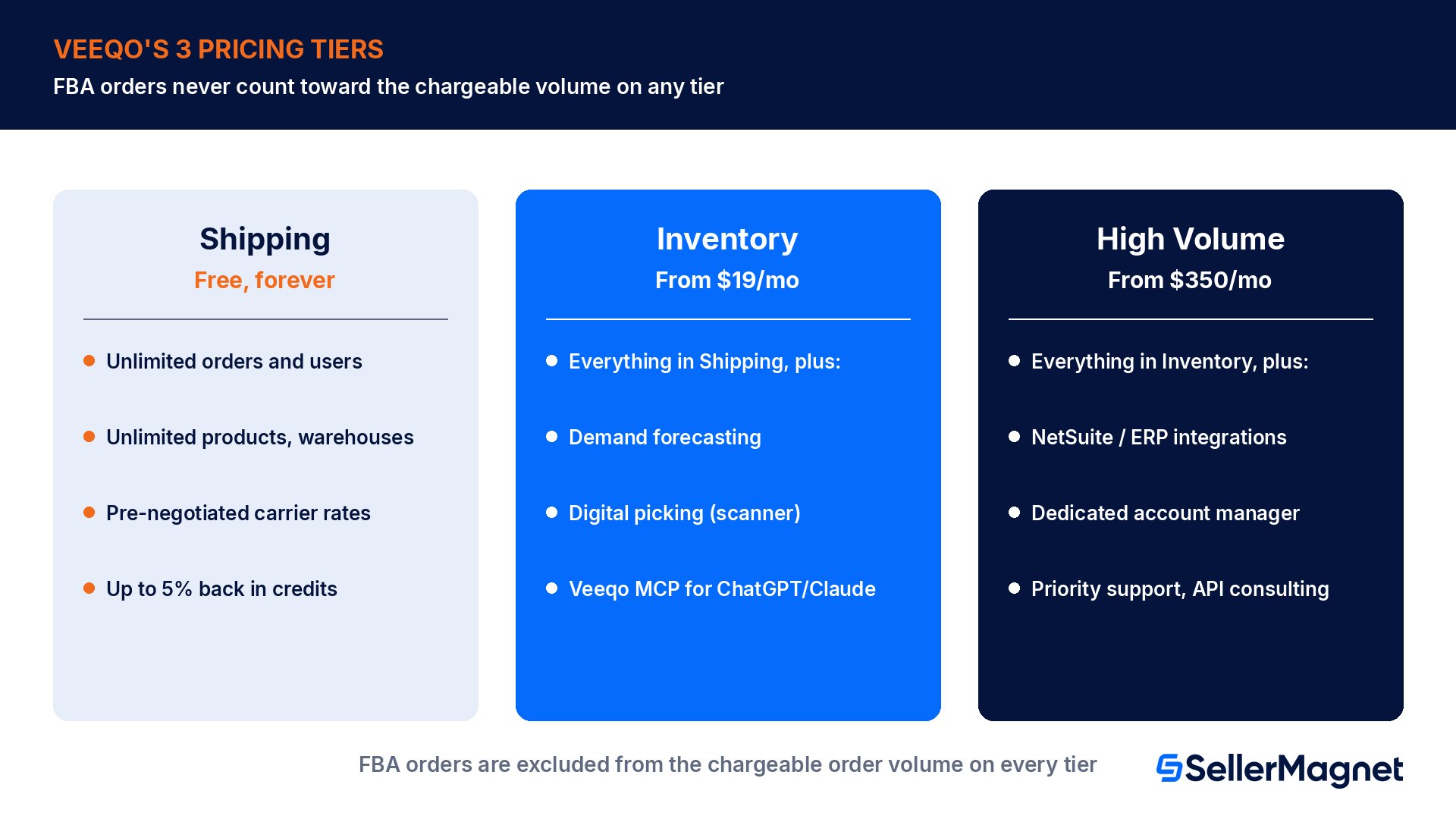
Veeqo's own pricing page splits the product into three tiers, and the free tier is not a stripped down trial; it is the full shipping product.
Tier
Price
What it adds
Shipping
Free, forever
Unlimited orders, users, products and warehouses; pre-negotiated rates from UPS, FedEx, USPS, DHL and OnTrac; up to 5% back in Veeqo Credits; bulk ship up to 100 orders at once; a rate shopping API; 10 free multichannel listings a month
Inventory
From $19/month, priced by monthly order volume
Everything in Shipping, plus automated inventory sync across channels, demand forecasting, digital picking with the Veeqo scanner, unlimited multichannel listings, and the Veeqo MCP connection for ChatGPT and Claude
High Volume
From $350/month, priced by monthly order volume
Everything in Inventory, plus NetSuite and other ERP integrations, a dedicated account manager, priority support and API consulting
One detail in Veeqo's own FAQ changes the math for an Amazon-heavy seller: order volume for the Inventory and High Volume tiers is counted only from the channels a seller actually imports into Veeqo, and any order fulfilled by Amazon (FBA) is explicitly excluded from the chargeable order volume on every tier. A seller running FBA on Amazon and FBM on a side Shopify store only pays for the Shopify order volume, no matter how many thousands of FBA units move that month.
A Worked Example: What Veeqo Credits Are Actually Worth
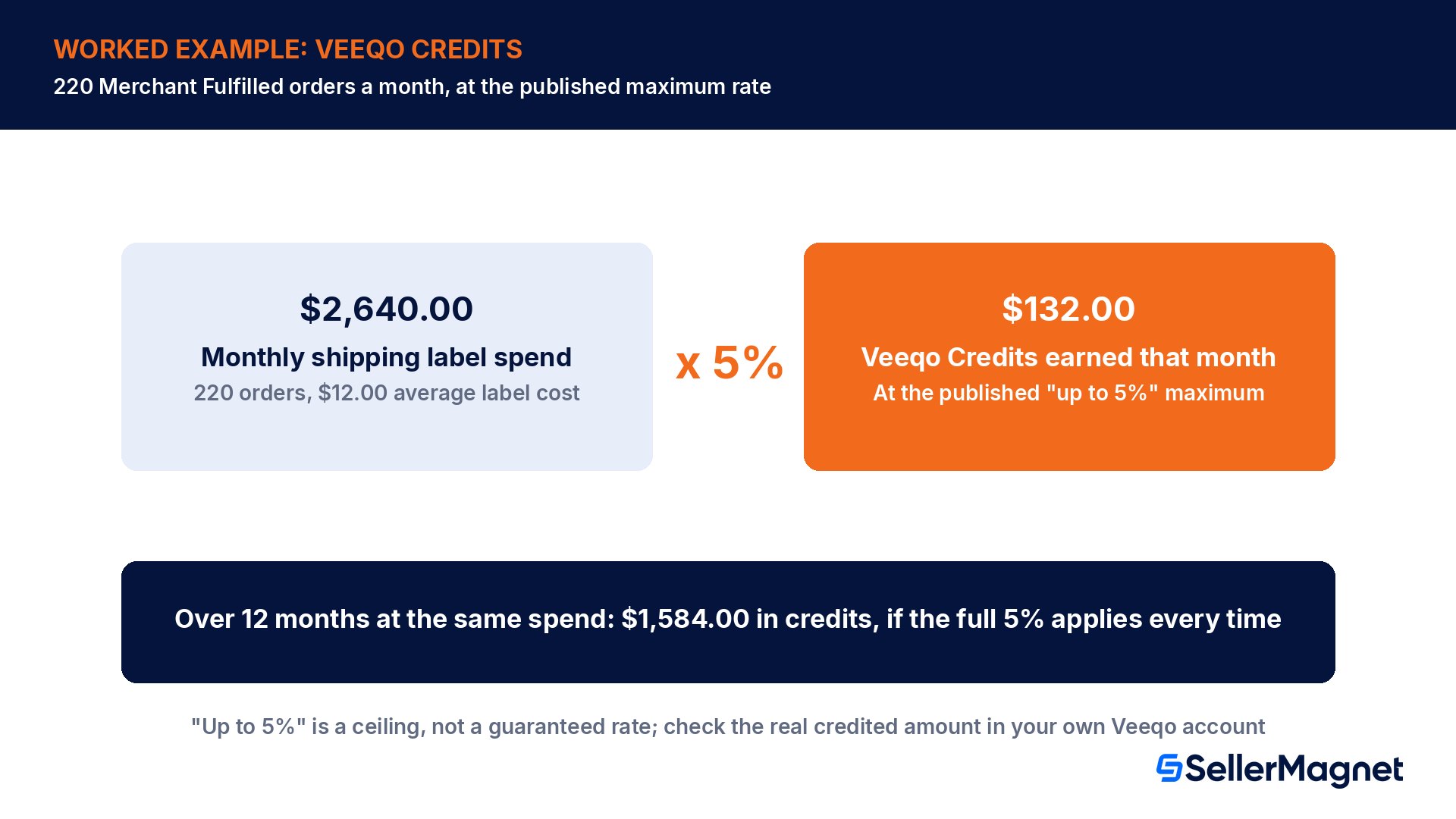
The one concrete, computable number Amazon and Veeqo both publish is the credits rate: up to 5% back in Veeqo Credits on eligible shipments, redeemable against future labels. Here is what that looks like for a seller running FBM alongside FBA.
A seller ships 220 Merchant Fulfilled orders a month and spends $2,640 total on shipping labels through Veeqo (an average label cost of $12.00 per order). At the maximum published rate, 5% of $2,640 is $132.00 in Veeqo Credits for that month, which lowers the following month's effective label spend to $2,508.00 if every credit gets used. Over a year of steady volume at the same spend, that is $1,584.00 in credits, assuming the full 5% applies to every shipment; Veeqo's own wording is "up to 5%", so a seller should treat this as the ceiling, not the guaranteed rate, and check the actual credited amount against their own monthly shipping report rather than assuming the maximum.
Credits earned on a carrier rate are only useful if a seller can actually see whether the label spend was worth it against the order's margin in the first place.
SellerMagnet's Analytics shows net profit per order and per marketplace after Amazon fees, COGS, shipping, VAT and refunds, so a Merchant Fulfilled order's real margin, including whatever it actually cost to ship, sits next to every FBA order's margin in the same dashboard rather than in a separate shipping tool's own report.
Our Amazon Buy Shipping guide covers the underlying rate card Veeqo also draws on, for a seller who ships Amazon orders only and wants the rates without the multichannel layer.
Set Up Veeqo for Amazon Orders
Connect Veeqo to an Amazon Seller Account
Create a Veeqo account - Sign up at Veeqo's signup page and choose "Continue with Amazon" if an Amazon Seller Central account already exists; an Amazon account is not required to use Veeqo, but A-to-z Guarantee protection is specific to Amazon orders.
Connect sales channels - Securely connect each online store (Amazon, eBay, Etsy, Shopify, Walmart, WooCommerce, TikTok Shop and more); this imports orders, stock levels and product data.
Turn on inventory control if needed - Optional: let Veeqo update inventory, prices and store orders automatically once connected, rather than only importing them.
Fulfill orders - Veeqo syncs orders and presents the best shipping rate by size and weight; select and purchase labels individually or up to 100 at once.
Set automation rules - Create inventory and order rules to prevent overselling, tag urgent Prime orders, or route orders to the nearest warehouse automatically.
FBA for non-Amazon orders
A Professional selling plan seller can use Veeqo's integration with Amazon Multichannel Fulfillment to route orders from other channels, like a Shopify or eBay order, to be fulfilled by FBA instead of shipping them separately.
What Does Amazon See From My Other Sales Channels?
A seller connecting a Shopify or eBay store to an Amazon-owned tool is a reasonable thing to pause on. Amazon's own FAQ states that Amazon does not have access to a seller's product sales data for non-Amazon sales; Veeqo's seller information is only accessed by Amazon to the extent necessary to provide and improve Veeqo's services or to assess and manage logistics provider performance, and that information is stated to be secured against inappropriate loss, access or disclosure. The multichannel selling tools guide compares Veeqo's category against dedicated listing and repricing tools for the same other channels.
Should You Use Veeqo Instead of Buying Labels Directly in Seller Central?
Yes, when the label is bought through Veeqo and the order ships on time
Credits back on labels
No
Up to 5% in Veeqo Credits
Inventory sync across channels
No
Paid Inventory tier and above
Cost
Included in selling on Amazon
Free for shipping; usage-priced from $19/month for inventory features
Is Veeqo really free?
The Shipping tier is free with no order limit: unlimited orders, users, products and warehouses, pre-negotiated carrier rates and up to 5% back in credits. Only the Inventory and High Volume tiers, which add demand forecasting, digital picking and ERP integrations, are priced by monthly order volume.
Do I need an Amazon account to use Veeqo?
No. Veeqo works as standalone multichannel shipping software for eBay, Etsy, Shopify, Walmart, WooCommerce, TikTok Shop and other channels. An Amazon account is only needed for the Amazon-specific A-to-z Guarantee claims protection.
Does shipping through Veeqo guarantee my on time delivery rate stays safe?
No. Amazon's own data shows sellers using Veeqo saw 20% fewer late deliveries on average over a 12 month measured period, which is evidence of a correlation, not a guarantee for any single seller or shipment.
What has to be true to get the A-to-z Guarantee claims protection?
The shipping label has to be purchased through Veeqo for that order, and the order has to ship on time. Both conditions apply together; neither one alone is enough.
Do FBA orders count toward my Veeqo order volume and cost?
No. Veeqo's own pricing FAQ states that orders fulfilled by Amazon (FBA) are excluded from the chargeable order volume on every tier, so unlimited FBA orders can be imported without raising the subscription cost.
Can Amazon see my sales data from other channels I connect to Veeqo?
Amazon's own FAQ states it does not have access to a seller's non-Amazon sales data; Veeqo's seller information is accessed only to provide and improve the service or to assess logistics provider performance.
Can I use Veeqo to fulfill non-Amazon orders with FBA?
Yes, with a Professional selling plan, through Veeqo's integration with Amazon Multichannel Fulfillment, which routes orders from connected non-Amazon channels into FBA for fulfillment.
How much are Veeqo Credits actually worth?
Up to 5% of what is spent on eligible shipping labels, credited back for use on future labels. A seller spending $2,640 a month on labels would see up to $132 back at the maximum published rate, though the real figure should be checked against the seller's own account rather than assumed.
Stop Juggling Tools. SellerMagnet Combines Everything You Need.