Amazon TRF 2026: How Direct Product Validation Works
R
RenéFreelance Amazon Editor
|
15 min read
One day your Seller Central account looks normal, and the next, a Performance Notification tells you a product has been flagged for a food or product safety issue and needs third-party testing before you can keep selling it. Amazon calls this process direct product validation, and the paperwork at the center of it is a Test Request Form, or TRF. Get the TRF process right and a flagged listing stays live while testing runs in the background; get it wrong, and the same listing goes dark immediately. This guide covers exactly what Amazon's own help page says about direct product validation and TRFs, what changed on July 24, 2026 when Amazon added bulk submission and a cross-store compliance dashboard, and the mistakes that turn a routine test request into an avoidable deactivation.
Direct product validation is Amazon's process for verifying a flagged product through an Amazon-authorized third-party testing, inspection and certification (TIC) provider, using a Test Request Form (TRF). A TRF can only be opened after a Performance Notification asks for it, the listing stays active while the TRF status is in progress, and a failed test or missing documents causes immediate deactivation. Since July 24, 2026, Amazon lets sellers submit TRFs for several flagged products at once and see every request's status across every store on the account from one compliance dashboard.
What direct product validation actually is
To sell on Amazon at all, Amazon's policy requires that you work with an Amazon-authorized independent testing, inspection and certification (TIC) provider to verify any reported ASIN through direct product validation. These TIC providers meet Amazon's standards and follow the applicable laws and regulations. Critically, a TIC provider submits documents to Amazon on your behalf; you no longer send paperwork to Amazon directly once a provider is involved. You can also use a different accredited lab for the underlying testing itself, but if that lab is not one of Amazon's own authorized TIC providers, its results still need to be reviewed and passed along by an authorized TIC provider before Amazon will accept them.
If you already have existing test documentation: submit it to an Amazon-authorized TIC provider, who checks whether it meets Amazon's guidelines.
If you don't have existing documentation, or a new test is required: send a physical product sample to a TIC provider, who runs the test against the applicable standard.
Either path runs through a provider, never a direct document upload to Amazon itself, once the compliance notification has gone out.
Start the moment you get the notification
Amazon's own guidance is blunt: to avoid delays and offer deactivation, start the required compliance work as soon as you receive a notification. The clock that matters is the remediation due date in the Performance Notification, not how busy your week is.
When a TRF actually gets triggered, and what happens to your listing while it runs
A Test Request Form is not something you file proactively for a product you merely suspect might need testing. You can only submit a TRF after Amazon sends you a Performance Notifications email specifically requesting compliance documents for that ASIN. Once that notification lands, the sequence that protects your listing is straightforward: submit a TRF to a TIC provider for direct product validation, then send either product samples or your existing test documentation for verification. As soon as the TIC provider receives your submission, they can set your TRF status to in progress, and an in-progress TRF keeps your offer live. The opposite is just as immediate: if your product fails testing, or your documents cannot be verified, your offer is deactivated right away, with no separate grace period.
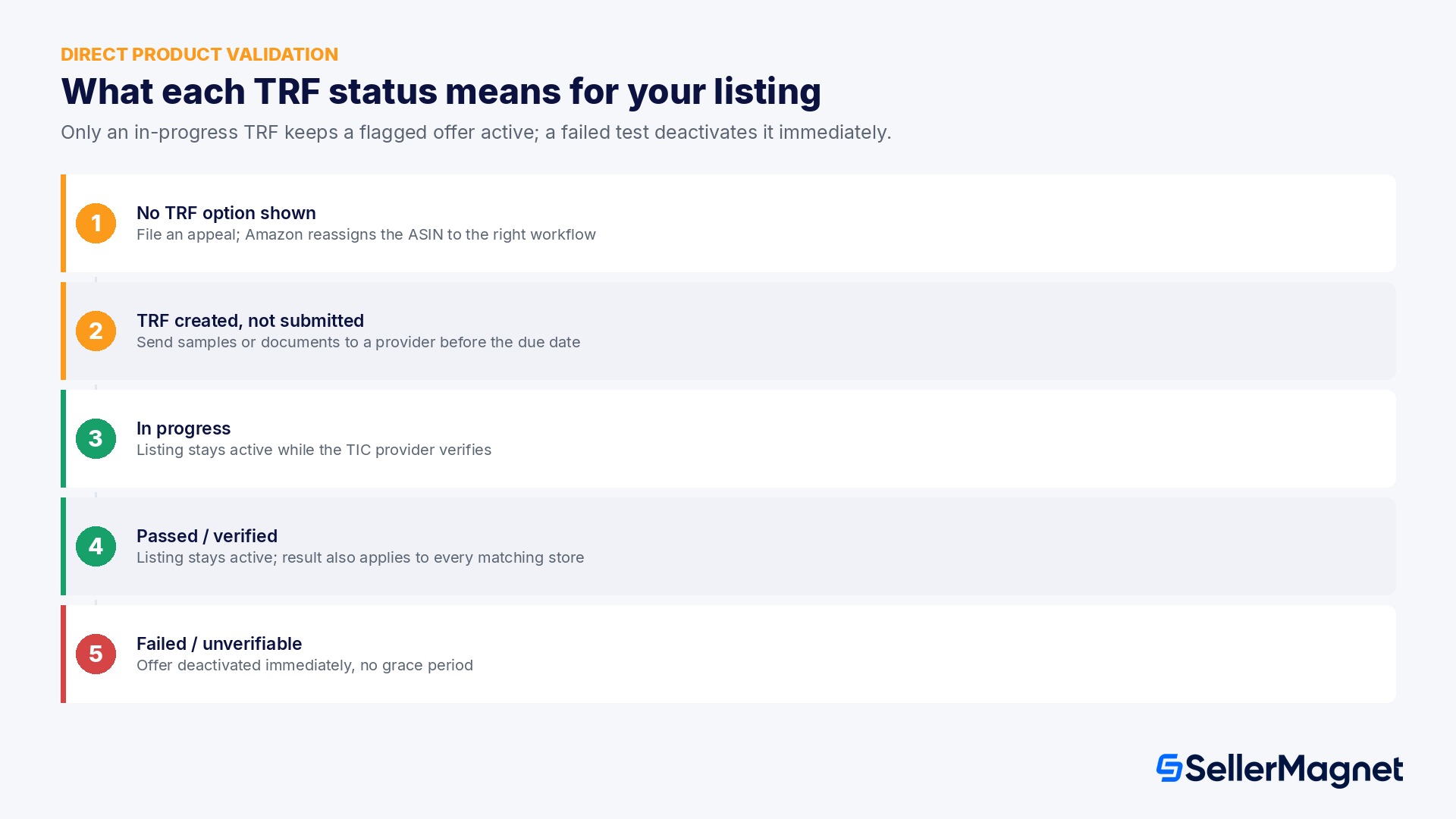
TRF status
What it means
What happens to the listing
No TRF option shown on a flagged ASIN
The ASIN was not assigned to the correct compliance workflow
File an appeal; Amazon reviews the ASIN and assigns it to the right flow
TRF created, not yet submitted to a provider
You have the TRF ID but have not sent samples or documents yet
Listing risk depends on the remediation due date; submit before it passes
In progress
The TIC provider has received your samples or documents and is verifying them
Listing stays active
Passed / verified
The provider sent passing results to Amazon for approval
Listing stays active; result also covers every other store with the same requirement for that ASIN
Failed / documents not verifiable
Testing did not pass, or paperwork could not be confirmed
Offer deactivated immediately
Submitting a TRF, step by step
The whole flow lives under Account Health, not under your listings themselves, which is why sellers who go looking for it in Manage Inventory often can't find it.
How to submit a TRF for a flagged ASIN
Open the flagged product's compliance screen - Go to Account Health, then under Policy Compliance click Food and Product Safety Issues.
Start the submission - Under Next Steps for the product you need to act on, click Submit.
Choose the validation path - Choose Verify Your Product, then pick Test (select providers who can verify your product) or Validate (upload an existing document for review).
Select the product(s) - Select one or more products and click Continue to Select Provider.
Pick a provider - Choose one or more listed providers and click Continue; clarify details like bundles, multipacks or variant testing if asked.
Confirm and generate the TRF - Confirm your contact details and click Confirm and Continue to generate the order number and TRF details.
Hand the TRF to your provider - Copy the order number and TRF details and share them with your chosen provider so they can match your submission to the right request.
If a flagged ASIN does not show you an option to submit a TRF at all, Amazon's help page is explicit about the fix: file an appeal. Amazon will review the ASIN and assign it to the correct workflow rather than leaving it stuck.
Picking a provider and comparing offers
You are not limited to a single provider per request. You can select a provider from Amazon's list, or request quotes from several TIC providers at once to compare price, turnaround time and the services offered before committing. Once you have chosen a provider, you create the TRF and give that provider the TRF identification number; from there, you work directly with the provider through the contact details you supplied to submit samples or existing documents, including any intake steps the provider needs to run outside of Amazon's own systems. When testing finishes, the provider sends the results straight to Amazon for approval, you do not relay them yourself.
On the offer-selection screen, Amazon groups products by which lab would test them, specifically because testing the same batch of products at the same lab lowers the per-product cost. You can select or deselect products inside each group, and your quoted price adjusts automatically as you do. A seller juggling several flagged ASINs at once gets a real incentive here to let one lab cover everything it can rather than splitting the work across providers for no reason.
Bundles, multipacks and variants: one TRF or several?
Testing scope is one of the places sellers most often over-file or under-file a TRF, and Amazon's guidance puts the decision in the provider's hands rather than leaving it to guesswork. Work with your TIC provider to determine the best approach for listings that involve component parts and bundles (separate items sold together as one unit), multipacks (identical items packed together), or variant testing across different versions of a product, different colors, sizes or flavors, for example. The provider is positioned to know which configuration genuinely needs its own test and which one can be covered by a result that already applies to a closely related variant, so the practical move is to ask before assuming either way.
Same ASIN, multiple stores: when one TRF covers all of them
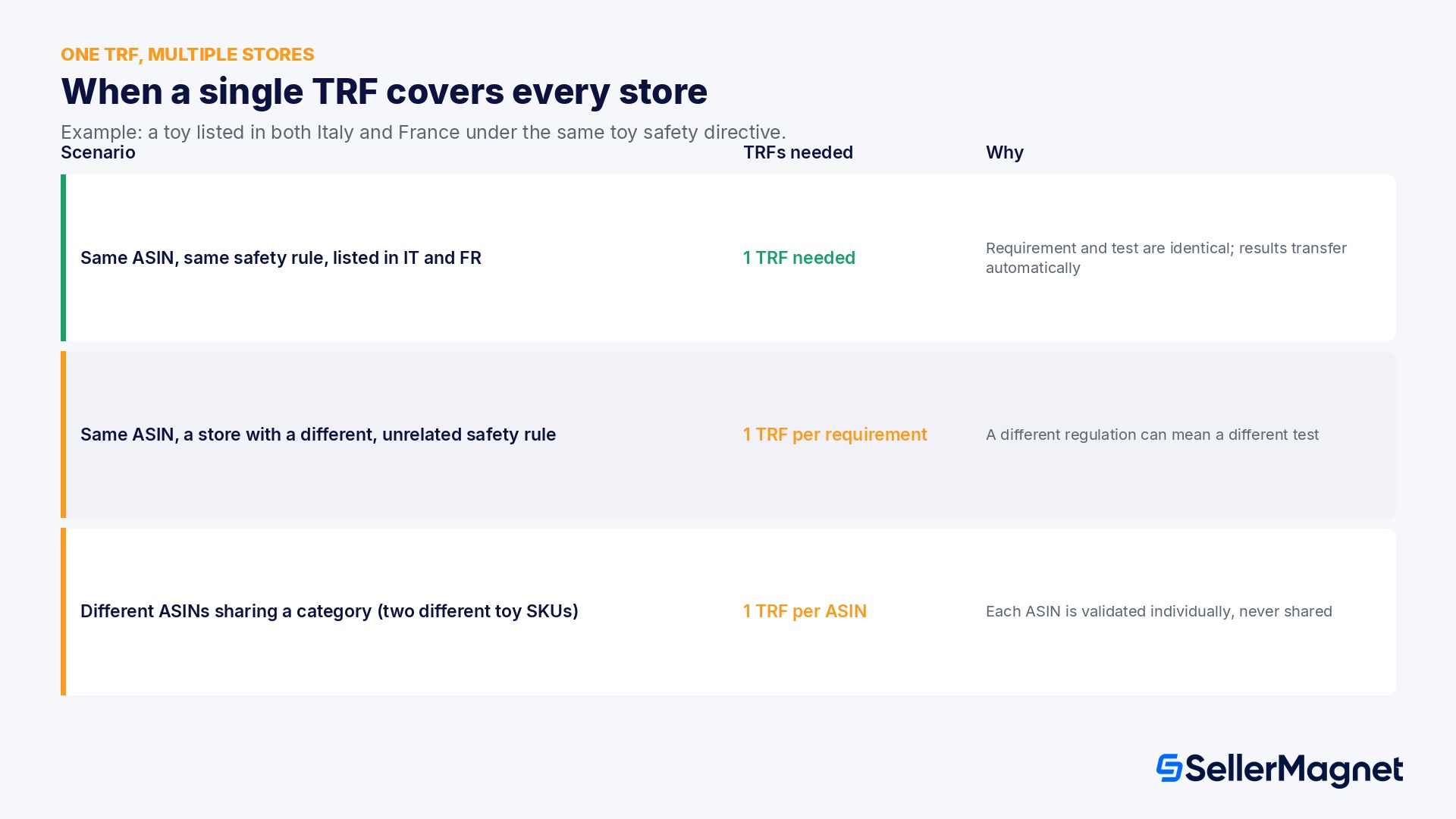
This is the rule that saves the most duplicated effort, and it is easy to miss if you are checking each marketplace separately. If you offer the same ASIN in multiple stores that are affected by the same product safety requirement, you only need to submit one TRF. Amazon's own example is a toy offered in both Italy and France, where the same toy safety directive applies in both stores. Once you submit the TRF in one store, it appears automatically for every other store that shares the same requirement for that ASIN. When the test is complete, the results apply to that ASIN across every one of those stores at once; there is no need to file duplicate requests store by store.
Scenario
How many TRFs needed
Why
Same ASIN, same safety requirement, listed in IT and FR (e.g. an EU toy directive)
1
The requirement and the test are identical across both stores; results transfer automatically
Same ASIN, listed in a store with a different, unrelated safety requirement
1 per distinct requirement
A different regulation can mean a different test, even for the same physical product
Different ASINs that happen to share a category (e.g. two different toy SKUs)
1 per ASIN
Each ASIN is validated individually; a passing test on one ASIN does not cover another
What changed on July 24, 2026: bulk submission and the compliance dashboard
Before July 24, 2026, a seller with several flagged products had to work through the TRF flow one ASIN, and one store, at a time, with no single screen showing every open request across the whole account. Amazon's own News team announced the fix directly in the Seller Forums: starting July 24, 2026, you can submit test requests in bulk and get visibility across multiple stores in one region under the same policy requirements. The update targets exactly the sellers listing in categories where third-party TIC verification is required, and it adds three concrete capabilities.
Bulk submission: submit test requests for multiple flagged products within a policy at once, instead of repeating the same steps separately for each product.
Cross-store compliance visibility: view the status of every test request across every store on your account without switching stores to check each one.
Centralized dashboard: track and manage test requests in a single place, with filters for ASIN, TRF ID, Order ID, status, store, or provider.
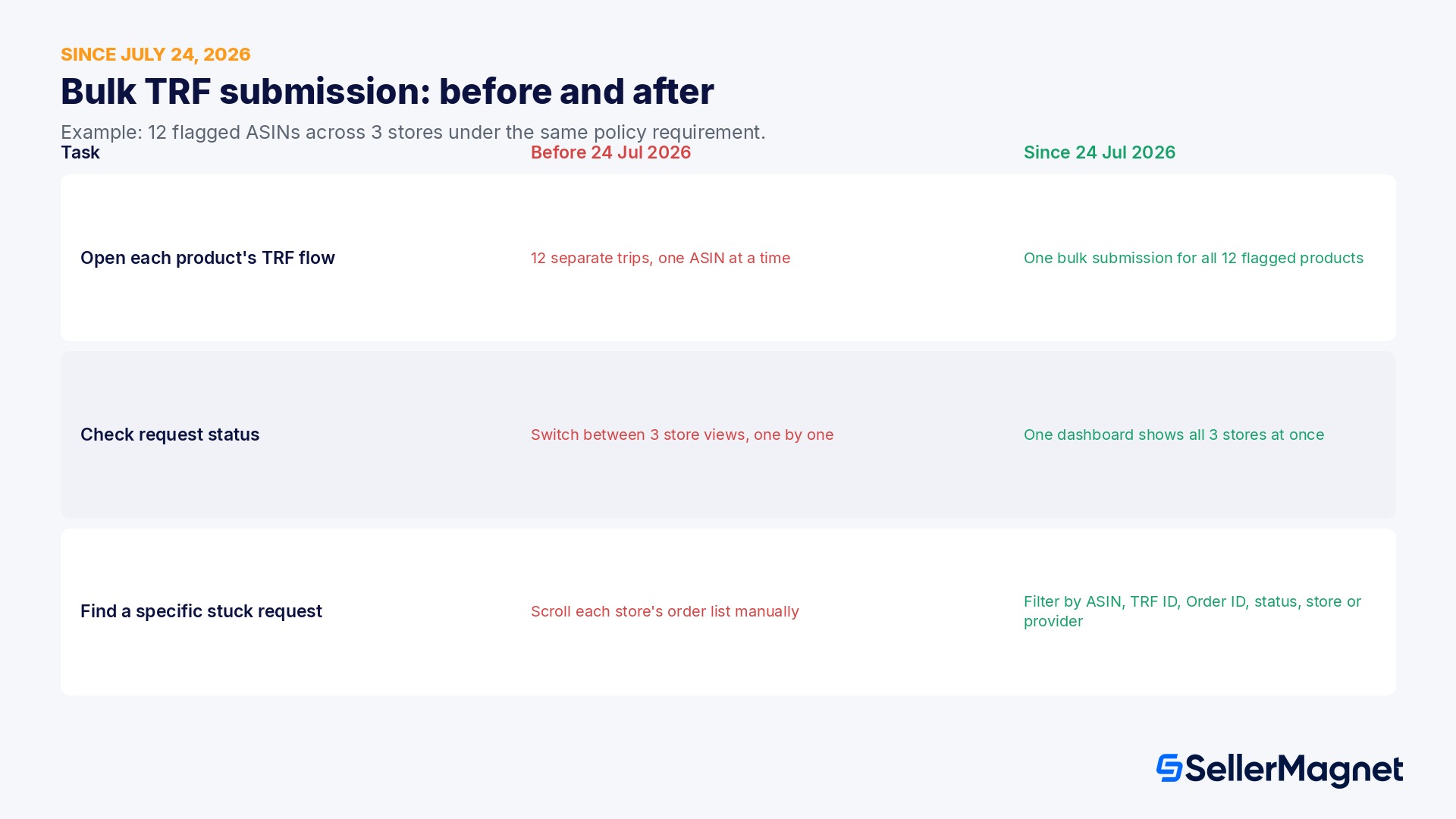
Task, example: 12 flagged ASINs across 3 stores
Before 24 Jul 2026
Since 24 Jul 2026
Open each product's TRF flow
12 separate trips through Submit, one ASIN at a time
One bulk submission covering all 12 flagged products
Check request status
Switch between 3 store views, checking each product's order number individually
One dashboard shows every request's status across all 3 stores at once
Find a specific stuck request
Scroll each store's own order list looking for the right order number
Filter the dashboard directly by ASIN, TRF ID, Order ID, status, store, or provider
Amazon frames this as a time-saving change, not a change to the underlying testing requirements or deactivation rules: the one-case-per-ASIN logic, the in-progress protection, and the immediate deactivation on failure all still apply exactly as before. What changed is how many clicks it takes a multi-category or multi-store seller to manage a pile of open requests instead of babysitting them one at a time.
A compliance notification is easy to miss in a busy inbox, and the clock starts the moment it lands. SellerMagnet's Notification Center can surface a new Performance Notification the moment it posts, so a food or product safety flag does not sit unread while a remediation deadline runs down. For the account-wide score these notifications feed into, see our Amazon Account Health Rating guide, for where the Performance menu itself now sits, our New Seller Central guide, and for a related device-specific compliance trigger, our Amazon lithium battery TIC compliance guide.
Tracking progress and cancelling a request
Once a TRF is submitted, the same Account Health, Policy Compliance, Food and Product Safety Issues path gets you back to its status: choose Verify Your Product to see the status of that order, or View All Orders to see everything at once. The Order Number column tells you which specific request you are looking at, and View Details next to any request opens more information about where it stands. If you need to cancel a request entirely, for example because the product was discontinued, go to View All Orders, select the request or requests, click Cancel, choose a reason, and confirm the cancellation.
Appeals: when an ASIN won't offer a TRF, or you disagree with a requirement
Two separate situations both route through an appeal, and it helps to know which one you are actually in. The first is a flagged ASIN that simply does not present a TRF submission option; Amazon's guidance here is to file an appeal so it can review and correctly assign the ASIN. The second is disagreeing with the compliance requirement itself, which uses the same general path, Account Health, Policy Compliance, Food and Product Safety Issues, Submit, then Appeal on the product in question. Neither situation is a reason to wait quietly; an ASIN stuck without a visible TRF path or a requirement you believe is wrong both need an appeal filed, not a support ticket opened separately.
Which sellers actually run into a TRF
Direct product validation is not something every seller ever sees, and that is exactly why it catches people off guard the first time it happens. Amazon triggers a TRF only on categories where it already requires third-party testing, inspection and certification, things like toys covered by region-specific safety directives, certain electronics and battery-powered devices, and products that fall under food or product safety rules. A seller running a single, unregulated category for years can go an entire Seller Central lifetime without opening the Food and Product Safety Issues screen, then get a Performance Notification the week a new regulatory requirement rolls out or a routine monitoring check flags an ASIN at random. Because the trigger is unpredictable from the seller's side, the practical move is knowing the process exists and where it lives before the notification arrives, not trying to guess in advance whether your catalog will ever need it.
Amazon's own guidance also makes clear this is not a one-time event even for a product that already passed. Products can be selected at any time for periodic testing or inspections, and you will be notified under Performance when that happens. Separately, your products may also be randomly selected for monitoring tests through Amazon's safety program; if a product fails a monitoring test, Amazon will contact you with next steps, and if either a test or your documentation fails to pass, the offer is deactivated immediately, the same immediate consequence as a first-time flag. A clean TRF history on an ASIN is useful, but it is not a permanent exemption from being checked again.
Common mistakes that turn a routine TRF into a lost listing
Waiting to start testing until closer to the remediation due date, instead of submitting the TRF to a provider the same day the Performance Notification arrives.
Sending product samples to a lab that is not an Amazon-authorized TIC provider and assuming the results will be accepted directly; they still need an authorized provider's review before Amazon will take them.
Filing a separate TRF per store for the identical ASIN under the identical safety requirement, instead of letting the one TRF you already submitted propagate automatically.
Treating a missing TRF option as a dead end and opening a general support case instead of filing the specific appeal that gets the ASIN reassigned to the right workflow.
Letting a TRF sit at created-but-not-submitted while assuming the listing is automatically protected; only an in-progress status, reached once the provider has your samples or documents, actually protects the offer.
A simple checklist for your next compliance notification
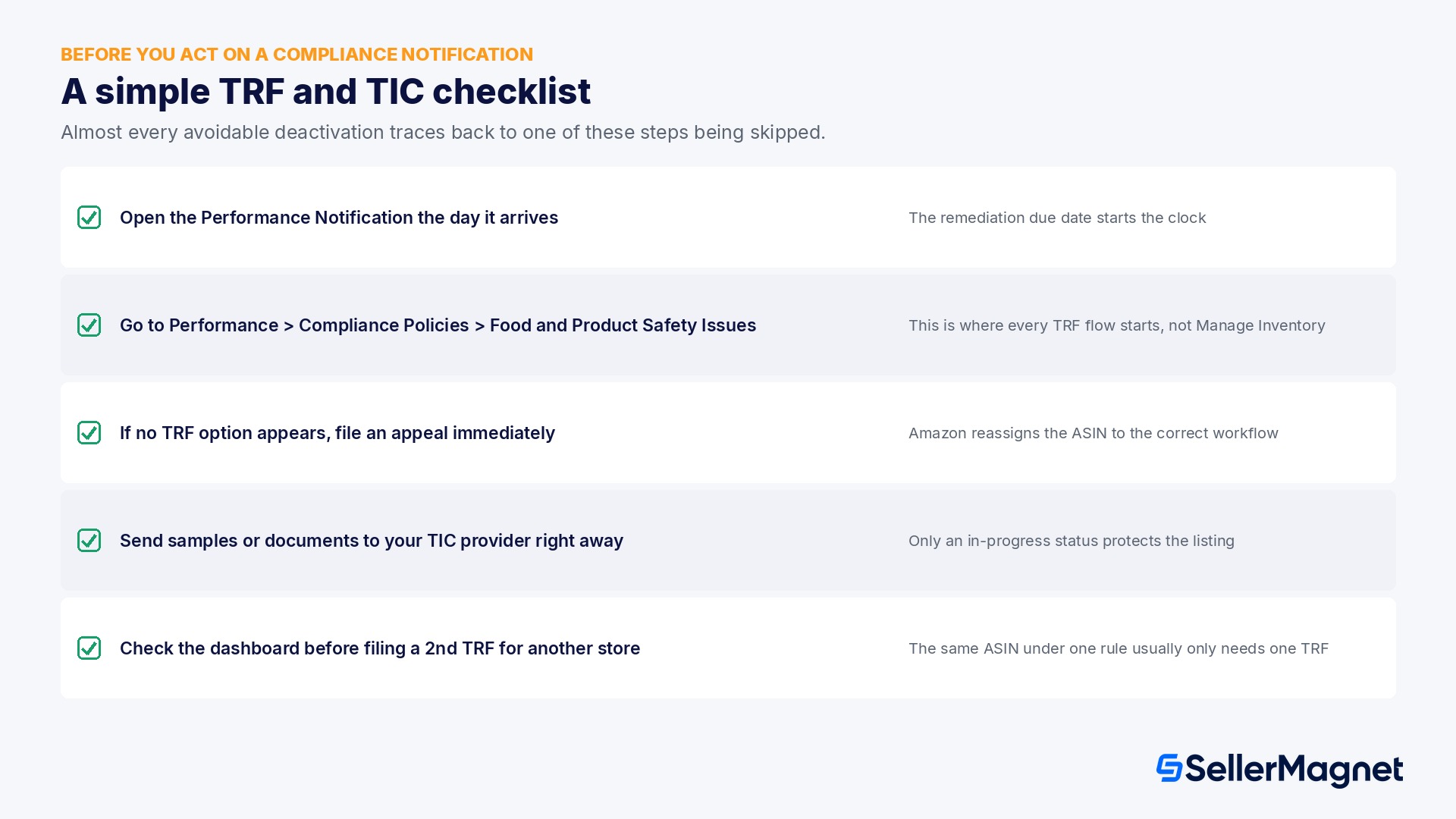
Open the Performance Notification the day it arrives and note the remediation due date.
Go to Account Health, Policy Compliance, Food and Product Safety Issues, Submit, and choose Test or Validate for that ASIN.
If no TRF option appears, file an appeal immediately instead of waiting.
Request quotes from more than one Amazon-authorized TIC provider if price or turnaround matters for this product.
Send samples or existing documentation to your chosen provider right away so the TRF can reach in progress status.
If the same ASIN sells in other stores under the same safety requirement, check the dashboard before filing anything else there; the result should already be propagating.
If you manage several flagged products at once, use the bulk submission flow and the centralized dashboard instead of repeating the single-product steps.
Scope: verify your own store's page before acting
This guide is built from the US Seller Central help page for direct product validation and Amazon's own Seller Forums announcement of the July 24, 2026 bulk-submission update, both read live. Amazon runs the same TIC/TRF mechanics across its marketplaces, but confirm the equivalent help page on your own store before treating a region-specific detail, such as which categories require TIC verification, as universal.
What is a TRF on Amazon?
A Test Request Form (TRF) is the document that starts direct product validation for a flagged ASIN: it connects your product to an Amazon-authorized third-party testing, inspection and certification (TIC) provider who verifies it on Amazon's behalf.
Can I submit a TRF before Amazon flags my product?
No. You can only submit a TRF after Amazon sends a Performance Notification requesting compliance documents for that specific ASIN; there is no proactive or preventive filing option.
Does my listing stay active while a TRF is being processed?
Yes, as long as the TRF status is in progress, which is reached once the TIC provider has received your product samples or existing documentation. A failed test or unverifiable documents cause immediate deactivation instead.
Can I use my own lab instead of an Amazon-authorized TIC provider?
You can use a different accredited lab for the actual testing, but if that lab is not one of Amazon's own authorized TIC providers, its results still must be reviewed and submitted by an authorized TIC provider before Amazon accepts them.
Do I need a separate TRF for every marketplace my ASIN is listed in?
Not if the stores share the same safety requirement for that ASIN. Submitting the TRF in one store makes it appear automatically for every other store with the identical requirement, and a passing result applies across all of them without duplicate filings.
What changed with Amazon's bulk TRF submission update?
Effective July 24, 2026, sellers can submit test requests for multiple flagged products at once, see every request's status across every store on the account without switching stores, and filter a centralized dashboard by ASIN, TRF ID, Order ID, status, store, or provider.
My ASIN doesn't show an option to submit a TRF. What do I do?
File an appeal. Amazon will review the ASIN and assign it to the correct compliance workflow rather than leaving it without a visible path forward.
How does Amazon group products for TIC provider offers?
Products are grouped by which lab would test them, since testing multiple products at the same lab lowers the per-product cost; you can select or deselect products within a group and your offer price adjusts accordingly.
Does a bundle or multipack need its own separate TRF?
It depends on the configuration. Amazon's guidance is to work directly with your TIC provider to determine the right approach for component parts and bundles, multipacks of identical items, and variant testing across colors, sizes or flavors, rather than assuming either way.
Can I cancel a TRF after submitting it?
Yes. Go to View All Orders, select the request, click Cancel, choose a reason, and confirm; this is commonly used when a flagged product has been discontinued.
Stop Juggling Tools. SellerMagnet Combines Everything You Need.