Amazon Prime Exclusive Discounts 2026: Price Rules, Fees and Eligibility
R
RenéFreelance Amazon Editor
|
15 min read
Prime Exclusive Price Discounts carry a badge Amazon shoppers trust, placement in search results and the cart, and a flat-looking fee that is easy to underestimate once a deal actually sells. This guide walks through the program as it runs for 2026: the account and listing requirements, the three price ceilings that decide your discount at once, the fee formula with its $5,000 cap, the operational limits that can get a seller-fulfilled listing rejected mid-event, and a worked example that shows exactly what a campaign costs once the sales come in. Every number ties back to Amazon's own published pages, named below.
A Prime Exclusive Price Discount is an Amazon promotion only Prime members can redeem, shown with event badging in search and on the product page. To run one, the price must be at least 15% below the ASIN's reference price, at or below the lowest sale price of the past 60 days, and at least 5% below the lowest sale price of the past 30 days; whichever of the three gives the lowest price is the one that applies. The fee is $100 per campaign plus 1.5% of the sales it generates, capped at $5,000.
What is a Prime Exclusive Price Discount?
A Prime Exclusive Price Discount, often shortened to PED, is a seller- or vendor-submitted promotion that only Prime members can see the discounted price for. Amazon highlights it with event badging in search results, on the product detail page and in the cart, which is the main reason sellers chase it during Prime Day, Prime Big Deal Days and the Black Friday Week through Cyber Monday period: the badge itself drives traffic on top of the lower price. It sits in Seller Central under Advertising, as one of three price-discount formats alongside Lightning Deals and Best Deals, and Amazon prices the three the same way for a given event.
Format
What it is
Fee for 2026 peak events
Prime Exclusive Price Discount
A standing discounted price, visible only to Prime members, for the length of the event
$100 per campaign + 1.5% of sales, capped at $5,000
Lightning Deal
A short, time-boxed discount shown on the Deals page with a countdown
$100 per campaign + 1.5% of sales, capped at $5,000
Best Deal
A longer-running discount on the Deals page, without the countdown urgency of a Lightning Deal
$100 per campaign + 1.5% of sales, capped at $5,000
Same fee, different formats
Amazon's own 2026 peak-season guidance states the fees for Best Deals, Lightning Deals and Prime Exclusive Price Discounts are the same. The decision between the three formats is about visibility and duration, not price.
Who can enroll: account and listing eligibility
Price discounts in general need a Professional selling plan and a seller feedback rating of at least 3.5. That is an account-level bar, measured on your overall seller feedback, and it is the baseline for the Price Discounts tool to even let you submit a deal.
A second, newer rating bar is being reported by sellers
Beyond the account-level 3.5 feedback rating, sellers in Amazon's forums describe a separate minimum PRODUCT star rating of 3.5 applied to 2026 peak-season Prime Exclusive Discounts specifically -- a listing below that bar gets turned down even if the account itself qualifies. This is not yet documented on Amazon's own help pages in the way the account-level rating is, so treat it as a planning flag rather than a guaranteed rule: check the exact wording in your own Seller Central eligibility notification for the event before you commit ad spend or inventory to a listing near the 3.5 line.
For seller-fulfilled (MFN) items, Amazon adds operational limits on top, checked in the month before the promotion starts. A listing that clears every price and rating rule can still be rejected if the account's recent performance misses these:
Metric
Limit for seller-fulfilled items
Note
Late delivery rate
4.0% or lower
Measured in the month before the promotion starts
Order defect rate
1.0% or lower
Same measurement window
Pre-shipment / pre-fulfillment cancellation rate
0.5% or lower (2.5% in Japan)
Marketplace-specific exception for Japan
Payment reserve policy
Set to 7 days or more after delivery
Account-level setting, not per listing
Shipping cost to the buyer
Free
Items must ship at no cost to qualify
Fulfilled-by-Amazon listings skip the delivery and cancellation checks above because Amazon runs the logistics, but they still need to be Prime-eligible, and the account-level feedback and rating bars above still apply. Watching account health in the weeks before a submission window opens is cheaper than finding out a star listing got rejected the week of the event.
The three price rules, and why only one of them usually binds
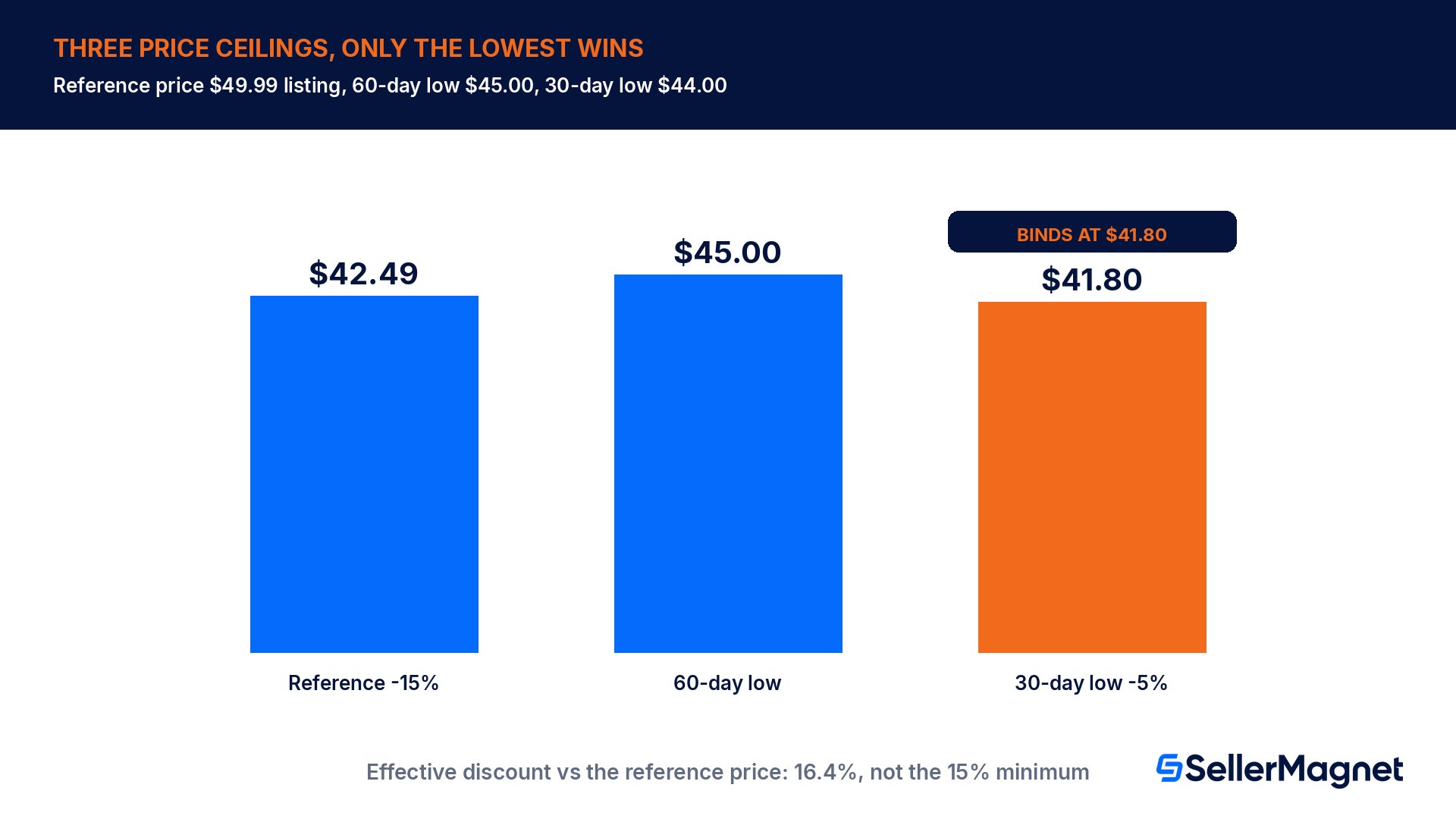
A Prime Exclusive Price Discount has to clear three separate price ceilings at the same time, and sellers who only track the 15% headline number are often surprised by which one actually decides their price. All three are checked against the SAME listing, not against each other, so the lowest of the three allowed prices is the one you can charge.
Rule
What it requires
Where it comes from
Minimum discount off reference price
At least 15% below the ASIN's current reference price
Amazon's Q4 2026 peak readiness guidance
60-day lookback
Priced at or below the lowest sale price of the past 60 days, including any past promotion, coupon or price discount
Same guidance
30-day lookback
At least 5% below the lowest sale price of the past 30 days, including past promotions, coupons and price discounts
Same guidance
Find the price a Prime Exclusive Discount can actually run at
Confirm the reference price - Check the ASIN's current reference price in Seller Central, not your own list price if the two differ.
Apply the 15% rule - Take 85% of the reference price (that is, the reference price minus 15%) to get the maximum price under that rule alone.
Pull the 60-day low - Look up the lowest price the ASIN sold at, or was discounted to, in the trailing 60 days. That figure is itself the ceiling under the 60-day rule; there is no extra percentage to apply.
Pull the 30-day low and apply the 5% rule - Take 95% of the lowest sale price of the trailing 30 days (that price minus 5%) to get the ceiling under that rule.
Take the lowest of the three - The lowest of the three ceilings is the maximum price you can submit. Submitting above it gets the deal rejected by the tool before it ever reaches a shopper.
Worked example: a $49.99 listing
Take a listing with a reference price of $49.99. Assume, for this example, that its lowest sale price over the past 60 days was $45.00 and its lowest sale price over the past 30 days was $44.00.
Rule
Calculation
Maximum price under this rule alone
15% off reference price
85% of $49.99
$42.49
60-day low
Lowest sale price of the past 60 days
$45.00
5% off the 30-day low
95% of $44.00
$41.80
The 15% headline rule alone would allow $42.49. But the 30-day rule only allows $41.80, which is lower, so $41.80 is the real ceiling -- the 30-day low binds, not the 15% figure most sellers plan around. The actual discount against the reference price works out to 16.4%, bigger than the 15% minimum, purely because of how recently the listing was discounted before. A listing that ran a coupon or a smaller promotion in the last 30 days will almost always find the 30-day rule is the tightest one.
Past promotions count against you
The 60-day and 30-day lookbacks explicitly include prices from past promotions, coupons and price discounts, not just your regular shelf price. Running a coupon two weeks before a Prime Exclusive Discount submission can quietly lower the ceiling you are allowed to price at for the bigger event.
What the campaign actually costs: the fee formula
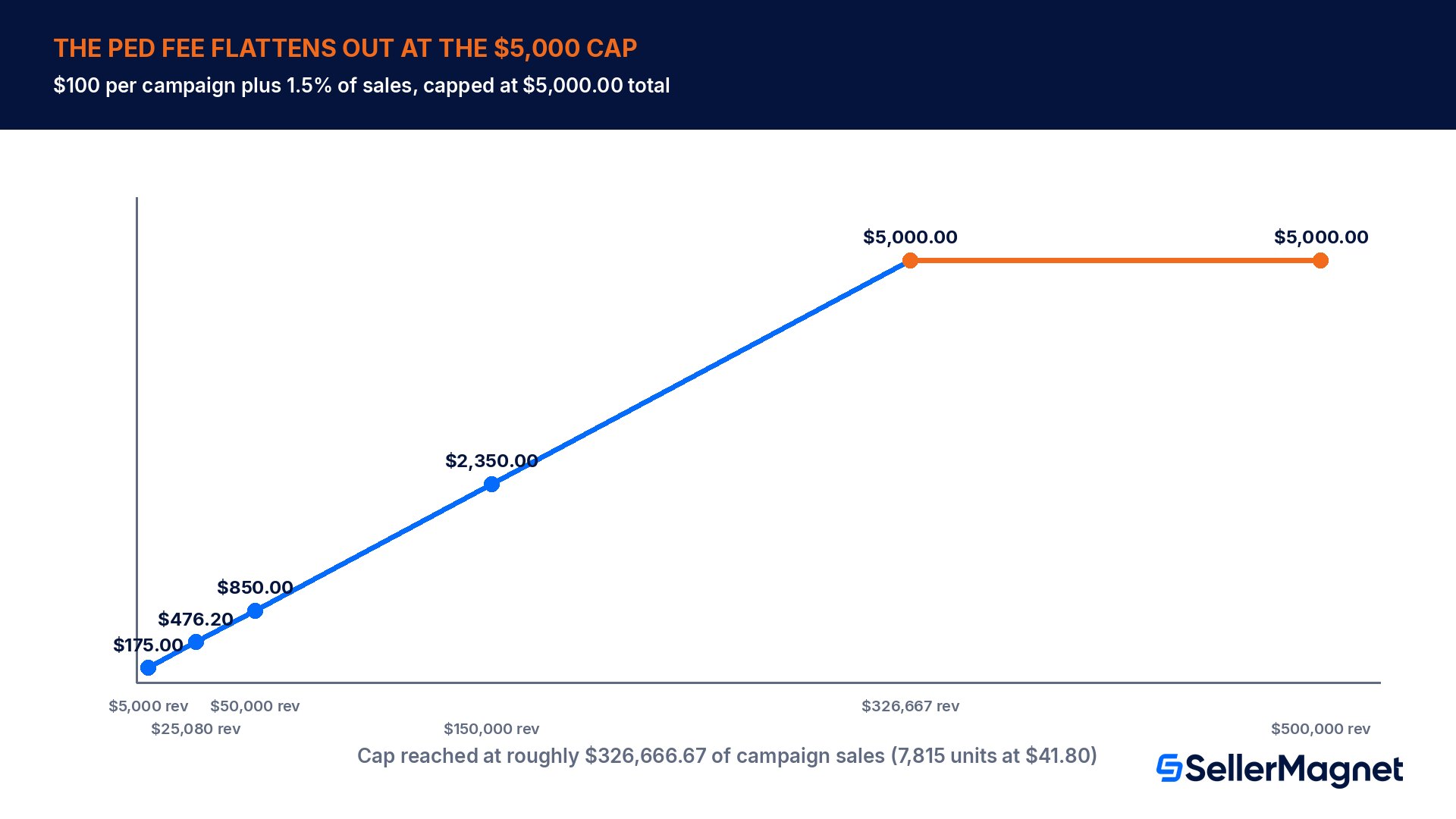
The fee for a 2026 peak-season Prime Exclusive Price Discount is $100 per campaign plus 1.5% of the sales it generates, with the total capped at $5,000.00. Continuing the worked example at a selling price of $41.80: if the campaign sells 600 units, revenue is $41.80 x 600 = $25,080.00.
Line
Amount
Basis
Campaign revenue
$25,080.00
600 units x $41.80
Fixed fee
$100.00
Per campaign
Variable fee (1.5% of sales)
$376.20
1.5% x $25,080.00
Total PED fee
$476.20
Fixed + variable, before the cap is reached
Fee as a share of revenue
1.9%
Fee / revenue
Revenue left after the PED fee
$24,603.80
Revenue - fee (before referral and fulfillment fees)
At this volume the fee is a small share of revenue, 1.9%. It only becomes a flat-rate cost once a single campaign's sales get large: the 1.5% variable portion reaches the $4,900 that fills the gap to the $5,000 cap at $326,666.67 of sales, which at $41.80 per unit is about 7,815 units in one event. Below that volume, every additional sale still costs 1.5 cents on the dollar in fees; above it, the fee stops growing and effectively shrinks as a percentage the bigger the event gets.
The PED fee is separate from referral and fulfillment fees
This fee is charged on top of, not instead of, the normal referral fee and FBA fulfillment fee (plus the US fuel and logistics surcharge where it applies) that every Amazon sale carries. Model the PED fee as an extra line in your margin check for the event, next to your usual FBA fee table, not as a replacement for it.
Remember too that the discounted price itself, not the reference price, is what every other fee is calculated on. A deeper discount lowers your per-unit revenue before any fee is even taken into account, on top of the PED fee itself, so run the full margin at the discounted price, never at the regular price, before committing a listing to the event.
When to submit, and what changes between events
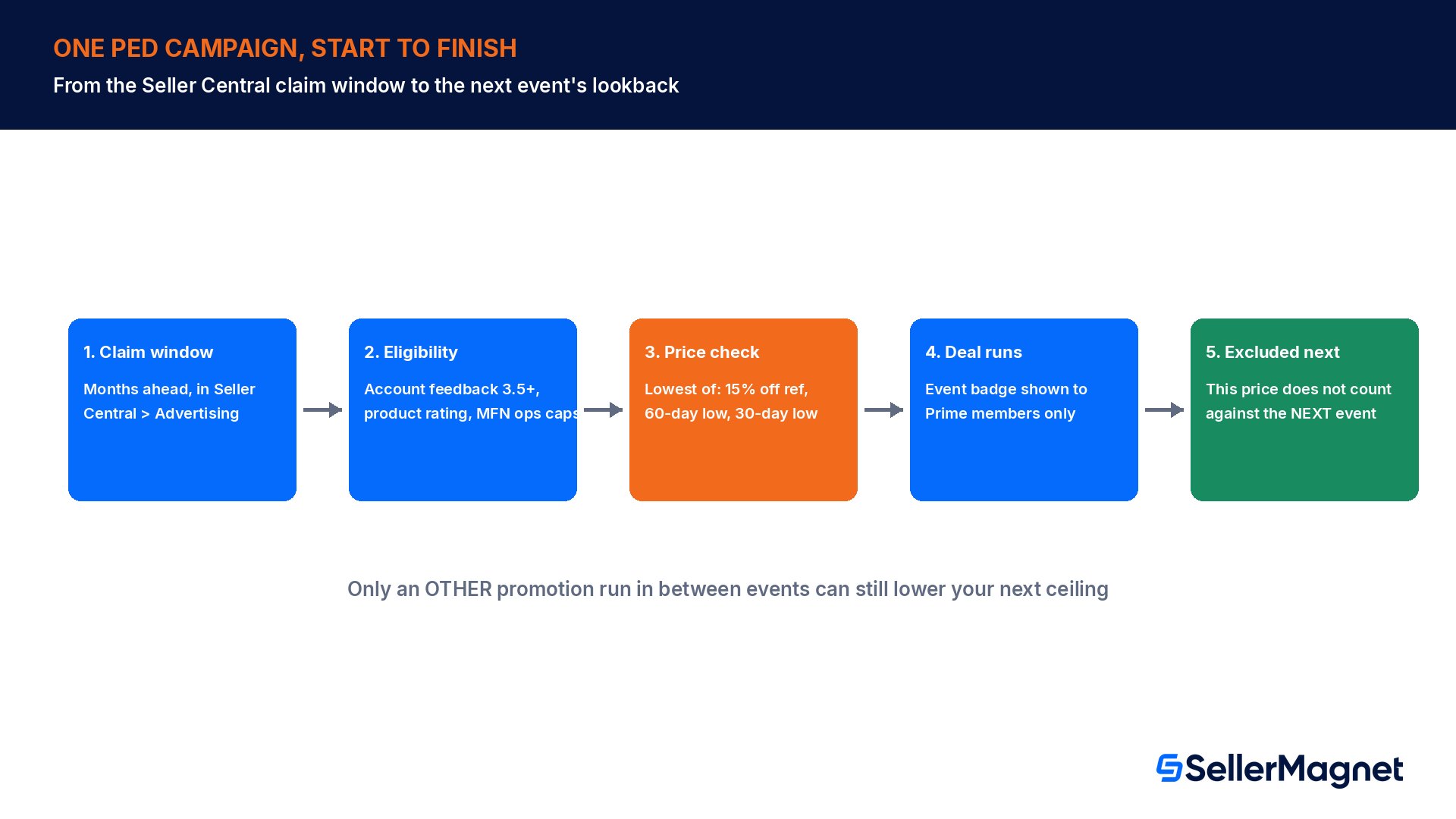
Amazon runs the same price-discount mechanics across Prime Day, Prime Big Deal Days and the Black Friday Week through Cyber Monday period, with claim windows opening months ahead of each event and shown in Seller Central for your specific marketplace. The promotional price itself is excluded from the 30-day and 60-day lookback windows of the NEXT event, so running a Prime Day discount does not permanently lower the ceiling you can price at for Black Friday; it is only excluded, not counted against you, going forward.
Practically, that means the planning work -- checking your account feedback rating, your recent order defect and cancellation rates, and whatever your listing's last 30 and 60 days of pricing look like -- has to happen before each submission window, not once a year. A listing that cleared easily for Prime Day can fail the 30-day rule for Black Friday Week simply because of a coupon run in between.
How Prime Exclusive Discounts interact with other promotions
Because the 60-day and 30-day lookbacks count any past promotion, coupon or price discount against the same listing, a Prime Exclusive Discount rarely exists in isolation. Running a percent-off coupon, a subscribe-and-save discount, or even a smaller unrelated deal in the weeks before a submission window directly lowers the ceiling you are allowed to price at for the bigger event, because that lower price becomes the new 30-day or 60-day low the next time Amazon checks. The practical consequence is scheduling: if a listing is heading into a Prime Exclusive Discount for a major event, it pays to hold off on smaller discounts on the same ASIN in the preceding month, or to plan the depth of the big event's discount around the smaller one on purpose.
The same mechanic works in your favor once the event is over. The promotional price used during the Prime Exclusive Discount itself is excluded from the lookback windows for the NEXT event, so a seller does not get boxed into an ever-deeper discount cycle purely from running one event after another. What does carry forward is any OTHER promotion run between events, which is exactly the coupon-and-discount trap described above.
Reading the submission window correctly
Claim windows for Prime Exclusive Discounts open well ahead of the event itself and differ by marketplace and by which event they cover; the exact date for your store shows inside Seller Central under Advertising, Price Discounts. For 2026, the submission window for the Prime membership promotion period opened in one block and the window for the Black Friday Week through Cyber Monday period opened separately, several weeks later, even though the fee structure and most eligibility rules were carried over unchanged between the two. Treat each event as its own submission with its own deadline, not as a single annual enrollment, and build the eligibility checks above into your calendar for every window rather than only the first one you run.
Common mistakes sellers make with Prime Exclusive Discounts
Planning around the 15% headline rule without checking the 30-day and 60-day lookbacks, which are very often the one that actually binds.
Running a coupon or a smaller promotion in the weeks before a submission window, which lowers the ceiling for the bigger event without the seller realizing it.
Forgetting that the PED fee stacks on top of the referral fee and FBA fulfillment fee, not instead of them.
Submitting a seller-fulfilled listing without checking the current late delivery, order defect and cancellation rates for the exact measurement month Amazon uses.
Assuming the account-level 3.5 feedback rating is the only rating bar, and not checking the current Seller Central notification for a listing-level rating requirement before committing inventory.
Pricing at the discounted price without re-running the margin, so the referral fee, FBA fee and the PED fee are all calculated against a lower per-unit revenue than normal.
Prime Exclusive Discount submission checklist
Confirm the ASIN's current reference price and compute 85% of it; that is the ceiling under the 15% rule alone.
Pull the listing's lowest sale price for the past 60 days; that figure is the ceiling under the 60-day rule.
Pull the lowest sale price for the past 30 days and compute 95% of it; that is the ceiling under the 30-day rule.
Price at or below the lowest of the three ceilings, not the highest.
Check the account's overall feedback rating is at least 3.5, and read the current Seller Central eligibility notification for any listing-level rating bar.
For seller-fulfilled items, pull the account's late delivery rate, order defect rate and cancellation rate for the measurement month, and confirm the payment reserve policy is 7 days or more after delivery.
Re-run the full margin at the discounted price, including the PED fee, the referral fee and the FBA fulfillment fee, before submitting.
Check whether a recent coupon or promotion on the same listing will lower the 30-day or 60-day ceiling for the event you are planning.
How SellerMagnet fits into the planning
Working out the right discount and checking the margin that is left after it is exactly the kind of fee math SellerMagnet's free Fee Calculator helps you with on a single ASIN: it compares FBA and FBM fees, the referral fee, profit and ROI using Amazon's public fee schedule, so you can see the margin at your planned Prime Exclusive Discount price before you submit it. The Analytics Dashboard shows profit and margin across your catalog, which helps you see, before an event opens for submissions, which listings still have enough margin left to run a 15 to 20% discount at all.
During the event itself, a deep, badge-driven discount is exactly the kind of price movement that can shift who holds the Buy Box on a shared listing, so sellers running the Repricer keep their own floor price in mind: the repricer runs around the clock and re-evaluates roughly every 5 minutes, but it never prices below the minimum you set, so your PED price for the event should be entered as that floor, not left for the repricer to work around separately.
What is a Prime Exclusive Price Discount on Amazon?
It is a promotion only Prime members can redeem, shown with event badging in search results, the product page and the cart. The price must clear three rules at once: at least 15% below the ASIN reference price, at or below the lowest sale price of the past 60 days, and at least 5% below the lowest sale price of the past 30 days.
How much does a Prime Exclusive Discount cost?
For 2026 peak events the fee is $100 per campaign plus 1.5% of the sales the campaign generates, capped at $5,000 total. It stacks on top of your normal referral fee and FBA fulfillment fee. Below roughly $326,667 of campaign sales, every extra dollar still costs 1.5 cents in fees; above that, the fee stays flat at $5,000.
Which of the three price rules actually decides my discount?
Whichever of the three gives the lowest allowed price for your specific listing. The 15% rule is only the headline figure that most sellers plan around; the 60-day and 30-day lookbacks, which include past promotions, coupons and price discounts rather than just your regular shelf price, are very often lower and end up being the real ceiling, especially on a listing that ran any kind of promotion recently.
Do I need a minimum star rating to run a Prime Exclusive Discount?
Your account needs at least a 3.5 feedback rating to use Amazon's Price Discounts tool at all. Sellers are also reporting a separate 3.5 minimum product star rating specifically for 2026 peak events, which is not yet on Amazon's general help pages the way the account rating is, so check your own Seller Central eligibility notification before relying on it.
Can a seller-fulfilled listing run a Prime Exclusive Discount?
Yes, if the account's late delivery rate is 4.0% or lower, order defect rate is 1.0% or lower, pre-shipment cancellation rate is 0.5% or lower (2.5% in Japan), the payment reserve policy is set to 7 days or more after delivery, and shipping to the buyer is free. Amazon checks these in the month before the promotion starts.
Does running a Prime Day discount hurt my Black Friday pricing?
No, the promotional price itself is excluded from the 30-day and 60-day lookback windows used for the next event, so it is not counted against you going forward. A separate, smaller promotion such as a coupon run in between events can still lower your ceiling, because that one is not excluded.
Stop Juggling Tools. SellerMagnet Combines Everything You Need.