Amazon FBA Export 2026: Auto-Enrollment and Opt-Out
R
RenéFreelance Amazon Editor
|
14 min read
Open the Fulfillment by Amazon settings page in Seller Central and scroll to Shipping programs and export settings, and most sellers find a toggle already switched on that they never touched. That toggle is FBA Export, and Amazon's own help page states plainly that most sellers who use FBA are enrolled automatically, with no application, no extra fee and no separate listing to create. A customer in Mexico, Singapore or the United Arab Emirates can already be looking at the exact same product page a seller built for amazon.com, checking out, and having Amazon ship the order internationally on the seller's behalf, all without the seller having done anything beyond letting the default setting stand. That is a meaningfully different mechanism from the two international programs sellers usually hear about first, Amazon Global Selling and Pan-European FBA, and conflating the three leads to real mistakes: disabling a program that was already quietly bringing in orders, or assuming export sales carry a hidden fee that the settlement report does not actually show. This guide works through exactly what FBA Export does, what it costs, the distinct Seller-Fulfilled Export sibling program for European marketplaces, how to exclude a country or a product without shutting the whole thing off, and a worked comparison of what an export order's settlement actually looks like next to a domestic one of the same size.
Amazon FBA Export is a program that automatically makes a seller's existing FBA listings available to buyers in more than 100 countries and regions who are shopping on the seller's home marketplace. Amazon identifies which listings are export-eligible, fulfills the international order, handles import duty and customs clearance, and ships to the buyer, all with no extra fee to the seller except on Multi-Channel Fulfillment orders. Most FBA sellers are enrolled by default and can check, exclude countries or products from, or disable the program at any time in Seller Central under Fulfillment by Amazon settings.
What does FBA Export actually do?
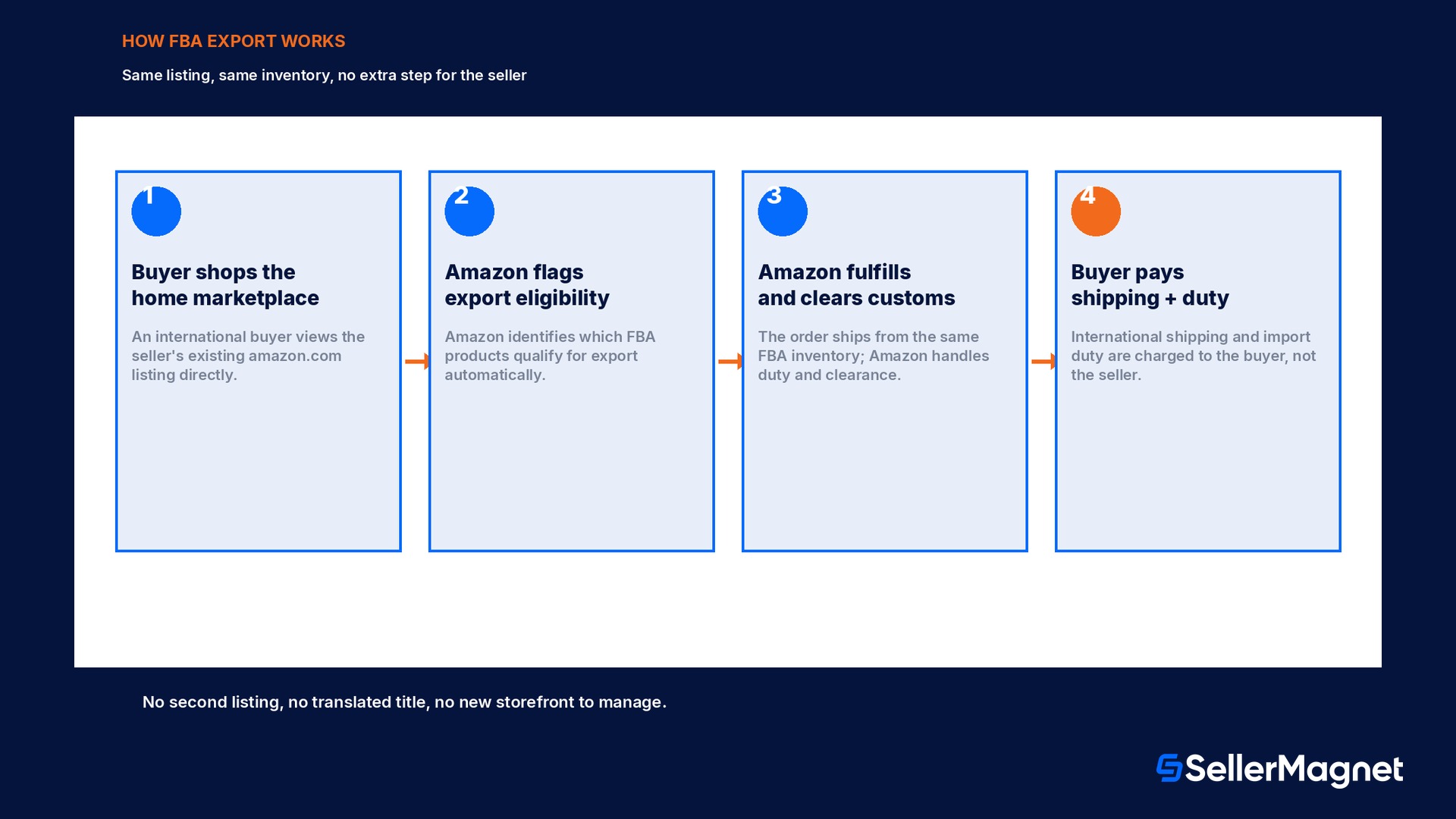
Amazon's own FBA Export help page describes the mechanism in six short bullet points, and the detail sellers usually skip past is the first one: international customers from more than 100 countries and regions can visit the seller's home store, meaning the exact storefront a US seller already built on amazon.com, and shop for products that are eligible for FBA Export. There is no second listing, no translated title created anywhere, and no new product page to manage. Amazon identifies which of a seller's FBA products qualify for export (based on category, size, destination restrictions and a handful of other eligibility factors Amazon evaluates automatically), fulfills the international order from the same US fulfillment center inventory the domestic orders ship from, handles the import duty and customs clearance paperwork at the border, and ships the finished package to the international buyer's address. The buyer pays the international shipping cost and the import duty at checkout, on top of the product price; the seller's side of the transaction looks, on paper, almost exactly like a domestic sale of the same item. Returns on an export order are evaluated against Amazon's standard return policies, the same ones that already govern domestic FBA returns, so a seller does not need a separate international returns process for FBA Export specifically.
Why FBA Export gets mixed up with Global Selling and Pan-European FBA
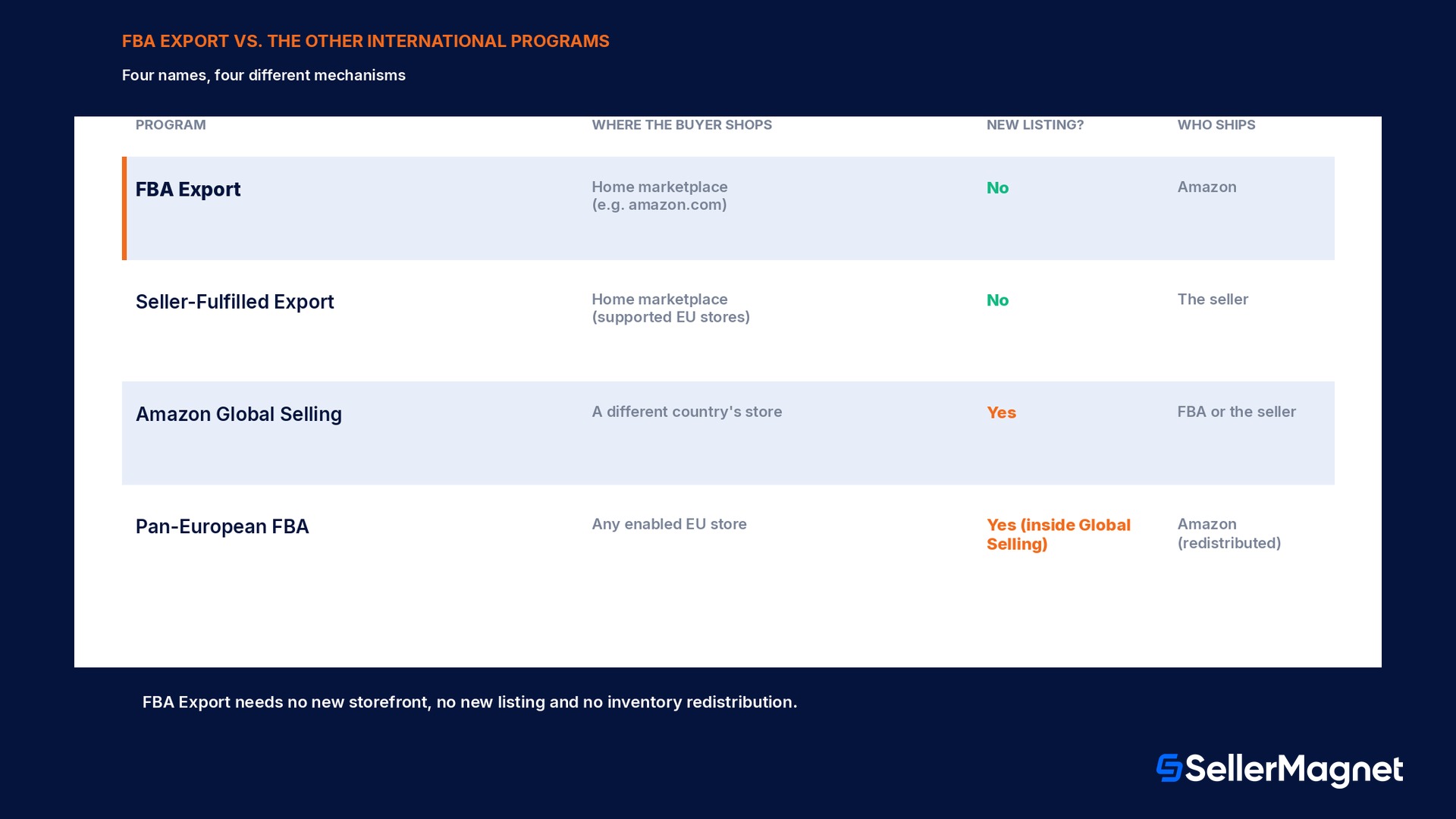
A seller researching "how do I sell internationally on Amazon" runs into three different programs that solve genuinely different problems, and the names alone do not make the distinction obvious. Amazon Global Selling is the program for creating a presence in a different country's Amazon store: a seller registers a new seller account (or links an existing one) in, say, amazon.de, lists products there, often under new ASINs or by matching to existing catalog items, and sells directly to customers who are shopping on that German storefront. Pan-European FBA is a logistics feature inside Global Selling: once a seller has FBA inventory enabled across at least two of France, Germany, Italy, Spain or Poland, Amazon automatically redistributes units between those fulfillment centers based on anticipated local demand, so the same stock becomes Prime-eligible for shoppers in every one of those stores without the seller shipping separately to each one. FBA Export is neither of those. It requires no new seller account, no new storefront registration and no inventory redistribution: it takes the listing a seller already has live on their one home marketplace and makes it buyable by shoppers in other countries who are browsing that same original listing page. A seller who disables FBA Export because they assume it duplicates Global Selling work is not avoiding extra effort, they are turning off orders that were arriving with zero extra listing work in the first place.
Program
Where the buyer shops
New listing needed?
Who ships it
FBA Export
The seller's existing home marketplace (e.g. amazon.com)
No
Amazon, from the seller's existing FBA inventory
Seller-Fulfilled Export
The seller's existing home marketplace in a supported EU store
No
The seller themselves
Amazon Global Selling
A different country's Amazon store (e.g. amazon.de)
Yes, a new or matched listing in that store
FBA or the seller, depending on setup
Pan-European FBA
Any of the enabled EU stores, Prime-eligible
Yes, inside Global Selling
Amazon, redistributed across EU fulfillment centers
Does FBA Export cost extra?
Amazon's FBA Export FAQ states the cost structure in two overlapping sentences that are easy to read past: there is no extra cost to the seller to fulfill FBA Export orders, and except on Multi-Channel Fulfillment orders, sellers do not pay additional fees to use FBA Export. The second clause is the one worth sitting with. A standard FBA Export order, meaning a normal customer order fulfilled from FBA inventory the way any domestic order is, carries the same referral fee and the same FBA fulfillment fee the seller already pays on a domestic sale of that item, at the same size and weight tier, with nothing added on top for the international destination. The international shipping cost and any import duty are charged to the buyer at checkout and handled by Amazon as part of getting the package across the border; neither one is deducted from the seller's payout or listed as a line item against the seller in the settlement report. The single carve-out is Multi-Channel Fulfillment, the separate feature that lets a seller fulfill an order placed on a different sales channel, such as their own website, from FBA inventory. An MCF order shipped to an international address is priced under Amazon's published MCF export fee schedule, which is a different, named fee structure entirely, and it is the one case where "FBA Export fees" genuinely means something is charged. A seller reading a forum thread that says "FBA Export charges extra" without specifying MCF is very likely looking at someone's MCF invoice, not a standard marketplace order.
The one real exception: Multi-Channel Fulfillment
Standard Amazon.com orders fulfilled through FBA Export carry no additional fee. Orders placed through Multi-Channel Fulfillment (an order from outside Amazon, such as the seller's own store, fulfilled from FBA inventory) that ship to an international address are priced under Amazon's separate MCF export fee schedule. Check the live MCF fee page before assuming either cost structure applies to a specific order type.
Checking, excluding and opting out without touching the listing
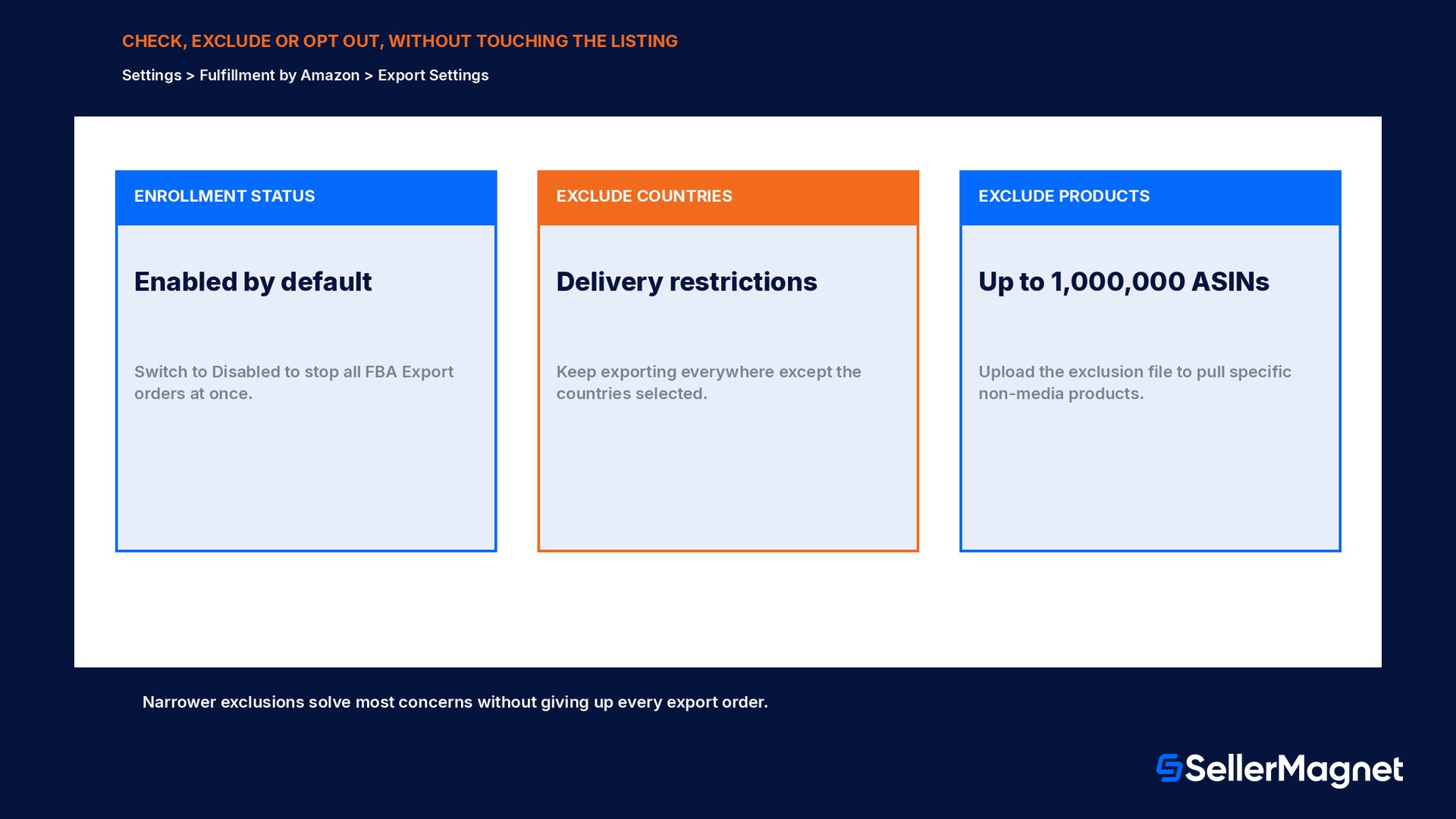
Because FBA Export runs on the existing listing rather than a separate one, every control for it lives in one settings screen rather than inside product editing. In Seller Central, under the Settings menu, Fulfillment by Amazon, scrolling to Shipping programs and export settings and selecting Edit opens the Export Settings group, where the current enrollment status is visible and can be switched to Disabled at any time to stop export of all FBA products, or back to enabled. Below the on/off switch sit two narrower controls that most sellers never open because the toggle itself already does what they assumed they needed. Delivery restrictions lets a seller exclude specific countries or regions from receiving FBA Export orders at all, useful when a distribution agreement or a trademark licence genuinely restricts where a product can legally be sold, without disabling export for every other country. Exclude products works the other direction: a seller downloads the FBA Export exclusion file, follows its instructions to mark individual products, and uploads it back, which supports excluding up to one million non-media products from the program, either globally or from specific countries only, and the exclusion list can be edited, added to or removed from at any time. Amazon's own guidance frames the opt-out choice explicitly around exactly this concern: a seller who worries that a distribution agreement limits where a product can be sold can opt out of FBA Export entirely, restrict it to certain countries, or exclude specific products, for any reason, at any time, which puts the actual compliance decision where it belongs, with the seller who knows their own contracts, rather than with a blanket default.
Is Seller-Fulfilled Export the same program?
A seller operating in Europe who hears "export" and assumes it means the same FBA Export mechanism is missing a second, separate program built specifically for EU marketplaces. Seller-Fulfilled Export is currently available from amazon.de, amazon.co.uk, amazon.fr, amazon.it and amazon.es, and from amazon.nl but only for shipments to Belgium, and it works on an entirely different fulfillment model: the seller, not Amazon, ships the order, handles the customs process and manages the customer experience from dispatch through any return. Amazon's own Seller-Fulfilled Export FAQ is direct about what distinguishes it from FBA Export: for FBA Export, Amazon fulfills the international order, including import duty and customs clearance where applicable, and ships the product to the buyer; for Seller-Fulfilled Export, the seller is responsible for that entire chain. Activation carries no additional selling fee either way, the FAQ states plainly that no fees are applied for activating seller-fulfilled export, but the seller remains responsible for understanding whether a given product is legally appropriate to ship from the origin country to the destination country, the same compliance judgment FBA Export leaves to the seller for exclusions. Enrollment runs two ways: Export Central offers a simplified enrollment flow, but it currently only supports enrolling into Seller-Fulfilled Export, not FBA Export, and the alternative is enabling it manually through an International Shipping Template, which must be repeated separately for each Amazon store and each shipping template a seller wants it active on. Stopping it is equally manual: remove the destination countries from the International Shipping Settings section of the relevant shipping template, store by store.
Why some products are not export-eligible, and how to check
Enrollment in FBA Export is automatic, but eligibility is still evaluated per product, not granted blanket across an entire catalog. Amazon's own description of the program says it helps identify which of a seller's products are eligible for export, which is a tell that the reverse is also true: some listed products will not be. The factors behind that evaluation are not published as a single checklist, but they line up with the same categories Amazon already restricts in other cross-border contexts: dangerous goods and other items subject to hazmat shipping rules, products restricted by the specific destination country's import regulations (certain electronics, food, cosmetics and regulated consumer goods vary country by country), and products Amazon has otherwise flagged as ineligible for international fulfillment for size, category or compliance reasons. A seller does not need to guess product by product. The export eligibility of each ASIN is visible directly in Seller Central, and the practical workflow is to treat the automatic eligibility flag as the first filter and the manual exclusion tools described below as the second, deliberate one, reserved for products with a real distribution-agreement or trademark reason to stay domestic rather than an assumption that export sounds risky. A seller running an international PPC or review-request campaign off the back of FBA Export sales should also confirm the specific ASIN is actually export-eligible before building marketing spend around international demand for it, since a non-eligible ASIN will simply not appear in export search results abroad no matter how the seller's settings are configured.
Worked comparison: reading an export order's settlement next to a domestic one
Take a US seller with a single FBA ASIN that already sells domestically at a price and size/weight tier carrying a known referral fee percentage and a known FBA fulfillment fee, both figures a seller can already see for that ASIN in Seller Central's fee preview or in a tool that reads the account's real fee schedule, such as SellerMagnet's Fee Audit, which checks flagged fees against Amazon's own published rates. When an identical unit sells through FBA Export to a buyer outside the US, the settlement line for that order shows the same referral fee percentage and the same FBA fulfillment fee amount as the domestic sale of that item, because Amazon's own FAQ states there is no extra cost to the seller for standard FBA Export fulfillment. What changes is entirely on the buyer's side of the checkout screen, not the seller's settlement: the buyer sees and pays an international shipping charge and an import duty figure that Amazon calculates and collects, and that money never touches the seller's payout at all, in either direction. The practical check for a seller who suspects an export order was charged something extra is to open the Transactions view (SellerMagnet's dashboard shows every Amazon fee and adjustment from a seller's settlements in one place) and confirm the fee lines on that specific order match a domestic order of the same ASIN and price tier line for line; if they match, the order was priced exactly as Amazon's FBA Export FAQ describes, and whatever looked unusual was the international shipping or duty figure on the buyer's receipt, not a seller-side charge. The one order type where that comparison will genuinely differ is Multi-Channel Fulfillment shipped internationally, which is priced under the separate MCF export schedule discussed above and should never be compared line for line against a standard Amazon.com Export order.
Checking and adjusting FBA Export settings
Open the settings page - In Seller Central, go to the Settings drop-down and select Fulfillment by Amazon.
Find the export group - Scroll to Shipping programs and export settings and select Edit, then go to the Export Settings group.
Check current enrollment - The page shows whether FBA Export is currently enabled; most FBA sellers find it already on by default.
Exclude specific countries if needed - Under Delivery restrictions, select Edit, choose the countries to exclude, and save; the rest of the program stays active.
Exclude specific products if needed - Download the FBA Export exclusion file, mark the ASINs to exclude (up to one million non-media products), and upload it back.
Decide, don't default - Before disabling the whole program, confirm whether the actual concern is a distribution agreement for specific products or countries, which the exclusion tools solve without losing the rest of the export orders.
Checklist before touching FBA Export settings
Confirm current enrollment status first; most FBA sellers are already enrolled and have been receiving export orders without realizing it.
Before disabling the whole program, check whether the real concern is a specific product (a distribution or trademark licence restriction) or a specific country, both of which have a narrower exclusion tool.
Never assume an export order carries a hidden seller-side fee; compare its settlement line against a domestic order of the same ASIN and price tier (SellerMagnet's Transactions view makes this a direct side-by-side check) before concluding otherwise.
If selling from a European marketplace, check Seller-Fulfilled Export separately: it is a different program, store-specific, seller-handled, and enabled through an International Shipping Template rather than the FBA Export settings page.
Treat Multi-Channel Fulfillment orders shipped internationally as a separate fee case; they are priced under the MCF export fee schedule, not the standard FBA Export no-extra-fee rule.
Keep the exclusion file (for excluded ASINs) and the delivery-restrictions list (for excluded countries) up to date as distribution agreements change, rather than toggling the whole program off and back on.
Mistakes sellers make with FBA Export
Disabling FBA Export entirely to solve a problem with one distribution-restricted product or one country, when the exclusion tools solve the same problem without losing every other export order.
Confusing FBA Export with Amazon Global Selling and assuming it requires a new storefront, a new seller account or a new listing; it uses the existing home-marketplace listing as-is.
Assuming export orders carry a hidden seller-side fee because the buyer's receipt shows international shipping and duty charges; those charges are paid by the buyer and never appear against the seller.
Trying to enroll a European marketplace listing into FBA Export through Export Central, when Export Central's simplified flow currently only supports Seller-Fulfilled Export enrollment.
Treating a Multi-Channel Fulfillment international order's fee as proof that all FBA Export orders cost extra, instead of recognizing MCF's separate, named export fee schedule.
Do I have to apply for FBA Export?
Does FBA Export cost extra?
Who pays the international shipping and import duty?
How is FBA Export different from Amazon Global Selling?
How is FBA Export different from Pan-European FBA?
Can I exclude just one country or one product instead of opting out entirely?
What is Seller-Fulfilled Export, and is it the same thing?
How do FBA Export returns work?
Stop Juggling Tools. SellerMagnet Combines Everything You Need.