Amazon Inventory Ledger Report 2026: Read It and Reconcile Units
R
RenéFreelance Amazon Editor
|
16 min read
Six different FBA reports used to answer six different pieces of the same question: where did my inventory go. Since January 31, 2023, Amazon folded Daily Inventory History, Monthly Inventory History, the Inventory Event Detail report, Inventory Adjustments, Inventory Reconciliation and the Received Inventory report into a single report, the Inventory Ledger, and most sellers who learned those older reports never relearned where the same numbers now live. Amazon describes the Inventory Ledger report as a bank statement for inventory: a starting balance, every movement in between (received, sold, returned, removed, damaged, lost, found and adjusted), and an ending balance, available for up to 18 months of history. The report has two views that answer two different questions, a Summary view for totals over a period and a Detailed view for the individual event behind any one of those totals, plus a built-in reconciliation trail that links a misplaced or damaged unit straight through to the reimbursement that resolved it. This guide works from Amazon's own Inventory Ledger help pages to lay out exactly how to read both views, what each disposition and reconciliation reason actually means, and a worked reconciliation using Amazon's own Beginning and Ending quantity formula so the numbers in Seller Central stop looking like a foreign currency.
The Inventory Ledger report is Amazon's single FBA inventory report, structured like a bank statement: it shows a starting warehouse balance, every inventory movement in a period (receipts, customer shipments, returns, transfers, found units, lost units, disposed units and other events), and an ending warehouse balance. It replaced six separate discontinued reports on January 31, 2023, and offers a Summary view for totals and a Detailed view for individual events, with up to 18 months of history.
Why did Amazon replace six reports with one?
Before January 31, 2023, a seller trying to answer where did my inventory go had to pull from six different places: the Daily Inventory History report, the Monthly Inventory History report, the Inventory Event Detail report, the Inventory Adjustments report, the Inventory Reconciliation report and the Received Inventory report, each with its own date range logic and its own column layout. Amazon's own migration guide maps every one of those old reports onto a specific Inventory Ledger configuration: Daily or Monthly Inventory History becomes a Summary view aggregated by the matching time period; the Inventory Event Detail and Inventory Adjustments reports become a Detailed view filtered to the relevant event or adjustment types; the Received Inventory report becomes a Detailed view filtered to Receipts; and the Inventory Reconciliation report becomes a Summary view aggregated by Country and Monthly, with one formula adjustment covered below. The practical effect is that a seller no longer needs to cross-reference six exports to confirm a single missing unit, every movement and every reconciliation for that unit sits in one report, filterable down to a single FNSKU.
Discontinued report
Inventory Ledger equivalent
Daily Inventory History
Summary view, aggregated Daily
Monthly Inventory History
Summary view, aggregated Monthly
Inventory Event Detail report
Detailed view, filtered by event type
Inventory Adjustments report
Detailed view, filtered by adjustment type
Received Inventory report
Detailed view, filtered to Receipts
Inventory Reconciliation report
Summary view, aggregated by Country and Monthly (plus the in-transit adjustment below)
Summary view and Detailed view answer two different questions
The Summary view answers how much moved: it shows inventory events (receipts, shipments, adjustments) grouped by SKU and disposition over the time period selected, Daily, Weekly or Monthly. How quickly that data becomes available depends on the period chosen: a Daily aggregation is generally ready within 24 hours, a Weekly aggregation by the end of the day on the following Monday, and a Monthly aggregation by the end of the second day of the next month. The Detailed view answers which specific event: it lists every individual inventory event with its date and time, event type, reference ID (a shipment or adjustment ID), quantity, fulfillment center, disposition, reason code and country, plus the Reconciled and Unreconciled quantity columns described below. The two views are linked in the online report: clicking a quantity figure in a Summary view field such as Returned or Received opens a new tab showing the Detailed view rows behind that number, so a seller rarely needs to search the Detailed view cold. Both views can be filtered by Merchant SKU, Fulfillment Network SKU (FNSKU) or ASIN, and the report covers up to 18 months of historical data, far more than most of the discontinued reports offered individually.
How does a monthly balance actually add up?
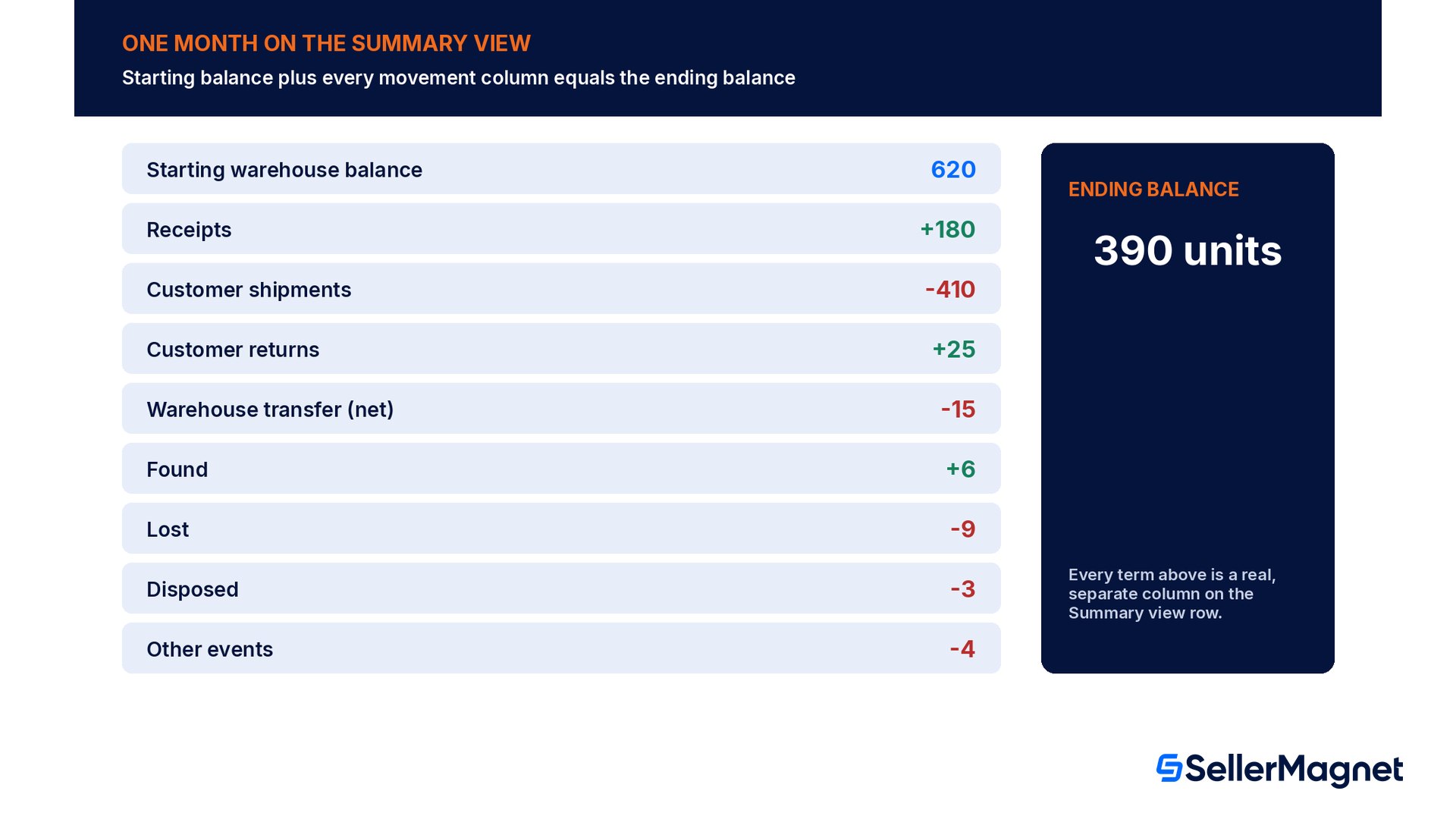
Take one FNSKU with a starting warehouse balance of 620 units at the start of the month. Over the period, the Summary view records 180 units received, 410 units shipped to customers, 25 units returned by customers, a net 15 units transferred out between fulfillment centers, 6 units found, 9 units lost and 3 units disposed, with 4 more units folded into Other events, the column that also carries damaged-unit movements rather than breaking Damaged out on its own. Adding every column to the starting balance, 620 + 180 - 410 + 25 - 15 + 6 - 9 - 3 - 4, nets out to an ending warehouse balance of 390 units, and that ending balance becomes next month's starting balance. Every term in that sum is a real, separate column on the Summary view row for that SKU and disposition, which is exactly why a seller can audit a single month's movement without downloading the Detailed view at all, unless one of the totals looks wrong and needs the individual events behind it.
Column
Units
Running effect
Starting warehouse balance
620
Base
Receipts
+180
Inbound
Customer shipments
-410
Outbound
Customer returns
+25
Inbound
Warehouse transfer in/out (net)
-15
Outbound
Found
+6
Inbound
Lost
-9
Outbound
Disposed
-3
Outbound
Other events
-4
Outbound
Ending warehouse balance
390
Result
Disposition: what state the units are actually in
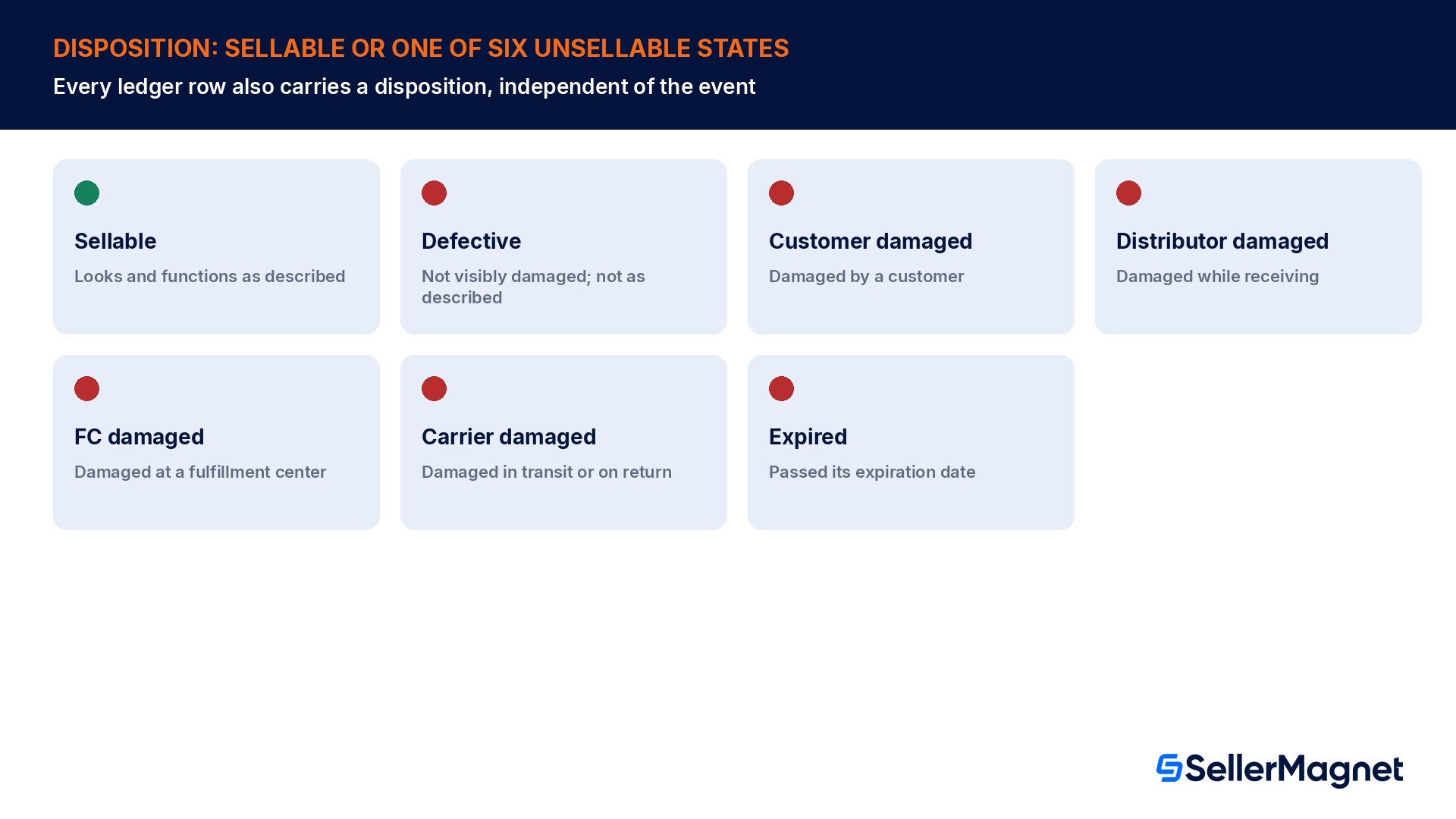
Every row in the Inventory Ledger also carries a disposition, the state of the physical unit, independent of the event that moved it. Sellable inventory looks and functions as described in the listing; it does not by itself confirm the unit is currently available to pick, pack or ship, that detail lives on the separate FBA Inventory report. Every other disposition is unsellable: Defective inventory does not look or function as described and is not visibly damaged, the category a recalled product typically falls into; Customer damaged covers units damaged by the buyer; Distributor damaged covers units the seller, vendor or distributor damaged during receiving; Fulfillment center damaged and Carrier damaged separate out whether the damage happened inside Amazon's warehouse or in transit; and Expired covers units that passed their expiration date. Reading disposition alongside the event type is what turns a raw quantity into an answer: 9 units lost this month only becomes actionable once a seller also knows whether those units were sellable stock that vanished or units that were already flagged defective before they disappeared from the balance.
Disposition
State
Definition
Sellable
Sellable
Looks and functions as described in the listing
Defective
Unsellable
Does not look or function as described; not visibly damaged
Customer damaged
Unsellable
Damaged by a customer
Distributor damaged
Unsellable
Damaged by the seller, vendor or distributor while receiving
Fulfillment center damaged
Unsellable
Damaged at an Amazon fulfillment center
Carrier damaged
Unsellable
Damaged by a carrier during receiving, in transit to the buyer, or on a return shipment
Expired
Unsellable
Passed its expiration date
Which adjustment types actually get reconciled?
Not every adjustment on the Inventory Ledger carries a reconciliation trail. Only three do: Inventory misplaced, Inventory found and Damaged at Amazon fulfillment center. Each of those three rows can resolve into one of a short list of reconciliation reasons, visible in both the online report and the downloadable file. A Damaged at Amazon fulfillment center row can resolve as Inspected and disposition corrected (an inspection found the unit was not actually damaged), Reimbursed, or Remaining misplaced or damaged inventory if nothing has resolved it yet. An Inventory misplaced row can resolve as Inventory found, Reimbursed, Damaged inventory misplaced (the unit turns out to belong to the Damaged at Amazon fulfillment center bucket instead), or the same Remaining misplaced or damaged inventory holding reason. An Inventory found row can resolve as Replacement inventory found (a unit Amazon sent to compensate for a lost or damaged one under the FBA inventory reimbursement policy), Missing inventory found, or Inventory ownership correction when a found unit gets reassigned to its correct owner. The downloadable Detailed view adds Reconciled quantity and Unreconciled quantity columns for exactly these three adjustment types, and those two numbers move in opposite directions as a case resolves: when a misplaced or damaged unit is reimbursed or reconciled, the unreconciled quantity drops and the reconciled quantity rises by the same amount. Amazon gives this process up to 60 days: once a unit under research is reimbursed, or once 60 days pass, whichever comes first, the corresponding adjustment moves into the Detailed view with its final reconciliation reason attached. The claims process behind a Reimbursed row itself, deadlines, SAFE-T cases and what Amazon pays out, is covered separately in Amazon FBA Reimbursements 2026; this report is where that same reimbursement shows up as a line item, not where the claim itself gets filed.
Where to click
When there is a reconciliation for an adjustment, the online report links straight to either the matching row in the Detailed view or the matching transaction in the separate Reimbursement report, so a seller does not have to cross-reference the two reports by hand.
Adjustment type
Reconciliation reason
Meaning
Damaged at Amazon fulfillment center
Inspected and disposition corrected
Inspection found the unit was not actually damaged
Damaged at Amazon fulfillment center
Reimbursed
Seller has been reimbursed for the unit
Damaged at Amazon fulfillment center
Remaining misplaced or damaged inventory
Not yet resolved; still open
Inventory misplaced
Inventory found
The misplaced unit was located
Inventory misplaced
Reimbursed
Seller has been reimbursed for the unit
Inventory misplaced
Damaged inventory misplaced
Reclassified into the Damaged at Amazon fulfillment center bucket
Inventory misplaced
Remaining misplaced or damaged inventory
Not yet resolved; still open
Inventory found
Replacement inventory found
Amazon sent a replacement unit under the FBA reimbursement policy
Inventory found
Missing inventory found
The misplaced unit was located
Inventory found
Inventory ownership correction
A found unit was reassigned to its correct owner
Matching the old Inventory Reconciliation report's Beginning and Ending quantity
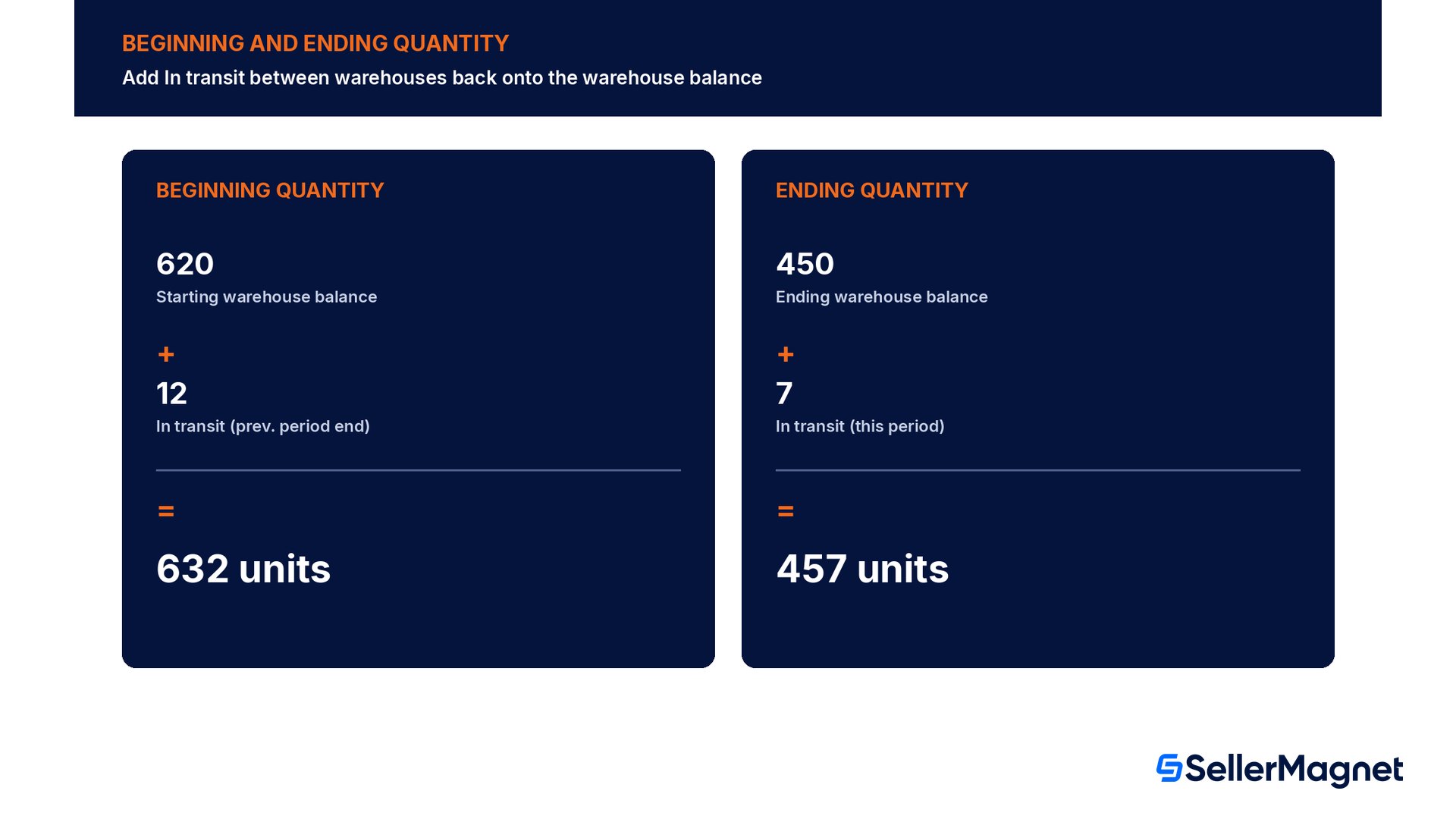
The retired Inventory Reconciliation report included in-transit quantities inside its Beginning quantity and Ending quantity figures; the Inventory Ledger's Summary view does not fold those in by default, it reports them separately in their own In transit between warehouses column. To reproduce the old report's numbers, add that column back in on both ends of the period: Beginning quantity equals the Starting warehouse balance plus In transit between warehouses at the end of the previous period, and Ending quantity equals the Ending warehouse balance plus In transit between warehouses for the current period. Carrying the 620-unit starting balance from the worked example above into a new period with 12 units in transit between warehouses at the end of the prior month gives a Beginning quantity of 620 + 12 = 632. If that period closes with an Ending warehouse balance of 450 units and 7 units in transit between warehouses, the Ending quantity is 450 + 7 = 457. Skipping the in-transit column is the single most common reason a seller's own Beginning or Ending quantity recalculation does not match what the old Inventory Reconciliation report used to show for the same period.
A worked reconciliation: watching reconciled units overtake unreconciled ones
Say 40 units on one FNSKU get flagged Inventory misplaced in a single month. By day 60, the case has partly resolved: 18 units were reimbursed outright and 7 units turned up and were reclassified as Inventory found, for a combined 25 reconciled units out of 40, a reconciled rate of 62.5%. The remaining 15 units sit under the Remaining misplaced or damaged inventory reason, still open. On the downloadable Detailed view, this shows up as the Unreconciled quantity column falling from 40 to 15 and the Reconciled quantity column rising from 0 to 25 across the same date range, which is the fastest way to see, at a glance, whether an open misplaced-inventory case is actually moving toward resolution or stuck. A seller who only checks the online view at the 60-day mark, instead of tracking the reconciled-versus-unreconciled trend along the way, has no way to tell the two situations apart until Amazon closes the case either way.
State
Reconciled
Unreconciled
Reconciled rate
Case opened
0
40
0.0%
Day 60 (reimbursed + found)
25
15
62.5%
Should you filter by FNSKU, ASIN or merchant SKU?
Amazon's own guidance for reconciling inventory is specific: use the Fulfillment Network SKU (FNSKU), not the ASIN and not the merchant SKU, to specify the exact product in each report pull. The FNSKU is the identifier Amazon itself assigns to a unit once it is received into a fulfillment center, which makes it the identifier that actually tracks the physical item through receiving, storage, movement and disposal, the same journey the Inventory Ledger report is built to show. An ASIN can map to multiple FNSKUs if the same product was shipped in under different prep or labeling configurations over time, and a merchant SKU is the seller's own identifier, not Amazon's internal one, so either can blur together units that the fulfillment network is actually tracking separately. A seller running a Low-Cost Store or FBA-from-origin catalog has one more filter available on both views, aggregating by Country = CN or by Fulfillment Center = XCND isolates exactly that inventory from the rest of a standard FBA catalog.
View online or download: which one should you use?
Both views are available two ways, View online and Download, and Amazon's own guidance ties the choice to scale rather than taste. View online is recommended for quickly checking inventory adjustments and reconciliations one at a time, since the linked quantity figures and the reconciliation links to the Detailed view or the Reimbursement report only work in the interactive version. Download is recommended for understanding the reconciliation status of inventory adjustments at scale, when a seller needs the Reconciled and Unreconciled quantity columns across hundreds or thousands of rows at once rather than clicking through them individually. The download itself offers a Detailed view export with a chosen date range and optional Merchant SKU, FNSKU or ASIN filters, delivered as either a .csv or a .txt file, and it is this exported file, not the online view, that carries the full adjustment-type and reason-code columns in a form a spreadsheet or a BI tool can actually aggregate across a large catalog in one pass.
Mistakes that make the Inventory Ledger look wrong when it is not
Comparing the Summary view's Beginning or Ending quantity to the old Inventory Reconciliation report without adding in-transit units. The Summary view excludes in-transit quantities by default; the old report did not.
Filtering by ASIN or merchant SKU instead of FNSKU when reconciling one product. Only the FNSKU tracks the exact physical unit through the fulfillment network end to end.
Expecting every adjustment type to carry Reconciled/Unreconciled columns. Only three adjustment types resolve that way: Inventory misplaced, Inventory found and Damaged at Amazon fulfillment center.
Checking the online report once and not again. The reconciled-versus-unreconciled split moves as a case resolves; a single snapshot cannot show whether an open case is progressing or stuck.
Assuming a Daily aggregation is instantly current. Daily data is generally available within 24 hours, Weekly by the following Monday, Monthly by the second day of the next month.
Giving up on a misplaced-inventory case before day 60. Amazon gives reconciliation up to 60 days from when a unit enters research before the adjustment is finalized in the Detailed view.
Where SellerMagnet fits: the ledger tells you what happened, forecasting tells you what is next
The Inventory Ledger report is backward-looking by design, it documents units that already moved, were already lost, or were already reimbursed. SellerMagnet's Analytics Dashboard sits on the forward-looking side of the same data: once a month's worth of receipts, shipments and losses is visible on the ledger, that same sell-through pattern feeds a restock forecast (the same mechanics covered in Amazon Inventory Forecasting and Restock Alerts), so a seller is not reconciling last month's shrinkage with one tool and guessing at next month's reorder quantity with a spreadsheet in a separate tab. Pulling the FNSKU-level detail from the Inventory Ledger before placing a reorder is also the fastest way to confirm a reorder quantity is not quietly padded to cover for a disposition problem, like repeated Carrier damaged units, that a fulfillment or packaging fix would solve more cheaply than ordering extra stock to absorb it.
Checklist for reading and reconciling the Inventory Ledger report
How to read and reconcile Amazon's Inventory Ledger report
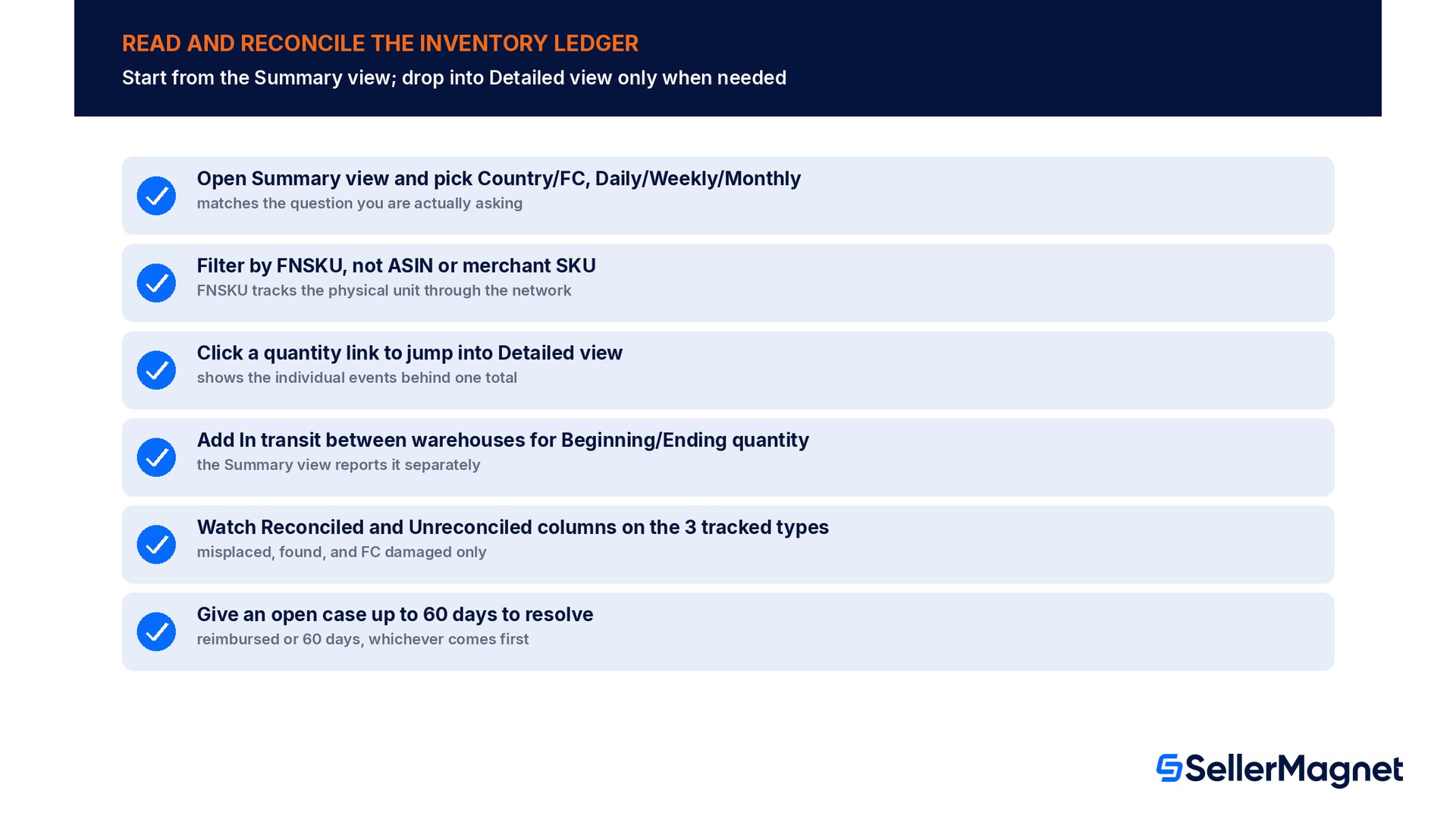
Open Inventory Ledger from the Reports menu and choose Summary view - Aggregate by Country or Fulfillment center, and by Daily, Weekly or Monthly, depending on the question.
Filter by FNSKU for any single-product question - FNSKU tracks the physical unit through the fulfillment network; ASIN and merchant SKU do not.
Click a quantity link (such as Returned or Received) to jump to the Detailed view behind it - This opens the individual events that make up that Summary view total.
Add In transit between warehouses to Starting and Ending warehouse balance if you need the old Reconciliation report's Beginning/Ending quantity - The Summary view reports in-transit units in a separate column, not folded into the balance.
Watch the Reconciled and Unreconciled quantity columns on Inventory misplaced, Inventory found and Damaged at Amazon fulfillment center rows - These are the only three adjustment types that carry a tracked reconciliation.
Give an open case up to 60 days before expecting a final reconciliation reason - Amazon finalizes the adjustment once a unit is reimbursed or 60 days pass, whichever happens first.
What replaced the Inventory Reconciliation report?
The Inventory Ledger report's Summary view, aggregated by Country and Monthly, replaced the Inventory Reconciliation report on January 31, 2023, along with five other discontinued reports.
Why doesn't my Beginning quantity match the old Inventory Reconciliation report?
The Inventory Ledger's Summary view does not include in-transit quantities by default. Add the In transit between warehouses column to the Starting or Ending warehouse balance to reproduce the old report's Beginning or Ending quantity.
Which adjustment types get a Reconciled/Unreconciled quantity column?
Only three: Inventory misplaced, Inventory found, and Damaged at Amazon fulfillment center. Other event and adjustment types do not carry a reconciliation trail.
Should I filter by ASIN, merchant SKU or FNSKU to reconcile a product?
FNSKU. It is the identifier Amazon itself assigns to the physical unit in its fulfillment centers, so it tracks the exact item through receiving, storage, movement and disposal.
How long does Amazon give a misplaced-inventory case before resolving it?
Up to 60 days. Once a unit under research is reimbursed, or 60 days pass, whichever comes first, the adjustment moves into the Detailed view with its final reconciliation reason.
Is this report the same as a reimbursement claim?
No. The Inventory Ledger documents inventory movements and their reconciliation status; filing or tracking a reimbursement claim itself is a separate process covered in SellerMagnet's FBA reimbursements guide.
How far back does the Inventory Ledger report go?
Up to 18 months of historical inventory data in a single report.
How quickly does new data appear on the report?
Daily aggregation is generally available within 24 hours, Weekly by the end of the day on the following Monday, and Monthly by the end of the second day of the next month.
Stop Juggling Tools. SellerMagnet Combines Everything You Need.