Amazon Quick Plus 2026: Free AI Year and the Claude Plugin
R
RenéFreelance Amazon Editor
|
15 min read
At Amazon Accelerate 2026, Amazon announced a cluster of AI features for Seller Central rather than a single new tool: a free year of a paid AI subscription for every primary account holder, a Seller Assistant that now remembers a seller's business across sessions, a way to let that assistant act on tasks like restocking and pricing on its own, and a plugin that lets outside AI assistants, including Anthropic's Claude, read a seller's own Seller Central data on request. Seller Forums reaction has been split between curiosity and open skepticism about whether any of it actually helps rather than just adding another thing to configure, and the announcement itself buries a 7-item safety checklist for connecting a third-party AI assistant to a live seller account at the bottom of the page, which is worth reading before anything else here. This guide lays out exactly what each of the four pieces does, what it does not do, the free-year deadline and who it covers, and the specific permission and audit steps a seller should take before granting any outside AI assistant access to Seller Central data.
Amazon Quick Plus is a free 12-month AI subscription Amazon is giving every primary Seller Central account holder (plus 2 delegated users) if they sign up by December 31, 2026. It is separate from Seller Assistant, the AI tool built into Seller Central itself, which now has persistent memory and can run 24/7 automated workflows for tasks like restocking and pricing. A new selling partner plugin, in beta, lets Amazon Quick or Anthropic's Claude read a seller's Seller Central listings, performance, and analytics data when the seller explicitly connects it, governed by a 7-point safety checklist Amazon published alongside the announcement.
What actually got announced?
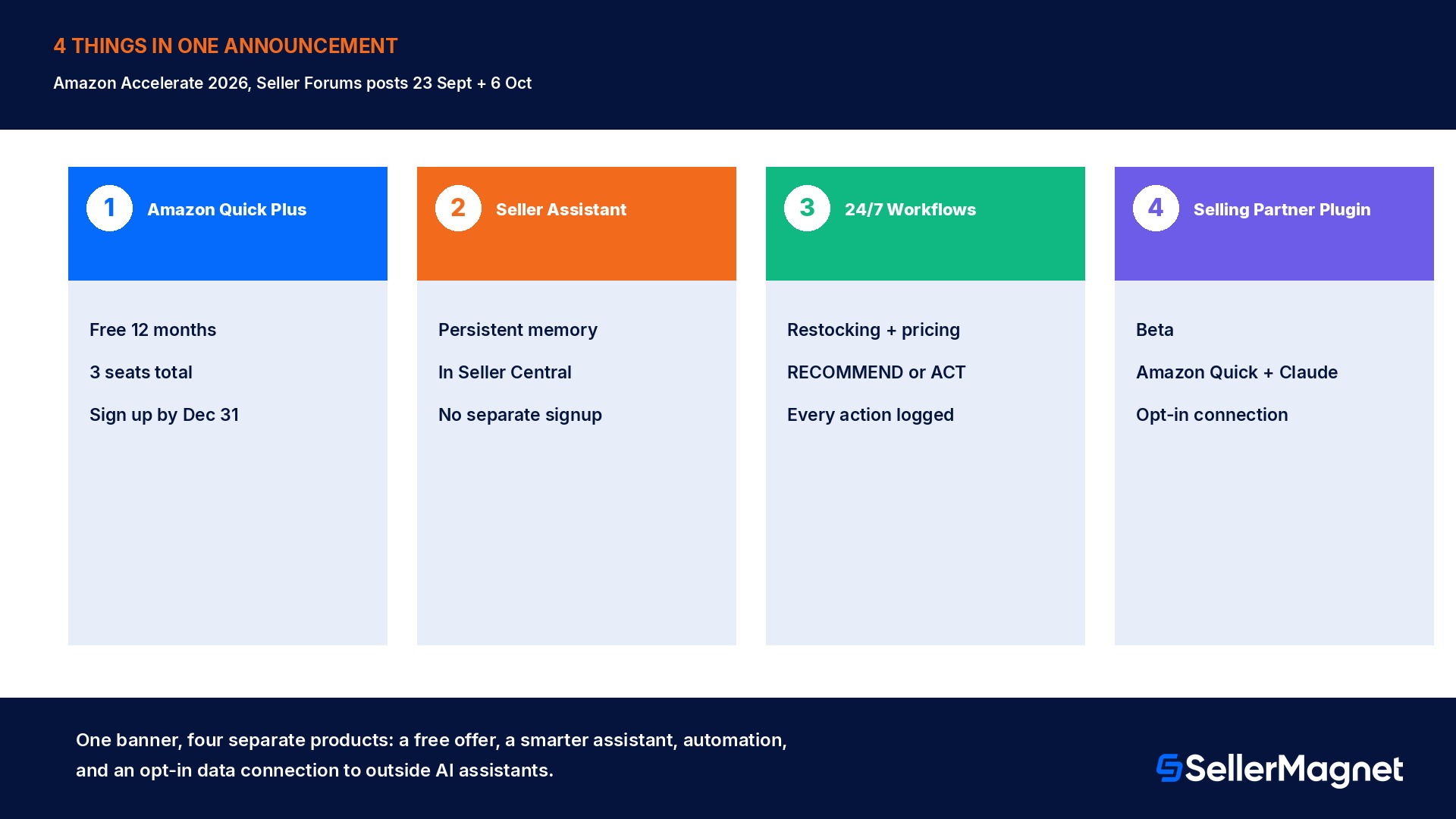
Amazon's Accelerate 2026 Seller Forums posts (News_Amazon, 23 Sept and 6 Oct 2026) bundle four separate things under one "new AI tools" banner, and the bundling is exactly why sellers reading quickly tend to conflate them. The first is Amazon Quick, a standalone AI companion product (not exclusive to sellers) that creates documents and spreadsheets, runs deep research, and connects to a user's email, calendar, and files; Amazon Quick Plus is the paid tier of that product, and the announcement is a 12-month free promotion of that paid tier for sellers specifically. The second is Seller Assistant, a tool that has existed inside Seller Central already and is described here as getting an upgrade: persistent memory across a seller's business, so it keeps context between sessions instead of starting over. The third is a workflow-automation layer bolted onto Seller Assistant, letting it monitor and act on tasks like restocking and pricing against guardrails a seller sets, on a 24/7 schedule. The fourth is the selling partner plugin, a new integration path (in beta) that lets a seller connect their Seller Central listings, performance, and analytics data to Amazon Quick or to Anthropic's Claude so either assistant can act on that data when asked. Nothing in any of the four changes a seller's existing fees, Buy Box mechanics, or payout schedule; this is entirely a new access and automation layer sitting on top of the account that already exists.
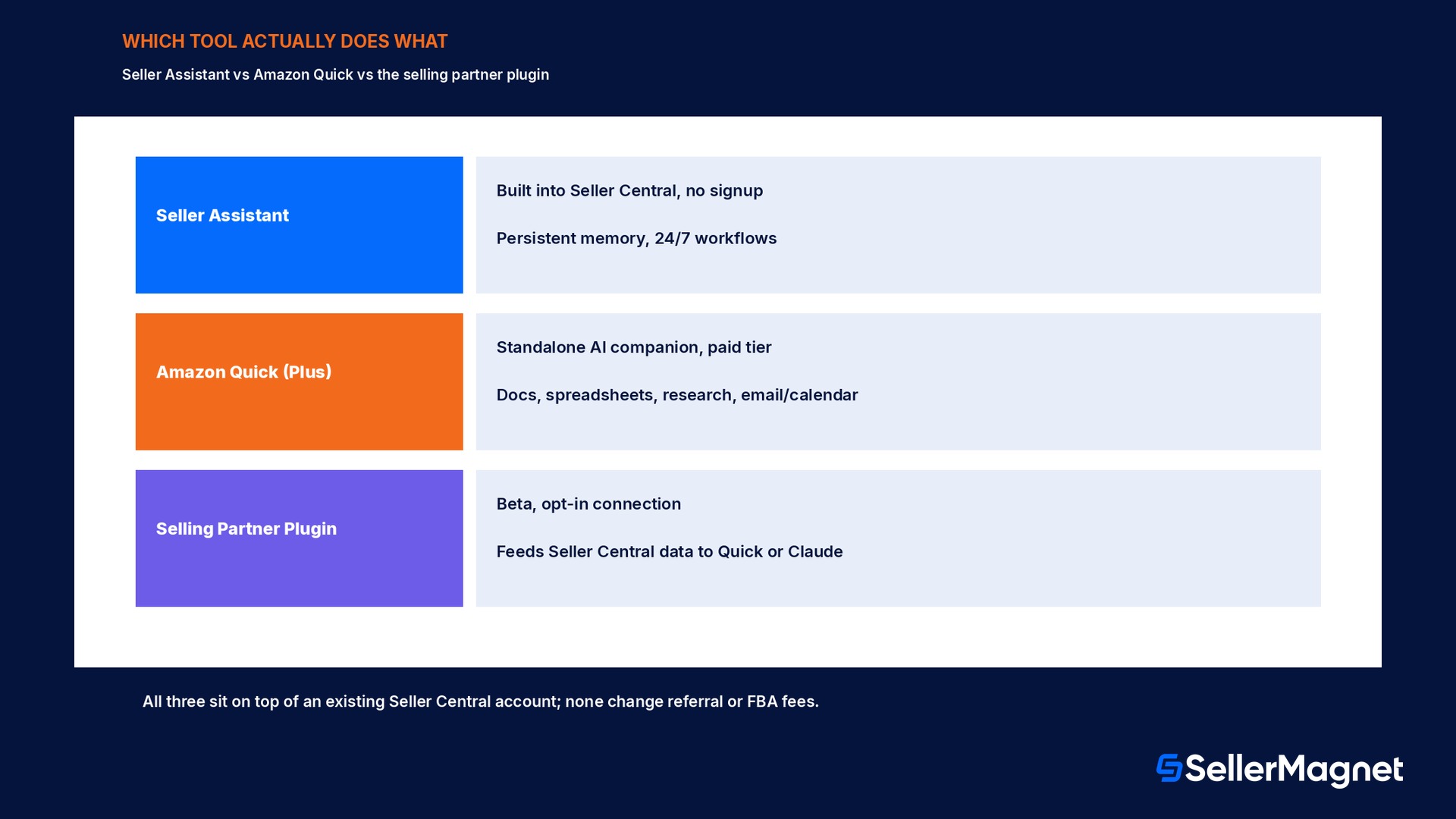
Name
What it actually is
Cost
Amazon Quick
Standalone AI companion: documents, spreadsheets, deep research, email/calendar/file access
Free tier exists; Plus is paid, free for sellers for 12 months via this offer
Seller Assistant
AI tool built into Seller Central itself, now with persistent memory across sessions
Included in Seller Central, no separate signup
Seller Assistant workflows
24/7 automation layer on top of Seller Assistant (restocking, pricing, etc.)
Included with Seller Assistant
Selling partner plugin (beta)
Connects Seller Central data to Amazon Quick or Anthropic's Claude on request
Free to connect; governed by the assistant's own terms
Who qualifies for the free year, and what is the deadline?
Amazon's own wording is specific: "every primary account holder worldwide can claim a free 12-month Amazon Quick Plus subscription... for you and two users you delegate," and the signup link must be used by December 31, 2026. Three details matter more than the headline. First, the offer is scoped to the PRIMARY account holder of a Seller Central account, not every user with login access, and the two additional free seats are seats the primary account holder delegates, not seats any user can claim independently. Second, "available to all sellers globally" is Amazon's own phrase in the 23 Sept post, so the offer is not US-only the way several other Seller Central AI features have been at launch, though a seller outside the US should still confirm eligibility on the actual signup page rather than assume. Third, the free period is 12 months, not indefinite, and nothing in either announcement states what happens automatically at renewal; a seller claiming the free year should calendar the 12-month mark to check whether automatic billing kicks in and at what rate, since that detail is not published yet.
A seller still has time, but the window is closing
Both News_Amazon posts carry the same December 31, 2026 cutoff for signup, with no stated extension or rolling-window mechanism; the original announcement ran 23 September 2026 and the holiday-focused follow-up ran 6 October, which means Amazon gave sellers roughly three months of visibility before the deadline, not a last-minute drop. A seller reading this now, before the end of 2026, still has an open window to sign up, but there is no published grace period after December 31, and the claim mechanism (the signup link inside Amazon's own Seller Forums announcement) is the only stated path; no alternate in-Seller-Central claim flow is mentioned in either announcement. Signing up costs nothing and uses an email the seller already controls, so the only real decision is whether to use the two delegated free seats on specific team members now, since reassigning them after the fact is not addressed in either post.
What does "persistent memory" actually change for Seller Assistant?
Seller Assistant is not a new product in this announcement; it is described as getting smarter in a specific way, building on the standalone Amazon Quick for sellers tool covered separately on this blog. Before this update, an AI assistant inside Seller Central that forgot everything between sessions meant re-explaining context (which products, which marketplaces, which goals) every time a seller opened a new conversation with it. Amazon's own description of the change is that persistent memory now carries "across your business in Seller Central," delivering recommendations on inventory management and pricing that sharpen over time rather than resetting. The practical example Amazon gives is asking how a product is performing and having Seller Assistant identify an opportunity, connect it to advertising, and draft a recommendation with its reasoning shown, and for bigger decisions, a dynamic visual workspace that lets a seller compare scenarios (Amazon's own example: "how profitable would a 10%, 15%, or 20% promotion be?"). None of this is described as mandatory or always-on in a way that acts without a prompt; it is a conversational tool a seller asks questions of, distinct from the 24/7 workflow automation covered next.
24/7 workflows: the part that acts without being asked each time
The workflow layer is the one genuinely new automation capability in the announcement, and it is the one worth the most care before turning on. Amazon's description: a seller describes what they need in plain language, sets guardrails, and Seller Assistant then monitors and executes tasks like restocking and pricing on the seller's behalf, with a choice per workflow between RECOMMEND (Seller Assistant surfaces a suggestion for the seller to approve) and ACT (Seller Assistant executes the action itself), and every action logged regardless of which mode is chosen. Amazon's own example prompt is "If a product's conversion rate drops below 2%, adjust my ad spend automatically," and the October post adds that pre-built automations exist alongside the option to write a custom one, with mapping out a full Black Friday strategy given as an example of a more complex custom workflow. A seller turning this on for the first time should start every workflow in RECOMMEND mode, read a week or two of its actual suggestions against what they would have done manually, and only switch a given workflow to ACT once its recommendations have been checked against real outcomes, since an unattended pricing or restocking action running wrong for days before anyone notices is a materially bigger risk than a single bad manual decision.
Every workflow action is logged, read the log
Amazon states every workflow action, whether recommended or auto-executed, is logged. That log is the actual safety net for ACT-mode workflows: check it on a schedule, not only when something looks wrong, since the point of catching a bad automated decision early is noticing it before a week of compounding price or inventory changes.
What does the selling partner plugin actually connect?
The selling partner plugin is described as connecting a seller's listings, performance, and analytics data to Amazon Quick and to Anthropic's Claude, both specifically named as beta integrations, so that "your preferred AI agent can act on your Amazon business." Amazon's own example prompt, "Help me update this listing to highlight gift-ready messaging for the holidays," is a listing-content use case, not a pricing or inventory one, and the feature-request thread attached to the announcement (a seller asking for scheduled report exports, bulk file upload with an approval step, and delivery to a local folder through the plugin) shows the capability set is still actively being requested and built out rather than finished. Critically, this is a CONNECTION a seller opts into, named "Manage Agents" in Seller Central per Amazon's own safety guidance below, not a default-on data share; an assistant only sees what a seller has explicitly connected and granted permission for.
Amazon's own 7-point safety checklist for connecting a plugin
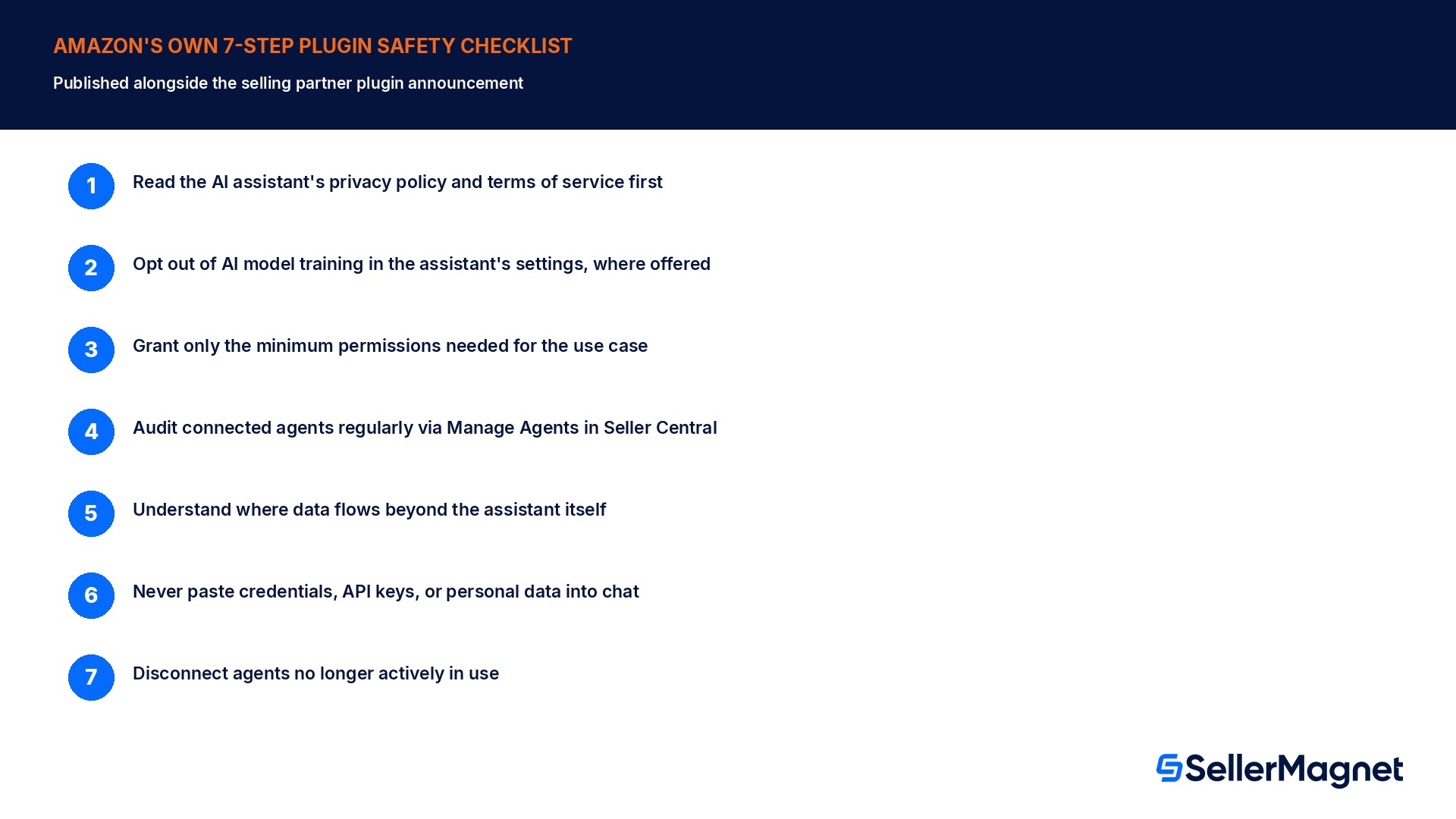
Amazon published a specific list of best practices alongside the plugin announcement, and it is worth reading in full before connecting any assistant to a live seller account, not skimmed as boilerplate: review the AI assistant's own privacy policy and terms of service before connecting; opt out of AI model training in the assistant's privacy settings where that option exists; grant only the minimum permissions needed for the actual use case, not blanket access; regularly audit connected agents through Manage Agents in Seller Central; understand what third-party integrations or services are connected to the AI assistant instance itself, since data may flow onward to those services too; never share account credentials, API keys, or sensitive personal information inside a chat with the assistant; and disconnect agents no longer in active use. A Seller Forums reply attached to the same thread flags the list itself as a signal worth taking seriously: a feature carrying 7 explicit safety warnings on day one is not a casual convenience toggle, and a seller should treat the Manage Agents audit step as a recurring calendar item, not a one-time setup step.
Safety step
Why it matters
Read the assistant's privacy policy and ToS first
The plugin moves Seller Central data to a third-party AI assistant; that assistant's own data terms apply once connected
Opt out of AI model training where offered
Prevents a seller's own business data from being used to train the assistant's underlying model
Grant only the minimum permissions needed
Limits exposure if the connection or the assistant account itself is ever compromised
Audit connected agents regularly via Manage Agents
Catches a stale or forgotten connection before it becomes a real exposure
Know where data flows beyond the assistant itself
Some assistants connect onward to other services; the seller's data may pass through more than one party
Never paste credentials, API keys, or personal data into chat
Chat logs and context windows are not a secure credential store
Disconnect agents no longer actively used
An unused connection is pure downside risk with no operational benefit
Both AI-assistant integrations are labeled beta: what does that mean in practice?
Amazon labels both the Amazon Quick and Anthropic Claude integrations inside the selling partner plugin as beta, and the feature-request reply attached to the 23 September announcement is a useful look at what "beta" actually means for a seller relying on this day to day rather than just reading the press release. One seller's request asks for scheduled, recurring report exports (daily, weekly, or monthly) from both Seller Central (Business Reports, inventory, orders, payments, Brand Analytics) and the Amazon Ads console (campaign, search term, and advertised product reports, the Bulk Operations file), delivered automatically to a connected local folder, plus bulk file upload with an explicit preview-and-approval step before anything is applied. None of that is described as already built in Amazon's own announcement text; it reads as a seller asking for capability that does not exist yet on day one of the beta. The practical takeaway: a seller should treat the plugin's current feature set as the floor, not the ceiling, confirm what it can actually do today in Manage Agents rather than assume the full request-a-report, bulk-upload workflow already works, and expect the capability list to change (a new permission, a new supported report type, a new connected assistant) without a guaranteed migration path for an existing automated workflow built around today's feature set.
What sellers on the announcement thread actually said
The Seller Forums replies attached to both News_Amazon posts are worth reading alongside the feature list itself, since the gap between Amazon's framing and seller sentiment is part of deciding how much to rely on any of this on day one. Replies on the September post raised concerns about Amazon eventually monetizing tools sellers help refine for free, and separately listed a set of longstanding operational complaints (inbound receiving speed, inventory handling, payout timing, fee growth) that these specific AI features do not address. A reply on the October post was openly skeptical that Seller Assistant's business-insight claims are backed by real account data rather than only advertising-account signals, illustrated with a screenshot of a suggestion the poster judged as generic. None of this means the tools are broken, but it is a fair caution against treating a day-one AI recommendation (RECOMMEND mode or otherwise) as more reliable than a seller's own read of their account until it has been checked against real outcomes over a few weeks, exactly the caution already made above for ACT-mode workflows.
Where does SellerMagnet fit, and where does it not?
SellerMagnet does not connect to the selling partner plugin, to Amazon Quick, or to Claude, and is not a substitute for Seller Assistant's own in-Seller-Central recommendations; those are Amazon's own tools running on Amazon's own account data. What SellerMagnet's Analytics Dashboard covers is the net-profit layer underneath any pricing or promotion decision an assistant might recommend: real margin per order, product, and marketplace after Amazon's own fees, COGS, shipping, VAT, and refunds, which is the number a seller needs before approving a RECOMMEND-mode pricing suggestion or deciding whether a 10/15/20% promotion (Amazon's own Seller Assistant example) is actually profitable rather than just revenue-positive. A seller connecting any AI assistant to listing or performance data through the new plugin should still run the resulting pricing or promotion idea through a true-margin check before accepting it, since neither Seller Assistant nor Amazon Quick is described anywhere in the announcement as using a seller's actual landed cost.
Checklist before claiming the free year or connecting a plugin
How to use the new Amazon Quick Plus and plugin features safely
Confirm the account is the primary Seller Central account - The free 12-month Amazon Quick Plus offer is tied to the primary account holder; only that login can claim and delegate the two extra seats.
Sign up before December 31, 2026 - No grace period is published past the stated deadline; the claim link is the one in Amazon's own Seller Forums post, not a separate in-Seller-Central flow.
Treat Seller Assistant and Amazon Quick as two different tools - Seller Assistant lives inside Seller Central with no separate signup; Amazon Quick is the standalone product the free year actually applies to.
Start every new workflow in RECOMMEND mode, not ACT - Check a week or two of real suggestions against manual judgment before letting any workflow execute restocking or pricing changes unattended.
Read Amazon's 7-point plugin safety checklist before connecting Claude or Quick - Grant minimum permissions, opt out of AI training where offered, and never paste credentials into a chat window.
Put a recurring reminder on Manage Agents in Seller Central - Audit every connected AI agent on a schedule, and disconnect anything no longer actively used.
Check true margin before accepting any AI-suggested price or promotion - Neither Seller Assistant nor Amazon Quick is described as using a seller's actual landed cost; verify profitability separately before approving.
Is Amazon Quick Plus actually free, or free for a limited time?
Free for 12 months for the primary Seller Central account holder plus 2 delegated users (3 seats total), only for sellers who sign up by December 31, 2026. Amazon's announcement does not state what happens to billing automatically after the 12 months end.
What is the difference between Seller Assistant and Amazon Quick?
Seller Assistant is built into Seller Central itself with no separate signup and now has persistent memory plus 24/7 workflow automation for tasks like restocking and pricing. Amazon Quick is a separate, standalone AI companion product (documents, spreadsheets, research, email/calendar/file access); its paid Plus tier is what the free 12-month offer applies to.
Does the selling partner plugin automatically share my Seller Central data with Claude?
No. The plugin is an opt-in connection a seller sets up and manages through Manage Agents in Seller Central; an assistant only sees data the seller has explicitly connected and granted permission for, and both the Amazon Quick and Anthropic Claude integrations are labeled beta.
What is the difference between RECOMMEND and ACT mode in Seller Assistant workflows?
RECOMMEND mode surfaces a suggested action (for example, an ad-spend change) for the seller to approve manually; ACT mode lets Seller Assistant execute the action itself without a per-instance approval. Every action is logged in either mode, and Amazon's announcement does not specify a default, so a seller should check which mode is set on each workflow.
Is it safe to connect my Amazon account to an outside AI assistant like Claude?
Amazon itself publishes a 7-point safety checklist for exactly this: read the assistant's privacy policy first, opt out of AI model training where offered, grant only minimum permissions, audit connected agents regularly via Manage Agents, understand where data flows beyond the assistant itself, never paste credentials or API keys into chat, and disconnect agents no longer in use.
Does any of this change Amazon's referral fees or FBA fees?
No. Amazon Quick Plus, Seller Assistant's workflows, and the selling partner plugin are a data and automation layer on top of an existing Seller Central account; none of the announcements mention a change to referral fees, FBA fees, Buy Box mechanics, or payout timing.
Stop Juggling Tools. SellerMagnet Combines Everything You Need.