Amazon Stores Insights 2026: Every Metric and Traffic Source Explained
R
RenéFreelance Amazon Editor
|
16 min read
A Brand Store launches, traffic starts arriving from the byline link and a Sponsored Brands campaign, and then the only number most sellers watch is the Store's total sales for the month. Amazon's own Stores insights dashboard tracks far more than that single total, and most of what it tracks is not visible anywhere else in Seller Central or the advertising console: how many of those visitors came back for a second page, which specific page inside the Store they left from, and whether the Sponsored Brands click that pays for a visitor actually buys anything once it lands. The dashboard is reached from inside the Stores builder or the Stores main page in the advertising console, under 6 report tabs, Overview, Traffic, Engagement, Sales, Pages, and Sources, and every number on every tab resets to zero insight the moment a seller stops checking it, because none of it appears automatically anywhere else. This guide works through exactly what each tab measures using Amazon's own metric definitions, the 4 traffic-source categories the dashboard sorts every visit into, a worked example of using the source breakdown to diagnose why a Store's visitor count is healthy but its sales are not, and the specific reporting gap, no dedicated Stores insights report outside this one dashboard, that catches sellers who assume the numbers live somewhere they can be automated.
Amazon Stores insights is the analytics dashboard inside the advertising console that reports a Brand Store's traffic and sales, reached via See Insights from the Stores builder or the Stores main page. It has 6 tabs (Overview, Traffic, Engagement, Sales, Pages, Sources) and tracks Visitors, Visits, Views, Views/Visitor, Purchases and Sales within a 14-day attribution window of a Store visit, broken down by date, page, and 4 traffic-source categories: Sponsored Brands, Amazon organic traffic (the byline), Your tags, and Other sources. There is no separate Stores report inside the console's Measurement and Reporting section; this dashboard, plus a limited CSV export, is the only place the data lives.
Where does the Stores insights dashboard actually live, and what are its 2 scopes?
Stores insights is not a standalone report with its own navigation entry; it sits inside the same tool a seller already used to build the Store. Amazon's own help page gives 2 routes in: from the Stores main page in the advertising console, click See Insights next to the specific Store to open its dashboard directly, or from inside the Stores builder while actively editing a Store, open the insights tab and return to it at any time without losing the editing session. Once open, the dashboard can be scoped 2 ways. Store overview reports on the Store as a whole, every page, every traffic source, combined. Current page report narrows the same metrics to only the specific page open in the builder at that moment, which is the view that answers a page-level question (did the new homepage layout change anything) that the Store-wide overview cannot answer on its own. A seller who only ever opens the Store-wide overview never sees the page-level breakdown that explains which part of a multi-page Store is actually carrying the traffic and the sales.
The 6 tabs, and what each one is actually for
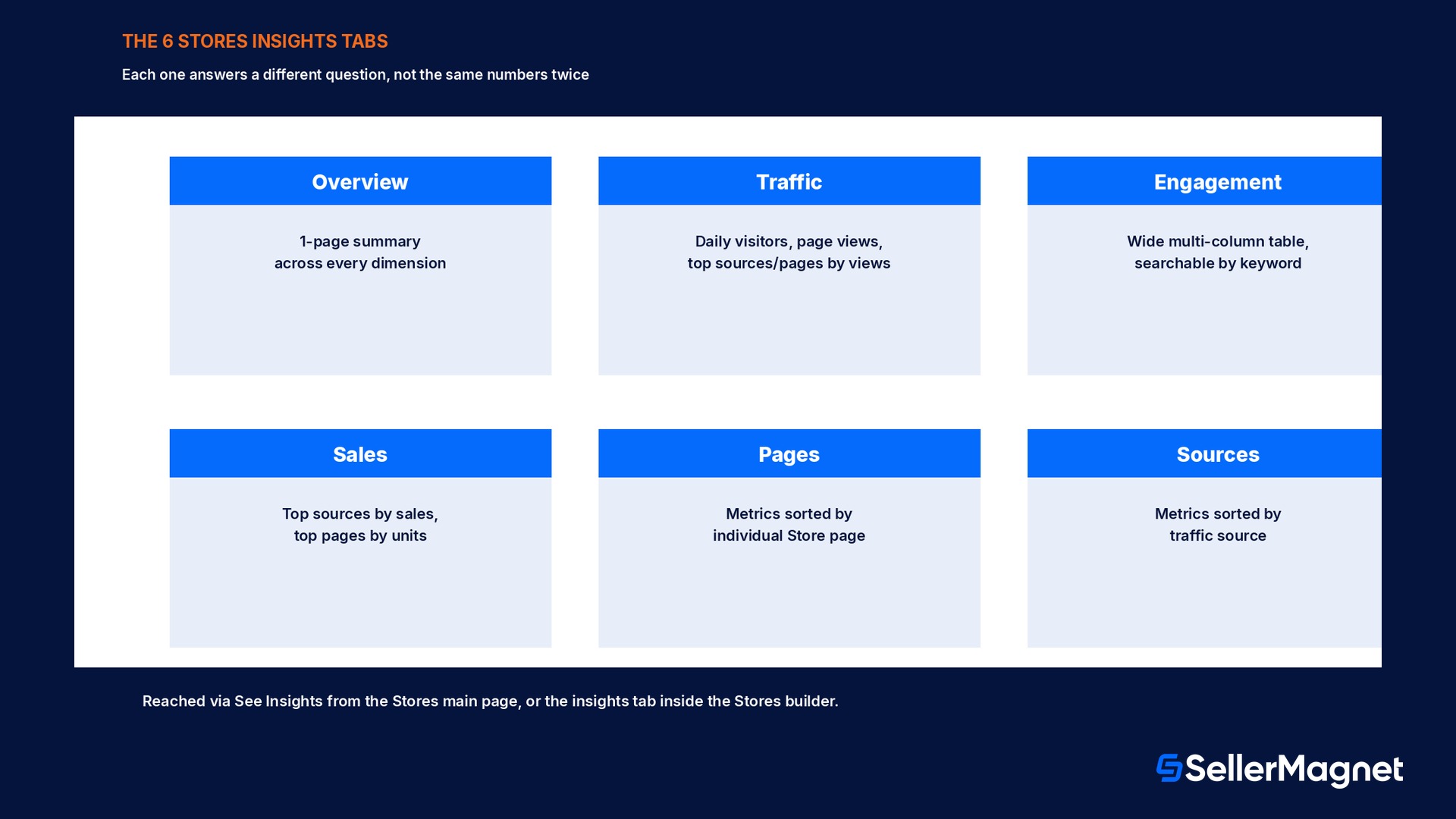
The insights menu sidebar toggles between 6 report tabs, and each one answers a different question rather than repeating the same numbers in a different chart style. Overview gives a single-page summary across every dimension, meant as a starting point before drilling into a specific tab, not a replacement for them. Traffic covers Daily visitors (a per-day line of how many visitors viewed the Store, useful for checking whether promotion or advertising is actually building consideration), Page views (the number of page views per day, expressed with an average views-per-visitor figure that shows whether visitors are browsing beyond the first page they land on), Top sources by views (a bar chart of which traffic source brought the most page views), and Top pages by views (which specific Store page is pulling the most attention, which can point to a product line or category worth expanding). Engagement is a wide, multi-column table, Amazon's own documentation notes some columns sit off-screen and need horizontal scrolling, with a keyword search box to filter it, and it is the tab Amazon's help content defers to its separate Stores metrics page for full column definitions rather than listing them inline. Sales covers Top sources by sales (which traffic source is actually lucrative, not just high-volume) and Top pages by units (which page is driving the most units sold, as distinct from the most page views). Pages and Sources are the dimension-level breakdowns, letting the same core metrics (visitors, views, sales) be sorted and compared by individual Store page or by individual traffic source rather than only viewed in aggregate.
Metric
Amazon's definition
Visitors
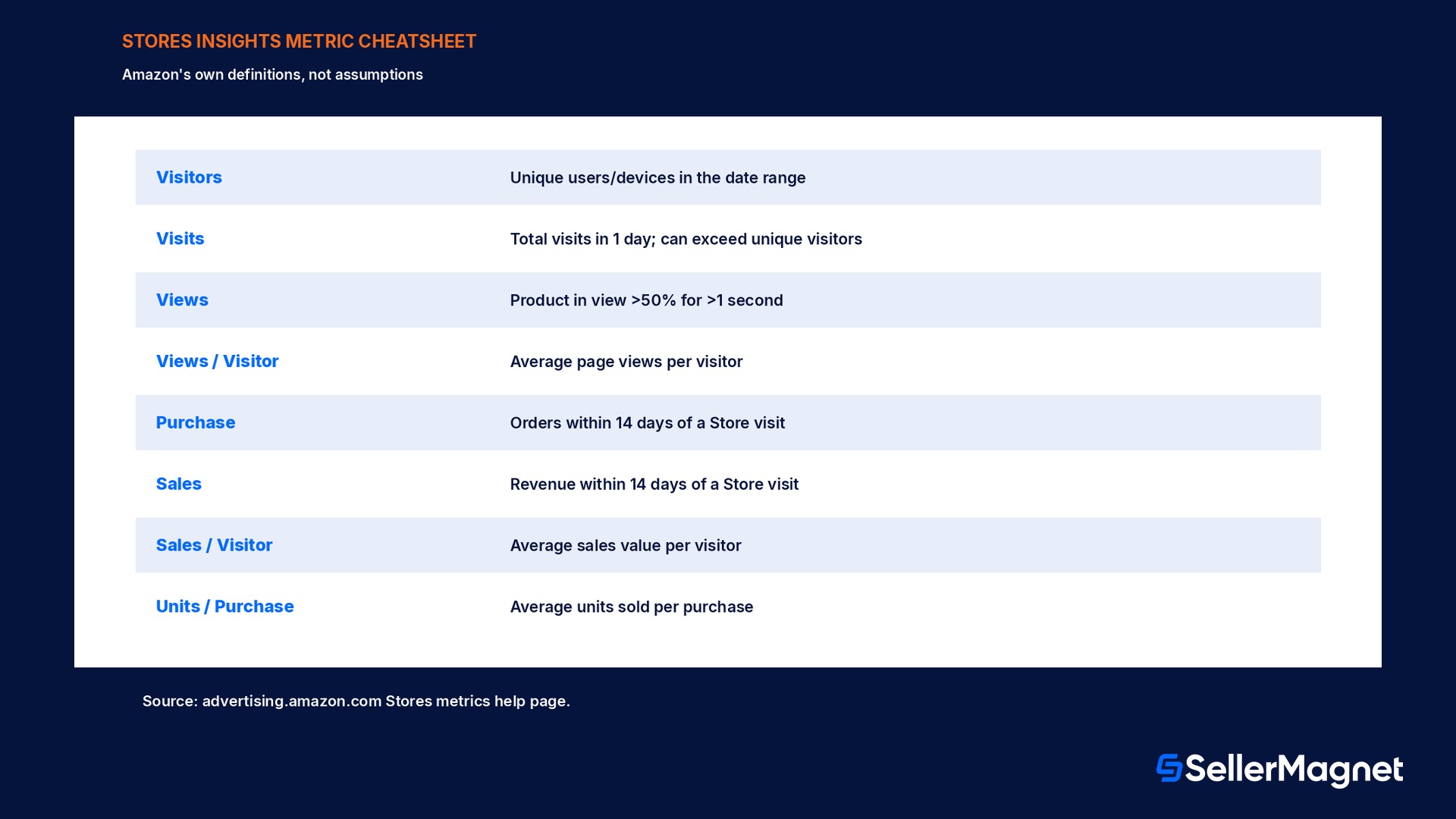
Total unique visitors to the Store in the selected date range, counted by unique users or devices per day
Visits
Total visits to a page or from a source within a single day; one visitor can register more than 1 visit
Views
Count of times more than 50% of a product in the Store was in view for more than 1 second
Views / Visitor
Average number of page views per visitor
Purchase
Estimated total purchases placed by Store visitors within 14 days of their visit, 1 or more units sold
Sales
Estimated total sales generated by Store visitors within 14 days of their last visit
Sales / Purchase
Average sales value per purchase
Sales / Visitor
Average sales value per visitor
Units / Purchase
Average number of units sold per purchase
Totals by page or source can exceed the Store's total visitor count, on purpose
Amazon's own documentation flags this directly: a visitor can visit more than 1 page, and can arrive at the Store from more than 1 traffic source, inside the same date range. That means visitor totals broken out by page, or by source, can sum to a number larger than the single Store-wide visitor total for that same range. A seller adding up the per-source visitor numbers and getting a figure higher than the headline total has not found a reporting bug; they have found the same visitor counted once under each source they actually used.
The 4 traffic sources the dashboard sorts every visit into
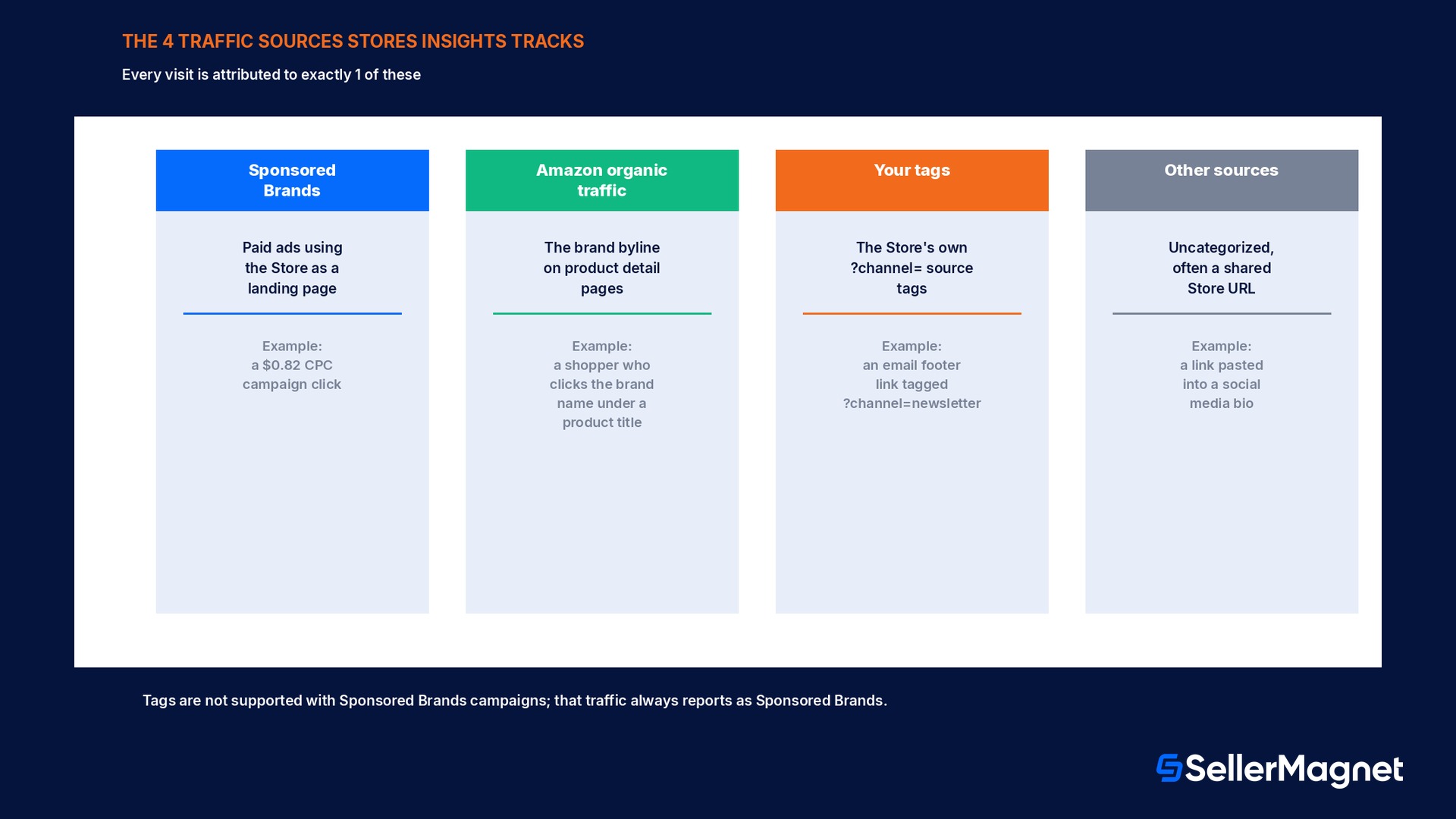
Every visit to a Store gets attributed to exactly 1 of 4 categories, and the category names are specific enough to matter when reading the Sources tab. Sponsored Brands covers traffic from Sponsored Brands ads on Amazon, meaning paid campaigns that use the Store as a landing page. Amazon organic traffic is the brand-name byline link that appears on product detail pages once a Store is live and approved, not organic search traffic from outside Amazon. Your tags is traffic from the Store's own source tags, the tracking parameters a seller creates to label a specific off-Amazon link (an email campaign, a specific social post) so that traffic shows up as its own line instead of folding into a catch-all. Other sources is everything that does not fit the first 3 categories, which Amazon's help page describes as commonly happening when a Store's URL gets shared across different social platforms and the resulting traffic lands here uncategorized by platform. A Store running only Sponsored Brands ads and a byline link, with no tagged off-Amazon promotion, should see almost nothing under Your tags; a sudden jump there is the signal that a tagged campaign just went live, not noise.
Traffic source
What it actually is
Sponsored Brands
Traffic from Sponsored Brands ads that use the Store as a landing page
Amazon organic traffic
Traffic from the brand-name byline link on Amazon product detail pages
Your tags
Traffic from the Store's own source tags on off-Amazon links the seller created
Other sources
Uncategorized traffic, commonly a Store URL shared across social platforms
How do I set up source tags so off-Amazon traffic does not fall into Other sources?
Sponsored Brands and Amazon organic traffic are categories the dashboard fills in on its own; Your tags is the one category a seller has to create. A source tag is a URL parameter, ?channel=tag-name, added to the end of a Store page URL, and once a customer visits using a tagged URL, Amazon detects the parameter and attributes that visit, and any resulting metrics, to the named tag, surfacing it under Your tags in Stores insights instead of folding into Other sources. Amazon's own help page gives 2 ways to build one: the tag creation tool inside Stores insights itself, go to Stores, click View Insights for the Store, click Create source tag, pick the destination page, enter a tag name, and copy the generated link to use with the relevant ad or marketing activity, or a manual version, copying the Store's own URL (a vanity URL, a stores/page URL, or a stores/[store name] URL are the only 3 formats tags support), stripping anything after a question mark if one is already present, and appending ?channel=tag-name by hand. The tag name itself is restricted to numbers, letters, dashes, spaces, and underscores, capped at 20 characters, and the parameter has to stay lower-case channel, since an upper-case Channel parameter is not recognized at all. One hard exception matters more than the syntax: tags are not supported with Sponsored Brands campaigns, so a Sponsored Brands click to a Store always reports under the Sponsored Brands source regardless of any tag appended to the landing URL, and only Amazon organic, email, social, and other off-Amazon or 3rd-party-platform links actually benefit from tagging.
Rule
Detail
Parameter format
?channel=tag-name, lower-case channel only
Tag name characters
Numbers, letters, dashes, spaces, underscores only
Tag name length
Capped at 20 characters
Supported URL types
Vanity URL, a stores/page URL, or a stores/[store name] URL
Not supported with
Sponsored Brands campaigns (always report under Sponsored Brands instead)
Check the URL a 3rd-party ad platform actually generates
Amazon's own guidance flags this specifically: when a Store is the landing page for a campaign built on a 3rd-party platform, enter the tag in the exact format that platform requests, then check the URL it actually generates against the tagged URL Stores insights produced. A platform that reformats or drops the parameter sends real traffic that never shows up under Your tags at all, with no error anywhere to flag it.
Is there a scheduled Stores report like a campaign report?
A seller used to the advertising console's Measurement and Reporting section, where Sponsored Products, Sponsored Brands, and Sponsored Display campaigns all generate scheduled, exportable reports, can reasonably expect Store performance to work the same way. Amazon's own Stores metrics help page states this directly and without qualification: brand store reports are not available there. An advertiser can export only certain aspects of Stores insights as a CSV, done manually from inside the dashboard itself, and there is no dedicated, schedulable Stores report sitting alongside the campaign reports. In practice that means Store performance tracking is a dashboard a person has to open and read, not a feed a script or a 3rd-party tool can pull automatically the way campaign reporting APIs allow, and a seller relying on an automated reporting pipeline for every other part of their Amazon business hits a manual step specifically here.
Worked example: using the Sources tab to diagnose a Store with visitors but weak sales
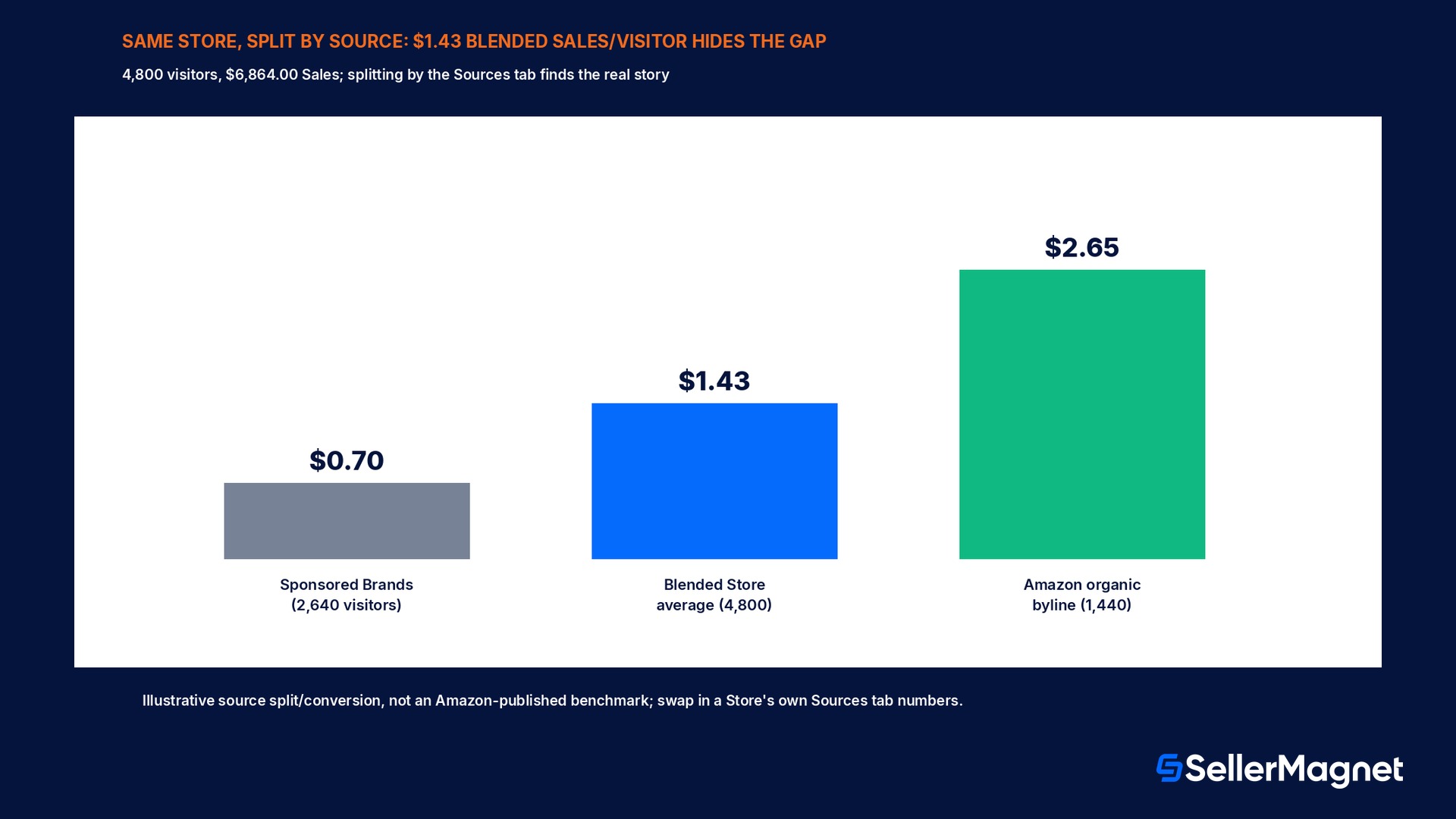
Take a Store that logged 4,800 visitors in a month, averaging 2.4 page views per visitor for 11,520 total views (4,800 x 2.4), with 96 purchases and $6,864.00 in Sales (96 x $71.50 Sales/Purchase). The blended Sales/Visitor across the whole Store is $1.43 ($6,864.00 / 4,800), for a 2.00% visitor-to-purchase conversion rate. On its own that single blended number says little about what to fix. Splitting the same visitors by the Sources tab, assume 55% arrive via Sponsored Brands (2,640 visitors) and 30% via the Amazon organic byline (1,440 visitors), with the remaining 480 (Your tags) and 240 (Other sources) too small a share to drive the total on their own. If the Sponsored Brands segment converts at $0.70 Sales/Visitor, it contributes $1,848.00 (2,640 x $0.70), while the Amazon organic byline segment, at $2.65 Sales/Visitor, contributes $3,816.00 (1,440 x $2.65) from under half as many visitors. The Sources tab is what makes that gap visible at all; the Store-wide Sales/Visitor figure alone blends a high-converting source with a low-converting one into a single average that looks merely mediocre instead of showing a Sponsored Brands campaign that is buying visitors who mostly do not buy anything, next to a byline that is converting visitors who already searched for the brand by name.
Source
Visitors
Sales / Visitor
Sales contributed
Sponsored Brands
2,640
$0.70
$1,848.00
Amazon organic traffic (byline)
1,440
$2.65
$3,816.00
Blended Store-wide average
4,800
$1.43
$6,864.00
The source shares and per-source conversion above are an illustration, not an Amazon-published benchmark
The 55/30/10/5 source split and the $0.70 / $2.65 Sales/Visitor figures above are assumptions built to show how to read the Sources tab, not numbers Amazon publishes as typical. A real Store's own Sources tab replaces every one of these inputs with that Store's actual visitor and sales figures for the same math.
What gets misread on this dashboard?
Adding up visitor counts across pages or sources and expecting them to match the Store total. Amazon states this directly: a visitor can visit more than 1 page and arrive from more than 1 source, so segment totals can legitimately sum to more than the Store-wide total.
Treating 'Amazon organic traffic' as search-engine organic traffic. Inside Stores insights it specifically means the brand byline link on product detail pages, not unpaid search results from outside Amazon.
Looking for a scheduled Stores report in Measurement and Reporting. Amazon's own help page states brand store reports are not available there; the dashboard itself plus a manual CSV export is the only access path.
Reading only the Store overview and never the Current page report. The overview blends every page together; a specific page's underperformance is invisible until the Current page report is opened for that page.
Confusing Views with Visitors. Views counts instances of a product being in view for over 1 second at over 50% visibility, a product-level attention metric; Visitors counts unique people or devices, a Store-level reach metric. A Store can gain Views without gaining a single new Visitor if existing visitors browse more pages.
Expecting Sales and Purchase to reflect same-session buying only. Both are attributed within a 14-day window of the Store visit, so a purchase counted in Sales this month can come from a visit that happened up to 2 weeks earlier.
Appending a source tag to a Sponsored Brands landing URL and expecting it under Your tags. Tags are not supported with Sponsored Brands campaigns; that traffic always reports under the Sponsored Brands source regardless of any tag on the URL.
What Stores insights does and does not tell SellerMagnet users
Stores insights is Amazon's own dashboard, built and hosted entirely inside the advertising console; no 3rd-party tool, including SellerMagnet, reads or exports this data on a seller's behalf, and the gap described above, no scheduled report outside the manual CSV, is an Amazon reporting limitation, not something any outside integration currently closes. Where SellerMagnet's tools apply is around that same data rather than inside it: Competitor Tracker puts a Store's own Sales/Visitor and conversion figures in context against what comparable listings and brands in the same category are doing, since the Stores dashboard only ever reports one brand's own numbers with nothing to compare them to.
PPC management is the direct action the worked example above points to: once the Sources tab shows a Sponsored Brands segment converting well below the Amazon organic byline, that is a landing-page and bid decision inside an existing campaign, not a new budget line. Profit Analytics then tracks whether a change made in response, a new Sponsored Brands creative, a different landing page, actually moves Sales/Visitor for that source in the following period, closing the loop that the Stores dashboard opens but does not track changes against on its own.
Checklist before trusting a month of Stores insights numbers
How to read a Store's Stores insights data without misreading the totals
Confirm whether the view is Store overview or Current page report - Store overview blends every page together; a page-level problem is invisible until the Current page report is opened for that specific page.
Read Sales and Purchase as a 14-day attribution window, not same-visit totals - A purchase counted this period can come from a visit up to 2 weeks earlier; day-to-day swings in Sales do not map 1-to-1 onto day-to-day Visitors.
Break the headline Sales/Visitor figure down by the 4 traffic sources before judging it - A blended average can hide 1 source converting far above it and another far below it, exactly the pattern the worked example above shows.
Do not sum per-page or per-source visitor totals and compare them to the Store-wide total - The same visitor can count under more than 1 page and more than 1 source in the same range; a larger sum is expected, not an error.
Check Your tags against actual tagged campaigns running that period - A jump or drop under Your tags should correspond to a specific tagged off-Amazon link going live or ending, not an unexplained swing.
Export the CSV manually if the data needs to leave the dashboard - There is no scheduled or API-fed Stores report; a manual export from inside the dashboard is the only way to get the numbers into another tool.
Where do I find Stores insights?
From the Stores main page in the advertising console, click See Insights next to the Store. From inside the Stores builder, open the insights tab directly while editing.
What is the difference between Visitors and Visits?
Visitors counts unique users or devices in the date range. Visits counts total visits to a page or source within a single day, and 1 visitor can register more than 1 visit.
Does 'Amazon organic traffic' mean search engine traffic?
No. Inside Stores insights it specifically means traffic from the brand-name byline link on Amazon product detail pages, not unpaid search traffic from outside Amazon.
How long after a visit does a purchase still count in Sales?
Up to 14 days. Sales and Purchase are both estimated based on activity within 14 days of a Store visit, not only purchases made during that exact visit.
Can I get a scheduled Stores report like a campaign report?
No. Amazon's own help page states brand store reports are not available in the console's Measurement and Reporting section; only a manual CSV export of certain aspects is available directly from the dashboard.
Can I use a source tag with a Sponsored Brands campaign?
No. Amazon states tags are not supported with Sponsored Brands campaigns; that traffic reports under the Sponsored Brands source regardless of any tag on the URL.
Stop Juggling Tools. SellerMagnet Combines Everything You Need.