Since September 21, 2026, two changes have reshaped how US sellers see and receive their Amazon money. Express Payout, a feature Amazon had already been rolling out, is now active by default for eligible US sellers: instead of waiting the standard 3 to 5 business days for a payout to clear the ACH network, eligible balances move into a bank account or debit card within 24 hours, including weekends, at no extra cost and with no enrollment step. At the same time, inside the redesigned Seller Central, Amazon folded payments, payouts and financial reports into a single Finance workspace, replacing a scattered set of separate pages with one place to see net proceeds, upcoming payouts, account balances and downloadable reports. Neither change is a Seller Central add-on a seller has to go looking for; both are now part of how a US account's money moves and where that seller goes to see it. This guide works through exactly how Express Payout's 24-hour delivery works by payout size, what eligibility actually requires, what the new Finance workspace shows, and a worked comparison of how many days of cash-flow a seller gets back by moving from the old 3 to 5 day standard payout to the 24-hour one.
Express Payout is an Amazon Seller Central feature, active by default for eligible US sellers since September 21, 2026, that delivers payouts to a bank account or eligible debit card within 24 hours, including weekends, instead of the standard 3 to 5 business days, at no extra cost. Finance Workspace, live from the same date, consolidates payments, payouts and financial reports into one area of the redesigned Seller Central.
What actually changed on September 21, 2026
Amazon's own Express Payout FAQ states plainly that Express Payout (Bank Account) delivers payouts to an authorized bank account within 24 hours, instead of the current 3 to 5 business days, and that it is active by default for all eligible US store sellers at no cost, with no enrollment required. A separate, related change landed the same week: Amazon's Seller Forums announcement for new Seller Central states that starting September 21, 2026, Finance Workspace consolidates financial management, reporting, and operations into a single workspace in new Seller Central, replacing the need to navigate between multiple separate pages to monitor finances, manage payouts, and download reports. The two changes are related but distinct: Express Payout changes how fast money actually moves into a seller's account, while Finance Workspace changes where and how a seller sees that money once it has moved, or is about to. A seller does not need to request either one separately through a support ticket; both are account-level changes that show up automatically for an eligible account inside the redesigned Seller Central.
How Express Payout's 24-hour delivery works by payout size
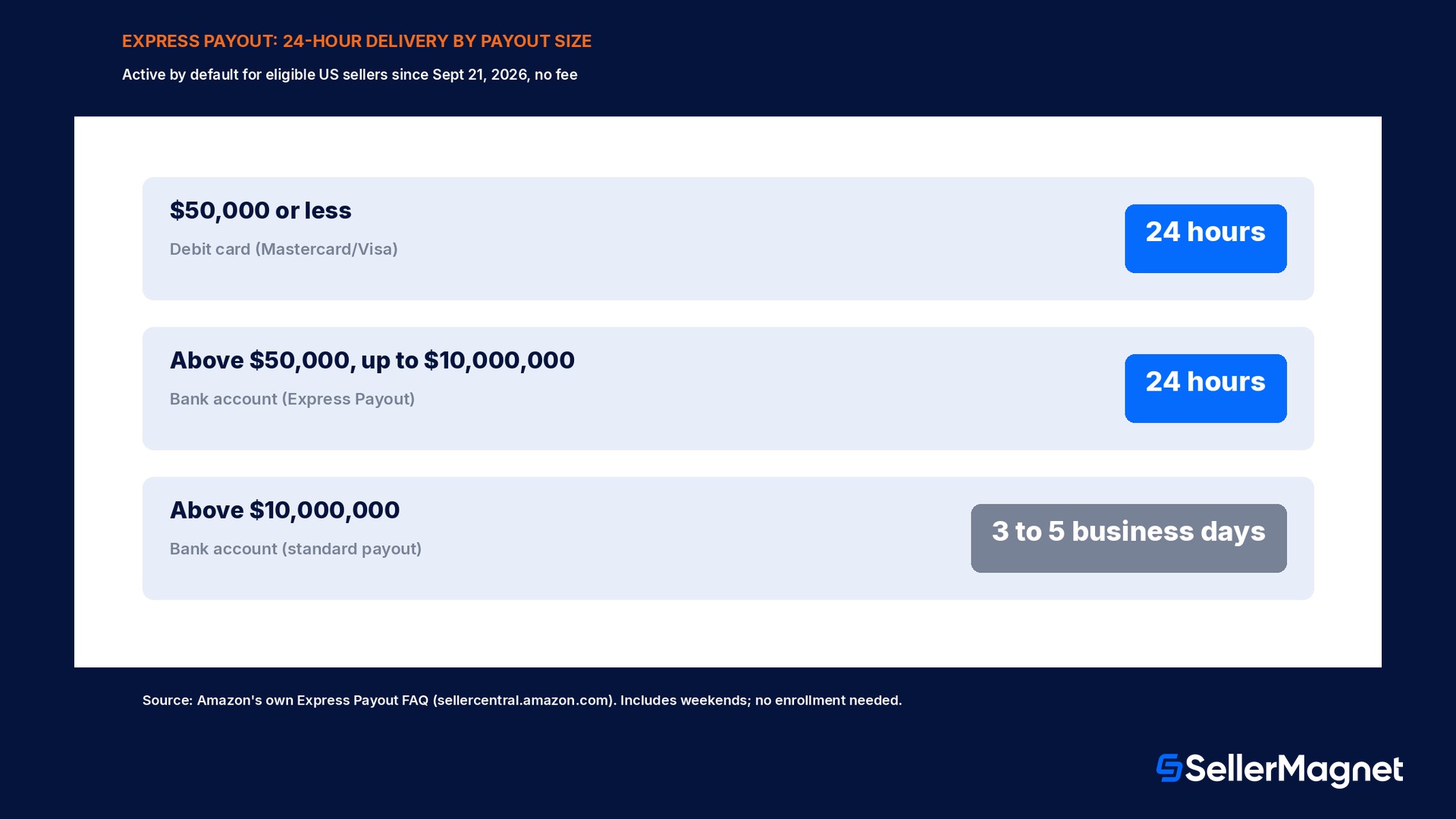
Express Payout is not a single flat rule; Amazon's own FAQ breaks the 24-hour delivery promise down by how large the payout is and which account type receives it. A payout of $50,000 or less can be delivered to an eligible US-issued Mastercard or Visa debit card registered in Seller Central within 24 hours. A payout above $50,000 and up to $10,000,000 moves to a bank account within 24 hours through Express Payout (Bank Account), provided that bank account is eligible for instant transfer. A payout above $10,000,000 still follows the standard bank account delivery path, taking 3 to 5 business days, so the 24-hour promise has a ceiling even for an eligible seller. A seller can also manually trigger a payout for any available balance by clicking Request Payment on the Payments dashboard in Seller Central; without a manual request, Amazon still initiates the payout automatically on the seller's next scheduled payout date, which Amazon's own help page notes may be up to 14 days later, since 14 days is the length of a standard settlement period.
Payout amount
Account that receives funds
Time to deposit
$50,000 or less
Eligible US debit card (Mastercard/Visa)
24 hours
Above $50,000, up to $10,000,000
Bank account (Express Payout)
24 hours
Above $10,000,000
Bank account (standard payout)
3 to 5 business days
Weekends count: Express Payout does not pause on a Saturday or Sunday
Amazon's own Express Payout materials state the 24-hour delivery applies including weekends, unlike the standard 3 to 5 business day ACH schedule, which only counts banking business days. A payout initiated on a Friday evening can still land within 24 hours under Express Payout rather than waiting until the following week.
Who gets Express Payout by default, and who stays on the old schedule
Amazon's FAQ sets out the eligibility requirements plainly rather than leaving them implicit: a seller needs a US bank account that is itself eligible for instant transfer, and the seller must sell and reside in the US. Express Payout (Bank Account) is the default delivery method for an account that meets those requirements, with no enrollment step, no fee and no opt-in form to submit. A separate, related eligibility path covers debit cards: Express Payout (Debit Card) is active by default for a seller with an eligible US-issued Mastercard or Visa debit card registered in Seller Central, and functions independently of the bank-account version; a seller still needs an active bank account on file for any payout that is not eligible for the debit card, such as one above the $50,000 ceiling. If a seller's bank does not yet support instant transfers, Amazon's help page states the payout simply continues via the standard ACH schedule, 3 to 5 business days, with no account suspension or penalty; the fix there is confirming eligibility with the receiving bank, not with Amazon. A seller who, for any reason, prefers the older standard ACH delivery over Express Payout can contact Seller Support to request the change; Express Payout is the default, not a locked-in requirement.
Finance Workspace: everything in one place since September 21
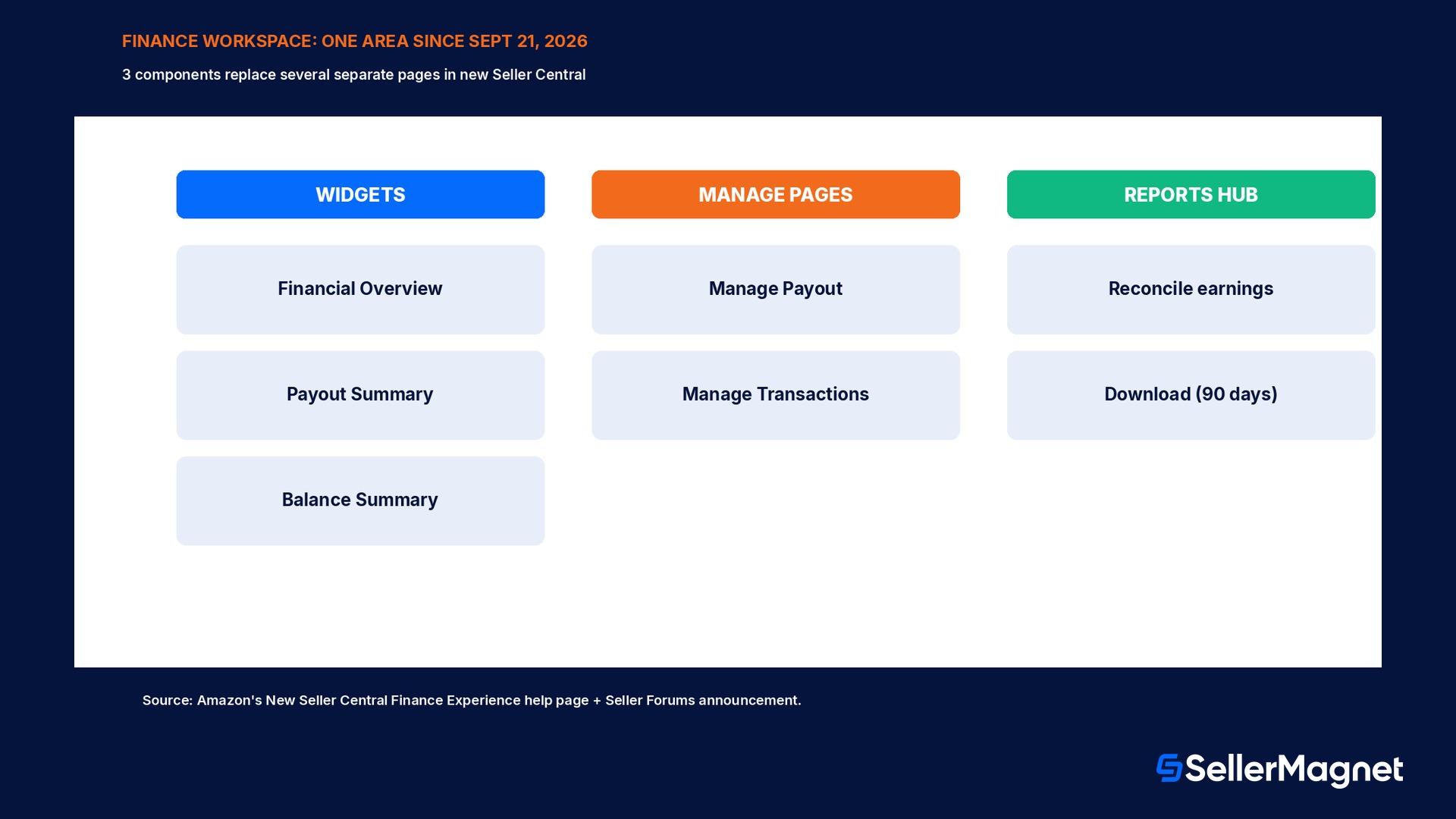
Amazon's own Seller Forums announcement and its New Seller Central Finance Experience help page describe Finance Workspace as three components rather than one flat page. Widgets sit at the top for at-a-glance monitoring: a Financial Overview showing net proceeds, earnings, fees and deductions broken down by month with statements downloadable as flat files, CSV or PDF; a Payout Summary showing the two most recent payouts with their payment date and amount, plus a Request Payment option where applicable; and a Balance Summary breaking the total balance into available funds, deferred amounts and account-level reserves. Below the widgets sit the Manage Pages for detailed financial operations: Manage Payout shows every payout's date, status, the 14-day settlement period it covers, a trace ID (useful when a payout needs to be verified with a bank), and a full timeline from the initial settlement period through final completion; Manage Transactions shows color-coded transaction status with a detailed breakdown available per charge, down to clicking any individual fee to see the calculation behind it. A Reports Hub rounds the workspace out, letting a seller reconcile earnings and understand payouts from one central location, organized by standard or invoice order, with reports available for download for 90 days after generation before they expire.
Component
What it shows
Where sellers used to look instead
Financial Overview widget
Net proceeds, earnings, fees, deductions by month
A separate payments summary page
Payout Summary widget
Next estimated payout, 2 most recent payouts, available balance
The old Payments dashboard
Balance Summary widget
Available funds, deferred amounts, account-level reserves
Manually cross-checking several balance figures
Manage Payout page
Payout date, status, 14-day settlement period, trace ID, full timeline
Searching individual settlement reports
Manage Transactions page
Color-coded status, per-charge fee breakdown
Downloading and filtering a raw transaction report
Worked example: the cash-flow days a seller actually gets back
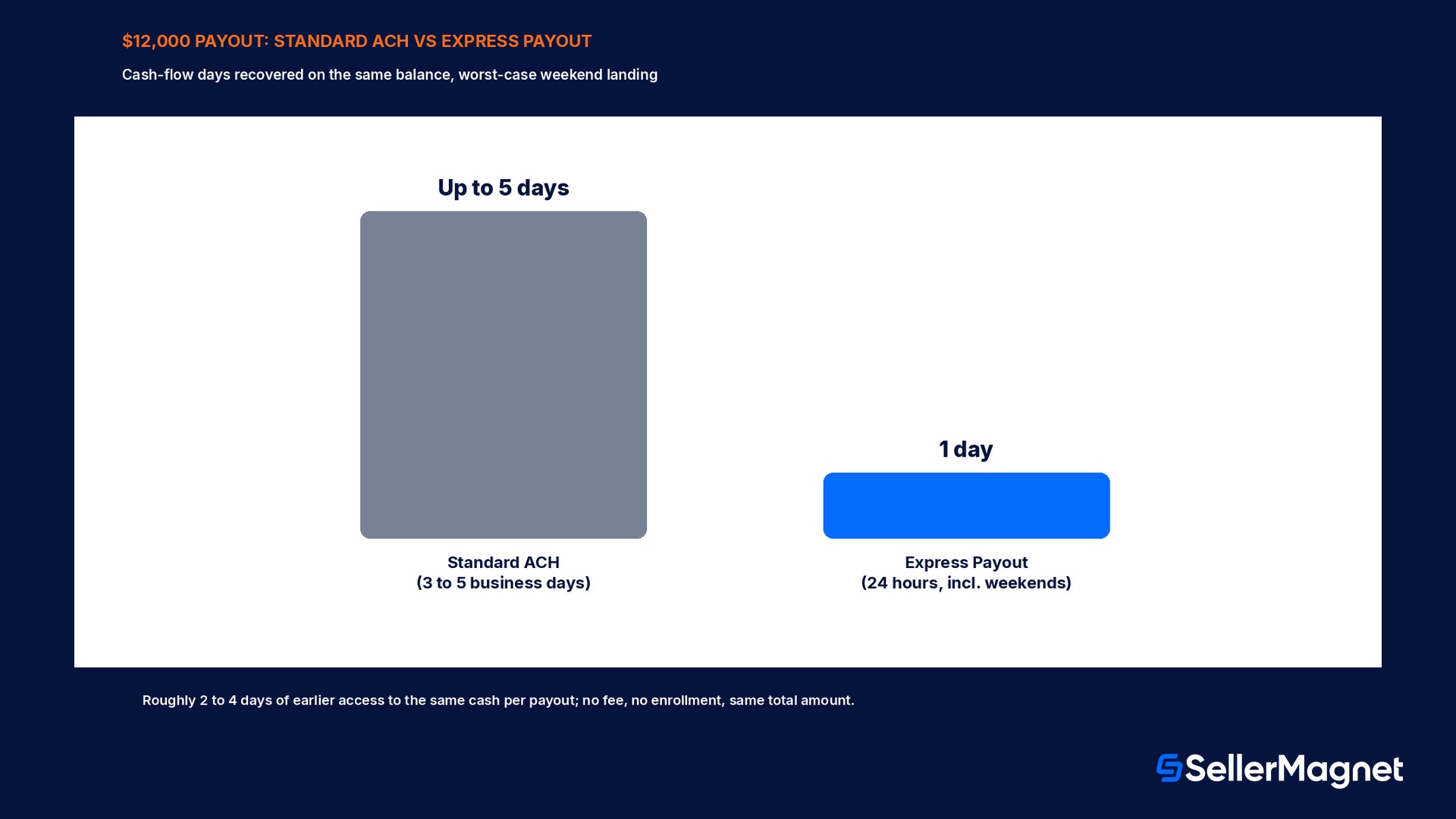
Take a seller with a $12,000 available balance who would otherwise wait for a standard ACH payout. Standard delivery takes 3 to 5 business days to clear, so counted from the moment the balance becomes available, that seller's $12,000 is inaccessible for 3 to 5 days depending on which day of the week the payout lands and whether a weekend falls inside that window; because ACH only counts business days, a payout that lands on a Thursday can stretch across the following Monday and Tuesday, pushing the real wait closer to the 5-day end of the range. Express Payout delivers the same $12,000 within 24 hours, including weekends, so the realistic gap between the two schedules is 2 to 4 full days of access to that cash, not just the 1-day headline number implies on its own. Over a single 14-day settlement period, a seller who receives 2 payouts under Express Payout instead of standard ACH recovers roughly 4 to 8 days of earlier access to the same total cash across that period, time that can go directly into restocking inventory ahead of a demand spike rather than sitting in transit through the banking network. None of this changes how much money a seller receives; Express Payout and Finance Workspace are both free and change timing and visibility only, never the underlying fee or payout amount.
Standard ACH payout
Express Payout
Delivery window
3 to 5 business days
24 hours, including weekends
$12,000 balance, worst case landing
Can stretch to 5 calendar days over a weekend
1 calendar day, weekend or not
Cash-flow days recovered per payout
Baseline
Roughly 2 to 4 days earlier access
Cost to the seller
No fee
No fee, no enrollment
Where to check it in Seller Central
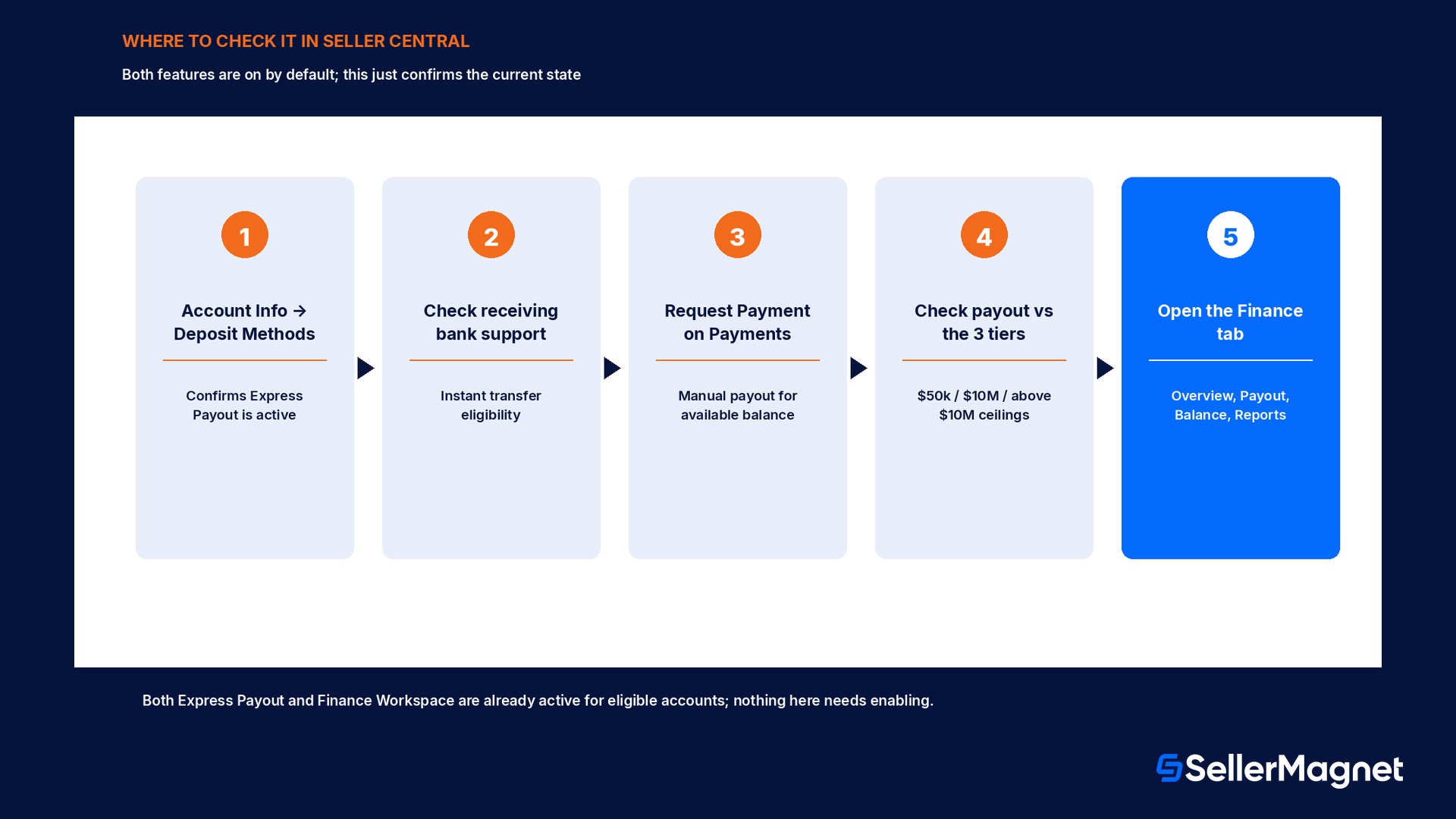
Both features show up without a seller doing anything, but confirming the current state takes under a minute. For Express Payout, Amazon's own help page points to Account Info, then Deposit Methods, inside the Seller Central Payments area: an eligible account shows Express Payout already selected as the delivery method for the bank account or debit card on file, with no further action needed; a seller who wants to confirm eligibility for a specific upcoming payout can also check the Payments dashboard and use Request Payment to trigger it manually. For Finance Workspace, the redesigned Seller Central groups every tool into six workspaces across the top navigation: My business, Products, Supply chain, Orders, Finance, and Marketing; the Finance tab is where the Financial Overview, Payout Summary, Balance Summary, Manage Payout, Manage Transactions and Reports Hub all live together. A seller whose account has not yet moved to the redesigned Seller Central navigation will still see the older separate pages until the rollout reaches that account; Amazon's own rollout language describes this as a gradual transition, not a single-day switch for every seller.
Mistakes that cost real time (not money) around this change
Assuming Express Payout needs an opt-in form. It is active by default for eligible US accounts; checking Deposit Methods confirms the state, it does not activate anything new.
Expecting every payout size to move in 24 hours. Above $10,000,000, standard 3 to 5 day delivery still applies; the 24-hour promise has a ceiling even on an eligible account.
Missing that Express Payout and the debit-card version are separate. A seller needs an eligible bank account on file for any payout that exceeds the debit card's scope, even with Express Payout (Debit Card) active.
Treating a slower payout as an Amazon problem when the cause is the bank. If a receiving bank does not support instant transfer, Amazon's own help page states the payout reverts to standard ACH automatically, with the fix sitting on the bank side, not Amazon's.
Looking for Finance data on the old separate pages after the redesign reaches an account. Everything consolidates under the Finance workspace tab; a bookmarked old page may still work during the gradual rollout but will not reflect the new consolidated view.
Not checking the Manage Payout timeline before contacting Seller Support about a 'missing' payout. The trace ID and full settlement timeline on that page answer most status questions Seller Support would otherwise need to look up manually.
Where SellerMagnet fits around faster, clearer payouts
Express Payout and Finance Workspace are both Amazon-run features inside Seller Central; SellerMagnet has no role in when a payout lands or what Finance Workspace displays. What faster, clearer payout visibility actually changes is how quickly a seller can act on real numbers once they land. Profit Analytics tracks margin and sales performance against the inventory a seller just restocked with a 24-hour payout, so the extra days of cash-flow access translate into a decision made on current numbers instead of a 3 to 5 day old snapshot.
Before committing a faster payout to a new inventory order, Fee Calculator computes the real landed cost and Amazon fee stack for that specific purchase, so the margin behind a restocking decision reflects Amazon's actual fees rather than a rough estimate. For sellers who restock specifically to defend Buy Box share ahead of a demand spike, Repricer is the tool that turns that faster-arriving inventory into the sales velocity the restocking decision was counting on.
Checklist: confirm Express Payout and Finance Workspace on your account
How to confirm Express Payout and Finance Workspace are active on your account
Open Account Info, then Deposit Methods - Confirms whether Express Payout (Bank Account) or (Debit Card) is already the active delivery method.
Check that the receiving bank supports instant transfer - If it does not, Amazon's help page confirms the payout reverts to standard ACH automatically, no penalty.
Use Request Payment on the Payments dashboard for an immediate manual payout - Available for any current balance on an eligible account.
Check the payout amount against the 3 published tiers - $50,000 or less (debit card), up to $10,000,000 (bank account), above that (standard 3 to 5 days).
Open the Finance tab in the redesigned Seller Central - Financial Overview, Payout Summary, Balance Summary, Manage Payout, Manage Transactions and Reports Hub all live there.
Use the Manage Payout timeline before contacting Seller Support - Trace ID and settlement timeline answer most status questions directly.
Do I need to sign up for Express Payout?
No. Amazon's own FAQ states Express Payout is active by default for all eligible US store sellers at no cost, with no enrollment required. Checking Deposit Methods in Seller Central confirms the current state.
Does Express Payout cost extra?
No. Both Express Payout (Bank Account) and Express Payout (Debit Card) are free for eligible accounts; there is no additional fee for the faster delivery.
What is the maximum payout Express Payout covers?
Up to $10,000,000 moves to a bank account within 24 hours through Express Payout. Above $10,000,000, the standard 3 to 5 business day payout schedule still applies.
Does Express Payout work on weekends?
Yes. Amazon's own materials state the 24-hour delivery includes weekends, unlike the standard ACH schedule, which only counts business days.
What is the settlement period Finance Workspace shows on each payout?
14 days. Amazon's New Seller Central Finance Experience help page describes the payout period covered by each payout as a 14-day settlement cycle.
Where did Finance Workspace's features live before the redesign?
Across several separate pages: a payments summary page, the old Payments dashboard, individual settlement reports and a separate reports section. Finance Workspace consolidates all of them under one Finance tab.
Stop Juggling Tools. SellerMagnet Combines Everything You Need.