Amazon Ads MCP Server 2026: Connecting AI Agents to Your Ads Account
R
RenéFreelance Amazon Editor
|
16 min read
A seller who wants to ask Claude, ChatGPT, or Gemini to pause an underperforming campaign, pull a reporting query, or check a budget has, until recently, had no official Amazon-built way to let an AI agent actually touch their advertising account. Amazon closed that gap with the Amazon Ads MCP Server, a hosted connector built on the Model Context Protocol, an open standard for how AI systems talk to external tools, that turns a plain-language request inside an AI agent into a structured call against the real Amazon Ads API. Amazon announced it in closed beta on November 13, 2025, then opened it globally in open beta on February 2, 2026, to Amazon Ads partners and advertisers with active Ads API credentials. This guide works through what the server actually is and is not, who is eligible to connect one today, exactly which advertising capabilities it exposes, the 2 ways an agent selects which account it is acting on, a worked example of the time this collapses for a routine campaign check, the real risk a write-capable AI connection introduces, and where a managed PPC tool fits for a seller who wants the AI benefit without running the integration themselves.
The Amazon Ads MCP Server is Amazon's own hosted connector that lets an AI agent, such as Claude, ChatGPT, or Gemini, read and act on a real Amazon Ads account through the Amazon Ads API. Amazon opened it globally in open beta on February 2, 2026, after a closed beta that started November 13, 2025, available to Amazon Ads partners and advertisers with active API credentials. Once connected, an agent can create, update, or delete campaigns, run reporting queries, manage account settings, and read billing data, acting through natural-language requests instead of a seller clicking through the advertising console by hand.
What is the Amazon Ads MCP Server?
Model Context Protocol, MCP, is an open standard that defines how an AI system talks to an external tool: instead of every AI platform building its own one-off integration with every advertising system it wants to touch, a tool exposes one MCP server, and any MCP-compatible AI agent can connect to it. The Amazon Ads MCP Server is Amazon's own implementation of that standard sitting in front of the Amazon Ads API, acting, in Amazon's own words, as a translation layer that turns a natural-language prompt into a structured API call. A seller or an agency does not write that translation logic themselves; they connect an MCP-compatible agent (Amazon names Claude, ChatGPT, and Gemini specifically) to Amazon's hosted server, and the server does the work of mapping a request such as pause the 3 lowest-converting campaigns in the pet-supplies portfolio into the exact Amazon Ads API calls that accomplish it. Amazon frames this as removing the need for custom, one-off integrations and the ongoing maintenance of multiple point-to-point connections between every AI platform and the advertising API, a single integration point instead of one per agent.
From closed beta to a global open beta: the actual dates
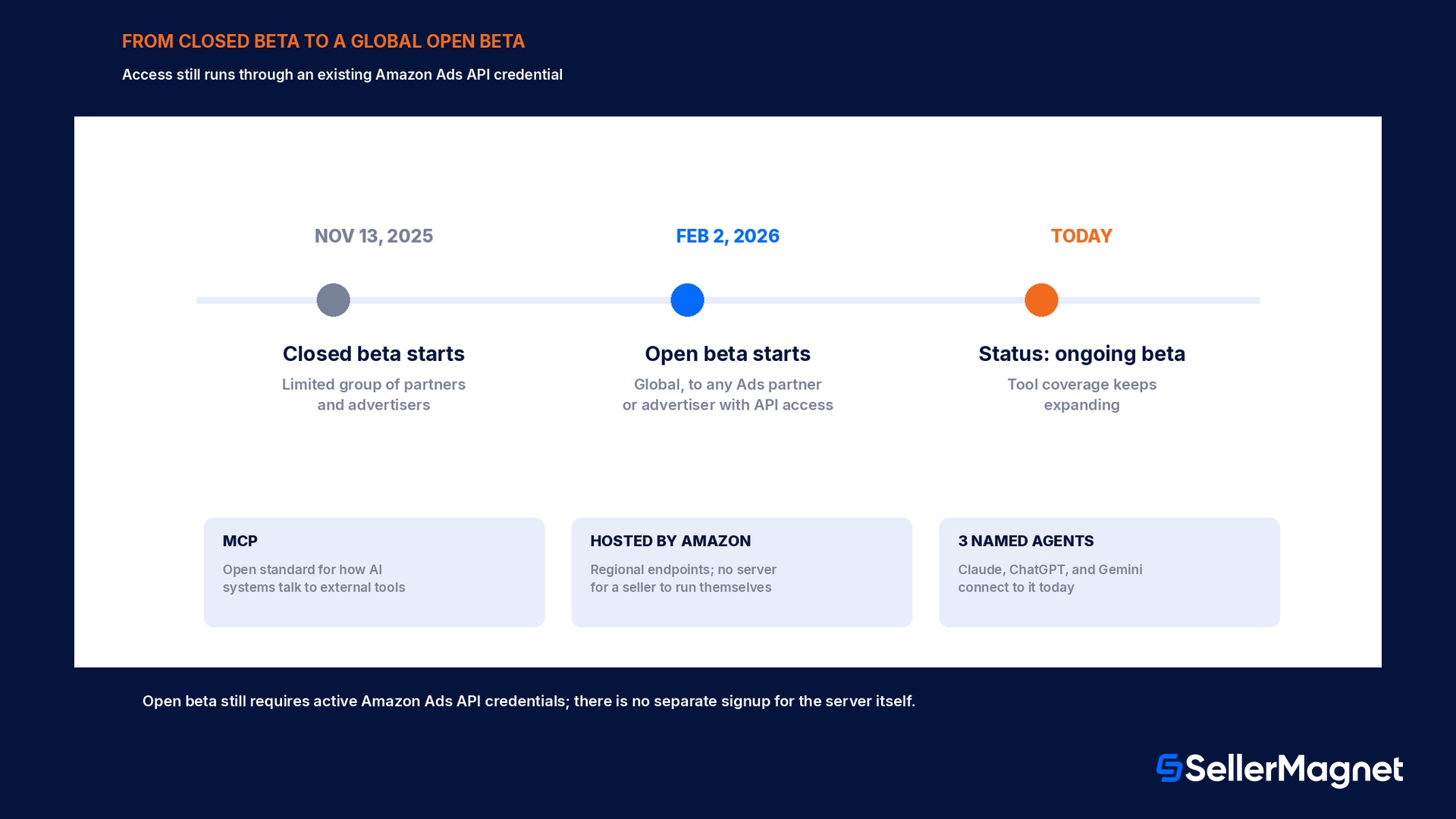
The Amazon Ads MCP Server did not appear overnight. Amazon ran it as a closed beta starting November 13, 2025, limited to a smaller group of partners and advertisers testing the connector before a wider release. On February 2, 2026, Amazon opened it globally in open beta, meaning the server itself is publicly reachable at Amazon's regional endpoints, but access still requires an existing Amazon Ads API credential, not a brand-new, separate application process. Open beta still means beta: Amazon continues to add tool coverage and account-management capabilities on top of the initial release, so a seller connecting today is working with an actively evolving feature set rather than a fixed, finished product.
Milestone
Date
Who had access
Closed beta starts
November 13, 2025
A limited group of Amazon Ads partners and advertisers
Open beta starts
February 2, 2026
Globally, any Amazon Ads partner or advertiser with active API credentials
Status today
Ongoing
Still beta; tool coverage continues to expand
Who can actually connect, and how does the approval path work?
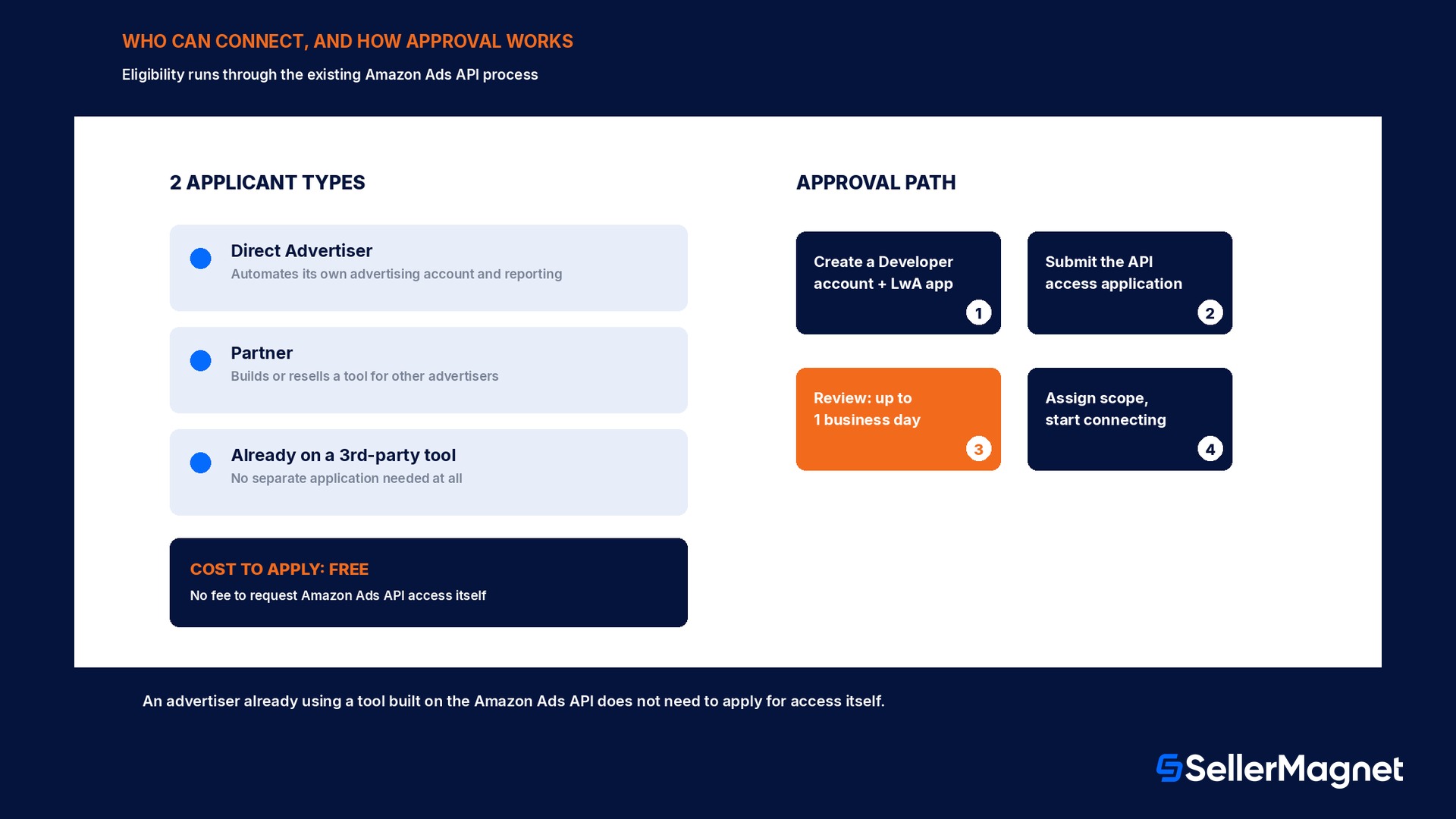
There is no separate signup form for the Amazon Ads MCP Server itself; eligibility runs entirely through the existing Amazon Ads API application and approval process, the same one that has governed programmatic access to advertising data for years. Amazon splits applicants into 2 categories at the point of applying. A Direct Advertiser is a business that wants to automate, scale, or optimize its own advertising activity and reporting, applying for API access on behalf of its own advertising account; Amazon's own description of who fits this category names companies with internal engineering resources that directly run a significant volume of Amazon Ads campaigns. A Partner is a business that builds applications and software solutions to automate or optimize advertising on behalf of other advertisers, applying to call the API and then license that application to clients; partners register through the Amazon Ads Partner Network, a self-service hub for managing that relationship, and request API access from inside its console. Either path starts with creating an Amazon Developer account and a Login with Amazon application, then submitting the access application itself; Amazon states that review of a Direct Advertiser application may take up to 1 business day, after which an approved applicant assigns the granted API scope to their Login with Amazon application and can begin connecting. One detail Amazon states plainly and that a lot of sellers miss: an advertiser who already works with a third-party tool built on the Amazon Ads API does not need to apply for API access at all, because the tool's own credentials cover that advertiser's use of it.
Applicant type
What it is for
Where to apply
Direct Advertiser
Automate, scale, or optimize your own advertising account and reporting
Direct Advertiser application form (Login with Amazon account required)
Partner
Build or resell a tool that automates advertising on behalf of other advertisers
Amazon Ads Partner Network console, API Applications
Advertiser using an existing third-party tool
No separate application needed; the tool's own API credentials already cover it
Not applicable
What can an AI agent actually do once it is connected?
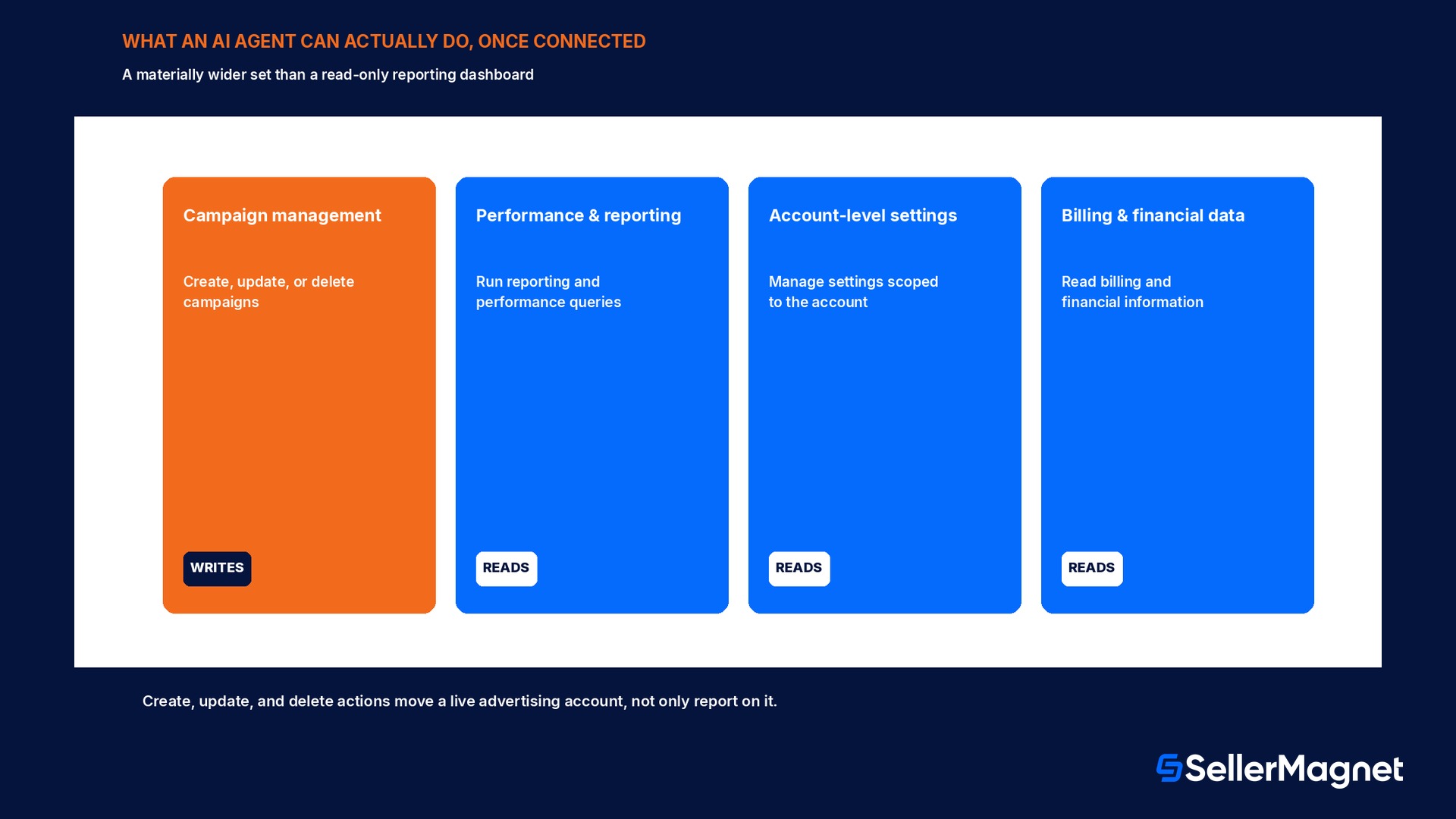
Amazon's own announcement names 4 capability groups the Amazon Ads MCP Server exposes once a connection is live: creating, updating, or deleting campaigns; running performance and reporting queries; managing account-level settings; and accessing billing and financial data. That is a materially wider set than a read-only reporting dashboard; it includes the write actions, create, change, remove, that actually move a live advertising account, not only the ability to look at one. Amazon also describes pre-built capabilities and workflows bundled into the server rather than exposing every granular API endpoint as a separate raw tool, so that a single natural-language request can resolve into a multi-step workflow (find the underperforming ad groups in a portfolio, then pause each one) instead of a seller or developer chaining individual calls themselves. Amazon's own documentation for connecting to the server groups this into Amazon-Ads-ClientId and Authorization headers carrying a Login with Amazon access token, meaning every action the agent takes is tied back to the specific application and account that authorized it, the same identity trail an API call made through any other integration would leave.
Capability group
What it covers
Campaign management
Create, update, or delete campaigns and related entities
Performance and reporting
Run reporting and performance queries against live campaign data
Account-level settings
Manage settings scoped to the advertising account itself
Billing and financial data
Read billing and financial information tied to the account
Write access means this is not a read-only reporting tool
The create, update, and delete capability means an AI agent connected through the Amazon Ads MCP Server can change a live campaign's budget, status, or structure, not only report on it. Treat the connection with the same care as any other credential that can write to a live advertising account: a Login with Amazon security profile dedicated to this purpose, scoped to only the accounts that need it, is the safer default over reusing a broader, already-privileged application.
Dynamic vs. Fixed Account Context: how does the agent know which account it is touching?
A single Amazon Ads API credential can often reach more than one advertising account or profile, so the server needs a way to resolve exactly which account a given request should act on, and Amazon documents 2 distinct modes for that. In Dynamic Account Context, the default mode, the connected AI agent itself asks the user to supply the account identifiers, such as a specific profile ID, needed to invoke each selected tool; the scoping decision happens conversationally, call by call. In Fixed Account Context, the request instead carries additional headers, a profile ID header, an account ID header, or a manager account ID header, plus a header indicating fixed mode is active, so every call through that connection is pinned to one account regardless of what the agent's own prompt implies. The practical difference matters for anyone managing more than one advertising account, an agency working multiple clients' portfolios, or a seller running separate profiles in different marketplaces: Dynamic mode is more flexible for an agent moving between accounts in the same conversation, while Fixed mode is the safer choice for a standing integration that should never accidentally act on the wrong account.
Mode
How account scope is set
Best fit
Dynamic Account Context
The agent asks the user for account identifiers at each tool call
A conversation that may move between several accounts
Fixed Account Context
Request headers pin one profile, account, or manager account ID
A standing integration that should only ever touch one account
Worked example: what a routine campaign check looks like before and after
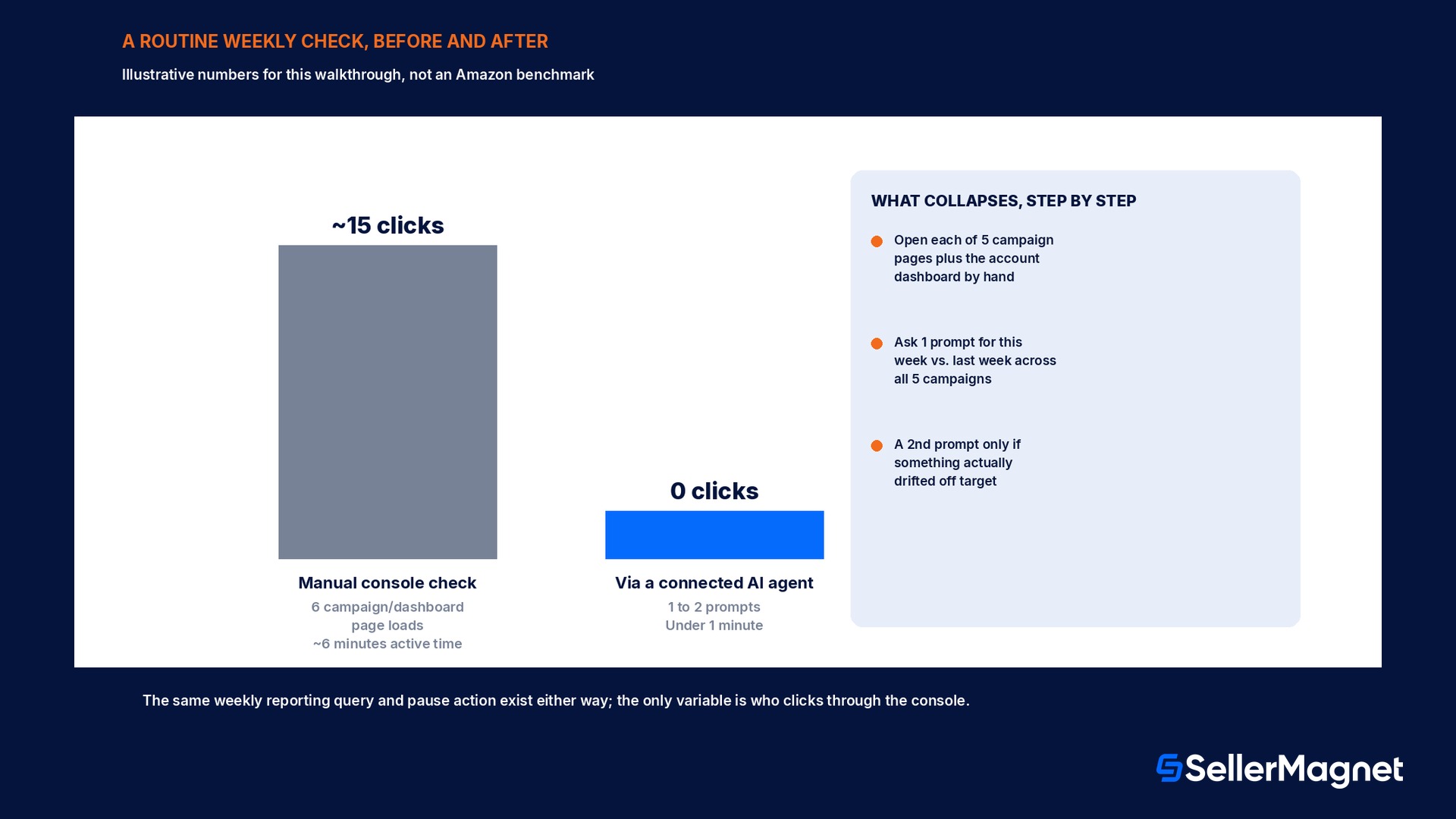
Take a seller who checks 5 active Sponsored Products campaigns every Monday morning, looking for anything with a cost-per-click that drifted above target or a conversion rate that collapsed since the prior week (illustrative numbers for this walkthrough, not an Amazon-published benchmark). Done by hand inside the advertising console, that check is roughly 6 separate page loads, one per campaign plus the account-level dashboard, each requiring a handful of clicks to open the right date range and locate the relevant metric, for a total the seller in this example estimates at about 15 clicks and 6 minutes of active attention, assuming nothing is actually wrong and no campaign needs a change. Connected through the Amazon Ads MCP Server, the same check becomes 2 natural-language exchanges with an AI agent: a first prompt asking for this week's cost-per-click and conversion rate across the 5 campaigns compared with last week, answered by a single reporting query the agent runs through the server, and a second prompt, only if something is actually off, asking the agent to pause or adjust the specific campaign that drifted. In this example that collapses the same weekly check to under a minute of typing and reading, with the console-clicking replaced by whatever time the agent itself takes to run the underlying reporting and write calls. The time saved scales with the number of accounts and campaigns a person or agency is checking on the same cadence, not with any single check in isolation.
Manual console check
Via a connected AI agent
Page loads / exchanges
6 (5 campaigns + account dashboard)
1 to 2 prompts
Clicks
About 15
0 (typed requests only)
Active time
About 6 minutes
Under 1 minute of typing/reading
Scales with
Number of campaigns checked by hand
Number of accounts/campaigns on the same cadence
The click and minute counts above are a planning example
The 15 clicks, 6 minutes, and under-a-minute figures above are illustrative numbers for this specific walkthrough, not a figure Amazon has published. What is not an assumption is the mechanism: the same weekly reporting query and the same write action (pause a campaign) exist either way, the only variable is whether a person clicks through the console for each one or an agent runs them through the server on a plain-language request.
The real question is not whether the AI can act, it is how carefully its access is scoped
Because the Amazon Ads MCP Server's own capability list includes creating, updating, and deleting campaigns, not only reading reports, the actual risk a seller takes on by connecting one is the same risk any write-capable API credential introduces: a wrong or over-broad request can change a live campaign's budget, pause the wrong ad group, or remove something that should have stayed. None of that is unique to AI; a developer with raw API access or a careless click in the console carries the identical risk. What changes with an AI agent in the loop is that the request originates from a natural-language prompt that can be ambiguous (pause the underperforming campaigns leaves room for interpretation an agent has to fill in on its own), so the practical safeguard is the same one that applies to any automation touching a live ad account: scope the connected credential to only the accounts and profiles that need it, review what an agent is about to change before a broad or ambiguous instruction executes at scale, and prefer a dedicated Login with Amazon security profile for this connection over reusing one already tied to other, unrelated integrations. A seller who wants the AI convenience without personally managing that credential and its scope is exactly the use case a managed PPC platform with its own Amazon Ads API access is built to absorb.
Mistakes that turn a convenience feature into a real account risk
Assuming open beta means fully finished. Amazon continues to expand tool coverage; a capability missing today may not be the server's final scope, and a seller should re-check official documentation before concluding something cannot be done.
Applying for Amazon Ads API access when a third-party tool already covers it. Amazon states plainly that an advertiser using a tool already built on the API does not need separate credentials; applying anyway adds an extra account and credential to manage for no benefit.
Reusing a broad, already-privileged Login with Amazon application for this connection. A dedicated security profile scoped only to the accounts the AI agent needs keeps the blast radius of a mistake, or a compromised credential, limited to exactly what the agent was meant to touch.
Leaving the connection in Dynamic Account Context mode for a standing integration that should only ever touch one account. Fixed Account Context pins the scope in the request headers themselves, removing the chance that an ambiguous prompt resolves to the wrong profile.
Giving an agent a broad, ambiguous instruction (clean up underperforming campaigns) without reviewing what it resolves to before it executes at scale. The same instruction a careful person would ask clarifying questions about deserves the same scrutiny when an agent is the one carrying it out.
Treating write access as equivalent to read access in how closely it is supervised. Reporting and performance queries carry none of the risk that create, update, and delete actions do; the 2 should not share the same level of oversight.
Where a managed PPC tool fits next to the Amazon Ads MCP Server
The Amazon Ads MCP Server itself, its hosting, its authentication, and the capabilities it exposes live entirely inside Amazon's own advertising infrastructure; no third-party platform, including SellerMagnet, builds or operates that server. What a seller actually has to decide is who manages the Amazon Ads API credential that does the acting, personally running and securing a Login with Amazon application and an AI agent connection, or a platform that already holds its own Amazon Ads API access and applies rules, limits, and human review around every campaign change before it goes live. SellerMagnet's PPC management is built on exactly the second model: the Amazon Ads API work happens behind a tool a seller already uses for bid, budget, and campaign decisions, with every automated change visible and reversible inside that same dashboard, instead of a seller personally scoping headers, tokens, and account-context modes for a direct AI-agent connection.
Profit Analytics then closes the loop on the same campaigns from the other direction: whatever a reporting query, AI-driven or not, says about clicks, spend, and conversions, the number that actually decides whether a change was worth it is the margin left after fees on the resulting orders, which is what a profit-focused view tracks rather than ad metrics in isolation.
Checklist before connecting an AI agent to a live Amazon Ads account
How to connect an AI agent to Amazon Ads without over-exposing a live account
Confirm which applicant category actually fits - A Direct Advertiser applies for its own account; a Partner applies to build or resell a tool for others; a seller already using a third-party tool built on the API needs neither.
Create a dedicated Login with Amazon security profile for this connection - Keeps the scope of a mistake, or a leaked credential, limited to exactly the accounts this profile was authorized for, instead of a broader application used elsewhere.
Choose Fixed Account Context for any standing integration - Pins the connection to one profile, account, or manager account via request headers, removing the chance an ambiguous prompt resolves to the wrong one.
List only the capability groups actually needed - Campaign management and write actions carry real risk; reporting and account-settings access do not need the same level of access if the use case is read-only.
Review what a broad or ambiguous instruction resolves to before it executes at scale - An instruction like pause the underperforming campaigns should be checked against what the agent actually selected before it runs against a live account.
Re-check Amazon's own documentation before assuming a capability is missing - Open beta means active development; tool coverage has already expanded since the February 2026 launch and is likely to keep expanding.
What is the Amazon Ads MCP Server?
A hosted connector Amazon built on the Model Context Protocol that lets an AI agent, such as Claude, ChatGPT, or Gemini, read and act on a real Amazon Ads account through the Amazon Ads API, instead of a person clicking through the advertising console by hand.
When did the Amazon Ads MCP Server launch?
Amazon ran a closed beta starting November 13, 2025, then opened it globally in open beta on February 2, 2026, to Amazon Ads partners and advertisers with active API credentials.
Who is eligible to connect to the Amazon Ads MCP Server?
Anyone with active Amazon Ads API credentials: a Direct Advertiser approved to access the API on its own account, or a Partner approved to build or resell a tool using it. An advertiser already using a third-party tool built on the API needs neither application.
Can an AI agent change a live campaign through the Amazon Ads MCP Server, or only read reports?
Both. Amazon's own description names creating, updating, and deleting campaigns alongside reporting queries, account settings, and billing data as the capabilities exposed once connected.
What is the difference between Dynamic and Fixed Account Context?
In Dynamic Account Context the agent asks for account identifiers at each tool call; in Fixed Account Context request headers pin the connection to one specific profile, account, or manager account.
Do I need to apply for Amazon Ads API access if I already use a PPC management tool?
No. Amazon states that advertisers working with a third-party tool already built on the Amazon Ads API do not need to request API access themselves; the tool's own credentials cover it.
How long does Amazon Ads API approval take?
Amazon states that review of a Direct Advertiser application may take up to 1 business day, after which an approved applicant assigns the granted scope to their Login with Amazon application.
Stop Juggling Tools. SellerMagnet Combines Everything You Need.