Amazon Pay by Invoice for Sellers 2026: How It Works and What It Costs
R
RenéFreelance Amazon Editor
|
15 min read
A customer checking out on Amazon Business can pay for an order the same way a buyer pays for a consumer purchase, by card, at the moment they click buy, or they can pay by invoice instead, receiving a bill with payment terms and settling it later rather than at checkout. For the seller whose product that customer bought, the second path changes almost nothing about how the order ships and almost everything about when the money shows up. Amazon runs the entire invoicing relationship itself: it decides which business customers qualify, it performs the credit check, it issues the invoice, it chases a late payer, and it fronts the seller's money if that chase fails. A seller cannot turn this off. Amazon's own seller blog states plainly, 'No, Amazon sellers cannot opt out of Pay by Invoice,' and explains the reasoning in one line: Amazon wants every qualified Amazon Business customer to be able to choose the payment method that works for their business, invoicing included, across every seller's catalog. For a seller who has never looked at the "Invoiced Orders" row of their Payments Dashboard, this guide works from Amazon's own seller-facing documentation to explain exactly what an invoiced order is, how Amazon's payment guarantee works, what the optional Get Paid Faster service actually costs, and where in Seller Central to go looking when an invoiced order does not behave like a normal one.
Amazon Pay by Invoice lets qualified Amazon Business customers buy now and pay later under terms like net 30, and sellers cannot opt out of it. Amazon performs the credit check, issues the invoice, chases late payers, and guarantees the seller gets paid no later than 7 days after the invoice due date even if the customer never pays. Sellers who want their money sooner can turn on the optional Get Paid Faster service for a 1.5% processing fee on every invoiced transaction.
What is an invoiced order, and why would a customer choose it?
Amazon's own seller blog defines the mechanism in one sentence: 'An invoiced order is a transaction where a customer receives an invoice that documents the details for one or more purchases they've placed,' with 'invoices can give customers the flexibility to pay at a later time, with payment terms specifying when payment is due,' and Amazon gives the standard example directly, '"net 30" payment terms give the customer 30 days from the purchase date before payment is due.' The customer who uses it is always an Amazon Business buyer, never a regular retail shopper: Amazon's Pay by Invoice FAQ states 'Pay by Invoice allows qualified Amazon Business customers to buy on the Amazon Business store and receive billing invoices for their orders,' and only 'qualified Amazon Business customers can opt to use Pay by Invoice for their Amazon buys,' meaning Amazon, not the seller, decides which buyers get the option at all through its own qualification process. Amazon names 3 reasons a business buyer prefers this over paying at checkout: it lets them group multiple purchases into one payment instead of paying order by order, it produces an itemized paper trail that plugs directly into a business's own accounting and spend-tracking, and it still lets that business settle the resulting bill through whichever payment method it already uses internally, wire transfer or check included, rather than through a credit card captured at the Amazon checkout screen. This whole mechanism sits specifically inside Amazon Business, the B2B program Amazon describes as 'a suite of tools and features to help sellers connect with B2B customers,' rather than being a general payment option available to every shopper in the regular Amazon store, so a seller only sees invoiced orders at all once a qualifying Amazon Business buyer places one against their listings.
Why sellers cannot turn Pay by Invoice off
This is the detail that catches sellers off guard the first time an invoiced order lands in their account: Pay by Invoice is not a seller setting, and there is no toggle to disable it. Amazon's FAQ answers the direct question 'Can I opt out of receiving invoiced orders?' with a flat 'No.' It lays out its own reasoning: 'Amazon's mission is to offer the earth's biggest selection of products to our customers, and this includes our business customers. To ensure a great shopping experience for Amazon Business customers, we believe that all selection should be available to them, and we believe the services and protections we offer to sellers makes an opt-out unnecessary.' Amazon's seller blog restates the same rule from the seller's side of the relationship: 'No, Amazon sellers cannot opt out of Pay by Invoice. For those business customers who qualify, Pay by Invoice is a payment option for all products available for sale in the Amazon store.' The blog adds the commercial argument for why that is framed as a benefit rather than a restriction. It 'helps ensure all sellers have the opportunity to benefit from sales placed by business customers who prefer invoices over other payment methods.' A seller who sells nothing but standard retail-priced single units can still receive a Pay by Invoice order from a qualifying business buyer with no prior setup, and no way to decline that specific order type going forward.
No enrollment step, no opt-out
Pay by Invoice needs no setup from a seller. Amazon states a seller does 'not have to take any action to enable Pay by Invoice,' and just as plainly, there is no later action available to turn it off. The only 2 settings a seller actually controls are the optional Get Paid Faster service and where they review invoiced orders inside the Payments Dashboard.
What happens if the business customer never pays?
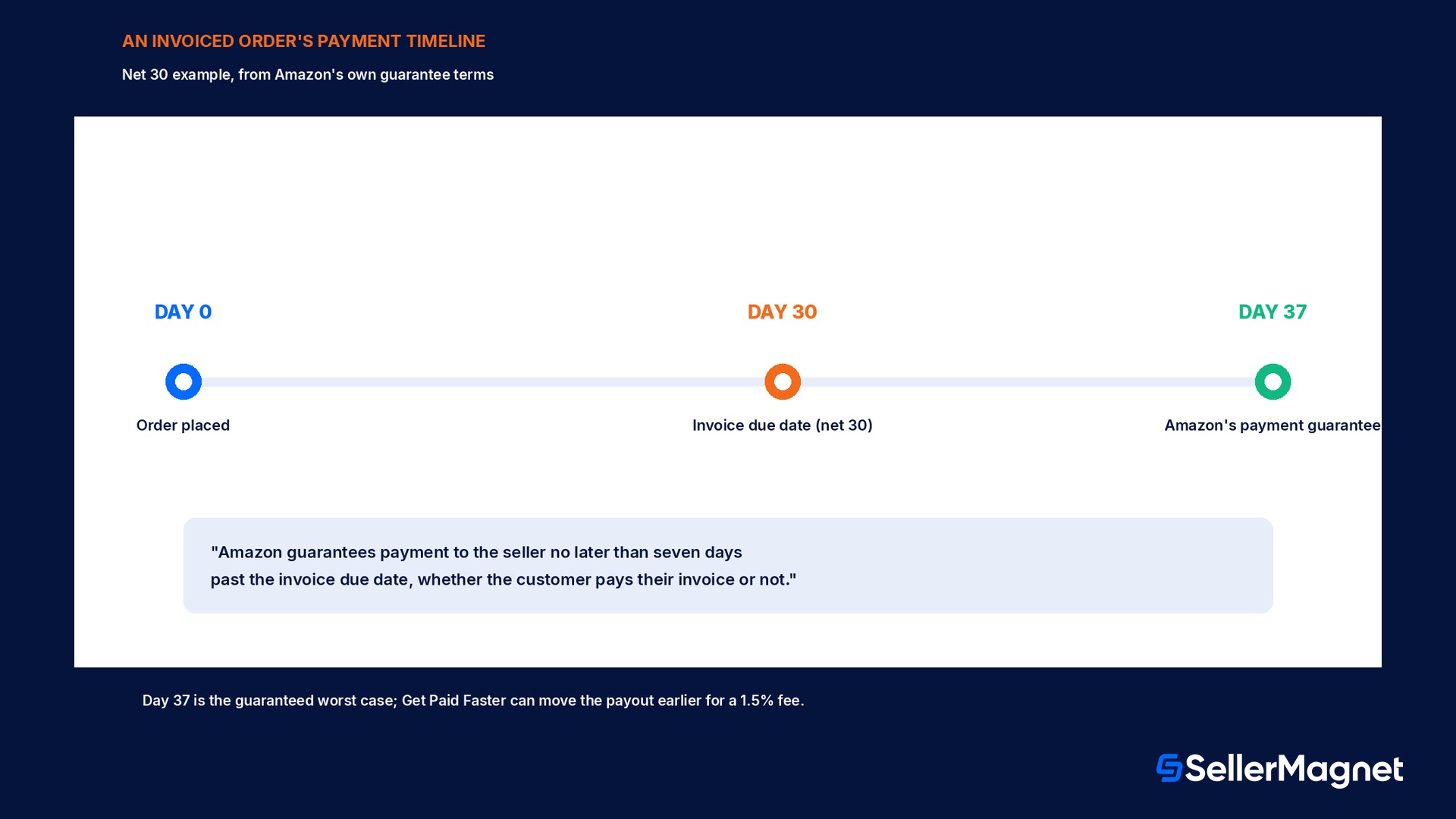
The part of this arrangement that actually works in a seller's favor is the payment guarantee, and Amazon states it in specific, countable terms rather than as a vague assurance. Its seller blog explains the risk Amazon is removing first: 'With traditional invoicing, even if the seller does their due diligence, there's a chance that a customer might not pay for the products or services provided.' It then states Amazon's own backstop: 'With Pay by Invoice, Amazon guarantees payment to the seller no later than seven days past the invoice due date, whether the customer pays their invoice or not.' The Get Paid Faster service terms, which govern the normal remittance timing for every invoiced order whether or not a seller activates that service, confirm the exact mechanic behind the guarantee: 'Sales Proceeds from invoiced orders are normally credited to your available balance on or before the seventh day following the applicable invoice due date.' Put together with a net 30 example, a seller selling into a net 30 invoiced order should expect Sales Proceeds in their available balance on or before 37 days after the order. That is 30 days until the due date, plus up to 7 more days under the guarantee, regardless of whether the business customer who placed the order has actually settled their invoice by that date. Amazon's own blog frames this as one of the central benefits of the program for a seller: it 'can help remove some of the risk associated with doing business by invoice,' moving the collection risk from the seller's own books onto Amazon's.
Milestone
Timing (net 30 example)
Order placed by the Amazon Business customer
Day 0
Invoice due date under net 30 terms
Day 30
Amazon's payment guarantee to the seller
On or before day 37 (due date + up to 7 days)
Standard, non-invoiced order payout
Per the seller's normal remittance schedule
US store only
Every figure in this guide, the net 30 example, the 7-day guarantee and the 1.5% Get Paid Faster fee, comes from Amazon's documentation for its US store specifically. Amazon's own blog states this directly: this post 'covers the details of how invoices work in Amazon's US store,' and for how invoices work in other stores, a seller has to check that country's own Amazon seller resources rather than assume the US terms carry over.
What Amazon actually does on a seller's behalf
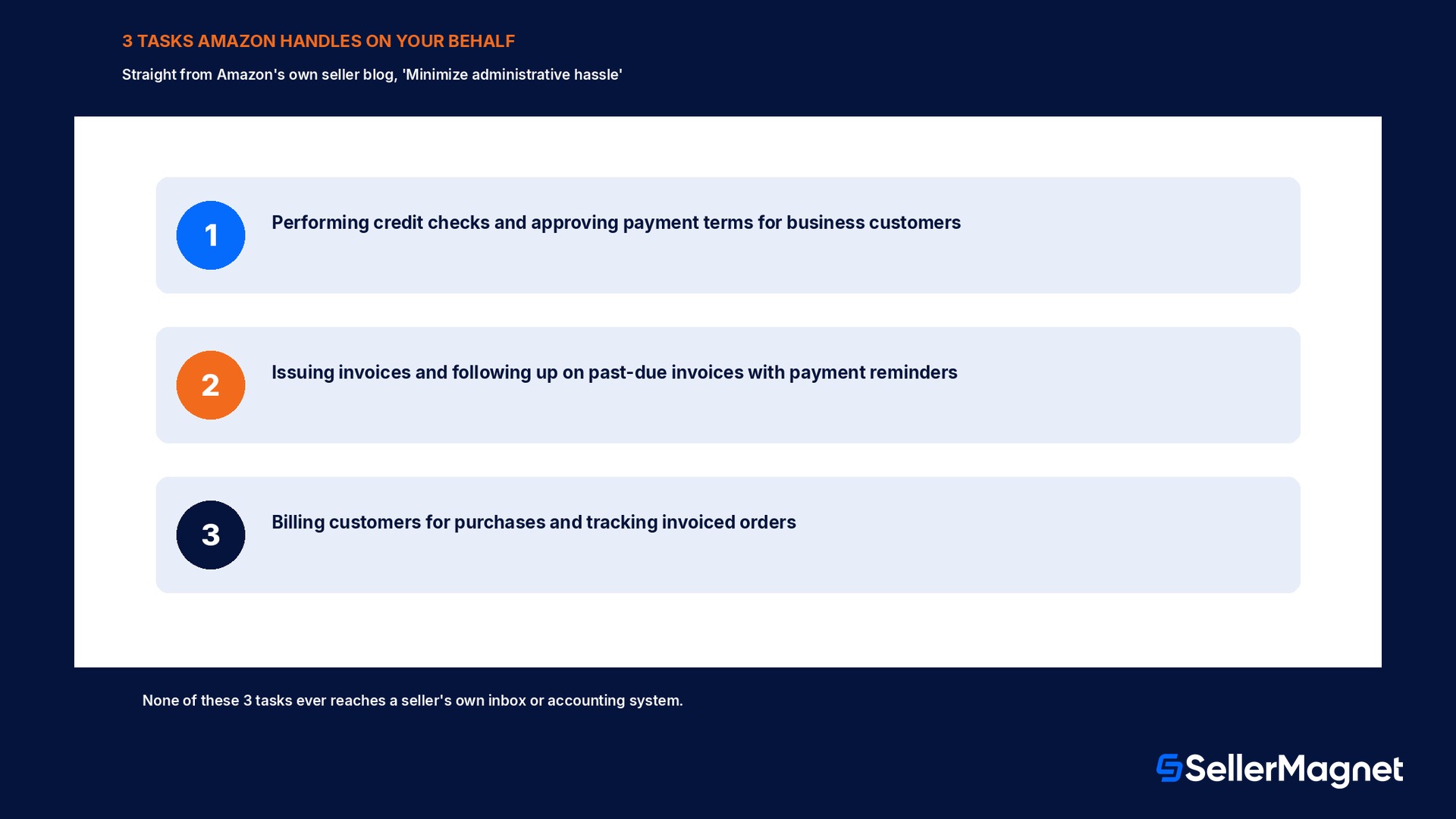
Amazon's seller blog lists the administrative load it is taking off a seller's plate under the heading 'Minimize administrative hassle.' It names the tasks it performs directly rather than describing them abstractly: 'Performing credit checks and approving payment terms for business customers,' 'Issuing invoices and following up on past-due invoices with payment reminders,' and 'Billing customers for purchases and tracking invoiced orders.' None of those 3 tasks ever reaches a seller's own inbox or accounting system. A seller is not the one deciding whether a given business buyer qualifies for invoice terms. A seller is not the one generating or sending the invoice document itself. A seller is not the one emailing a reminder when a payment is late. Amazon's own operations handle every step of that chain on the seller's behalf, while the seller's order simply ships and gets paid on the guaranteed schedule described above. The practical upside Amazon's blog states for this is reach, not just convenience: invoices 'can help attract B2B customers who prefer to pay via invoice and might not otherwise buy from your business or shop in the Amazon store,' and Amazon notes that 'business customers often buy in larger quantities and return fewer products.' That means the orders this opens up tend to be both bigger and less likely to come back as a return, on top of removing the collections work entirely.
Get Paid Faster: what the 1.5% fee actually buys
The one lever a seller does control is how quickly Sales Proceeds from an invoiced order reach their available balance. Amazon prices that acceleration in specific, published terms rather than a vague premium. The official Get Paid Faster service terms describe the mechanic directly: 'Sales Proceeds from invoiced orders are normally credited to your available balance on or before the seventh day following the applicable invoice due date. You may elect, in the manner we designate, to accelerate the application of certain Sales Proceeds for invoiced orders (net of applicable fees) to your available balance by activating the Get Paid Faster Service.' The cost is stated as a single flat rate with no tiers: 'In exchange for the accelerated application of Sales Proceeds to your available balance, a processing fee of 1.5% will be applied to all related Sales Proceeds. This processing fee will be in addition to any other fees payable to Amazon or its Affiliates under your seller agreement, and will be paid to Amazon Services LLC.' Amazon's seller blog frames the business case for paying it in cash-flow terms: 'Because there's a delay between order placement and when you get paid, invoices can add complexity to the way you manage your cash flow. If you want to accelerate payments for Pay by Invoice orders, you can activate our Get Paid Faster service.' The election is also sticky by design, not a one-time toggle. The service terms state 'once activated, your election to use the Get Paid Faster Service will apply to all future invoiced orders until you deactivate it.' A seller who turns it on is paying 1.5% on every invoiced order going forward, not selecting it order by order.
Run the numbers before switching it on
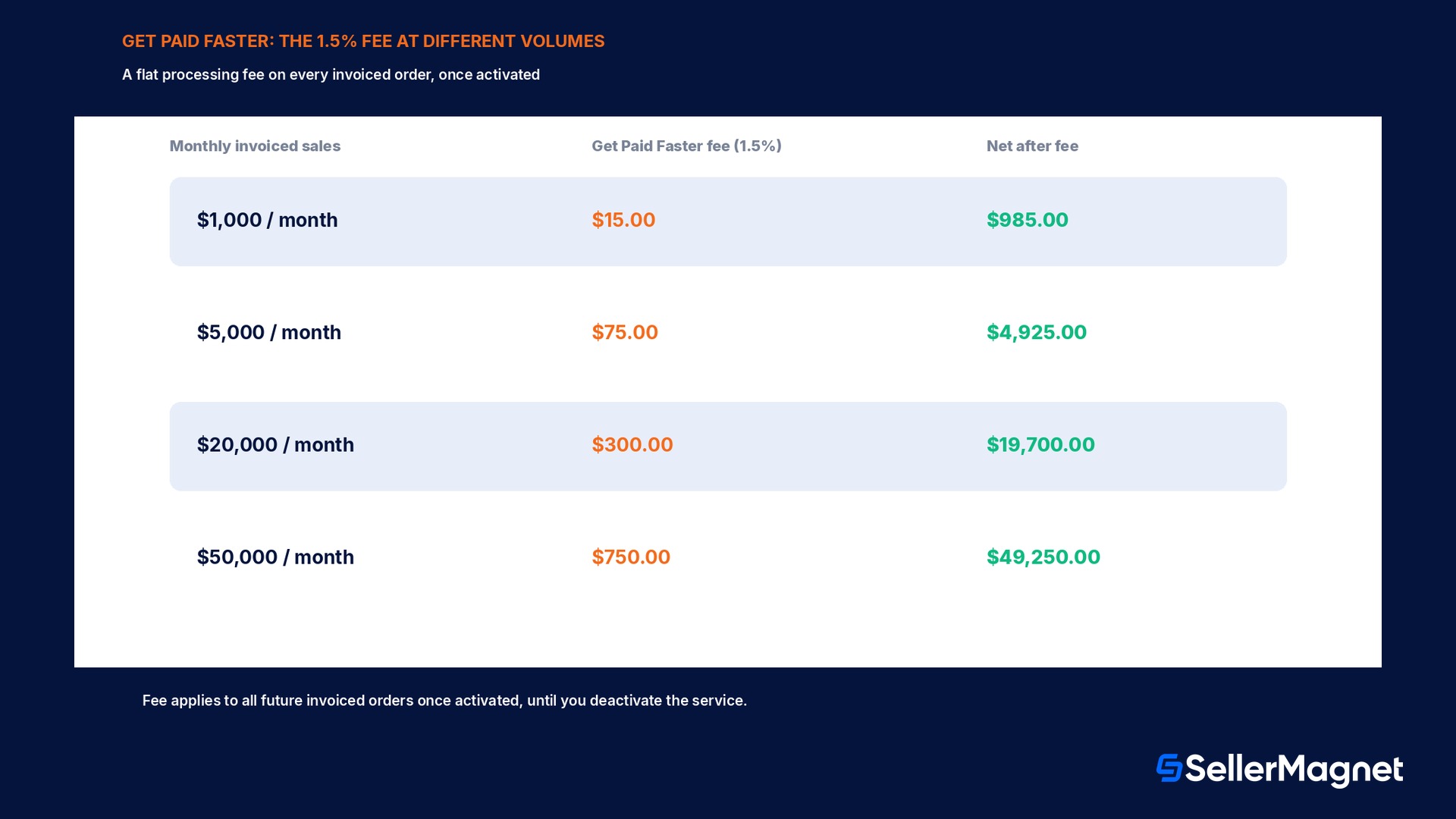
A seller invoicing $5,000 a month through Pay by Invoice pays $75 a month for Get Paid Faster (1.5% of $5,000); at $20,000 a month the same rate costs $300 a month. Amazon's published terms do not state exactly how many days sooner the accelerated balance posts, only that the normal path is 'on or before the seventh day' past the due date, so the right comparison for a seller is their own cost of waiting out that window elsewhere, a credit line, a supplier payment term, or simply cash on hand, against a flat 1.5% charged on every invoiced order from the day it is switched on.
Monthly invoiced sales
Get Paid Faster fee (1.5%)
Net after fee
$1,000
$15.00
$985.00
$5,000
$75.00
$4,925.00
$20,000
$300.00
$19,700.00
$50,000
$750.00
$49,250.00
Where to actually review an invoiced order in Seller Central
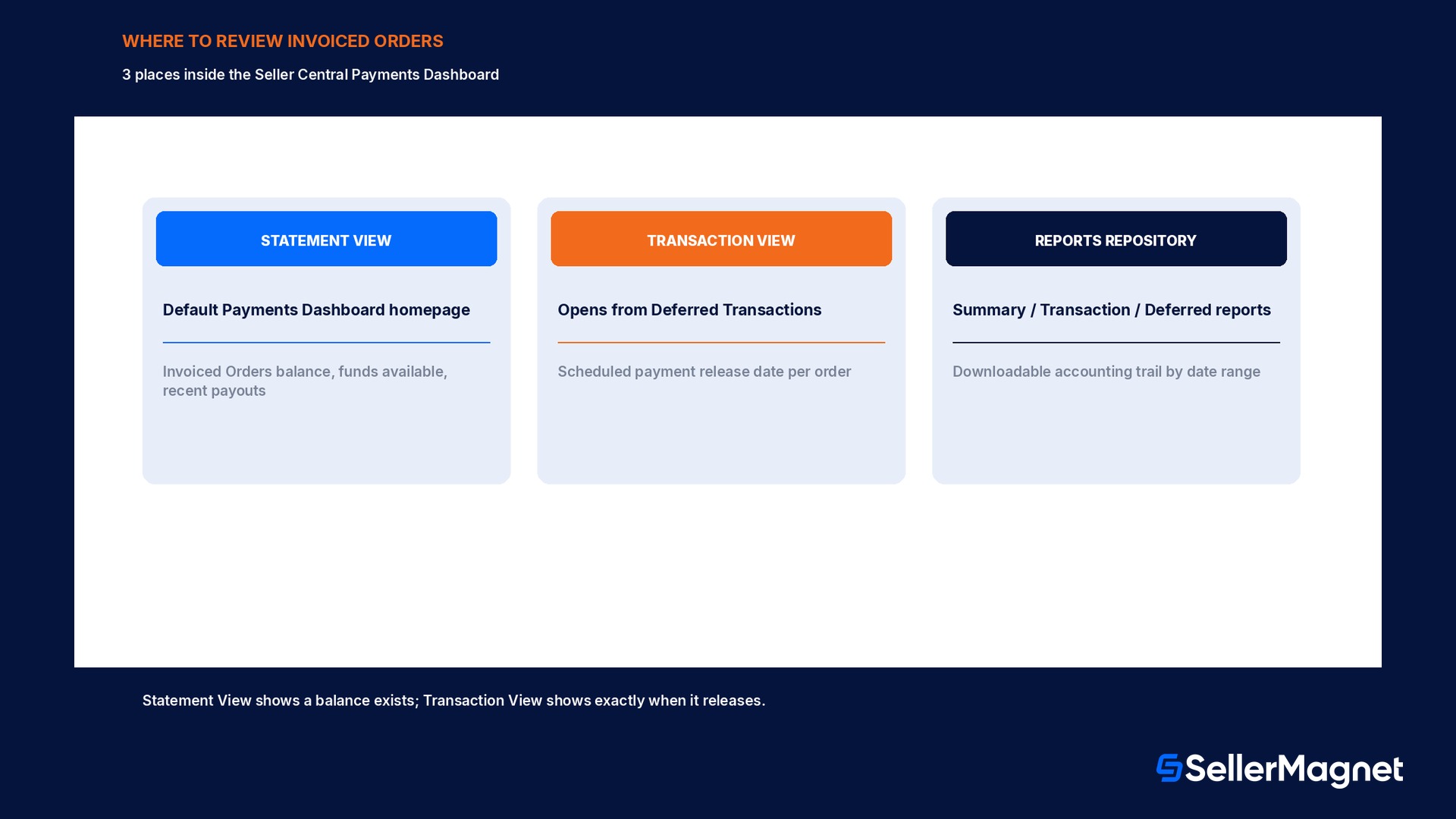
Amazon's seller blog walks through 3 specific places inside the Payments Dashboard where an invoiced order's status lives, and they answer 3 different questions. Statement View is 'the default homepage for the Payments Dashboard,' reached by selecting Payments in the main menu. It separates 'Standard Orders' from 'Invoiced Orders' in its own row, showing 'a total balance, funds available, and recent payouts for invoiced orders' specifically, with a 'Deferred Transactions' row underneath tracking amounts still waiting to be released, whether because of invoicing or another reason such as an order awaiting delivery. Transaction View answers the question of when a specific order actually pays out. Selecting the hyperlinked amount in the Deferred Transactions row opens it, and from there the Account Type menu can be set to Invoiced Orders while the Transaction Status menu filters between All Transaction Statuses, Released Transactions, or Deferred Transactions. Each individual transaction's hyperlinked total opens further detail, including, in Amazon's words, 'the scheduled payment release dates.' Reports Repository is the place to pull the paper trail for accounting rather than check one order at a time. Selecting Invoiced Orders in its Account Type menu and then Summary, Transaction, or Deferred Transaction in Report Type, with a custom or monthly date range, generates a downloadable report rather than an on-screen view. A seller who only ever looks at their default Statement View homepage can see that invoiced orders exist as a separate balance, but has to go into Transaction View specifically to find out when an individual invoiced order is actually scheduled to release.
Mistakes sellers make with invoiced orders
Assuming an invoiced order pays like a standard order. It follows its own guaranteed window, on or before 7 days past the invoice due date, not the seller's normal remittance schedule for card-paid orders.
Looking for an opt-out that does not exist. Amazon's FAQ is explicit: sellers cannot opt out of Pay by Invoice, so there is no setting to find, change, or escalate a support ticket about.
Activating Get Paid Faster without checking the math. The 1.5% processing fee applies to every invoiced order going forward once switched on, not just the one that prompted the decision.
Treating a pending invoiced order as a lost sale. Amazon's own guarantee means the seller is paid regardless of whether the business customer has actually settled the invoice by the due date.
Not knowing where to look when a payout seems delayed. Transaction View, not the Statement View homepage, is where a specific invoiced order's scheduled release date actually shows.
Chasing the business customer directly for a late invoice. Amazon states it performs the follow-up on past-due invoices itself; a seller does not need to, and is not expected to, contact the buyer about payment.
Where SellerMagnet fits around invoiced orders
Pay by Invoice is Amazon's own payment rail: it decides who qualifies as a buyer, performs the credit check, sets the guarantee window, and prices Get Paid Faster, and no seller tool changes any of those terms. Where SellerMagnet fits is in the numbers a seller still has to manage around it. Profit Analytics tracks net proceeds and payout timing across every order type on one dashboard, which is the practical way to see how much of a given month's revenue is sitting in the Invoiced Orders balance versus already settled, before deciding whether a 1.5% Get Paid Faster fee is worth paying on that month's volume. Fee Audit checks Amazon-side charges for reimbursement eligibility, useful background for any seller trying to understand everything being deducted from an invoiced order's net proceeds alongside the processing fee itself. For sellers weighing whether to lean further into Amazon Business volume, which is where invoiced orders originate, the repricer and Product Sourcer help keep the underlying catalog priced and stocked for the larger, less-returned orders Amazon's own blog says B2B buyers tend to place.
Checklist before your next invoiced order lands
How to handle an Amazon Pay by Invoice order correctly
Open the Payments Dashboard Statement View - Check the separate 'Invoiced Orders' row against 'Standard Orders' to see your current invoiced balance.
Find the specific order in Transaction View - Set Account Type to Invoiced Orders to see that order's scheduled payment release date.
Compare the due date plus 7 days against your calendar - Amazon guarantees payment on or before the seventh day past the invoice due date, whether or not the customer has paid.
Run the Get Paid Faster math against your own invoiced volume - 1.5% on every invoiced order going forward, not a one-time charge, before switching the service on.
Pull a Reports Repository report for your records - Select Invoiced Orders and Summary, Transaction, or Deferred Transaction for a downloadable accounting trail.
Can I opt out of Amazon Pay by Invoice as a seller?
No. Amazon's own FAQ states directly that sellers cannot opt out; Pay by Invoice is available on all products for sale in the Amazon store to qualifying Amazon Business customers.
Do I need to set anything up to receive invoiced orders?
No. Amazon states you do not have to take any action to enable Pay by Invoice; eligible orders from qualified Amazon Business customers simply arrive.
When am I guaranteed to get paid for an invoiced order?
On or before the seventh day after the invoice due date, whether the business customer has paid by then or not, per Amazon's stated guarantee.
What does Get Paid Faster cost?
A processing fee of 1.5% of the invoiced amount, applied to every invoiced order once activated, until you deactivate the service.
Who decides the payment terms, like net 30, on an invoiced order?
Amazon approves payment terms for qualified business customers as part of its own credit-check process; the seller is not setting or negotiating those terms.
Where do I see when a specific invoiced order will pay out?
Transaction View inside the Payments Dashboard, with Account Type set to Invoiced Orders, shows the scheduled payment release date for that order.
Does Amazon chase a late-paying business customer, or do I?
Amazon does. Its seller blog states Amazon handles issuing invoices and following up on past-due invoices with payment reminders on the seller's behalf.
Stop Juggling Tools. SellerMagnet Combines Everything You Need.