Amazon Item Highlights 2026: The New 125-Character Field
R
RenéFreelance Amazon Editor
|
15 min read
Amazon's own numbers tell you how big this change is: sellers updated more than 984 million product titles after the June 2026 announcement introducing Item Highlights, a brand-new 125-character field that sits directly beneath the product title and is fully searchable. The headline rule is simple, a product title of 75 characters or fewer, except for media products, unlocks a separate 125-character Item Highlights field for materials, use cases, or comparison details. What is not simple is everything downstream of that rule: an AI tool that rewrites titles and highlights automatically if a seller does nothing, a 14-day brand owner review window buried in a page called Review Listings Changes, a bulk-upload path through the Category Listings report, and a rollout that seller forums describe as buggy well into its second month, with sellers reporting error 100476 and highlights that silently fail to save. This guide works from Amazon's own "Updates to improve your product titles begin on July 27" announcement, the "Answers to your product title update questions" follow-up, and live Seller Forums threads to walk through what Item Highlights actually is, the exact timeline, where to edit it, the known rollout problems, and a checklist for getting ahead of the AI rewrite instead of reacting to it after the fact.
Item Highlights is a new 125-character Amazon listing field, separate from the product title, that only unlocks once the title is 75 characters or fewer. Announced in June 2026, enforced from July 27, 2026, and shown under the title from August 10, 2026, it is searchable like the title. Sellers who do not update their own titles get an AI-generated version, with brand owners given 14 days to review AI changes in Review Listings Changes before they go live.
What Item Highlights actually is
Item Highlights is a field Amazon added next to the product title, not a renamed bullet point and not the same thing as the 250-byte backend search terms field that stays invisible to shoppers. It holds up to 125 characters for "materials, recommended use cases, or details that help customers compare options," in Amazon's own wording, and it is both searchable and visible: it shows up with the title in search results and on the product detail page itself. The field sits directly below the Item name on both the detail page and in search listings as of August 10, 2026, and it only becomes available to fill in once the Item name itself is at or under 75 characters including spaces. That gate matters more than it looks: a seller whose title currently runs 95 characters cannot add Item Highlights content until the title is trimmed down first, which is the whole mechanism Amazon is using to push the two changes through together instead of as separate, optional updates.
The 200-character budget that replaces the old wider title
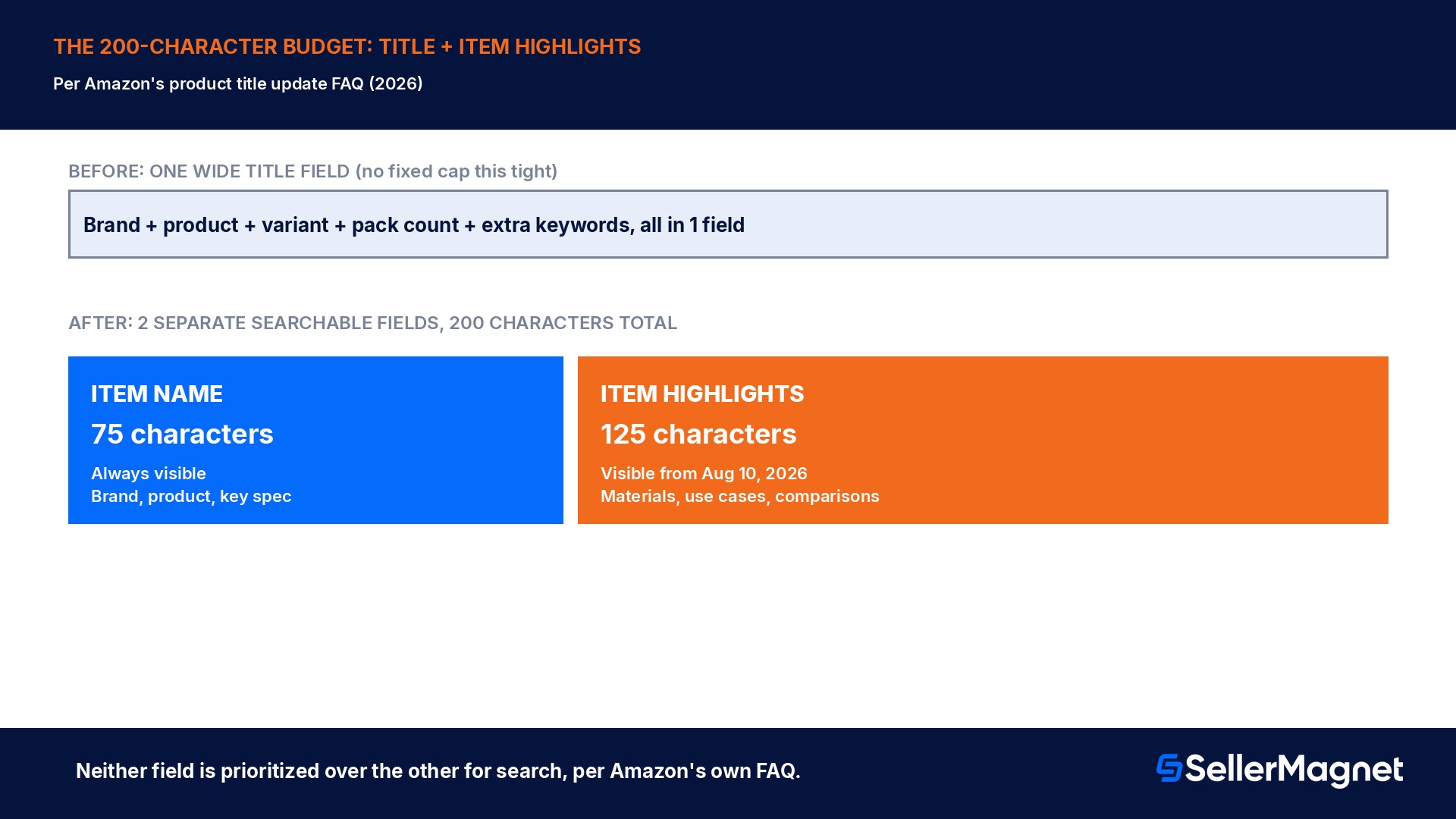
Before this change, a product title had no fixed universal character cap as tight as 75; sellers routinely ran titles well past 100 characters, stuffing in brand, variant, pack count, and extra keywords in one field. Amazon's own FAQ reframes the whole budget directly: "you'll still have 200 characters to list your important product information; those characters will be split between Item name (75 characters) and Item Highlights (125 characters)." The split, not a straight cut, is the actual policy. Amazon's stated best practice is to keep the brand name in the Item name and distribute everything else across both fields, and for listings with meaningful variating attributes (color, size, edition, pack count), to keep the most important ones in the title and move the rest into Item Highlights if the 75-character limit will not fit them all. A seller optimizing only for the title's new 75-character ceiling and ignoring Item Highlights entirely is leaving 125 characters of searchable, customer-visible space unused, functionally shrinking their total listing information budget by more than half.
Field
Character limit
Visible to shoppers
Searchable
Item name (title)
75 (except media products)
Yes, always
Yes
Item Highlights
125
Yes, beneath the title from Aug 10, 2026
Yes
Backend search terms
250 bytes
No, invisible
Yes (indexing only)
The exact rollout timeline
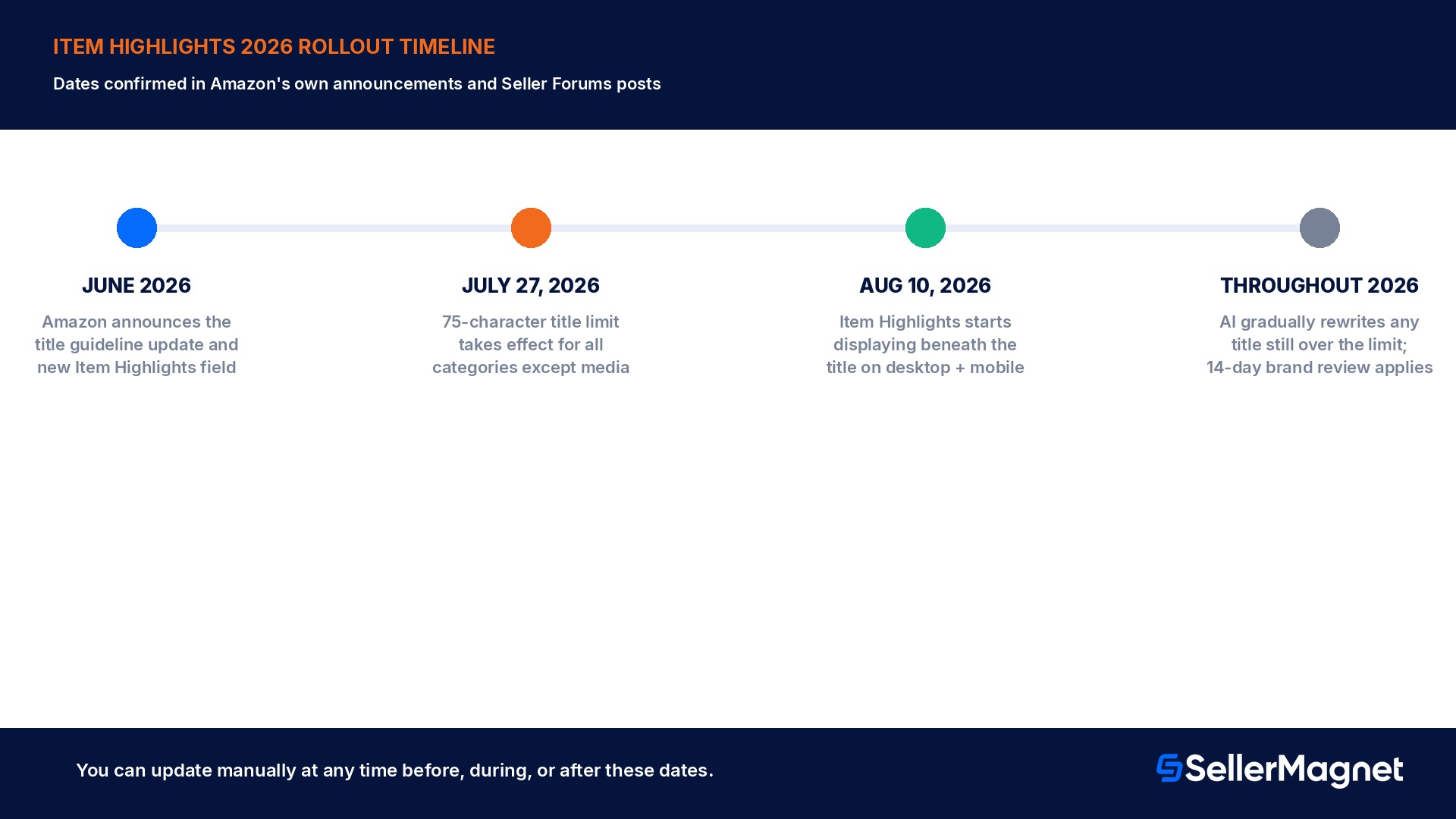
The change moved in stages that are each independently confirmed in Amazon's own posts. Amazon first announced the update to title guidelines and the new Item Highlights feature in June 2026. The enforcement date for the title length itself was set for July 27, 2026: "titles in all categories except for media will need to be 75 characters or less including spaces" from that date, with the stated reasoning that shorter titles display fully on mobile and match the title length conventions of other online stores. Item Highlights content could be added before that date too, Amazon's own announcement says sellers "can continue using your existing title until July 27 or update your title to 75 characters and add Item Highlights" early. The display change landed about 2 weeks later: from August 10, 2026, Item Highlights started appearing beneath the Item name on both desktop and mobile, with Amazon noting the number of visible characters can still vary by screen size. After July 27, Amazon's AI tools began generating recommended titles and Item Highlights for any listing still over the limit, and that automated cleanup is explicitly described as continuing gradually "throughout 2026," not as a single cutover night.
The 14-day brand owner review window, and what happens if you miss it
A seller does not have to wait for Amazon's AI to act; updating a title and adding Item Highlights manually at any time, before or after July 27, is explicitly allowed and overrides whatever the AI would otherwise generate. For listings a seller has not touched, Amazon's own process is to generate an AI recommendation first and then give brand owners a 14-day window to review, modify, or approve it inside a page called Review Listings Changes, reachable from Manage All Inventory. If that window passes with no action, Amazon implements its own AI-generated title and Item Highlights text, and the listing stays active, editable, and searchable throughout, before, during, and after the change. A seller who disagrees with a change Amazon already made, whether reviewed or auto-implemented, can still update the title and Item Highlights at any time afterward through Manage All Inventory or the List Your Products tool; nothing about the 14-day window is a one-time, unrepeatable decision.
Review Listings Changes is where the 14-day clock runs
Reachable from Manage All Inventory. Miss the 14-day review window and Amazon implements its own AI-generated title and Item Highlights automatically; you can still edit them again afterward at any time.
Where to actually edit it: single-listing and bulk paths
For a single listing, the path is inside the existing editor, not a separate tool: go to Manage All Inventory, select the listing, choose Edit, then click View enhancements on the left side of the page to see Amazon's AI-recommended title and Item Highlights that already follow the new limits. A seller can accept the recommendation, edit it, or write their own version entirely from scratch in the same screen; forum reports describe the Item Highlights field also appearing directly on the Product Details tab inside Edit Listing for a manual, non-AI edit path. For catalogs with many ASINs, Amazon added an Item Highlights column directly next to the Item name column in the downloadable Category Listings report; both fields are pre-populated with whatever has already been set, both can be edited in the same spreadsheet row, and the file uploads back through the List Your Products (bulk) tool. Amazon's own stated turnaround for a bulk upload is that listings are typically updated within 8 hours, which matters for planning a catalog-wide cleanup rather than assuming it happens instantly.
Variation listings and large catalogs: where the rules get murkier
Amazon's own guidance gets thinner exactly where catalogs get complicated. For a single-variation product, the advice is straightforward: keep the most important variating attributes, color, size, edition, in the Item name, and only push the rest into Item Highlights if the 75-character limit will not fit them all. For multi-variation listings with many child ASINs, sellers report conflicting guidance depending on who they ask: one forum thread describes Seller Support directing a toner-cartridge seller to put the variating attributes (series, model, color, pack count) into Item Highlights rather than the title, which produces hundreds of child ASINs sharing an identical, generic title, a pattern that contradicts the general best-practice advice to keep important variating attributes in the title itself. Amazon has not published a single rule resolving which approach is correct for every category, so a seller running a large multi-variation catalog should decide per listing whether the variating attribute is something a shopper searches on directly (in which case it belongs in the title) or something they only check after finding the right product (in which case Item Highlights is the better home for it), rather than copying a format recommended for a different category.
A second catalog-scale concern raised directly in the Seller Forums deserves a plain answer: order invoices and packing slips pull from the Item name field only, they do not currently show Item Highlights content. A seller who moves a distinguishing detail, an edition, a size, a rarity tier, entirely out of the title and into Item Highlights should expect that detail to stop appearing on the invoice or packing slip for that order, which matters for anyone who identifies what sold by scanning invoices rather than looking up each ASIN individually. Where a detail is needed for fulfillment or order identification at a glance, keeping it in the title, even at the cost of trimming something else, avoids this gap; Amazon has not announced a fix adding Item Highlights to invoices as of this writing.
A worked example: splitting a 102-character title into both fields
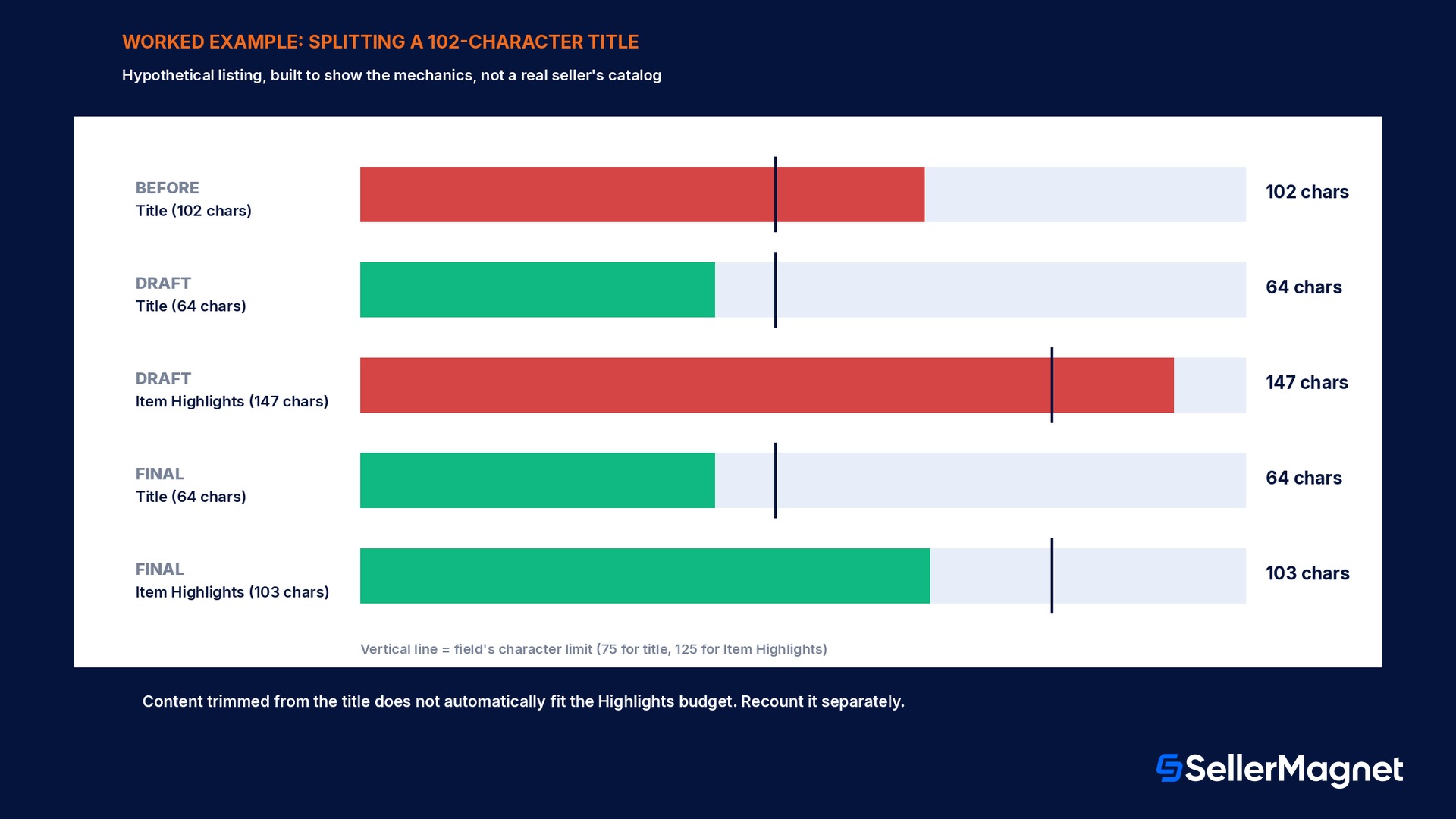
The listing below is a constructed example, not a real seller's catalog, built only to make the mechanics concrete. Before the change, the seller's live title ran 102 characters: "Acme Pro Stainless Steel Insulated Water Bottle 32oz Wide Mouth Leak Proof BPA Free Sports Gym Travel." At 102 characters, this title already exceeds the new 75-character cap by 27 characters, so under the new rule it cannot carry an Item Highlights entry until it is trimmed, and if the seller does nothing, Amazon's AI will eventually rewrite it for them. Trimming it by hand to fit 75 characters while keeping the information customers search on most (brand, material, capacity, mouth width) gives: "Acme Pro Stainless Steel Insulated Water Bottle, 32oz Wide Mouth" at 64 characters, 11 characters under the new ceiling. The 38 characters trimmed out of the title, leak proof, BPA free, and the sports, gym, and travel use-case words, move into the new 125-character Item Highlights field instead of disappearing from the listing entirely: "Leak-proof lid, BPA-free Tritan construction. Ideal for the gym, daily commute, hiking, and travel. Keeps drinks cold up to 24 hours, hot up to 12." That Item Highlights text runs 147 characters as drafted, 22 over the 125-character limit, which is the single most common mechanical mistake in a manual split: writing highlights to fit everything that got cut from the title, instead of checking the new field's own separate 125-character ceiling. Tightened to fit: "Leak-proof lid, BPA-free Tritan build. Great for gym, commute, hiking, travel. Cold 24 hrs, hot 12 hrs." lands at 103 characters, within budget with 22 characters of headroom.
Version
Field
Character count
Within limit
Before
Title only (102 chars)
102 / 75
No, 27 over
After, draft
Title
64 / 75
Yes
After, draft
Item Highlights
147 / 125
No, 22 over
After, final
Title
64 / 75
Yes
After, final
Item Highlights
103 / 125
Yes, 22 to spare
Rollout bugs and mistakes sellers are actually hitting
Error 100476 on an already-compliant title. Multiple Seller Forums threads report the message "Provide an Item Name that is 75 characters or less to use Item Highlights" appearing even when the title is already under 75 characters; this is a reported system bug during the rollout, not a sign the seller miscounted.
Item Highlights appears to save, then reverts after 24 hours. One forum thread documents entering new Item Highlights text through the AI enhancement interface, seeing it accepted, then finding the field still showing the original AI-recommended text a day later with no error shown at the time of entry.
Writing Item Highlights to fit everything trimmed from the title. The worked example above shows the exact failure: content cut from a title to hit 75 characters does not automatically fit the separate 125-character Item Highlights budget; it needs its own trim pass.
Assuming Item Highlights and backend search terms are the same field. They are not. Item Highlights is visible to shoppers and displays beneath the title; backend search terms (250 bytes) stay invisible and only affect indexing, never display.
Treating the first AI-generated bullet-point flag as a one-off. Forum reports describe the AI enhancement tool flagging legitimate bullet content as "false or promotional claims or external links" regardless of wording; sellers hitting this repeatedly should write Item Highlights manually instead of relying on the AI suggestion for that listing.
Missing the 14-day Review Listings Changes window on a brand-owned ASIN. A brand owner who ignores the review notice gets Amazon's own AI-generated title and Item Highlights implemented automatically, which can still be edited afterward but is live in the meantime.
Assuming child ASINs in a variation listing need identical titles. Amazon has not published a single public rule forcing every child ASIN's title to be identical; sellers running multi-variation listings should treat each child's title and Item Highlights individually against the same 75/125 limits.
Expecting the bulk upload to apply instantly. Amazon's own stated turnaround for a Category Listings report upload through List Your Products is typically up to 8 hours, not immediate, which matters for timing a catalog-wide cleanup around a launch or promotion.
Compliance checklist: get ahead of the AI rewrite
How to update a listing for Item Highlights without waiting for Amazon's AI
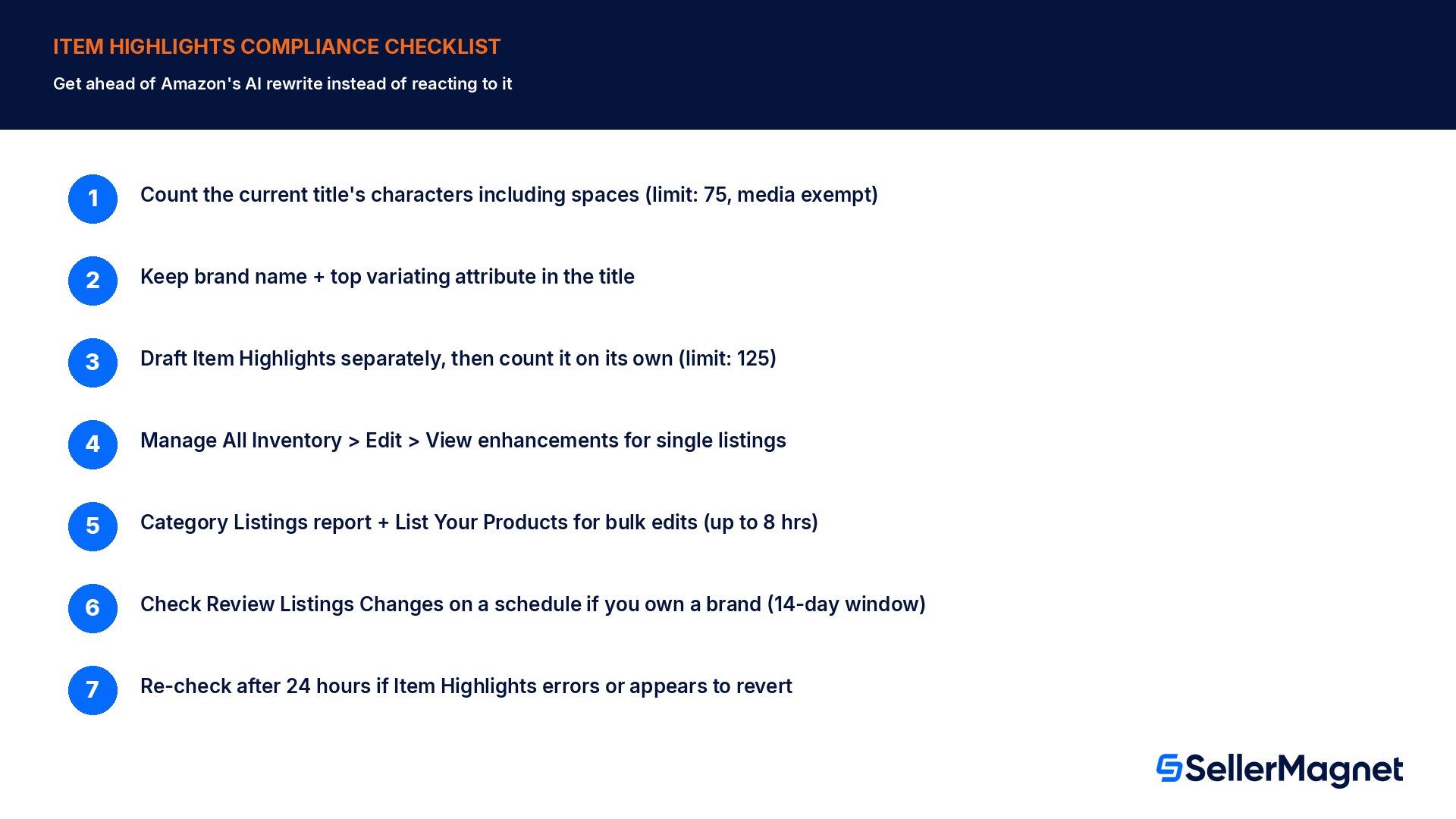
Count the current title's characters including spaces - Anything over 75 characters, except media products, needs trimming before Item Highlights can be filled in at all.
Keep the brand name and the most important variating attribute in the title - Amazon's own best-practice guidance: brand name stays in the Item name; other attributes (color, size, edition) go in the title only if space allows, otherwise into Item Highlights.
Draft Item Highlights separately, then count it on its own - The content trimmed from the title does not automatically fit 125 characters; it needs its own edit pass and its own character count, independent of the title.
Go to Manage All Inventory, Edit, then View enhancements - This surfaces Amazon's AI-recommended title and Item Highlights for that exact listing, which can be accepted, edited, or replaced with a fully manual version.
For many ASINs, use the Category Listings report instead - Download it, edit the Item name and Item Highlights columns together in the spreadsheet, then upload through List Your Products; allow up to 8 hours for the update to apply.
Watch Review Listings Changes for brand-owned ASINs - Brand owners have 14 days to review an AI-generated change before Amazon implements it automatically; check that page on a schedule instead of waiting for it to surface the change on its own.
If Item Highlights repeatedly errors or reverts, write it manually and recheck after 24 hours - The rollout has documented bugs (error 100476, silently reverted values); a manual re-entry and a follow-up check the next day catches both.
What SellerMagnet can and cannot do about this
Editing the title and Item Highlights fields, approving or overriding Amazon's AI recommendations, and reviewing changes in Review Listings Changes all happen entirely inside Seller Central; no third-party tool, including SellerMagnet, edits those fields on a seller's behalf. Where SellerMagnet's Listing Optimizer genuinely helps is catching the character-budget mistakes before they ship: flagging a title still over 75 characters, an Item Highlights draft that overruns its own 125-character limit, or a listing where Item Highlights was never filled in at all after the title was already trimmed, so it is not quietly leaving half of the new 200-character budget unused.
This field is a different mechanism from the 75-character title requirement on its own and from the 250-byte backend search terms field, which stays invisible to shoppers and only affects search indexing. Item Highlights is visible, searchable, and sits right under the title customers already read first, which makes a careless AI-generated highlights line as damaging to a listing's conversion rate as a careless title ever was.
Do all product categories need a 75-character title?
All categories except media products need titles of 75 characters or fewer including spaces, effective from July 27, 2026; media product titles keep their own existing rules.
Can I add Item Highlights before my title is 75 characters or shorter?
No. Item Highlights only becomes available to fill in once the Item name itself is at or under 75 characters; a longer title has to be trimmed first.
Does Item Highlights replace bullet points?
Amazon describes Item Highlights as a new field for materials, use cases, or comparison details next to the title, separate from a listing's existing bullet points and separate from the invisible backend search terms field.
What happens if I never update a non-compliant title myself?
Amazon's AI generates a recommended title and Item Highlights for it; brand owners get a 14-day window to review the recommendation in Review Listings Changes before Amazon implements it automatically.
Will updating my title hurt my search ranking?
Amazon's own FAQ states search and discoverability are unchanged by this update, and that Item name and Item Highlights are both search inputs with neither prioritized over the other.
My Item Highlights field shows an error even though my title is already short enough. What is going on?
Seller Forums document a rollout bug producing error 100476 ("Provide an Item Name that is 75 characters or less") on titles that are already compliant; this has been reported as a system issue during the rollout, not a seller-side miscount.
Can I bulk-edit Item Highlights across many ASINs at once?
Yes. Download the Category Listings report, which has an Item Highlights column next to Item name, edit both in the spreadsheet, and upload it through the List Your Products tool; Amazon's stated turnaround is typically up to 8 hours.
Is Item Highlights visible to shoppers, or only used for search indexing?
It is fully visible: Amazon shows Item Highlights beneath the Item name on both desktop and mobile product pages and in search results, from August 10, 2026, in addition to being searchable.
Stop Juggling Tools. SellerMagnet Combines Everything You Need.