Amazon Customer Review Insights 2026: What It Shows and How to Use It
R
RenéFreelance Amazon Editor
|
16 min read
Amazon's Customer Review Insights is a free Seller Central tool, built into Product Opportunity Explorer, that reads every written review for a product or an entire niche and sorts the recurring themes into positive and negative buckets, showing how much each theme actually moves the star rating and whether it is trending up or down over the past 6 months. It does not write reviews, request reviews, or display anything to shoppers; it is a seller-side research tool that turns hundreds or thousands of reviews a seller would otherwise never read in full into a short list of concrete things to fix or to keep doing. Because it lives inside Product Opportunity Explorer rather than as its own menu item, and because Product Opportunity Explorer itself requires an active Brand Representative role in Amazon Brand Registry, most sellers who could use it have never opened it, and many confuse it with Customer Review Highlights, the unrelated AI-written paragraph Amazon shows to shoppers on the product page. This guide works through exactly what Customer Review Insights shows, who can access it and how, how it differs from Amazon's other review-related features, and a worked estimate of how much manual reading time it actually replaces.
Amazon Customer Review Insights is a free Seller Central tool inside Product Opportunity Explorer that aggregates the recurring positive and negative themes across a product's or niche's written reviews, shows how much each theme moves the star rating, and tracks the trend over the past 6 months. It requires an active Brand Representative role in Amazon Brand Registry to access, and it only analyzes existing reviews; it does not request, generate, or display reviews to shoppers.
What is Amazon Customer Review Insights?
Amazon's own description, published on its official seller blog, defines Customer Review Insights as a feature that automates product review analysis, reducing the manual effort it takes to read and analyze thousands of customer reviews. The mechanics behind that description matter more than the one-line summary: the tool aggregates customer reviews for a specific product or for an entire niche, buckets the recurring themes it finds into positive and negative review snippets, and shows how each theme positively or negatively impacts the star rating. A theme here is not a single review; it is a topic that shows up across many reviews written in different words by different customers, for example several customers independently describing a garment as running small, or several customers independently praising fast delivery, which the tool groups together as one topic rather than leaving a seller to notice the pattern by eye across a long review list. Amazon pairs each topic with a handful of real review snippets as supporting evidence, so a seller is not asked to trust an unexplained score; the underlying sentences are there to read. Nothing about the tool edits, hides, or removes a single review; it reads the same reviews a shopper already sees and re-presents their recurring content in an aggregated, topic-level view a seller can act on.
Where do you find it, and who can actually open it?
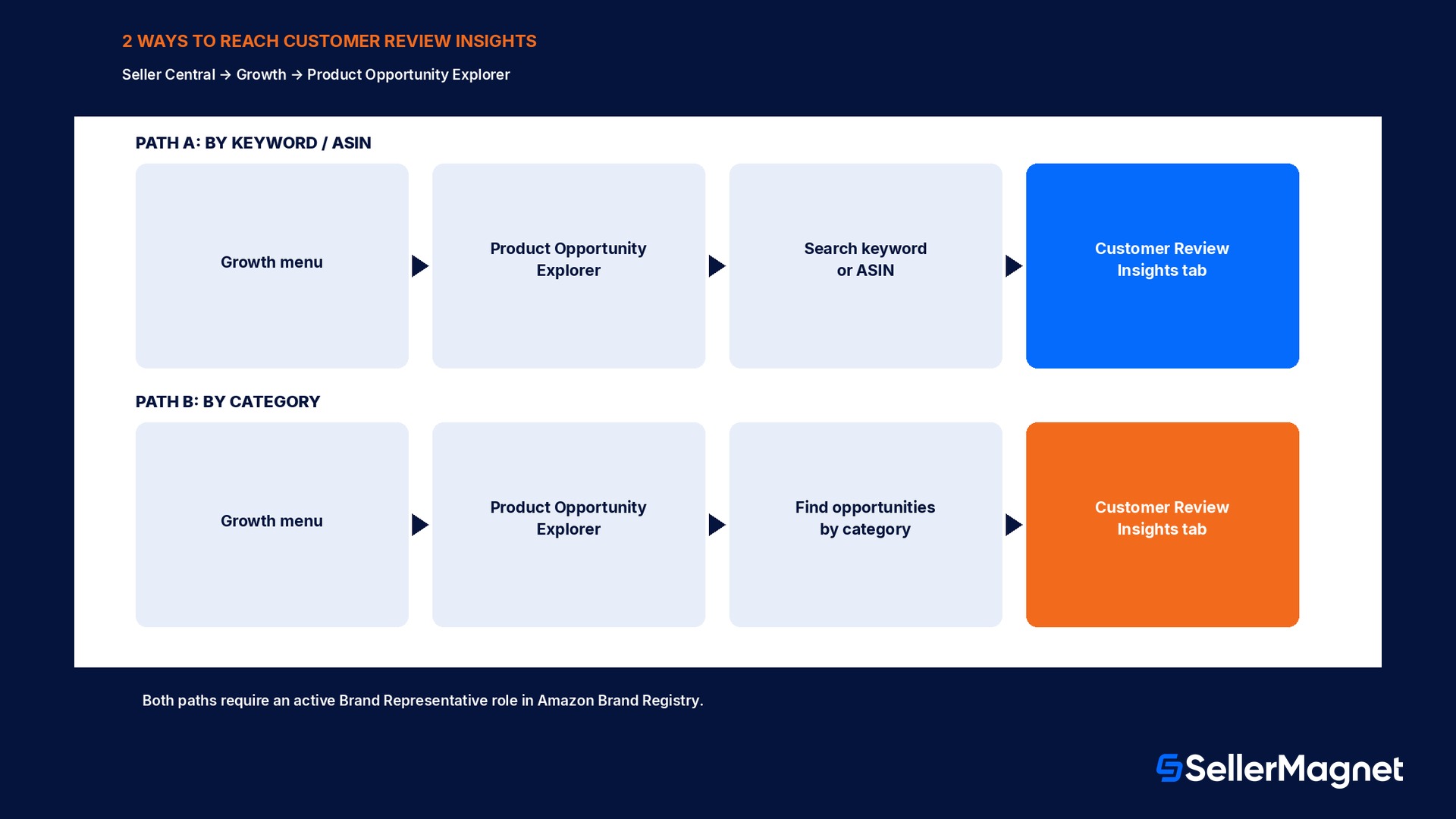
Customer Review Insights is not a standalone item in the Seller Central left-hand menu; it is a tab inside Product Opportunity Explorer, which itself lives under the Growth section of the main Seller Central menu. Amazon's documentation describes two ways to reach the Customer Review Insights tab once inside Product Opportunity Explorer: searching a specific keyword or Amazon Standard Identification Number (ASIN) and then selecting the Customer Review Insights tab for the product or niche that search returns, or using the Find opportunities by category dropdown to browse to a category, clicking into any niche, and then selecting the same tab. Both paths land on the same two-view layout, one for positive themes and one for negative themes, for whichever product or niche was selected. The access requirement that trips up most sellers looking for this tool is one level up from Customer Review Insights itself: Product Opportunity Explorer is part of Amazon's growth and brand tooling, and reaching it requires an active Brand Representative role assigned to a brand in Amazon Brand Registry, the same account-level requirement that gates other Growth-menu tools such as Subscribe & Save enrollment and New Seller Incentives brand benefits. A seller account with no brand enrolled in Brand Registry, or a seller who only has a non-brand-representative role on the account, does not see Product Opportunity Explorer in the Growth menu at all, and therefore cannot reach Customer Review Insights either, regardless of how many reviews the seller's own products have.
Access path
Steps
By keyword or ASIN
Seller Central -> Growth -> Product Opportunity Explorer -> search a keyword or ASIN -> select the Customer Review Insights tab
By category browse
Seller Central -> Growth -> Product Opportunity Explorer -> Find opportunities by category -> pick a niche -> select the Customer Review Insights tab
Prerequisite for both paths
An active Brand Representative role assigned to a brand in Amazon Brand Registry; without it, Product Opportunity Explorer does not appear in the Growth menu
What do the positive and negative views actually show?
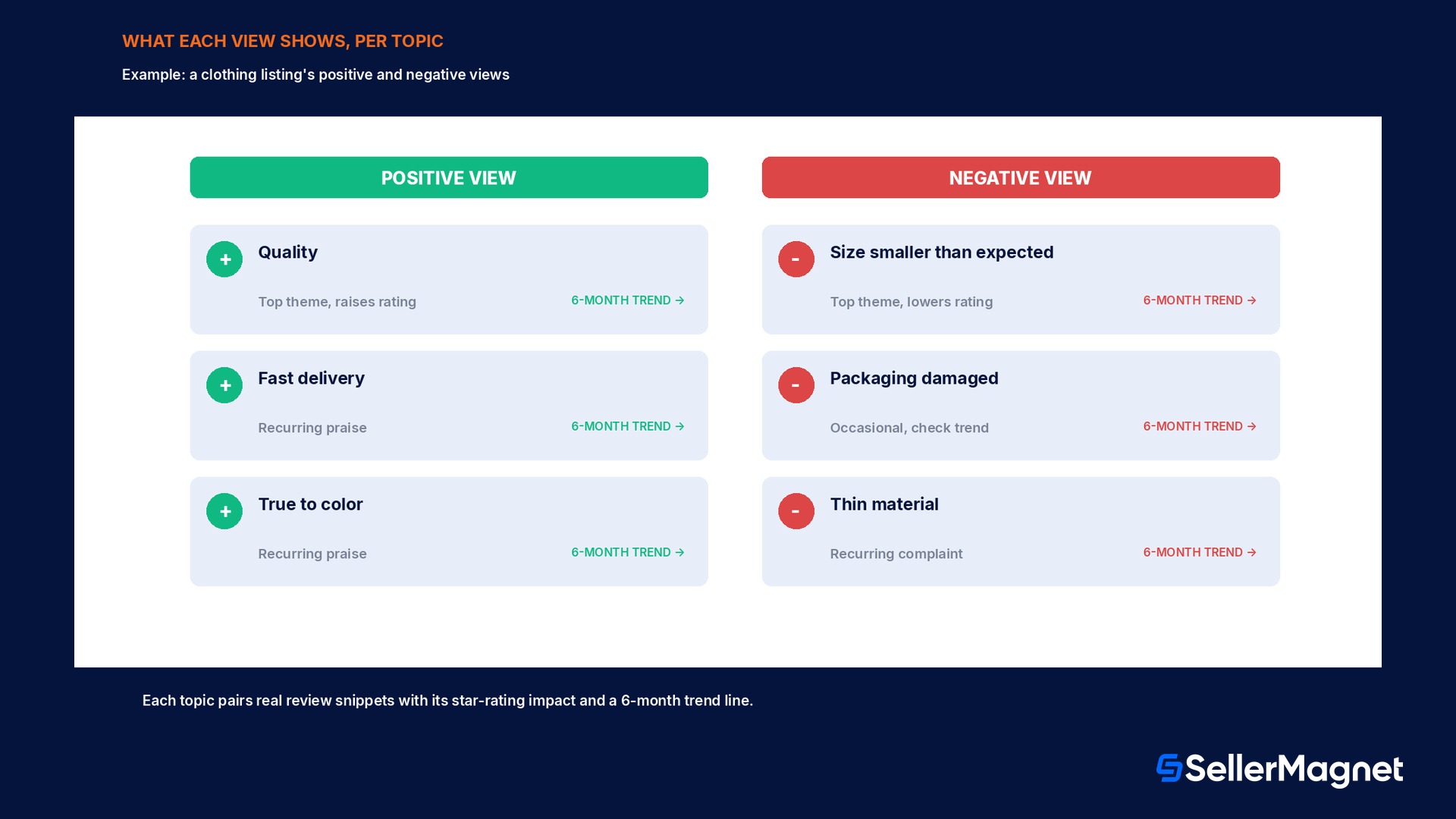
Once a product or niche is selected, Customer Review Insights presents two separate views rather than one combined score: a positive view and a negative view. Each view lists the most common topics customers raise in that direction, a handful of real review snippets illustrating each topic, a measure of how much that specific topic moves the star rating up or down, and a trend line of how often that topic has come up over the past 6 months. Amazon's own worked example in its seller blog illustrates how the two views are meant to be read together rather than separately: for a clothing seller, size smaller than expected might surface as a recurring negative topic, while the positive view for the same product might show quality as the most common theme customers praise, so a seller is not just told the product has problems, but specifically which attribute is costing rating points and which attribute is already working and worth protecting in any redesign. The 6-month trend per topic is the piece most sellers skip past on a first look, and it is the one that separates a real product defect from a temporary spike: a negative topic that jumps sharply in one month and falls back the next points toward an external cause in that window, commonly a fulfillment delay or a manufacturing batch issue, while a negative topic that stays elevated across the full 6-month window points toward something structural in the product itself that a one-time fix will not solve.
Reviews are not re-weighted into a simple average here
Amazon's own description notes that its overall star rating already uses machine-learned models rather than a simple average, considering factors such as how recent a review is and the reviewer's verified purchase status. Customer Review Insights is a separate, topic-level breakdown of the same underlying review text, built to explain which recurring themes are driving that rating rather than to recompute the rating itself.
How much manual reading time does this actually replace?
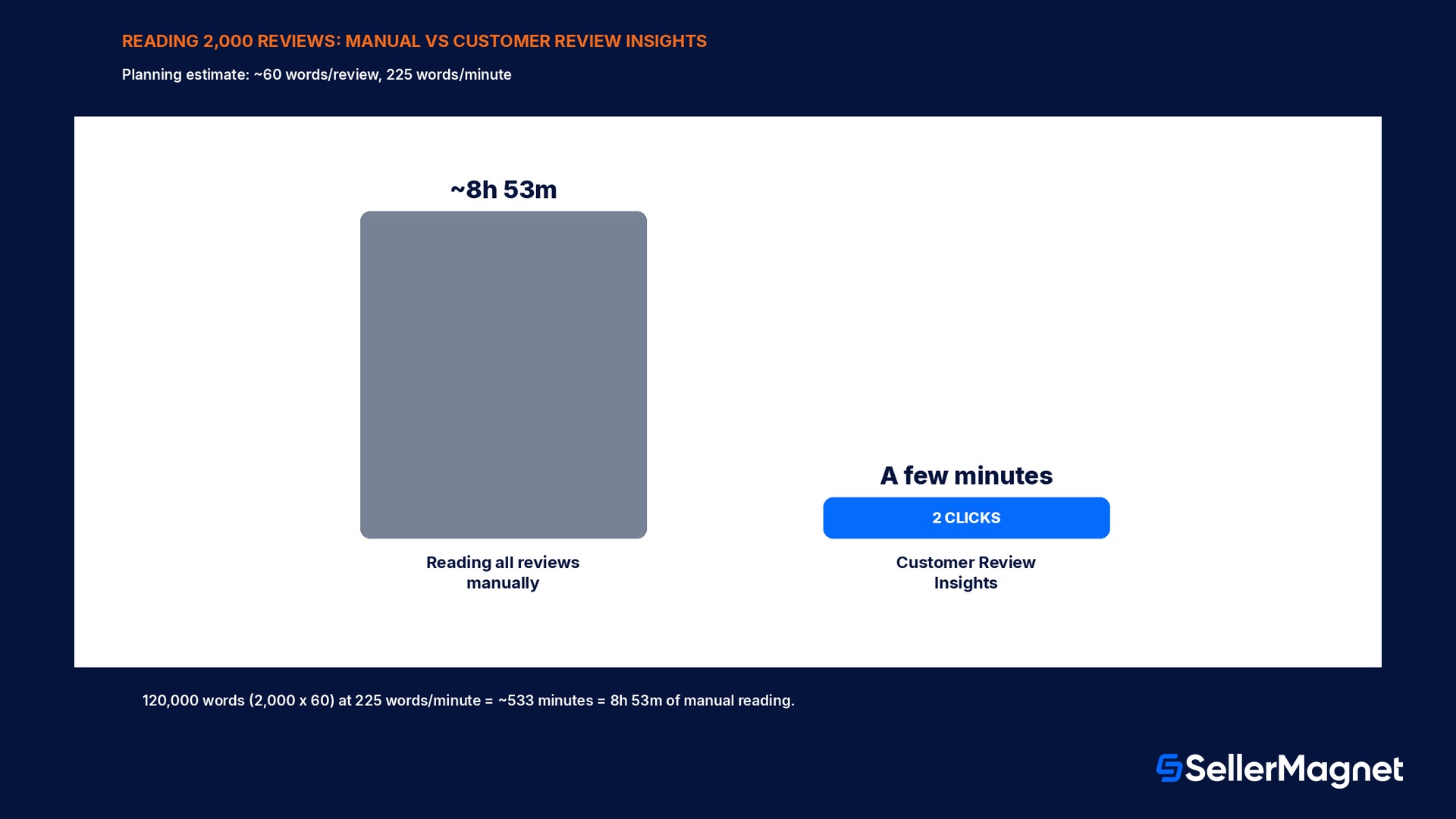
Amazon does not publish a figure for how much time Customer Review Insights saves, so the estimate below is a transparent planning calculation, not an Amazon-stated number, built from two widely used, generic assumptions: a typical written customer review runs to about 60 words, and an adult reads at roughly 225 words per minute when reading for comprehension rather than skimming. Take a niche or product with 2,000 written reviews, a realistic count for an established listing in a competitive category after a year or more on sale. Reading all 2,000 reviews in full, word for word, at 60 words each is 2,000 multiplied by 60, or 120,000 words. At 225 words per minute, that is 120,000 divided by 225, or about 533 minutes, which is 533 divided by 60, just under 8 hours and 53 minutes of continuous reading, before a seller has even started grouping what was read into themes by hand. Customer Review Insights replaces that reading-and-grouping step with two clicks inside an already-open Seller Central tab: search or browse to the product or niche, then open the Customer Review Insights tab, after which the positive and negative topic lists, snippets, and trend lines are already built. The time saved scales directly with review count: a niche with 10,000 written reviews, five times the figure above, would take an estimated 44 hours of manual reading at the same assumptions, which is the real reason Amazon frames this as a tool for understanding feedback at a glance rather than a tool that merely makes reading reviews a little faster.
Reading all reviews manually
Customer Review Insights
Reviews covered
2,000 written reviews
Same 2,000 reviews, aggregated
Words to read (at ~60 words/review)
120,000 words
0 (already aggregated into topics)
Time at 225 words/minute
~8 hours 53 minutes
Minutes, 2 clicks inside Seller Central
The 60-word and 225-wpm figures are planning assumptions, not Amazon data
Amazon has not published an average review length or a recommended reading speed; both numbers above are standard, generic planning estimates used only to make the time comparison concrete. A seller with longer or shorter reviews, or a different personal reading speed, should rerun the same multiplication with real numbers for their own niche: review count multiplied by average word count, divided by a realistic reading speed.
How Customer Review Insights differs from Amazon's other review features
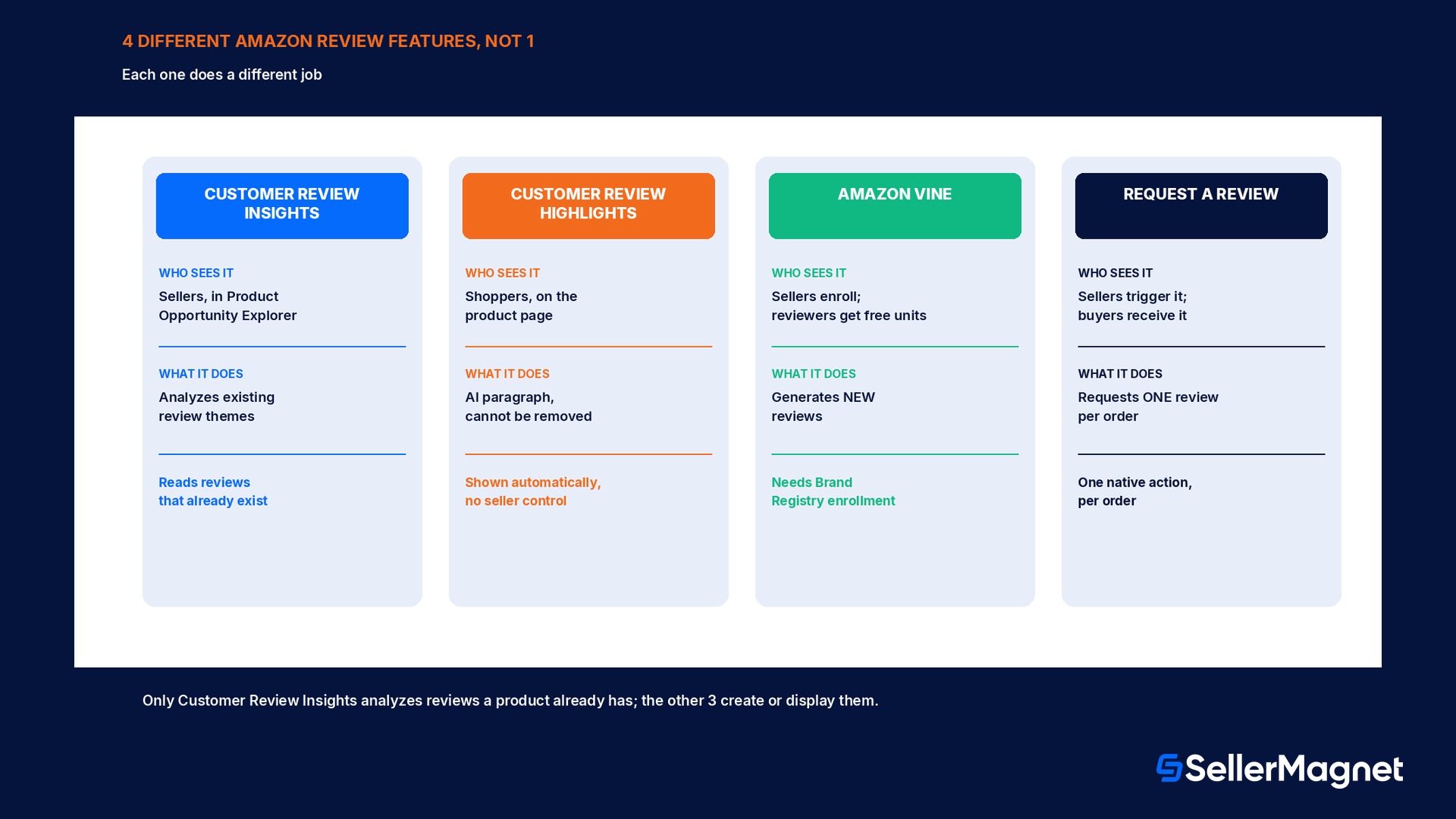
Amazon runs several review-related features under similar-sounding names, and conflating them leads to a seller looking for the wrong tool entirely. Customer Review Highlights, confirmed through Amazon's own feature FAQ, is a completely different, buyer-facing feature: an AI-powered short paragraph and set of product insights that Amazon displays directly on the product detail page, highlighting customer sentiment frequently mentioned across written reviews, for shoppers deciding whether to buy, not for sellers deciding what to fix. A seller cannot remove, edit, or opt out of Customer Review Highlights on their own listing; Amazon's FAQ states plainly that the feature cannot be removed or disabled, since it is built to give shoppers a consistent experience across the catalog. Amazon Vine is a third, unrelated feature: a program available to brands enrolled in Brand Registry that generates new reviews by giving free units to Amazon-trusted reviewers, in other words a tool for creating reviews rather than analyzing ones that already exist. Request a Review, the action automated by tools such as SellerMagnet's Review Requester, is a fourth distinct piece: a single native Amazon action that asks a specific buyer, after their order, to leave a review and a seller feedback rating, again a review-generation step rather than a review-analysis step. Customer Review Insights sits apart from all three: it neither generates reviews (Vine, Request a Review) nor displays anything to a shopper (Customer Review Highlights); it only reads the reviews a product already has and reports the recurring themes back to the seller.
Feature
Who sees it
What it actually does
Customer Review Insights
Sellers, inside Product Opportunity Explorer
Aggregates existing review themes, positive and negative, with star-rating impact and a 6-month trend
Customer Review Highlights
Shoppers, on the product detail page
An AI-written paragraph summarizing sentiment, cannot be removed or edited by the seller
Amazon Vine
Sellers (enrollment); reviewers receive free units
Generates new reviews from Amazon-trusted reviewers; does not analyze existing reviews
Request a Review
Sellers trigger it; buyers receive the request
A single native action asking one buyer to leave a review and seller feedback after their order
How to actually use the two views
The practical workflow Amazon's own guidance describes starts from reading the negative and positive views together, not in isolation. On the negative side, the first useful question for any topic is whether it is fixable in the product itself (a sizing chart, a packaging material, an included-parts list) or fixable only in the listing's expectations (a product description that overstates a feature, which a shopper then marks down for not matching reality even though the product itself is unchanged); Amazon's own clothing example, a recurring size smaller than expected theme, is explicitly framed as fixable either way, by adjusting the product description to set better expectations or by tailoring the product to fit more accurately, and a seller should decide which fix actually matches the topic before changing anything. On the positive side, the main use is protective rather than corrective: if quality is the leading positive topic, that is the attribute a seller should avoid touching in a cost-reduction pass on packaging or materials, since the theme's star-rating contribution shows exactly what is currently working. The 6-month trend line is the gate before reacting to any single topic: a sudden one-month spike in a negative topic calls for checking that month's fulfillment or inbound shipment records before assuming a design flaw, while a topic that holds steady or worsens across the full 6 months calls for an actual product or listing change. Comparing a product's own Customer Review Insights to a top-performing competitor's page in the same niche extends the same two views into a benchmarking exercise: Amazon frames exactly this use, benchmark listings against best-in-class products, as one of the tool's intended outcomes, since a seller can open a best-in-class competitor's niche view and compare which positive topics it has that a seller's own product view does not.
Mistakes that waste the tool, or the time it saves
Confusing it with Customer Review Highlights. Customer Review Insights is seller-facing and lives in Product Opportunity Explorer; Customer Review Highlights is the separate, buyer-facing AI paragraph on the product page that a seller cannot remove.
Assuming any seller account can open it. Product Opportunity Explorer, and therefore the Customer Review Insights tab inside it, requires an active Brand Representative role in Amazon Brand Registry; it does not appear in the Growth menu without one.
Reacting to a single-month spike as if it were permanent. Check the 6-month trend line first; a topic that spikes once and falls back usually traces to a fulfillment or inbound-shipment event in that window, not a product defect.
Treating it as a way to get more reviews. It only analyzes reviews that already exist; Amazon Vine and Request a Review are the features that generate or request new ones.
Reading only the negative view. The positive view's top topic is the attribute most worth protecting in any cost or design change, and skipping it risks removing exactly what is driving the current rating up.
Never benchmarking against a best-in-class competitor niche. Amazon explicitly frames this as an intended use; comparing views side by side surfaces positive topics a seller's own product view is missing entirely.
Making a fix and never checking back. The topic's 6-month trend only shows whether a change worked if a seller returns to the same tab a few months later and reads the updated trend line for that topic.
Where SellerMagnet fits around Customer Review Insights
Amazon builds, aggregates, and hosts Customer Review Insights itself; no third-party tool, including SellerMagnet, can add topics to it or influence what it surfaces, since it is reading Amazon's own review database directly. What SellerMagnet's tools do is sit on either side of the two decisions that come out of reading it. Before acting on a negative topic, Competitor Tracker follows a chosen best-in-class ASIN in the same niche, including its rating and negative-review patterns, which is the practical way to run the benchmarking comparison this guide describes without manually reopening Product Opportunity Explorer for every competitor. Once a theme points to a real listing or content fix rather than a product change, Listing Optimizer is where that description, image set, or bullet-point change actually gets made and checked against Amazon's listing rules before publishing.
After a genuine product or listing fix has had time to show up in new reviews, Review Requester automates Amazon's own Request a Review action on the resulting orders, the same native action described in the comparison table above, so the next batch of reviews that will eventually refresh the Customer Review Insights topic list arrives faster than waiting on unprompted reviews alone. Profit Analytics tracks the sales and rating trend over the following months on the same timeline as the tool's own 6-month window, which is the most direct way to confirm that a negative topic's falling trend line is coinciding with a real change in sales, not just a smaller sample of reviews.
Checklist for a first Customer Review Insights session
How to run a first Customer Review Insights review
Confirm Brand Registry access first - An active Brand Representative role in Amazon Brand Registry is required before Product Opportunity Explorer, and Customer Review Insights inside it, will appear in the Growth menu at all.
Open the tool by ASIN or by category - Seller Central -> Growth -> Product Opportunity Explorer, then either search the specific ASIN or browse by category and niche, then select the Customer Review Insights tab.
Read the negative view and sort each topic by the 6-month trend - Separate topics that spiked once (check that month's fulfillment records) from topics that have stayed elevated across the full window (a real product or listing issue).
Read the positive view before changing anything - Identify the leading positive topic and treat it as a constraint on any cost-reduction or redesign change, not just a nice-to-have fact.
Benchmark against a best-in-class competitor in the same niche - Open the same tool for a top-performing competitor's niche and compare which positive topics appear there but not on the seller's own product.
Turn exactly one topic into one fix - Pick the highest-impact negative topic, decide whether it needs a product change or a listing-description change, make that one change, and note the date to re-check the trend line later.
Is Customer Review Insights the same as Customer Review Highlights?
No. Customer Review Insights is a seller-facing tool inside Product Opportunity Explorer that aggregates review themes for sellers. Customer Review Highlights is a separate, buyer-facing AI-written paragraph Amazon displays on the product detail page, which a seller cannot remove or edit.
Who can access Customer Review Insights?
A seller needs an active Brand Representative role assigned to a brand in Amazon Brand Registry. Without it, Product Opportunity Explorer, and the Customer Review Insights tab inside it, does not appear in the Seller Central Growth menu.
Does Customer Review Insights generate new reviews?
No. It only analyzes reviews a product already has. Amazon Vine and Request a Review are the separate features that generate or request new reviews.
How do I find Customer Review Insights in Seller Central?
Go to Growth -> Product Opportunity Explorer, then either search a keyword or ASIN or use Find opportunities by category, and select the Customer Review Insights tab for the product or niche shown.
What do the positive and negative views actually show?
Each view lists the most common recurring topics in that direction, example review snippets for each topic, how much that topic moves the star rating, and a trend line of how often the topic has come up over the past 6 months.
Can Customer Review Insights tell me if a negative review spike was a one-time event?
The 6-month trend line is built for exactly this: a topic that spikes in one month and falls back usually points to an external cause in that window, such as a fulfillment delay, rather than a persistent product defect.
Can I compare my product's reviews against a competitor's?
Yes. Amazon describes benchmarking listings against best-in-class products as an intended use: open the same tool for a top-performing competitor's niche and compare the positive and negative topics side by side.
Stop Juggling Tools. SellerMagnet Combines Everything You Need.