Amazon Sponsored Prompts: A Seller's Guide to the New Ads
R
RenéFreelance Amazon Editor
|
14 min read
Two Amazon Advertising products most sellers have never opened a report for went from a free beta to a billable, automatically-on feature this year: Sponsored Products prompts and Sponsored Brands prompts. They are not the free Alexa for Shopping assistant that answers a shopper's question from your detail page, and they are not a new campaign type you build from scratch. They are a layer that Amazon switches on inside the Sponsored Products and Sponsored Brands campaigns a seller already runs, and since March 25, 2026 a click on one is charged the same way a click on any other ad in that campaign is charged. This guide covers exactly what prompts are, who is eligible, where to find them in the Ads Console, what changed at general availability, a worked example of what a prompt can cost and return inside an existing daily budget, and the dedicated Prompts report most advertisers do not yet know exists.
Sponsored Products prompts and Sponsored Brands prompts are an AI-powered enhancement that Amazon automatically adds to existing Sponsored Products and Sponsored Brands campaigns. A shopper who clicks one either opens a dialog in Rufus or gets an answer directly on the page, built from the advertiser's detail pages, Brand Store, and campaign data. They launched in open beta in November 2025 and became generally available, and billable under normal CPC pricing, in the United States on March 25, 2026. No setup is needed; a seller reviews and pauses prompts from the Prompts tab inside an existing campaign.
What Sponsored Products prompts and Sponsored Brands prompts actually are
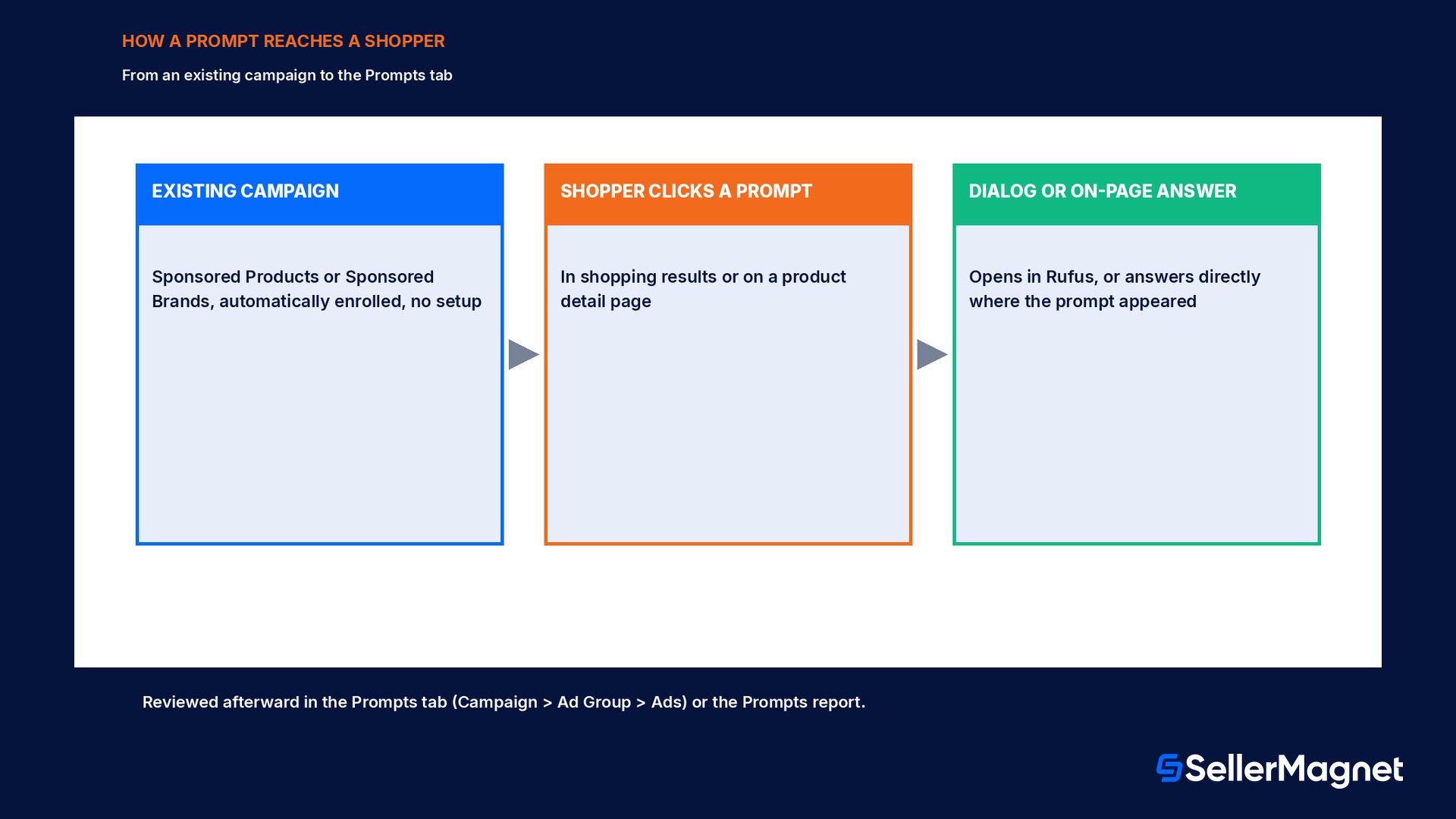
Amazon describes prompts as an AI-powered enhancement to a seller's existing Sponsored Products and Sponsored Brands campaigns that automatically engages shoppers with relevant product information. They can appear in shopping results and on product detail pages. When a shopper clicks one, it may open a dialog inside Rufus (Amazon's shopping assistant, since folded into Alexa for Shopping), or it may answer the shopper directly on the page where the prompt appeared. Amazon's own framing calls this a 24/7 virtual product expert: the prompt draws on first-party signals Amazon already has about the product, specifically the detail page, the Brand Store, and the campaign's own data, to surface the advertiser's product expertise at the moment a shopper is deciding.
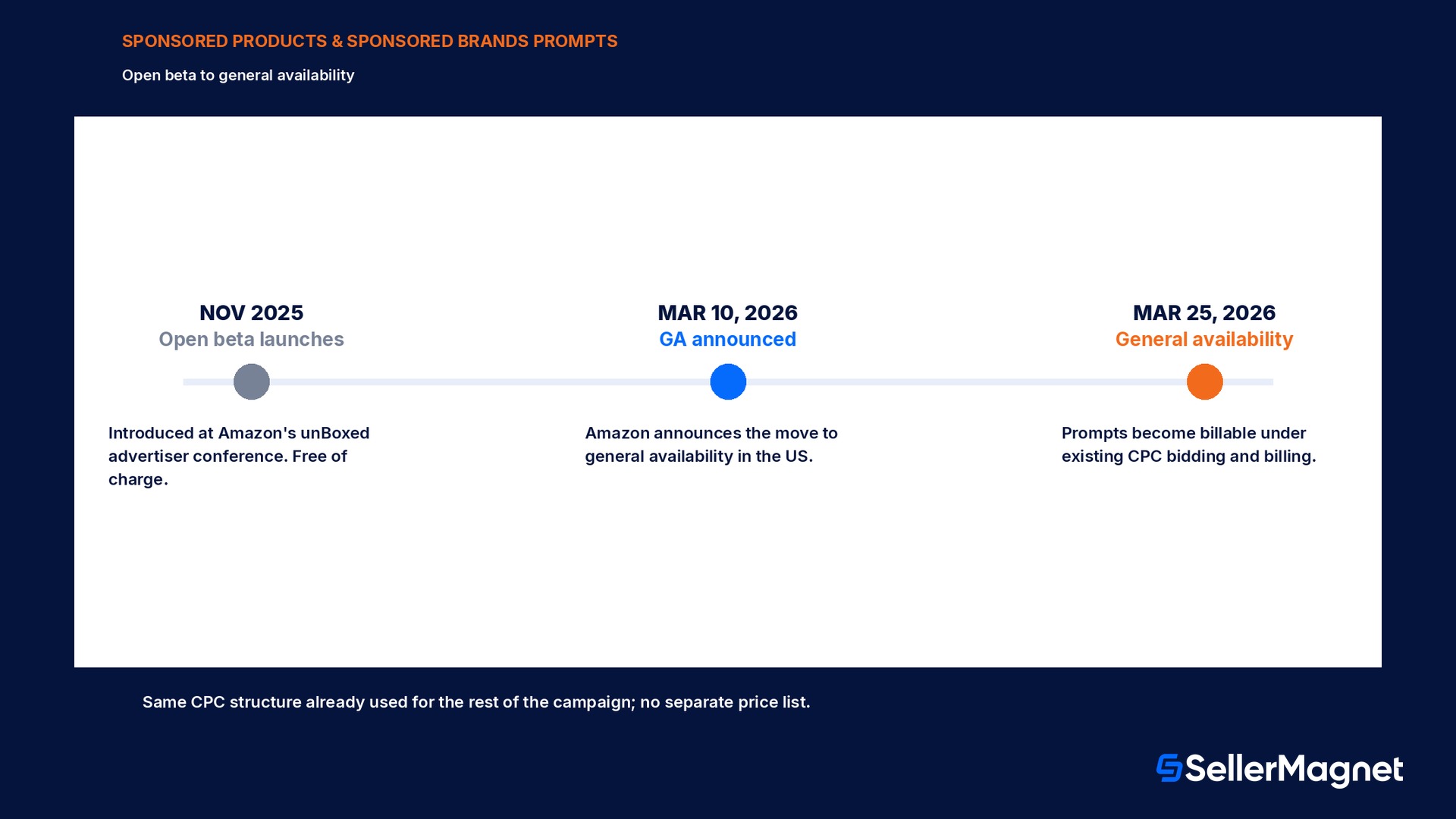
The feature started in open beta in November 2025, introduced at Amazon's unBoxed advertiser conference, and ran free of charge through that beta period. On March 10, 2026 Amazon announced that prompts would move from open beta to general availability in the United States on March 25, 2026, and that general availability would also start the billing: a click on a prompt charges the advertiser under the same cost-per-click bidding and billing parameters already governing the underlying campaign.
This is not the free Alexa for Shopping assistant
Alexa for Shopping answers a shopper's question from your detail page for free; no budget or campaign is involved. A Sponsored Products or Sponsored Brands prompt is an advertising placement that can open a dialog in the same assistant, but it rides on a campaign you already pay for and already target. Confusing the two leads sellers to either expect a bill for something free, or assume a prompt needs a budget decision it does not.
Who is eligible, and where does it run?
Prompts are available to advertisers in the United States running Sponsored Products or Sponsored Brands campaigns, which includes both sellers and vendors; the one named exclusion is authors and publishers. Amazon has not announced a timeline for expanding prompts beyond the US, so a seller running campaigns in other marketplaces should not expect to see a Prompts tab there yet, and should check back on this feature rather than assume it rolled out everywhere Sponsored Products already runs.
Question
Answer
Where
the United States only (North America)
Who
Sellers and vendors running Sponsored Products or Sponsored Brands campaigns
Excluded
Authors and publishers
Setup required
None; existing eligible campaigns are automatically enrolled
Access
Ads Console and the Amazon Ads API
Zero setup: automatic enrollment and where to actually look
There is no prompts campaign type to build and no toggle to switch on. Eligible Sponsored Products and Sponsored Brands campaigns are automatically enrolled and use the campaign's existing targeting; the only action available to an advertiser is reviewing what is already running and, if wanted, pausing it. That makes the normal failure mode not a missed setup step, it is simply never opening the tab where this shows up, since nothing about a campaign's main dashboard changes to flag that prompts are active on it.
Find and review the prompts already running on your campaigns
Open an existing Sponsored Products or Sponsored Brands campaign - In the Ads Console, go to Campaign, then Ad Group, then Ads.
Open the Prompts tab - Every prompt that has received at least one click is listed there, each with its exact prompt text and the ad it belongs to.
Read the performance columns - Impressions, clicks, and orders are shown per prompt directly in this tab.
Pause if needed - A prompt can be paused at any time from the same tab without touching the rest of the campaign's targeting or budget.
An unclicked prompt will not show up in the tab
The Prompts tab only lists prompts that have received at least one click, so a brand-new or very low-traffic campaign can show an empty tab even though prompts are active on it. Absence from the tab is not proof prompts are off; the Prompts report (below) can still show impression-level activity.
What changed at general availability?
The single most consequential change at general availability is financial, not functional. During the open beta that started in November 2025, a click on a Sponsored Products or Sponsored Brands prompt cost the advertiser nothing. From March 25, 2026, that same click is billed under the campaign's existing cost-per-click bidding and billing parameters, the identical structure already used for every other click in that Sponsored Products or Sponsored Brands campaign. Amazon has not published a separate price list for prompt clicks; the cost of a given click depends on the same auction dynamics, bid, and placement modifiers that already apply to the rest of the campaign.
Practically, this means a campaign that was running prompts for free throughout the beta period saw its effective spend rise on March 25, 2026 without the advertiser changing a single setting, simply because a previously free source of clicks and orders became a paid one. A seller who tracked campaign-level ACOS across that date without separating out prompt clicks would see a shift and could easily misattribute it to a bidding or targeting change instead of the billing change that actually happened.
Worked example: what a prompt costs and returns inside an existing budget
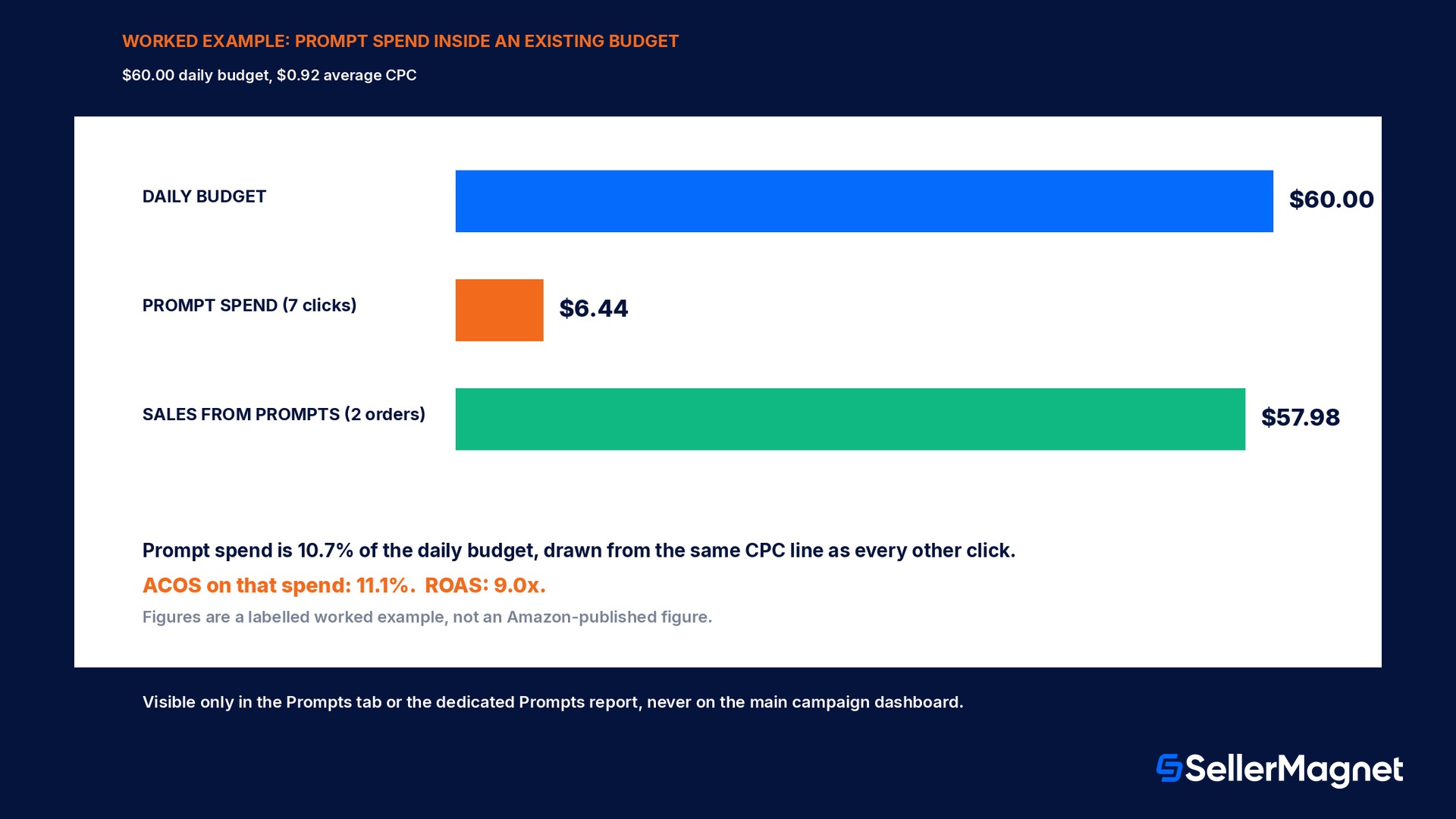
Here is a labelled, illustrative example, not an Amazon-published figure, to show the mechanism. A campaign already runs on a $60.00 daily budget at an average cost-per-click of $0.92. On a given day its enrolled prompts receive 7 clicks, all billed at that same average CPC, and those clicks lead to 2 orders at $28.99 each. None of this required a separate line item; the prompt clicks simply drew from the same $60.00 budget as every other click that day.
Metric
Value
Note
Prompt clicks that day
7
billed at the campaign's average CPC
Spend from prompts
$6.44
10.7% of the $60.00 daily budget
Orders from prompts
2
at $28.99 each
Sales from prompts
$57.98
= orders x sale price
ACOS on prompt spend
11.1%
spend / sales
ROAS on prompt spend
9.0x
sales / spend
In this illustration, prompt spend used 10.7% of the day's budget and returned a 9.0x ROAS, well inside most sellers' target range, without a single bid or budget change. The number worth watching is not the dollar amount, which will vary campaign to campaign, it is the share of total spend prompts are quietly drawing and the ACOS that spend produces on its own; both are invisible unless the Prompts tab or the Prompts report is actually opened.
The Prompts report: more than the tab shows
Beyond the per-campaign Prompts tab, Amazon Ads offers a dedicated Prompts report with a wider set of metrics at the individual prompt level. Build it from Reports, Create report, with the report category set to Sponsored Products and the report type set to Prompts, then choose a time unit and report period and run it.
Field in the Prompts report
What it tells you
Prompt text
The exact wording shown to the shopper
Associated ad
Which ad in the campaign the prompt belongs to
Impressions, clicks, CTR
Reach and engagement for that specific prompt
Cost per click, spend
What that prompt actually cost over the report period
Sales, ACOS, ROAS
Revenue efficiency for that prompt alone, not the whole campaign
7-day orders and units
Attribution window matching Amazon's standard Sponsored Products reporting
Running this report per campaign, rather than relying only on the Prompts tab's impressions/clicks/orders view, is what actually lets a seller judge a specific prompt's ACOS or ROAS against the rest of the campaign, since the tab itself does not show cost or revenue columns.
Should you pause a prompt?
A prompt with clicks but no orders over a reasonable sample is spending the same CPC as the rest of the campaign for a worse return; pause it from the Prompts tab and keep the campaign's other targeting intact.
A prompt with a strong ROAS in the Prompts report is a case for leaving automatic enrollment alone rather than looking for a way to scale it further; there is no separate bid to raise, since it already shares the campaign's existing bid.
An empty Prompts tab on a low-traffic campaign is not a problem to fix; it simply means no prompt has been clicked yet, and the Prompts report may still show impression-level activity below the tab's click floor.
Pausing is reversible and does not touch the underlying Sponsored Products or Sponsored Brands campaign's budget, bid, or targeting; it only turns prompts off for that one campaign.
How does this fit with the rest of an Amazon ads account?
Prompts are not a fourth ad type sitting alongside Sponsored Products, Sponsored Brands, and display ads; they are a layer on top of the Sponsored Products and Sponsored Brands campaigns a seller already decided to run, for the reasons that led to running those campaigns in the first place. The free Alexa for Shopping assistant answering a shopper's product question from the detail page is a separate, unpaid surface; prompts are the paid advertising placement that can appear inside that same conversational experience. Treating the two as one feature, or assuming either one requires a new campaign strategy, is the most common confusion sellers run into when this topic comes up.
Do I write the prompt text myself?
No, and that is a deliberate difference from writing ad copy for the rest of a Sponsored Products or Sponsored Brands campaign. Amazon's own description of the feature says prompts leverage first-party signals from the detail page, the Brand Store, and the campaign's own data to generate the prompt text and its answer; there is no prompt-text editor in the campaign builder the way there is a headline field for Sponsored Brands. The lever an advertiser actually controls is the quality of those three sources: a thin detail page, an empty Brand Store, or a campaign with sparse targeting data gives the system less to generate a useful prompt from, the same way a thin listing gives the free Alexa for Shopping assistant less to answer a shopper's question from. Reviewing the exact prompt text shown in the Prompts tab is therefore less an editing task and more a diagnostic one: a prompt whose wording reads as generic or slightly off-target is a signal to improve the underlying detail page or Brand Store content, not a copy to rewrite directly.
This also means a brand with a sparsely filled-out Brand Store, or a seller account with no Brand Store at all (since Sponsored Products does not require Brand Registry the way Sponsored Brands does), is working from a smaller first-party data pool than a fully built-out brand presence. The practical fix is the same catalog and brand-content hygiene that already helps conversion and the free assistant experience; prompts simply add one more consumer of that same underlying data.
Common mistakes with Sponsored Products and Sponsored Brands prompts
Not realizing prompts are already running: because enrollment is automatic, a seller who never opens the Prompts tab can be paying for prompt clicks for months without knowing it.
Reading a post-March 25, 2026 ACOS jump as a targeting or bid problem, when it is the switch from a free beta to billed clicks on the same prompts that were already there.
Looking for a prompts budget or bid field to set; there is none, prompts bill under the campaign's existing CPC parameters, so the lever is the campaign's own bid and budget, not a prompts-specific one.
Confusing the free Alexa for Shopping assistant with the paid Sponsored Products and Sponsored Brands prompts feature; only the second one shows up on an ad invoice.
Checking only the Prompts tab and missing the dedicated Prompts report, which is the only place ACOS, ROAS, spend, and sales appear at the individual prompt level.
Checklist: get prompts under control inside your existing campaigns
Open every active Sponsored Products and Sponsored Brands campaign's Prompts tab at least once to see what is already enrolled and whether anything has clicks.
Pull the dedicated Prompts report (Reports, Create report, category Sponsored Products, type Prompts) for a recent period and read ACOS and ROAS per prompt, not just per campaign.
If a campaign's ACOS moved around March 25, 2026, check prompt spend specifically before changing bids or targeting elsewhere in the campaign.
Pause any prompt with clicks but no orders over a fair sample; leave high-ROAS prompts alone.
Remember there is no separate prompts budget or bid to set; any change you make is still at the campaign or ad group level.
How does SellerMagnet fit into the decision?
Prompt spend is invisible in a normal campaign-level view because it is folded into the same CPC line as every other click, so the only way to see it is to go looking, per campaign, in the Prompts tab or the Prompts report. SellerMagnet's PPC Manager gives you one place to review campaign performance without hunting through the Ads Console tab by tab, and the AI Optimizer flags wasted spend and automates bidding so a quiet drain like an underperforming prompt does not sit unnoticed inside a campaign's average numbers. The Analytics Dashboard shows the real margin behind every order, prompt-driven or not, so a change in ad efficiency around a date like March 25, 2026 shows up as a number, not a guess.
Do I need to set up a campaign for Sponsored Products prompts or Sponsored Brands prompts?
No. Existing Sponsored Products and Sponsored Brands campaigns are automatically enrolled, using the campaign's existing targeting; there is no separate prompts campaign type to create.
Are Sponsored Products prompts and Sponsored Brands prompts free?
They were free during the open beta that started in November 2025. Since general availability on March 25, 2026, a click on a prompt is billed under the campaign's existing cost-per-click bidding and billing parameters.
Where do I find the prompts running on my campaigns?
Inside the campaign, go to Campaign, then Ad Group, then Ads, then the Prompts tab. It lists every prompt that has received at least one click, with its text, associated ad, and impressions, clicks, and orders.
Can I pause a prompt without affecting the rest of my campaign?
Yes. A prompt can be paused at any time from the Prompts tab in the Ads Console, and pausing it does not change the campaign's budget, bid, or targeting.
Where do I see cost and revenue metrics for a specific prompt?
The Prompts tab shows impressions, clicks, and orders only. For CPC, spend, sales, ACOS, ROAS, and 7-day orders and units per prompt, run the dedicated Prompts report from Reports, Create report, category Sponsored Products, report type Prompts.
Is this the same thing as the free Alexa for Shopping assistant?
No. Alexa for Shopping is a free assistant that answers a shopper's product question from the detail page. Sponsored Products and Sponsored Brands prompts are a separate, paid advertising feature riding on campaigns you already manage, which can open a dialog inside the same assistant.
Who is eligible to run Sponsored Products prompts or Sponsored Brands prompts?
US advertisers, sellers and vendors alike, running Sponsored Products or Sponsored Brands campaigns, with one named exclusion: authors and publishers.
Will prompts expand outside the United States?
Amazon's general availability announcement covers the United States only, and no timeline for other marketplaces has been published; sellers advertising elsewhere should not assume the Prompts tab is live there yet.
Stop Juggling Tools. SellerMagnet Combines Everything You Need.