Amazon Seller Assistant Workflows 2026: What Changed
R
RenéFreelance Amazon Editor
|
15 min read
A seller who logs into Seller Central every morning to check yesterday's return rate, glance at the Buy Box, and nudge a bid up or down is doing the same three checks hundreds of other sellers also do by hand, every single day. At Amazon Accelerate 2026, Amazon announced that Seller Assistant, the AI tool built into Seller Central, now does that watching for you around the clock, not just when you ask it a question. The update has three parts: Seller Assistant now carries persistent memory of a seller's own pricing patterns, inventory cycles and growth goals across sessions; it can run custom workflows that continuously monitor conditions and act on them, even while the seller is logged out; and a new Selling Partner plugin pipes the same live Seller Central data into Amazon Quick and, in beta, into Anthropic's Claude, so a seller can ask about their business from tools they already use outside Seller Central. This guide works through what a Seller Assistant workflow actually is and how it differs from the assistant Amazon first launched in 2023, a worked example of what a week of logged actions from one workflow looks like, the guardrails that keep a seller in control, the new plugin and where it fits, and the mistakes that are easy to make when handing a recurring task to an always-on automation for the first time.
Seller Assistant workflows, announced at Amazon Accelerate 2026, are custom automations inside Seller Central that run continuously, even when the seller is logged out, monitoring a condition the seller describes in plain language, such as a review score dropping or inventory running low, and then either recommending an action or carrying it out automatically within guardrails the seller sets. Every action a workflow takes, or recommends, is logged in a complete audit trail, and sellers choose per workflow whether it only surfaces suggestions or acts on their behalf.
Why does Seller Assistant now run continuously instead of answering only?
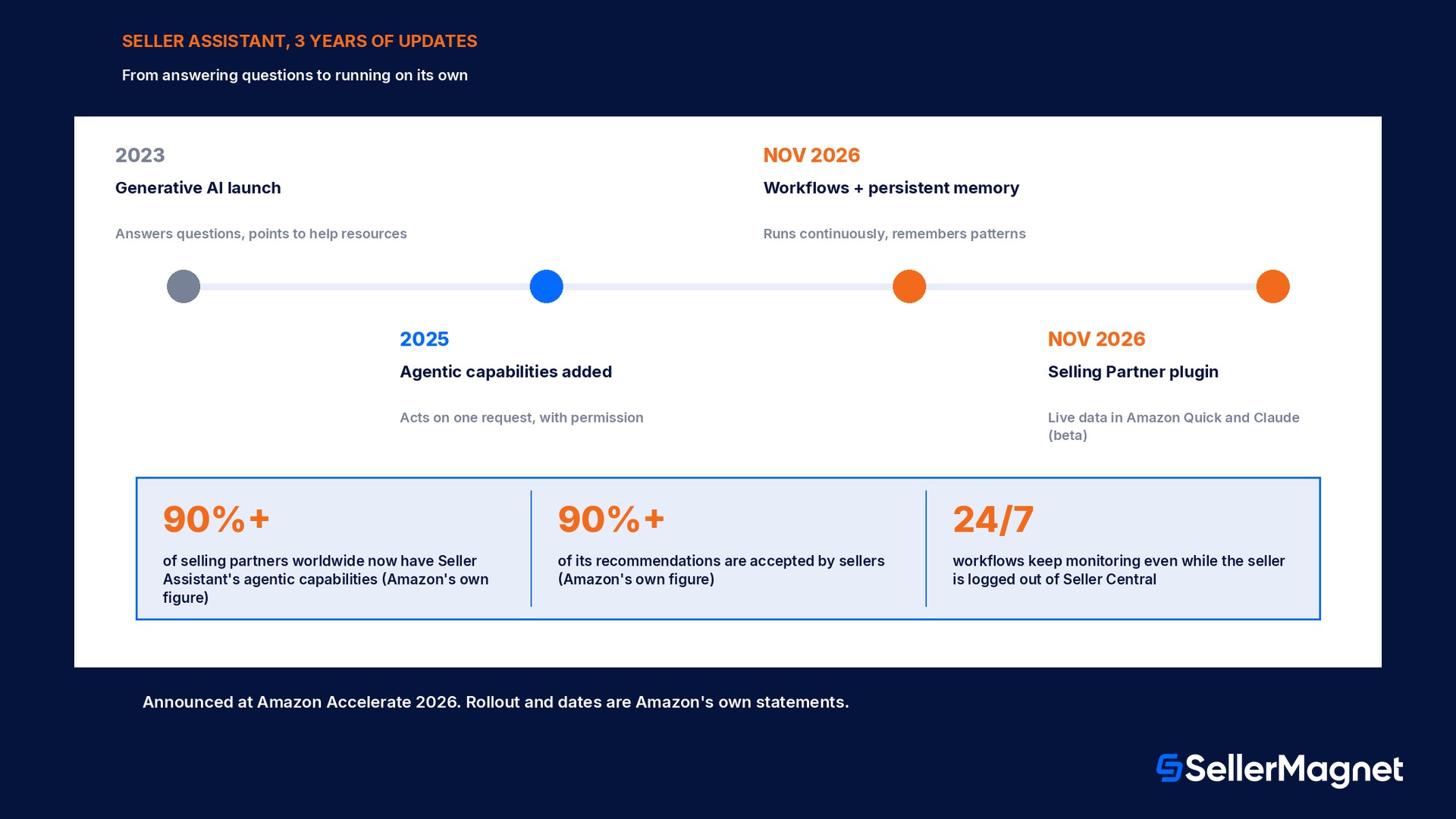
Amazon first introduced Seller Assistant in 2023 as a generative AI tool that answered seller questions in plain language and pointed to help resources, the kind of assistant a seller opens, asks something, and closes again. A later update added agentic capabilities so the assistant could reason through a problem and, with permission, carry out an action the seller asked for directly, such as adjusting a price for one ASIN or drafting a restock plan on request. Both of those versions shared one limit: Seller Assistant only acted when a seller opened Seller Central and asked. Tasks that follow a predictable pattern, checking an inventory threshold every morning, watching a competitor's price, reviewing account health alerts after each sync, still needed a seller to remember to ask every time. The Accelerate 2026 update removes that requirement. A workflow is a standing instruction: the seller describes the condition once, sets the guardrail once, and Seller Assistant keeps watching and responding to it on its own, independent of whether the seller is logged in at that moment.
Capability
2023 launch
Agentic update
2026 workflows
Answers questions in plain language
Yes
Yes
Yes
Takes one action a seller asks for, with permission
No
Yes
Yes
Runs continuously without the seller asking each time
No
No
Yes
Keeps memory of pricing and inventory patterns across sessions
No
No
Yes
Works while the seller is logged out of Seller Central
No
No
Yes
Persistent memory and the data behind it
Before this update, each Seller Assistant session started from the same blank slate: the assistant could read a seller's live account data when asked, but it did not carry forward what it had already learned about that seller's business from one conversation to the next. Amazon now describes Seller Assistant as carrying persistent memory of a seller's pricing patterns, inventory cycles and growth goals, following the seller across Seller Central, Amazon Quick and Claude, so a recommendation on Monday can build on what the assistant noticed on Friday instead of starting over. Amazon states the underlying models are built on Amazon Bedrock using Amazon Nova and Anthropic's Claude, trained on roughly 25 years of Amazon's own selling-partner data, and that seller data stays inside Amazon's infrastructure rather than being shared outside Amazon. When a seller wants to explore a decision interactively rather than read a recommendation, Seller Assistant can also open a canvas, a visual workspace that reshapes itself as the seller asks follow-up questions, for example comparing a 10 percent, 15 percent and 20 percent discount on one product line side by side using the seller's own last-30-day data.
Setting up a workflow: guardrails, templates and the recommend-or-act choice
A seller builds a workflow by describing the outcome in plain language rather than configuring rules field by field. Amazon's own examples from the Accelerate 2026 announcement include instructions such as monitoring return data on a listing and drafting a fix the moment returns start climbing, or watching a product's conversion rate and adjusting ad spend automatically once it drops below a threshold the seller names. For every workflow, two choices stay with the seller: the guardrail, meaning the exact condition and limit that triggers the workflow, and the mode, meaning whether the workflow only recommends what it would do or goes ahead and acts. A workflow set to recommend only ends with a draft sitting in the seller's inbox; a workflow set to act carries out the change itself and then logs it. Amazon ships a set of prebuilt templates so a seller does not have to write every workflow from a blank page, alongside the option to build a fully custom one.
Prebuilt template
What it watches
Typical output
Account health monitor
Policy warnings, performance metrics nearing a threshold
Alert plus a draft fix with the root cause explained
Order summary
Daily or weekly order and sales totals
A written summary on a schedule the seller sets
Pricing trend analysis
A product's price history against its own sales response
A recommendation to hold, raise or lower, with reasoning
Product expansion finder
Catalogue gaps against demand signals Amazon already tracks
A shortlist of candidate products with an explanation
Custom (seller-written)
Whatever condition the seller describes in plain language
Recommend or act, exactly as the seller configured it
How one workflow actually runs, end to end
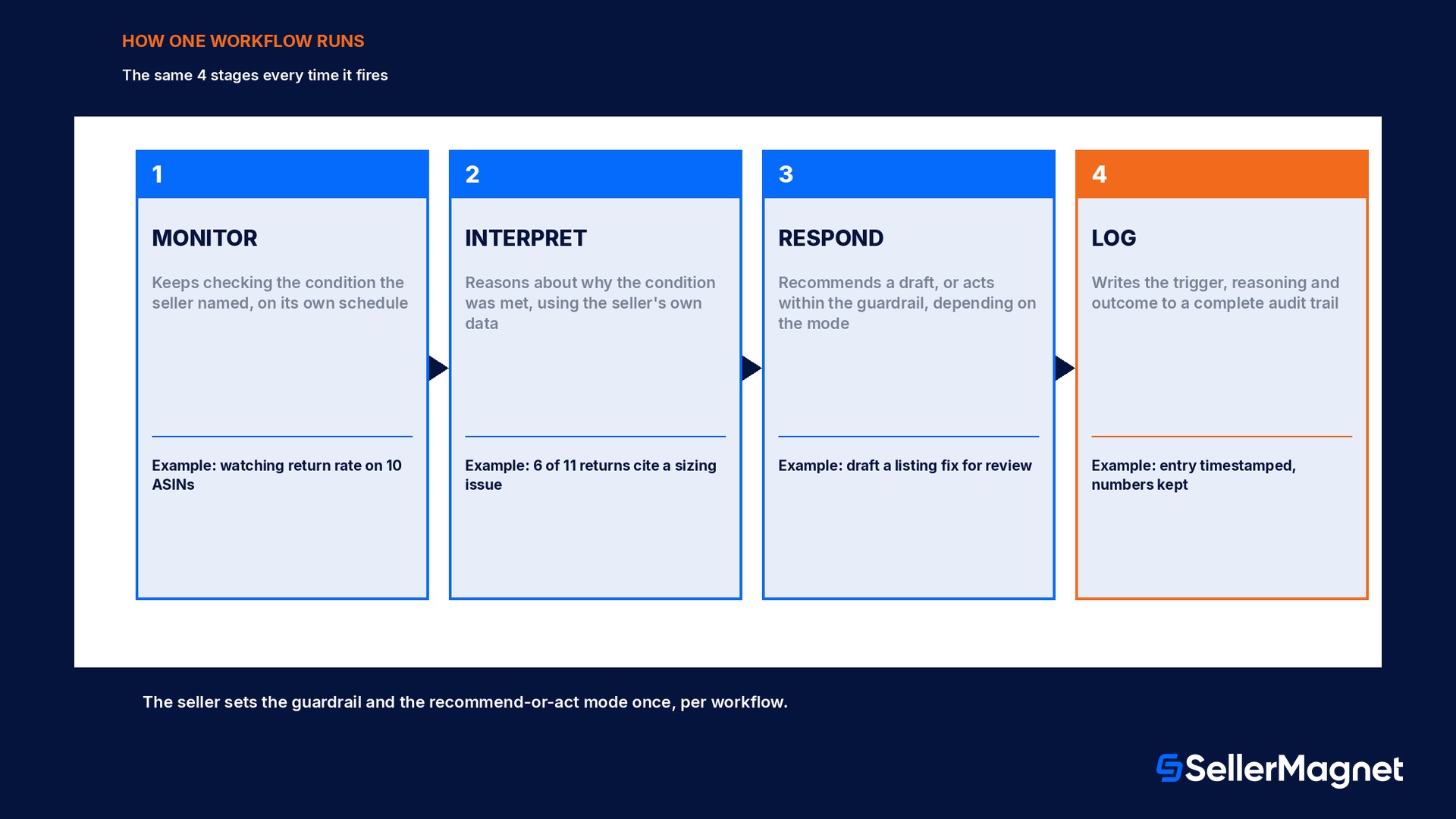
A workflow goes through the same four stages every time it fires, regardless of which template it started from. First, it monitors: the workflow keeps checking the condition the seller named, on its own schedule, without the seller doing anything. Second, it interprets: once the condition is met, Seller Assistant reasons about why it happened, using the seller's historical data rather than a generic rule, the same reasoning it would show if the seller had asked the question directly. Third, it responds: depending on the mode the seller picked, it either writes a recommendation for the seller to review or carries out the change itself, inside the guardrail the seller set, such as a maximum bid increase or a price floor. Fourth, it logs: every firing of the workflow, whether it only recommended or actually acted, is written to a complete audit trail the seller can open at any time, so nothing a workflow does happens invisibly in the background.
Worked example: a week of one workflow's audit trail
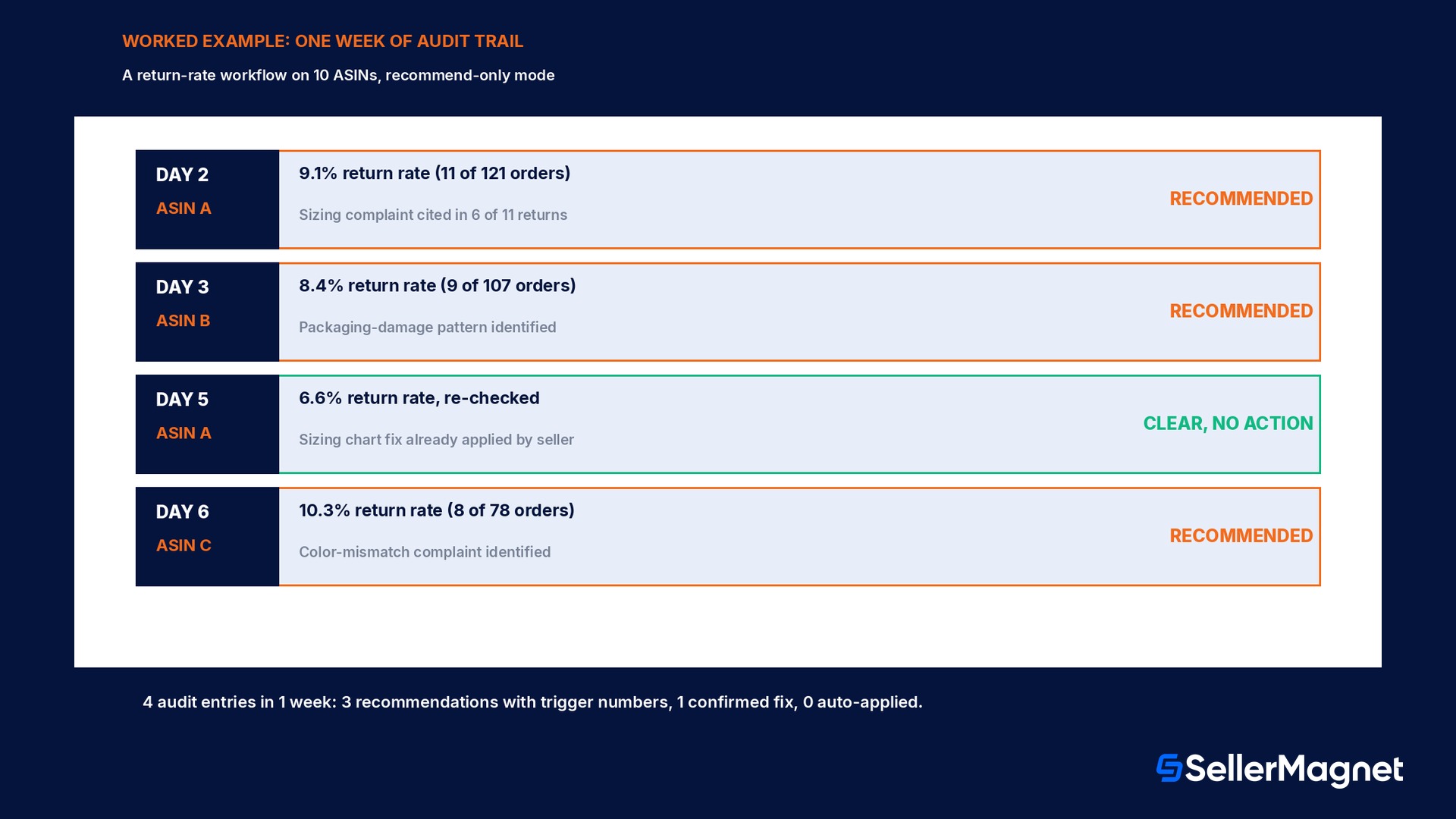
A seller running a bakeware line sets up one workflow on 10 ASINs: monitor return data on each listing, and the moment a product's weekly return rate crosses 8 percent, draft a listing fix explaining the likely cause, set to recommend only while the seller is still getting used to it. Over one week the workflow fires 4 times. On day 2, ASIN A's return rate reaches 9.1 percent (11 returns out of 121 orders); the workflow logs the trigger, drafts a note pointing at 6 of the 11 returns citing a sizing complaint, and recommends adding a sizing chart to the listing. On day 3, ASIN B crosses the threshold at 8.4 percent (9 of 107 orders) and the draft note points at a packaging-damage pattern instead. On day 5, ASIN A is checked again, now back at 6.6 percent after the seller manually applied the sizing-chart fix, so the workflow logs a clear reading and takes no action. On day 6, ASIN C fires at 10.3 percent (8 of 78 orders) with the note pointing at a color-mismatch complaint. Across the week the audit trail shows 4 entries: 3 recommendations with their reasoning and exact trigger numbers, and 1 clear reading confirming a fix worked, with nothing acted on automatically because the seller chose recommend only for this workflow. A seller who later switches the same workflow to act automatically would see the same 4 entries, except the 3 recommendations would instead read as actions already taken, each still carrying its own trigger numbers and reasoning in the log.
What is the new Selling Partner plugin for Amazon Quick and Claude?
Seller Assistant itself lives inside Seller Central. The new Selling Partner plugin, launched alongside the workflows update, brings the same live listings, performance and analytics data into AI tools a seller already uses outside Seller Central, starting with Amazon Quick and, in beta, with Anthropic's Claude. Amazon describes Amazon Quick as a general AI companion that drafts documents and spreadsheets, runs research and connects to a seller's email, calendar and files; with the plugin connected, it can also read a seller's live Amazon data when asked, for example turning a year of holiday sales into a one-page business review, or checking which products will run out of stock before the holidays and when to reorder. Amazon is also offering every primary selling partner account holder a free 12 month Amazon Quick Plus subscription for themselves and 2 delegated users, for sign-ups by 31 December 2026, a time-limited company offer worth checking on Amazon's own sign-up page rather than assuming it is permanent. For Claude, Amazon states the plugin is in beta and lets a seller connect their Amazon account to analyze selling data alongside whatever other business data they already have in Claude, such as accounting or supplier records. In both cases the plugin can also take actions in Seller Central through the AI tool, for example updating a listing description, but Amazon states every such action requires the seller's explicit approval before it goes through, the same recommend-or-act control that applies inside Seller Central itself.
The practical difference between asking Seller Assistant a question inside Seller Central and asking the same question through the plugin in Amazon Quick or Claude is where the conversation happens, not what data it can see; Amazon states the plugin reads the same live listings, performance and analytics data either way. A seller who already does financial planning in a spreadsheet tool, or already keeps supplier and accounting records in Claude, gains from not having to export Amazon numbers by hand into that other tool first. A seller who does all of their planning inside Seller Central itself may not need the plugin at all, since Seller Assistant's own canvas already covers the same kind of scenario comparison without leaving Seller Central.
Tool
Where it lives
What it adds
Action requires approval
Seller Assistant
Inside Seller Central
Questions, workflows, persistent memory, the data canvas
Yes, per workflow guardrail
Amazon Quick (with the plugin)
Separate AI companion app
Documents, research, planning, connected to email and files plus live Amazon data
Yes
Claude (plugin, beta)
A seller's existing Claude account
Amazon data alongside other business data already in Claude
Yes
Rollout and cost, as Amazon states them
Amazon says Seller Assistant's agentic capabilities have reached over 90 percent of selling partners worldwide in their own language, at no additional cost, and that sellers accept its recommendations more than 90 percent of the time. These are Amazon's own reported figures, not independently audited numbers, and a feature reaching most sellers is not the same as it being available to every seller on every marketplace on the same day; check the Seller Assistant panel inside Seller Central for the current rollout status on a specific account.
What mistakes do sellers make handing a task to an always-on workflow?
Switching straight to act mode on a new workflow. Running a brand-new workflow on recommend only for at least a week, and comparing its drafts against what the seller would have actually done, catches a wrong assumption in the guardrail before it changes a live price or listing.
Writing a guardrail that is too broad to be useful. A workflow told to adjust ad spend if conversion drops will trigger constantly on normal day-to-day noise; a specific threshold and a minimum time window makes the audit trail readable instead of a long list of near-identical entries.
Never reading the audit trail once the workflow is running. The entire point of the log is that a seller can check what an automation actually did; an unread audit trail defeats the guardrail the seller set in the first place.
Running two workflows that can fight each other. A pricing workflow and a separate ad-spend workflow on the same ASIN can both react to the same signal in opposite directions if their guardrails are not checked against each other first.
Assuming a workflow understands marketplace-specific rules it was never told. A workflow built around US return-rate thresholds does not automatically apply the right numbers to a different marketplace; a seller selling in several stores should confirm each workflow's guardrail per marketplace rather than copying one everywhere.
Connecting the Selling Partner plugin and never checking which actions it approved. Because the plugin can take actions in Seller Central from outside it, the same discipline of reading the log applies there as it does to a workflow running inside Seller Central.
What can SellerMagnet do alongside Seller Assistant, and what can it not do?
Seller Assistant workflows and SellerMagnet's own automation live in the same space, continuous monitoring with a guardrail and a logged trail, but they are built by different companies and do not talk to each other. SellerMagnet does not connect to, read from or write into Seller Assistant workflows, and nothing in this guide is a claim that it does. Where the two overlap is in the habit they both encourage: automate the recurring check, but keep a mode that only recommends until the guardrail is proven. SellerMagnet's own Repricer re-evaluates active rules roughly every 5 minutes and never sets a price outside the minimum and maximum the seller defines, with every price change logged with its reason; the PPC Manager (currently in beta) offers the same recommend-or-act choice Amazon describes for workflows, suggestions only, manual approval, or fully automatic within limits the seller sets, plus one switch to stop all automation and an activity log for every change, with bid, budget, placement and pause or enable changes reversible within 24 hours. A seller running both an Amazon workflow and a SellerMagnet automation on the same ASIN, one on pricing, one on ad spend, benefits from checking the two guardrails against each other for the same reason two Seller Assistant workflows should not be left to fight: the Analytics dashboard gives a single place to see the profit effect of both changes together, rather than reading two separate logs side by side.
Checklist before turning on a Seller Assistant workflow
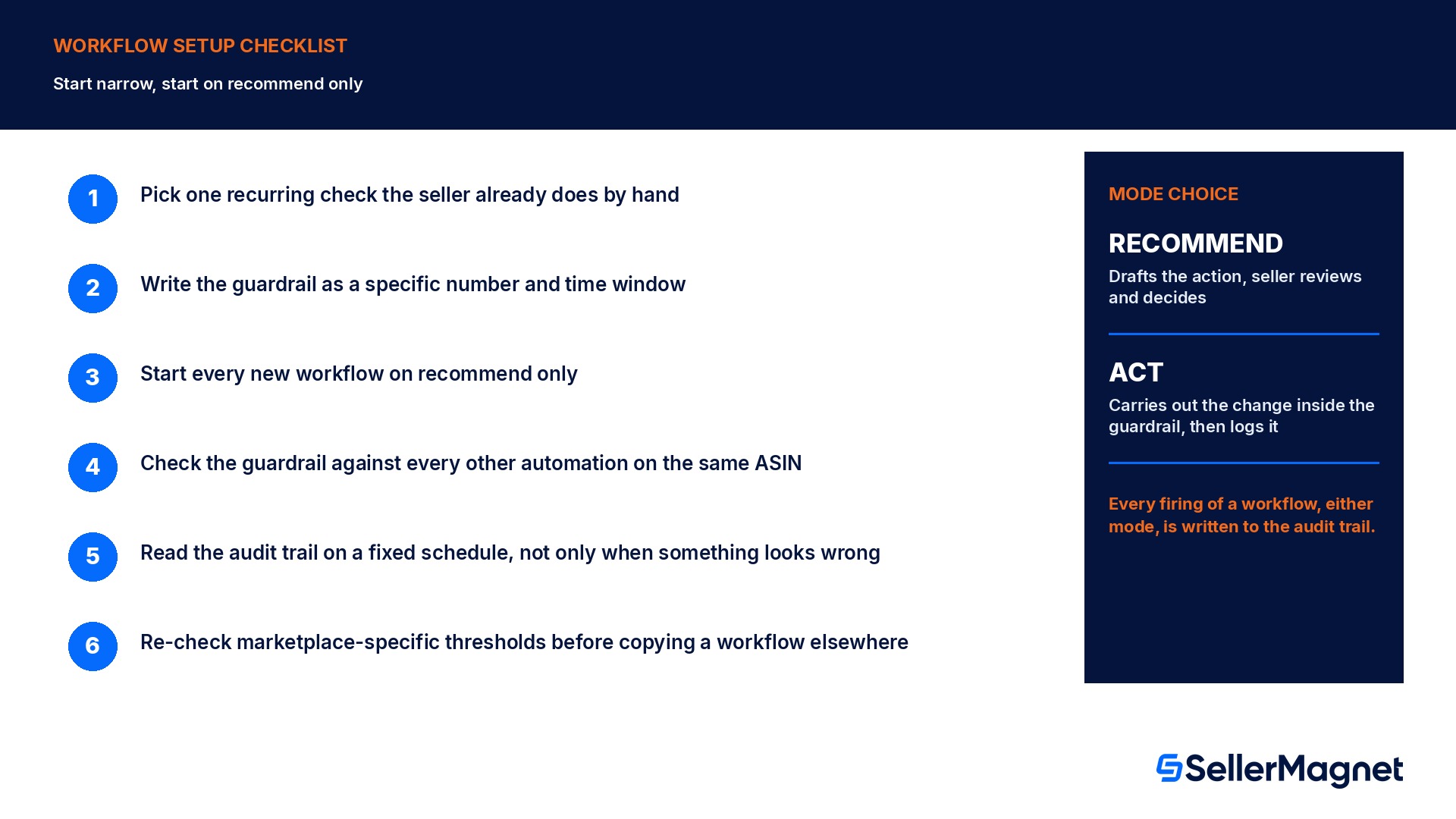
How to set up a Seller Assistant workflow safely
Pick one recurring check the seller already does by hand, not a whole department at once - Inventory threshold, return-rate watch and price-trend review are the easiest first workflows because each has one clear trigger.
Write the guardrail as a specific number and a time window, not a vague condition - A trigger like return rate above 8 percent over the last 7 days is checkable in the audit trail; a vague phrase like too many returns is not.
Start every new workflow on recommend only - Compare a week of drafts against what the seller would have actually decided before switching that workflow to act automatically.
Check the guardrail against every other automation already running on the same ASIN - A pricing workflow and an ad-spend automation, from Amazon or from a third-party tool, can react to the same signal in conflicting directions if nobody checks first.
Read the audit trail on a fixed schedule, not only when something looks wrong - A log nobody reads is the same as having no guardrail at all.
Re-check marketplace-specific thresholds before copying a workflow to another store - A guardrail tuned to one marketplace's return or pricing norms may trigger constantly, or never, on a different one.
What is a Seller Assistant workflow?
A custom automation inside Seller Central, announced at Amazon Accelerate 2026, that runs continuously, monitoring a condition the seller describes in plain language and either recommending an action or carrying it out automatically within a guardrail the seller sets, even while the seller is logged out.
How is this different from the Seller Assistant that launched in 2023?
The 2023 launch answered questions when a seller asked. A later agentic update let it carry out one action a seller requested directly. The 2026 workflows update adds continuous, unprompted monitoring and persistent memory across sessions, so the assistant watches conditions and acts on them without the seller asking each time.
Does a workflow act on its own, or does it always ask first?
The seller chooses per workflow. A workflow set to recommend only drafts an action for review; a workflow set to act carries it out automatically inside the guardrail the seller defined, and either way the action is written to an audit trail.
What does the audit trail actually show?
Every time a workflow fires, whether it only recommended or acted, the log records the trigger condition, the exact numbers that met it, the reasoning behind the recommendation or action, and what was recommended or done.
What is the new Selling Partner plugin for Amazon Quick and Claude?
A plugin, launched alongside the workflows update, that connects a seller's live Seller Central data (listings, performance, analytics) to Amazon Quick and, in beta, to Anthropic's Claude, so the seller can ask about their business from those tools; any action the plugin takes in Seller Central still needs the seller's explicit approval.
Does SellerMagnet connect to or control Seller Assistant workflows?
No. SellerMagnet does not read from or write into Amazon's Seller Assistant workflows. SellerMagnet's own Repricer and PPC Manager run their own separate automation, with their own guardrails, activity logs and recommend-or-act controls, alongside whatever a seller runs through Seller Assistant.
Can two automations, one from Amazon and one from a third-party tool, conflict on the same product?
Yes, if their guardrails are not checked against each other. A pricing automation and a separate ad-spend automation reacting to the same signal can push in opposite directions; reading both tools' logs for the same ASIN before relying on either in act mode is the way to catch that before it happens repeatedly.
Does the free Amazon Quick Plus offer cost anything after 12 months?
The 12 month Amazon Quick Plus offer is free for the primary account holder and 2 delegated users, for sign-ups by 31 December 2026. What happens after those 12 months is set by Amazon's own terms at the time, so check the sign-up page rather than assuming.
Stop Juggling Tools. SellerMagnet Combines Everything You Need.