Amazon Service Provider Access 2026: The 365-Day Reauthorization Clock
R
RenéFreelance Amazon Editor
|
15 min read
On 1 September 2026, Amazon upgraded how every service provider, an agency, a freelancer, a virtual assistant, anyone outside your own organization, accesses your Seller Central account. The core of the change is a clock: a Service Provider's authorization now expires after 365 days, and if you let it run out without acting, restoring access is not a one-click job. This guide works through what changed, the difference between a Service Provider and an internal team member, a worked example of the 365-day clock on a real authorization date, what happens if several providers' clocks are out of sync, and what actually breaks when one lapses.
Amazon's enhanced service provider access security, effective 1 September 2026, requires every third-party agency, freelancer or virtual assistant with Seller Central access to complete business verification before reauthorization, and sets every authorization to expire after 365 days. You get an email and a Seller Central Action Center notice before it expires. If you miss the deadline, the provider's access is cut off immediately, any automation they run may stop working, and you must complete the full authorization process again, not just click Reauthorize, to restore it.
What actually changed on 1 September 2026
Amazon's own community team announcement describes three concrete upgrades to how a Service Provider, their phrase for any agency, freelancer or virtual assistant who helps run your Amazon business from outside your organization, accesses your account. The wording is careful to say this is an upgrade to EXISTING access, not a brand-new program: if you already had an agency or VA connected before 1 September 2026, their access did not vanish that day, but it now sits on the new clock described below the next time it comes up for renewal.
Business verification: a provider must complete verification before being reauthorized for the services they provide.
Time-limited access: every authorization now expires after 365 days, with a notice sent before each expiration so you can decide whether to continue.
Permission selection: you choose exactly which permissions that provider gets, rather than granting broad access by default.
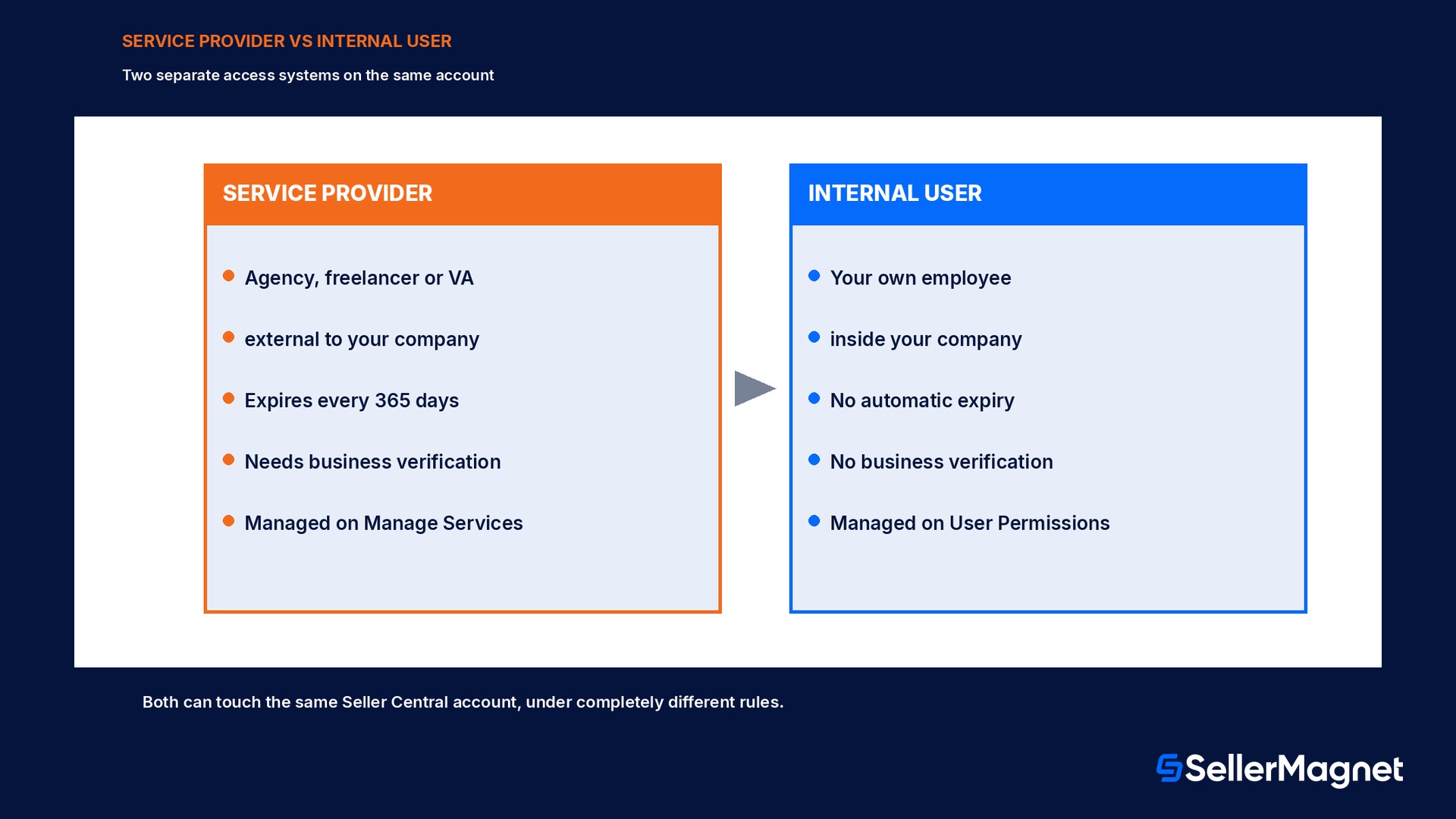
None of this touches how you add your own employees. An internal team member, someone inside your own company, is still added and managed through the standard Seller Central user permissions screen, a separate flow covered in Amazon Seller Central User Permissions 2026. The distinction matters because the two systems answer different questions: user permissions controls what someone inside your company can click, while Service Provider authorization controls whether an outside party can touch your account at all, and for how long.
The underlying rationale is straightforward account security. Third-party access is one of the most common ways a seller account gets compromised, not because the agency or VA is malicious, but because a shared login, an old authorization nobody remembered to revoke, or a provider who changed hands without the seller knowing all widen the attack surface over time. Business verification raises the bar for who can even claim to be a legitimate service provider in the first place, and the 365-day expiry forces a periodic check instead of letting a years-old authorization sit untouched indefinitely.
What business verification actually asks for
The forum announcement does not publish a document-by-document checklist, so treat the exact flow as something to confirm live with your provider rather than assume from this guide. What it does say plainly is that verification happens BEFORE a provider can be reauthorized, and that the requirement applies per provider, not once for your whole account. In practice, this means a provider who manages several of your accounts, or several sellers' accounts at once, verifies separately for each relationship it holds, since the authorization itself is scoped to one seller account at a time.
Ask your provider to confirm their own verification status early
Since the provider, not you, typically completes the business verification step, the most useful thing you can do before a deadline is ask them directly whether they have already verified on their end. A provider juggling many client accounts may be mid-verification for you while already cleared for others, and finding that out a week before expiry beats finding it out the day after.
Multi-marketplace sellers and the country or region scope
If you sell across several Amazon marketplaces, the country or region filter on the reauthorization screen is worth a second look rather than a reflexive renewal. A provider engaged to run PPC for your US and Canada listings does not automatically need standing access to an EU marketplace you also sell on, even if the original authorization never drew that line. Reauthorization is the natural checkpoint to narrow that scope down to the marketplaces the relationship actually covers today, rather than carrying forward a broader grant made when the relationship started.
This matters more the longer a provider relationship runs. A VA hired for one marketplace's listing cleanup a year ago may, by the next renewal, be doing meaningfully different work, or none at all, in marketplaces outside that original scope. The 365-day cadence gives you a built-in, recurring moment to ask whether the access still matches the work, instead of that question only coming up if something goes wrong.
How you get notified before a clock runs out
Amazon states it will contact you two ways before a provider's authorization expires, and explicitly says that getting neither one means nothing is due yet.
Email, with instructions and a date to reauthorize by
A Seller Central Action Center notification that stays visible until the action is done
No email yet does not mean the clock stopped
Amazon states plainly that not receiving an email means no action is required from you today. That is a statement about whether you need to act right now, not proof the 365-day clock reset. Track authorization dates yourself rather than waiting on the notice alone, especially if you run several providers.
Worked example: the 365-day clock on one agency
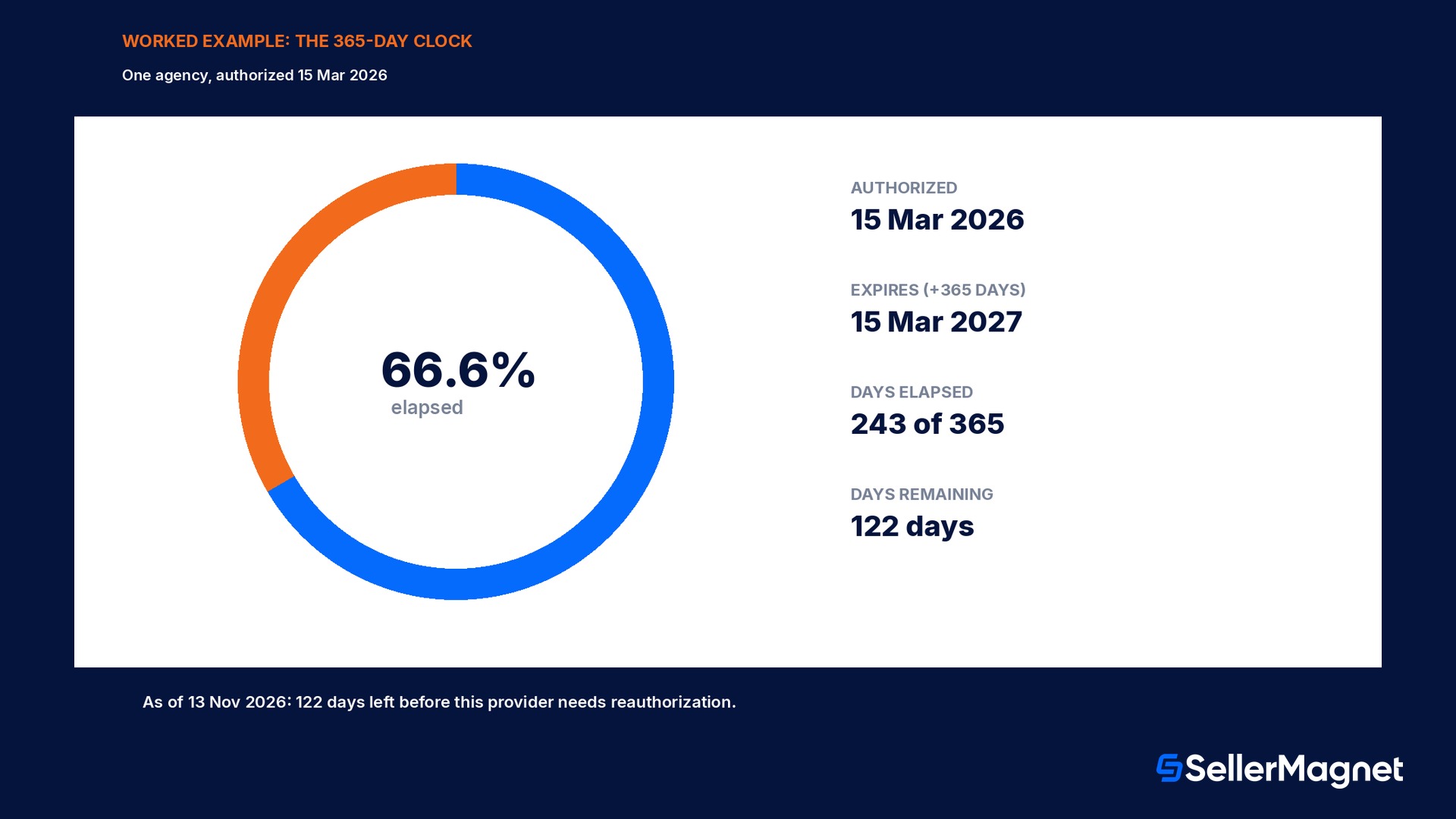
Say you authorized a PPC agency on 15 March 2026. Add 365 days and that authorization expires on 15 March 2027, a full year later to the day. As of 13 November 2026, 243 of those 365 days have passed, 66.6% of the clock, leaving 122 days before you need to act.
Date
Authorization granted
15 Mar 2026
Expires (authorization + 365 days)
15 Mar 2027
Days elapsed as of 13 Nov 2026
243 days (66.6%)
Days remaining
122 days
Worked example: three providers, three anniversaries
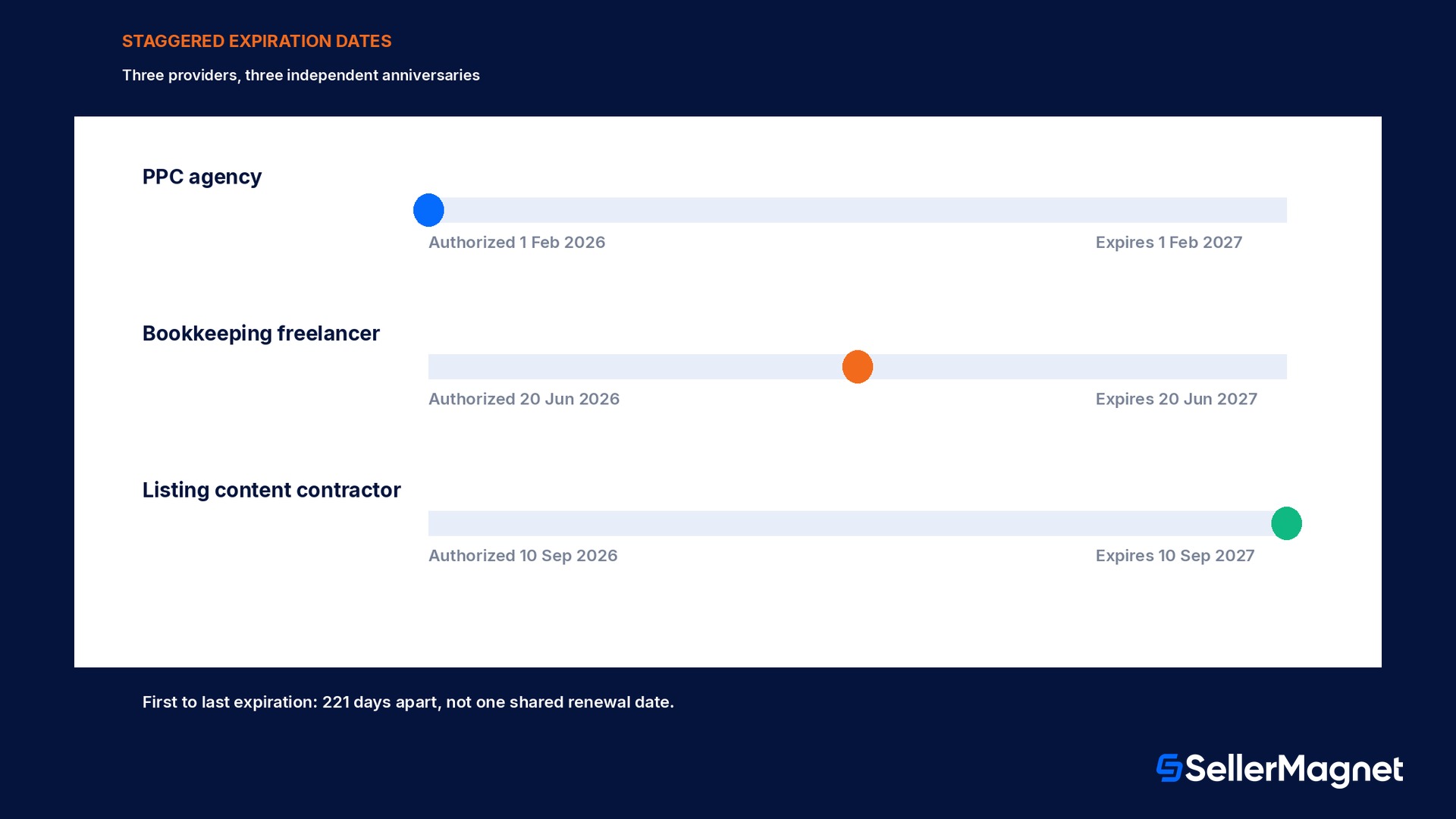
Most sellers who use outside help do not use just one provider. Say you run a PPC agency authorized 01 Feb 2026, a bookkeeping freelancer authorized 20 Jun 2026, and a listing content contractor authorized 10 Sep 2026. Each gets its own independent 365-day clock, so their expiration dates land 221 days apart from first to last, not on one shared renewal date you could put on a single calendar reminder.
Service provider
Authorized
Expires
PPC agency
01 Feb 2026
01 Feb 2027
Bookkeeping freelancer
20 Jun 2026
20 Jun 2027
Listing content contractor
10 Sep 2026
10 Sep 2027
Staggered clocks are the real risk, not the 365 days itself
A single provider's one-year clock is easy to track. Three or five providers, each authorized on a different signup date, means three or five silent deadlines running at once. The Action Center notice helps, but it fires once per provider, close to its own date, not as a combined view.
What happens if you miss the deadline
Amazon's reauthorization help page spells out what a missed window actually costs you, and it is more than losing the provider's login.
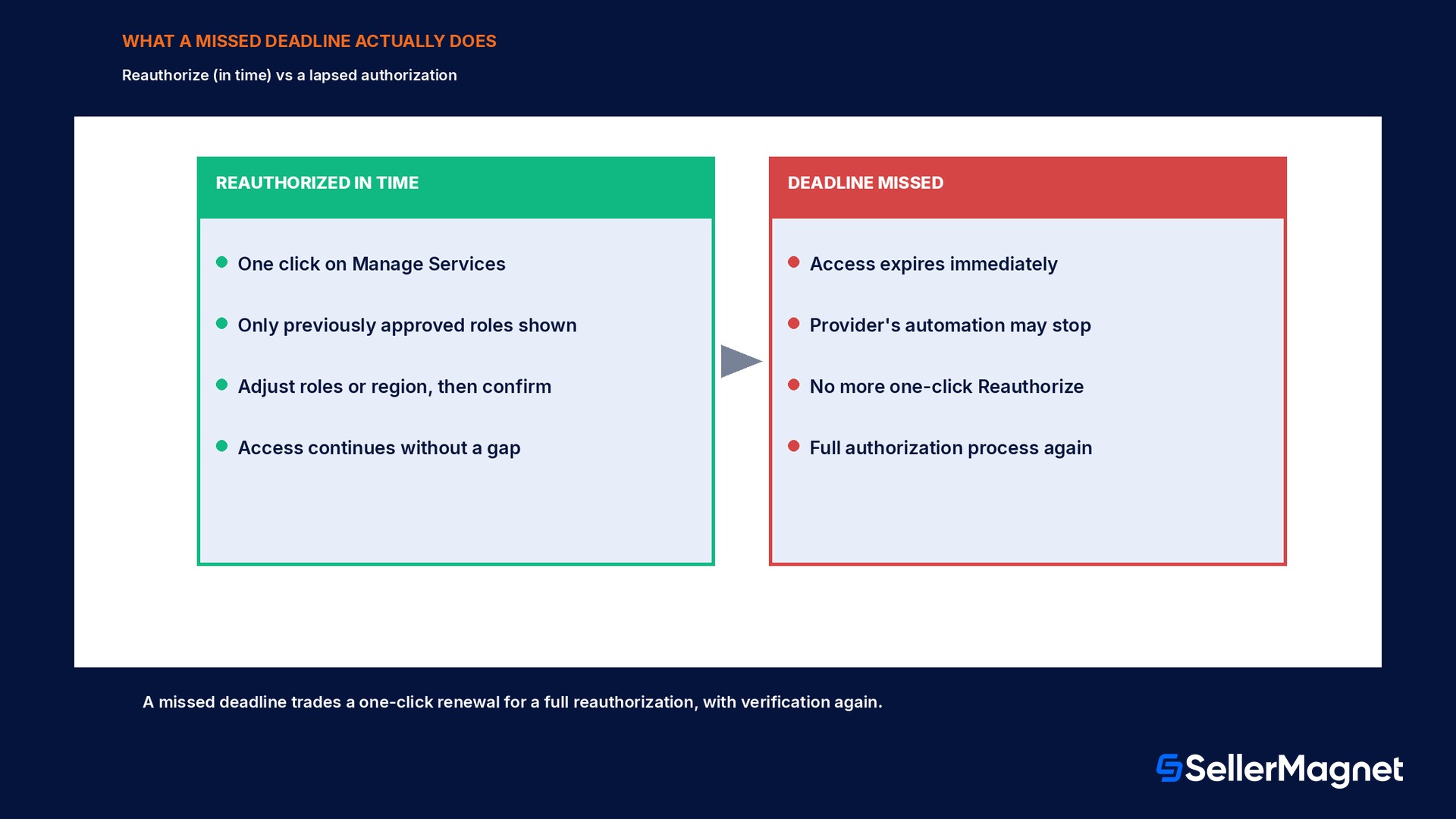
The service provider's access expires immediately and they can no longer perform actions on your behalf
Any automated processes or integrations the provider manages may stop functioning
The one-click Reauthorize option disappears; you must run the full authorization process again, including a fresh business verification, to restore access
The part most sellers miss on a first read is the third line. Reauthorizing before expiration is a quick in-place renewal on the Manage Services page, where only roles already approved are shown and you can adjust or restrict them. Once the deadline passes, that shortcut is gone. Getting the provider back on your account means the FULL authorization process again, which includes a fresh round of business verification, not a renewal click.
Illustrating the cost of a lapse (worked example, disclosed as illustrative)
Say an agency manages 340 SKUs for you, and roughly 22% of that catalog leans on a repricing integration the agency runs on your behalf. If their authorization lapses and it takes 6 days to notice and complete a full re-authorization, that is 75 SKUs with no active repricing for 6 days each, 450 SKU-days where a competitor's own price move has nothing on your side responding to it.
This figure is an illustration, not an Amazon statistic
The 22% at-risk share and the 6-day pause above are a worked illustration of the mechanics, not a published Amazon number. The real exposure depends entirely on how much of your catalog a given provider's tools actually touch; check that before assuming a specific cost.
Managing authorization the right way: roles, scope, and reviews
The reauthorization flow gives you more control than a blanket yes or no. On the Manage Services page, you see only the roles that provider was previously approved for, you can narrow or adjust those roles before confirming, and you can scope access by country or region if a provider only needs to touch a subset of your marketplaces. Treat each reauthorization as a review, not a formality: the roles a provider actually uses day to day are frequently narrower than the roles they were originally granted, especially once a relationship has settled into a routine.
Keep a simple log outside Seller Central, a spreadsheet is enough, listing each provider's name, the date you authorized them, and the computed expiration date; do not rely on the per-provider email alone.
When a reauthorization notice arrives, open Manage Services and actually review the listed roles before clicking through, rather than renewing blind.
Narrow permissions and country or region scope to only what that provider currently does for you, since roles tend to accumulate over a long engagement.
If a provider relationship has ended, revoke access immediately through Remove a Service Provider's account access instead of letting the 365-day clock expire it for you later.
Before a known busy season, check every active provider's expiration date so none of them lapses mid-peak-event.
That last point deserves its own emphasis. A provider whose authorization happens to land in, say, late November is a bad surprise if nobody notices until the Action Center item shows up mid-Black-Friday-week. Pulling a full list of providers and their expiration dates once a quarter, rather than reacting to each notice individually, catches a badly timed renewal while there is still time to act calmly instead of under peak-season pressure.
Service Provider access versus internal user permissions
It is worth being precise about the boundary, since the two systems look similar but answer different questions and live on different settings pages.
Service Provider access
Internal user permissions
Who it covers
Agencies, freelancers, VAs, external contractors
Your own employees inside your company
Expires automatically
Yes, every 365 days
No, access persists until you change or remove it
Needs business verification
Yes, before reauthorization
No
Managed where
Manage Services page
User Permissions settings
If your team mixes both, in-house staff plus an outside agency, you are running two different access-control systems on the same account at once. See Amazon Seller Central User Permissions 2026 for the internal-user side of that split.
Common mistakes sellers make with Service Provider access
Assuming the one Action Center email covers every provider; each provider's notice fires independently, near its own 365-day date.
Treating 'no email yet' as proof the clock has not started, rather than checking the actual authorization date you granted.
Waiting for the expiration date itself to act, when reauthorization only stays a one-click action up until that date.
Granting broad roles once and never revisiting them, instead of narrowing permissions at each reauthorization.
Forgetting to formally revoke access for a provider relationship that already ended, leaving a stale authorization live until its own clock runs out.
Not checking whether a lapsed provider's tooling, a repricer, a reporting sync, a listing editor, was doing something time-sensitive before the lapse happens.
Assuming a provider has already completed their own business verification simply because they said they would; confirm it directly rather than finding out at the deadline.
Running the same broad authorization across every marketplace a seller operates in, instead of using the country or region scope to match what the provider actually works on.
Where to check your current Service Provider list
Before any of the tracking advice above is useful, you need an accurate list of who currently has access. Seller Central keeps this under its own authorization management area, separate from the general Users and Permissions page used for employees, and it is worth a direct look rather than trusting memory of who was ever connected.
Open Manage Services from Seller Central settings; this is the same page used for both authorizing a new provider and reauthorizing an existing one.
Review every row for a provider name, the service or role granted, and its current authorization status, active, pending reauthorization, or expired.
Cross-check this list against your own internal record of who you actually pay or work with; a provider still showing active access after the relationship ended is the single most common gap found on a first audit.
For any provider you do not recognize, or no longer remember granting, revoke access immediately rather than leaving it to expire on its own 365-day schedule.
Run this audit once now, then quarterly
A single clean pass through Manage Services, done once right after reading this, catches most of the stale-access risk in one sitting. After that, a quarterly five-minute check is enough to stay ahead of staggered expirations instead of reacting to each Action Center item as it arrives.
Service provider access checklist
You can list every active Service Provider on your account and the date each one was authorized.
You have computed each provider's real expiration date (authorization date plus 365 days), not just guessed from memory.
Every reauthorization notice this year was reviewed on the Manage Services page, not clicked through without reading the roles.
Permissions and country or region scope match what each provider actually does for you today, not what they did a year ago.
Ended provider relationships were revoked immediately, not left to expire on their own.
You know which of your automated processes, repricing, reporting, listing edits, depend on a given provider's access, so a lapse is noticed fast if it happens.
How SellerMagnet fits into the decision
SellerMagnet is an app you connect yourself, not a Service Provider inside this authorization system, so none of the 365-day mechanics above apply to your own SellerMagnet connection. What this change does highlight is how much can quietly depend on a third party's continued access. Amazon Alerts and Offer Watch watch your connected catalog every day regardless of who else has access to the account, so if an agency's repricing integration goes quiet after a lapsed authorization, a stalled price or a lost Buy Box shows up in your own notification feed instead of surfacing only when a sales chart flattens out. Profit Analytics lets you see the actual sales and margin trend for the SKUs a given provider manages, so you are not relying on their own reporting alone to know whether their access, and their work, is still paying off. See plans and pricing for current rates.
For the account-health side of any access or automation gap, see Amazon Account Health Rating 2026, and for what a stalled repricing integration can cost you specifically, what decides the Buy Box covers the mechanics a lapsed provider's pricing tool would stop acting on.
What is an Amazon Service Provider?
Any third party external to your own organization, an agency, consultant, freelancer or external contractor, that you have authorized to access your Seller Central account on your behalf. It is a separate category from an internal team member added through standard user permissions.
How long does a Service Provider authorization last?
Since 1 September 2026, every authorization expires 365 days after you grant it. You are notified by email and a Seller Central Action Center item before it expires.
What happens if I do not reauthorize a Service Provider in time?
Their access expires immediately, they can no longer act on your behalf, any automation they run may stop working, and the one-click Reauthorize option disappears. You must run the full authorization process again, including business verification, to restore access.
Does this affect how I add my own employees?
No. Internal team members are still managed through the standard Seller Central user permissions page, a separate system with no 365-day expiration and no business verification requirement.
Why did I not get a reauthorization email yet?
Amazon states that if you have not received an email, no action is required yet, meaning that specific provider's 365-day window has not reached its notice period. It does not mean the clock has not started; check the actual authorization date.
Can I control exactly what a Service Provider can access?
Yes. You choose which permissions to grant, and at each reauthorization you can adjust or restrict the previously approved roles, as well as scope access by country or region.
What if I want to end a Service Provider relationship early?
Revoke their access immediately through Remove a Service Provider's account access rather than waiting for the 365-day authorization to lapse on its own.
What is the actual difference between Reauthorize and Authorize?
Reauthorize is the fast, in-place renewal available before an existing authorization expires; it only shows roles already approved and lets you adjust them. Authorize is the full process, including business verification, required either for a brand-new provider or for one whose previous authorization already lapsed. Missing the reauthorization deadline moves you from the first path to the second.
Does the 365-day expiry apply retroactively to providers I authorized before September 2026?
Amazon's announcement frames this as an upgrade to how existing access works, not a one-time reset: an authorization made before 1 September 2026 keeps running, but its next renewal follows the new rules, business verification and the 365-day clock, rather than the older process.
Stop Juggling Tools. SellerMagnet Combines Everything You Need.