Amazon Streaming TV Ads 2026: Sponsored TV Renamed
R
RenéFreelance Amazon Editor
|
12 min read
A seller who bookmarked the Sponsored TV page a year ago and goes back to buy a campaign in 2026 finds something unexpected: the page still exists, still describes a self-service tool with no minimum spend, and still says Sponsored TV is for businesses of any size. Nothing on it says it was retired. Yet the separate Streaming TV ads page, the one Amazon now promotes in its own navigation, describes the identical inventory, Prime Video, Twitch, Fire TV, with a different cost structure entirely: a self-service package with a ten-thousand-dollar recommended minimum and a managed-service package with a fifty-thousand-dollar one. Both pages are live on advertising.amazon.com at the same time, both are official, and they do not agree with each other. This guide works through what actually happened to Sponsored TV, who is eligible to buy streaming TV inventory at all, what the real cost looks like once the two pages are read side by side, where the ad actually shows up, how it differs from the Sponsored Display and DSP video options a seller may already run, and the checklist to get a brand ready before spending a dollar on it.
Amazon Streaming TV ads are the new name for Sponsored TV, Amazon's self-service video advertising product that places ads across Prime Video, Twitch, Fire TV and third-party streaming services. Eligibility requires enrollment in Amazon Brand Registry, vendor status, or an advertising agency or technology provider role. Amazon's own pages disagree on minimum spend: the Sponsored TV product page says there is no minimum, while the Streaming TV ads FAQ states a ten-thousand-dollar recommended minimum for self-service campaigns and fifty thousand dollars for managed-service packages.
What actually happened to Sponsored TV
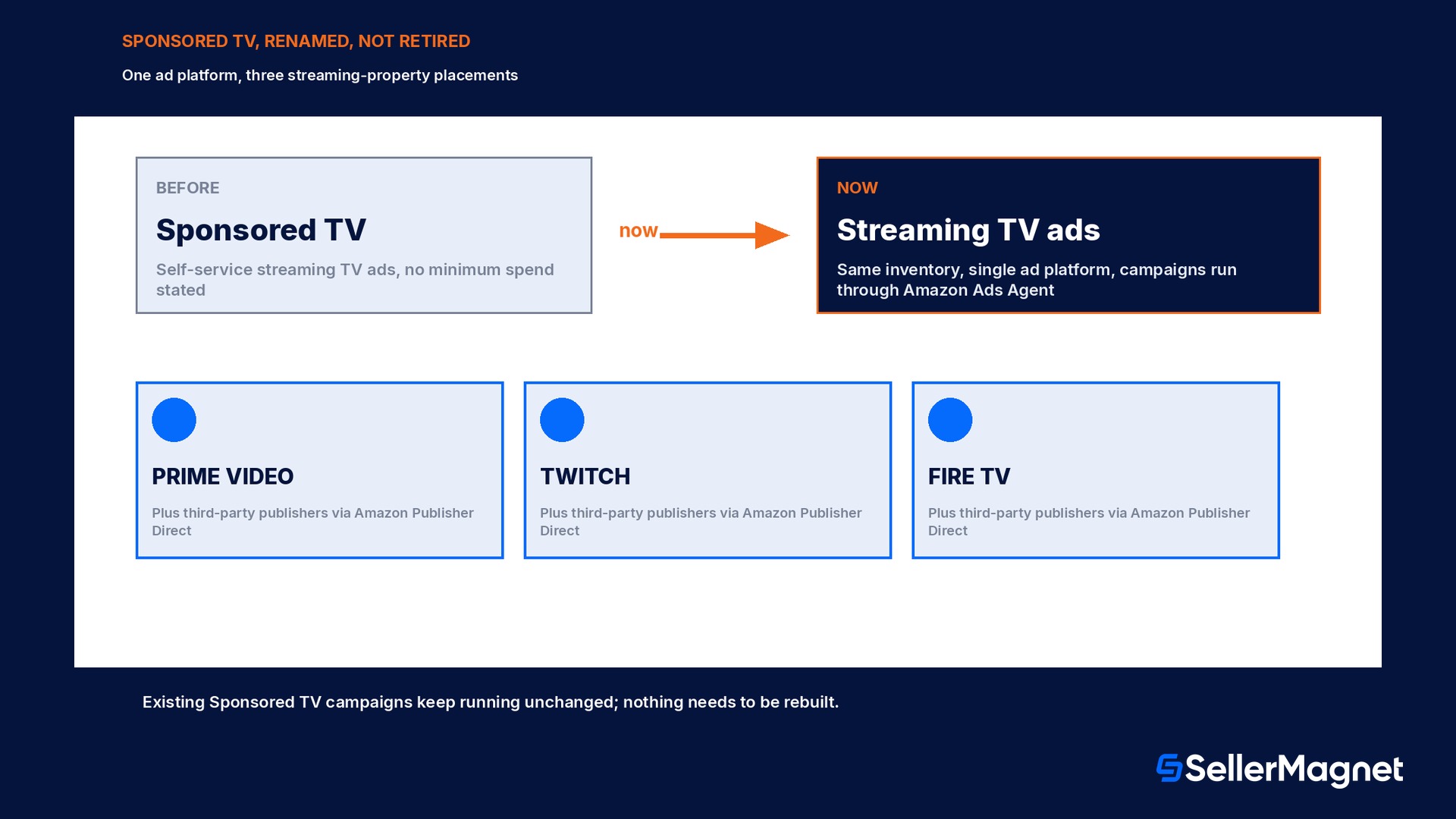
Sponsored TV launched as Amazon's self-service streaming TV ad product, built so a business of any size could buy TV-style video inventory without a minimum spend and without going through a managed, high-touch sales process. In 2026 Amazon introduced what it calls a single ad platform that connects streaming TV campaigns across its properties, Prime Video, Twitch and Fire TV, plus premium placements across the open internet, under one buying interface. Sponsored TV's own product page is explicit that this is a rename, not a shutdown: 'This is not a replacement of Sponsored TV. Businesses of any size can continue to access Sponsored TV through a single ad platform under the name Streaming TV.' Existing Sponsored TV campaigns keep running without interruption, and advertisers reach them through Campaign Manager inside Amazon Ads Agent, the same console, under the Display, Video and Audio campaign type rather than a separate Sponsored TV tab. For a seller who set up a campaign under the old name, nothing has to be rebuilt. For a seller starting fresh, the product to search for in Amazon Ads documentation going forward is Streaming TV ads, with Sponsored TV surviving mainly as the FAQ explaining the name change.
Two official pages, two different minimums
advertising.amazon.com/products/sponsored-tv states Sponsored TV has no minimum spend. advertising.amazon.com/solutions/products/streaming-tv-ads, the page Amazon now promotes for the same inventory, states in its own FAQ that self-service packages carry a ten-thousand-dollar recommended campaign minimum and managed-service packages carry a fifty-thousand-dollar minimum. Both were live at the same time when this guide was researched. Treat the Streaming TV ads FAQ as the current operative number, since it is the page carrying the product's current name, but confirm the live minimum in Campaign Manager before building a budget around either figure.
Who is actually eligible to buy streaming TV inventory
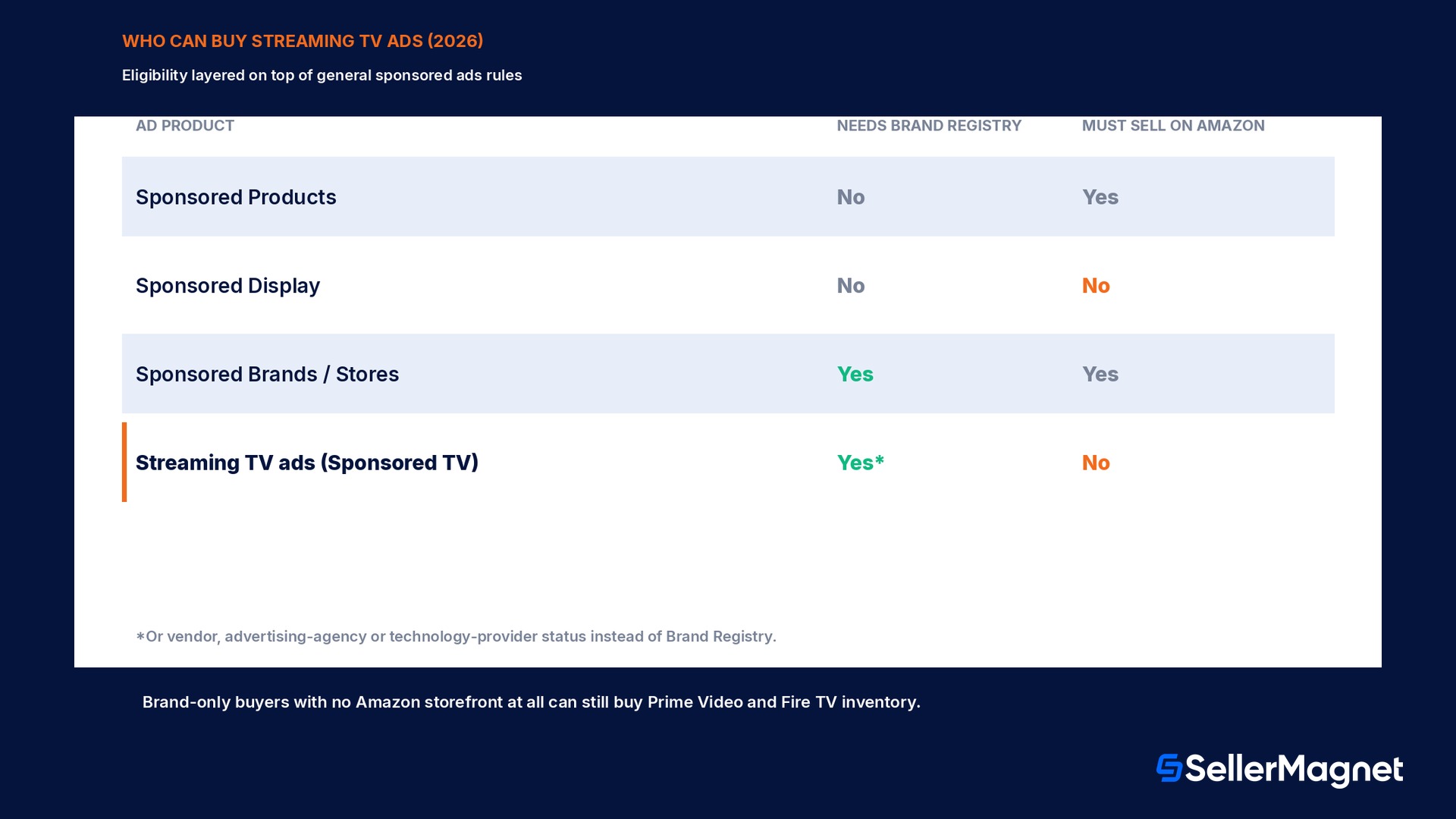
Streaming TV ads sit on top of two separate eligibility layers, and a seller needs to clear both. The first layer is Amazon's general sponsored ads eligibility: a professional seller, vendor, author, or advertising agency, with an account in good standing, the ability to ship to the country being advertised in, and a valid payment method on file. The second, narrower layer applies specifically to streaming TV and to Sponsored Brands or Stores: an enrollment in Amazon Brand Registry. Amazon's own Streaming TV ads page lists exactly who qualifies for that second layer: sellers enrolled in Brand Registry, vendors including book vendors and publishers, advertising agencies, technology providers, and brands in the United States whether or not they sell anything on the Amazon store at all. That last clause matters more than it looks: a business with no Amazon storefront can still buy Prime Video and Fire TV inventory as a pure brand-awareness play, which is a different door than the one most sellers use for Sponsored Products. For a seller who already sells on Amazon but has not enrolled in Brand Registry, Streaming TV, Sponsored Brands and Stores are all closed off at the same gate; Sponsored Products and Sponsored Display remain the only paid placements available until that enrollment is done.
Ad product
Needs Brand Registry
Needs to sell on Amazon
Sponsored Products
No
Yes
Sponsored Display
No
No (brands can target off-Amazon audiences too)
Sponsored Brands / Stores
Yes
Yes
Streaming TV ads (Sponsored TV)
Yes (or vendor/agency/tech-provider status)
No, brand-only buyers are explicitly supported
The real cost: self-service versus managed-service
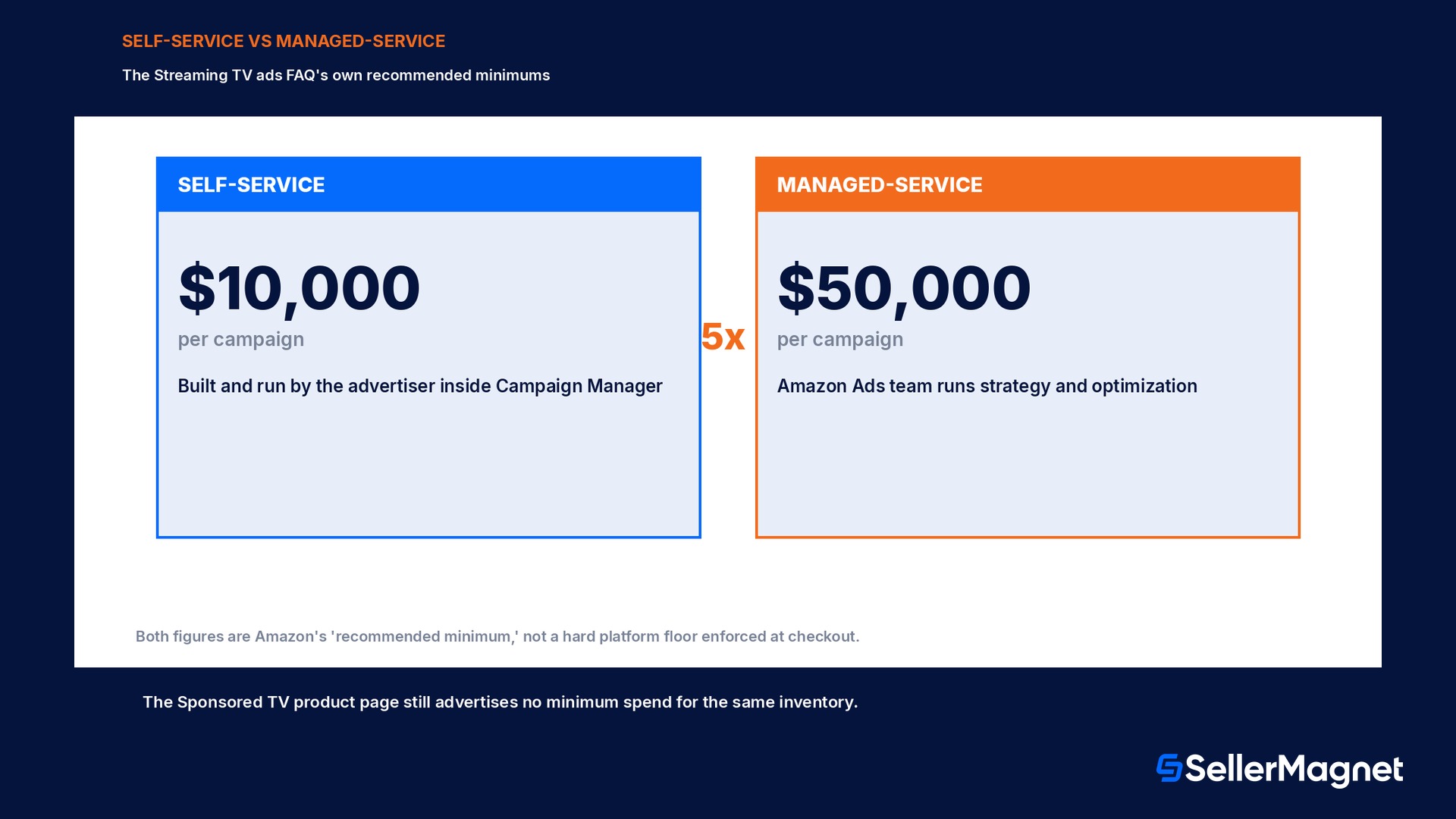
Once eligibility clears, the next question is what a campaign actually costs to run, and this is exactly where the two official pages pull in different directions. The current Streaming TV ads FAQ splits the product into two packages. A self-service package is built and managed inside Campaign Manager by the advertiser directly, the same self-serve workflow Sponsored TV always used, and it carries a recommended minimum of ten thousand dollars per campaign. A managed-service package hands campaign strategy, creative guidance and optimization to an Amazon Ads team, and it carries a recommended minimum of fifty thousand dollars per campaign, five times the self-service floor. Neither figure is a hard platform block the way a referral fee percentage is; Amazon's own wording is 'recommended minimum,' not a mandatory floor enforced at checkout, and the still-live Sponsored TV product page continues to advertise no minimum spend at all for exactly the same self-service buying path. The practical reading for a seller building a first budget: price a trial self-service campaign well under ten thousand dollars first inside Campaign Manager itself, since the live interface is the only place that will show whether a minimum is actually enforced for the specific account, before committing to either recommended figure as a hard number.
Package
Who runs it
Recommended minimum (Streaming TV ads FAQ)
Self-service
The advertiser, inside Campaign Manager
$10,000 per campaign
Managed-service
An Amazon Ads team
$50,000 per campaign
Where the ad actually shows up
Streaming TV ads run across Amazon's own streaming properties, Prime Video, Twitch and Fire TV, plus premium placements reached through Amazon Publisher Direct on third-party services the page names directly, Bloomberg and Crackle among them. Supply varies by locale, and Prime Video ad availability specifically depends on the country, so a seller advertising outside the United States should check the Prime Video ads locale list before assuming the same inventory is buyable everywhere Streaming TV ads itself is marketed. The ad format itself is full-screen video, the kind a viewer sees between or during streamed content rather than a banner on a product page, which puts it closer in feel to a traditional television commercial than to any Sponsored Products placement. This is also the detail that explains why eligibility does not require selling on Amazon: a brand buying Prime Video inventory is paying for attention on a screen, not for a click into a product listing, so the awareness case stands on its own even for a business with no Amazon storefront at all.
How this differs from Sponsored Display and DSP video a seller may already run
A seller already running Sponsored Display remarketing or DSP over-the-top video campaigns can mistake Streaming TV ads for the same thing bought a second way, and the mechanics are genuinely different. Sponsored Display and DSP retargeting work from first-party audience signals, shoppers who viewed a product, added it to cart, or lapsed, and the ad itself is typically a smaller display or short video unit placed across Amazon's own pages and partner sites. Streaming TV ads instead buy dedicated, full-screen TV-style inventory on named entertainment properties, and they do not require an existing Amazon DSP seat to access; a brand with no DSP history at all can still buy Streaming TV self-service through Campaign Manager once Brand Registry (or vendor/agency status) is in place. The two are complementary rather than competing: a seller running the activation order of Sponsored Products first, then Sponsored Display remarketing, then DSP retargeting, is already following the standard escalation path for first-party audience targeting, and Streaming TV ads sit above all three as a pure reach-and-awareness layer rather than a step inside that same funnel.
Worked example: what the 5x gap between the two packages means for a budget
Take a Brand Registry seller who already spends on Sponsored Products and Sponsored Display and is deciding whether a first Streaming TV ads test belongs in the self-service or managed-service tier. The two recommended minimums in the Streaming TV ads FAQ are not close: $50,000 for managed-service is exactly 5 times the $10,000 self-service figure, which means a managed-service commitment is not a modest step up, it is committing a budget 4 times larger than the self-service entry point on top of it. A seller whose entire monthly advertising spend across Sponsored Products, Sponsored Display and Sponsored Brands combined is well under $10,000 is being asked, by the managed-service figure alone, to commit more to a single new, untested channel than to every proven channel combined; that gap alone is a reason to start at self-service, inside Campaign Manager, rather than accept a managed-service pitch first. Because Amazon's own cost-per-impression rates for this inventory are not published on either the Sponsored TV or Streaming TV ads page, the only way to convert the $10,000 self-service minimum into an expected number of impressions or completed views is to request a live quote inside Campaign Manager at setup; building a budget from an estimated rate found outside Amazon's own interface risks being wrong by a wide margin, since TV-style video CPMs vary heavily by targeting, season and placement mix. The one number a seller can plan against with confidence before that quote is the 5x ratio itself: it sets how much more a managed-service test actually costs relative to doing the same self-service test twice. Whichever tier is chosen, read the resulting branded-search and sales trend against the weeks before the campaign in SellerMagnet's analytics, since a Streaming TV test with no attributable clicks still needs a before/after sales baseline to judge.
How to set up a first Streaming TV ads campaign
Confirm eligibility - Check Brand Registry enrollment, or vendor, advertising-agency or technology-provider status, inside Seller Central or the advertising console before building anything.
Open Campaign Manager - In Amazon Ads Agent, start a Display, Video and Audio campaign; Streaming TV ads are bought inside this campaign type, not a separate Sponsored TV tab.
Pick self-service or managed-service - Self-service means building and running the campaign directly; managed-service hands strategy to an Amazon Ads team at a materially higher recommended minimum.
Set the locale and placements - Confirm Prime Video availability for the target country before assuming the same inventory as the US is buyable there.
Upload full-screen video creative - Use TV-style video built for Prime Video, Twitch and Fire TV, not a resized Sponsored Products image or Sponsored Display banner.
Track view-through and branded search - Measure completed view rate and branded search lift rather than last-click ROAS, and compare the trend in SellerMagnet's analytics against the weeks before launch.
Readiness checklist before spending a dollar on streaming TV
Confirm Brand Registry enrollment is active, or confirm vendor, advertising-agency or technology-provider status; without one of these, Streaming TV, Sponsored Brands and Stores are all unavailable.
Have a valid payment method on file and an account in good standing; sponsored ads eligibility checks both before any campaign can launch.
Decide self-service or managed-service before pricing a budget: self-service means building and running the campaign inside Campaign Manager directly, managed-service means an Amazon Ads team runs strategy and optimization for a materially higher recommended spend.
Check the Prime Video ads locale list if advertising outside the United States; supply sources and availability vary by country.
Have full-screen video creative ready, not a resized Sponsored Products image or a Sponsored Display banner; Streaming TV inventory is TV-style video, not a product-page unit. Keep the underlying listing itself conversion-ready with SellerMagnet's listing optimizer before spending on awareness that sends viewers back to it.
Price a small self-service trial campaign inside Campaign Manager itself before committing to either the $10,000 or $50,000 recommended figure, since the two official Amazon pages disagree and only the live interface shows what the account is actually asked to spend.
Mistakes sellers make with streaming TV ads
Assuming Sponsored TV was shut down and skipping the format entirely: the product page itself calls this a rename, not a retirement, and existing campaigns keep running unchanged.
Treating 'no minimum spend' on the Sponsored TV page as the current rule without also checking the Streaming TV ads FAQ, which states real recommended minimums for the same inventory.
Trying to buy Streaming TV, Sponsored Brands or Stores without Brand Registry enrollment and concluding the format is broken, when the real blocker is the eligibility gate, not the platform.
Reusing a Sponsored Display banner or a product-page image as the ad creative; Streaming TV inventory is full-screen video and needs creative built for that format.
Assuming Prime Video ad inventory is available in every country Streaming TV ads is marketed in, instead of checking the Prime Video locale list for the specific market.
Is Sponsored TV still available in 2026?
Do I need to sell on Amazon to buy Streaming TV ads?
What is the real minimum spend for Streaming TV ads?
Do I need Amazon DSP to run Streaming TV ads?
Where do Streaming TV ads actually appear?
How is this different from Sponsored Display?
Can an agency buy Streaming TV ads on behalf of a brand?
Stop Juggling Tools. SellerMagnet Combines Everything You Need.