Amazon Business Discount Badge 2026: The New B2B Pricing Rules
R
RenéFreelance Amazon Editor
|
13 min read
A business buyer searching Amazon Business sees a different price block than a regular shopper: strikethrough pricing, a savings percentage, and, as of October 2026, a new red Business Discount badge that most single-unit B2B offers have never carried before. Amazon rolled the badge out to replace the old Business Savings Blue Badge (BSBB) for single-unit business prices, and it drops the one requirement that kept a lot of otherwise-discounted listings out of the running: a 4-star rating. Quantity discounts keep their own, separate badge path unchanged. None of this is automatic just because a business price exists. Amazon computes savings against a validated reference price (VRP), the same was-price or list-price logic used on the consumer side, and a listing without one shows no strikethrough, no savings percent, and no badge no matter how deep the discount is. This guide works through exactly how the badge is earned, how it differs from strikethrough-only display and from the legacy BSBB, a worked example showing what the same business price looks like at 2% vs 5% savings, the FBA fee-discount angle most sellers miss, and the mistakes that leave a real discount invisible to B2B buyers.
The Business Discount badge is a new red badge on Amazon Business, launched October 2026, that displays automatically on single-unit business prices offering at least 5% savings against a validated reference price. It replaces the old Business Savings Blue Badge for single-unit pricing and drops the 4-star rating requirement that badge used to need. A smaller 2% savings against the same validated reference price still earns strikethrough pricing without the badge. Quantity discounts are untouched: a 3% first-tier discount plus a 4-star rating still earns the legacy badge on that path. Either way, nothing displays without a validated reference price on the listing.
What is the Business Discount badge, and what changed in October 2026?
Amazon announced the Business Discount badge to Seller Forums in October 2026 as a direct replacement for the Business Savings Blue Badge (BSBB) on single-unit business prices. The mechanics are the same reference-pricing system Amazon already used for B2B savings claims, just with a new, more prominent price block: when a single-unit business price offers at least 5% savings against a validated reference price (VRP), the offer automatically earns the badge, shown with strikethrough pricing and the savings percentage in red across both search results and the product detail page. The badge is described as reaching millions of organizations that buy on Amazon Business, and Amazon's own framing in the announcement is that B2B sales of products carrying business pricing grew nearly double the rate of products without it in 2026, which is the stated reason for making qualifying discounts more visible rather than buried in a plain price. The badge is assigned automatically; there is no separate enrollment or application, only the underlying business price and reference price have to clear the thresholds below.
The three thresholds: badge, strikethrough, and the legacy quantity-discount badge
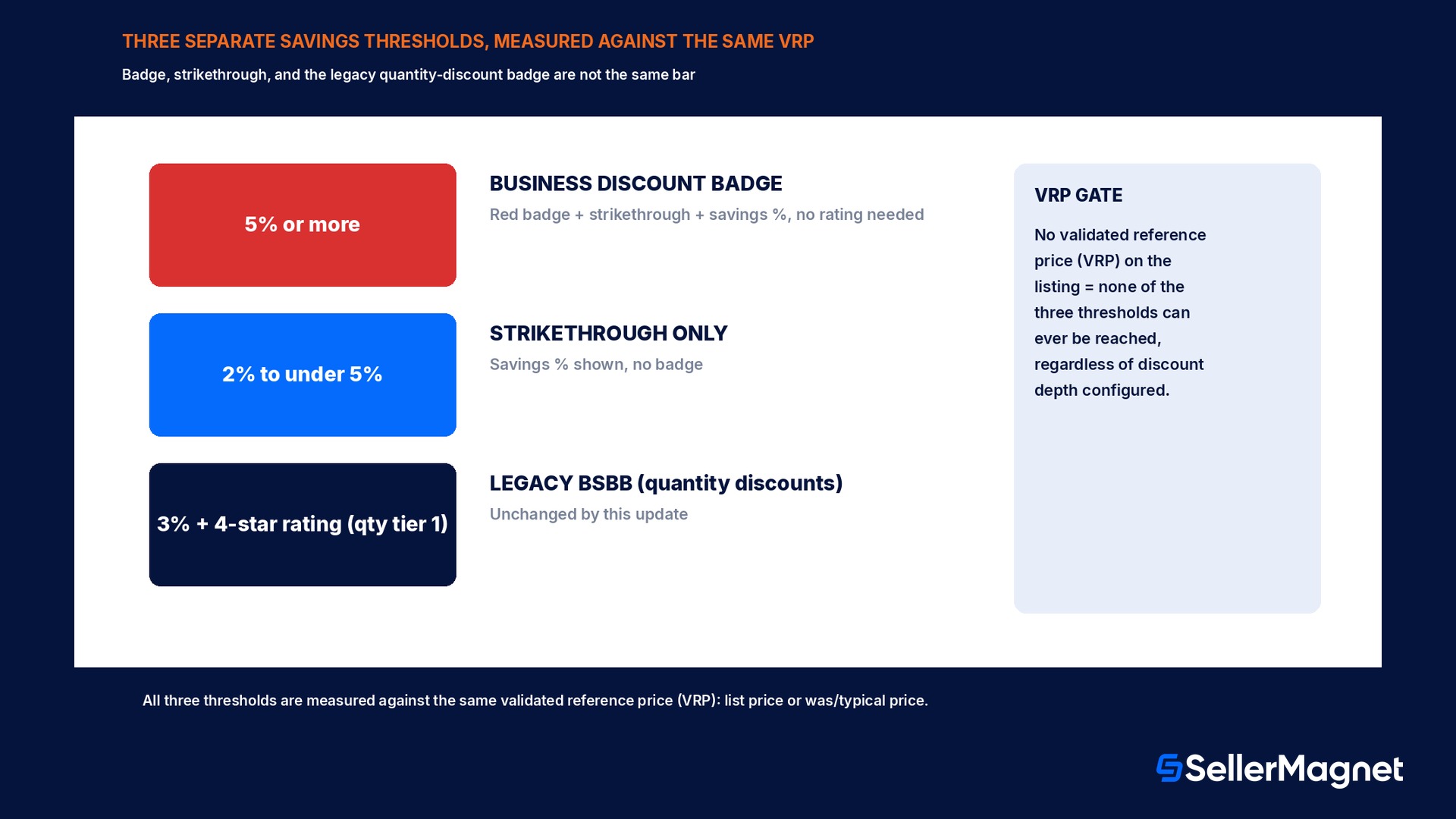
Three separate rules now govern what a B2B buyer actually sees next to a price, and mixing them up is the most common source of confusion. First, the new Business Discount badge needs a single-unit business price offering at least 5% savings against a validated reference price; it shows the modernized red price block with badge, strikethrough, and savings percentage, and it does not require any star rating. Second, strikethrough pricing alone, without the badge, displays once a single-unit business price offers at least 2% savings against a validated reference price; between 2% and 5% savings a listing shows the discount but not the badge itself. Third, the legacy Business Savings Blue Badge (BSBB) still exists, unchanged, for quantity discounts specifically: a 3% or greater discount on the first (lowest-quantity) tier of a quantity discount structure, combined with a 4-star product rating, still earns that older blue badge. A single-unit business price and a quantity discount on the same listing are judged against these two separate paths independently.
Price type
Minimum savings vs VRP
Star rating needed
What displays
Single-unit business price
5% or more
Not required
Business Discount badge + strikethrough + savings % (red)
Single-unit business price
2% to under 5%
Not required
Strikethrough + savings %, no badge
Single-unit business price
Under 2%, or no VRP
N/A
Standard price only, no strikethrough
Quantity discount, 1st tier
3% or more off business price
4 stars or higher
Legacy Business Savings Blue Badge (BSBB)
Quantity discount, 1st tier
Under 3%, or rating under 4 stars
N/A
Quantity price shown, no BSBB
No validated reference price, no badge, no matter the discount
Every one of these thresholds is measured against a validated reference price (VRP), and Amazon is explicit that this is the same underlying reference-price logic used on the regular (B2C) store, not a separate B2B number. The VRP is typically the list price or the was/typical price (called the typical price in the US, median price in some EU stores, previous price in Mexico and Brazil), computed automatically from recent sales history while excluding short promotional dips such as Black Friday or Cyber Monday pricing, unless that promotional price ran long enough to represent the typical selling price for the product. A business-only offer, one with a business price and no consumer-facing price at all, cannot have a was/typical price computed from consumer sales, so only a provided list price can serve as its VRP. Without any validated reference price, a single-unit business price shows no strikethrough, no savings percent, and no badge, even at a very deep discount, because Amazon has no verified baseline to measure the saving against. This is the single most common reason a seller's business discount looks identical to the standard price on Amazon Business despite being correctly configured in Seller Central.
Set a list price on new products before relying on a was price
A was/typical price needs sales history to compute, so a newly listed product has no VRP yet. Providing a list price (Seller Central's product list-price field) gives Amazon a reference price to validate against immediately, instead of waiting for enough sales history to build a was price.
Business Discount badge vs the legacy Business Savings Blue Badge
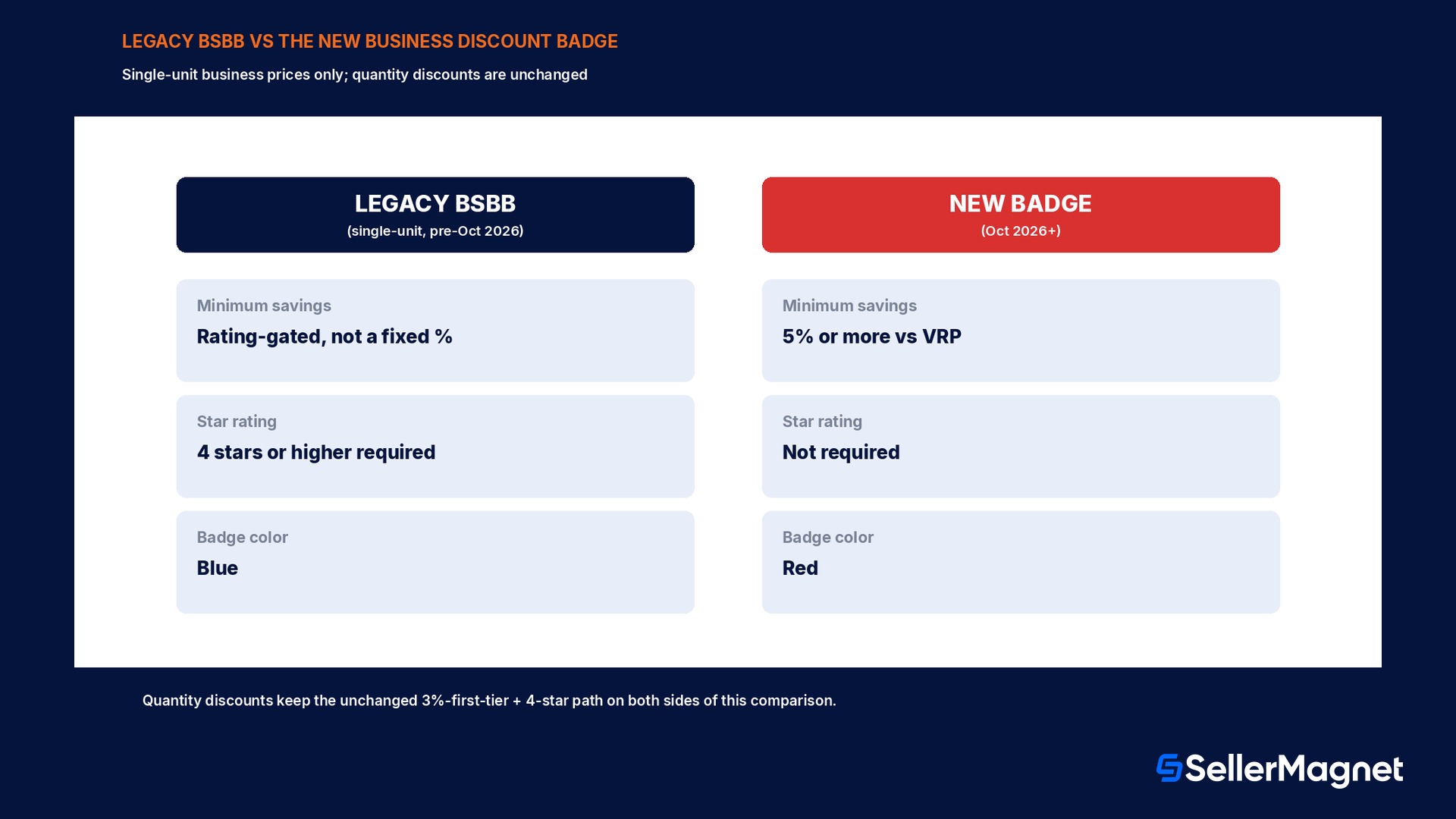
The badge swap only touches single-unit business pricing; quantity discounts were not changed by this update. A seller who only ever used quantity-tiered B2B pricing sees no difference at all from this announcement, since the 3%-off-first-tier-plus-4-star-rating BSBB path for quantity discounts stays exactly as it was. The actual change lands on single-unit business prices, where the 4-star rating requirement disappears entirely for the new badge, and the savings bar for the badge itself (5%) sits above the bar for strikethrough-only display (2%). A product with a 3.5-star rating and a 6% single-unit business discount, which would not have qualified for the old BSBB under the star-rating rule, now qualifies for the new badge because the rating requirement was dropped for this price type.
Legacy BSBB (single-unit, pre-Oct 2026)
New Business Discount badge (Oct 2026+)
Applies to
Single-unit business price
Single-unit business price
Minimum savings vs VRP
Not rating-gated at a fixed %; practically required deeper discounts to clear review
5% or more
Star rating requirement
4 stars or higher
None
Badge color / block
Blue badge
Red badge, strikethrough, savings % in modernized price block
Quantity discounts
Unaffected, still 3% first tier + 4 stars
Unaffected, still 3% first tier + 4 stars
Worked example: the same product at 2%, 5%, and 8% off
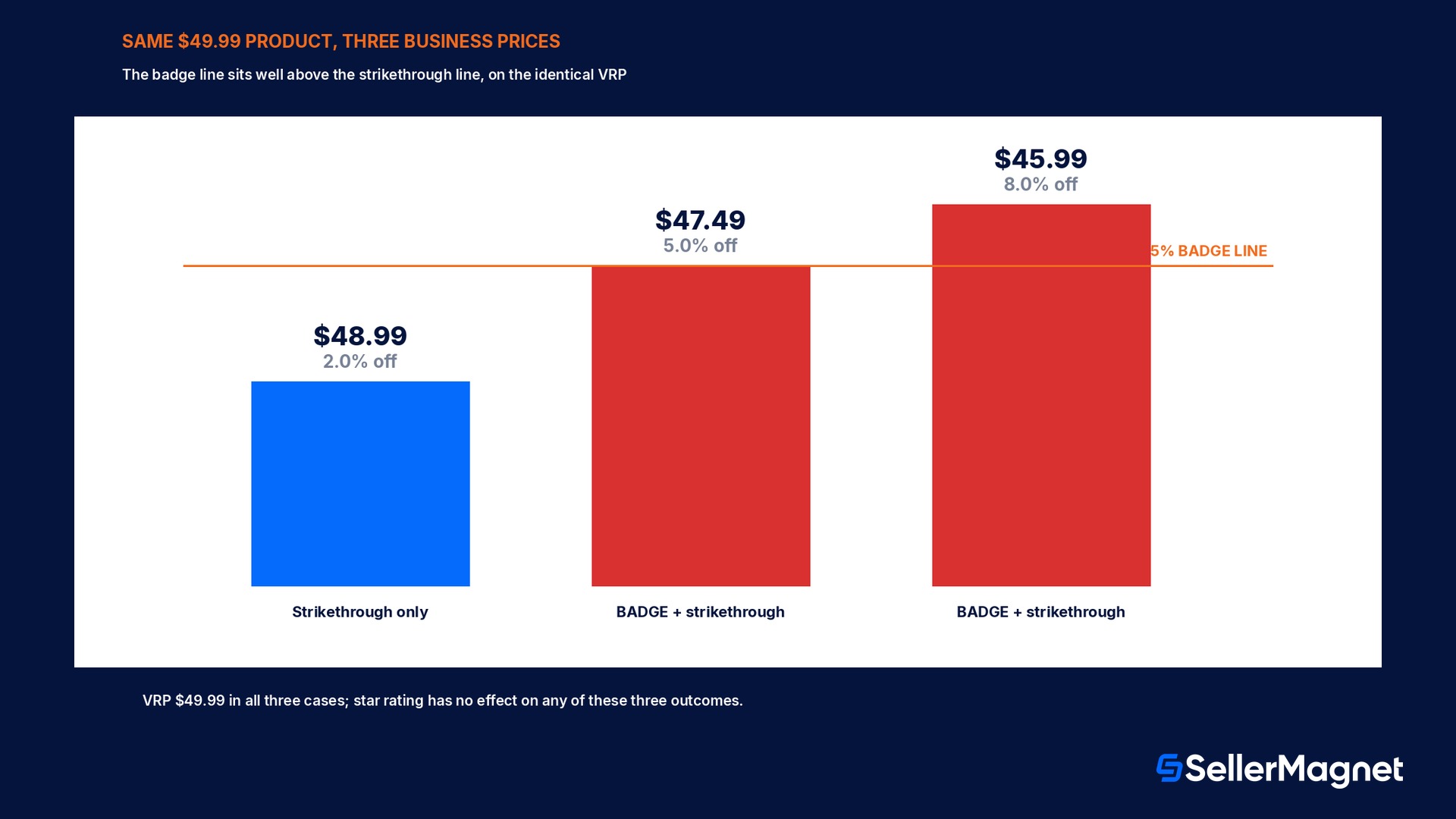
Take a product with a standard retail price of $49.99 and a validated reference price of $49.99 (no separate was-price gap, to isolate the business-price effect alone). At a $48.99 single-unit business price, the discount is $1.00, or 2.0% off the VRP: this clears the strikethrough minimum, so Amazon Business shows a strikethrough $49.99 next to $48.99 with a 2% savings label, but no badge. At a $47.49 single-unit business price, the discount is $2.50, or 5.0% off the VRP: this clears the badge minimum exactly, so the same listing now carries the red Business Discount badge, strikethrough $49.99, $47.49, and a 5% savings label, with no star-rating requirement to clear. At a $45.99 single-unit business price, the discount is $4.00, or 8.0% off the VRP, comfortably above the 5% badge threshold, still with the badge and a larger savings percentage shown. The product's star rating, whether 3 stars or 5, has no effect on any of these three outcomes, because the star-rating gate only applies to the separate quantity-discount BSBB path, not to single-unit pricing.
Business price
Savings vs $49.99 VRP
What Amazon Business displays
$48.99
$1.00 (2.0%)
Strikethrough + 2% savings, no badge
$47.49
$2.50 (5.0%)
Business Discount badge + strikethrough + 5% savings
$45.99
$4.00 (8.0%)
Business Discount badge + strikethrough + 8% savings
A fractionally deeper discount is the difference between no badge and a badge
In this example, moving the business price down by exactly $0.50 more, from $48.99 to $48.49 (3.0% off), still would not earn the badge; only crossing $47.49 (5.0% off) does. Pricing a few cents below the 5% line, instead of just above the 2% strikethrough line, is the difference between a plain discount and badge-level visibility.
The separate FBA fee-discount angle at 3%
A third threshold exists alongside the badge and strikethrough rules, and it is easy to conflate with them because it also uses a percentage off standard price: business prices or quantity discounts of 3% or more off the standard price may separately qualify for a reduced FBA multi-unit fulfillment fee on business orders, through Amazon's FBA multi-unit fulfillment fee discount program. This 3% figure is unrelated to the 2% strikethrough threshold, the 5% badge threshold, and the 3%-first-tier BSBB threshold for quantity discounts; a single-unit business price can clear the 3% fee-discount bar while sitting below the 5% badge bar, or clear the badge bar while the fee-discount program evaluates it separately on its own terms. Checking all three thresholds against the same VRP, rather than assuming one implies the others, is the only way to know which displays and which fee treatment actually apply to a given listing.
Mistakes that leave a real discount invisible to B2B buyers
Setting a business price with no list price and no sales history on a new ASIN: with no validated reference price yet, no strikethrough, savings percent, or badge can display, regardless of the discount depth configured.
Assuming star rating still matters for single-unit business pricing: the new badge dropped that requirement; a 3-star product with a 5%+ single-unit discount still earns the badge.
Pricing a single-unit business discount at exactly 2% to 4.9% off and expecting the badge: that range earns strikethrough and a savings percentage, but not the red Business Discount badge, which needs 5% or more.
Relying on a promotional price (a Black Friday or Cyber Monday price) to anchor the was-price calculation: Amazon's automated was-price logic excludes short promotional dips unless the promotional price ran long enough to represent the typical selling price.
Treating the 3% FBA fee-discount threshold, the 3%-first-tier BSBB threshold for quantity discounts, and the 5% single-unit badge threshold as the same number: they are three independent thresholds measured for different purposes.
Forgetting that quantity discounts and single-unit business prices are judged on separate paths: a listing can show the new badge on its single-unit price while its quantity tiers still need the unchanged 4-star-plus-3% BSBB path to show their own badge.
Pricing business discounts without guessing at the reference price
The reference price a business discount is measured against is computed by Amazon from recent sales history and is not directly visible before a price change goes live, which is exactly why a seller can configure what looks like a solid discount and still see no badge appear. SellerMagnet's Repricer can run a parallel business-price rule alongside the standard repricing strategy, keeping a single-unit business price a fixed percentage below the current standard price rather than a fixed dollar amount, so the gap against a moving reference price stays consistent as the standard price itself changes with the market.
SellerMagnet Analytics tracks B2B order volume and business-price performance in the same dashboard as standard sales, making it possible to see whether a specific ASIN's business-price change actually moved B2B order volume, rather than inferring it indirectly from a change in Seller Central's own business pricing reports days later.
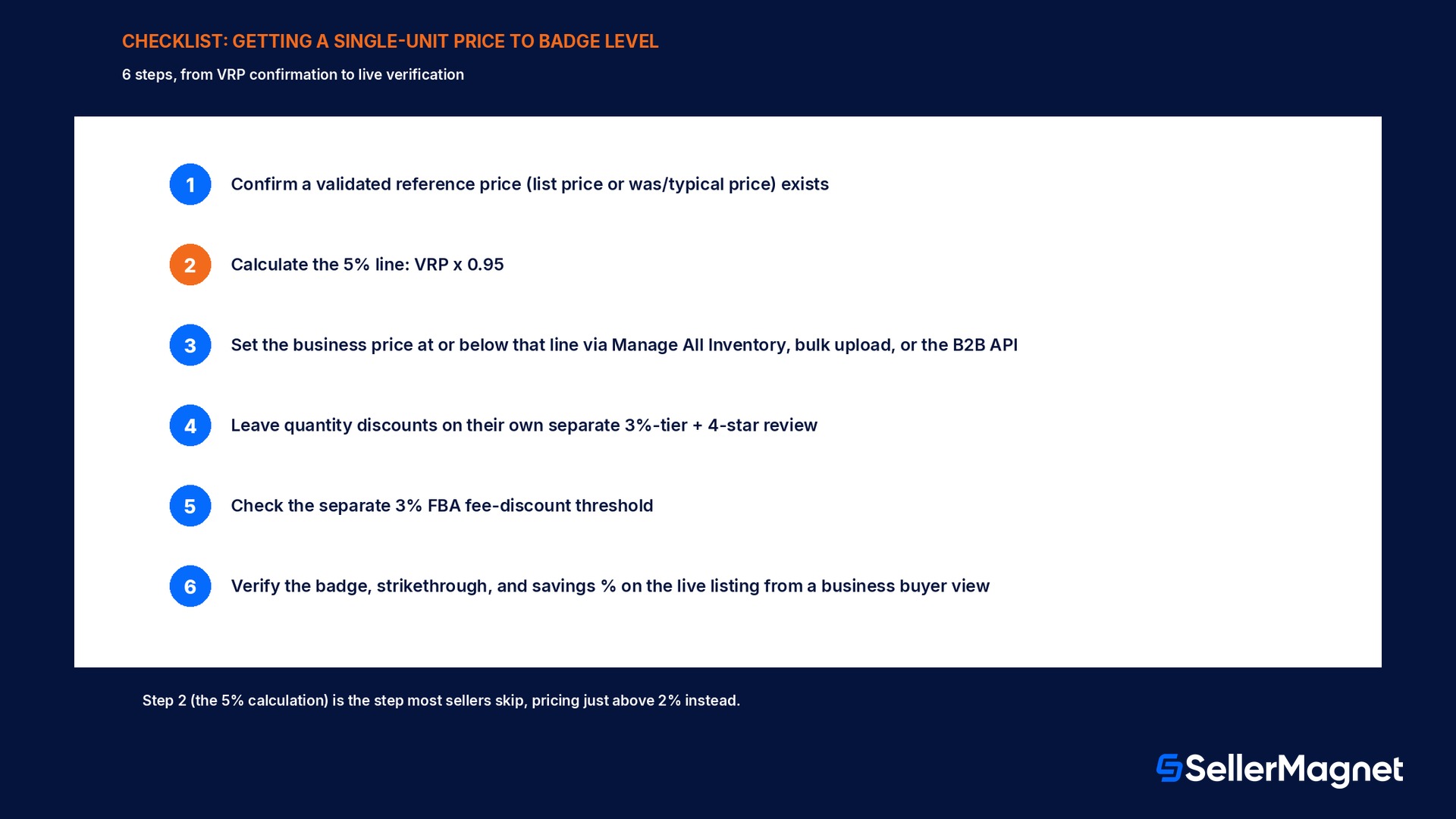
Checklist: getting a single-unit business price to badge level
How to earn the Business Discount badge on a single-unit business price
Confirm a validated reference price exists - Check the product's list price (set one for new ASINs with no sales history) or confirm a was/typical price is computed from recent non-promotional sales.
Calculate the 5% line against that reference price - A single-unit business price at or below 95 percent of the validated reference price clears the badge threshold.
Set the business price through Manage All Inventory, bulk upload, or the B2B API - Business prices cannot exceed the standard price; if submitted higher, the standard price displays to business customers instead.
Leave quantity discounts on their own separate review - A quantity discount's first tier still needs a 3% or greater discount off the business price plus a 4-star or higher product rating for the legacy BSBB; the badge change does not affect this path.
Check the FBA fee-discount threshold separately - A business price or quantity discount of 3% or more off standard price may also qualify for a reduced FBA multi-unit fulfillment fee, independent of whether it clears the 5% badge line.
Verify on the live listing - Search the ASIN from a registered Amazon Business buyer account (or the equivalent business view) to confirm the strikethrough, savings percent, and badge actually display as expected.
When did Amazon launch the Business Discount badge?
Amazon announced the Business Discount badge to Seller Forums in October 2026 as a replacement for the Business Savings Blue Badge (BSBB) on single-unit business prices.
What savings percentage earns the Business Discount badge?
At least 5% savings against a validated reference price (VRP) on a single-unit business price earns the badge automatically.
Do I need a 4-star rating for the new badge?
No. The new Business Discount badge does not require any star rating, unlike the legacy BSBB it replaces for single-unit pricing.
What is the minimum savings for strikethrough pricing without the badge?
At least 2% savings against a validated reference price displays strikethrough pricing and a savings percentage, even below the 5% needed for the badge itself.
Does this change affect quantity discounts?
No. Quantity discounts keep their own unchanged rule: a 3% or greater discount on the first tier plus a 4-star or higher rating still earns the legacy Business Savings Blue Badge on that path.
What happens if there is no validated reference price?
No strikethrough, savings percentage, or badge displays at all, regardless of how deep the business discount is, because Amazon has no verified baseline to measure savings against.
Is the 3% FBA fee discount the same threshold as the 5% badge?
No. They are independent: a 3% or greater discount off standard price may separately qualify for a reduced FBA multi-unit fulfillment fee, unrelated to the 5% single-unit badge threshold or the 3%-first-tier quantity-discount BSBB rule.
Do I need to enroll separately to get the badge?
No. The badge is assigned automatically once a single-unit business price clears the 5% savings threshold against a validated reference price; there is no separate application.
Stop Juggling Tools. SellerMagnet Combines Everything You Need.