Amazon Listing Quality Score 2026: The Enhance Tab Explained
R
RenéFreelance Amazon Editor
|
11 min read
Open Manage Products in Seller Central and, alongside the familiar All and Fix tabs, there is now an Enhance tab that groups listings by how complete and correct their product detail pages are. That grouping comes from Amazon's Listing Quality Indicator, a score that did not exist in this form a year ago and that most sellers have never read a definition of, even though it now decides which of their ASINs get flagged with AI-generated improvement suggestions and which do not. The indicator is not a single number sellers can look up on a dashboard; it is a five-tier classification, Poor, Fair, Good, Great or Optimized, built from two pillars, content quality and multimedia quality, that Amazon's own help pages describe in specific, checkable terms. This guide works from Amazon's Enhance Listings and Manage Products help pages to explain exactly what the two pillars measure, what the five tiers mean, how the Enhance tab's AI suggestions actually work, why the score is explicitly not a ranking signal, and a worked comparison of what ignoring it actually costs in hours across a catalog.
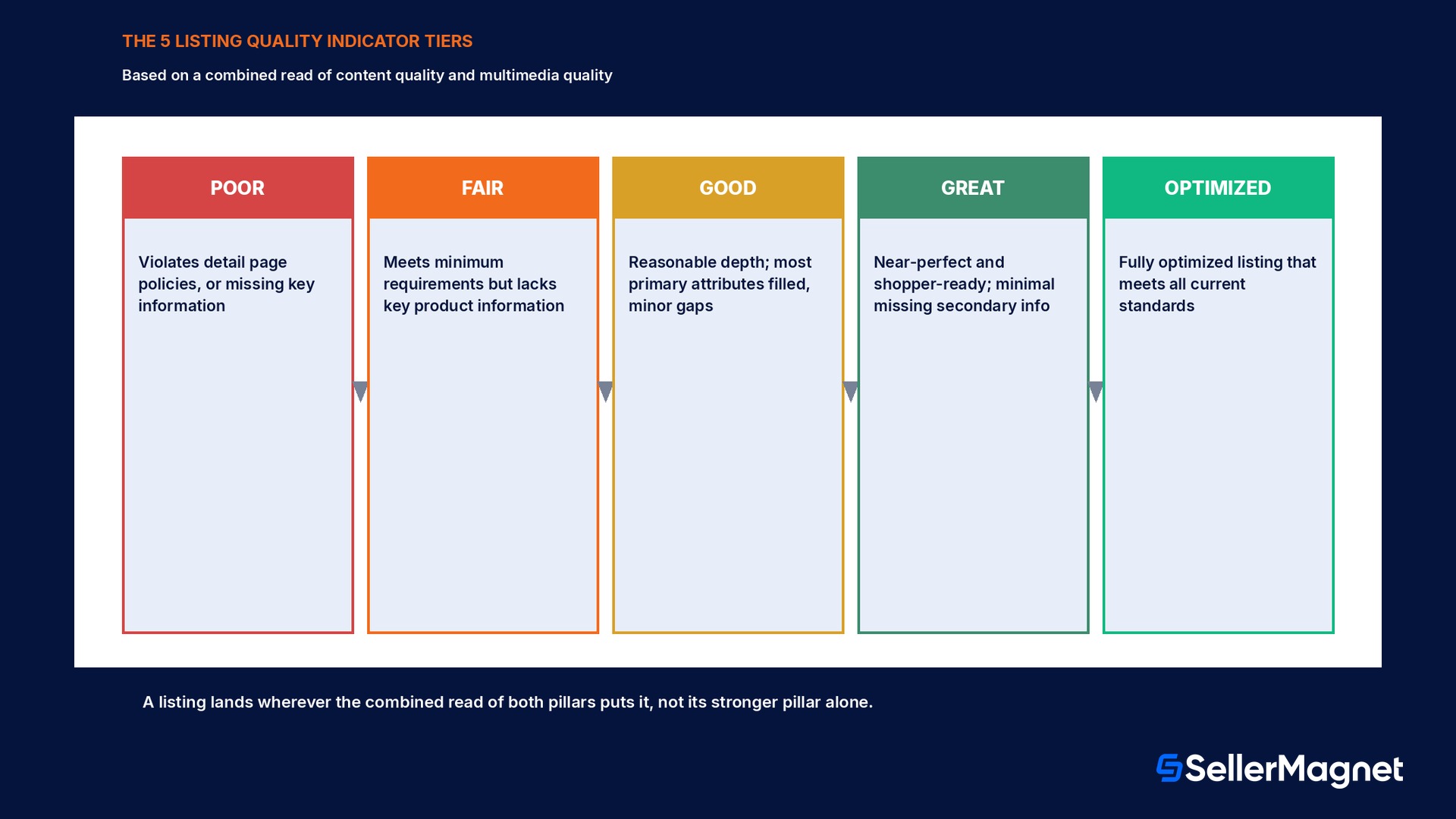
Amazon's Listing Quality Indicator sorts every listing into one of five tiers, Poor, Fair, Good, Great or Optimized, based on two pillars: content quality (titles, bullet points, key attributes) and multimedia quality (images and A+ content). The Enhance tab on Manage Products shows which listings need work and offers AI-generated suggestions per attribute. It is a directional indicator of how complete and correct a listing is, not a predictor of search ranking or sales.
What the Listing Quality Indicator actually measures
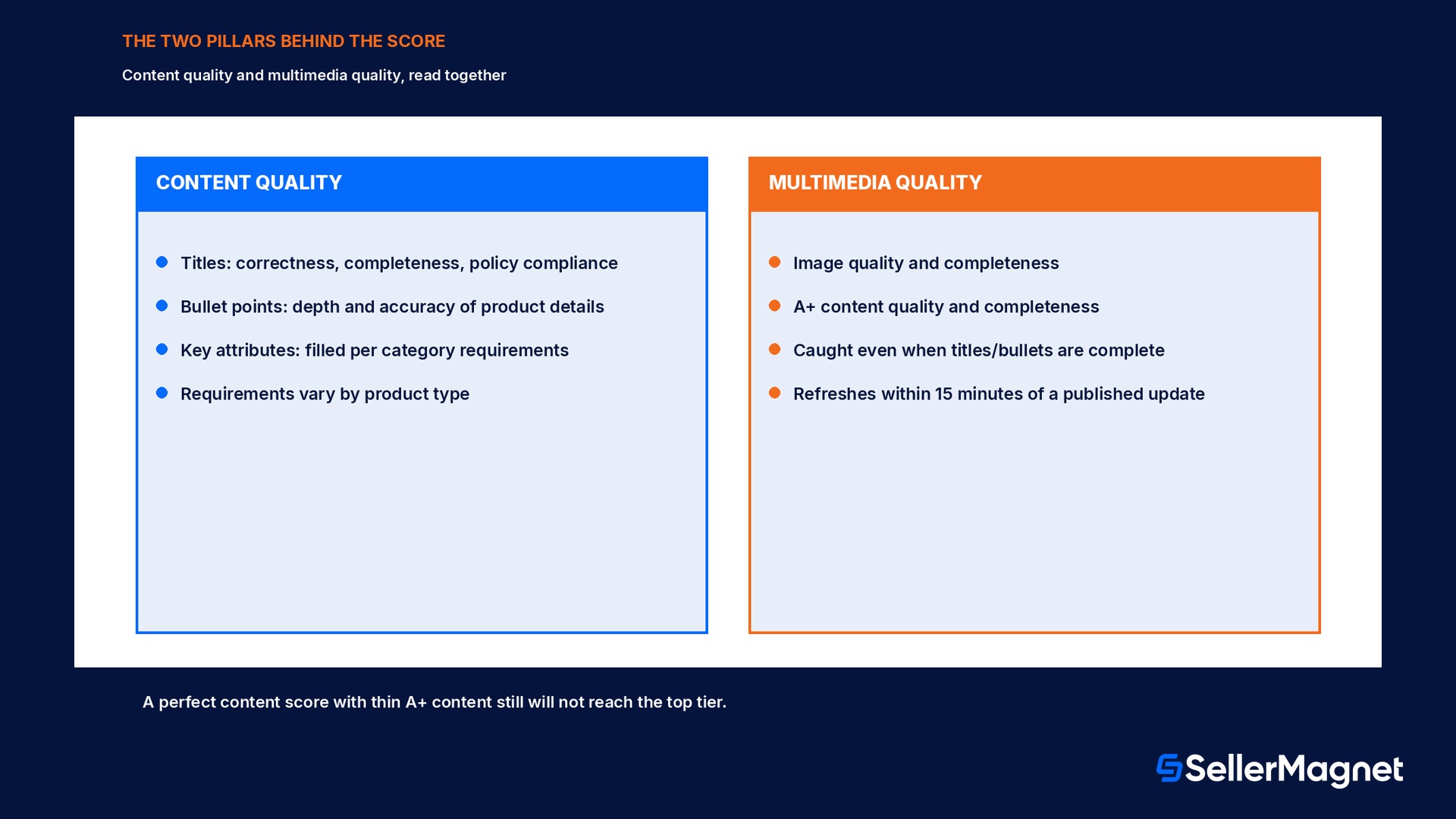
Amazon's Enhance Listings help page defines the indicator in two sentences that are worth reading literally rather than skimming. The Listing Quality Indicator measures how complete and correct your product detail page is, based on two pillars. The first, content quality, evaluates product data such as titles, bullet points and key attributes for correctness, completeness and policy compliance, and Amazon states plainly that requirements vary by product type, so a toy listing and an electronics listing are not held to the identical checklist. The second, multimedia quality, reviews image and A+ content quality and completeness, which is the pillar that catches a listing with a technically complete title and bullets but thin or missing visual content. A listing's classification sits wherever the combined read of both pillars lands it, not wherever its stronger pillar alone would place it, which is why a listing with perfect bullet points and no A+ content still will not reach the top tier.
Tier
What it means
Poor
Listing violates Amazon detail page policies, for example special characters in the title, or the listing is missing key information.
Fair
Meets minimum requirements and all Amazon policies but lacks some key product information; shoppers may need more details before purchasing.
Good
Reasonable depth of information, such as a high-quality title and images with most primary attributes filled, with minor gaps remaining.
Great
Near-perfect and shopper-ready; complete and high quality in both content and multimedia, with minimal missing secondary information.
Optimized
Fully optimized listing that meets all current standards.
How the Enhance tab's AI suggestions actually work
The Enhance tab lives on the Manage Products dashboard, next to All and Fix, and filters the catalog down to listings with a status of Enhance listing, meaning they are actively selling but have room to perform better. Clicking Enhance on a specific ASIN opens a side panel listing every opportunity to improve that listing's quality, the specific factors impacting it, and, where available, an AI-generated recommendation for each attribute, together with the reason behind that recommendation shown underneath it. A seller is never forced to accept the suggestion as written: the panel lets a seller enter their own value, modify the AI-provided text, or accept it as-is, and a thumbs up or down on each suggestion feeds Amazon's own feedback loop on suggestion quality. Checking the box next to an attribute and clicking Save and Finish publishes the update, and Amazon states the Listing Quality Indicator refreshes within 15 minutes of that publish, not instantly and not on the next day's batch job. Once every flagged opportunity on a listing is addressed, it drops out of the Enhance view entirely, which is the practical signal that a given ASIN is done, not a separate score to monitor.
AI-generated content can go beyond what you wrote
Amazon's own help page warns that AI-generated content can include features and claims that were not in the listing's original content. Read every suggested attribute before accepting it, especially on regulated or safety-sensitive categories, rather than treating Save and Finish as a one-click action.
What the score is not: a ranking signal
Amazon's own description of the Listing Quality Indicator includes a limitation sellers tend to skip past because it reads like boilerplate. The indicator measures how a listing's content and attributes compare to best-in-class listings in similar categories, evaluating completeness, accuracy and policy compliance, but it does not account for dynamic factors such as offer price, fulfillment or seasonality. Amazon's own wording states the conclusion directly: while high-quality listings are generally better positioned to perform, the score should be used as a directional indicator rather than a predictor of visibility or sales. A listing can sit at Optimized and still lose the Buy Box on price or fulfillment speed; a listing can sit at Fair and still sell, just with more friction than a complete one would need. Treat the tier as a content health check, not a search-ranking or conversion guarantee.
A worked comparison: the hours a catalog actually saves using the Enhance tab
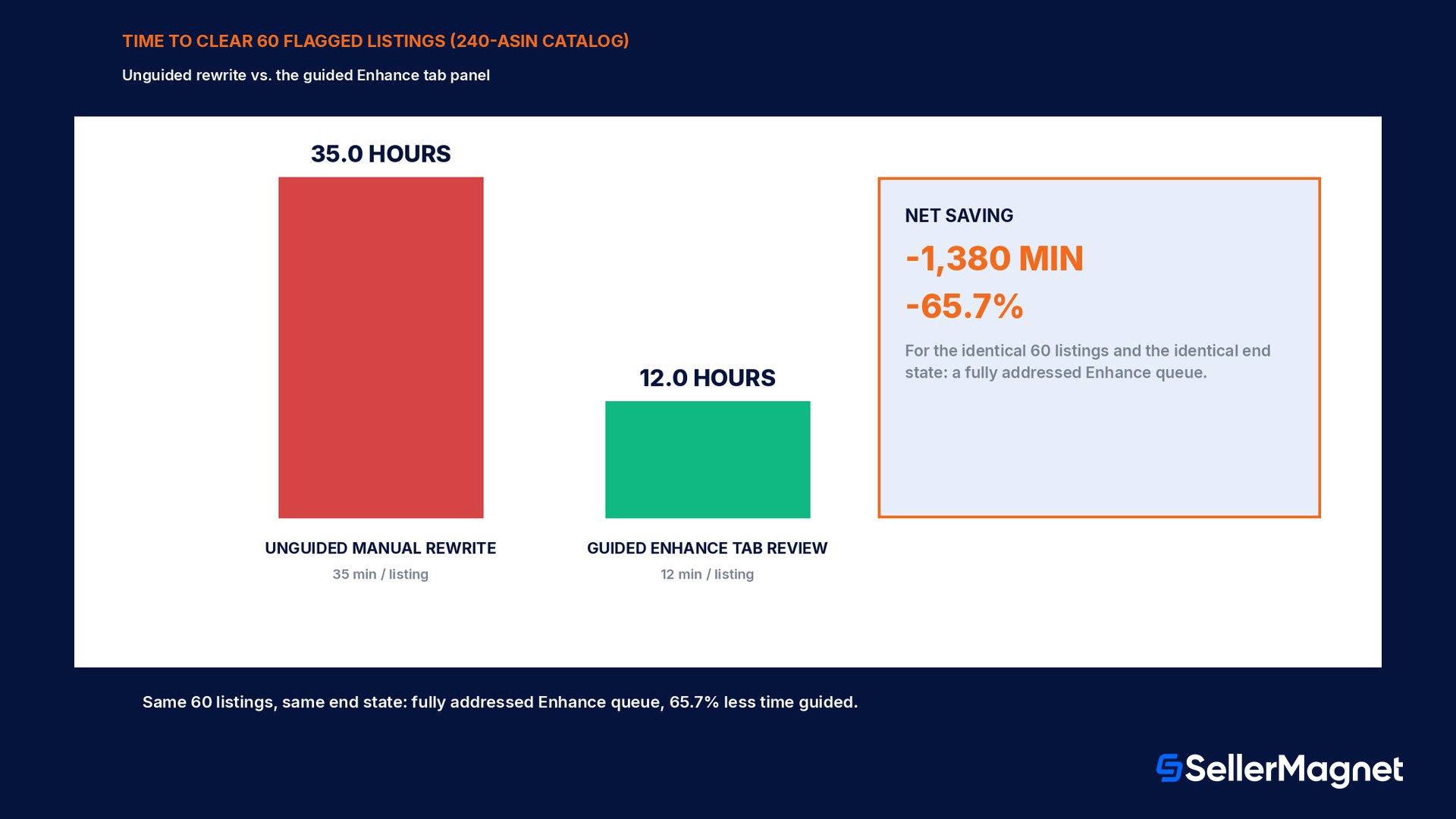
Take a seller with a 240-ASIN catalog where the Enhance tab currently flags 60 listings, 25.0% of the catalog, as Fair or Poor. Fixing one of those listings unguided, meaning pulling up the live listing, deciding which fields are weak, writing new titles, bullets and attribute values from scratch and cross-checking category policy requirements, runs about 35 minutes per listing in a reasonably careful workflow; across 60 listings that is 2,100 minutes, 35.0 hours. Fixing the same 60 listings through the guided Enhance side panel, where the specific weak attributes and an AI-generated starting suggestion are already presented per listing and a seller mainly reviews, edits and approves, runs closer to 12 minutes per listing; across 60 listings that is 720 minutes, 12.0 hours. The guided path saves 1,380 minutes, a 65.7% reduction in the time this specific cleanup pass takes, for the identical 60 listings and the identical end state, a fully addressed Enhance queue. The saving scales with how much of the catalog sits below Great, not with catalog size alone, which is why running the Enhance tab as a routine rather than a one-off project is the detail the Seller Forums tip below is getting at.
Approach
Minutes per listing
Time for 60 flagged listings
Unguided manual rewrite
35 min
2,100 min (35.0 hours)
Guided Enhance tab review
12 min
720 min (12.0 hours)
Difference
-23 min
-1,380 min (65.7% less time)
Make the dashboard a habit, not a cleanup project
A Seller Forums thread on the newer Manage Products experience puts the operating advice in one line sellers keep repeating back to each other: make the dashboard a weekly habit rather than a once-a-quarter cleanup. The same thread ties the Enhance tab to a second, related surface, the Fix tab, which separately flags suppressed listings, stranded inventory and restriction flags, and notes that a suppressed listing can now be tracked and confirmed fixed across the Listing Quality Dashboard, the Suppressed tab in Manage Inventory, and Fix Stranded Inventory, three places that are meant to agree with each other once the fix lands. The practical read is that Enhance and Fix solve different problems, listings that are selling but could perform better versus listings that are blocked from selling at all, and a seller who only checks Fix because it feels more urgent will let an Enhance queue of weaker-but-still-live listings grow quietly in the background.
A different metric with a similar name: the India STEP programme's PLQS
Sellers researching this topic across marketplaces will run into a second, differently defined metric that shares a name pattern: the Product Listing Quality Score, or PLQS, published inside Amazon's India-specific STEP (Seller Transparency and Enforcement Policy) performance-linked benefit programme. Amazon's own India help page gives the formula explicitly: PLQS equals the sum, across listings, of each listing's content-quality score multiplied by the customer views that listing received, divided by total customer views across the catalog, a traffic-weighted average rather than a flat tier. PLQS feeds STEP level classification alongside cancellation rate, late dispatch rate and other fulfillment metrics, and is scoped to the India marketplace's seller-benefit programme. It is related in spirit, both measure listing content completeness, but it is not the same figure as the global Listing Quality Indicator described above, is not shown on the Enhance tab, and does not use the five-tier Poor-to-Optimized scale. A seller selling only outside India will not see PLQS at all; a seller selling in India should not assume their Enhance tab tier and their PLQS number are the same thing measured twice.
Where SellerMagnet fits once the Enhance tab tells you what is weak
The Enhance tab tells a seller which listings and which specific attributes are weak; it does not help plan the rewrite across a catalog or hand a seller a keyword-informed starting draft outside Amazon's own panel. Listing Optimizer is built for exactly that gap, between Amazon flagging a weak title or thin bullet points and a seller having a category-appropriate replacement ready to review and approve, so a flagged ASIN clears the Enhance queue with a draft that was planned against real search terms, not written from scratch under time pressure.
Mistakes the Enhance tab and its score make easy to fall into
Treating the tier as a ranking or sales guarantee. Amazon states directly it is a directional indicator, not a predictor of visibility or sales; price, fulfillment and seasonality sit outside what it measures.
Accepting every AI suggestion without reading it. Amazon's own warning is explicit: AI-generated content can include features and claims that were not in the original listing.
Checking Fix but never Enhance. Fix flags listings blocked from selling; Enhance flags listings that are selling but underperforming their potential. Ignoring Enhance lets a quieter problem compound.
Expecting an instant score change. The indicator refreshes within 15 minutes of a published update, not the moment a seller clicks save inside the panel, and only once the update is live on the detail page.
Confusing the global Listing Quality Indicator with the India STEP programme's PLQS. They share a theme, not a formula, a scale, or a marketplace scope.
Treating a once-a-quarter cleanup as sufficient. Sellers in the Forums thread explicitly recommend a weekly habit; new listings and category requirement changes keep refilling the Enhance queue between quarterly passes.
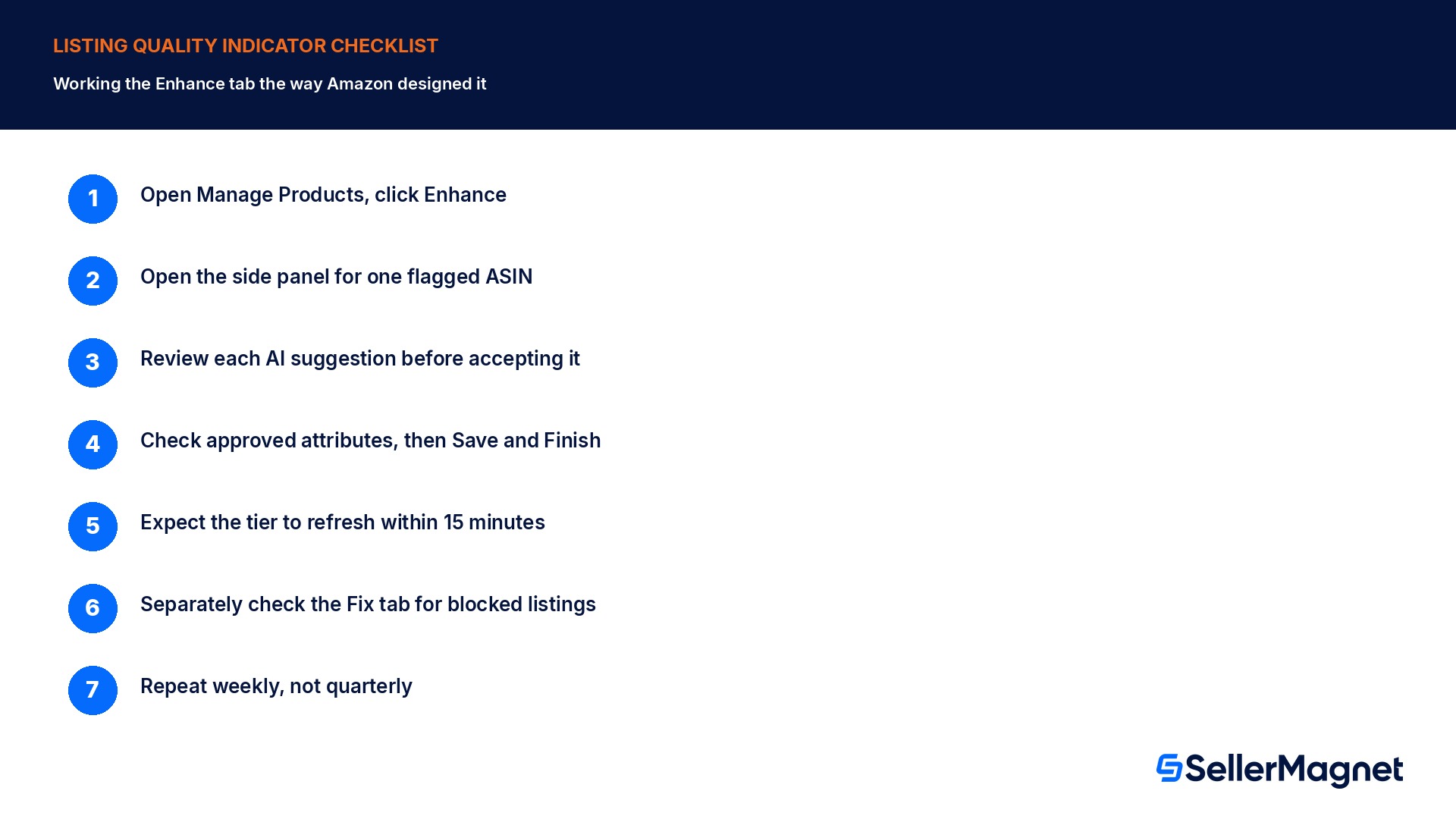
Checklist for working the Listing Quality Indicator
How to work Amazon's Listing Quality Indicator
Open Manage Products and click Enhance - This filters the catalog to listings with a status of Enhance listing: selling, but with room to improve.
Open the side panel for one flagged ASIN - It lists every opportunity to improve quality, the specific factors involved, and an AI-generated suggestion per attribute where available.
Review each suggestion before accepting it - Enter your own value, edit the AI suggestion, or accept it as-is; use the thumbs up or down to flag suggestion quality.
Check the boxes for the attributes you approve, then Save and Finish - This publishes the update to the live detail page.
Expect the quality classification to refresh within 15 minutes - Not instantly, and only once the change is visible on the product detail page.
Separately check the Fix tab for blocked listings - Suppressed listings, stranded inventory and restriction flags are a different, more urgent queue than Enhance.
Repeat weekly, not quarterly - New listings and shifting category requirements continuously refill the Enhance queue.
What are the five Listing Quality Indicator tiers?
Poor, Fair, Good, Great and Optimized, based on a combined read of content quality and multimedia quality.
What is the difference between content quality and multimedia quality?
Content quality evaluates titles, bullet points and key attributes for correctness, completeness and policy compliance. Multimedia quality reviews image and A+ content quality and completeness.
Where do I find listings that need improvement?
Manage Products has an Enhance tab, alongside All and Fix, that filters to listings with a status of Enhance listing.
How fast does my quality tier update after I fix a listing?
Amazon states the Listing Quality Indicator refreshes within 15 minutes of publishing the update, once it is live on the product detail page.
Does a higher Listing Quality tier mean better search ranking or more sales?
No. Amazon states explicitly that the score ignores price, fulfillment and seasonality and should be used as a directional indicator, not a predictor of visibility or sales.
Is the Listing Quality Indicator the same as the PLQS in Amazon's India STEP programme?
No. PLQS is a traffic-weighted formula (content-quality score times views, divided by total views) scoped to the India marketplace's STEP seller-benefit programme, with a different scale and purpose.
Should I accept every AI-generated suggestion in the Enhance panel?
Read it first. Amazon's own help page warns AI-generated content can include features or claims not in the listing's original content.
What is the difference between the Fix tab and the Enhance tab?
Fix flags listings with issues blocking sales or visibility, such as suppressed status or stranded inventory. Enhance flags listings that are selling but have room to improve.
Stop Juggling Tools. SellerMagnet Combines Everything You Need.