Amazon Brand Store 2026: Requirements, Image Specs and What Converts
R
RenéFreelance Amazon Editor
|
16 min read
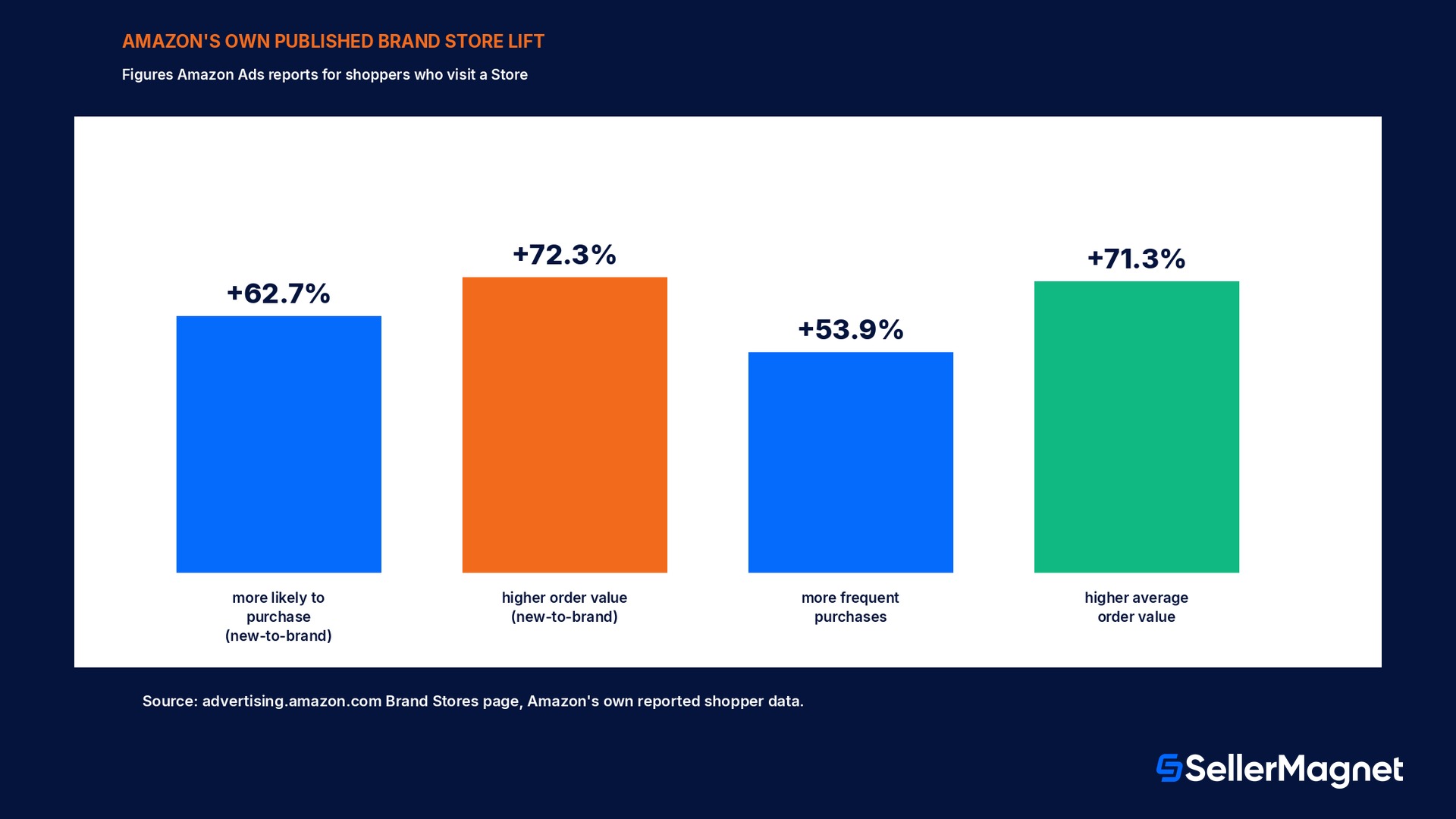
Click the brand name under almost any product title on Amazon and a seller expects a pop-up filter, not a destination. Instead it opens a full page with its own navigation bar, its own hero image, and its own URL: a Brand Store. Amazon's own numbers make the case for building one bluntly rather than gently. New-to-brand shoppers who visit a Brand Store are 62.7% more likely to purchase than shoppers who never visit one, and when they do buy, they spend 72.3% more per order on average. Shoppers who visit a Store anywhere in their shopping journey buy 53.9% more frequently, add to cart 52.1% more often, pay a 42.4% higher average selling price, and post a 71.3% higher average order value than shoppers who skip the Store entirely. None of that costs anything extra to unlock: a Brand Store is free to build and free to keep live, with no separate ad budget required, but it is gated behind Brand Registry enrollment and a specific set of image and tile dimensions that reject a file one pixel short of the minimum. This guide works through what a Store actually is versus an Influencer storefront, the exact eligibility and image specs Amazon's own Stores creative guidelines publish, how customers actually arrive at one, a worked traffic-and-revenue projection using Amazon's published lift figures, and the mistakes that get a submitted Store bounced in moderation before a single shopper sees it.
An Amazon Brand Store is a free, multi-page branded destination that sellers and vendors enrolled in Brand Registry can build inside Amazon, reachable through the brand byline on product pages, Sponsored Brands or display campaigns, or a direct short URL. Amazon's own published data shows new-to-brand shoppers who visit a Store are 62.7% more likely to purchase and spend 72.3% more per order than shoppers who never visit one, with Store visitors overall buying 53.9% more frequently and posting a 71.3% higher average order value. It requires a Professional selling plan or vendor account, Brand Registry enrollment, and passes a content moderation review (usually within 24 hours, up to 3 business days) before it goes live and the byline link appears.
Is a Brand Store the same thing as an Influencer storefront?
Amazon uses "storefront" loosely enough that a seller searching for the right help page can land on the wrong one. There are two distinct products. An Amazon Influencer storefront is a customizable page that members of the Amazon Influencer Program create to recommend a mix of products, usually from many brands, to their own social following; it is built from inside the Influencer Program, not Seller Central or the advertising console, and a seller does not create one for their own brand. A Brand Store is the separate, free, dedicated space described in the rest of this guide: a destination carrying only one brand's own products, built in the advertising console's Store builder by a seller, vendor, or agency enrolled in Brand Registry. The two pages look similar to a shopper scrolling past tiles of products and lifestyle imagery, but only the Brand Store is something a seller's own brand controls, publishes, and gets analytics on. A seller who wants a dedicated branded page for their own catalog is looking for a Brand Store, not an Influencer storefront, even though both terms show up in the same search results.
Amazon Influencer storefront
Brand Store
Who builds it
An Amazon Influencer Program member
A seller, vendor, or agency enrolled in Brand Registry
Where it is built
Inside the Influencer Program
Advertising console Store builder
Product mix shown
Products the influencer recommends, often multiple brands
Only the brand's own catalog
Cost
Free
Free
Analytics for the brand owner
None (the influencer's own, not the brand's)
Daily traffic and sales insights per page
Who can actually build a Brand Store
Amazon's Stores eligibility requirements page sets two separate gates, and a seller who clears one without the other gets an error with no obvious cause. The account gate: the business must hold a Professional selling plan or be a vendor, be enrolled in Brand Registry with the brand properly registered and the correct selling roles assigned, and be an active account in good standing. Brand Registry enrollment specifically is the gate most first-time builders hit, because the Store builder checks for it directly; Amazon's own support note for this case is specific, too: if Brand Registry status already shows Approved but the Store builder still throws an error, the fix is to use Amazon's own Contact us link on the eligibility page rather than retrying the same enrollment step. The content gate sits on the other side, after the account checks pass: the finished Store must meet the Stores content guidelines and acceptance policies to clear moderation review and go live, which is a separate pass/fail step from simply being eligible to open the builder in the first place.
Requirement
Detail
Selling plan
Professional seller plan, or a vendor account
Brand Registry
Enrolled, with the brand properly registered and correct selling roles assigned
Account standing
Active, in good standing with Amazon
Advertising spend
Not required; a Store can be created without ever running an ad
Content review
Must pass the Stores content guidelines and acceptance policies to go live
Moderation timing
Usually completed within 24 hours; can take up to 3 business days
Building it: the 5-step order Amazon's own builder expects
Amazon's own how-to guide lays the process out as 5 steps, and skipping the order rather than the steps themselves is the most common way a first Store stalls. First, go to the Brand Store builder: from the main Seller Central menu, hover Stores, select Manage Stores, sign in with the Amazon Ads account credentials when prompted, then select Create Brand Store from the Brand Stores main page (or, from the advertising console directly, open Brand Content in the left panel, select Brand Stores, then Create Brand Store). Second, design the Store: Amazon recommends at least 3 levels of pages with the homepage as the first level, built with Page Manager and Add a page, using either a pre-designed page template with adjustable tiles or a blank template built from scratch, and an AI-assisted option that can generate layouts, text, and product placement from a preset or custom prompt. Third, add the products: a full catalog listed through product grids or collections organized by category, with best sellers or new releases highlighted in the most visible homepage placements, shoppable images that let a shopper click a product inside a lifestyle photo, and automated widgets such as best-selling or recommended-for-you that update themselves from browsing behavior rather than a manual edit. Fourth, test for functionality before submitting, since a broken link or a missing product inside a published Store still has to go through moderation again to fix. Fifth, submit for publishing, which starts the content moderation review described above.
The image and tile specs that reject a file one pixel short
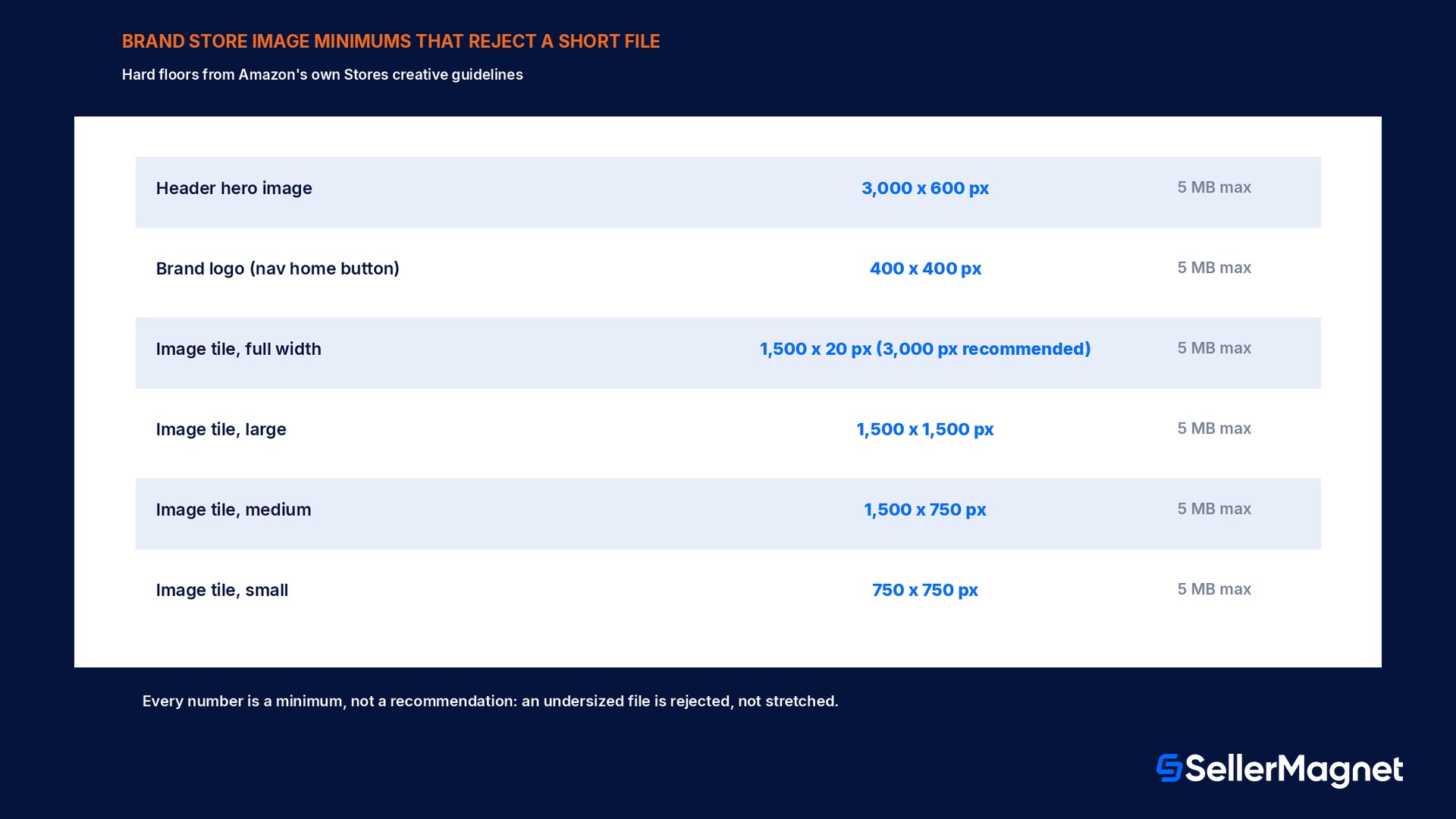
Every Store page is built from tiles, and Amazon's Stores creative guidelines lock each tile type to a specific aspect ratio and minimum resolution rather than accepting any image that roughly fits. The header, which appears above the navigation bar on every page, needs a hero image at a minimum of 3,000 x 600 px and a maximum file size of 5 MB, plus a brand logo at a minimum of 400 x 400 px, also capped at 5 MB; the brand logo doubles as the home-button icon shown in the navigation on every page of the Store, not just the homepage. Below the header, basic image tiles come in 4 locked sizes, full width, large, medium, and small, and each size carries its own minimum: a full-width image tile needs at least 1,500 x 20 px (3,000 px width recommended for high-resolution displays), a large tile at least 1,500 x 1,500 px, a medium tile at least 1,500 x 750 px, and a small tile at least 750 x 750 px, each capped at 5 MB. Image-with-text tiles that overlay text on a photo need larger source images than a plain image tile at the same size, for example 3,000 x 1,500 px minimum at full width versus 1,500 x 20 px for a plain full-width image tile, because the text overlay needs clean space to sit on top of the photo without covering a product. Shoppable image tiles, which let a shopper interact with up to 6 points on one photo to see product name, price, star rating, and a buy action, recommend a 3,000 x 1,500 px source for the sharpest display across devices. A seller who re-uses a product's existing Amazon detail-page photography at its native resolution for a full-width header or shoppable tile very often ships an image technically under the recommended 3,000 px width, which still passes the hard minimum but renders visibly softer than a purpose-shot asset at full resolution.
Tile / element
Min. image size
Max. file size
Header hero image
3,000 x 600 px
5 MB
Brand logo
400 x 400 px
5 MB
Image tile, full width
1,500 x 20 px (3,000 px wide recommended)
5 MB
Image tile, large
1,500 x 1,500 px
5 MB
Image tile, medium
1,500 x 750 px
5 MB
Image tile, small
750 x 750 px
5 MB
Image with text, full width (text over image)
3,000 x 1,500 px
5 MB
Shoppable image, full width
1,500 x 750 px (3,000 x 1,500 px recommended)
5 MB
A page can hold 20 sections, with limits on 5 of the tile types
Every Store page has a built-in header plus up to 20 additional sections, but Amazon caps how many of certain tile types can appear on one page regardless of the 20-section ceiling: a maximum of 4 background video tiles, and only 1 each of a product grid tile, a gallery tile, a featured deals tile, and a recommended-products tile. Hitting one of those caps does not block adding more sections of other types; it blocks adding another tile of that specific type until an existing one of the same type is deleted or its content is swapped instead.
How do customers actually arrive at a Brand Store?
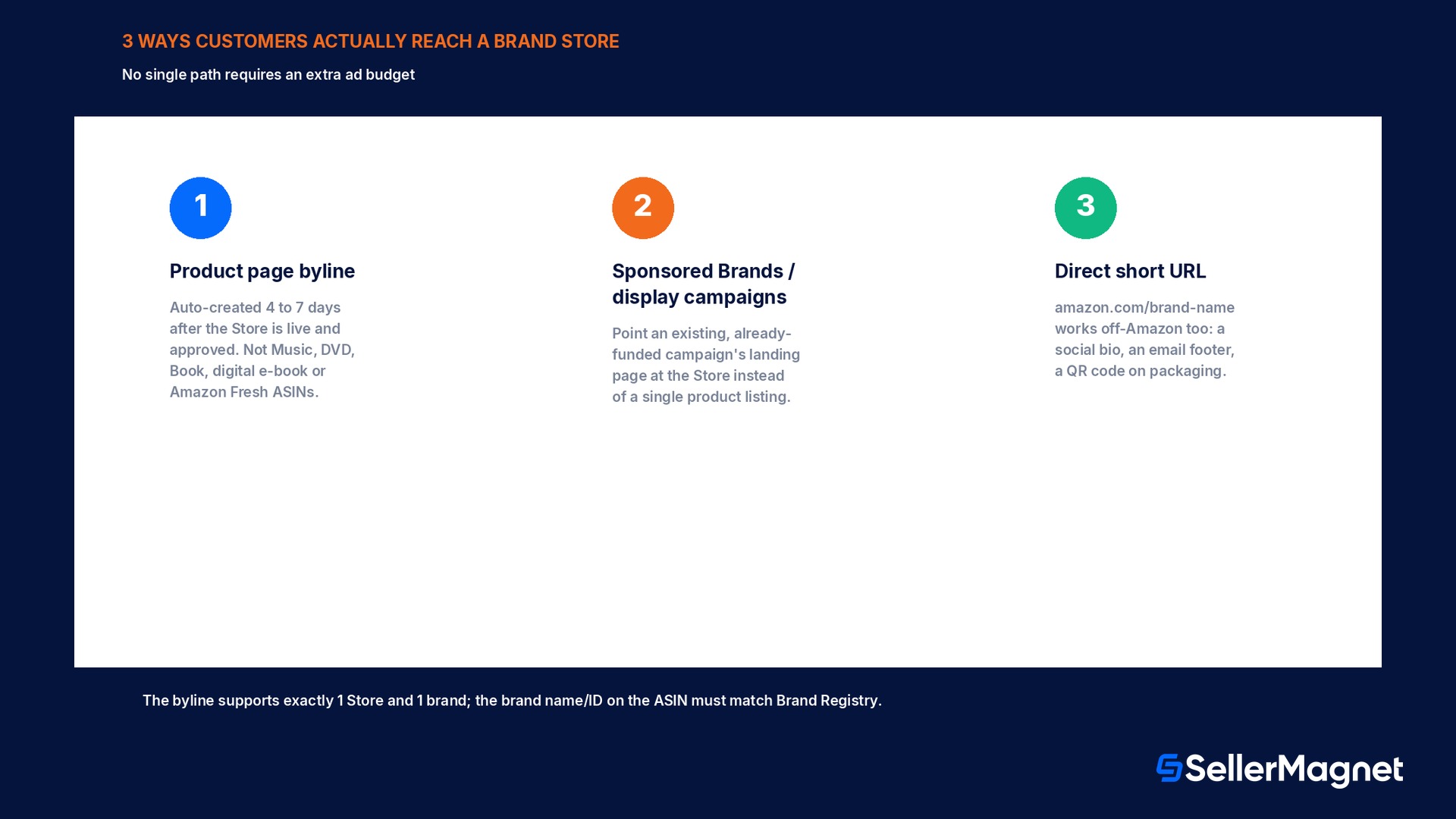
A Store with zero promotion still gets a small, steady path of visitors through the product detail page byline, the brand-name link positioned above or below the product title that, once a Store is live and approved, is created automatically within 4 to 7 days and needs no separate setup. The byline supports exactly 1 Store and 1 brand; it does not work across multiple brands pointed at one Store, and the brand name and brand ID on an ASIN must match Brand Registry exactly or the byline will not attach correctly. A handful of categories are excluded from the byline redirect by design: Music, DVD, digital music, Book, digital e-book, and Amazon Fresh products send a shopper to the artist page or search results instead of the Store, regardless of how the brand is configured. Beyond the byline, a Store becomes a landing page for Sponsored Brands and display ad campaigns, which is where the biggest controllable traffic lever sits, since every click a campaign already pays for can land on a multi-page branded destination instead of a single product listing. Finally, the Store's own short URL (amazon.com/brand-name) works anywhere off Amazon too, a social media bio, an email footer, a QR code on packaging, giving a brand one consistent destination to point to outside Amazon's own search and ad surfaces.
Worked example: what the published lift actually does to a Sponsored Brands budget
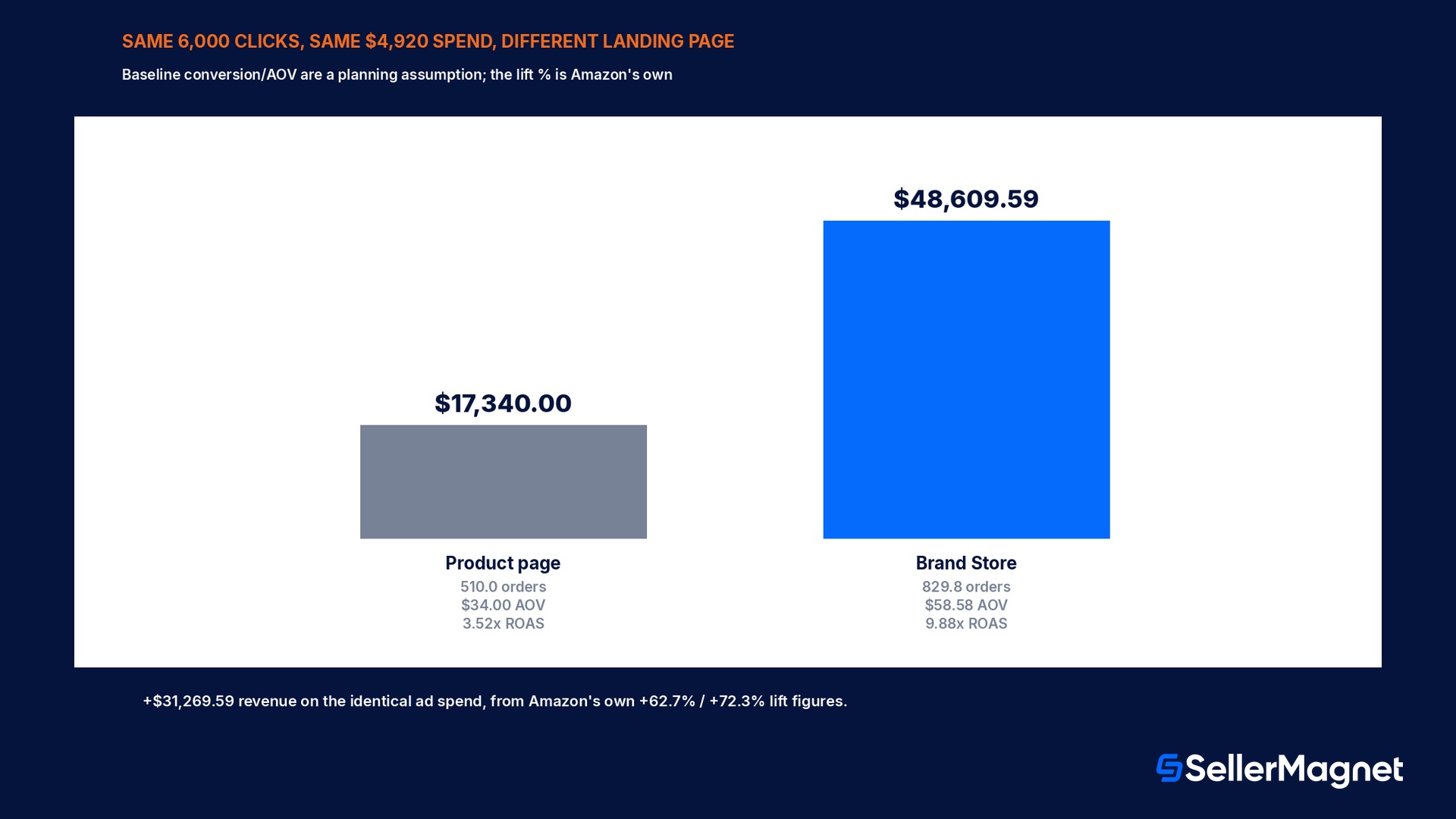
Take a brand already running Sponsored Brands at 6,000 monthly clicks and an average $0.82 cost per click, for a fixed $4,920.00 monthly spend, and assume (clearly a seller's own planning baseline, not an Amazon-published figure) that sending those clicks to a single product detail page converts at 8.5% with a $34.00 average order value. That baseline produces 510.0 orders (6,000 x 8.5%) and $17,340.00 in revenue (510.0 x $34.00), a 3.52x return on ad spend. Now apply Amazon's own published lift figures to the same 6,000 clicks landing on a Brand Store instead: a 62.7% higher likelihood to purchase lifts the conversion rate to 13.83% (8.5% x 1.627), and a 72.3% higher order value lifts the average order to $58.58 (\$34.00 x 1.723). The same 6,000 clicks now produce 829.8 orders (6,000 x 13.83%) and $48,609.59 in revenue (829.8 x $58.58), a 9.88x return on the identical ad spend. Nothing about the campaign's targeting, bids, or budget changed between the two scenarios; the only variable is the landing page the existing clicks arrive on. That gap, roughly $31,269.59 in this example, is also why Amazon positions the Store specifically as a Sponsored Brands and display landing page rather than only a passive brand page: the lift figures describe shoppers who visit a Store, and a campaign already paying for the click is the most direct way to put a shopper there instead of on a single listing.
Landing on a single product page
Landing on the Brand Store
Monthly clicks (same spend)
6,000
6,000
Conversion rate
8.5% (baseline assumption)
13.83% (+62.7% per Amazon's published lift)
Orders
510.0
829.8
Average order value
$34.00 (baseline assumption)
$58.58 (+72.3% per Amazon's published lift)
Revenue on $4,920.00 spend
$17,340.00
$48,609.59
Return on ad spend
3.52x
9.88x
The baseline numbers are planning assumptions, the lift percentages are Amazon's own
The 8.5% conversion rate and $34.00 order value above are a sample baseline for illustration; a real brand should substitute its own single-listing conversion rate and AOV from Seller Central or Amazon Ads reporting before running the same math. The 62.7% purchase-likelihood lift and 72.3% order-value lift are Amazon's own published figures for new-to-brand shoppers who visit a Brand Store, not an estimate; the only unknowns are the inputs a brand already has on hand.
What mistakes get a submitted Store bounced or built for nothing?
Building a Store while Brand Registry is still pending. The Store builder gates on Brand Registry status; a pending application, even one submitted days earlier, blocks access until it is Approved.
Uploading a header hero image under 3,000 x 600 px and finding out only after upload. The spec is a hard minimum, not a recommendation; an undersized file is rejected rather than stretched or cropped by the builder.
Treating the brand logo as decoration instead of the home button. The logo displays on every page's navigation bar and acts as the click-to-homepage control; a low-contrast or illegible logo makes every page of the Store harder to navigate, not just the homepage.
Assuming the byline appears the moment the Store goes live. Amazon's own documentation states the byline is created automatically within 4 to 7 days of approval, not instantly; a Store that looks finished can still show no byline link for most of a week.
Expecting the byline to work on Music, DVD, digital music, Book, digital e-book, or Amazon Fresh ASINs. Those categories redirect to the artist page or search results instead of the Store by design, regardless of brand configuration.
Hitting a tile-type cap and assuming the page is full. The 20-section page limit and the separate caps on background video (4), product grid (1), gallery (1), featured deals (1), and recommended products (1) are independent; running into one of the 5 capped types still leaves room for more sections of other types.
What SellerMagnet can and cannot do about a Brand Store
A Brand Store itself, its builder, its moderation review, and its byline mechanics live entirely inside Amazon's advertising console and Seller Central; no third-party tool, including SellerMagnet, builds, submits, or approves a Store on a brand's behalf. Where SellerMagnet's Listing Optimizer helps is upstream of the Store itself: keeping the product titles, images, and category data that feed a Store's product grids and collections accurate and in sync across every ASIN a Store will display, since a Store surfaces whatever a brand's catalog data already says rather than letting a seller override it page by page.
After a Store is live, PPC management is the direct lever covered in the worked example above: routing Sponsored Brands and display campaigns to the Store instead of a single listing is a landing-page change inside an existing campaign, not a new budget line. Profit Analytics then tracks whether the resulting orders actually carry the higher average order value a Store visit is supposed to produce, per SKU and per campaign, rather than trusting the published lift figures to apply identically to every brand and catalog.
Checklist before submitting a Brand Store for moderation
How to confirm a Brand Store is ready to pass moderation on the first submission
Confirm Brand Registry status shows Approved, not Pending - The Store builder gates on this status directly; a pending application blocks access regardless of selling plan.
Check the header hero image is at least 3,000 x 600 px and under 5 MB - This is a hard minimum enforced by the builder, not a stylistic recommendation.
Check the brand logo is at least 400 x 400 px and reads clearly at small size - It is the home-button icon shown in the navigation bar on every page, not just a homepage decoration.
Match every tile's source image to its locked size's minimum, not just its visible size on screen - Full width, large, medium, and small each have a different minimum resolution per tile type.
Count background video, product grid, gallery, featured deals, and recommended-products tiles against their separate caps (4, 1, 1, 1, 1) - These 5 tile types have independent caps inside the 20-section page limit; other tile types are not capped the same way.
Test every link and product placement before submitting, not after - A broken link found after submission still has to go through content moderation again, which can take up to 3 business days.
Is a Brand Store the same as an Amazon Influencer storefront?
No. An Influencer storefront is built by a member of the Amazon Influencer Program to recommend products, often from multiple brands, to their own audience. A Brand Store is built by a seller, vendor, or agency enrolled in Brand Registry and shows only that brand's own catalog.
Does it cost anything to create a Brand Store?
No. Creating and maintaining a Brand Store is free, and a brand does not need to run any Amazon ads to create one, though Sponsored Brands or display campaigns can use it as a landing page.
What is the minimum image size for the Store header?
The header hero image needs a minimum of 3,000 x 600 px, capped at 5 MB. The brand logo shown in the navigation bar needs a minimum of 400 x 400 px, also capped at 5 MB.
How long does it take for the byline to appear on product pages?
Amazon's own documentation states the byline is created automatically within 4 to 7 days once the Store is live and approved; it is not instant.
How long does Store moderation review take?
Usually within 24 hours, but Amazon states it can take up to 3 business days.
How many products can one product collection on a Store page show?
Up to 60 products per collection, with up to 5 collections on a single page. Out-of-stock items are hidden from the display automatically.
Which product categories never get a working byline link?
Music, DVD, digital music, Book, digital e-book, and Amazon Fresh products redirect to the artist page or search results instead of the Store, regardless of how the brand is otherwise configured.
Do I need to be enrolled in Brand Registry to build a Store?
Yes. Brand Registry enrollment with the brand properly registered and the correct selling roles assigned is one of the account-level eligibility requirements, alongside a Professional selling plan or vendor account in good standing.
Stop Juggling Tools. SellerMagnet Combines Everything You Need.