Amazon Live for Sellers 2026: Eligibility, Setup and Real Numbers
R
RenéFreelance Amazon Editor
|
14 min read
A seller scrolling Amazon.com on a weekday evening will eventually land on a product page with a small red dot in the corner of a thumbnail, a sign that a brand is streaming live right now, talking through a product while viewers add it to cart without leaving the video. That feature is Amazon Live, and it has existed since 2019, yet most sellers who are not already brand owners with a Brand Registry enrollment have never been inside the app that runs it, because the entry door is narrower than it looks. Amazon Live is not a paid ad product like Sponsored Display or Streaming TV ads; it is a free livestreaming tool bundled with Brand Registry, which means the real cost is never a line item in a budget, it is the hour a founder, an employee or a hired host spends on camera. This guide works through exactly who Amazon's own Amazon Live guide says can open the Creator App, the video and thumbnail specifications the app enforces before a stream is even allowed to start, the actual sequence from downloading the app to ending a broadcast, how creator levels and built-in analytics work, how Amazon Live differs from the other video options a seller may already use (the Upload and Manage Videos tab and Sponsored Brands video), and a worked look at what a single livestream hour has to produce in attributable activity to be worth doing again next week.
Amazon Live is a free shoppable livestreaming feature available through the Amazon Live Creator App. Eligibility requires enrollment in Amazon Brand Registry with a Brand Representative or Brand Rights Owner role, an approved and published Brand Store, and selling on Amazon.com, or enrollment in the Amazon Influencer Program, or Vendor Central status with a published Amazon Advertising Console store. The app enforces a minimum 1920x1080 resolution, 30 fps, a 4.5 Mbps maximum bitrate, and a 50 Mbps minimum internet connection for a stream to go live.
What Amazon Live actually is
Amazon's own Amazon Live guide describes the feature in one line: it enables social commerce on Amazon by bringing a brand to life through interactive, shoppable livestreams that play directly on that brand's Store. A host, who can be the founder, an employee, a hired presenter or an enrolled Amazon Influencer, opens the Amazon Live Creator App, picks products from their own catalog by ASIN, and goes live on camera. Viewers land on the stream from the brand's Store page or from Amazon's own Amazon.com/Live hub, watch the product carousel next to the video player, chat with the host and other viewers in real time, and can add a featured product to cart without ever leaving the stream. Nothing about Amazon Live requires a media buy, a campaign budget, or an insertion order; it sits entirely outside Amazon Ads. The trade is that the only cost is production time, and the only reach a stream gets beyond a brand's existing Store traffic is whatever Amazon's own Amazon.com/Live discovery surface decides to feature, which Amazon does not guarantee and does not publish a formula for.
Who can actually open the Creator App
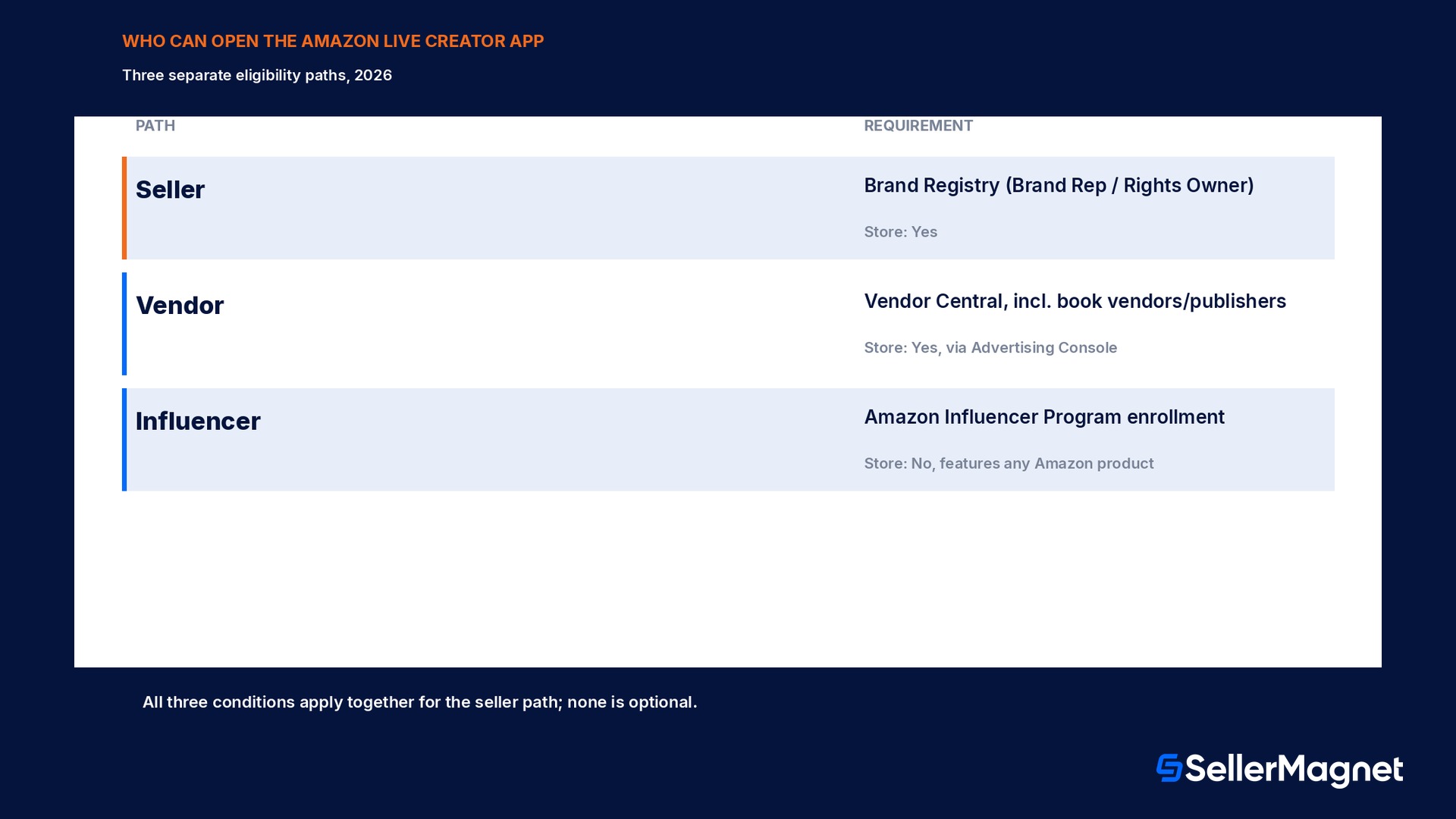
Amazon's eligibility language is specific enough to rule most sellers in or out before they ever download anything. For a seller, the path is enrollment in Amazon Brand Registry with a Brand Representative or Brand Rights Owner role assigned, an approved and published Brand Store already live on Amazon.com, and an active selling presence on Amazon.com itself; all three conditions apply together, not as alternatives. A second path exists for Amazon retail vendors who use Vendor Central: the same requirement applies in spirit, a published store, but it runs through Vendor Central and the Advertising Console rather than Seller Central, and it covers book vendors and publishers specifically alongside standard vendors. A third path has nothing to do with selling at all: enrollment in the Amazon Influencer Program, which lets a creator stream and feature products they do not manufacture or sell, earning through Amazon's separate influencer commission structure instead of their own margin. For the Brand Representative or Brand Rights Owner role specifically, Amazon's guide is explicit that any user holding that role for the brand in Brand Registry can sign in and create a channel on the brand's behalf, so a streaming schedule can be split across more than one person on a team without re-enrolling anyone.
Path
Who qualifies
Needs a published Brand Store
Seller
Brand Registry, role Brand Representative or Brand Rights Owner
Yes
Vendor
Vendor Central account, incl. book vendors and publishers
Yes, via Advertising Console
Influencer
Enrolled in the Amazon Influencer Program
No, features any product on Amazon
Everyone else
No current path into the Creator App
N/A
Setting up the Amazon Live Creator App
Download the app - Get the Amazon Live Creator App from the Apple App Store on iOS or the Google Play Store on Android; there is no desktop or browser version.
Select account type - On the home screen, choose Seller as the account type before signing in; vendors and influencers select their own matching type.
Sign in with Seller Central credentials - Use the same login as Seller Central. Only a user with the Brand_Representative or Brand_Rights_Owner role in Brand Registry can create a channel and sign in on behalf of the brand.
Select the brand - Pick which Brand Store the livestream will play on and be associated with; a seller managing more than one brand chooses per session, not once globally.
Accept the Community Guidelines - The app presents Amazon Live's Community Guidelines before activation; Amazon states compliance is required to maintain streaming access, so a guideline violation is a real risk to the channel, not a warning that gets ignored.
Confirm the channel is active - Once accepted, the channel goes active immediately and the account is ready to build its first broadcast; nothing further needs approval before a first Practice Mode run.
The video specs Amazon enforces before a stream can go live
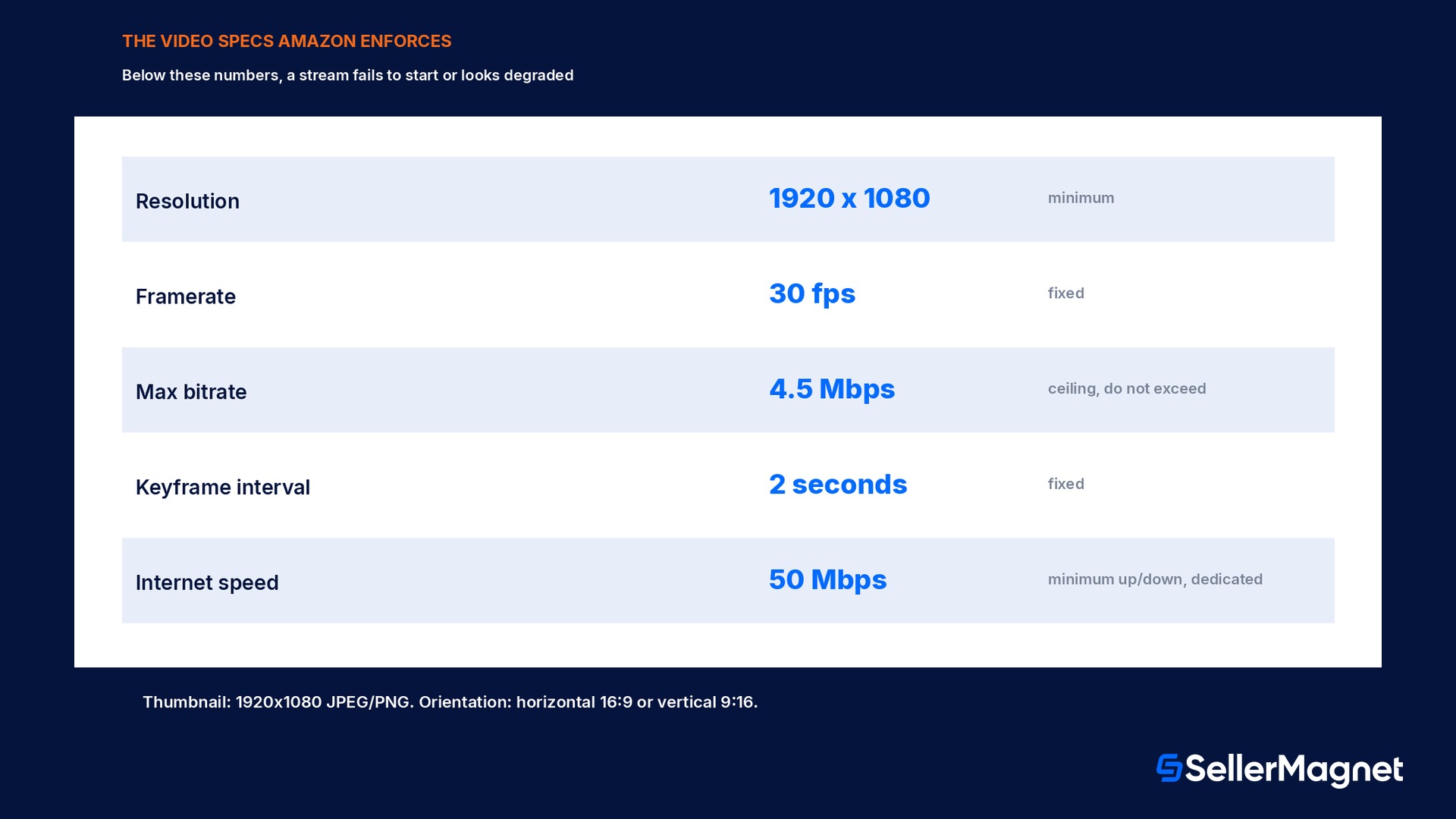
Unlike a social platform that accepts almost any phone footage, Amazon Live publishes a concrete technical bar in its own guide, and a stream that falls short of it either fails to start or looks visibly worse to viewers than the examples Amazon shows in its own marketing. The minimum resolution is 1920x1080, full HD, at a 30 frames-per-second framerate; dropping either number produces a softer, more stuttery picture on a product page that otherwise sits next to crisp professional photography. The maximum bitrate is 4.5 Mbps, 4,500 kbps, a ceiling rather than a target, so pushing past it risks the stream being rejected or throttled rather than looking better. The keyframe interval, how often the video re-anchors a full frame rather than just the changes since the last one, has to be 2 seconds; a wider interval is a common default in some external broadcasting software and needs to be checked and corrected manually. The thumbnail that represents the broadcast before and during playback has its own spec, 1920x1080 pixels, JPEG or PNG, and the orientation can be either horizontal 16:9 for the typical desktop or living-room viewing or vertical 9:16 for a feed-style mobile view. Behind all of it, Amazon's guide states a minimum internet speed of 50 Mbps upload and download, with a dedicated connection recommended rather than one shared with other household or office traffic, because a bitrate ceiling of 4.5 Mbps still needs real headroom above it to avoid the connection itself becoming the bottleneck mid-stream.
Add a new broadcast - Tap the + at the bottom of the screen inside the app to start building a broadcast before any stream details exist.
Add a thumbnail, title and schedule - Set the 1920x1080 thumbnail, a stream title, and the start date and time; leave Practice Mode enabled for a rehearsal run or disabled for the real broadcast.
Set the video source and camera - Choose whether the stream runs from the phone's own camera or an external one, and pick the orientation, horizontal or vertical, before adding products.
Add products by ASIN - Search and add products to the on-screen carousel. Amazon's own setup guide recommends searching by ASIN rather than title specifically to avoid pulling the wrong variation into the stream.
Arrange the product order - Use Edit on the home screen to set which product appears first in the carousel; the order a host plans to talk through on camera should match this list exactly.
Run Practice Mode first - Toggle on Practice Mode and open the practice link to test camera, audio and the product carousel with zero public viewers before the real stream; end the practice session once everything checks out.
Go live and feature products as you talk - Tap Preview, wait for the Go Live button to turn solid red confirming the stream data is reaching Amazon correctly, then tap Go Live for a 3-second countdown. Tap a featured product mid-stream to jump it to the front of the carousel while discussing it on camera.
End the stream - Tap End Stream in the upper right when finished; the broadcast and its chat close together and the session moves into the app's own performance view.
Creator levels and the analytics Amazon actually provides
Every broadcast counts toward a creator level inside the Creator App, Amazon's own progression system built from streaming frequency and audience engagement over time; the app states explicitly that performance is counted toward this level and that leveling up unlocks additional rewards and benefits, without publishing the exact point formula behind it. The practical read for a seller is that one stream is a trial, not a strategy: the level system itself is designed around a cadence, so a brand testing Amazon Live with a single broadcast and then stopping will never see what a consistent weekly slot does for either the level or the audience that starts recognizing a recurring host. Inside the app, built-in analytics let a host track performance and review it to improve the next broadcast, covering viewers, engagement and the product interactions during the stream itself. This is the only official Amazon Live performance report that exists; there is no Seller Central dashboard section for livestream numbers the way there is for Sponsored Products or Brand Analytics, so a seller who wants to know whether a stream day actually moved units has to read the in-app numbers for engagement and then check Amazon's own order and sales data for the same ASINs on the same day separately, the way SellerMagnet's analytics already tracks day-over-day sales for a catalog.
How Amazon Live differs from the other video options a seller may already use
A seller who already uploads short product videos or runs Sponsored Brands video ads can mistake Amazon Live for a live version of the same thing, and the mechanics, and the eligibility, are genuinely different across all three. The Upload and Manage Videos feature inside Seller Central lets any seller who has been selling on Amazon for at least three months and meets eligibility requirements upload a pre-recorded video to a product's detail page; it needs no Brand Registry enrollment and no live presence, just an account old enough and in good standing. Sponsored Brands video is a paid ad product, bought through Campaign Manager, that shows a short video in search results and on product pages, and it does require Brand Registry the same way Amazon Live does, but the content is pre-produced and paid media, not a live interactive broadcast. Amazon Live sits apart from both: it is free like Upload and Manage Videos, but it requires Brand Registry like Sponsored Brands, and uniquely among the three it happens in real time with live chat and a host who can react to what viewers are asking on screen, which is the one thing neither a static product video nor a pre-rendered ad can do.
Feature
Needs Brand Registry
Live or pre-recorded
Cost
Upload and Manage Videos
No (3+ months selling)
Pre-recorded
Free
Sponsored Brands video
Yes
Pre-recorded
Paid (CPC)
Amazon Live
Yes (or vendor/influencer path)
Live
Free
Worked example: what an hour on camera actually has to produce
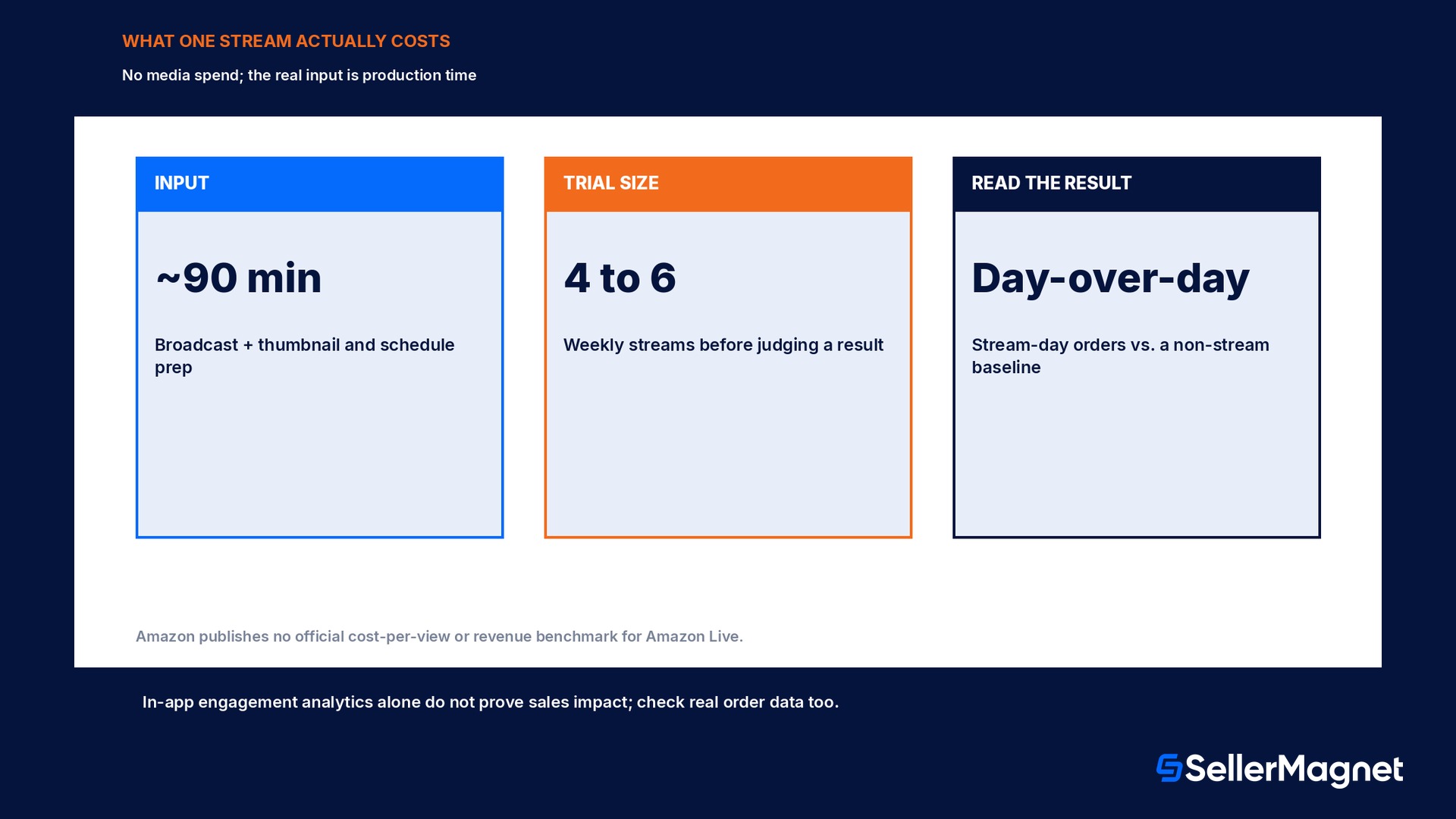
Take a Brand Registry seller deciding whether a weekly one-hour Amazon Live slot is worth a staff member's time against doing nothing and letting the Brand Store sit static. The stream itself costs no media spend, so the real input being spent is the hour of a person's time, plus whatever thumbnail and schedule prep happens beforehand, call it 90 minutes of total effort per week once setup is no longer new. For that hour to clear a simple bar, it has to produce more attributable value than the same 90 minutes spent on an alternative task that already has a known return, such as writing a listing update or responding to a backlog of customer questions; a seller already running SellerMagnet's listing optimizer has a rough sense of what an hour of listing work is worth in conversion terms, and that figure is the real comparison point, not zero. Because Amazon Live publishes no official cost-per-view or revenue benchmark the way its ad products publish a recommended minimum spend, the only honest way to judge a stream is the same day-over-day comparison the engagement analytics inside the Creator App are built for: orders on the featured ASINs on a stream day against the same ASINs on a non-stream day the week before and the week after, holding price and any other promotion constant. A single stream with an ambiguous result is not evidence either way, consistent with the creator-level system itself being built around a cadence rather than a one-off; four to six weekly streams at the same time slot, read against that day-over-day baseline, is a fair trial before deciding whether a recurring slot earns its hour.
Readiness checklist before the first broadcast
Confirm Brand Registry enrollment with a Brand Representative or Brand Rights Owner role, or Vendor Central status, or Influencer Program enrollment; without one of the three, the Creator App has no path to a channel.
Confirm the Brand Store is already approved and published; Amazon Live streams play on the Store itself, so an unpublished or unapproved Store blocks the channel even with Brand Registry otherwise in order.
Test the actual connection against the 50 Mbps minimum upload/download figure on the device and network that will stream, not a separate device on the same Wi-Fi, since shared bandwidth is the most common reason a stream that tested fine alone drops mid-broadcast.
Set the broadcasting source, phone camera or external camera plus encoder, to 1920x1080 at 30 fps with the bitrate capped at 4.5 Mbps and a 2-second keyframe interval before the first Practice Mode run, not during the live stream itself.
Build the product list by ASIN, not by title search, and arrange the carousel order to match the talking order planned for the broadcast.
Run at least one full Practice Mode rehearsal end to end, camera, audio, product carousel and chat, before the first public stream; the practice link is the only way to catch a setup mistake with zero audience watching.
Plan a recurring weekly slot rather than a single trial stream, since the creator-level system and any real read on day-over-day sales both need more than one data point.
Mistakes sellers make with Amazon Live
Trying to open the Creator App without an approved, published Brand Store and assuming Brand Registry enrollment alone is enough; the Store has to be live first.
Searching for products by title inside the app instead of by ASIN, which Amazon's own setup guide warns can pull the wrong product variation into the carousel mid-stream.
Skipping Practice Mode and discovering a bitrate, resolution or audio problem live, in front of real viewers, instead of in the private rehearsal link built for exactly this.
Running one stream, seeing an inconclusive result, and concluding Amazon Live does not work, instead of treating the creator-level system's own cadence design as a sign that four to six weekly streams is the real trial.
Judging a stream's result from the in-app engagement analytics alone instead of checking the actual order numbers for the featured ASINs on the stream day against a non-stream baseline.
Exceeding the 4.5 Mbps bitrate ceiling assuming a higher bitrate means a better picture, when Amazon's guide states this is a maximum to stay under, not a quality target to aim at.
Is Amazon Live free to use?
Do I need Brand Registry to use Amazon Live?
What internet speed does Amazon Live actually require?
Can more than one person on a team stream for the same brand?
How do I add products to the stream?
Is there a Seller Central report for Amazon Live performance?
What happens if I exceed the 4.5 Mbps bitrate limit?
Stop Juggling Tools. SellerMagnet Combines Everything You Need.