A seller opening the Amazon advertising console for the first time sees 3 ways to pay Amazon to show a product to a shopper, and no obvious reason to pick one over another. Sponsored Products, Sponsored Brands, and what Amazon now calls display ads (the product most sellers still know as Sponsored Display, renamed in 2026) are not 3 versions of the same thing with different names. They run on different eligibility rules, target different parts of a shopper's decision, show up in different places, and in Sponsored Brands' case require an entirely different qualification (Brand Registry) before the campaign builder even opens. Picking the wrong one for the goal at hand, or running only the one that was easiest to set up, is the single most common reason a seller's ad account has spend going out with no clear read on what it is buying. This guide works through what each ad type actually is, who is allowed to run it, where it shows up and what it costs, which shopping-journey stage each one is built to influence, a worked example of splitting one budget across all 3, and the renaming of Sponsored Display that changed in 2026.
Sponsored Products, Sponsored Brands, and display ads (the 2026 rename of Sponsored Display) are 3 distinct Amazon advertising products, not 3 versions of one tool. Sponsored Products is cost-per-click and keyword-targeted, promoting one listing at a time to any professional seller. Sponsored Brands is cost-per-click or cost-per-impression, shows a brand logo and multiple products, and requires Amazon Brand Registry enrollment. Display ads target audiences and product pages rather than keywords, reach shoppers on and off Amazon, and carry no minimum spend in their self-service form.
What is each of the 3 ad types, really?
Sponsored Products are cost-per-click ads that promote individual product listings, built around keyword or automatic targeting, and designed for one job: getting a specific listing in front of a shopper who is already searching for something like it. Sponsored Brands are cost-per-click or cost-per-1,000-viewable-impression ads built around a custom headline, a brand logo, and a selection of products, designed to help a shopper discover the brand behind the product rather than a single SKU. Display ads are the current name for what Amazon sold as Sponsored Display, now folded into the wider Amazon Ads Agent platform alongside Amazon DSP; existing Sponsored Display campaigns kept running unchanged under the new name, and the ads themselves target audiences, interests, and product or category pages instead of search keywords, reaching shoppers both on Amazon and on third-party sites and apps.
Sponsored Display was renamed to display ads in 2026
Amazon's own Sponsored Display product page now states: "Sponsored Display is now a part of Amazon's wider display ads offering within Amazon Ads Agent, that unifies access to all Amazon Ads products, bringing together sponsored ads and Amazon DSP workflows into a single workspace." Existing Sponsored Display campaigns continue running uninterrupted under the new display ads name; new display campaigns are created from Campaigns > Create Campaign > Display, Video, and Audio > Display. A seller searching Seller Central help for "Sponsored Display" in 2026 should expect to land on "display ads" instead; it is the same underlying product, not a discontinued one.
Who is actually allowed to run each ad type?
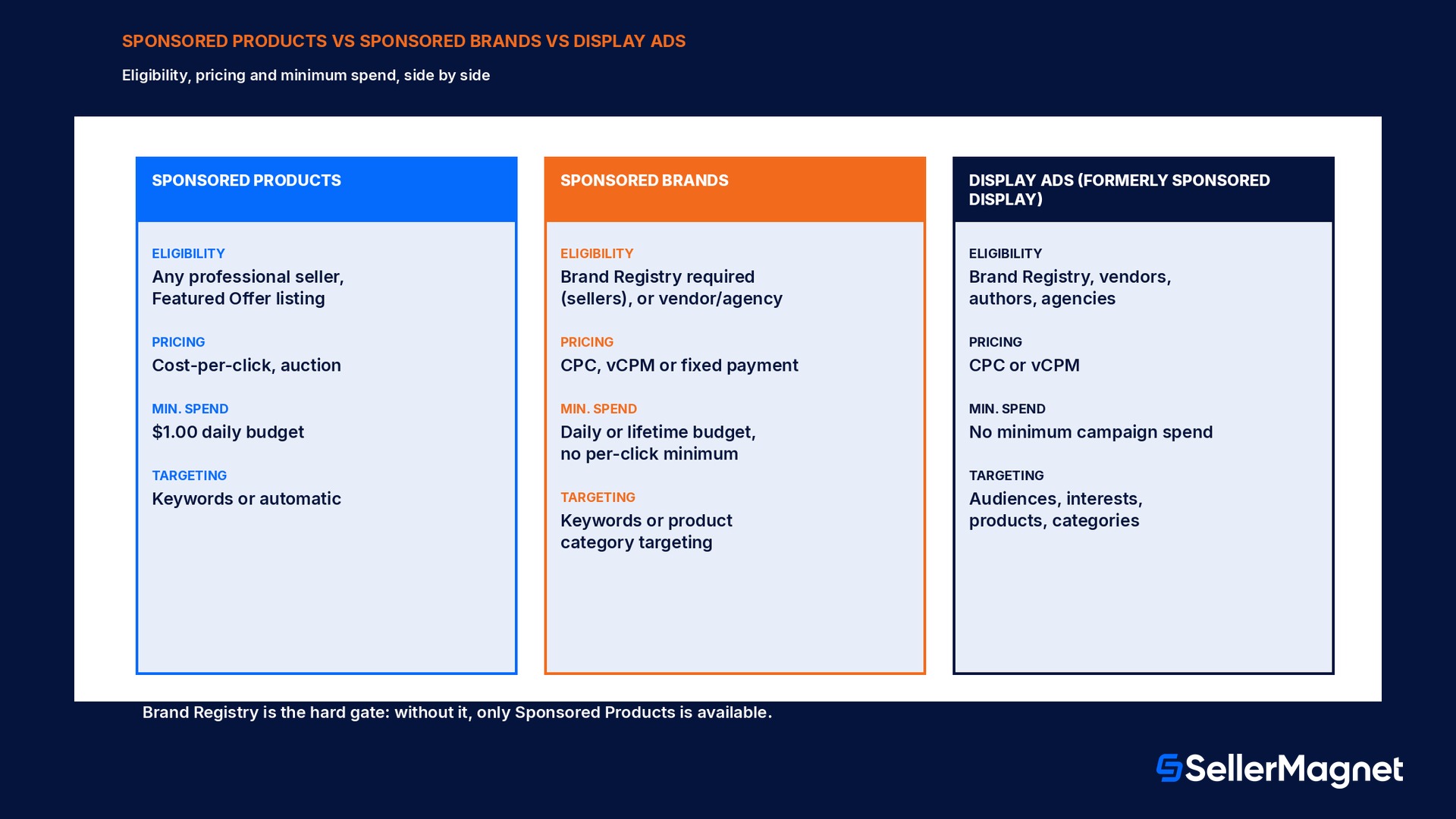
Eligibility is where the 3 ad types diverge the most, and it is the first filter that decides which ones are even an option. Sponsored Products requires an active professional seller account, the ability to ship to every address in the marketplace being advertised in, listings in available (non-closed) categories, and that the specific listing is eligible for the Featured Offer; a listing that is not the Featured Offer will not display an ad even if the campaign is live. Sponsored Brands adds one hard requirement on top of the Sponsored Products list: enrollment in Amazon Brand Registry for sellers, or vendor, book vendor, or agency status; there is no way around this for a seller account, Brand Registry enrollment is the gate. Display ads, in their self-service form, are available to professional sellers enrolled in Brand Registry, vendors, authors, and agencies with clients who sell on Amazon; the managed-service version of display, video, and audio campaigns run through an Amazon Ads account executive typically requires a minimum spend of $50,000. Adult products, used products, refurbished products, and products in closed categories are excluded from Sponsored Products across the board.
Ad type
Who can run it
Sponsored Products
Any active professional seller with a Featured-Offer-eligible, new listing; no Brand Registry required
Sponsored Brands
Professional sellers enrolled in Amazon Brand Registry, vendors, book vendors, KDP authors, agencies
Display ads (self-service)
Professional sellers enrolled in Brand Registry, vendors, authors, agencies with clients selling on Amazon
Display, Video, and Audio (managed service)
Any advertiser, through an Amazon Ads account executive; typically a $50,000 minimum spend
Where each ad type appears, and what a click costs
Sponsored Products ads can appear at the top of, alongside, or within shopping results, on product detail pages, on checkout pages, in Amazon marketing emails, and on select premium apps and websites, on desktop, tablet, and mobile; a click costs whatever the seller's auction bid wins at, with a $1.00 minimum daily campaign budget. Sponsored Brands ads appear at the top of, within, or alongside shopping results, on product detail pages, and occasionally on the Amazon homepage, directing a click either to a specific product's detail page or to a custom landing page such as a Store; pricing is cost-per-click, cost-per-1,000-viewable-impressions, or a fixed upfront payment depending on the chosen goal, with a choice between a daily budget (uncapped pacing within the day) or a lifetime budget (paced across the campaign's full run) that cannot be switched once selected. Display ads, run through sponsored ads in their self-service form, support both cost-per-click and cost-per-1,000-viewable-impression pricing with no minimum campaign spend requirement, and can appear across the Amazon store, on Amazon-owned properties such as Twitch and IMDb, and on thousands of third-party apps and websites, taking a click either to a product detail page on Amazon or to a custom landing page on an external site.
Sponsored Products
Sponsored Brands
Display ads (self-service)
Pricing model
Cost-per-click, auction
CPC, vCPM, or fixed payment
CPC or vCPM
Minimum spend
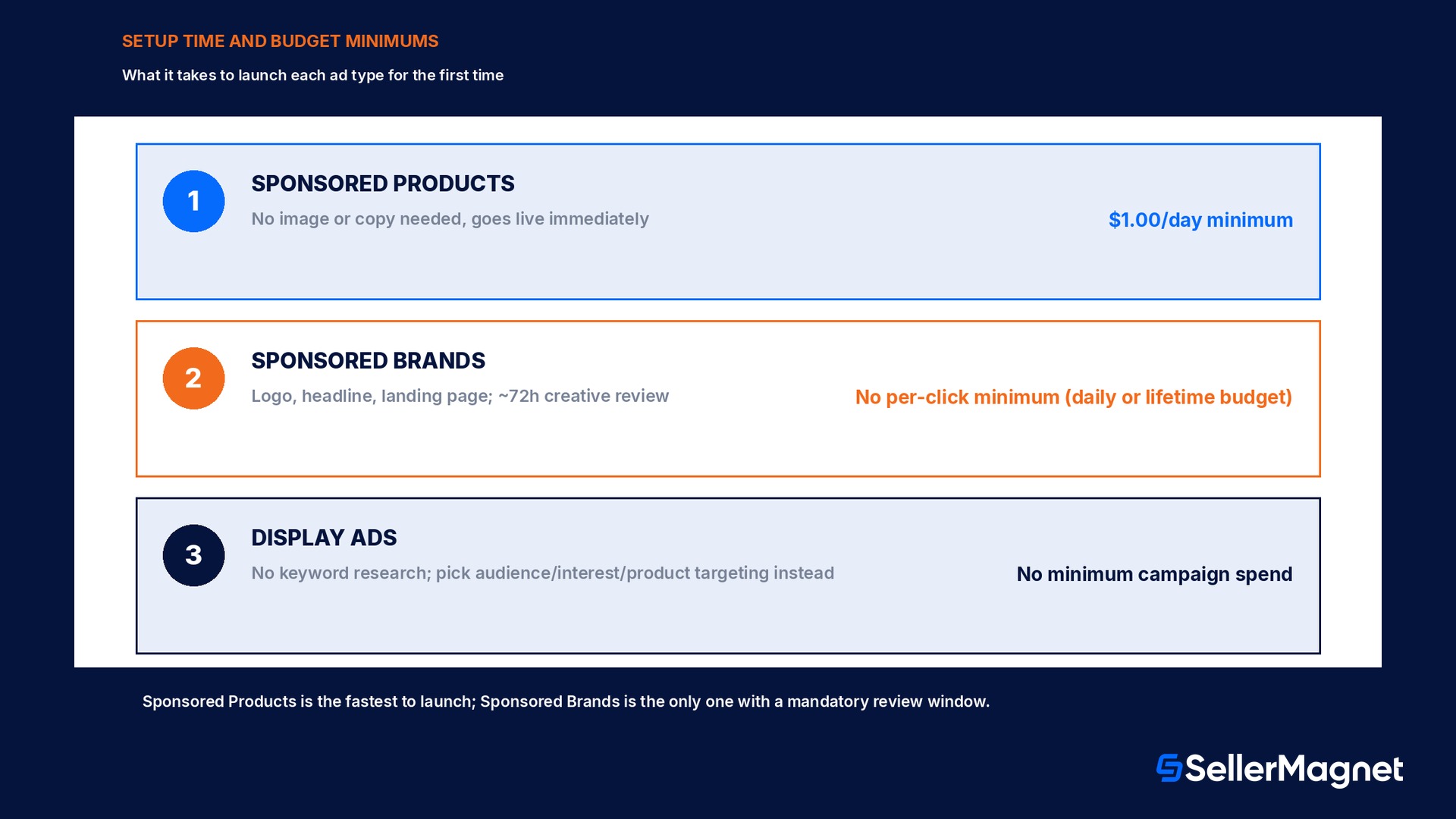
$1.00 daily minimum
No stated per-click minimum; daily or lifetime budget choice
No minimum campaign spend
Targeting
Keywords (manual) or automatic
Keywords or product/category targeting
Audiences, interests, products, categories
Click destination
The advertised product's detail page
Product detail page, Store, or custom landing page
Product detail page or external landing page
Typical placement
Search results, detail pages, checkout
Top of search results, detail pages, homepage
On-Amazon and third-party sites and apps
Which ad type matches which stage of the shopper's journey?
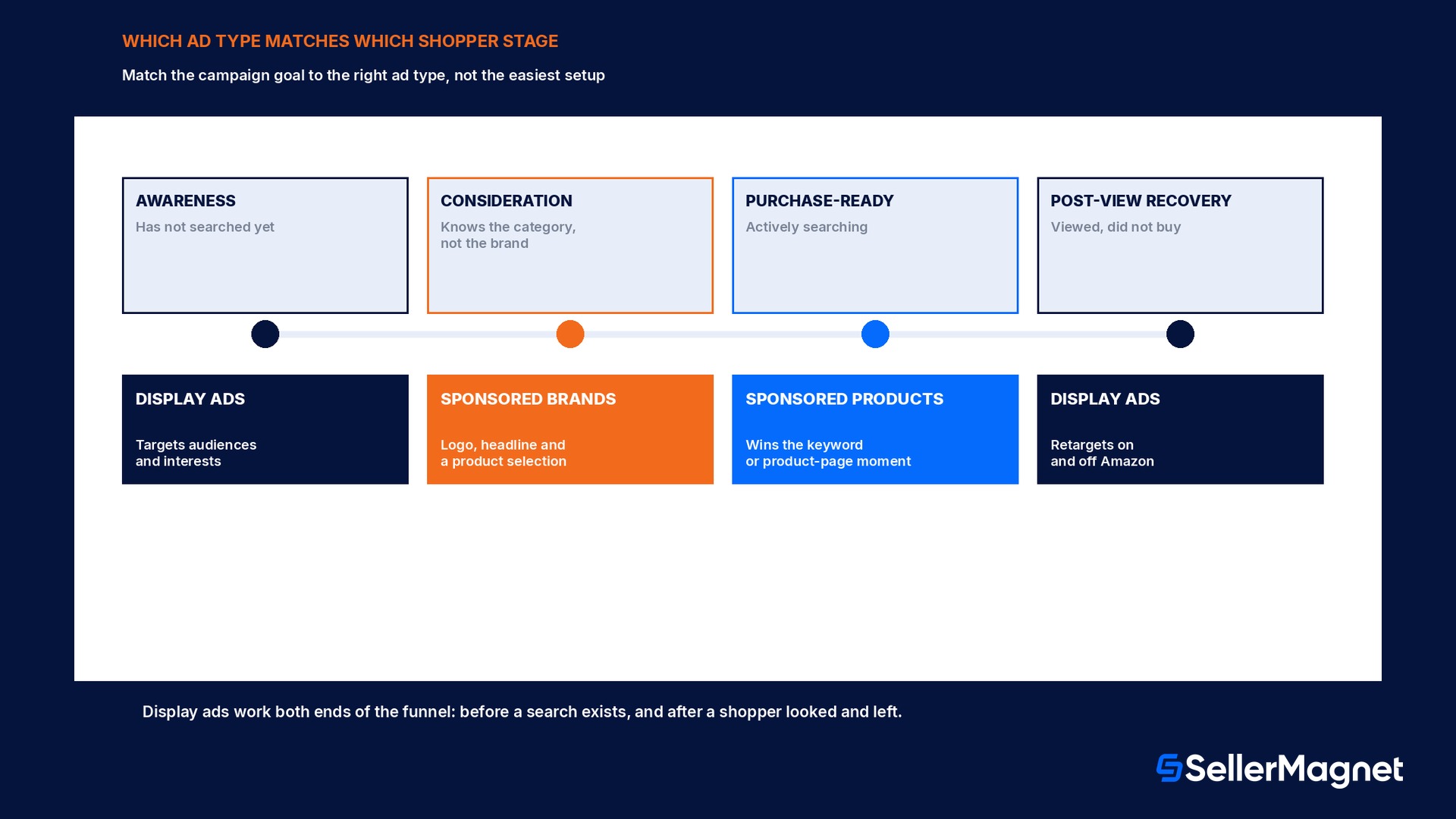
The fastest way to pick the right ad type is to ask which stage of the shopper's decision the campaign is trying to influence, not which one has the easiest setup. Sponsored Products is built for the purchase stage: a shopper has already typed a search or is already looking at a related product, and the job is winning that specific moment of intent. Sponsored Brands is built for the consideration stage: a shopper recognizes the category but has not picked a brand yet, and the job is introducing the brand and a curated set of products rather than a single SKU, which is why it needs a logo, headline, and (for sellers) Brand Registry in the first place. Display ads are built to work both earlier and later than the other two: for awareness, reaching an audience that has not searched for the product yet based on interests or categories, and for recovery, retargeting a shopper who viewed a product detail page without buying, work neither Sponsored Products nor Sponsored Brands is designed to do since both depend on an active search or shopping-results placement.
Shopper stage
Best-matched ad type
Why
Awareness (has not searched yet)
Display ads
Targets audiences and interests, not an active search
Consideration (knows the category, not the brand)
Sponsored Brands
Introduces the brand, logo, and a product selection together
Purchase-ready (actively searching)
Sponsored Products
Wins the specific keyword or product-page moment of intent
Post-view recovery (viewed, did not buy)
Display ads
Retargets a shopper after a detail-page visit, on or off Amazon
Worked example: splitting one monthly budget across all 3
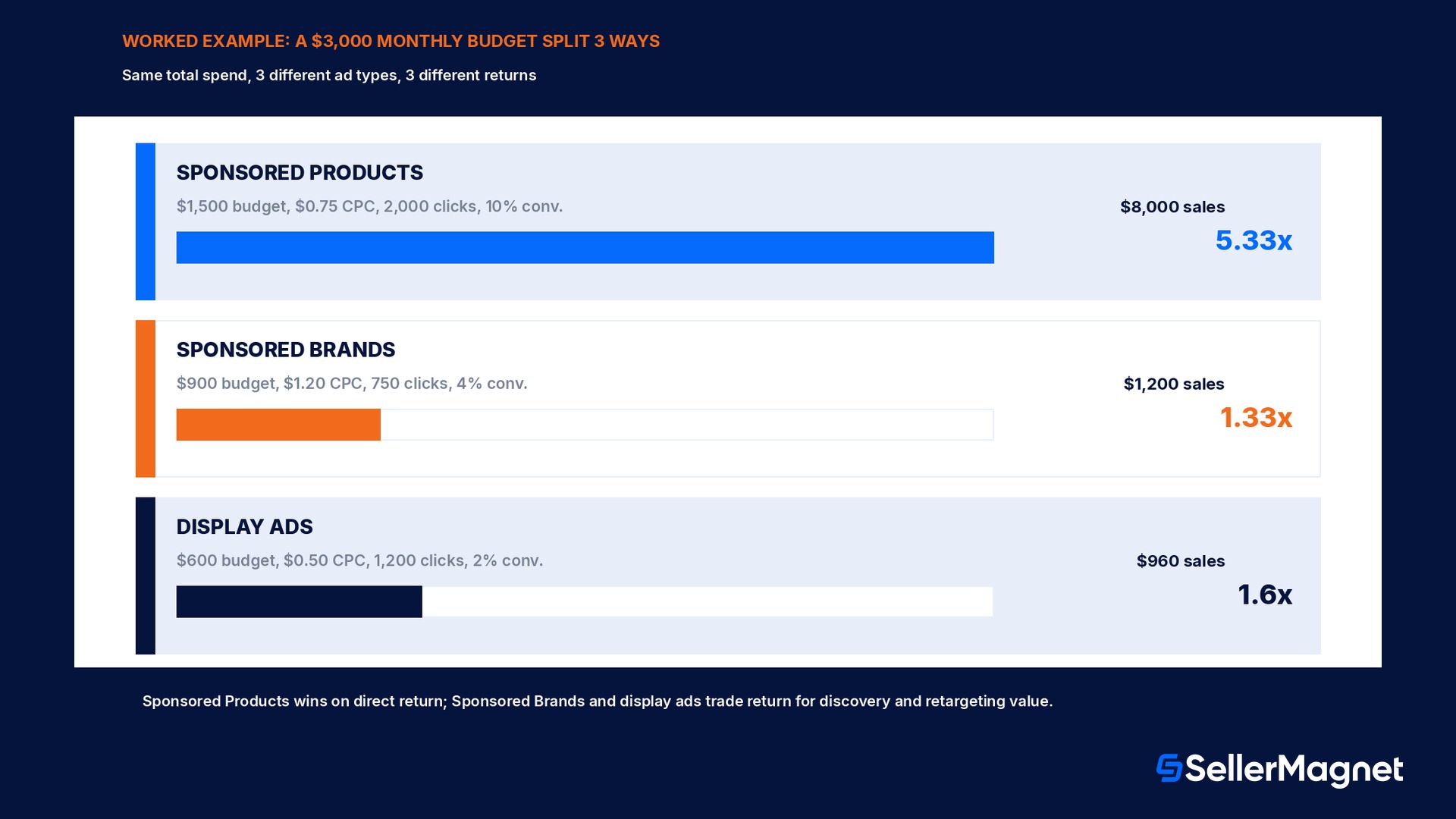
Take a seller with Brand Registry enrollment and a $3,000.00 monthly advertising budget, deciding how to split it rather than putting it all behind the easiest campaign to launch (these are illustrative planning numbers for this example, not Amazon-published benchmarks). Allocating 50% ($1,500.00) to Sponsored Products at an average $0.75 cost per click buys 2,000.0 clicks; at a 10% conversion rate from click to purchase, that is 200.0 purchases, and at a $40.00 average order value, $8,000.00 in attributed sales, a 5.33x return. Allocating 30% ($900.00) to Sponsored Brands at an average $1.20 cost per click (Sponsored Brands clicks typically cost more because the ad promotes the brand and multiple products rather than one listing) buys 750.0 clicks; at a lower 4% conversion rate typical of a consideration-stage ad, that is 30.0 purchases and $1,200.00 in directly attributed sales, a 1.33x return on its own, before counting the brand-awareness value a last-click sales number does not capture. Allocating the remaining 20% ($600.00) to display ads at an average $0.50 cost per click buys 1,200.0 clicks; at a 2% conversion rate typical of an awareness or retargeting placement, that is 24.0 purchases and $960.00 in directly attributed sales, a 1.6x return, again before counting the downstream effect of a shopper who saw the retargeting ad and later converted through a Sponsored Products click instead.
Sponsored Products (50%)
Sponsored Brands (30%)
Display ads (20%)
Budget
$1,500.00
$900.00
$600.00
Avg. cost per click
$0.75
$1.20
$0.50
Clicks bought
2,000.0
750.0
1,200.0
Conversion rate (assumed)
10%
4%
2%
Purchases
200.0
30.0
24.0
Attributed sales ($40.00 AOV)
$8,000.00
$1,200.00
$960.00
Direct return on spend
5.33x
1.33x
1.6x
The split above is a planning illustration, not a universal ratio
The 50/30/20 split, click costs, and conversion rates above are sample figures for walking through the mechanics of a 3-way budget; a real seller substitutes their own numbers from the Amazon advertising console once campaigns are running. What does not change across accounts is the pattern: Sponsored Products carries the highest direct return because it captures ready-to-buy intent, while Sponsored Brands and display ads trade a lower measured direct return for discovery and retargeting value that a last-click sales number alone understates.
How does setup actually differ between the 3?
Sponsored Products is the fastest to launch: no image or custom copy is required, ads go live immediately after a product and a bid are chosen, and automatic targeting lets Amazon's own shopping-insight data pick relevant keywords without the seller researching any. Sponsored Brands setup takes longer: a campaign needs a custom headline, a brand logo meeting Amazon's creative guidelines, a choice of ad format (Product Collection, Store Spotlight, or Video), a landing page choice (a product detail page, a Store, or a custom page), and every ad submitted goes through a review that Amazon states typically completes within 72 hours before it can run. Display ads setup sits in between: no custom creative copy is strictly required for every format, but the targeting choice (audience, interest, product, or category) replaces keyword research entirely, since display ads do not use keywords at all; Amazon's own FAQ is explicit that keywords are used only for Sponsored Products and Sponsored Brands, while display ads reach products, product categories, or customer interests instead.
Mistakes that waste spend across the 3 ad types
Running only Sponsored Products because it was easiest to set up, with no Sponsored Brands or display presence at all. A seller with no Brand Registry enrollment is actually locked out of Sponsored Brands and self-service display ads until that enrollment is in place, which is often the real reason, not a choice.
Judging a Sponsored Brands campaign on last-click sales the same way as a Sponsored Products campaign. Sponsored Brands is a consideration-stage tool; Amazon's own guidance is to weight new-to-brand metrics over ROAS when reading its results.
Advertising a listing that is not the Featured Offer. Sponsored Products and Sponsored Brands ads for a non-Featured-Offer listing simply will not display to shoppers, regardless of bid or budget; the campaign manager flags this.
Assuming Sponsored Display disappeared in 2026. It was renamed to display ads and folded into Amazon Ads Agent; existing campaigns kept running under the new name, nothing needed to be rebuilt from scratch.
Using keyword research for a display ads campaign. Display ads target audiences, interests, products, and categories, not keywords; keyword lists built for Sponsored Products or Sponsored Brands do not transfer.
Setting a Sponsored Brands lifetime budget by mistake when a daily budget was intended, or the reverse. The choice cannot be switched once a campaign is created, so the wrong pick locks in pacing behavior for the campaign's full run.
Which metric actually tells you whether a campaign is working?
Reading all 3 ad types with the same metric is one of the fastest ways to misjudge a campaign that is actually doing its job. ACOS (advertising cost of sale) and ROAS (return on ad spend) are the right lens for Sponsored Products, because a purchase-ready search converts quickly enough for last-click attribution to mean something: a high ACOS on a Sponsored Products campaign targeting a competitive keyword usually does mean the bid or the targeting needs work. The same ACOS number on a Sponsored Brands campaign tells a different, weaker story, because the campaign's job is brand discovery, not an immediate purchase; Amazon's own advertiser guidance is to weight new-to-brand order percentage (the share of attributed sales from customers who had not bought the brand on Amazon in the past year) and detail-page-view rate alongside, not instead of, ROAS when judging a Sponsored Brands campaign. Display ads need yet another lens again: with no keyword to measure against, the useful numbers are reach (how many unique shoppers the audience or retargeting segment actually touched), click-through rate, and the downstream conversion a shopper completes later through a different, unassisted channel, something a single campaign's own attributed-sales line will always understate since the ad's job was the impression or the retarget, not necessarily the final click. A seller who cancels a Sponsored Brands or display campaign purely because its own ROAS trails Sponsored Products is very likely cutting the part of the advertising mix that was making the Sponsored Products campaign's own numbers look as good as they do, by building the brand recognition or recovering the abandoned browse that led to the search in the first place.
Where SellerMagnet fits across all 3 ad types
Sponsored Products, Sponsored Brands, and display ads are all built, launched, and billed entirely inside Amazon's own advertising console; no third-party tool, including SellerMagnet, creates or runs campaigns on a seller's behalf outside that console. SellerMagnet's PPC Manager sits on top of the campaigns a seller is already running there: search-term harvesting and negation, bid rules, brand defense, keyword research and planning, and an AI Optimizer, all available in suggestions-only mode by default so nothing changes on Amazon until a seller explicitly approves it, with a single "Stop all automation" switch and a full activity log of every change made.
Profit Analytics then tracks what a split like the one in the worked example above actually did to margin and repeat-purchase behavior per SKU once real orders land, the step after attributed sales that decides whether a budget split should be kept or rebalanced next month.
Checklist before choosing an Amazon ad type
How to pick the right ad type for a specific Amazon advertising goal
Confirm Featured Offer eligibility for the listing - Sponsored Products and Sponsored Brands ads will not display to shoppers for a listing that is not the Featured Offer, regardless of bid.
Check Brand Registry enrollment status - Required for Sponsored Brands and for the self-service version of display ads for sellers; without it, only Sponsored Products is available.
Identify which shopper stage the campaign is actually trying to move - Purchase-ready intent points to Sponsored Products, brand discovery to Sponsored Brands, audience-building or retargeting to display ads.
Pick the pricing and budget structure that matches the goal - Sponsored Products: $1.00 minimum daily budget. Sponsored Brands: daily or lifetime budget, cannot switch later. Display ads: no minimum spend, CPC or vCPM.
Match the success metric to the ad type - Sponsored Products and Sponsored Brands: ROAS and new-to-brand metrics. Display ads: reach, detail-page views, and downstream conversion through other channels.
Budget for a 72-hour review window on any Sponsored Brands creative - Ads are reviewed before they can run; launching a time-sensitive Sponsored Brands campaign without that buffer risks missing the window.
What happened to Sponsored Display in 2026?
It was renamed to display ads and folded into Amazon's Ads Agent platform alongside Amazon DSP. Existing campaigns kept running unchanged under the new name; it is the same underlying product.
Do I need Amazon Brand Registry to run Sponsored Products?
No. Sponsored Products is open to any active professional seller with a Featured-Offer-eligible, new listing. Brand Registry is required for Sponsored Brands and for the self-service version of display ads.
What is the minimum budget for each ad type?
Sponsored Products: $1.00 minimum daily budget. Sponsored Brands: a chosen daily or lifetime budget with no stated minimum beyond the auction bid. Display ads (self-service): no minimum spend requirement.
Which ad type should a new seller start with?
Sponsored Products, since it requires no Brand Registry enrollment, no creative review, and goes live immediately. Sponsored Brands and self-service display ads become available once Brand Registry enrollment is complete.
Do Sponsored Brands ads get reviewed before running?
Yes. Amazon states Sponsored Brands ad submissions are typically reviewed within 72 hours before they can go live.
Do display ads use keyword targeting?
No. Amazon's own FAQ states keywords are used only for Sponsored Products and Sponsored Brands; display ads target products, product categories, or customer interests instead.
Can I switch a Sponsored Brands campaign from a daily to a lifetime budget?
No. Amazon states the budget type cannot be changed once selected for that campaign; a new campaign is needed to change it.
Stop Juggling Tools. SellerMagnet Combines Everything You Need.