Amazon Pay for Sellers 2026: Fees, Setup and What It Actually Costs
R
RenéFreelance Amazon Editor
|
16 min read
A seller who already has an Amazon account and a Shopify or WooCommerce store on the side often skips past the Amazon Pay button in the checkout settings, assuming it is just another Amazon-branded widget that adds friction rather than removing it. It is the opposite: Amazon Pay lets a shopper who already has an Amazon account check out on the seller's own website using the shipping address and payment method already saved there, with no new account to create and no card number to retype. For the seller, it is a separate payment processing service, not a selling channel, so none of Amazon's marketplace referral fees apply to it; what applies instead is a transaction-based processing fee charged by Amazon Pay itself, which is a materially different number and a different contract to understand than the familiar Seller Central fee schedule. This guide works through exactly what Amazon Pay charges per transaction, what a business actually needs to qualify, how fast the money actually arrives, and a worked example that turns the published fee formula into real numbers on a real sale.
Amazon Pay is a payment processing service that lets a shopper check out on a seller's own website (not Amazon.com) using the shipping and payment details already stored in their Amazon account. It charges a transaction-based fee with a processing component and a flat authorization fee, separate from and unrelated to Amazon's Seller Central referral or FBA fees. Businesses register with a Seller Central-linked email and password, and for US entities need a US phone number, a US bank card, a US checking account, and a tax ID. Disbursements run daily and take 3 to 5 business days to clear.
What Amazon Pay actually is, and what it is not
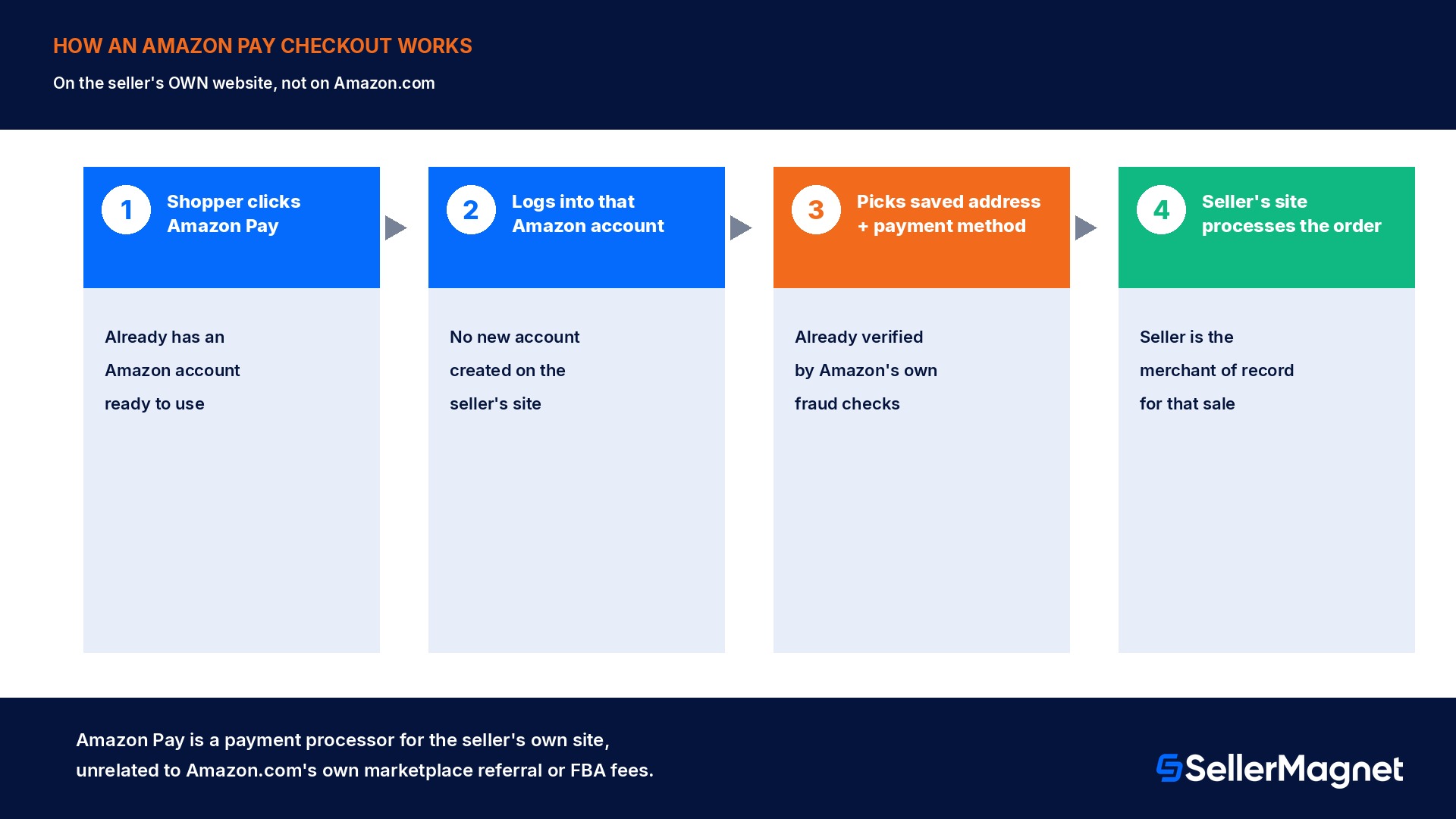
Amazon Pay is a checkout option a seller adds to their OWN website or app, not a feature of a listing on Amazon.com, and not a replacement for a Seller Central account. It lets a shopper who already has an Amazon account log into that account at checkout instead of creating a new one on the seller's site, then complete the purchase using a shipping address and payment method Amazon has already verified. The seller is the merchant of record for that sale on their own site; Amazon Pay simply processes the payment and verifies the buyer's identity and payment method behind the scenes, the same role a payment gateway like Stripe or PayPal plays, just backed by Amazon's own fraud detection and the shopper's existing Amazon account data. This is a genuinely separate business relationship from selling on Amazon.com: a product sold through an Amazon Pay checkout on the seller's own site never appears in Amazon's marketplace catalog, is not subject to Amazon's referral fee or FBA fee schedule, and is not covered by FBA fulfillment unless the seller separately uses the Multichannel Fulfillment service to ship it. A seller can use Amazon Pay with zero Amazon Seller Central listings at all, and plenty of merchants who sign up for Amazon Pay never sell a single item on Amazon.com itself.
What it is
What it is not
A checkout button for the SELLER'S OWN website or app
A listing or selling channel on Amazon.com
A payment processor, like Stripe or PayPal, backed by Amazon account data
A Seller Central feature or FBA service
Billed as a per-transaction processing + authorization fee
Billed as a referral fee or FBA fulfillment fee
Usable with zero Amazon.com listings
Dependent on having an active Seller Central catalog
What Amazon Pay actually charges per transaction
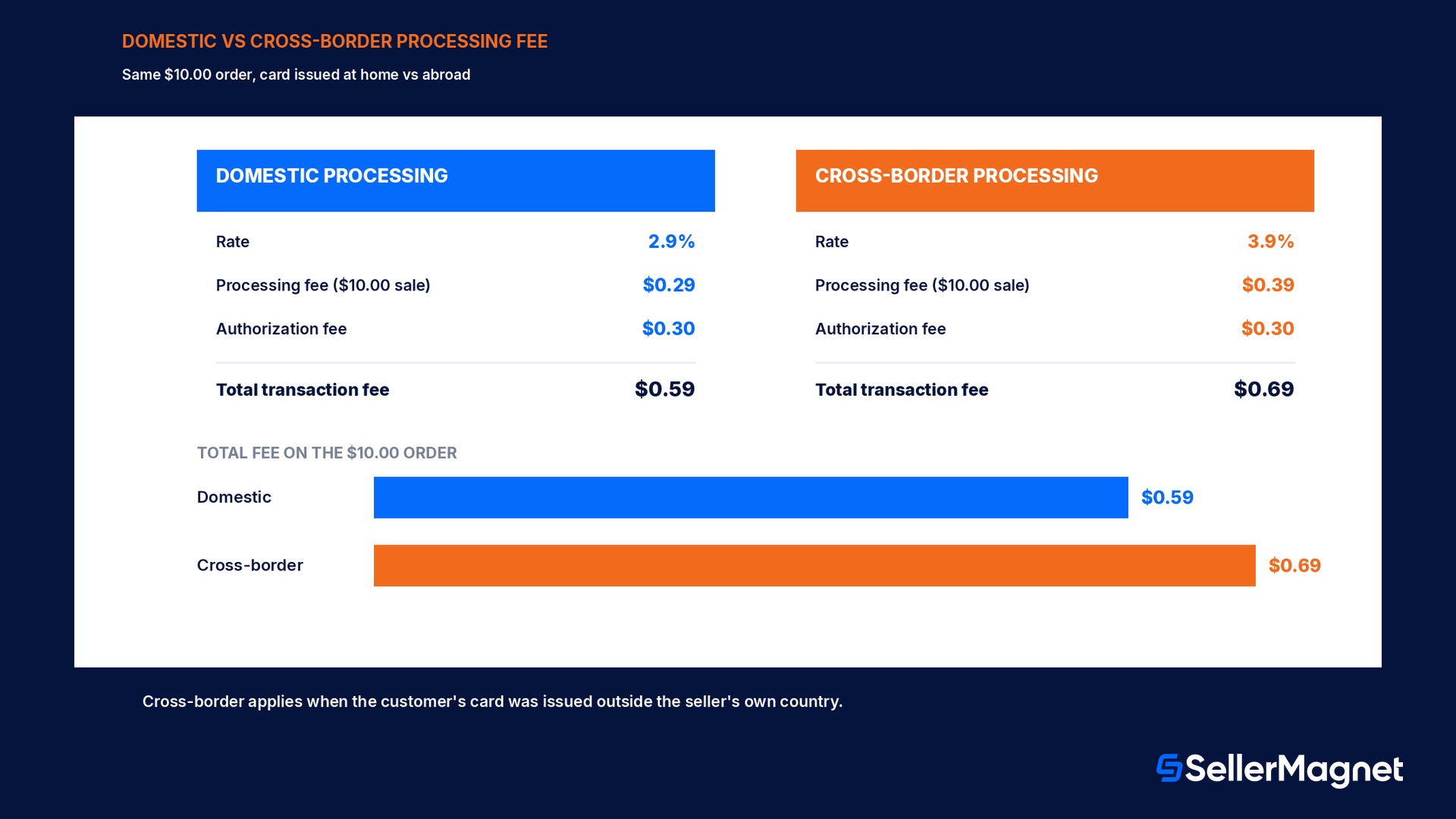
Amazon Pay's own fee page is explicit that fees are transaction-based, with a processing component and a flat authorization fee, charged together only once a purchase is successfully authorized and processed; an abandoned cart, a declined card, or a failed authorization never generates a charge. For a standard domestic web or mobile transaction, the fee is a percentage-based domestic processing fee plus a flat authorization fee, and tax where applicable. A separate, higher cross-border processing fee replaces the domestic one, on top of the same flat authorization fee, when the payment method the customer used was issued outside the seller's own country; Amazon Pay's published comparison shows this cross-border rate running about a full percentage point higher than the domestic rate on the same transaction. Sellers running Amazon Pay through Shopify Payments or certain other integration partners may see a different blended rate than the published standalone figures, since the processor relationship itself changes the fee the integration partner passes through; the standalone domestic and cross-border rates on Amazon Pay's own fee page are the baseline to check first, and the actual per-transaction rate that lands in a seller's own account should always be confirmed against the live current rate card on that page rather than a cached number, since payment-processing rates are revised periodically.
This is not the same fee as Seller Central's referral fee
Amazon's marketplace referral fee (a percentage of the sale price, charged on Amazon.com orders) and Amazon Pay's processing fee (charged on orders placed through the Amazon Pay button on a seller's OWN site) are two unrelated fee schedules from two unrelated parts of the relationship with Amazon. A seller using both channels pays both fees independently, on their respective orders only.
A worked example: what a $50 sale actually nets
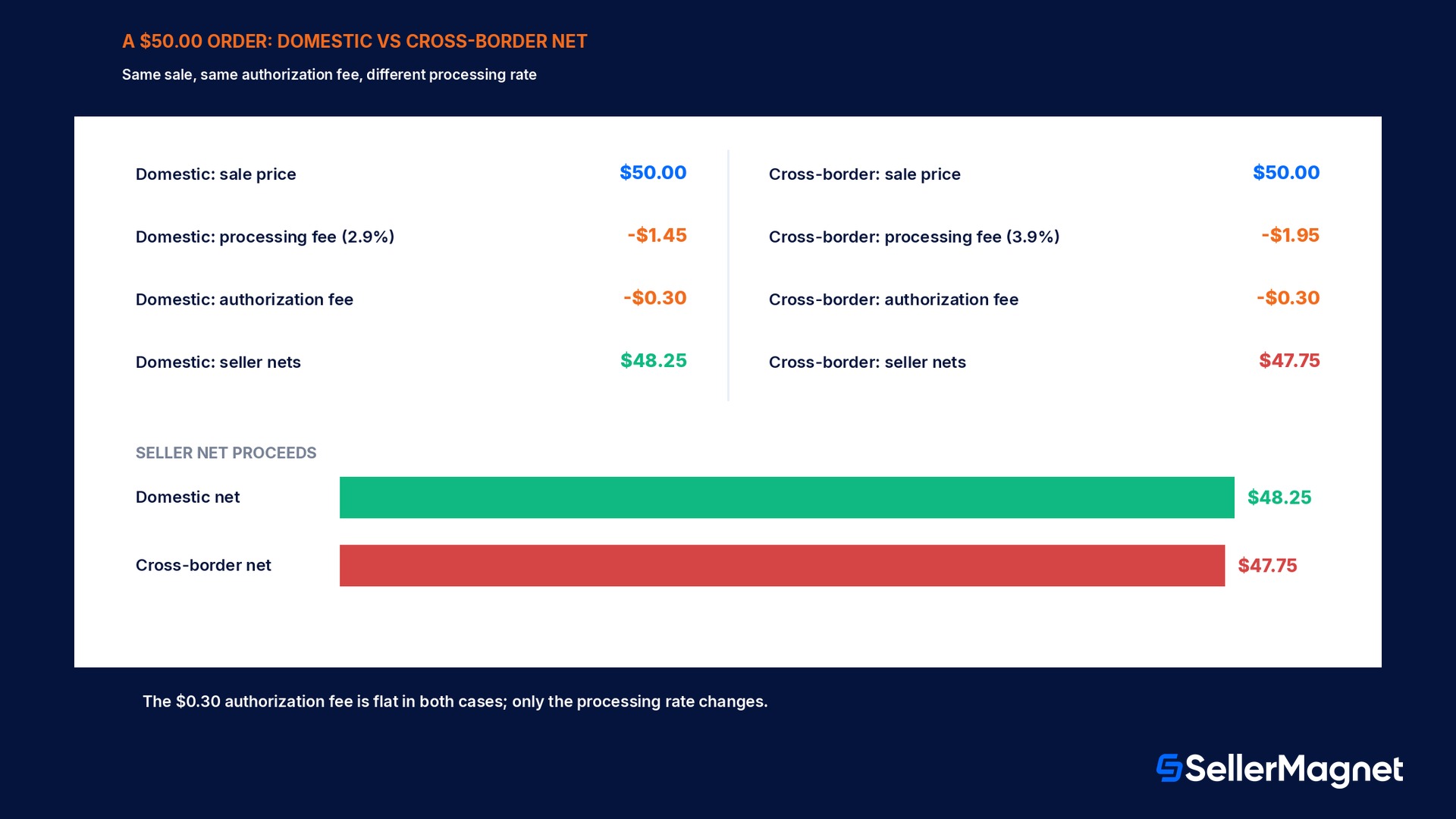
Amazon Pay's own published fee comparison uses a $10.00 transaction to illustrate domestic versus cross-border processing, so running a slightly larger, round seller order through the same two-part formula (processing fee plus the flat $0.30 authorization fee) makes the gap concrete. On a $50.00 domestic web order at the standard 2.9% domestic processing rate, the processing fee comes to $1.45 (2.9% of $50.00), and the flat $0.30 authorization fee is added on top of that, for a total transaction fee of $1.75; subtracted from the $50.00 sale price, the seller's net proceeds on that order are $48.25. Run the identical $50.00 sale through a card issued outside the seller's own country instead, and the cross-border processing rate of 3.9% replaces the domestic one: the processing fee becomes $1.95 (3.9% of $50.00), the same flat $0.30 authorization fee still applies, the total transaction fee is $2.25, and the seller's net proceeds drop to $47.75, a full $0.50 lower than the domestic outcome on an otherwise identical order. The distance between the two outcomes is the entire reason a seller doing meaningful cross-border volume through their own site should check Amazon Pay's current published rate card rather than assume the domestic figure applies to every order; the two numbers come from the same checkout button but are not close to each other.
Does a business actually qualify for Amazon Pay?
Amazon Pay's own FAQ states the US qualification bar plainly: a business entity authorized to do business and with a physical presence in the United States needs a US-based phone number, a credit card issued by a US-based bank, a checking account with a US-based bank, and the business's taxpayer ID, EIN, or a personal Social Security number for a sole proprietor. Registration itself runs through the existing Seller Central account email and password via the Business Registration button, so a seller with an active Seller Central account is not starting from zero on identity verification, though Amazon Pay still runs its own separate verification and document checks on top of that. A non-US business registers through its own country's Amazon Pay help page rather than the US page, and the requirements, supported banks, and available currencies differ by country, so a seller operating from outside the US should start on their own country's page rather than assuming the US checklist applies to them.
How fast the integration and the money actually move
Amazon Pay's own FAQ gives two separate speed figures that sellers tend to conflate: how fast the checkout button goes live, and how fast money from a completed sale actually reaches the bank. Integration speed depends entirely on the platform: Amazon Pay states that, based on the services and technical setup in use, the button can appear on a seller's site in as little as 15 minutes, with one-click integration available for Stripe and Shopify stores specifically, while a fully self-hosted platform integrating directly against the API may require additional coding and a longer timeline. Payout speed is a separate number: Amazon Pay processes disbursements daily, and states it takes 3 to 5 business days for a given payment to complete and appear in the seller's bank account, with a reserve possibly applied under Amazon Pay's own reserve policy depending on the account's risk profile. This 3-to-5-business-day disbursement timeline is specific to Amazon Pay transactions on a seller's own site; it is a different clock from Seller Central's Express Payout feature for Amazon.com marketplace sales, and the two should not be assumed to run on the same schedule just because both ultimately come from Amazon.
Fraud protection and chargebacks: what is included, and what to still check
Amazon Pay's FAQ states that it backs every transaction with the same fraud detection technology used on Amazon.com itself, including fraud detection, chargeback controls, and risk management, at no additional cost beyond the standard transaction fee; a seller is not paying extra for this layer on top of the processing fee above. Separately, Amazon Pay publishes an A-to-z Guarantee Policy for Merchants that covers how disputes and buyer claims are handled. None of this removes the seller's own responsibility to read the specific terms of that guarantee policy and the acceptable use policy before relying on it for a dispute; the fraud tooling reduces exposure, it does not eliminate the possibility of a chargeback or a claim landing against a specific order, and a seller doing meaningful volume should read the actual policy text rather than the FAQ's one-line summary of it.
The checkout options a merchant can actually turn on
Amazon Pay is not limited to a single immediate-charge button; its own merchant documentation lists six distinct payment behaviors a business can enable, and the right choice depends entirely on what the store actually sells rather than a default setting left untouched. Immediate charge takes the customer's payment the moment the order is placed, the behavior most sellers picture by default and the right one for same-day-shipped goods or an instantly downloadable digital product. Deferred payment instead waits to capture funds until a specific milestone is met, built for a pre-order, a backorder, or an order placed online for in-store pickup, where charging on day one before the item is even available would be the wrong moment to take the customer's money. Split payment spreads the total across multiple individual charges, suited to a built-to-order item needing a partial deposit upfront or an order that ships across several separate shipments rather than one. Recurring payments charge a fixed or variable amount on a repeating schedule set by the business, covering a membership, a subscription with a variable amount or frequency, or a pay-per-use arrangement. One-off purchase with subscription lets a single transaction combine an immediate one-time charge with the start of a recurring plan in the same checkout, for example selling a product alongside a refill subscription in one step instead of two. Refund issues a full or partial refund against funds already captured, covering a voided transaction, a returned item, or a partial fulfillment. A seller setting up Amazon Pay for the first time should map their actual sales model onto this list before accepting whatever a given shopping-cart plugin turns on by default, since several of the more advanced ones, split and recurring in particular, need to be explicitly supported by the integration in use, not just by Amazon Pay itself.
Payment behavior
What it is for
Immediate charge
Charge placed the moment the order is made; same-day-shipped goods, instant digital downloads
Deferred payment
Capture funds only at a milestone; pre-orders, backorders, buy-online-pick-up-in-store
Split payment
Spread the total across several charges; built-to-order deposits, multi-shipment orders
Recurring payments
Fixed or variable repeating charge; memberships, subscriptions, pay-per-use
One-off + subscription
A single checkout combines an immediate charge with a new recurring plan
Refund
Full or partial refund against funds already captured
Which integration path actually applies to a given store
Amazon Pay's own FAQ draws a specific line between stores that get a fast path and stores that do not, and it is worth checking which side of that line a given storefront is on before promising a launch date internally. Stripe and Shopify customers specifically get one-click integration, meaning the Amazon Pay option can be switched on inside settings already exposed by that platform, which is where the frequently repeated 'as little as 15 minutes' figure comes from. A merchant on a different hosted cart platform, or a WooCommerce store on top of WordPress, typically still integrates through a documented plugin or the platform's own payment-settings screen rather than custom code, though the setup time runs longer than the one-click case because there are more configuration screens to work through. A fully self-hosted or custom-built storefront, one that is not running on an established commerce platform at all, is the case Amazon Pay's FAQ flags as possibly needing additional coding against the API directly: the Integration Guide on Amazon Pay's own help pages is the primary reference for that path, and it is worth reading before committing to a specific technical approach or timeline internally, since the actual effort depends on the existing checkout architecture far more than it does for a Stripe or Shopify store.
Where Amazon Pay fits for a seller who also sells on Amazon.com
A seller already running an Amazon.com listing is not choosing between the two channels; Amazon Pay specifically targets the seller's OWN site, app, or other sales channel outside Amazon.com, so the two commonly run side by side rather than competing. A seller's own brand site using Amazon Pay at checkout gets a familiar, trusted button for the large pool of shoppers who already have an Amazon account and would otherwise hesitate to create a new login just to buy once, while the Amazon.com listing itself continues to run on the separate referral-fee and FBA-fee schedule regardless of what happens on the seller's own site. The two revenue streams, their fees, and their payout timing are tracked separately: an order through the Amazon Pay button on the seller's own site never appears in Seller Central's own order or payments reports, so a seller running both channels needs their own bookkeeping, or a tool built to combine multiple revenue sources, to see true profit across both at once rather than reading only the Seller Central side of the business.
What SellerMagnet does and does not cover here
SellerMagnet connects to a seller's Amazon Seller Central account and does not process payments or integrate with the Amazon Pay button on a seller's own website; registering for Amazon Pay, choosing an integration partner, and reading its fee and guarantee policies all happen directly between the seller and Amazon Pay. Where SellerMagnet's Analytics Dashboard is useful is on the Amazon.com side of the same business: it shows net profit per order, product, and marketplace after Amazon's own fees, COGS, shipping, VAT, and refunds, which is the half of a multi-channel seller's numbers that Amazon Pay's own reporting does not touch. A seller comparing the true margin on an Amazon.com sale against an Amazon-Pay-processed sale on their own site still needs to pull the Amazon Pay transaction fee into that second number by hand, or inside whatever accounting tool reconciles the own-site order; the free Fee Calculator only computes Amazon's marketplace referral and FBA fee schedule, not Amazon Pay's separate processing-fee schedule covered in this guide.
A seller handling US tax paperwork for marketplace sales rather than their own-site Amazon Pay transactions should read the 1099-K tax reporting guide instead, which covers Amazon.com's own payout reporting threshold, a separate mechanic from anything on this page.
Checklist before turning on the Amazon Pay button
How to check whether Amazon Pay is worth adding to a seller's own site
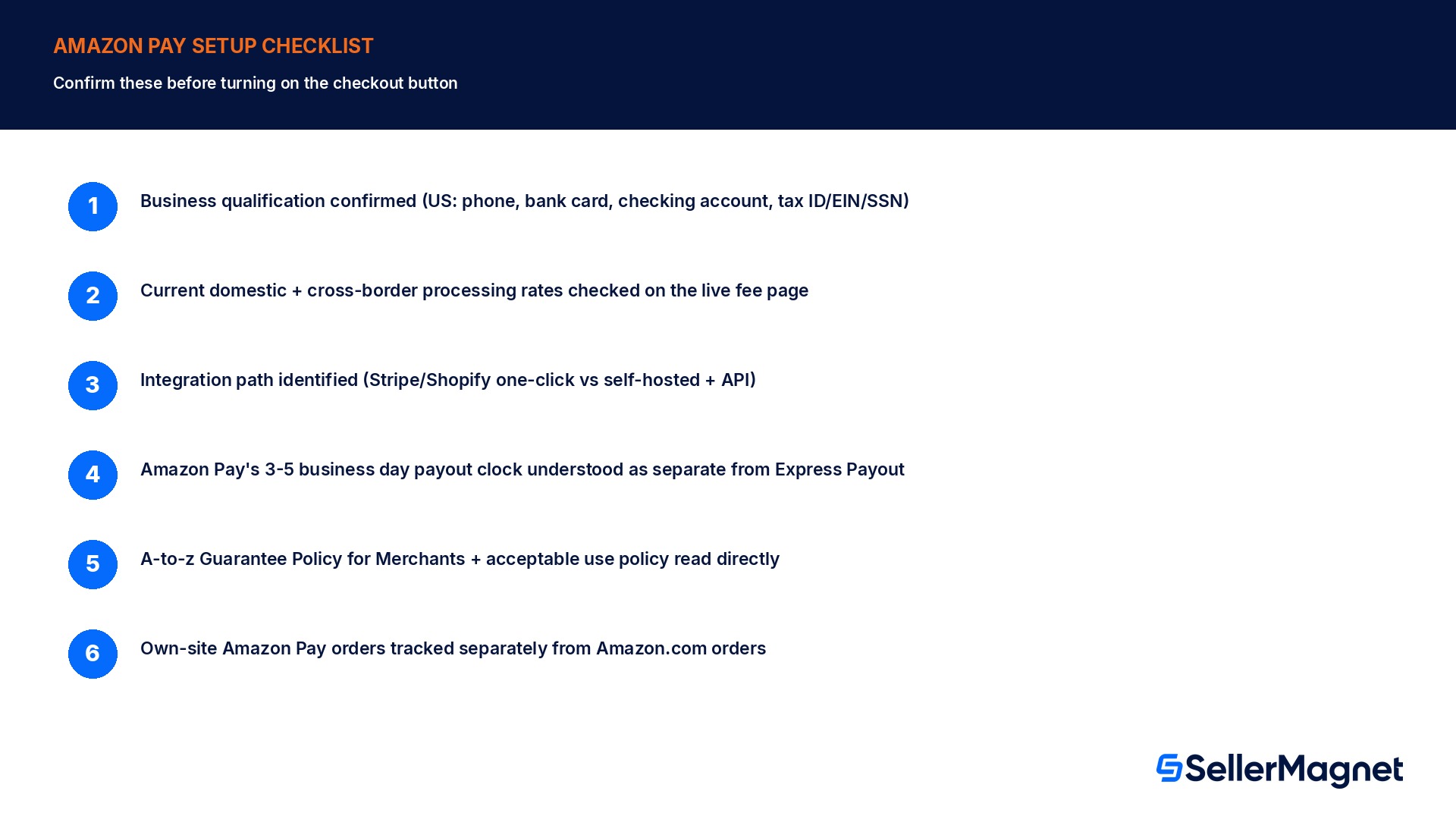
Confirm business qualification first - US entities need a US phone number, a US bank card, a US checking account, and a tax ID/EIN/SSN; non-US businesses check their own country's Amazon Pay page instead.
Read the CURRENT domestic and cross-border processing rates - Rates are revised periodically; check the live fee page rather than a number from an older source, including this one.
Check the integration path for the actual storefront platform - Stripe and Shopify support one-click setup (as little as 15 minutes); a self-hosted platform may need additional coding.
Separate Amazon Pay's payout clock from Seller Central's - Disbursements run daily and typically take 3 to 5 business days, a different timeline from Express Payout on Amazon.com orders.
Read the A-to-z Guarantee Policy for Merchants and the acceptable use policy directly - The built-in fraud tooling and chargeback controls reduce exposure; they do not replace reading the actual dispute-handling terms.
Track own-site Amazon Pay orders separately from Amazon.com orders - They never appear in the same Seller Central reports; reconcile them in a separate bookkeeping or accounting step.
Is Amazon Pay the same as selling on Amazon.com?
No. Amazon Pay is a checkout button a seller adds to their OWN website or app, not a feature of an Amazon.com listing. It is unrelated to Amazon.com's marketplace referral fee or FBA fee schedule, and a seller can use it on their own site with zero Amazon.com listings, since it is a separate payment relationship entirely.
What does Amazon Pay actually charge per transaction?
A domestic transaction has a processing fee component plus a flat $0.30 authorization fee, charged together only once a purchase is authorized and processed; nothing is charged on an abandoned cart or a declined card. A higher cross-border processing fee replaces the domestic rate when the customer's card was issued outside the seller's own country.
Does my business qualify for Amazon Pay?
US entities authorized to do business in the United States need a US-based phone number, a credit card issued by a US bank, a US-based checking account, and the business's taxpayer ID, EIN, or a personal Social Security number for a sole proprietor. Non-US businesses register through their own country's Amazon Pay help page instead, with different local requirements.
How long does Amazon Pay take to pay out?
Amazon Pay processes disbursements daily, and states it typically takes 3 to 5 business days for a given payment to complete and land in the seller's bank account, with a reserve possibly applied depending on the account's risk profile. This timeline is separate from, and unrelated to, Seller Central's own Express Payout feature for Amazon.com marketplace orders.
How long does it take to add the Amazon Pay button to a website?
As little as 15 minutes for a Stripe or Shopify store, since both get a one-click integration option built right into settings the platform already exposes. A fully self-hosted or custom-built storefront integrating directly against Amazon Pay's own API may need additional coding and a longer timeline, depending entirely on the existing checkout architecture already in place.
Does Amazon Pay include fraud protection?
Yes, at no extra cost beyond the standard transaction fee: Amazon Pay backs every transaction with the same fraud detection technology, chargeback controls, and risk management used on Amazon.com itself. Sellers should still read the A-to-z Guarantee Policy for Merchants and the acceptable use policy directly, since the built-in tooling reduces exposure without removing every possibility of a dispute.
Can Amazon Pay handle subscriptions and split payments, not just one-time charges?
Yes. Beyond the default immediate charge, a merchant can enable deferred payment for pre-orders or pickup orders, split payment across multiple charges for built-to-order items, recurring payments for memberships and subscriptions, and a one-off purchase combined with a new subscription in a single checkout, depending on what the specific integration in use actually supports.
Will an Amazon Pay order on my own site show up in my Seller Central reports?
No. Amazon Pay orders placed through the checkout button on a seller's own website are a separate revenue stream from Amazon.com marketplace orders, and they never appear in Seller Central's own order or payments reports. A seller running both channels needs their own bookkeeping, or a combined tool, to reconcile true profit across both sides of the business at once.
Stop Juggling Tools. SellerMagnet Combines Everything You Need.