Amazon Lightning Deals 2026: Fees and Margin Guide
R
RenéFreelance Amazon Editor
|
17 min read
Last updated: Oct 25, 2026
A Lightning Deal badge can move more units in a single afternoon than a listing sells in a slow week, but the badge is not free, and the fee is charged whether the deal sells well or flops. This guide covers Amazon's exact 2026 deal-fee structure for non-peak days and for Prime Day, Prime Big Deal Days and Black Friday/Cyber Monday, how long a Lightning Deal can actually run versus a Best Deal, the two scenarios where the fee is waived entirely, and a worked fee-versus-margin example that shows when a deal actually pays for itself and when it quietly turns a profitable SKU into a loss leader.
Amazon charges two fee components for a Lightning Deal: an upfront fee and a variable fee based on deal sales. A Lightning Deal always runs for a single day, up to 12 hours, so on non-peak days it carries exactly one $70 upfront fee plus 1.0% of sales, capped at $2,000. During peak events like Prime Day, Prime Big Deal Days and Black Friday/Cyber Monday, the upfront fee is a flat $100 per promotion and the variable fee rises to 1.5% of sales, capped at $5,000. You pay the upfront fee even if the deal sells nothing, and the fee is not refunded if customers return the item afterward.
How long does a Lightning Deal actually run?
Amazon's own guide to creating a deal is specific on this point: a Lightning Deal is scheduled to run on one day during the week you select, for up to 12 hours; only a Best Deal can be configured with its own start and end dates, running between 1 and 14 days in 24-hour increments starting at midnight local time. A 14-day, multi-day "deal" is never a Lightning Deal; it is a Best Deal. That distinction matters directly for the fee math below, because the non-peak upfront fee accrues per day the deal runs, and a Lightning Deal only ever has one day on the clock.
Deal frequency limits
Amazon also caps how often the same ASIN can repeat: a Lightning Deal cannot run on the same ASIN again within 7 days of its last one, and a Best Deal cannot repeat on the same ASIN within 21 days. Plan a calendar around both the duration difference and these cooldown windows before committing a catalog of ASINs to a promotion schedule.
How the deal-fee structure actually works
Deal fees apply to time-bound promotional offers that get special merchandising through a Deals badge, which covers both Lightning Deals and Best Deals. Amazon's own deal fees guide is specific about when the charge lands: you are billed after the deal runs on its scheduled date and time, not when you submit it. The fee shows up as a deal fee transaction on your Seller Central statement, deducted the same way FBA fees are, and you can click into the amount in the Total column to see which deal it is tied to.
You pay even if nobody buys
Amazon states this directly: you will be charged the upfront fee for each day the deal runs even if it produces no sales at all. The variable fee only grows with sales, but the upfront fee is a fixed cost of running the promotion regardless of outcome, and it is not refunded if a customer later returns the item.
Non-peak rates: $70 per day plus 1%, but a Lightning Deal is only ever one day
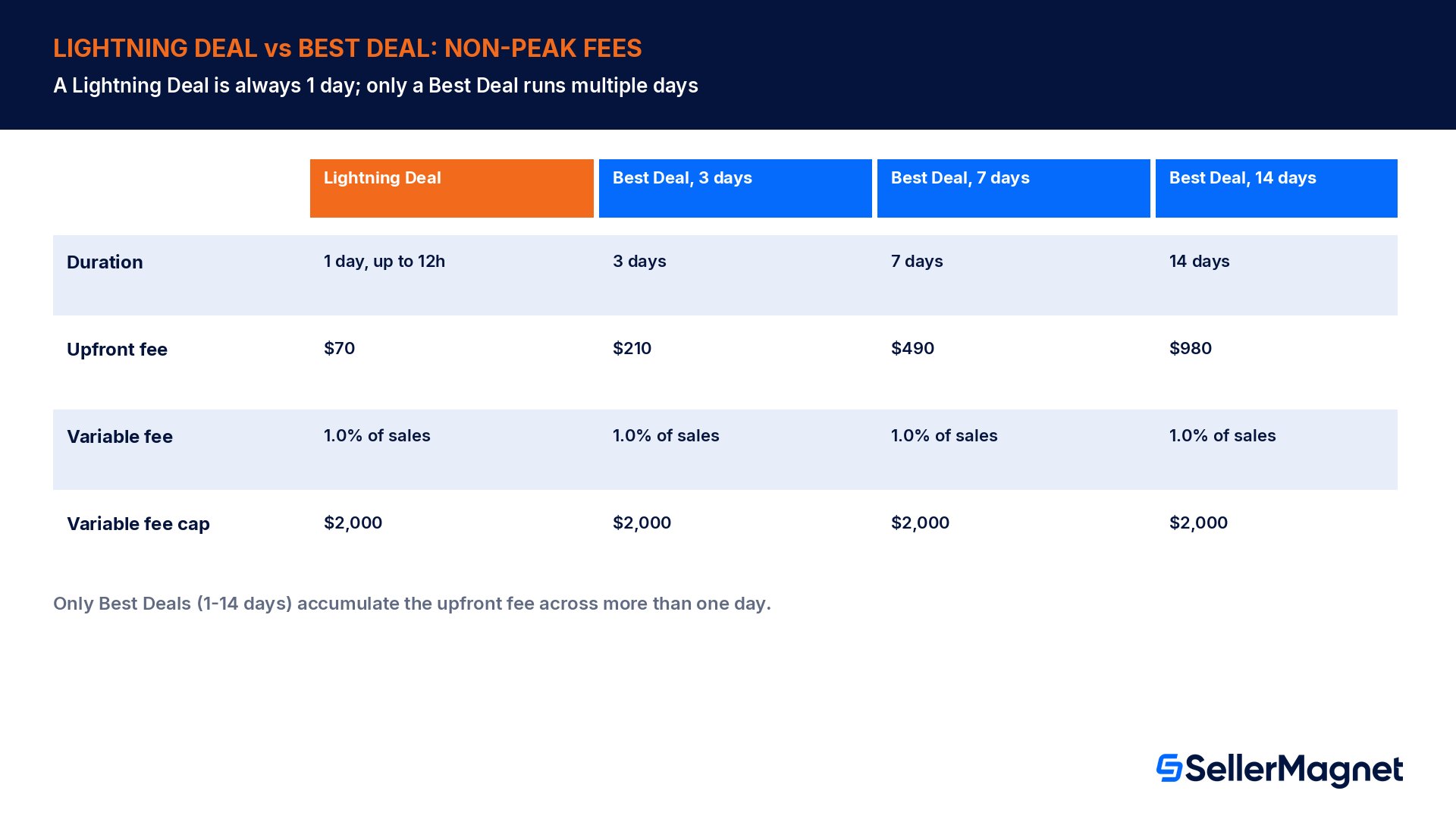
On non-peak days the fee has two components. The upfront fee is $70 for each day the deal runs. The variable fee is 1.0% of the deal's total sales, measured on the price the customer actually paid after redeeming the deal, and that variable portion is capped at $2,000 no matter how large the deal's sales turn out to be. Because a Lightning Deal is capped at 12 hours on one scheduled day, it can only ever carry a single day's upfront fee: $70. Only a Best Deal, which can run 1 to 14 days, accumulates the upfront fee across more than one day.
Deal type and length
Upfront fee
Variable fee
Variable fee cap
Floor cost before any sales
Lightning Deal (always 1 day, up to 12h)
$70
1.0% of deal sales
$2,000
$70
Best Deal, 1 day
$70
1.0% of deal sales
$2,000
$70
Best Deal, 3 days
$210
1.0% of deal sales
$2,000
$210
Best Deal, 7 days
$490
1.0% of deal sales
$2,000
$490
Best Deal, 14 days
$980
1.0% of deal sales
$2,000
$980
Peak event rates: Prime Day, Prime Big Deal Days, Black Friday and Cyber Monday
Peak events use a different structure, and the upfront fee is easy to misread as a daily rate when it is actually a flat charge per promotion, regardless of whether the promotion is a one-day Lightning Deal or a multi-day Best Deal. For 2026, the peak-event upfront fee is $100 per promotion, plus a variable fee of 1.5% of deal sales, capped at $5,000. That $100 does not multiply by the number of days the deal runs; it is charged once for the promotion as submitted.
Confirm whether the date you are submitting for counts as a peak event (Prime Day, Prime Big Deal Days, or Black Friday/Cyber Monday) before you read the rate card, since the two fee structures are not interchangeable.
Budget the flat $100 upfront fee per promotion for a peak event, not per day; this is the single most common planning mistake sellers make when moving from non-peak to peak submissions.
Model the 1.5% variable fee against your expected deal-price sales volume, and check whether the $5,000 cap will realistically be hit for a high-volume ASIN.
Check your account's current early-bird deadline for that specific event before submitting; both 2026 windows have already closed (see below).
The 2026 early-bird deadlines have already closed
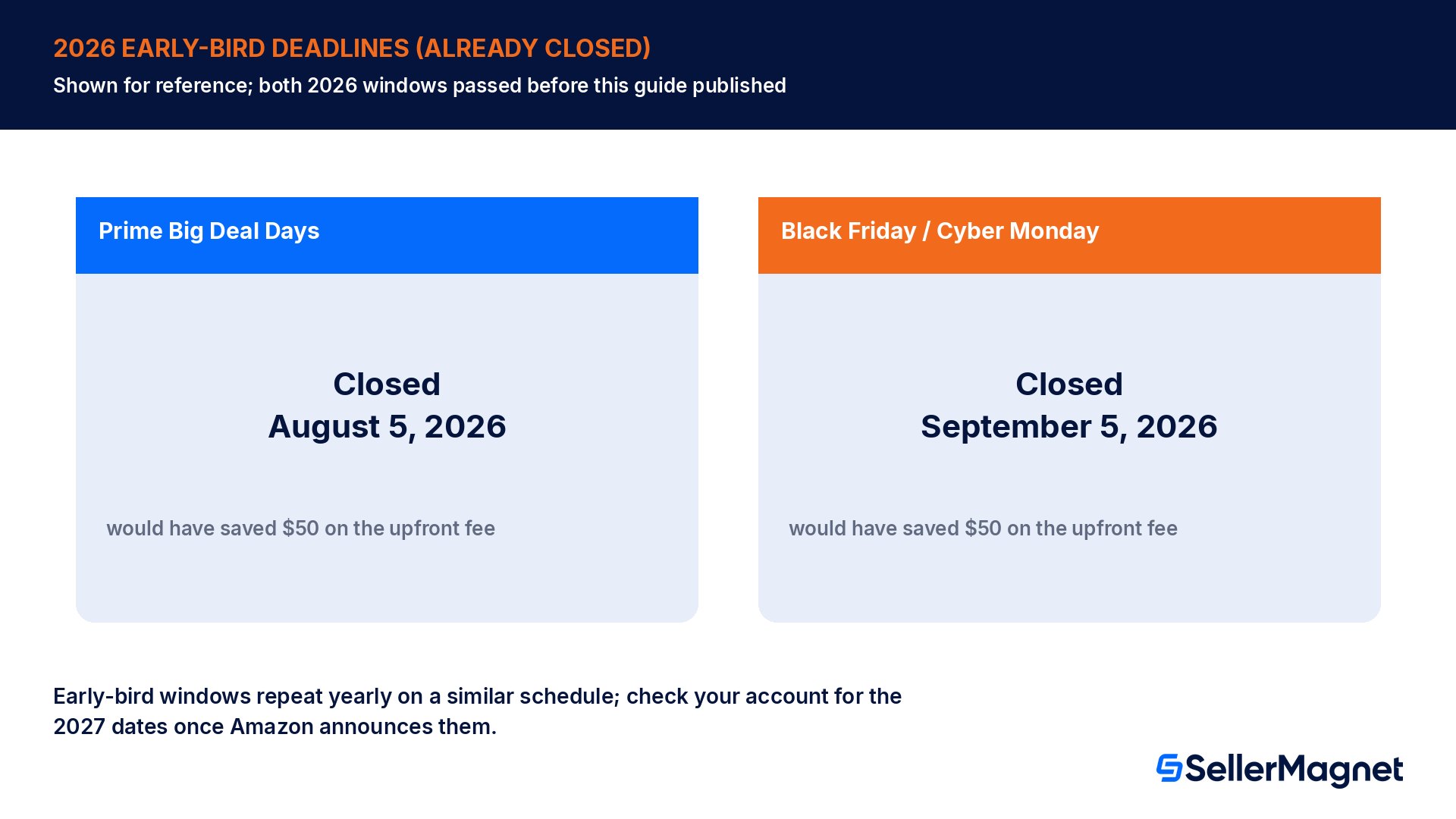
Amazon offers a flat $50 saving on the fixed upfront fee per deal for early submission, and the deadline is event-specific, not a single date across the year. For 2026, Prime Big Deal Days deals needed to be submitted and scheduled by August 5, 2026 to qualify, and Black Friday/Cyber Monday deals needed to be submitted and scheduled by September 5, 2026. Both of those 2026 windows have already closed by the time this guide publishes in late October 2026, so they are shown here for reference, not as something still actionable this year. Non-peak Lightning Deal and Best Deal submissions remain open year-round; for this year's Black Friday/Cyber Monday submission state specifically, see Amazon Black Friday deals for sellers.
Plan ahead for next year's early-bird window
Early-bird deadlines are event-specific and set separately each year; the 2026 Prime Big Deal Days deadline (August 5) fell about two to three months before Amazon's announced event dates, and the Black Friday/Cyber Monday deadline (September 5) worked the same way. Once Amazon announces the 2027 dates, submitting before that event's specific early-bird deadline saves $50 per deal; across ten deals through one peak event, that is $500 in upfront fees alone, before any variable-fee math, just from moving the submission date up on the calendar.
Worked example straight from Amazon's own fee table (a Best Deal, not a Lightning Deal)
Amazon publishes worked examples in its own guide; the clearest non-peak one is a 14-day deal with $4,200 in total deal sales. Because only a Best Deal can run 14 days, this specific example is necessarily a Best Deal, not a Lightning Deal. The upfront fee is $70 per day for 14 days, which is $980.00. The variable fee is 1.0% of $4,200, which is $42.00. The total deal fee comes to $1,022.00. That example makes the arithmetic transparent: on a modest-volume deal, the upfront fee, not the variable percentage, is doing almost all of the cost.
Example
Deal type
Upfront fee
Total deal sales
Variable fee
Total deal fee
Amazon's own example, non-peak
Best Deal, 14 days
$980.00
$4,200
$42.00
$1,022.00
Amazon's own example, capped
Best Deal, 14 days
$980.00
$250,000
$2,000.00 (cap hit)
$2,980.00
Amazon's own example, Prime Day high-volume
Peak event (either deal type)
$100.00
$500,000
$5,000.00 (cap hit)
$5,100.00
The middle row shows exactly when the 1.0% non-peak cap matters: at $250,000 in deal sales the uncapped variable fee would be $2,500, but Amazon caps it at $2,000, so the seller is charged $2,980 total instead of $3,480. The cap protects sellers with very large promotion volume from the variable fee scaling without limit, but only past the threshold where 1.0% (or 1.5% at peak) of sales exceeds the cap amount.
Fee-versus-margin: a one-day Lightning Deal, recomputed properly
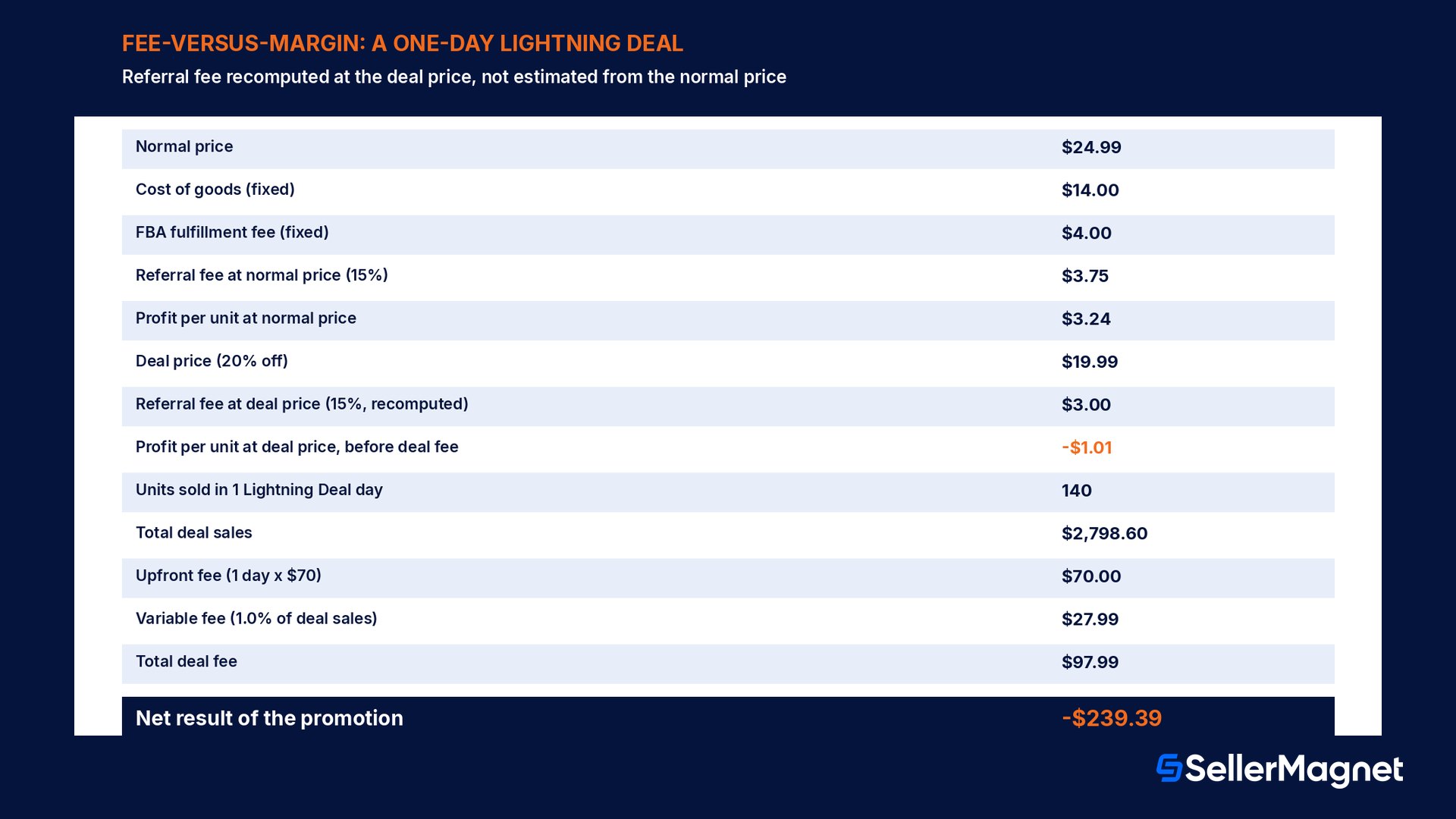
The deal-fee table answers what you are charged. It does not answer whether running the deal was worth it on that specific SKU, and getting that answer right means defining the cost stack explicitly and recomputing it at the deal price, not just at the normal price. Take an item that normally sells for $24.99: cost of goods is $14.00, the FBA fulfillment fee for its size tier is a fixed $4.00, and the referral fee is 15% of the selling price. At the normal price, the referral fee is $3.75, total cost is $21.75, and profit per unit is $3.24.
Discount that item 20% for a one-day Lightning Deal and the price drops to $19.99. The fixed FBA fee stays $4.00 and cost of goods stays $14.00, but the referral fee recalculates on the lower price: 15% of $19.99 is $3.00, not $3.75. Total cost at the deal price is $21.00, and profit per unit is now negative $1.01, a real per-unit loss before the deal fee is even added. The mistake sellers make, flagged again under Common mistakes, is holding the normal-price cost stack constant and assuming the deal-price margin is simply the discount percentage subtracted from the normal margin; recomputing the referral fee at the actual deal price is what reveals the true, usually worse, number.
Line
Value
Normal price
$24.99
Cost of goods
$14.00
FBA fulfillment fee (fixed)
$4.00
Referral fee at normal price (15%)
$3.75
Profit per unit at normal price
$3.24
Deal price (20% off)
$19.99
Referral fee at deal price (15%, recomputed)
$3.00
Profit per unit at the deal price, before deal fee
-$1.01
Deal length
1 day (Lightning Deal, up to 12h)
Units sold during the deal
140
Total deal sales
$2,798.60
Upfront fee (1 day x $70)
$70.00
Variable fee (1.0% of deal sales)
$27.99
Total deal fee
$97.99
Net result of the promotion
-$239.39
That loss does not automatically mean the deal was a bad decision. A Lightning Deal can still be worth running at break-even or a small loss for reasons beyond this month's margin on this one SKU, covered in detail further down. The mistake is running the numbers only in your head and assuming the deal paid for itself because units moved; the deal fee is a real, non-refundable line item on top of whatever margin the discount itself already gave up, and that margin needs the referral fee recomputed at the deal price, not estimated from the normal price.
The two situations where the fee is waived
Amazon's guide lists exactly two scenarios where no deal fee applies. First, the deal is canceled, by you or by Amazon, before its scheduled start time; once it starts running, cancellation mid-deal still incurs the full fee. Second, every ASIN included in the deal is suppressed before the deal has run; a single live ASIN inside an otherwise-suppressed deal keeps the fee in play. Neither exemption helps once a deal has actually gone live, so the only real lever to avoid the fee is catching a problem before the scheduled start time, not during the deal window.
Fee waived: you cancel the deal yourself before it starts.
Fee waived: Amazon cancels the deal before it starts.
Fee waived: all ASINs in the deal are suppressed before it runs.
Fee still charged: the deal runs and produces zero sales.
Fee still charged: you cancel the deal while it is already running.
Fee still charged: a customer returns units bought during the deal afterward.
Does running a coupon alongside a deal cost extra?
Amazon's guide flags a stacking rule worth planning around: running multiple promotions, for example a deal and a coupon, incurs separate fees for each promotion type. The combined discount a customer sees might look like a single generous offer, but the fee ledger behind it treats each promotion as its own billable event, so stacking promotions without checking the combined fee first can turn what looked like one deal fee into two.
Common mistakes
Treating a multi-day promotion as a Lightning Deal; only a Best Deal can run more than one day (up to 14), while a Lightning Deal is always a single day, up to 12 hours.
Reading the peak-event $100 upfront fee as a daily rate and multiplying it by the deal's length; it is a flat per-promotion charge.
Assuming a deal with no sales costs nothing; the upfront fee is charged regardless of sales, and it is the single largest guaranteed cost on a low-volume deal.
Holding the normal-price cost stack constant instead of recomputing the referral fee at the deal price, which overstates the real per-unit margin during the deal.
Treating the fee-waiver rule as available mid-deal; both exemptions (cancellation, full suppression) only apply before the deal's scheduled start time.
Running a coupon during a deal without budgeting for two separate promotion fees instead of one.
Forgetting the 7-day (Lightning) and 21-day (Best Deal) same-ASIN cooldown when planning a promotion calendar across a catalog.
Pre-submission checklist
Confirm the deal type and its hard duration: Lightning Deal (1 day, up to 12h) or Best Deal (1 to 14 days), and the matching non-peak ($70/day + 1.0%, capped $2,000) or peak-event rate ($100 flat + 1.5%, capped $5,000).
Check the same-ASIN cooldown: 7 days since its last Lightning Deal, or 21 days since its last Best Deal.
Run the fee-versus-margin math on the deal price, not the normal price: recompute the referral fee at the discounted price, then subtract the expected deal fee from the result.
Decide the deal's real objective upfront, margin, inventory clearance, rank momentum or launch visibility, since a break-even or loss outcome can still be correct for the right objective.
Check for any stacked coupon or promotion and budget its fee separately, not combined.
If a pricing error is found after the deal starts, know that pulling it still owes the full fee; fix the price error in advance instead.
Where SellerMagnet fits in
SellerMagnet's Analytics dashboard tracks net profit per order, product and marketplace after Amazon fees, cost of goods, shipping, VAT and refunds. Pulling the affected ASIN's actual numbers after a Lightning Deal runs shows whether the real margin at the deal price covered the deal fee, turning the question of whether a specific deal paid off into a measured, after-the-fact answer rather than a guess made from the normal-price numbers.
SellerMagnet's Fee Calculator checks FBA versus FBM fees, the referral fee and the resulting profit and ROI for an ASIN at a given price; running it at the discounted deal price does the referral-fee recompute shown in the worked example above without manual arithmetic, before the deal fee itself is subtracted on top. The deal price is set inside the deal submission on Amazon, separately from anything SellerMagnet's Repricer sets; the two tools answer different questions, margin at a given price versus the live price itself, and are worth checking together rather than assuming one covers the other.
Is a Lightning Deal worth running if the margin comes out negative?
Sometimes, and the honest answer depends on what the deal is actually buying beyond this month's profit-and-loss line. Two reasons can justify running a deal at break-even or a small loss on a specific SKU: clearing inventory that is approaching Amazon's aged inventory surcharge thresholds, where the alternative cost is the surcharge itself plus eventual removal or disposal fees; and building initial sales velocity and review count on a newly launched ASIN during its first weeks, since organic ranking tends to respond to early sales momentum. Amazon's own deal-fee guide is explicit that running a deal does not guarantee you will win the Featured Offer, so defending that position is a possible side effect worth noting, not something the deal fee is guaranteed to buy.
The failure mode worth avoiding is the opposite: running a deal with no stated goal beyond moving units, discovering afterward that the margin was negative, and then reaching for one of these reasons after the fact. Naming the goal, inventory clearance or launch velocity, before submitting the deal is what turns a planned break-even promotion into a defensible decision instead of an unplanned loss discovered in the Analytics dashboard a week later.
How do I submit a Lightning Deal in Seller Central?
Submitting a Lightning Deal
Open Deals - Go to Advertising, then Deals, inside Seller Central, and choose Create a new deal.
Pick the ASIN and deal type - Select the eligible ASIN and choose Lightning Deal (1 day, up to 12 hours) or Best Deal (1 to 14 days); Amazon determines eligibility and available scheduling at submission.
Pick a week; Amazon schedules the day - For a Lightning Deal you choose an available week and Amazon assigns the specific day and up-to-12-hour window. For a Best Deal you choose the exact start and end dates yourself, in 24-hour increments starting at midnight local time.
Review the displayed fee before confirming - The upfront fee and the fee structure are shown in the deal creation workflow itself; run your own margin math against the deal price before confirming, since Amazon's display shows the fee, not whether it clears your margin.
Check the same-ASIN cooldown - Confirm the ASIN has not run a Lightning Deal in the last 7 days, or a Best Deal in the last 21 days; Amazon may cancel any deal without notification if it does not meet these criteria.
Monitor status and cancel before start if needed - A deal can still be canceled fee-free up until its scheduled start time; once it starts running, the full fee is owed regardless of what happens afterward.
Related reading
This guide focuses specifically on Lightning Deal mechanics: the 12-hour, one-day duration limit, the 7-day cooldown, and the fee math once the referral fee is recomputed at the deal price. Two other posts on this blog cover adjacent ground worth reading alongside it: Amazon coupon and deal fees walks through the same base fee structure from a coupon-stacking angle, and Amazon Black Friday deals for sellers covers the peak-event submission calendar in more depth. If a deal's real goal is clearing aged stock rather than margin, Amazon FBA storage fees and reducing Amazon FBA fees cover the aged inventory surcharge thresholds that make a break-even deal worth running in the first place.
How long can a Lightning Deal run?
A Lightning Deal is scheduled to run on one day during the selected week, for up to 12 hours. It cannot be extended to multiple days; a promotion running 1 to 14 days is a Best Deal, not a Lightning Deal.
How much does an Amazon Lightning Deal cost?
On non-peak days, a Lightning Deal's one day carries a $70 upfront fee plus 1.0% of deal sales, capped at $2,000. During peak events (Prime Day, Prime Big Deal Days, Black Friday/Cyber Monday) it is a flat $100 per promotion plus 1.5% of deal sales, capped at $5,000. The upfront portion is charged regardless of how the deal performs.
Is the $100 peak-event fee charged per day or per promotion?
Per promotion. Unlike the non-peak $70-per-day structure, the peak-event upfront fee of $100 is a flat charge for the promotion as submitted, not multiplied by how many days the deal runs.
Do I pay a deal fee if the Lightning Deal gets no sales?
Yes. Amazon's guide states the upfront fee is charged even if the deal produces zero sales. Only the variable fee component depends on sales volume; the upfront fee is a fixed cost of running the promotion.
Can I get a refund on a deal fee if customers return the item?
No. Deal fees are not refunded if a customer returns the item purchased during the deal, regardless of the return reason or how soon after the deal it happens.
How often can the same ASIN run a Lightning Deal?
Amazon's guide caps repeats: a Lightning Deal cannot run on the same ASIN again within 7 days of its last one, and a Best Deal cannot repeat on the same ASIN within 21 days.
How can I avoid paying the deal fee?
Only two situations waive it: canceling the deal yourself, or Amazon canceling it, before the scheduled start time, or having every ASIN in the deal suppressed before it runs. Once a deal starts running, neither exemption applies anymore.
Is a Lightning Deal still worth it if the margin at the deal price is negative?
It can be, depending on the goal. A break-even or small-loss deal can still be worth running for inventory clearance ahead of an aged inventory surcharge, or sales velocity during a launch window. The decision should be made deliberately against that goal, not assumed automatically because units sold.
Stop Juggling Tools. SellerMagnet Combines Everything You Need.