How to Reduce Amazon FBA Fees: Size Tiers, Weight, Storage
R
RenéFreelance Amazon Editor
|
19 min read
Two sellers can list the exact same product, at the exact same price, and pay two different FBA fulfillment fees, because Amazon prices fulfillment on package size and weight, not on the product inside the box. The lever most sellers never pull is the one Amazon actually measures: the packaged item's length, width, height and the greater of its unit weight or its dimensional weight. This guide covers the 4 places that lever moves the needle, all for the United States marketplace unless stated otherwise, with EU differences called out where they apply: how Amazon's 2026 size tiers are defined, how dimensional weight can make a light item cost like a heavy one, how the inbound placement service fee changes based on how many warehouses a shipment is split across, and how the monthly and aged inventory storage fees punish units that sit too long. Every figure below is quoted from Amazon's own Seller Central help pages, with the page named next to the number.
You reduce Amazon FBA fees by changing the 4 numbers Amazon actually bills on: package dimensions and weight (which set your size tier and dimensional weight), how many fulfillment centers your inbound shipment splits across, how many cubic feet your inventory occupies, and how many days it sits before it sells. Trimming a package below a size tier's threshold, choosing an Amazon-optimized inbound split instead of a minimal one, and clearing inventory before the 271-day aged inventory cliff are the 3 changes with the clearest dollar return, and all 3 are checkable against Amazon's own fee pages before you make them.
What decides your Amazon FBA fulfillment fee in 2026?
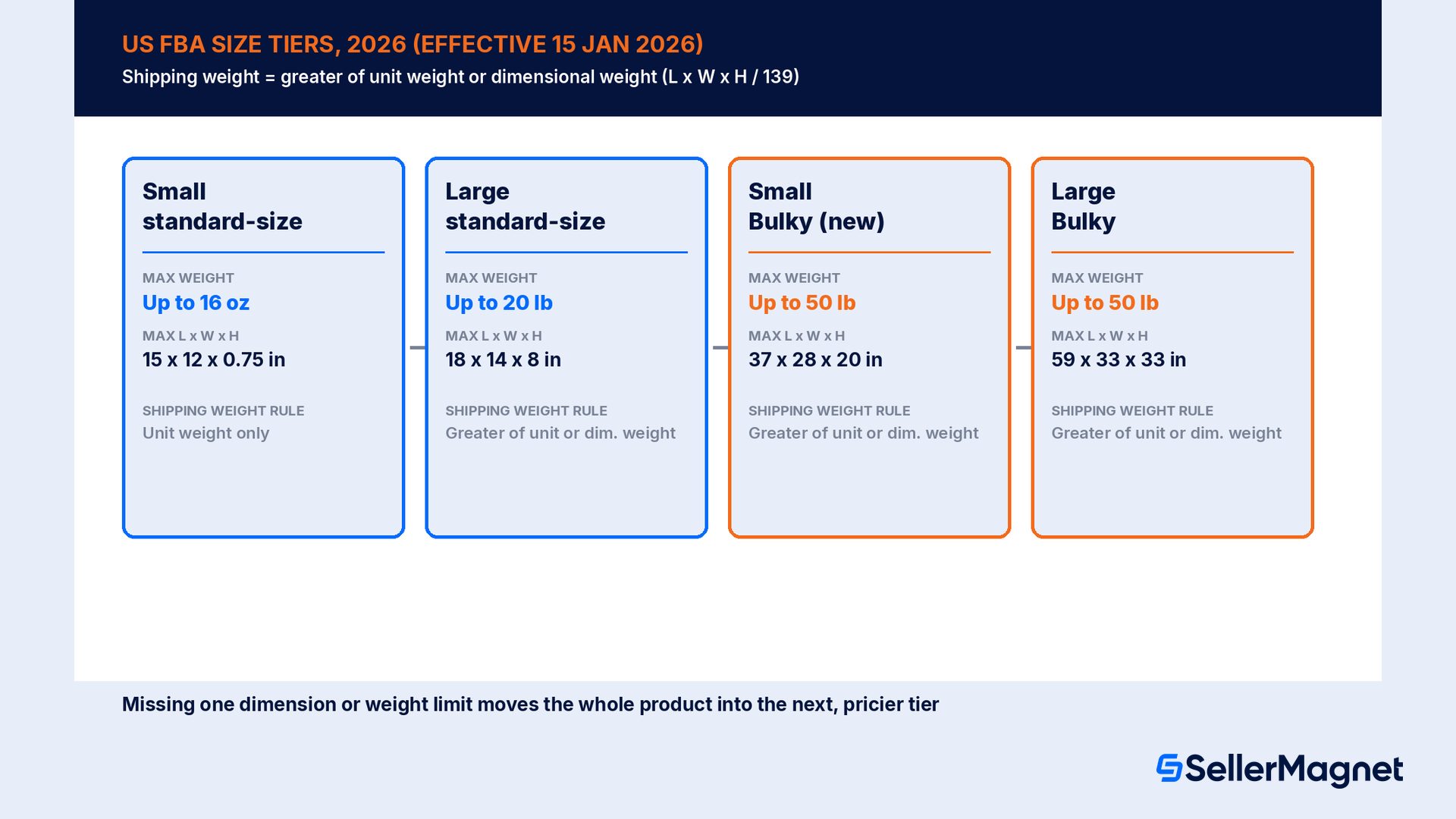
Amazon's fulfillment fee is a lookup, not a quote: it takes your product's packaged size tier, then its shipping weight band inside that tier, and returns one number from a published table. Amazon's own "Product size tiers" help page defines the tier using unit weight, dimensions, and dimensional weight together: “Product size tiers are measurement categories based on the unit weight, product dimensions, and dimensional weight of a packaged item.” Starting 15 January 2026, the US tier table reads this way, smallest to largest.
Size tier (US, 2026)
Shipping weight
Longest side
Median side
Shortest side
Length + girth
Small standard-size
Up to 16 oz
Up to 15 in
Up to 12 in
Up to 0.75 in
N/A
Large standard-size
Up to 20 lb
Up to 18 in
Up to 14 in
Up to 8 in
N/A
Small Bulky (new tier for 2026)
Up to 50 lb
Up to 37 in
Up to 28 in
Up to 20 in
Up to 130 in
Large Bulky
Up to 50 lb
Up to 59 in
Up to 33 in
Up to 33 in
Up to 130 in
Small Bulky is a brand-new 2026 tier, not a renamed one
Before 15 January 2026, anything over Large standard-size and under 59 x 33 x 33 in was one tier, Large Bulky. Amazon's 2026 update splits that range into Small Bulky (up to 37 x 28 x 20 in) and Large Bulky (up to 59 x 33 x 33 in), each with its own, cheaper fee table for the smaller of the 2 ranges. A product that was priced as Large Bulky in 2025 can price as the less-expensive Small Bulky in 2026 without the seller changing a single dimension, simply because the tier boundary moved.
What is Amazon dimensional weight, and how can it override unit weight?
Amazon's “Dimensional weight” help page states the formula plainly: “The dimensional weight is equal to the unit volume (length x width x height) divided by 139.” For Large standard-size, Small Bulky, Large Bulky and Extra-Large (except 150+ lb) products, Amazon bills on the shipping weight, and the shipping weight is the greater of the unit weight or this dimensional weight, not whichever number is lower. Only Small standard-size and Extra-Large 150+ lb items are billed on unit weight alone. Amazon's own worked example on that page shows how far apart the 2 numbers can land: a white dry erase board measuring 40 x 1 x 25 inches has a unit weight of 4.5 lb, but a dimensional weight of 14.4 lb once the page's required 2-inch minimum width and height is applied to the 1-inch-thick side (40 x 2 x 25, divided by 139). That is more than 3 times the actual weight of the board, and it is the dimensional weight, not the 4.5 lb on the scale, that the fee table uses.
The same Amazon example also shows a tier changing without the product changing: “2025: Item is Large Bulky, so dimensional weight is used for fee calculations. 2026: Item is Small Bulky, so dimensional weight is used for fee calculations.” The board's dimensions never moved; the Small Bulky tier boundary moved to include it. The lesson for a seller packing a new product is the reverse of that example: a package that is mostly air (a thin board, a tall thin box, an oddly shaped item) will almost always carry a dimensional weight well above its unit weight, and the fix is cutting the package down, not the product.
Worked example: trimming 0.3 inches off a box changes the fee band
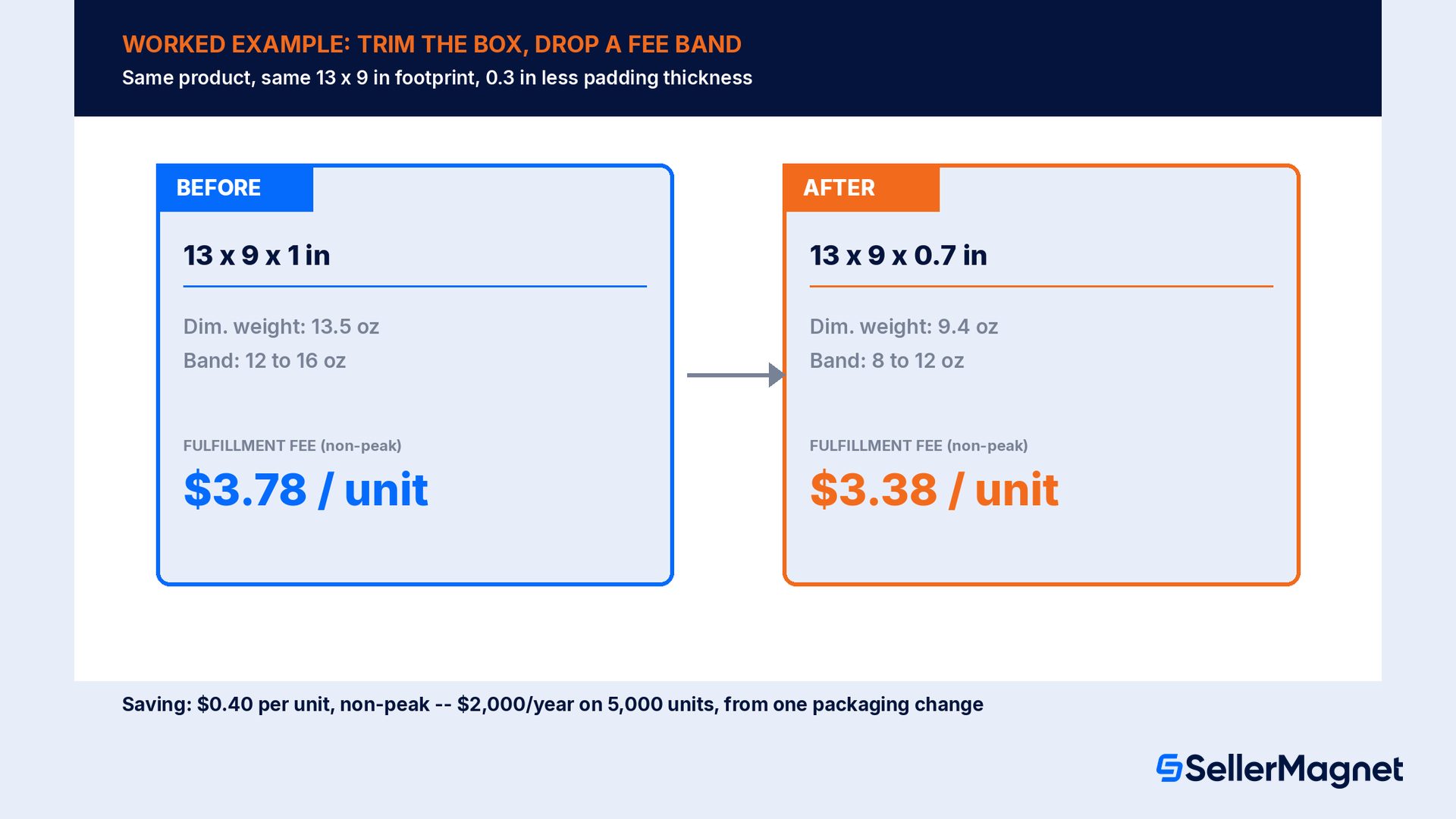
Take a product priced under $10 and enrolled in Low-Price FBA, boxed at 13 x 9 x 1 inches, unit weight 6 oz, a Large standard-size item (its shortest side, 1 inch, is under the 8-inch Large standard-size limit, so it never becomes Bulky). Its dimensional weight is (13 x 9 x 1) / 139 = 0.842 lb, which is 13.5 oz, higher than its 6 oz unit weight, so Amazon bills on 13.5 oz. That lands in the 12-to-16-oz Large standard-size fulfillment fee band, which Amazon's 2026 US Low-Price FBA fulfillment fee page prices at $3.78 per unit for items under $10 (non-apparel, non-peak). This is the Low-Price FBA rate card, a separate, lower table from the standard FBA fulfillment fee for items priced at $10 or more; check which table applies to a product before using either number. Now trim the box to 13 x 9 x 0.7 inches, the thinnest padding that still protects the product. Dimensional weight drops to (13 x 9 x 0.7) / 139 = 0.589 lb, or 9.4 oz, which falls in the 8-to-12-oz band, priced at $3.38 per unit on the same Low-Price FBA page.
Before: 13 x 9 x 1 in box. Dimensional weight 13.5 oz (above the 6 oz unit weight), billed in the 12-to-16-oz Large standard-size band at $3.78 per unit, non-peak US Low-Price FBA rate (item under $10).
After: 13 x 9 x 0.7 in box. Dimensional weight 9.4 oz, billed in the 8-to-12-oz band at $3.38 per unit, non-peak US Low-Price FBA rate (item under $10), with the same product and the same protective padding thickness class, just less excess air.
Saving: $0.40 per unit, non-peak, before any change in the referral fee, storage fee or sale price; on 5,000 units sold a year that is $2,000 back on fulfillment fees alone from one packaging change. A product priced at $10 or more uses the standard FBA fulfillment fee table instead; check the Revenue Calculator for the exact dollar figure on the standard table, the same packaging-weight logic still applies.
Peak season (15 Oct to 14 Jan) uses a higher rate on every band
Both the non-peak and peak fulfillment fee tables use the same weight bands, so the same dimensional-weight trim still moves a product to a cheaper row during peak season; the dollar saving is simply larger, because every band's peak rate sits above its non-peak rate. Check the exact peak figure for your product's size tier and weight band on Amazon's fulfillment fee page or in the Revenue Calculator rather than reusing a non-peak number for a Q4 forecast.
Why does the inbound placement service fee change by shipment?
Every FBA shipping plan asks how many fulfillment centers to send a shipment to, and that choice is itself a fee. Amazon's FBA inbound placement service fee page lists 3 options. Minimal shipment splits send inventory to the fewest locations, generally one, for a fee. Amazon-optimized shipment splits send inventory to multiple locations the seller chooses, for no fee, but only if “shipments must include at least five identical cartons or pallets per item,” with “the same quantity per item and the same item mix” in each carton or pallet. Partial shipment splits sit in between, for bulky-sized inventory only, a reduced fee for fewer locations than the optimized option but more than the minimal one; the page states this option “is not available for shipping plans for standard-sized products.” The fee, when it applies, is charged 45 days after the shipment is received, based on the quantity actually received.
Large standard-size, 15 to 20 lb band: $0.55 to $1.90 per unit on a minimal split, $0 on an Amazon-optimized split, per Amazon's inbound placement service fee page.
Large Bulky, 42+ to 50 lb band: $5.50 to $6.50 per unit on a minimal split, $1.23 to $3.50 on a partial split, $0 on an Amazon-optimized split, same page.
The fee is assessed per shipment, by size tier, shipping weight band and inbound location, so the same product can carry a different fee on 2 shipments sent to different regions.
The math favors the optimized split whenever a seller can hit the 5-identical-carton minimum. A seller shipping a Large standard-size product in the 15-to-20-lb band, who sends it as a single minimal-split shipment, pays up to $1.90 per unit; the same inventory split into 5 or more identical cartons sent to Amazon's chosen locations costs $0 per unit on that fee line. On a 600-unit restock, that is up to $1,140 saved by choosing how the shipment is split, before any other fee changes. The trade-off is real: an optimized split needs more up-front carton planning and the inventory physically at several ports or carriers at once, which is not always practical for a single small shipment.
How do I lower my monthly Amazon storage fee?
Amazon's “Monthly inventory storage fees” page bills storage by the cubic foot your inventory occupies, with a separate rate for standard-size and oversize, and a separate rate for the October-to-December peak quarter.
US monthly storage fee (per cubic foot)
Standard-size
Oversize
January to September
$0.78
$0.56
October to December (peak)
$2.40
$1.40
On top of that base rate, a storage utilization surcharge of $0.44 to $1.88 per cubic foot (standard-size) or $0.23 to $1.26 (oversize) can apply, but only if both conditions hold: average daily inventory of 25 cubic feet or more, and a storage utilization ratio (stored volume divided by shipped volume over the trailing 13 weeks) above 22 weeks, sustained for a seller with over 365 days of selling history. Amazon's own guidance on avoiding it is direct: “You can reduce your storage utilization ratio and minimize or avoid the surcharge by reducing your stored inventory volume. You can improve your sell-through rate, request a liquidation order, or request a return or disposal order through a removal order.” New sellers (their first 365 days), Individual-plan sellers, and anyone under 25 cubic feet of average daily inventory never pay this surcharge regardless of ratio.
Amazon Warehousing and Distribution can waive the surcharge entirely
Products auto-replenished by Amazon Warehousing and Distribution (AWD) qualify for a full storage utilization surcharge waiver once 70% or more of the product's FBA units in the trailing 13 weeks came from AWD auto-replenishment, per Amazon's monthly storage fee page. The Auto-Replenishment Ratio is calculated daily per product, so a product mostly restocked through AWD can clear the threshold even if a smaller share still ships the normal way.
Where is the aged inventory surcharge actually costing the most?
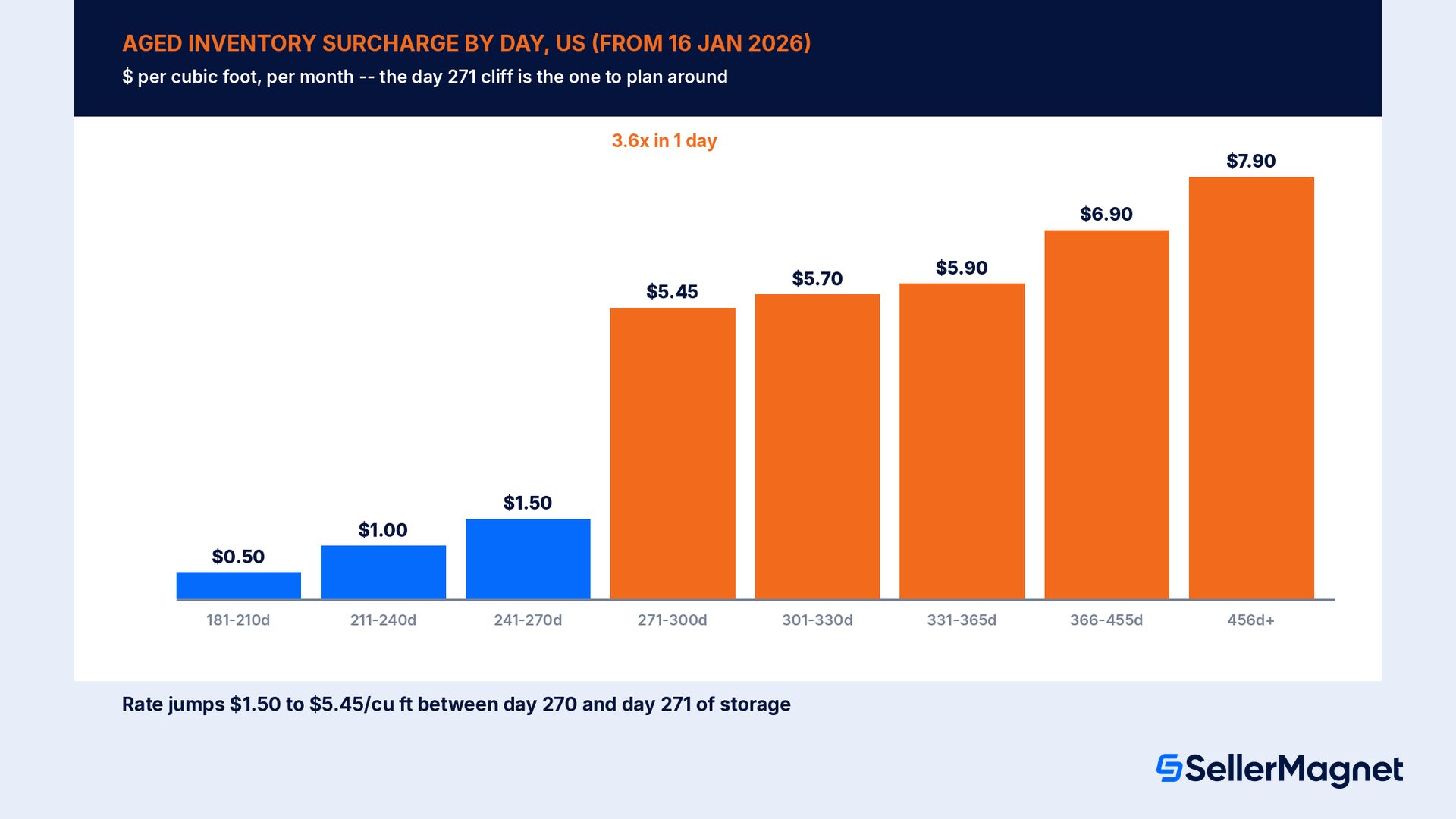
Amazon's “Aged inventory surcharge” page (updated 16 January 2026 for the 366-day-and-above bands) charges this fee monthly, in addition to the regular storage fee, on units that have sat in the fulfillment network for 181 days or longer, assessed from a snapshot taken on the 15th of each month and billed between the 18th and 22nd. Inventory age is tracked “on a first-in, first-out basis across our entire fulfillment network,” so the specific unit physically picked for an order is not necessarily the one Amazon deducts from the age count; the oldest unit in stock is deducted first regardless.
Days in a US fulfillment center
Surcharge, from 16 Jan 2026
181 to 210 days
$0.50 per cubic foot
211 to 240 days
$1.00 per cubic foot
241 to 270 days
$1.50 per cubic foot
271 to 300 days
$5.45 per cubic foot
301 to 330 days
$5.70 per cubic foot
331 to 365 days
$5.90 per cubic foot
366 to 455 days
$6.90 per cubic foot, or $0.30 per unit, whichever is greater
456 days or more
$7.90 per cubic foot, or $0.35 per unit, whichever is greater
The step between day 270 and day 271 is the one number on this whole page worth planning around: the rate multiplies by roughly 3.6 times in a single day, from $1.50 to $5.45 per cubic foot. Clothing, shoes, bags, jewelry and watches are excluded from the 3 lowest bands (181 to 270 days) but not from the 271-day-and-up bands. Amazon's own FAQ on the page answers the obvious question directly: “To help you avoid the aged inventory surcharge, we recommend that you actively review the FBA Inventory tool to identify which ASINs are currently subject or will be subject to the aged inventory surcharge within 60 days.” It then lists 3 concrete fixes: run a markdown through Amazon Outlet (a promotional deal with a minimum discount of 20%), submit a removal or disposal order before the cleanup date, since “that inventory won't incur an aged inventory surcharge, even if it isn't physically removed before the cleanup date,” with the removal order deadline at 11:59 p.m. Pacific time on the 14th of the month, or set up automated removals so the same decision runs every cycle without a manual check.
How to check a product's size tier and dimensional weight before you repackage it
Measure the fully packaged item - Record the longest, median and shortest side in inches, and the unit weight, with the product in its actual shipped packaging, not the bare product.
Calculate dimensional weight - Multiply length by width by height, in inches, and divide by 139. Apply the 2-inch minimum to width and height if the item is Bulky or Extra-Large.
Take the greater of the 2 weights - Compare unit weight and dimensional weight. For every tier except Small standard-size and Extra-Large 150+ lb, Amazon bills on whichever number is higher.
Match the result to the 2026 size tier table - Check the shipping weight and all 3 dimensions against Small standard-size, Large standard-size, Small Bulky and Large Bulky; a single dimension over a limit moves the whole product to the next tier.
Re-run the Fee Calculator before and after - Price the current packaging and the trimmed packaging separately on a fee calculator to confirm the change actually crosses into a cheaper band.
Catch fee overcharges and run every ASIN through the real fee schedule.Fee Audit checks flagged fees against Amazon's own published rates and only marks a row claimable when it can verify the overcharge, so a size-tier or dimensional-weight mistake on Amazon's side does not just sit there. Before you repackage a product, the free SellerMagnet Fee Calculator compares FBA vs FBM fees, referral fee, profit and ROI for any ASIN using Amazon's public fee schedule, with 5 free lookups a day and no signup, so you can check the before-and-after fee band yourself before you cut a single box. For an account-wide view, Profit Analytics lists every fee and adjustment from your settlements in one Transactions view, from €19/month excl. VAT (as of Oct 2026, 14-day free trial), so a size-tier or storage fee change shows up in net profit per order automatically.
Common mistakes that waste a fee-reduction effort
Trimming a product's packaging without re-checking the dimensional weight. A smaller box lowers volume, which is the entire point, but only recalculating length times width times height divided by 139 confirms it actually crossed into a cheaper weight band rather than just shrinking inside the same one.
Assuming a lighter product always means a cheaper fee. For every tier except Small standard-size and Extra-Large 150+ lb, Amazon bills on the greater of unit weight or dimensional weight; a very light, oddly shaped item can cost more to fulfill than a heavier, compact one.
Choosing a minimal shipment split out of habit. The $0 Amazon-optimized split only requires 5 or more identical cartons or pallets with the same quantity and item mix in each, a bar many restocks already clear without the seller realizing it qualifies.
Watching the 15th-of-the-month snapshot date instead of the 14th. The aged inventory surcharge is assessed from a snapshot on the 15th; a removal or disposal order has to be submitted by 11:59 p.m. Pacific on the 14th to keep those units off that month's bill.
Reusing a US dollar figure for an EU shipment. The EU size tier table uses completely different category names (parcels and oversize tiers, not standard and bulky) and a different dimensional weight formula; see the next section before applying any number above to a non-US marketplace.
Averaging storage utilization across a whole catalog. The surcharge is assessed per product against a 22-week ratio and a 25-cubic-foot floor; a healthy account average can still hide a handful of ASINs that are quietly carrying the surcharge every month.
A 2026 FBA fee-reduction checklist
Pull the current packaged dimensions and unit weight for every ASIN, and recalculate dimensional weight (length x width x height, divided by 139) rather than assuming the unit weight on the spec sheet is what Amazon bills.
Check each product against the 2026 size tier table (Small standard-size, Large standard-size, Small Bulky, Large Bulky) for a dimension sitting just over a threshold; a fraction of an inch on the shortest or median side can be the whole tier.
For any shipment of 5 or more identical cartons or pallets with the same quantity and item mix, choose an Amazon-optimized inbound split instead of a minimal one to drop the inbound placement service fee to $0.
Review the FBA Inventory tool for ASINs inside 60 days of the aged inventory surcharge, and submit removal, disposal or Outlet markdown decisions before 11:59 p.m. Pacific on the 14th of the month.
Check your storage utilization ratio (13-week stored volume divided by shipped volume) against the 22-week line if your account carries 25+ cubic feet of average daily inventory and more than 365 days of selling history.
Confirm whether a fast-moving SKU qualifies for the AWD auto-replenishment storage utilization surcharge waiver at a 70% Auto-Replenishment Ratio.
Re-run the math separately for peak season (15 October to 14 January), since every fulfillment and storage rate rises for that quarter on the same weight band.
Run the before-and-after packaging change through a fee calculator before cutting a single box, to confirm it actually crosses into a cheaper band rather than just shrinking within the current one.
Does this work the same way outside the US?
No, and reusing a US number on an EU listing is one of the fastest ways to misprice a product. Amazon's EU Seller Central size tier page uses an entirely different tier structure (light envelope, standard envelope, large envelope, extra-large envelope, small parcel, standard parcel, small oversize, standard oversize, bulky oversize, special oversize) with metric thresholds, not the US's standard-size and bulky tiers. The dimensional weight formula is different too: the EU page states “Dimensional weight in kilograms is calculated as (length x width x height cm3) divided by 5,000,” not divided by 139 inches. Several EU categories (Clothing and Accessories, Footwear, Grocery and Gourmet, Mattresses and others) use unit weight only, skipping dimensional weight altogether, which is a specific carve-out the US size tier page does not have. If you sell in both the US and an EU marketplace, treat each size tier lookup and each dimensional-weight calculation as a separate exercise in its own measurement system, never a currency or unit conversion of the other.
How do I know my Amazon FBA size tier?
Measure the packaged item's length, width, height and unit weight, then compare against Amazon's 2026 tiers: Small standard-size (16 oz, 15 x 12 x 0.75 in), Large standard-size (20 lb, 18 x 14 x 8 in), Small Bulky (50 lb, 37 x 28 x 20 in) or Large Bulky (50 lb, 59 x 33 x 33 in), all maximums.
What is Amazon dimensional weight and how is it calculated?
Dimensional weight is length times width times height, in inches, divided by 139, per Amazon's Dimensional weight help page. Amazon bills the greater of this number or the actual unit weight for Large standard-size, Small Bulky, Large Bulky and Extra-Large (except 150+ lb) products; only Small standard-size and Extra-Large 150+ lb items are billed on unit weight alone.
Can I reduce my Amazon FBA fulfillment fee by changing my packaging?
Yes, when the smaller package crosses into a lower weight band or a cheaper size tier. Recalculate the dimensional weight after any packaging change; shrinking a box without checking the new length x width x height divided by 139 can leave the product in the exact same fee band it started in.
How do I avoid the Amazon inbound placement service fee?
Choose an Amazon-optimized shipment split instead of a minimal one. It costs $0 per unit, but the shipment must include at least 5 identical cartons or pallets per item, each with the same quantity per item and the same item mix, per Amazon's FBA inbound placement service fee page.
How can I avoid the Amazon aged inventory surcharge?
Review the FBA Inventory tool for ASINs subject to the surcharge within 60 days, then mark down stock through an Amazon Outlet deal (minimum 20% discount), or submit a removal or disposal order before 11:59 p.m. Pacific on the 14th, which keeps those units off the 15th-of-the-month snapshot even if removal takes longer.
What is the biggest jump in the Amazon aged inventory surcharge rate card?
The step from day 270 to day 271, where the per-cubic-foot rate rises from $1.50 to $5.45, a roughly 3.6x increase in a single day on Amazon's 2026 rate card. The next largest jump is from day 365 ($5.90) to the 366-to-455-day band ($6.90 per cubic foot or $0.30 per unit, whichever is greater).
Does the monthly storage fee change during the holidays?
Yes. The US base rate rises from $0.78 to $2.40 per cubic foot for standard-size inventory (and $0.56 to $1.40 for oversize) during the October-to-December peak quarter, on top of any separate storage utilization surcharge a seller's account already carries.
Are Amazon FBA size tiers the same in the US and the EU?
No. The EU uses a different tier structure (envelopes, parcels, and oversize categories, measured in metric units) and a different dimensional weight formula, length x width x height in centimeters divided by 5,000, instead of the US formula of inches divided by 139. Several EU categories are billed on unit weight only, with no dimensional weight calculation at all.
Stop Juggling Tools. SellerMagnet Combines Everything You Need.