A box of perfectly good inventory can sit in an Amazon fulfillment center for days, racking up unplanned prep fees, for one reason that has nothing to do with the product itself: a missing, wrong, or unscannable FNSKU label. The Fulfillment Network Stock Keeping Unit, FNSKU for short, is the barcode Amazon's own fulfillment centers use to tell one seller's unit of a product apart from every other seller's unit of the exact same product, and it is a completely different identifier from the UPC or EAN printed on the package by the manufacturer. Most sellers only meet the FNSKU for the first time at the Label Products step of creating a shipment, where Seller Central either tells them no sticker is needed at all, or hands them a PDF of barcodes that have to be printed, cut, and applied to every single unit before the box ever leaves for the fulfillment center. Getting this step wrong, an unlabeled unit, a label that does not match its item, a barcode a scanner cannot read, is one of the most common and most completely avoidable reasons a shipment gets flagged, delayed, or hit with an unplanned-service fee at receiving. This guide, built from Amazon's own FBA barcode requirements, label-element documentation, and its 2026 FBA Barcode Choice and Labeling FAQ, works through what an FNSKU actually is, exactly when a physical label is and is not required, how to get and print one correctly, the placement rules that trip sellers up, and the mistakes that most often slow a shipment down at the fulfillment center.
An FNSKU (Fulfillment Network Stock Keeping Unit) is the barcode Amazon's own fulfillment centers print and scan to identify a specific seller's unit of a product, in the format X00- followed by letters and numbers, and it is different from a UPC or EAN. A physical FNSKU label is required unless a product qualifies for Stickerless, Commingled Inventory (new condition, a single scannable UPC/EAN/ISBN matching one ASIN) or, since 31 March 2026, unless the seller is a Brand Registry Brand Representative using a manufacturer barcode instead. The label must completely cover the product's original barcode and be printed from Manage Inventory or the shipment workflow after the listing and ASIN already exist.
What an FNSKU actually is, and how it differs from a UPC or ASIN
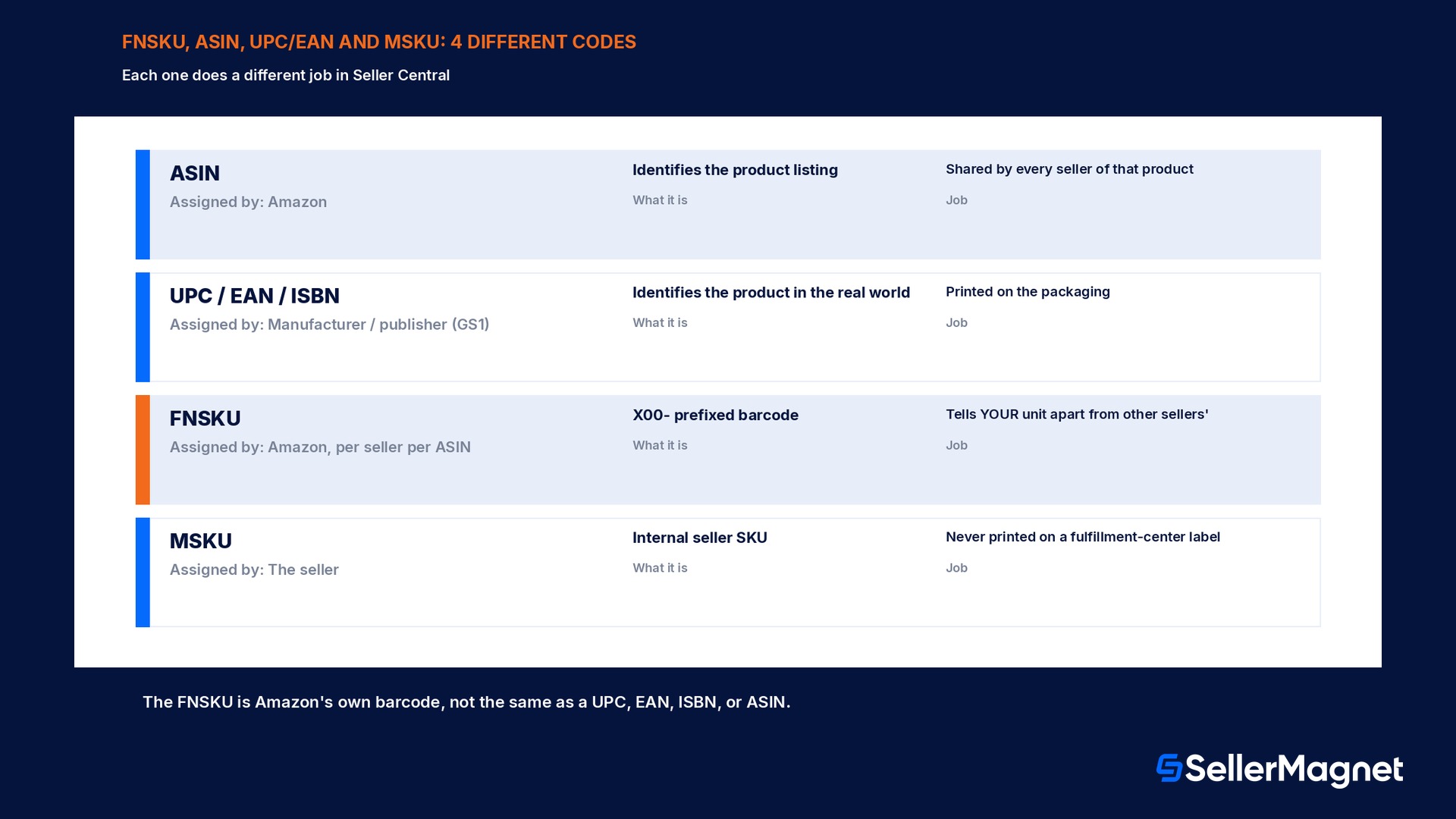
Three different codes get confused constantly in Seller Central, and each one does a different job. The ASIN (Amazon Standard Identification Number) identifies the product listing itself, the same ASIN is shared by every seller offering that exact product. The UPC, EAN, ISBN, or other GTIN-family code is assigned by the product's manufacturer or publisher and printed on the physical packaging; it identifies the product in the real world, independent of Amazon entirely. The FNSKU is neither of those: it is Amazon's own internal barcode, generated per ASIN per individual seller account, in the documented format of the prefix "X00-" followed by a string of letters and numbers (some older or manufacturer-barcode-tracked listings instead show a "B0" ASIN-style code, which is explicitly not a valid Amazon barcode for stickered shipments and has to be regenerated as an X00 code before printing). Two sellers offering the literal same physical product each get their own distinct FNSKU for it, which is exactly the mechanism that lets a fulfillment center's scanner tell "your" unit of a product apart from a different seller's unit of the identical item sitting one shelf over. The seller's own internal SKU, sometimes called the MSKU (Merchant Stock Keeping Unit) inside Seller Central, is a fourth, separate code entirely: the seller chooses it, Amazon has no input into its format, and it never appears on a printed fulfillment-center label at all.
When a physical FNSKU label is required, and when it is not
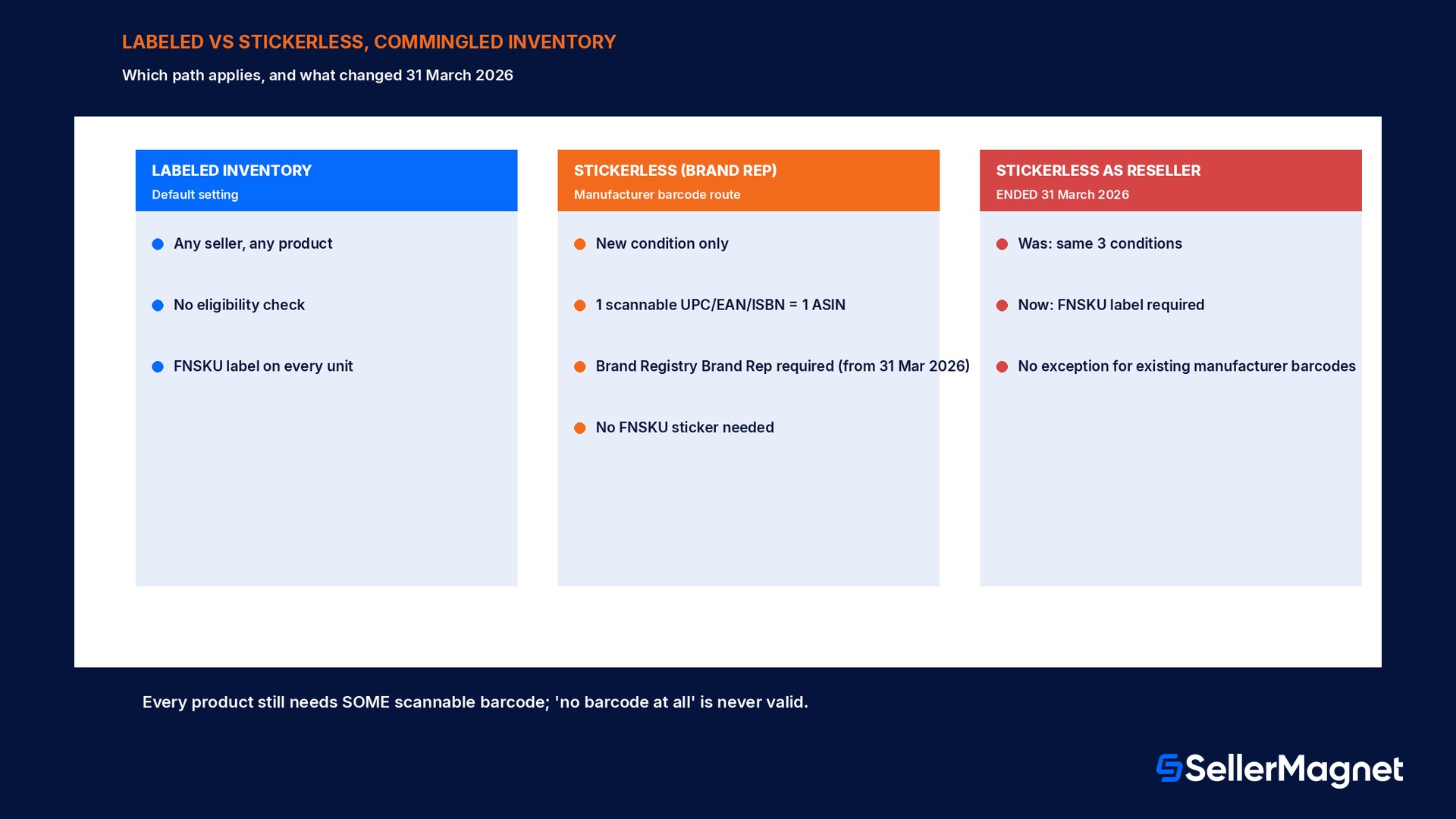
Amazon's FBA barcode requirements page defines exactly two labeling paths, and which one applies is a per-product, per-seller decision, not an account-wide setting that covers everything a seller sends in. Labeled Inventory is the default: an FNSKU label, printed from Seller Central, has to be applied to every single unit shipped to a fulfillment center, full stop. Stickerless, Commingled Inventory is the alternative setting a seller can enable, and it removes the FNSKU labeling requirement, but only for units that meet three eligibility conditions at once, listed on Amazon's own help pages: the unit has to be in new condition; it needs a single, scannable UPC, EAN, or ISBN barcode that matches exactly one ASIN in Amazon's catalog (a code shared across more than one ASIN forces labeling even for an otherwise-eligible item); and, since the 31 March 2026 FBA barcode requirements update, this manufacturer-barcode route is reserved for sellers who are a Brand Representative for that brand under Amazon Brand Registry. A reseller, including an authorized reseller of the brand, no longer qualifies for stickerless handling on that basis alone as of that date, and must apply Amazon barcode labels even to products carrying a legitimate manufacturer barcode. Every product, regardless of which path applies, still needs a scannable barcode of some kind on the outside of the unit for the fulfillment center to receive it; "no barcode at all" is never a valid state for either path.
Setting
Who it applies to
Eligibility to use it
Label needed on the unit?
Labeled Inventory (default)
Any seller, any product
No eligibility check; always allowed
Yes, an FNSKU label on every unit
Stickerless, Commingled (manufacturer barcode)
Brand Registry Brand Representatives only, from 31 Mar 2026
New condition + single UPC/EAN/ISBN matching one ASIN
No FNSKU sticker; the manufacturer barcode is scanned instead
Stickerless, Commingled as a reseller
No longer available from 31 Mar 2026
Was: same 3 conditions, any seller
Now requires an FNSKU label regardless of condition/barcode
How to actually get and print an FNSKU label
An FNSKU is not something a seller requests separately or receives before a listing exists: Amazon's own Seller Forums guidance is direct on this point, the listing has to be complete and submitted for approval first, and the FNSKU is generated automatically once that listing is approved and an ASIN is assigned to it; a draft listing has no FNSKU yet, and there is nothing to print until that happens. Once the ASIN exists, the FNSKU shows up in two places inside Seller Central: on the Manage Inventory page next to the product, and inside the Label Products step of the shipment-creation workflow, the same step where a seller sets the quantity of units being shipped before clicking "Print Item labels." That click generates a PDF, built to one of 9 supported label-size templates (including the common 1 inch by 2 and 5/8 inch size, 30 labels per US Letter page, and several metric sizes sized for A4), which a seller opens and prints directly, or forwards to a manufacturer or prep center to print and apply on their behalf. The label itself carries three required elements printed together: the FNSKU barcode, the product's name or title, and its condition (for example "New"); a label printed with any of those three pieces missing or illegible is one of Amazon's own documented causes of a receiving delay.
The FNSKU label has to completely cover the original barcode
Amazon's own placement guidance is explicit: when affixing an FNSKU label, cover the entire original manufacturer barcode (UPC, EAN, or ISBN) underneath it. A label placed next to the original barcode, instead of over it, leaves two scannable codes on one unit and is a documented source of receiving errors.
Placement rules that affect whether a scanner can actually read the label
Beyond covering the original barcode completely, Amazon's placement guidance and seller-forum staff replies converge on a short list of rules that determine whether a fulfillment center's handheld scanner reads a label correctly on the first pass. The label goes on a flat surface of the unit's outer packaging, never wrapped around a corner or a curved edge, where the barcode's lines distort and a scanner has to be angled repeatedly to get a read. If the product ships inside poly bagging, the FNSKU either has to be scannable straight through the clear bag or placed on the outside of the bag itself, not sealed facing inward against the product. For a bundle of multiple physical items sold and received as one unit, only the bundle's own FNSKU should be visible to a scanner; the individual component items' original barcodes inside the bundle need to be covered so a scanner cannot accidentally pick up the wrong code first. Each unit needs its own individual label matched to that exact item, not a single label covering a multi-pack from the outside while loose individual units sit inside, and a label has to be printed on white, non-reflective stock at a sharp enough resolution (300 dots per inch or higher is the commonly cited floor) that the bars stay distinct instead of blurring into each other when toner or ink runs low.
Variations, multi-packs, and the FNSKU mistake that is easy to miss
A parent-child variation listing, a shirt sold in 4 colors and 5 sizes, for example, is not one FNSKU shared across every combination; each distinct child ASIN gets its own separate FNSKU, because each child is tracked by Amazon's fulfillment network as its own product. A seller who prints one batch of labels for the parent listing and applies them across every color and size is mixing up the same error class covered on the identifier side by a shared manufacturer part number across variations: the fulfillment center receives units it cannot correctly attribute to the right child ASIN, and the mismatch surfaces later as inventory discrepancies or a stranded-looking count on the wrong child. The safer workflow for a multi-variation shipment is to generate the Label Products PDF per child ASIN, one print run per color or size, and keep the resulting label sheets physically separated during packing so a size Medium label never ends up on a Large unit by accident on the warehouse floor before the box is sealed. The same per-ASIN logic applies to a multi-pack sold as its own distinct product: a 3-pack has its own FNSKU, separate from the FNSKU of the single-unit version of the same underlying item, even though both ultimately contain the same physical product inside.
A worked example: relabeling 500 units after a barcode-preference switch
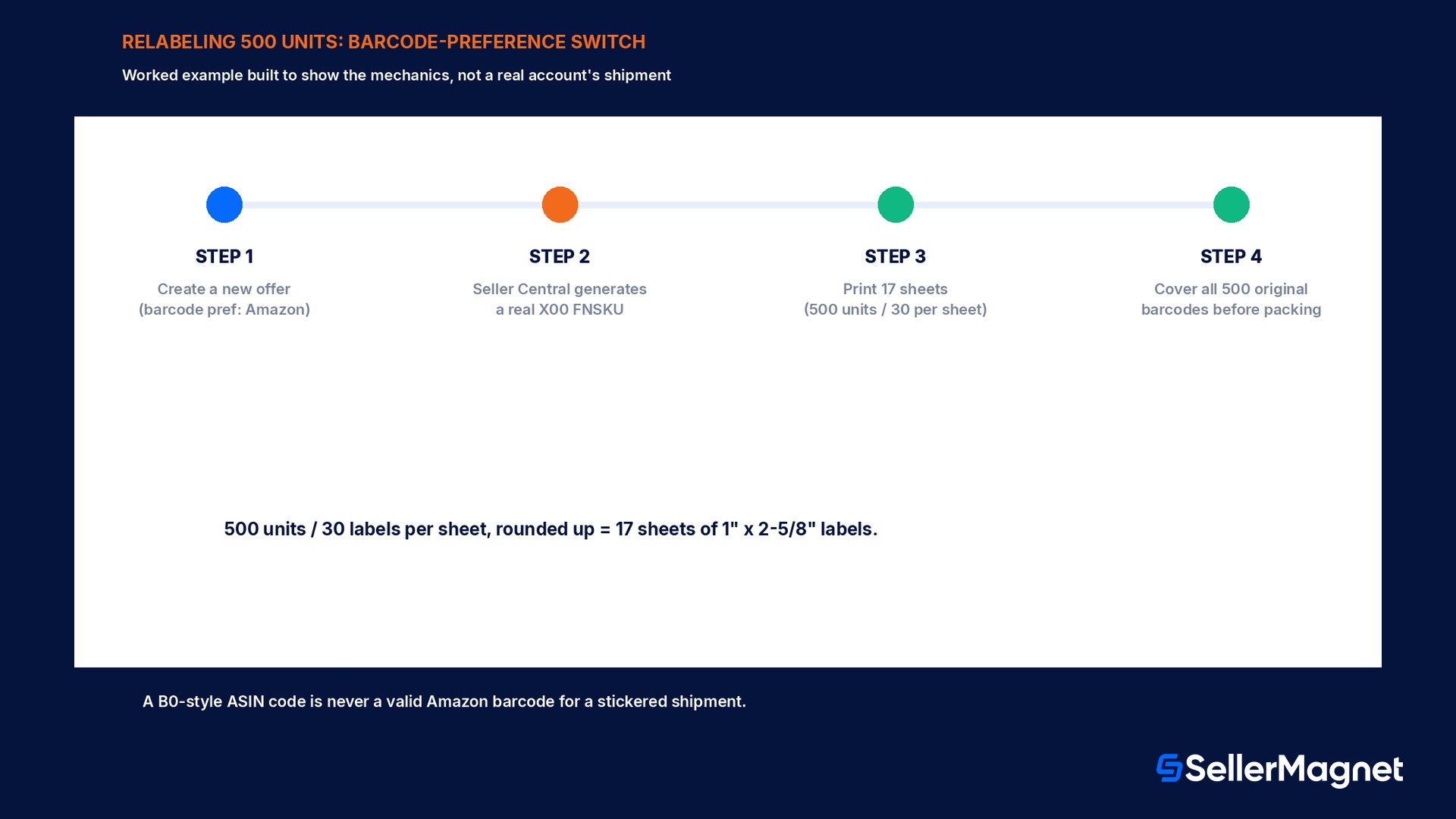
The numbers below are built to make the mechanics concrete, not a real account's shipment. A reseller has been shipping a product under Stickerless, Commingled Inventory using the brand's manufacturer barcode, and after the 31 March 2026 requirement change, discovers the account no longer qualifies for that path because it is not a Brand Registry Brand Representative for the brand in question. The existing listing still shows a B0-style ASIN code where sellers sometimes expect to see a barcode, but Amazon's own forum guidance confirms a B0 code is not a valid Amazon barcode for stickered shipments, so a genuinely new offer has to be created on the same ASIN before Seller Central will generate a real X00-prefixed FNSKU for it. With the new offer in place and the barcode preference switched to Amazon barcode, the seller sets a shipping quantity of 500 units in the Label Products step and clicks Print Item labels. The resulting PDF, printed on the 30-labels-per-US-Letter-page, 1 inch by 2 and 5/8 inch template, needs 17 full sheets to cover all 500 units (500 divided by 30, rounded up), each label showing the new X00 FNSKU, the product's title, and its condition. Every original manufacturer barcode on the 500 units gets fully covered by the new label before packing, and the shipment plan is created against the new offer's FNSKU, not the old commingled listing, since the two are now tracked as separate inventory under Amazon's own rules.
Step
Detail
This example's number
Units needing a new FNSKU label
After losing stickerless eligibility as a reseller
500 units
Label template
30 labels per US Letter page, 1" x 2 5/8"
30 per sheet
Sheets to print
500 units / 30 per sheet, rounded up
17 sheets
Barcode action per unit
Cover the entire original manufacturer barcode
500 covers
Mistakes that slow a shipment down at receiving
Shipping a unit with no label at all. Amazon's own common-errors list names this first; every unit in Labeled Inventory needs its own FNSKU label, with no exceptions for a box that looks obviously correct.
Mislabeling a unit, where the sticker does not match the item inside the box. A label printed for one ASIN applied to a different product creates exactly the kind of catalog confusion the FNSKU exists to prevent.
Printing labels with low ink, toner, or a smudged printer, so the barcode is not scannable. A barcode that a human eye can read is not the same as one a handheld scanner can read; low print quality is a documented common error.
Leaving an item label missing required information, the barcode, the FNSKU itself, or the product title. All three elements have to print together and stay legible for the label to count as complete.
Leaving the original manufacturer barcode visible instead of fully covered. A scanner that reads the wrong code first, the UPC instead of the FNSKU, is a documented path to the exact mismatch problem FNSKU labeling exists to avoid.
Assuming a B0-style ASIN code is a usable Amazon barcode. Forum guidance from Amazon staff is explicit that B0 codes are not valid for stickered shipments; a genuinely new offer, which generates a real X00 FNSKU, is required instead.
Applying a label to a curved or corner surface instead of a flat one. The resulting distortion is a common, avoidable cause of a scanner needing multiple attempts, or failing to read the code at all.
Treating an existing manufacturer-barcode exemption as still valid after 31 March 2026 without checking Brand Representative status. A reseller that kept shipping stickerless past that date risks having inbound units treated as defective.
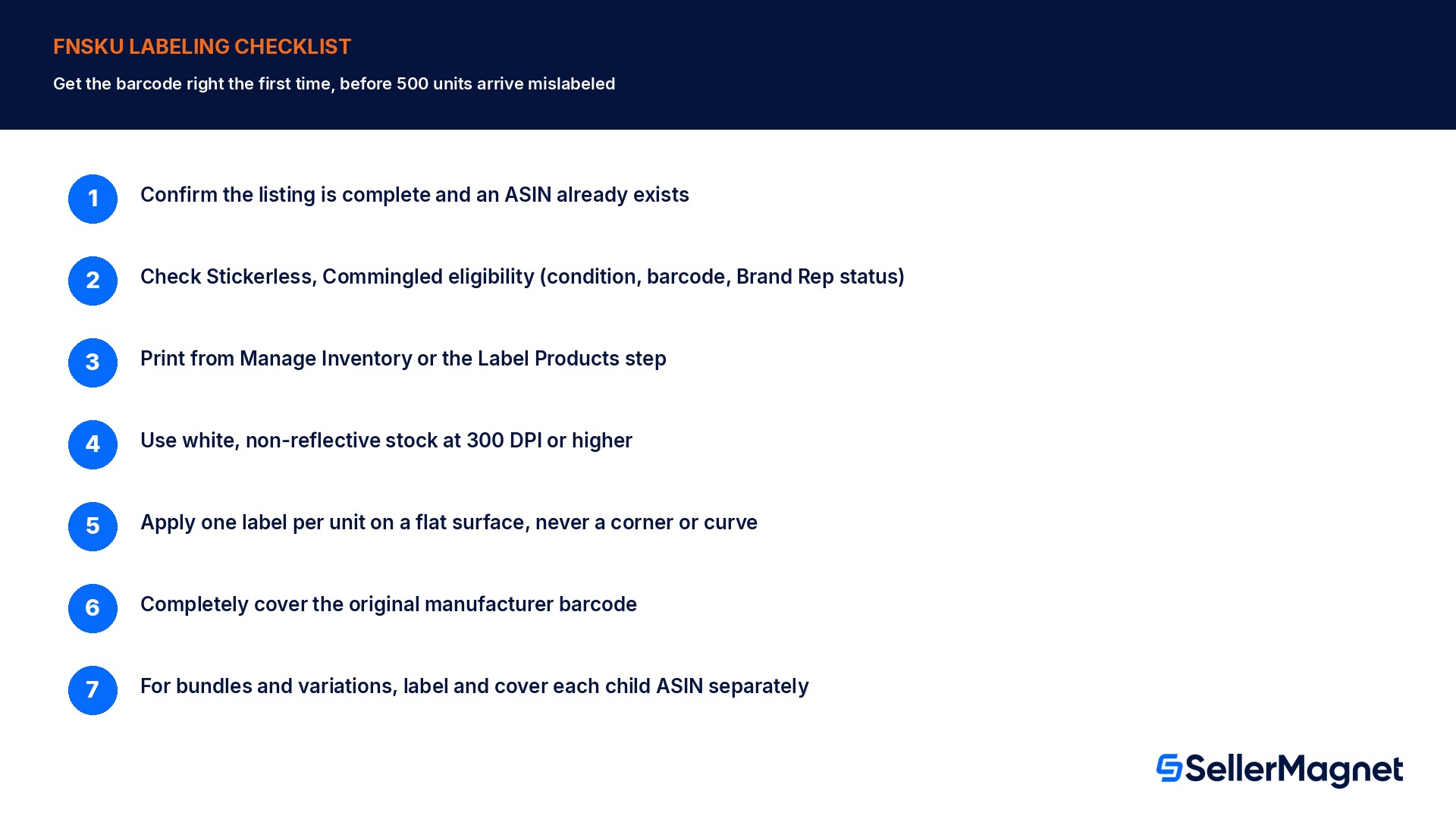
Checklist before you print a single label
How to label an FBA shipment with FNSKUs correctly the first time
Confirm the listing is complete and an ASIN already exists - An FNSKU cannot be generated for a draft listing; complete and submit it first.
Check whether the product genuinely qualifies for Stickerless, Commingled Inventory - New condition, one scannable UPC/EAN/ISBN matching exactly one ASIN, and, since 31 Mar 2026, Brand Representative status for a manufacturer-barcode route.
If labeling is required, print from Manage Inventory or the shipment workflow's Label Products step - Choose a supported label size and set the exact unit quantity before printing.
Print on white, non-reflective stock at 300 DPI or higher - A low-quality print is one of Amazon's own documented causes of a receiving delay.
Apply one label per unit on a flat surface, never a corner or curve - Match every label to its exact item; a mismatched label is a documented common error.
Completely cover the original manufacturer barcode with the new label - A visible original barcode risks a scanner reading the wrong code.
For bundles, cover the individual items' barcodes and expose only the bundle's own FNSKU - This keeps a scanner from picking up a component's code instead of the bundle's.
What SellerMagnet can and cannot do about this
Printing and applying FNSKU labels happens entirely inside Seller Central and at packing time, physical steps no third-party tool, including SellerMagnet, performs for a seller. Where SellerMagnet's Listing Optimizer helps is upstream of the shipment itself: flagging a listing whose barcode preference and brand-registry status do not line up (a reseller account still configured for a manufacturer-barcode route it may no longer qualify for), so the mismatch surfaces before 500 units arrive at a fulfillment center mislabeled.
This sits alongside the box-dimension and packing checks covered in the FBA box requirements guide and the separate identifier questions answered in the MPN and GTIN exemption guide: a shipment can pass every box-size and weight check and still stall at receiving over a single uncovered barcode, so treat FNSKU labeling as its own checkpoint, not something box prep automatically covers.
What does FNSKU stand for, and is it the same as a UPC?
FNSKU stands for Fulfillment Network Stock Keeping Unit. It is not the same as a UPC, EAN, or ISBN; those are manufacturer-assigned barcodes, while the FNSKU is Amazon's own barcode generated per ASIN per seller account.
Do I need an FNSKU label on every unit I send to Amazon?
Only under Labeled Inventory, the default setting. Under Stickerless, Commingled Inventory, eligible new-condition units with a single scannable UPC/EAN/ISBN matching one ASIN do not need an FNSKU label, though since 31 March 2026 that route for a manufacturer barcode is limited to Brand Registry Brand Representatives.
My listing shows a B0 code where I expected a barcode. Can I print that as my FNSKU?
No. A B0-style ASIN code is not a valid Amazon barcode for a stickered shipment. Creating a new offer on the listing, with the barcode preference set to Amazon barcode, is what generates a usable X00-format FNSKU.
Where do I actually print FNSKU labels?
From the Manage Inventory page, or from the Label Products step of the shipment-creation workflow, once the listing is approved and an ASIN exists. Both generate a printable PDF sized to one of 9 supported label templates.
Do I need to cover the original barcode on the product, or can the FNSKU label go next to it?
The FNSKU label has to completely cover the original manufacturer barcode. Leaving it visible next to the new label risks a fulfillment center scanner reading the wrong code.
Are resellers still allowed to use stickerless, commingled inventory?
Not on the basis of a manufacturer barcode alone, as of 31 March 2026. That route is now limited to sellers who are a Brand Representative for the brand under Amazon Brand Registry; resellers must apply Amazon barcode (FNSKU) labels.
What happens if I ship inventory without the correct FNSKU labels after 31 March 2026?
Amazon's own guidance states units received without the required Amazon barcode are considered defective; Amazon will attempt to correct the labeling issue and flag it on the Inbound Performance Dashboard, and improperly labeled units are not eligible for reimbursement.
Can I use any printer and paper for FNSKU labels?
Use white, non-reflective label stock printed at a resolution high enough (commonly cited at 300 DPI or higher) to keep the barcode scannable; low ink, toner, or print quality is one of Amazon's own documented causes of a receiving delay.
Stop Juggling Tools. SellerMagnet Combines Everything You Need.