A seller adding a new product to Amazon's catalog runs into two different identifier systems in the first five minutes, and mixing them up is the single most common reason a listing gets rejected before it ever goes live. The Manufacturer Part Number (MPN) is the code the maker of a product assigns to identify it, printed on packaging or documentation; the GTIN (Global Trade Item Number), the family that includes UPC, EAN, JAN and ISBN, is the barcode-backed identifier Amazon's catalog expects by default for almost every new listing. Some categories, automotive parts, industrial and scientific products, computer components, and several electronics-accessory types, require an MPN on the listing itself. A separate, much larger set of sellers never has a GTIN at all: private-label brands, handmade goods, bundles, and parts sold without a barcode, and for those sellers Amazon runs an entirely different process called a GTIN exemption, requiring real product photos and a brand name instead of a 12 or 13-digit code. This guide works from Amazon's own Brand Name policy, its GTIN exemption help pages, and the List Products Without a GTIN workflow to separate what an MPN actually is, which categories require one, exactly how the exemption application works end to end with real photo-count numbers, and the mistakes that get an exemption request rejected or a listing pulled down for a mismatched identifier.
A Manufacturer Part Number (MPN) is the identifier a product's own manufacturer assigns to it, required on Amazon listings in categories like automotive parts, industrial and scientific products, and computer components. A GTIN exemption is a separate Amazon approval, requested with 2 to 9 real product photos per item and a decision typically emailed within 48 hours, that lets a seller without a UPC, EAN, JAN or ISBN list a product anyway. Confusing the two, or entering a SKU or barcode in the MPN field, is the most common reason a new listing gets rejected.
What an MPN actually is, and what it is not
A Manufacturer Part Number is a unique alphanumeric code the maker of a product assigns to identify that exact product, the same number printed on the item's packaging, label, or included documentation, or published in the manufacturer's own catalog. Amazon uses it, alongside UPC, EAN and GTIN, to match a listing to the correct catalog entry and to help buyers searching by part number find the right product. What trips sellers up first is the field's name: a "Catalog Part Number" from a supplier's own order catalog is the same thing as an MPN in Amazon's eyes, so a seller who orders from a distributor can usually find the number already printed on the supplier invoice or product page rather than needing to contact the original manufacturer directly. What an MPN is never allowed to be, per Amazon's own guidance, is invented by the seller, copied from the seller's internal SKU, or substituted with a UPC or EAN; each of those entries creates incorrect catalog data that can trigger a listing suppression later, even if the listing goes live without an error in the moment.
Which categories actually require an MPN
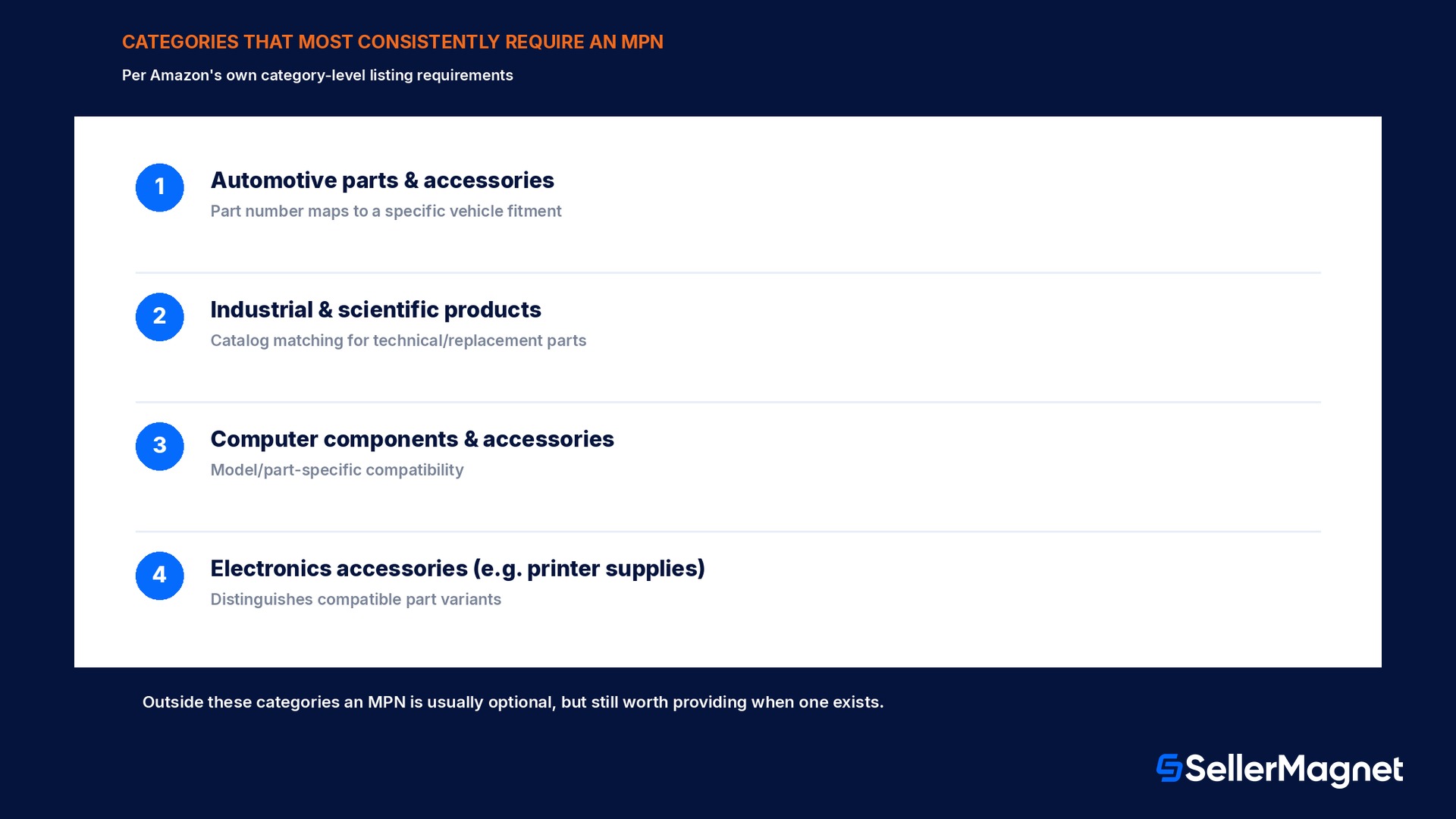
Not every Amazon category asks for an MPN, and Amazon has not published one single master list covering every storefront and locale, so the field's requirement is enforced at the category and product-type level during listing creation itself; the add-a-product flow or flat-file template will show the field as mandatory, with a validation error on submission, exactly where it applies. The categories that most consistently require it are the ones where a part number is how buyers and fitment tools already identify a product in the real world: automotive parts and accessories (where a part number maps directly to a specific vehicle fitment), industrial and scientific products, computer components and accessories, and several electronics-accessory product types such as printer supplies. Outside those categories, an MPN is usually optional but still worth providing when one genuinely exists, because Amazon's catalog-matching logic uses it to avoid creating a duplicate listing for a product that already exists, and because shoppers who search by part number specifically will only find a listing that has the field filled in correctly.
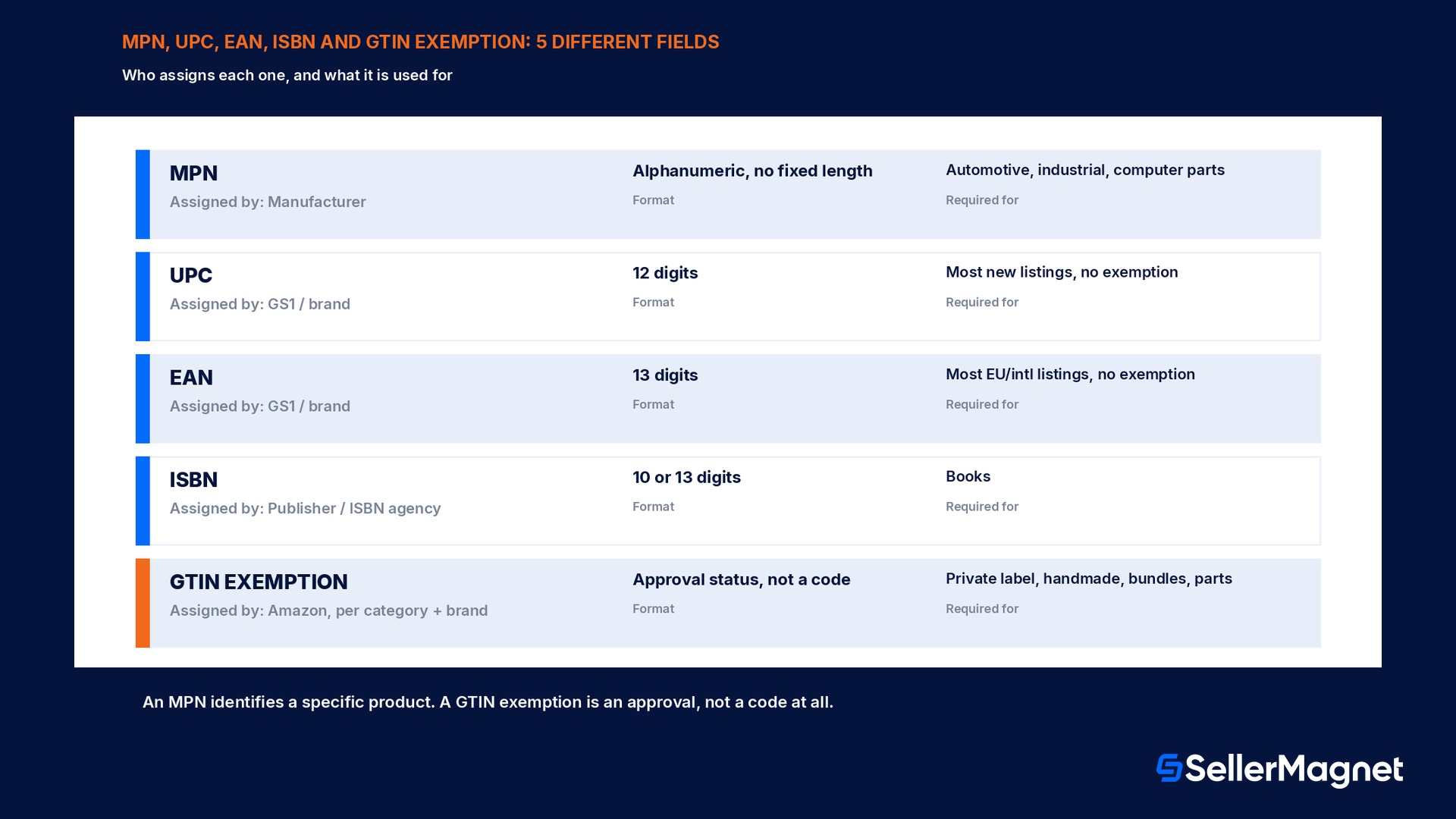
Identifier
Assigned by
Typical format
Required for
MPN
The product's manufacturer
Alphanumeric, manufacturer-specific, no fixed length
Automotive, industrial/scientific, computer components, some electronics accessories
UPC
GS1 (via the brand/manufacturer)
12 digits
Most new listings without an approved GTIN exemption
EAN
GS1 (via the brand/manufacturer)
13 digits
Most new listings in EU/international stores without an exemption
ISBN
The book's publisher / ISBN agency
10 or 13 digits
Books
GTIN exemption
Amazon, per category + brand, on request
Not a code; an approval status
Private-label, handmade, bundles, or parts with no barcode at all
GTIN exemption: when a seller has no barcode at all
A GTIN exemption solves a completely different problem than the MPN field: it is Amazon's approval process for listing a product that has no UPC, EAN, JAN, ISBN or GS1-approved barcode whatsoever, not a replacement for one. Amazon's own eligibility list names exactly who this is for: sellers listing products for which the brand, manufacturer or publisher never issued a GTIN (typical of private-label and handmade goods); sellers who are themselves the manufacturer, brand or publisher and have not put barcodes on their products; sellers listing product parts that do not carry their own GTIN, automotive parts and mobile accessories are Amazon's own named examples; and sellers listing a bundled pack of more than one product, such as a belt-and-wallet set or a two-shirt pack, where the bundle itself was never assigned its own barcode even though the individual items might carry their original ones. The one hard exclusion, stated directly in Amazon's guidance, rules out the request entirely: a product that already has a GS1-approved barcode printed on it or its packaging cannot get a GTIN exemption, full stop, and should be listed with that existing barcode instead.
How the exemption application actually works, step by step
The request happens inside Seller Central's Apply for a GTIN exemption tool, and it is a category-plus-brand request, not a single global switch for an entire account. A seller first selects the relevant product category from a pop-up list, then types the brand or publisher name into the Brand/Publisher field, using the literal word "Generic" (case-sensitive, by Amazon's own instruction) for unbranded items and bundles rather than leaving it blank or inventing a brand name. Up to 10 brand-and-category combinations can be added to a single request by repeating that step, which matters for a seller launching several private-label product lines in different categories at once rather than filing 10 separate requests. Clicking "Check for eligibility" runs Amazon's own automated screen and returns an Eligibility summary table with a checkmark next to every combination that qualifies; any combination that fails the automated check cannot continue past this point in the normal flow, no matter how the proof is prepared afterward. For every eligible combination, the seller moves to "Continue to submit proof" and uploads, per product, a product name plus a minimum of 2 and a maximum of 9 real-world photographs, held in hand or placed on a table, never digital mockups, showing every side of the product and its packaging with the brand name visible and matching the Brand/Publisher field exactly. After clicking Submit request, Amazon states a seller will hear back by email within 48 hours on the approval status, and an approved exemption unlocks listing creation for that category and brand roughly 30 minutes after the approval itself, a seller does not need to wait for a second confirmation step before creating the listing.
The brand name has to match the product, exactly
Amazon's own requirement: the brand name typed into the exemption request must be an exact match to the brand name printed on the product or its packaging in the submitted photos. A mismatch here is a common, avoidable rejection reason.
A worked example: requesting an exemption for a 3-item private-label bundle
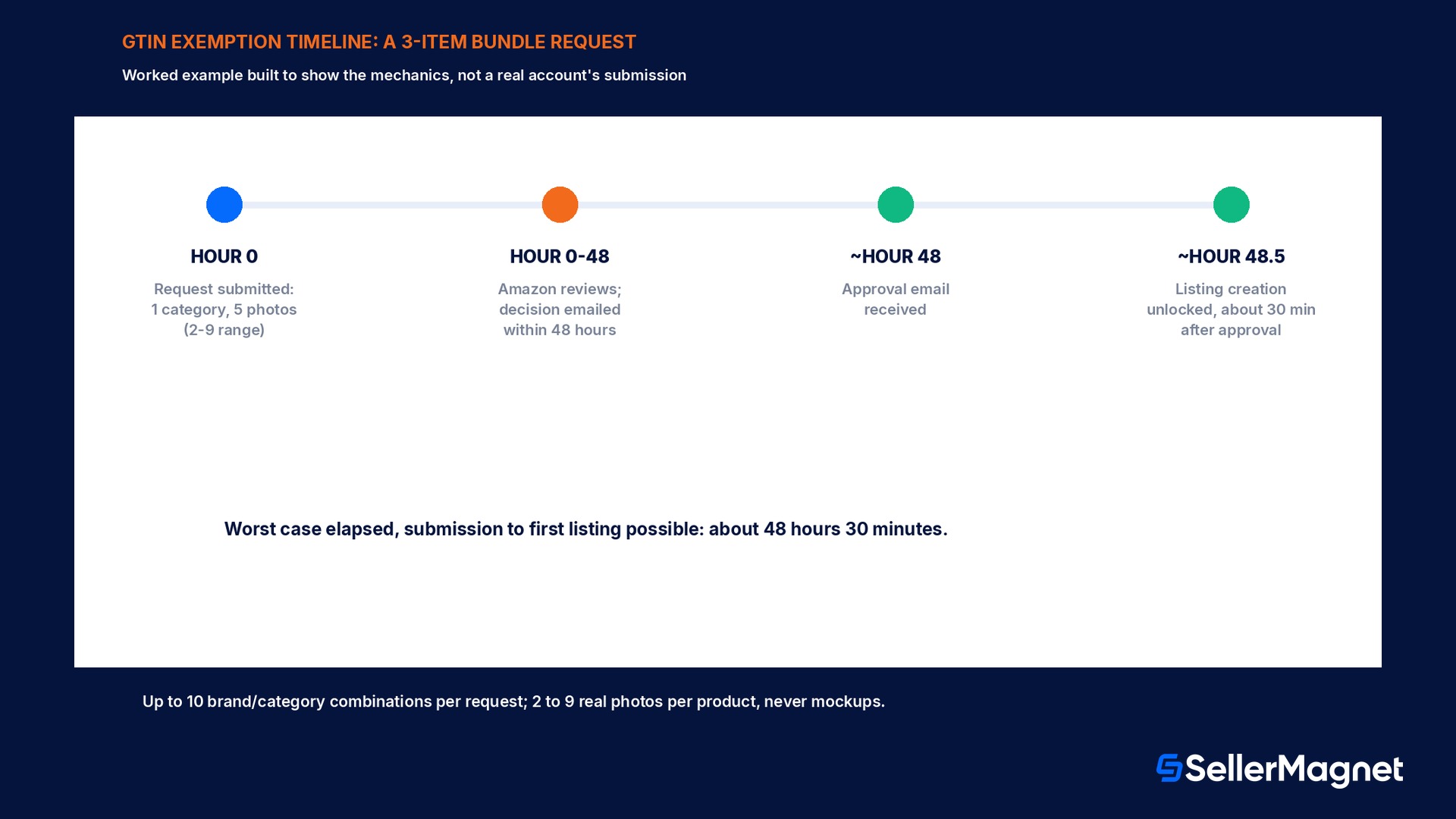
The scenario below is constructed to make the photo-count and timing mechanics concrete, not a real account's submission. A private-label seller is launching one bundle, a kitchen set containing a cutting board, a knife, and a sharpening stone, sold together under one brand with no GTIN on the bundle pack itself, even though none of the 3 individual items ever had their own barcode either. Because this is one bundle counted as one product for the exemption request, the seller needs only 1 brand-and-category combination, well inside the 10-combination limit per request, with the category set to the relevant kitchen housewares category and the Brand/Publisher field set to the brand's exact printed name. For the photo proof, the seller follows Amazon's stated 2-to-9-photo range per product and submits 5 photos of the assembled bundle: the full bundle from the front, the full bundle from an angled side view, a close-up of the brand name on the packaging, the cutting board alone showing the brand stamp, and the full bundle's back panel; 5 sits comfortably inside the 2-minimum, 9-maximum range with room to add more only if the eligibility reviewer asks for additional angles later. Counting the clock from Amazon's own stated figures: submission at hour 0, an email decision arrives by hour 48 at the latest, and if approved, the listing becomes creatable at roughly hour 48.5, 30 minutes after that approval, for a maximum real-world wait of about 48 hours and 30 minutes from submission to the first moment a new listing can be created.
Step
Amazon's stated figure
This example's choice
Within range
Brand/category combinations
Up to 10 per request
1 (one bundle, one category)
Yes, 9 to spare
Photos per product
2 minimum, 9 maximum
5
Yes
Decision turnaround
Within 48 hours by email
Assume the full 48 hours
Worst case, not exceeded
Listing unlock after approval
About 30 minutes
30 minutes
As stated
Total elapsed (submission to first listing possible)
Up to about 48.5 hours
48 hours 30 minutes
Matches worst case
MPN not found, or 2 different products sharing one: what Seller Support actually does
Two separate problems show up under the same symptom, a listing attempt that will not go through on the MPN step, and they need different fixes. The first is an MPN Amazon's catalog has simply never seen before: the manufacturer's part number is correct, but no existing catalog entry uses it yet. Amazon's own guidance for this case is to create a new product page using that MPN together with the GTIN the listing already requires (UPC, EAN, JAN or ISBN), rather than treating the unmatched MPN itself as an error to work around; the two identifiers together, not the MPN alone, are what lets the catalog accept a genuinely new product page. The second, rarer problem is a real conflict: two different manufacturers' products that happen to use what looks like the same MPN string, which produces catalog confusion between unrelated listings rather than a clean rejection. Amazon's guidance for that case is a direct Seller Support contact, because resolving which product the shared code actually belongs to is not something the add-a-product flow or a flat-file validation rule can determine automatically. A seller should never try to dodge either situation by altering the MPN itself, appending a suffix, a dash, or extra digits to make it look unique, since Amazon's own formatting guidance explicitly warns against adding anything to the original part number beyond what the manufacturer printed.
Entering MPN and part number data at scale, and the formatting rules that trip up bulk uploads
A seller adding one listing at a time enters the MPN directly in the Add a Product flow's part-number attribute; a seller managing hundreds or thousands of SKUs instead works from a flat-file template or the bulk upload tool, where the same field appears as a plain text column next to the other identifier attributes. The formatting rule that catches the most bulk-upload errors is consistency for variations: Amazon's own locale guidance for part numbers gives a concrete example, a product with color variations should get a distinct part number per color rather than reusing one parent code across every child, for instance a base code with a different suffix per color rather than one shared string for the whole family. The field itself tolerates a reasonably long alphanumeric string, commonly documented at up to 40 characters depending on the template and marketplace, but the content rule matters more than the length limit: half-width characters only where the template requires them, no characters appended that the manufacturer did not originally assign, and the same exact string used consistently every time that product reappears in a future upload, since a part number that changes formatting between uploads for the same physical product is exactly the kind of inconsistency that produces duplicate or mismatched catalog entries later.
Mistakes that get a listing or an exemption request rejected
Inventing an MPN when the product has none. Amazon's own guidance is explicit: if a product genuinely has no manufacturer part number, leave the field blank rather than typing "N/A", "none", or a placeholder value, which can itself cause a catalog-matching error.
Entering the seller's own SKU as the MPN. The MPN has to be the manufacturer's assigned code; an internal SKU in that field creates incorrect catalog data and can trigger a listing mismatch.
Entering a UPC or EAN into the MPN field. These are different identifier systems with their own dedicated fields; mixing them up is one of the most common new-listing rejection reasons reported in Seller Forums.
Requesting a GTIN exemption for a product that already has a GS1-approved barcode. This is a hard exclusion in Amazon's own eligibility rules, not a borderline case; a product with an existing approved barcode should be listed with that barcode instead.
Submitting digital mockups instead of real photographs. Amazon's stated requirement is photos of the physical product held in hand or placed on a table; a rendered or mockup image does not meet the proof requirement.
A brand name in the request that does not exactly match the packaging. Reviewers check the photos against the typed Brand/Publisher field; any mismatch, including minor spelling or punctuation differences, is a common rejection reason.
Treating an approved exemption as covering every category the seller sells in. An exemption is granted per brand-and-category combination; a brand approved for one category still needs a fresh request for a different category.
Assuming the exemption is required before every listing without a GTIN. If a seller already holds an approved exemption for that exact product type from an earlier request, Amazon's own guidance says a new exemption request is not needed; check the existing approval first.
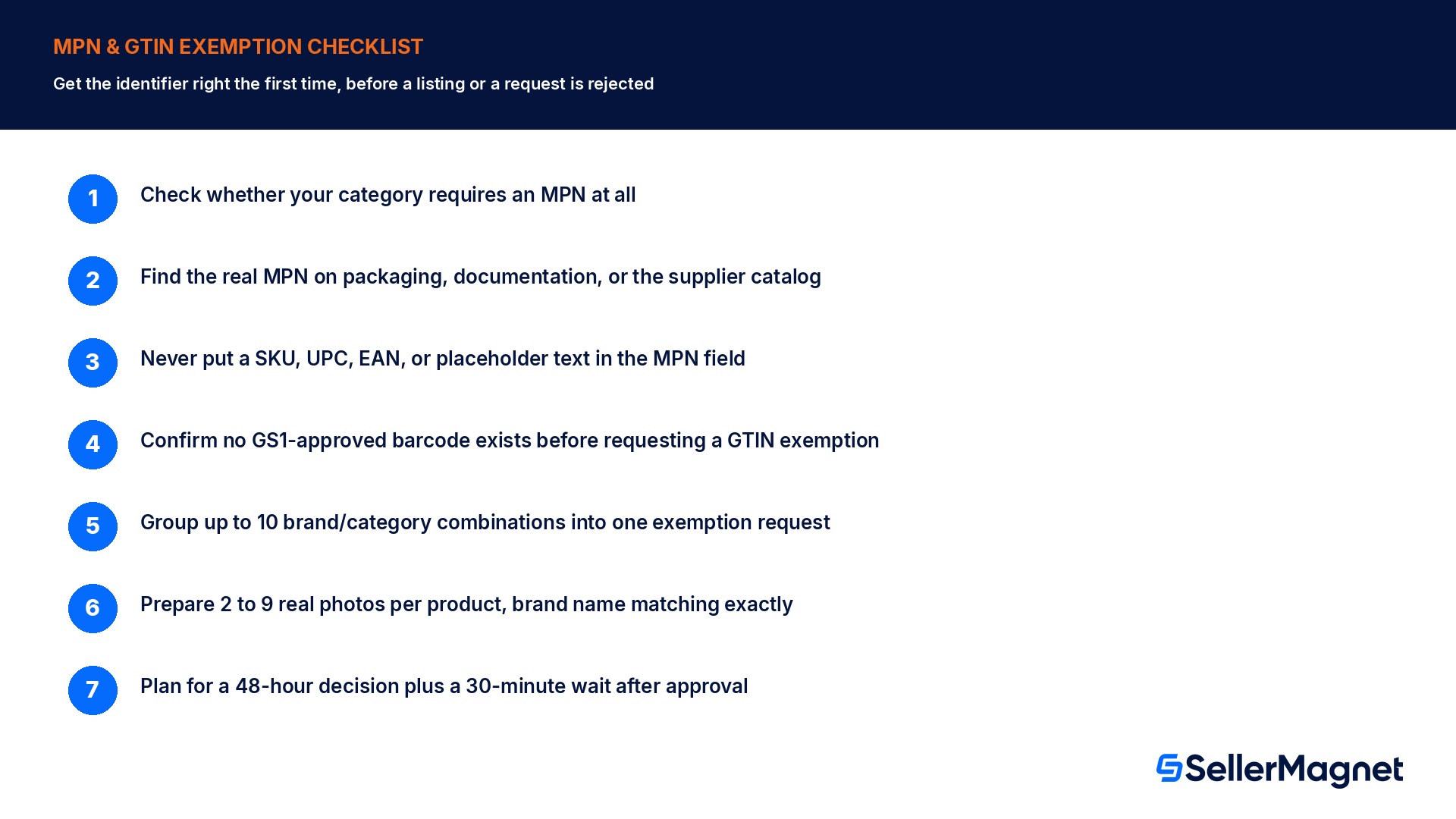
Checklist before you submit either form
How to get the MPN field and a GTIN exemption request right the first time
Check whether your category requires an MPN at all - Automotive, industrial/scientific, computer components, and several electronics-accessory categories enforce it; most others treat it as optional.
Find the real MPN on the packaging, documentation, or supplier catalog before typing anything - A supplier's own "Catalog Part Number" counts as the MPN; contact the manufacturer directly only if the supplier cannot provide one.
Never put a SKU, UPC, EAN, or placeholder text in the MPN field - Leave it blank if the product genuinely has no manufacturer part number.
Confirm the product has no GS1-approved barcode before requesting a GTIN exemption - An existing approved barcode disqualifies the exemption request entirely; list with that barcode instead.
Group brand-and-category combinations into one request, up to 10 at a time - Run the eligibility check first; only combinations with a checkmark can continue to the proof step.
Prepare 2 to 9 real photos per product showing every side, with the brand name visible and exactly matching the typed Brand/Publisher field - Use "Generic" (exact spelling, case-sensitive) for unbranded items and bundles, not a made-up brand.
Plan around a 48-hour email decision and a further 30-minute wait after approval - Submit exemption requests at least 2 to 3 days before a planned launch date, not the same day.
What SellerMagnet can and cannot do about this
Both processes run entirely inside Seller Central: typing the MPN field during listing creation, and submitting the category, brand name and photo proof for a GTIN exemption, are not steps any third-party tool, including SellerMagnet, performs on a seller's behalf. Where SellerMagnet's Listing Optimizer genuinely helps is catching the mismatch before it ships: flagging a listing where the MPN field holds what looks like an internal SKU pattern or a UPC-length numeric string instead of a real manufacturer code, or a product description claiming a brand name that does not match what the seller's own exemption or Brand Registry record has on file.
This is a different gate from the 75-character title requirement on the same listing, or from the fee tables covered in the FBA fee guide: a listing can have perfect identifiers and still get the title, fee tier, or category wrong, so treat the MPN/GTIN step as one checkpoint in a longer launch checklist, not the final one.
Is an MPN the same as a GTIN or UPC?
No. An MPN is assigned by the product's manufacturer and has no fixed digit format; a GTIN (the family that includes UPC, EAN, JAN and ISBN) is a GS1-issued barcode number, typically 12 or 13 digits. They are separate fields serving different catalog functions.
What do I do if my product genuinely has no manufacturer part number?
Leave the MPN field blank. Amazon's own guidance says not to enter "N/A", "does not apply", or any placeholder text in its place.
Can I use my own SKU as the MPN?
No. The MPN must be the manufacturer's assigned code; entering an internal SKU creates incorrect catalog data and can cause listing errors.
Which categories require an MPN on Amazon?
Automotive parts and accessories, industrial and scientific products, computer components and accessories, and several electronics-accessory types most consistently require it; the listing flow itself flags the field as mandatory where it applies.
Do I need Brand Registry to apply for a GTIN exemption?
No. A GTIN exemption does not require Brand Registry enrollment, though some categories separately require brand name approval (BNA) in addition to the exemption.
How many photos does a GTIN exemption request need?
A minimum of 2 and a maximum of 9 real-world photographs per product, showing every side of the product and its packaging, held in hand or placed on a table, never digital mockups.
How long does a GTIN exemption decision take?
Amazon states a seller will receive an email on the approval status within 48 hours of submitting the request, and can typically start listing about 30 minutes after an approval.
Can I request exemptions for more than one brand or category at once?
Yes, up to 10 brand-and-category combinations can be added to a single exemption request before running the eligibility check.
Stop Juggling Tools. SellerMagnet Combines Everything You Need.