Amazon Unfulfillable Inventory in Europe: The 14-Day Disposal Rule Expands on 28 October 2026
R
RenéFreelance Amazon Editor
|
17 min read
If you sell through FBA in Europe, there is a quiet deadline sitting inside your Seller Central settings. When a unit in an Amazon fulfilment centre becomes unfulfillable (damaged, defective, expired or otherwise unfit for sale), Amazon does not store it forever. It sends you a notice, gives you a fixed window to tell it what to do, and then disposes of or donates the stock itself. On 28 October 2026 that window becomes 14 days in 10 stores, because Belgium and Ireland join the 8 European stores where the 14-day rule has applied since 6 October 2025. Below is exactly what changes, what it costs to get it wrong, and the 10-minute settings check that protects you.
From 28 October 2026, Amazon disposes of or donates unfulfillable FBA inventory after 14 days' notice in 10 UK and EU stores (now including Belgium and Ireland) if you have not configured automated unfulfillable settings. Customer returns graded unfulfillable are disposed of immediately under the default. To keep control, go to Settings > Fulfilment by Amazon > Automated unfulfillable settings, choose Return (optionally Grade and Resell, Liquidate or Furbishment) and enter a valid return address for both the UK and the EU.
What changes on 28 October 2026
Amazon announced the update on its Changes to programme policies page: starting 28 October 2026, if you have not enabled automated unfulfillable settings in the United Kingdom, Germany, France, Italy, Spain, Sweden, Poland, the Netherlands, Belgium and Ireland, it will dispose of or donate unfulfillable inventory after 14 days' notice. The stated reason is the same one Amazon gave for every earlier step: to create more room for your products in its fulfilment centres and to help you save on storage fees. To avoid the disposal, the page names 2 routes: create a manual removal order, or configure the automated settings to Liquidate (recover some value) or Return (send the stock to your return-to address or to a third-party freight forwarder).
The important detail is the scope. The 14-day notice itself is not new. The same policy page records that the rule took effect on 6 October 2025 for 8 stores: the UK, Germany, France, Italy, Spain, Sweden, Poland and the Netherlands. What 28 October 2026 changes is the list: Belgium and Ireland are added, so the rule now covers 10 stores. If your unfulfillable units sit in one of the original 8, you are already on 14 days and the date is a reminder to check your settings. If you have stock in Belgium or Ireland, this is the day your window shortens to 14 days.
Store
14-day notice applies since
What to do before 28 Oct 2026
United Kingdom
6 Oct 2025
Check the UK settings (separate from the EU)
Germany, France, Italy, Spain
6 Oct 2025
Check the EU settings and return address
Sweden, Poland, Netherlands
6 Oct 2025
Check the EU settings and return address
Belgium
28 Oct 2026 (new)
Set up automated unfulfillable settings now
Ireland
28 Oct 2026 (new)
Set up automated unfulfillable settings now
Which marketplaces this covers
This is a UK and EU policy. The dates, the 14-day notice and the fees in this article apply to FBA inventory stored in those 10 stores. US, Canadian and other non-European FBA inventory follows its own removal rules, so do not apply these numbers there.
How the notice period got shorter: 30, 23, then 14 days
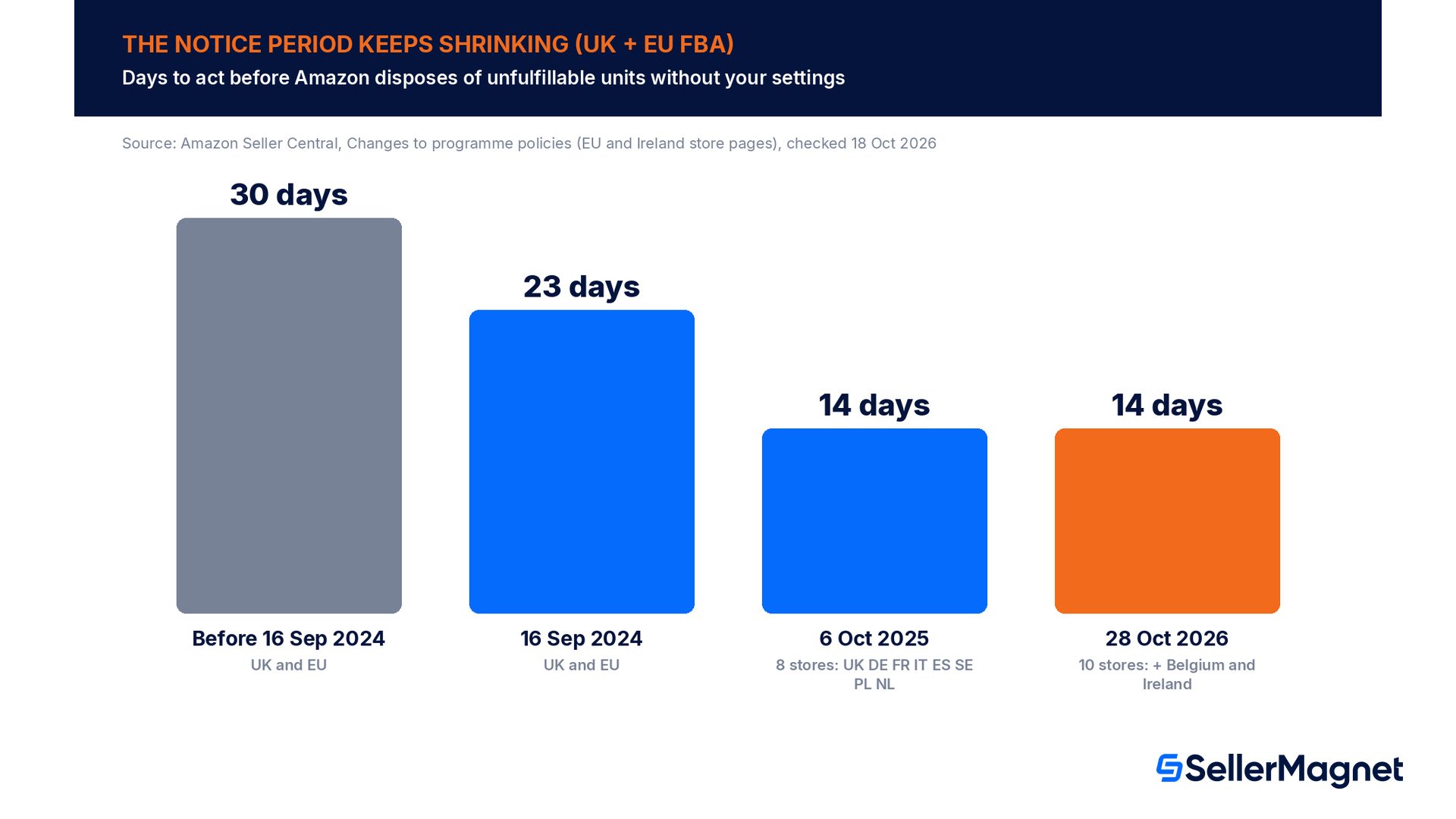
Amazon has tightened this rule in steps, and the history explains why so many sellers are caught out: a setting that was harmless 2 years ago now costs stock. Under the older policy you had 30 days to act after a unit became unfulfillable. From 16 September 2024, Amazon cut that to 23 days for sellers in the UK and EU who had not enabled automated unfulfillable settings. From 6 October 2025 it cut it again, to 14 days, for 8 stores. From 28 October 2026 the 14 days cover Belgium and Ireland as well. Separately, Amazon's FAQ warns that it may remove soon-to-expire unfulfillable units on a shorter time frame to prevent the product expiring in the warehouse.
Each step cuts the time you have to notice a problem before the stock is gone; from 30 to 14 days, the window has more than halved. With 30 days, a seller who checked removals once a month was mostly safe. With 14 days, the same habit means some notices expire before you ever see them. That is why the safe answer is not a calendar reminder but a standing instruction in your FBA settings, which Amazon follows without waiting for you.
What actually happens to a unit, day by day
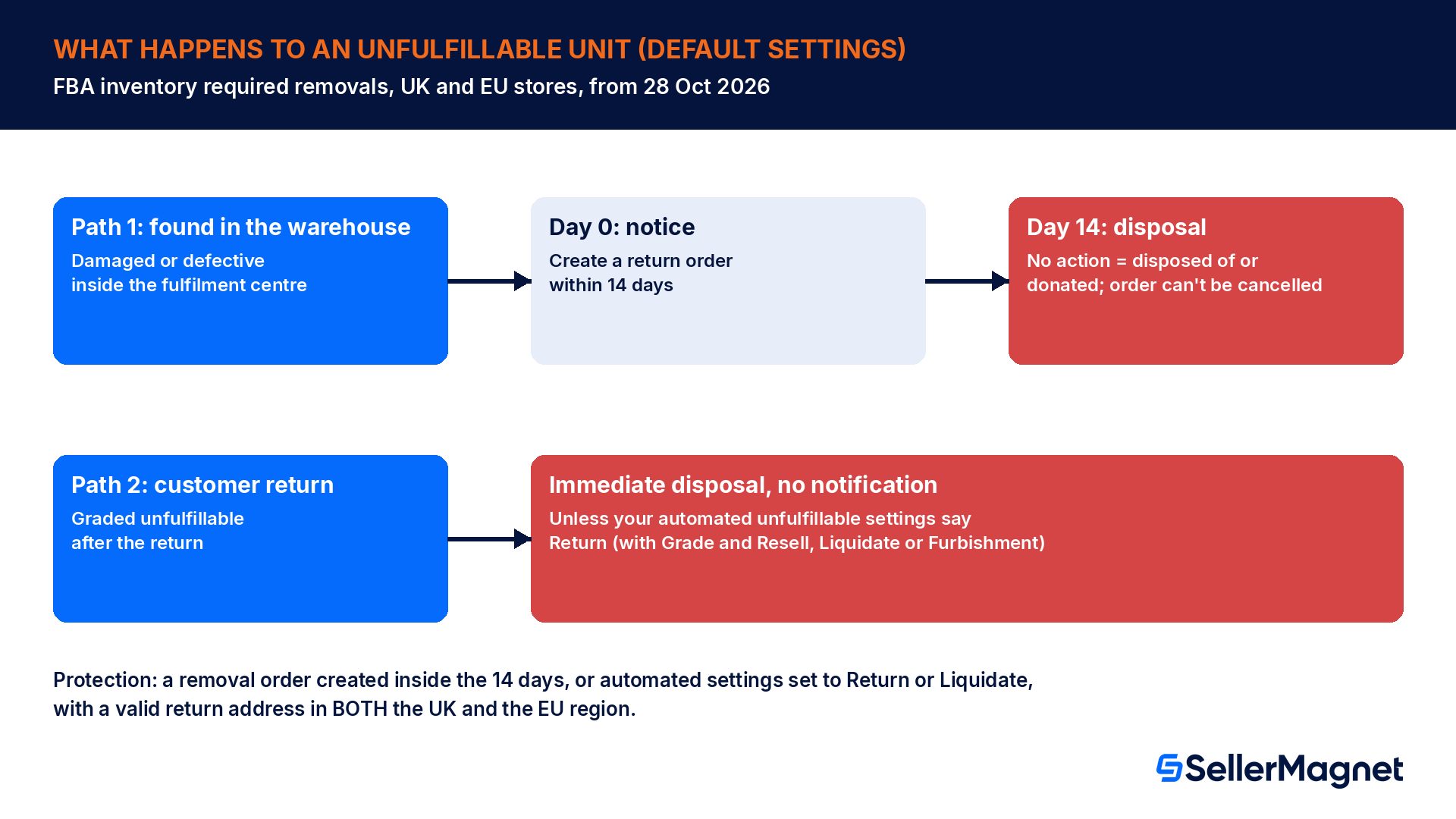
Amazon's FBA inventory required removals page describes 2 different paths for unfulfillable stock when you have not configured your automated settings, and they behave very differently.
A unit becomes unfulfillable inside the fulfilment centre (for example, it is found damaged or defective). Amazon notifies you to create a return order within 14 days. If you take no action in that period, Amazon disposes of the unit, and removal fees may apply.
A customer returns a unit and Amazon grades it unfulfillable after the return. In this case you receive no notification at all, and Amazon disposes of the unit immediately.
The second path is the one most sellers underestimate. Returns are a steady stream, and in categories with a high return rate a meaningful share of returned units can be graded unfulfillable. Under the default, every one of those units is destroyed or donated without a message, which also means you never get a chance to inspect whether the grading was right. The only way to change that outcome is to tell Amazon in advance what to do with unfulfillable returns, using the automated settings.
No extension, no undo
Amazon's FAQ answers 3 questions sellers ask after the fact. Can the 14 days be extended? No, extensions are not possible. Can you cancel the disposal order Amazon created after the notice? No, once created it cannot be cancelled. Will Amazon dispose of units for which you created a removal order inside the 14 days but that it has not processed yet? No: a removal order created within the notice period protects them.
That last answer is your safety valve. You do not need the stock physically out of the warehouse within 14 days. You need a removal order (or the right automated setting) in place before the notice runs out. Creating one takes a few minutes: Manage inventory > Remove unfulfillable inventory, then choose Return-to address or Liquidate.
What counts as unfulfillable, and what does not
Amazon's definition is short: unfulfillable is inventory that is damaged, defective, expired or otherwise unfit for sale. You can see your current unfulfillable units under Inventory > FBA inventory > Unfulfillable inventory, which lists the units and lets you create a removal order for them straight from the list. Before you decide anything, open that list and sort it by quantity: in most accounts a handful of ASINs make up most of the units.
One exception matters for your money. On the Remove inventory automatically page, Amazon notes that lost, expired, carrier-damaged or warehouse-damaged units are not eligible for removal. Warehouse-damaged and lost units are a reimbursement question, not a disposal question: if Amazon damaged or lost the stock, the path is a reimbursement claim under Amazon's FBA reimbursement policy, not a removal order. Keep those 2 lists apart, because a unit you dispose of is a unit you can no longer prove anything about.
Situation
What Amazon does by default
Your best move
Unit found damaged or defective in the warehouse (seller-caused)
14-day notice, then disposal
Removal order (return or liquidate) inside 14 days
Customer return graded unfulfillable
Immediate disposal, no notice
Automated settings on Return, with value recovery
Soon-to-expire unit becomes unfulfillable
May be removed on a shorter time frame
Automated settings; plan expiry dates at inbound
Unit damaged or lost by Amazon
Not eligible for removal
Reimbursement claim, not a removal
Unit damaged by the carrier
Not eligible for removal
Check the carrier and reimbursement rules
The fee trap: in the EU, disposal costs more than a local return
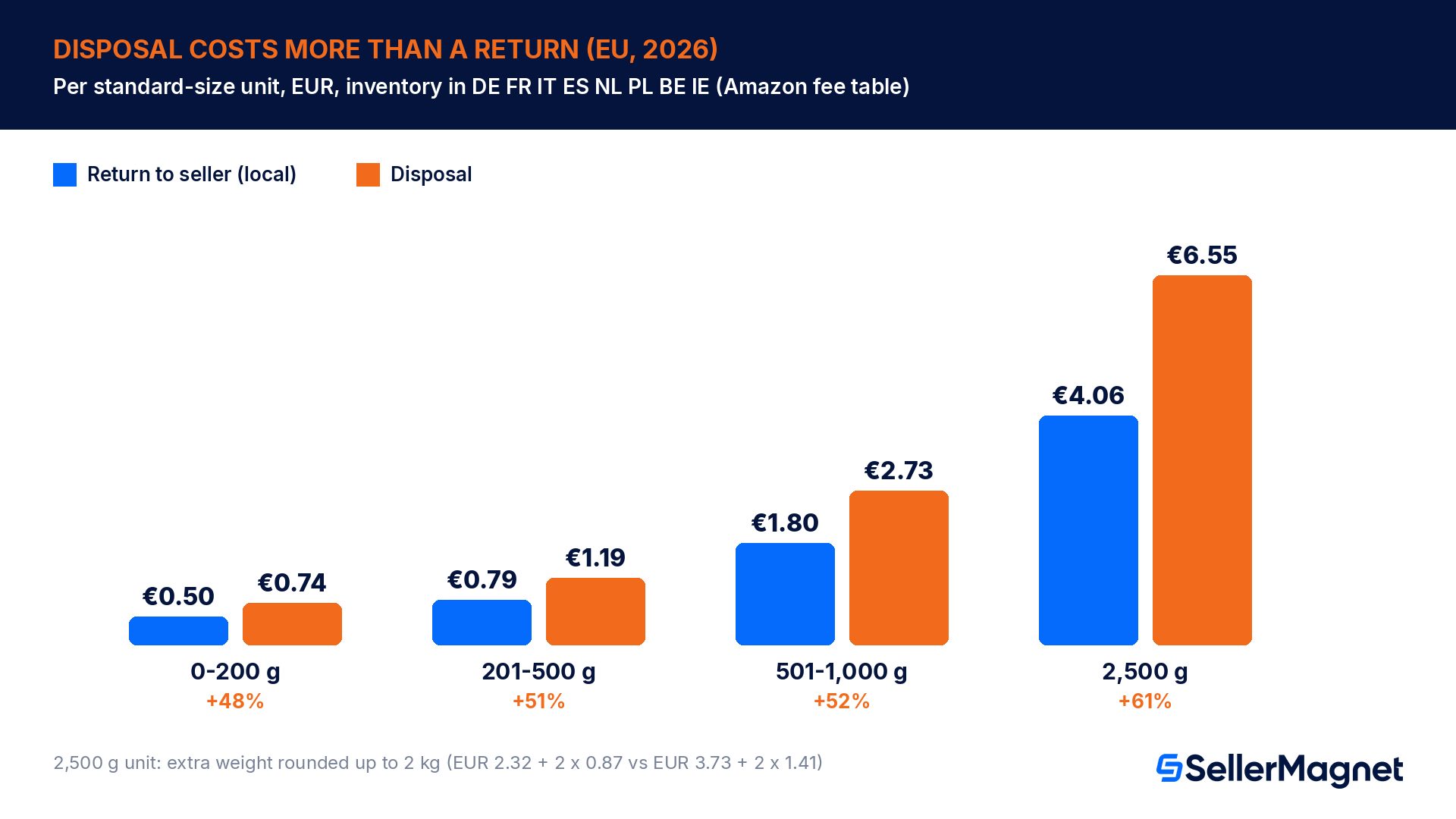
Most sellers assume that letting Amazon dispose of bad stock is the cheap option because nothing has to be shipped. Amazon's own fee table says the opposite. On the FBA return-to-seller order and disposal fees page, both services are charged per unit, based on the unit's shipping weight, in the currency of the country where the inventory is stored. Since 1 May 2026 the removal fee is charged at the time each individual unit is removed. For standard-size units stored in Germany, France, Italy, Spain, the Netherlands, Poland, Belgium or Ireland, a local return-to-seller costs €0.50, €0.79 or €1.80 per unit for the 0 to 200 g, 201 to 500 g and 501 to 1,000 g bands, while a disposal costs €0.74, €1.19 or €2.73.
Standard-size unit (EU stores)
Return to seller (local)
Disposal
Disposal costs
0 to 200 g
€0.50
€0.74
48% more
201 to 500 g
€0.79
€1.19
51% more
501 to 1,000 g
€1.80
€2.73
52% more
2,500 g (1,001+ g band)
€4.06
€6.55
61% more
The last row shows how the heavier band works. Above 1,000 g, the return fee is €2.32 plus €0.87 per kg and the disposal fee is €3.73 plus €1.41 per kg, and Amazon rounds the extra weight up to the next full 1,000 g. A 2,500 g unit therefore pays for 2 extra kilograms, not 1.5: €2.32 + 2 x €0.87 = €4.06 to return it, €3.73 + 2 x €1.41 = €6.55 to dispose of it. Oversize units follow the same pattern: for 1,001 to 2,000 g the return costs €6.15 and the disposal €10.66 per unit.
UK stock is billed in pounds on the same logic: a standard-size unit of 201 to 500 g costs £0.71 to return and £1.15 to dispose of. Swedish stock is billed in kronor. Two more rules on the same page matter for your return address: a return to another EU country is priced by zone and costs more than a local return (€1.04 in zone 1 and €1.81 in zone 2 for 201 to 500 g), and Amazon can no longer fulfil cross-border return-to-seller orders between the UK and the EU, so EU stock needs an EU return address. For a local return, and for a zone 1 return in every standard-size band, the default is both the more expensive option per unit and the one that leaves you with nothing to resell. Only a zone 2 cross-border return can cost more than a disposal (€1.81 versus €1.19 at 201 to 500 g), so give Amazon a return address in the same country as the stock or in a zone 1 country. You will find the charges in your Payments report under Transaction view > Service fees, labelled FBA return fee or FBA disposal fee.
Worked example: 120 unfulfillable units in Germany
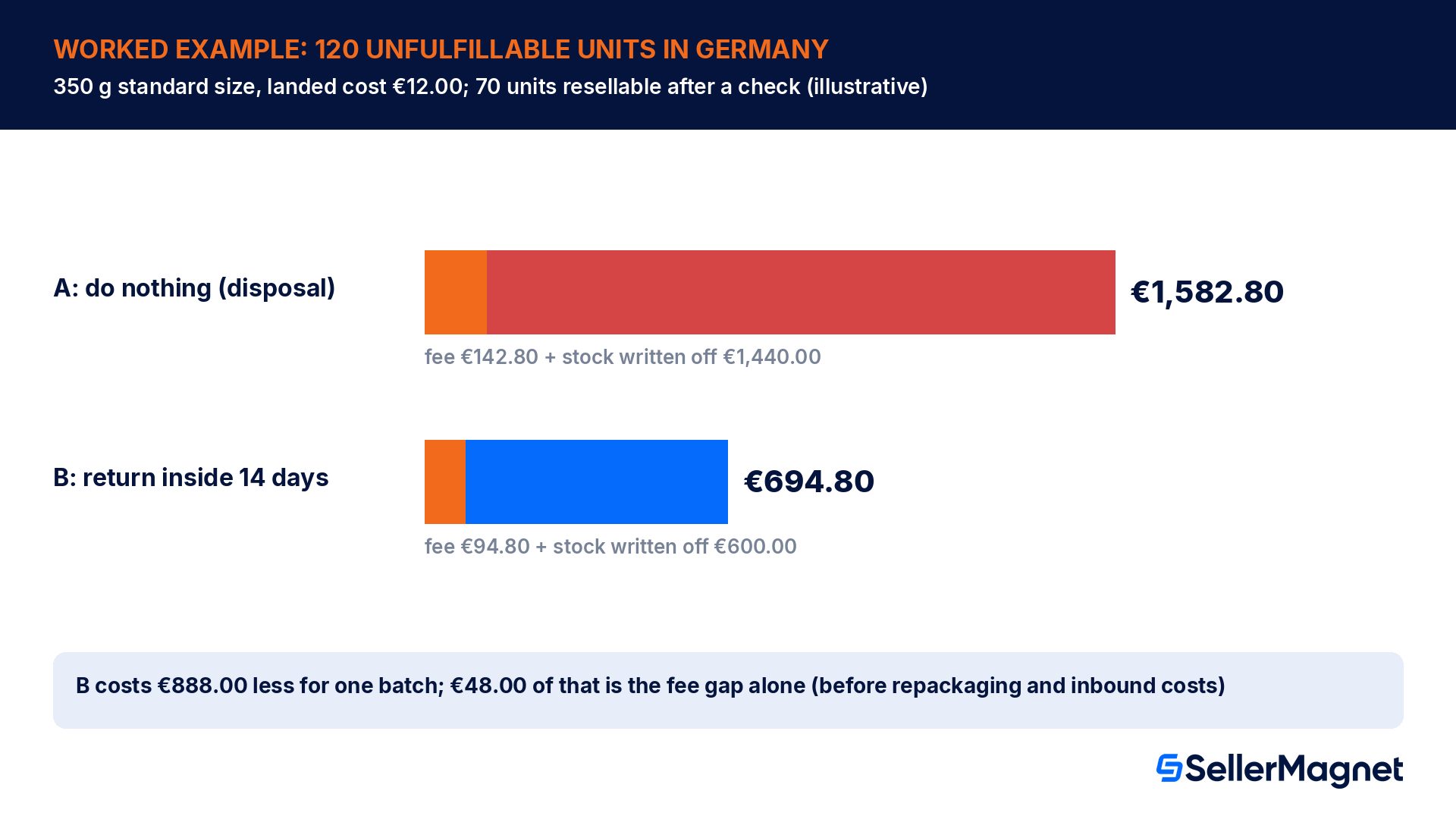
Take a seller with 120 unfulfillable units of one standard-size product stored in Germany, each with a shipping weight of 350 g (the 201 to 500 g band) and a landed cost of €12.00. The units were graded unfulfillable inside the fulfilment centre for reasons on the seller's side (for example, damaged retail packaging or defective units), so each one triggered the 14-day notice. We assume, for illustration, that 70 of the 120 only need new packaging or a label and can be sold again, and the other 50 are genuinely damaged. The fee figures come straight from Amazon's 2026 table; the 70-unit split is an assumption you should replace with your own inspection data.
Option A, do nothing: the notice runs out and Amazon disposes of all 120 units. Disposal fee 120 x €1.19 = €142.80, plus 120 x €12.00 = €1,440.00 of stock written off. Total cost: €1,582.80.
Option B, return to seller inside the 14 days: removal fee 120 x €0.79 = €94.80. You re-sell the 70 good units and write off only the 50 damaged ones (50 x €12.00 = €600.00). Total cost: €694.80, before your own repackaging and inbound shipping costs.
Difference: Option B costs €888.00 less for this one batch, and €48.00 of that is the fee gap alone, before you count a single resold unit.
If the units had been customer returns, Option B would only exist with automated settings on Return set up before the returns arrived, because unfulfillable returns get no notice under the default. The repackaging and inbound shipping are real costs, so the exact gap in your account will be smaller than the headline. But the direction does not change unless almost nothing is recoverable, and even then the local return fee is lower than the disposal fee. If you cannot resell the stock yourself and do not want it back, Liquidate is the option that recovers something, which is why Amazon lists it next to Return as the alternative to disposal.
Your options for unfulfillable stock, compared
Amazon's automated unfulfillable settings offer 2 removal options and 3 optional value recovery services. You can combine them: for example, Return as the removal option with FBA Grade and Resell switched on, so eligible units are graded and relisted as used and only the rest come back to you.
Option
What happens
Good for
Return
Units are shipped to your return-to address or a freight forwarder on your schedule
Stock you can inspect, repackage and resend
Dispose
Units are disposed of, recycled or donated, immediately by default
Truly worthless or unsafe units
FBA Grade and Resell
Eligible units are graded and relisted for resale as used items
Returns in good condition with damaged packaging
Liquidations
Eligible units are liquidated to recover some value
Stock you do not want back
Furbishment
Eligible unsellable units are refurbished for sale
Products Amazon can restore to sellable
Donations are part of the disposal service: Amazon says that when a disposal order is created, it donates or recycles everything it can, and the fee page notes that donations through FBA are available for inventory stored in the UK, France, Spain and Italy only. If you choose Return, you also pick a schedule: weekly (on the 8th, 15th, 22nd and 28th), twice a month (on the 5th and 20th) or once a month (on the 1st). If you choose Dispose, the schedule defaults to Immediate.
How to set up automated unfulfillable settings before 28 October 2026
Open the FBA settings. - Go to Settings > Fulfilment by Amazon and find Automated unfulfillable settings, then click Edit.
Enable the settings and choose a removal option. - Select Enable, then choose Return to have unsellable inventory sent back, or Dispose.
Switch on value recovery where it fits. - Optionally enable Furbishment, FBA Grade and Resell or Liquidations for eligible units.
Pick the return schedule. - For Return, choose weekly, twice a month or once a month. Dispose defaults to Immediate.
Enter a complete, valid address and phone number. - Use your own warehouse, a prep centre or a freight forwarder that accepts returns, plus a monitored email address.
Save, then repeat for the other region. - Click Update, then switch to the UK (or EU) region and set it up there too.
An invalid address silently switches you back to disposal
Amazon's page states that an incomplete or invalid address leads to the settings being disabled in that region, and the inventory then falls under the required removals policy. If your prep centre moved or your address is missing a postcode, your careful settings may already be off. Open both regions and check the address field, not just the toggle.
One more detail from the same page: in current Seller Central the automated unfulfillable settings are switched on for every account and the Disable option is greyed out, so you cannot opt out of having settings. What you can control is what they say. If you have never chosen, the default is Dispose, which is exactly the outcome this article is about.
Common mistakes that cost sellers stock
Setting up the EU region and forgetting the UK (or the reverse). The 2 regions have separate settings and separate return addresses.
Leaving an old or incomplete return address in place. Amazon disables the settings for that region and your units fall back to the disposal rule without any change you would notice.
Treating the 14 days as time to get the stock out. The deadline is for creating the removal order. Once the order exists, the units are protected even if Amazon processes it later.
Assuming disposal is cheaper than a return. In the EU fee table a local return is cheaper in every standard-size band.
Disposing of units that Amazon damaged or lost. Those units are not eligible for removal anyway, and they belong in a reimbursement claim.
Ignoring customer returns. Under the default, returns graded unfulfillable are disposed of immediately, without a notice, so you never see them.
Waiting for a monthly review. With 14 days, a monthly check misses notices by design. Let the automated settings do the work and review the Unfulfillable inventory list weekly.
The 10-minute checklist for this week
Open Inventory > FBA inventory > Unfulfillable inventory and note the units and ASINs listed for each store.
Create removal orders now for anything with a notice that is already running (Return-to address or Liquidate).
Open Settings > Fulfilment by Amazon > Automated unfulfillable settings for the EU region: Enable, Return, value recovery, schedule, valid address, Update.
Repeat the same in the UK region.
If you have stock in Belgium or Ireland, confirm that those units are covered before 28 October 2026.
Check your Payments report (Service fees) for FBA disposal fee lines in the last 90 days: each one is a unit you lost.
Separate warehouse-damaged and lost units into a reimbursement list instead of a removal list.
Put a weekly 5-minute review of the Unfulfillable inventory list in your calendar.
Where SellerMagnet fits
The settings above stop the disposal problem. The part that remains is money you are owed: units Amazon lost or damaged, and fees charged in the wrong amount. SellerMagnet's Lost & Found scans up to 2 years of your Seller Central data for lost, damaged and unreturned inventory and fee issues, and prepares each claim with a template and evidence; you review and file every claim yourself, and Amazon pays any reimbursement straight into your Amazon balance. Fee Audit checks flagged fees against Amazon's own published rates and only marks a row claimable when it can verify the overcharge. Check the current terms on the website before you start. Neither tool can stop Amazon disposing of stock you left without instructions, so do the settings check first.
What changes for Amazon unfulfillable inventory on 28 October 2026?
Belgium and Ireland join the 14-day rule. From 28 October 2026, if you have not set up automated unfulfillable settings, Amazon disposes of or donates unfulfillable FBA inventory after 14 days' notice in 10 stores: the UK, Germany, France, Italy, Spain, Sweden, Poland, the Netherlands, Belgium and Ireland. The first 8 have used 14 days since October 2025.
Does Amazon notify me before it disposes of a customer return?
Not under the default. Amazon's required removals page says that when a customer return is graded unfulfillable and you have not configured your automated settings, you receive no notification and the unit is disposed of immediately. Only units that become unfulfillable inside the fulfilment centre get the 14-day notice to create a return order.
Can I get more than 14 days to remove unfulfillable inventory?
No. Amazon's FAQ says extensions are not possible. What protects your stock is creating a removal order inside the 14 days: Amazon confirms it will not dispose of units covered by a removal order you created within the notice period, even if the order has not been processed yet. Set up automated settings so you never depend on the deadline.
Is it cheaper to let Amazon dispose of unfulfillable units?
Usually not in Europe. For a standard-size unit of 201 to 500 g stored in the EU, Amazon's 2026 fee table charges €0.79 for a local return to seller and €1.19 for a disposal, and disposal is about 1.5 to 1.6 times the return fee in every standard-size band. A disposal also destroys any resale value the units still had.
Where do I change the automated unfulfillable settings?
Go to Settings > Fulfilment by Amazon, find Automated unfulfillable settings and click Edit. Select Enable, choose Return or Dispose, add optional value recovery such as FBA Grade and Resell, Liquidations or Furbishment, pick a schedule, enter a valid address and click Update. Repeat the setup for the UK and the EU regions separately.
Why did my settings stop working?
The most common cause is the address. Amazon's help page says an incomplete or invalid address disables the settings in that region, and the inventory then falls back under the required removals policy and its disposal default. Check the return address, postcode and phone number in both the UK and the EU settings, not just the Enable toggle.
Can I cancel a disposal order that Amazon created?
No. Amazon's FAQ states that once it creates a disposal order after the 14 days' notice, the order cannot be cancelled. If the units were worth keeping, the only real protection is acting earlier: a removal order inside the notice period, or automated settings that tell Amazon to return or liquidate unfulfillable stock instead of disposing of it.
Do these rules apply to damaged units that Amazon lost or broke?
No. Amazon notes that lost, expired, carrier-damaged or warehouse-damaged units are not eligible for removal at all. Units that Amazon lost or damaged in its own warehouse belong in a reimbursement claim under its FBA reimbursement policy. Keep them on a separate list so that a removal or disposal decision never covers inventory you should be paid for.
Stop Juggling Tools. SellerMagnet Combines Everything You Need.