Amazon Repricing: How Min and Max Prices Really Work
R
RenéFreelance Amazon Editor
|
12 min read
Last updated: Oct 18, 2026
Amazon repricing is software that changes your offer price automatically when competing offers or the Featured Offer move, but only inside a minimum and maximum price you set. Amazon's free Automate Pricing tool and third-party repricers both work this way. The minimum price is the number that matters most, because it decides how far your price follows a competitor down. Calculate it from your landed cost, Amazon's fees and the profit you need per unit. Do not copy it from the lowest offer on the listing. The maximum price matters too: Amazon checks it, and prices far above recent levels can cost you the Featured Offer.
Amazon repricing works by applying a pricing rule, such as matching the Featured Offer or staying below the lowest price, every time the competition changes. The new price is always held between the minimum and maximum price you set. Set the minimum from your landed cost, Amazon fees and minimum profit per unit, and set the maximum close to recent selling prices so the offer stays eligible for the Featured Offer.
What does an Amazon repricer do, step by step?
A repricer watches for an event, applies a rule and writes a new price. The event is usually a competitor changing price, a new offer appearing, or the Featured Offer (the Buy Box) moving to another seller. The rule is something you chose in advance, for example "match the Featured Offer" or "stay $0.10 below the lowest price". The result is then checked against your two limits. If the rule asks for a price below your minimum, the repricer stops at the minimum. If it asks for a price above your maximum, it stops at the maximum.
Amazon's own help page on what happens to your price spells this out with examples. With a rule to beat the Featured Offer by $0.10 and a minimum of $20.00, a Featured Offer at $19.00 leaves your price at $20.00. When two sellers both run Automate Pricing with "stay below the lowest price by $0.10", and their minimums are $10.00 and $10.50, Amazon settles the prices at $10.40 and $10.50 instead of letting the two rules undercut each other in a loop. And if you are the only seller on the ASIN, a Featured Offer or lowest-price rule does nothing until a competing offer appears.
Third-party repricers add more rule types and different timing. Amazon says a changed Automate Pricing rule can take up to an hour to apply to all its SKUs. The SellerMagnet Repricer re-evaluates rules roughly every 5 minutes and logs every price change with its reason. Both still obey the same two numbers you set. That is why the rest of this guide is mostly about the floor and the ceiling, not about the software.
The repricer never decides your floor
Every repricer, Amazon's included, treats the minimum price as an instruction. If the minimum is wrong, the tool will sell at a loss exactly as configured, and the price history will show it did nothing unusual. Checking the floor is your job, and it is worth doing again every time a fee or a purchase price changes.
How do you calculate a minimum price that protects your margin?
Add your fixed costs per unit and your minimum profit, then divide by what is left of each dollar after percentage-based fees. The division is the step most sellers skip. Amazon's referral fee is a percentage of the sale price, so lowering the price lowers the fee, and a simple sum of today's costs gives a floor that is slightly too low.
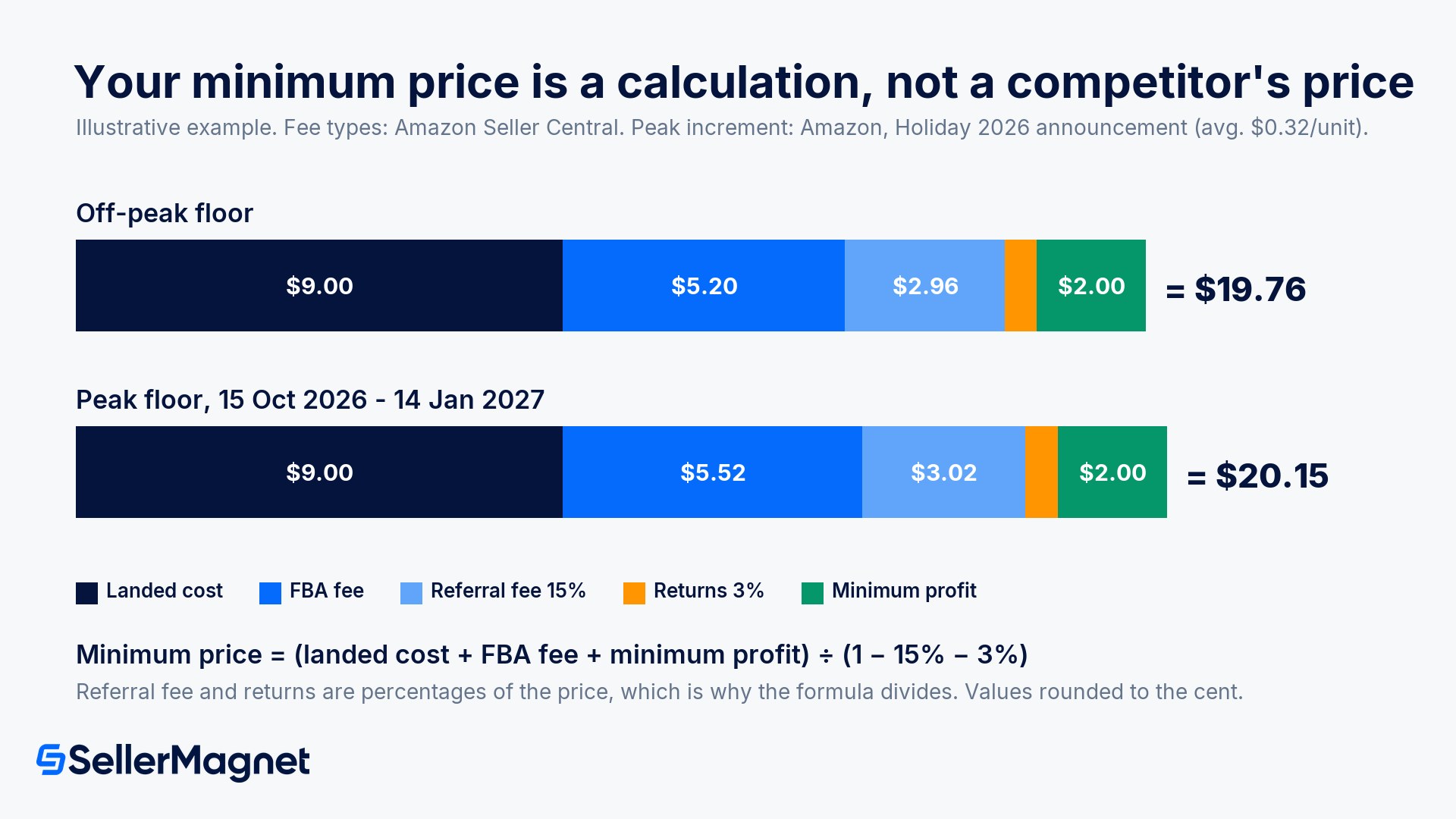
Minimum price = (landed cost + FBA fulfilment fee + other fixed costs per unit + minimum profit) ÷ (1 − referral fee % − other percentage costs)
The numbers above are an illustration, not a quote for your product. Run your own ASIN through the free SellerMagnet Fee Calculator to see its FBA and referral fees, then put those values into the formula. Check the result by working forward: at $19.76 the referral fee is $2.96 and the 3% allowance is $0.59, so costs come to $17.75 and $2.01 is left. That is the $2.00 profit you asked for plus a cent of rounding, which means the floor is right.
Peak fees start on 15 October
Amazon's Holiday 2026 announcement says holiday peak fulfilment fees apply from 15 October 2026 to 14 January 2027, with the same per-unit increase as last year, averaging $0.32, and the 3.5% fuel and logistics surcharge applied on top. A floor calculated on off-peak fees is too low for the whole period. The holiday peak fee breakdown covers the rates in detail; put the peak fee for each size tier into your floors for the whole peak window, and take it out again on 15 January.
What does Amazon check on your minimum and maximum prices?
Amazon runs basic checks when you start repricing a SKU in Automate Pricing. According to its Minimum and Maximum Price Validation page, your minimum price must be higher than the minimum referral fee for the category, which Amazon puts at $0.50 to $1.00 in many cases. Your maximum price must be less than 6 times the ASIN's recent sales price or $200, whichever is higher. A product that recently sold at $50 can therefore carry a maximum just under $300, while a $10 product stays just under $200.
The limits also matter outside the repricing tool. If you remove your minimum or maximum through a feed, Manage Pricing or Manage Inventory, or change one to an invalid value, Amazon pauses the pricing rule for that SKU and leaves the price where it was. Pricing errors go further. Amazon's Pricing Health page says it detects potential pricing errors partly from "the limits that you've set", for example an offer price lower than the minimum you set, and deactivates the affected listing until the price data is fixed.
A high floor can cost you the Featured Offer
Amazon's own example: a rule to match the lowest price, a minimum of $150, and a lowest competing price of $15. Automate Pricing holds the price at $150, but Amazon warns the offer may become ineligible for the Featured Offer or be disqualified under the Marketplace Fair Pricing Policy, which covers prices "significantly higher than recent prices offered on or off Amazon". A floor protects your margin only while it sits near the market. Far above it, the offer stays live but rarely wins the sale.
Pricing Health also lists offers that are eligible for the Featured Offer and priced within 5% of it, and offers that are ineligible because their total price is above the competitive external price or well above recent prices. Read that page once a week next to your repricer report. It is a quick way to see which floors are doing their job and which ones are simply blocking sales. The Featured Offer guide explains the other factors, besides price, that decide who wins the Buy Box.
Do you really need a maximum price?
Yes, set one, even though Automate Pricing calls it optional. Without a maximum, a rule follows the market up as far as it goes. Amazon's example is a rule to beat the Featured Offer by $0.10 with no maximum: when the Featured Offer is $50.00, your price becomes $49.90, whatever your product normally sells for. When competitors run out of stock in Q4, that can mean a sudden jump, a few sales at a price shoppers resent, and an offer that Amazon may treat as priced significantly higher than recent prices.
If you leave the maximum empty, Amazon says it will keep your offer from being priced "significantly higher than recent prices" so that it stays eligible for the Featured Offer. That protects Amazon's customers, not your strategy. A ceiling you set yourself, typically somewhere between your normal price and your list price, keeps the repricer predictable. If you sell a product with a list price, the guide to Amazon list prices explains how reference prices are shown and why they should stay credible.
Resale products: set the ceiling near the recent typical selling price, so a competitor's stock-out lifts your price a little rather than all the way.
Private label without competing offers: a competitor-based rule does nothing on its own listing. Use a sales-rate rule instead, with a ceiling you would still be comfortable defending to a customer.
Seasonal or limited stock: a slightly higher ceiling can slow the sell-through of the last units, but check the result against your reorder date first.
Which repricing strategy fits your products?
The right strategy depends on whether you compete with other sellers on the same listing. Resellers on shared listings compete on price for the Featured Offer, so their rules react to competitors. Brand owners usually have their own listings, where the competition sits on other ASINs, so their rules react to their own sales rate or to a chosen competitor's price.
The SellerMagnet Repricer, for example, offers seven strategies. Four are built for resellers: Lowest Price, Buy Box, Position and Same Price. Three are built for brand owners: BrandGuard, Competitor ASIN-BuyBox Sync and Velocity Balance, which prices from your own sales rate and needs no competitor at all. The strategy overview in the docs describes each one. Three things hold whatever tool you use:
Rules that always undercut the lowest offer are the ones that start price wars. Use them only with a floor you would be happy to sell at all week.
Rules that aim for the Featured Offer and then raise the price while you hold it give back less margin. The SellerMagnet Buy Box strategy, for instance, lowers the price gradually until it wins and then raises it again with care.
Repricing cannot remove unauthorized sellers from a brand's listing. That needs Brand Registry tools, not a lower price.
Test the floor before it touches a live price. The SellerMagnet Repricer never sets a price outside the minimum and maximum you define, and its simulator runs a rule against best, expected and worst competitor scenarios without changing your real prices. It works for FBA and FBM, from €29 per month excl. VAT for 25 SKUs on one marketplace (as of October 2026, see pricing), with a 14-day free trial.
When should you change your minimum price?
Change the floor whenever one of its inputs changes, and not because a competitor dropped their price. Most floors go stale for one of four reasons: a fee change, a new purchase batch, an inventory problem, or a promotion.
Fee changes. The peak fee window from 15 October 2026 to 14 January 2027 is the obvious one. Annual fee changes and new surcharges belong on the same list.
New landed cost. A new batch with a different purchase price or freight rate changes the floor for every unit from that batch.
Aged stock. If storage fees on old units will soon cost more than the margin left in them, a lower, temporary floor can be the cheaper choice. The FBA storage fee guide shows when the surcharges start. Set the lower floor for a fixed period and note the reason.
Deals and discounts. Amazon's deal eligibility looks at the lowest prices of the past 30 and 60 days. A repricer that drops your price for a weekend can raise the discount you need for your next deal, so review floors before a deal period.
Watch who is pushing the price down. A floor that keeps getting hit is a signal. Check whether a new seller joined the listing, whether Amazon itself is selling, or whether one competitor is clearing stock. Offer Watch in SellerMagnet checks your catalogue for new sellers, Buy Box losses and undercuts on a daily, 8-hourly or hourly schedule. Knowing who moved tells you whether to wait it out or rethink the floor.
How to set minimum and maximum prices for Amazon repricing
Collect the unit costs - Write down landed cost per unit, the current FBA fulfilment fee (peak or off-peak), the referral fee percentage for the category and your typical return allowance.
Choose a minimum profit - Decide the smallest profit per unit you would accept on a normal day, as a dollar amount rather than a percentage.
Calculate the floor - Divide the sum of fixed costs and minimum profit by one minus the percentage costs, then check the result by working forward from that price.
Set a ceiling near recent prices - Pick a maximum close to the recent typical selling price, below 6 times the recent sales price or $200, and well inside what shoppers would see as a fair price.
Review on every input change - Recalculate when fees, purchase prices or stock age change, and check Pricing Health weekly for offers that are deactivated or not eligible for the Featured Offer.
How does Amazon repricing work?
A repricer applies a rule each time the competition changes, such as matching the Featured Offer or staying $0.10 below the lowest price. The new price is then held between your minimum and maximum. Amazon's Automate Pricing and third-party repricers all work this way; they differ in rule types and in how often they check.
What should my minimum price be on Amazon?
Your minimum price should cover landed cost, the FBA fee, the referral fee, a returns allowance and the smallest profit you accept. Because the referral fee is a percentage, divide the fixed costs plus profit by one minus the percentage costs. With $9.00 landed cost, a $5.20 FBA fee, $2.00 profit, 15% referral and 3% returns, that gives $19.76.
Is a maximum price required for Amazon Automate Pricing?
No, Amazon lists the maximum as optional. Without one, Amazon limits your price to stop it rising far above recent prices so the offer stays eligible for the Featured Offer. A maximum you set yourself is still better, because it keeps the repricer from following a competitor's stock-out to a price your customers will not accept.
Can repricing get my Amazon listing deactivated?
Repricing within sensible limits does not, but bad limits can cause trouble. Amazon deactivates offers with potential pricing errors, such as a price below the minimum you set, and lists them in Pricing Health. Prices significantly higher than recent prices can lose Featured Offer eligibility or breach the Fair Pricing Policy, so keep floors and ceilings near the market.
How often do Amazon repricers change prices?
It depends on the tool and on how often the competition moves. Amazon says a changed Automate Pricing rule can take up to an hour to apply to all its SKUs. The SellerMagnet Repricer re-evaluates rules roughly every 5 minutes. Faster checks matter most on busy shared listings and much less on private-label listings without competing offers.
Stop Juggling Tools. SellerMagnet Combines Everything You Need.