What Is Amazon List Price and How Should Sellers Use It?

Explore All Articles
amazon list price rules and risks
Tags:
FBA FBM Amazon Basics
SellerMagnet Logo with Text
Sign up to receive exclusive contents and the latest SellerMagnet news.
Join a smarter way to manage your Amazon store
Join Newsletter
What Is Amazon List Price and How Should Sellers Use It?
By René | 6 min read
Pricing tells a story. When the story is clear, shoppers understand value and convert more often; when it is fuzzy, they hesitate and your margins suffer. List Price and other reference prices exist to make value explicit. This article reframes Amazon’s guidance in a seller-first way: what each reference price means; when and why Amazon shows the strikethrough; how to suggest or update a List Price correctly; and how to keep your Account Health safe while you improve conversion.

Table of Contents

Reference prices on Amazon: what they are and how they display

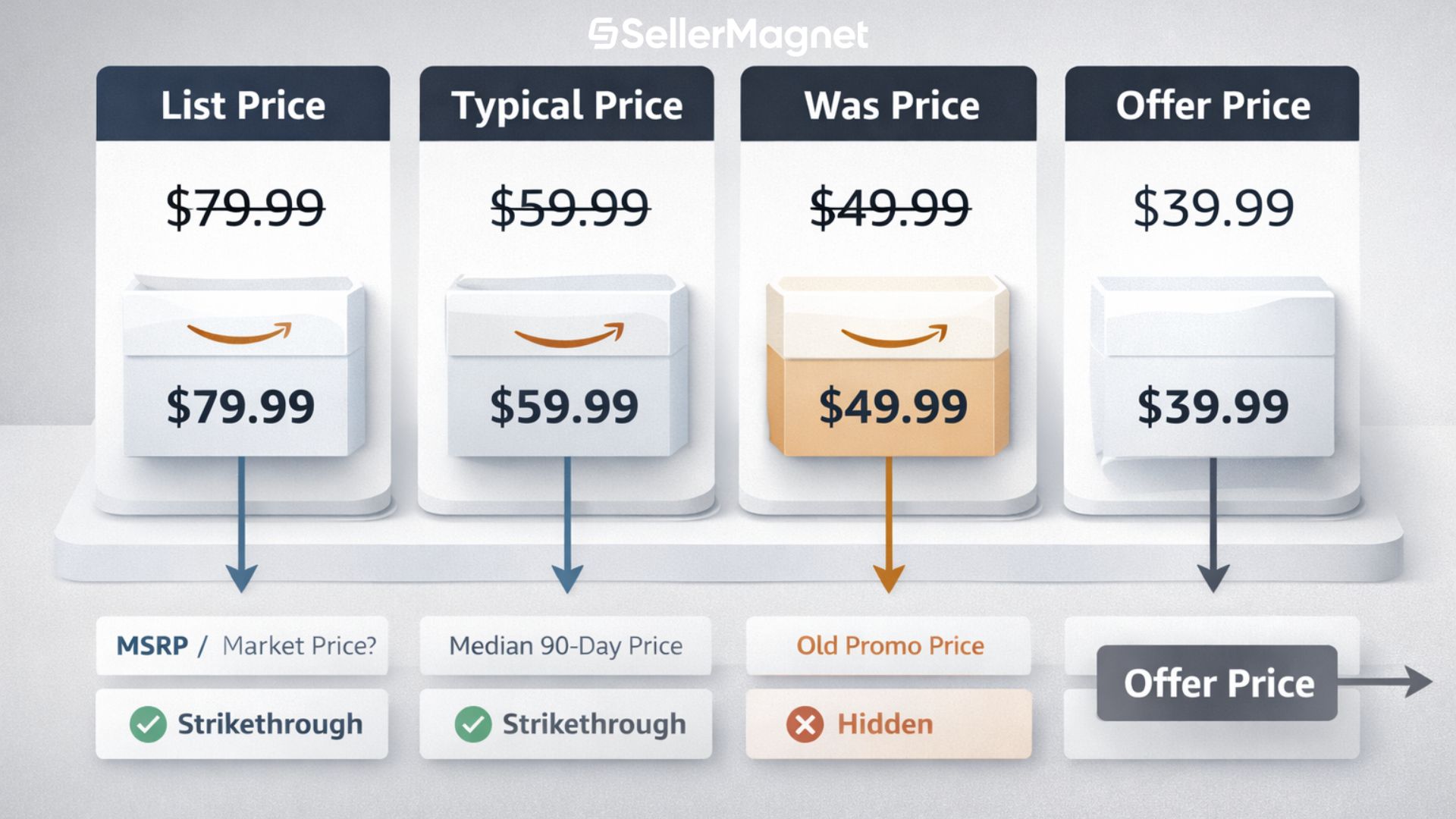
Reference prices are benchmarks that help customers see potential savings versus today’s offer price. On Amazon you will most often encounter List Price and Typical Price; both can render as a strikethrough next to the current offer.
Quick definition recap
Offer Price: the price a buyer pays today.
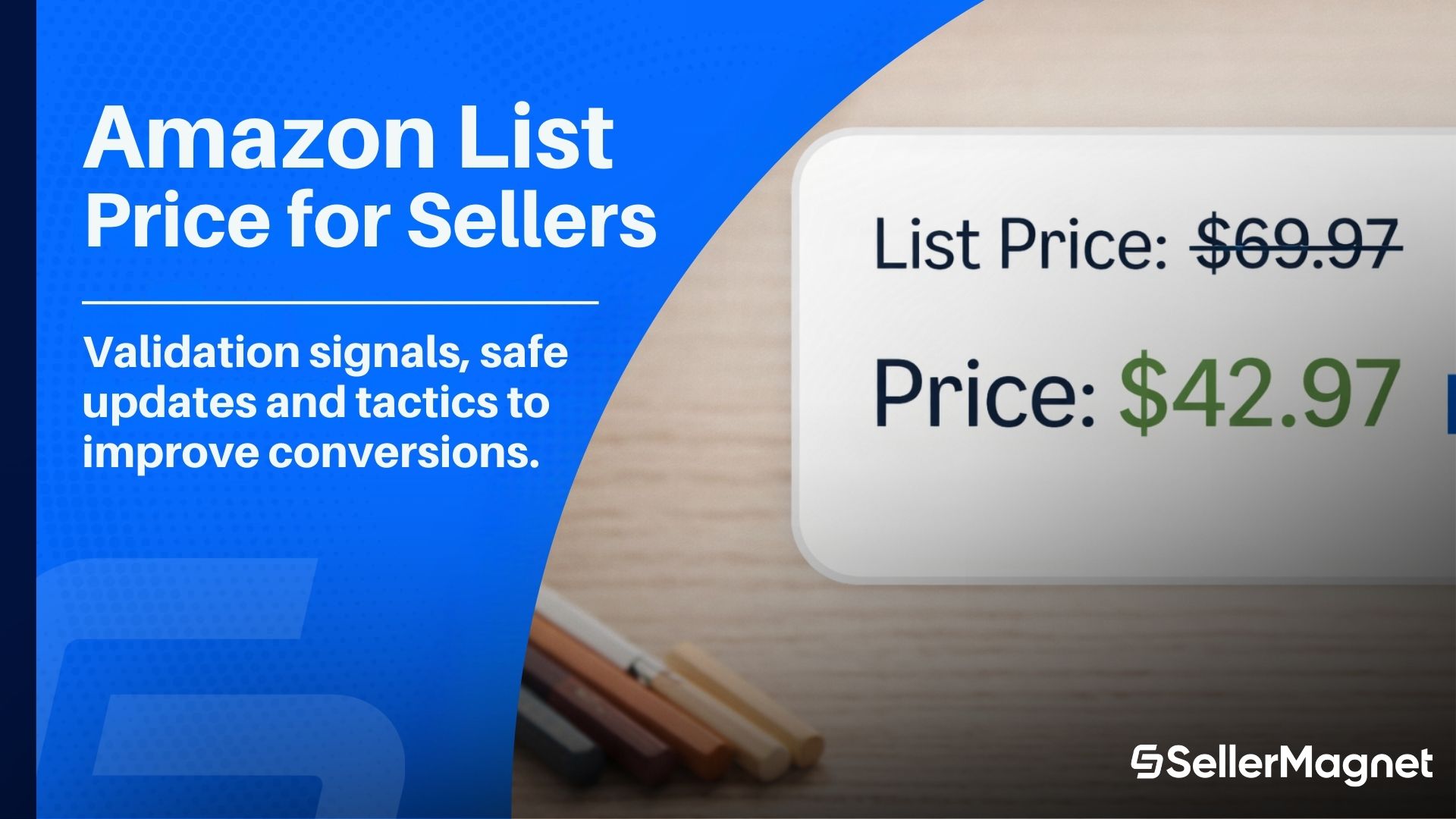
List Price: suggested retail price (often MSRP/RRP) provided by a manufacturer; vendor; or seller; validated by Amazon for credibility.
Typical Price: Amazon-computed median of prices actually paid in the last 90 days; excludes short-term promos.
Strikethrough: the visual treatment of a reference price; shown smaller and crossed out to anchor savings.

Where shoppers see strikethrough prices

Strikethroughs may appear on the homepage; in search; and on product detail pages (PDP). They are comparison points; not guarantees; and visibility can vary by locale and device.

List Price vs Typical Price: definitions, math, and use cases

The two validated reference prices serve different purposes. Use them appropriately to set expectations without misleading buyers.
Reference type Who sets it How it is determined Where it shows Best for Pitfalls to avoid
List Price You; brand; or vendor; then validated by Amazon Suggested retail price supported by recent substantial sales intentions or evidence PDP; search; sometimes home modules Clear value framing when MSRP/RRP is recognized Inflated or stale MSRP; wrong region reference; using it as a proxy for a sale
Typical Price Amazon Median of buyer-paid prices over 90 days; excludes limited-time promos PDP and other placements Transparent anchor on stable ASINs with consistent sell-through Expecting it to move instantly after short promos
Was Price Amazon Derived from past offer history Savings widgets; PDP copy Communicating historical price context Treating it like a user-editable field
Offer Price You Your current selling price Everywhere The number that actually converts Ignoring margin when stacking incentives
amazon list price vs typical price
Narrative example A brand publishes an MSRP of $49.99 for a new shaver. You suggest that value as List Price and launch at $39.99. Search results now show $49.99 crossed out; $39.99 as today’s price; and a clear You save message. After 90 days of consistent sales between $37.99 and $41.99; Amazon may also compute a Typical Price near $39–$40; reinforcing the anchor without any manual input.
When List Price helps most
• Products with recognizable MSRP/RRP
• Seasonal pushes where you want clear value framing
• Premium items where a truthful anchor prevents a race to the bottom
Turn post purchase momentum into reviews. If List Price framing and incentives lift your sales; capture that demand with SellerMagnet Review Request. Automate compliant requests with a blacklist rule; or trigger one click sends when needed; so you build rating density and sustain conversion without manual workload.

Suggesting or updating a List Price: single SKU and bulk

You can provide a suggested List Price for eligible products. Amazon will reconcile multiple suggestions across selling partners and will show the value only if it passes validation and meets savings thresholds.

Single-SKU update (Seller Central)

  1. Go to Inventory → Manage All Inventory.
  2. Find the product; open Edit listing; switch to the Offer tab and enable All attributes.
  3. Enter the List Price value in the relevant field for your category.
  4. Save and finish; then monitor the PDP to confirm if the strikethrough renders.

Bulk update (inventory files)

  1. Navigate to Catalog → Add Products; choose Spreadsheet → Download blank template.
  2. Under Update Product Details select Get product template and generate the spreadsheet for your store; language; and product types.
  3. In the Offer section (red-shaded columns) populate the List Price field.
  4. Upload on the List Your Products → Spreadsheet tab and keep a backup for future edits.
Operational tips
• Keep dated MSRP/RRP proofs: brand catalogs; price sheets; or screenshots.
• Align to region: US MSRP is not EU RRP.
• Review quarterly: if the market shifts; update or remove the List Price to stay credible.
• Learn more: providing a List Price → https://sellercentral.amazon.com/gp/help/external/GU7Q2X52ZKQ3WENW

Validation signals Amazon checks before showing the strikethrough

Amazon validates suggested List Prices against store sales and external competitors. If a value looks inaccurate or misleading; it will be hidden or edited.

Signals that help visibility

  • Offer history consistent with the reference value.
  • Clean catalog data: brand; GTIN; pack; and condition match.
  • Alignment with reputable retailers for the identical item.

Signals that hurt visibility

  • Reference far above prevailing market or your recent pricing.
  • Old MSRP copied from a prior model; wrong region; or different pack size.
  • Using List Price to simulate a sale when there is no credible anchor.
Remember
Strikethrough is a display outcome. Suppression is not a penalty by itself; it is a signal that the anchor does not pass today’s checks. Fix the cause; do not try to force the render.
For policy details and guardrails; review Amazon Marketplace Fair Pricing Policy and Amazon policy on reference prices; they define acceptable anchors; validation expectations; and enforcement actions.

Risks, policy pitfalls, and how to stay compliant

Misuse of reference prices damages trust and can lead to enforcement or reduced visibility. Keep your anchors truthful and current.
Avoid
• Inflating List Price to exaggerate savings.
• Treating List Price as Was Price; they are different concepts.
• Leaving stale anchors after cost or assortment changes.
• Using US MSRP in markets that expect RRP.
Account Health considerations Misleading price displays can raise negative feedback and A-to-z claims. Review pricing policies; watch for PDP changes that remove strikethroughs; and keep documentation ready for audits.
Align repricing with credible references. If you are a reseller fighting for the Featured Offer; set minimum margin stops; floor and ceiling logic; and competition rules in the SellerMagnet Amazon Repricer so your Offer Price stays consistent with a verifiable List Price. If you are a private label brand; use dynamic strategies tied to demand; inventory cover; and event calendars; avoiding price swings that would undermine reference validity.

FAQ (seller-friendly Q&A)

What is the difference between Offer Price and List Price?

Offer Price is today’s selling price. **List Price** is a suggested retail value (often MSRP/RRP) that Amazon may show as a strikethrough if it passes validation.

Why did my List Price stop showing?

Amazon likely reconciled suggestions and found the anchor **no longer credible**. Check recent sales levels; competitor references; region; and pack equivalence.

Can List Price improve conversion?

Often yes. It clarifies savings and sets expectations. Results are strongest when the MSRP is well known and your PDP content is clear.

Is Typical Price something I can set?

No. Amazon computes it as the **median** buyer-paid price over **90 days** excluding short promos.

How often should I update List Price?

Review at least **quarterly** or when brands update MSRP; remove or revise anchors that are no longer representative.
SellerMagnet Logo with Text
Stop Juggling Tools - SellerMagnet Combines Everything You Need in One Platform.
Join a smarter way to manage your Amazon store
Try for Free
Recommended Posts
Tags: FBA FBM Amazon Basics
What Is Amazon List Price and How Should Sellers Use It?
What is Amazon List Price, how does it differ from Typical Price, when does the strikethrough appear, and how sellers can update it safely.
Read more
Tags: FBA FBM Amazon Basics
Amazon Chargebacks: What They Are, How to Respond, and How to Reduce Them
Understand Amazon chargebacks, ODR impact, where to manage cases, what evidence to submit, and how to prevent disputes with clear PDPs and tracked shipping.
Read more
Tags: FBA FBM Advertising & PPC Inventory Management SellerMagnet Tools BuyBox
Black Friday for Amazon Sellers 2025: Plan & Win
Turn BFCM traffic into profit. Plan what to do before, during and after, choose PED vs coupons vs deals, protect Buy Box and measure true margin.
Read more
Tags: Advertising & PPC Amazon Basics
Amazon Seller Promo Codes: A Profitable How To
Learn when promo codes beat coupons: how to set single use or group codes and how to track profit with Amazon Seller PPC.
Read more
Tags: Advertising & PPC Amazon Basics
10 Advanced Amazon Seller Ads That Scale Profit
The seller guide to advanced Amazon ads. Retargeting, video, DSP, category and product targeting, bidding, and tests to scale profit.
Read more
Tags: FBA Amazon Updates Amazon Basics
Prime Big Deal Days Seller Playbook (Oct 7–8)
A practical plan for Amazon sellers to win Prime Big Deal Days: choose PED vs coupons vs Deals, scale Sponsored Products, and protect margin.
Read more
Tags: FBA Inventory Management
Give Returns a Second Life with FBA Grade & Resell
Turn Amazon FBA returns into revenue with Grade & Resell. Learn grading, pricing, eligibility, and when to use alternatives.
Read more
Tags: FBA FBM Amazon Basics
How to Optimize Customer Lifetime Value (CLV) on Amazon
A seller’s guide to raising customer lifetime value on Amazon with product ladders, reviews, Subscribe & Save, and analytics.
Read more
Tags: SellerMagnet Tools Product Research Amazon Basics
How to Find Profitable B2B Products on Amazon
A practical guide for Amazon B2B sellers: where to find products, validate margins, set business pricing, and scale with data.
Read more
Tags: FBA FBM SellerMagnet Tools Amazon SEO
Improve Conversion on Amazon: The Seller’s Playbook
Actionable steps to increase conversion on Amazon: better titles, images, A+ content, pricing tests, reviews, and analytics.
Read more
Tags: FBM Inventory Management Amazon Basics
Amazon FBM Return Codes: How to Handle Prepaid Returns
Learn how Amazon FBM return reason codes work, who pays shipping costs, and how to manage returns effectively with SellerMagnet.
Read more
Tags: FBA FBM SellerMagnet Tools Amazon Basics
White Label vs Private Label on Amazon: Complete Guide
White or private label? Guide to differences and SellerMagnet tools to succeed on Amazon.
Read more
Load More
Why Choose SellerMagnet?
With SellerMagnet, you have everything you need to dominate the Amazon marketplace and grow your business without the burden of manual management. The platform includes tools to monitor profits, optimize pricing, analyze products and gather reviews - boosting your efficiency and competitiveness.
Amazon
Analytics Dashboard
The Analytics Dashboard gives you a clear view of your finances and profits.
Learn More
Amazon
Repricer
The Repricer keeps your prices competitive to boost BuyBox chances.
Learn More
Amazon
Sourcing Tool
The SellerMagnet Sourcer helps you find profitable products with ease.
Learn More
Amazon
Review Requester
The Review Requester automates gathering customer reviews for credibility.
Learn More
Compatible with
Amazon Logo
Supported Marketplaces
US
CA
AU
DE
ES
FR
IT
UK
IE
NL
BE
SE
BR
MX
IN
JP