Amazon Negative Keywords: How Many Clicks Before You Negate
R
RenéFreelance Amazon Editor
|
18 min read
Last updated: Oct 25, 2026
Most sellers add Amazon negative keywords on gut feel: ten clicks and no sale looks like a loser, so the search term goes on the negative list. Often that cuts a term that was about to convert. The better rule is short: negate a relevant search term once it has had roughly 3 divided by your conversion rate in clicks without an order (29 clicks at a 10% conversion rate, 14 at 20%), lower its bid earlier if its spend passes what one order is worth to you, and negate irrelevant terms at once. Below: the math, how to read the search term report, and a worked example with eight decisions.
How many clicks before you negate a keyword on Amazon? Negate a relevant search term with zero orders once it reaches about 3 divided by your conversion rate in clicks: 29 clicks at 10%, 14 at 20%. By then a term that converts like your average would show zero orders less than 5% of the time. If its spend passes your break-even cost per order first, lower the bid. Negate irrelevant terms right away.
What do negative keywords do in Amazon Sponsored Products?
A negative keyword tells Amazon not to show your ad for shopping queries that match it. It does two jobs: it stops you paying for clicks from shoppers who want something you do not sell, and it keeps a proven search term in the one campaign where you set its bid (if campaign structure is new to you, start with our Amazon PPC guide). According to Amazon's targeting guide, negative targeting works in both automatic and manual Sponsored Products campaigns, and you can add negatives for a whole campaign or for one ad group. To keep your ads off specific product detail pages, use negative product targeting, which excludes ASINs or brands rather than words.
Negative type
What it blocks
Limits (Amazon Ads help)
Best use
Negative exact
Shopping queries that match the exact phrase or a close variation
Up to 10 words, 80 characters
One relevant search term that has proven it does not sell
Negative phrase
Shopping queries that contain the complete phrase or close variations
Up to 4 words, 80 characters
A word or short phrase that is always wrong for your product
Negative product targeting
Your ad on the detail pages of the ASINs or brands you exclude
Set per ASIN or brand
Detail pages where your ad spends without selling
Two details from Amazon's help page on negative keywords matter in daily work. You cannot change the match type of an existing negative keyword, so a phrase negative that turns out too broad is deleted and added again as exact. And negatives do not work at once: Amazon lists a buffer period of 72 hours for negative keywords and 96 hours for negative products or ASINs, so a few clicks on a term you negated yesterday are expected.
Negatives are free, wrong negatives are not
Adding a negative costs nothing, so it is tempting to add many. The cost shows up quietly: a relevant query you block is a sale you never see in any report, because a blocked query never produces a click.
What does the search term report show, and what does it hide?
Every decision below starts with the search term report for Sponsored Products: the list of what shoppers actually typed before they clicked your ad, with clicks, spend, orders and sales per term. Four properties of that report decide how you should read it.
It only lists search terms with at least one ad click. A term with impressions but no clicks never appears, so the report lists what you paid for, not everywhere you showed up (and its impressions may not match the campaign manager).
Its lookback window is 65 days, in a summary or a daily view. A pull over most of that window gives a term enough clicks to judge; a 7-day pull almost never does.
Orders arrive late. For sellers, Sponsored Products credits an order to the last ad click within 7 days, and Amazon's attribution page adds that conversions can take up to 12 hours to appear in reports and that a day's numbers stay incomplete until its 7-day window has ended.
Some rows are ASINs, not words. In automatic campaigns and product-attribute-targeted ad groups, an entry like b00ipgvvz4 is a product detail page where your ad appeared. Amazon's help page says you block those through negative targeting, so they get negative product targeting, not a negative keyword.
Never judge the last 7 days
A term that got 20 clicks yesterday can still collect orders that Amazon credits to yesterday later this week. End every review range at least 7 days before today, for example the 58 days from 65 days ago to 8 days ago.
Read it by product, not by campaign: in an ad group with several ASINs, a term can sell one and never the other.
The click rule: how many clicks before you negate?
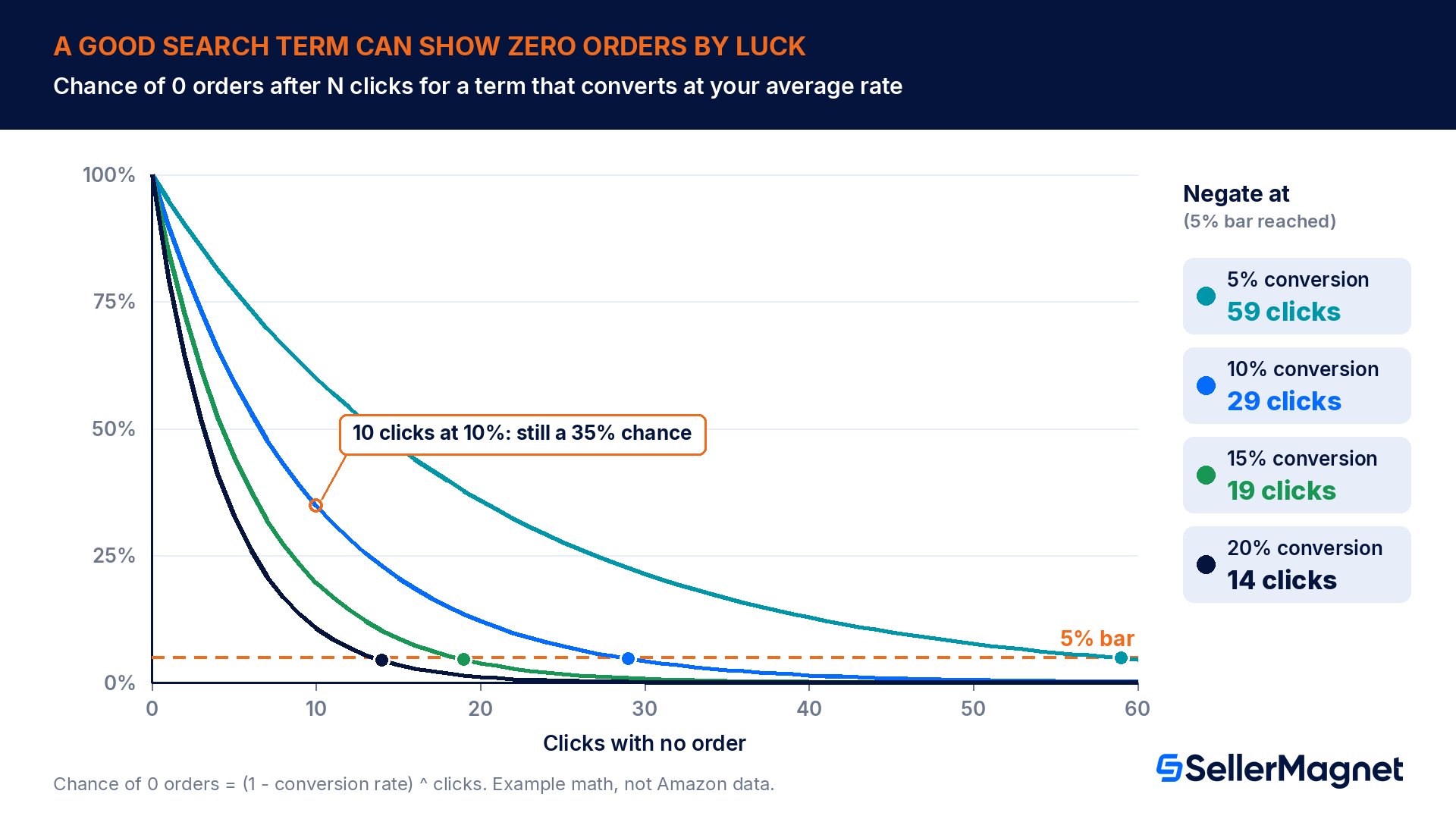
Start with the luck problem. Say a search term converts exactly as well as your product's average, 10%. The chance that one click does not become an order is 90%, and the chance that 10 clicks in a row produce none is 0.9 multiplied by itself 10 times: 35%. Negate at 10 clicks and you throw away about a third of the terms that were working.
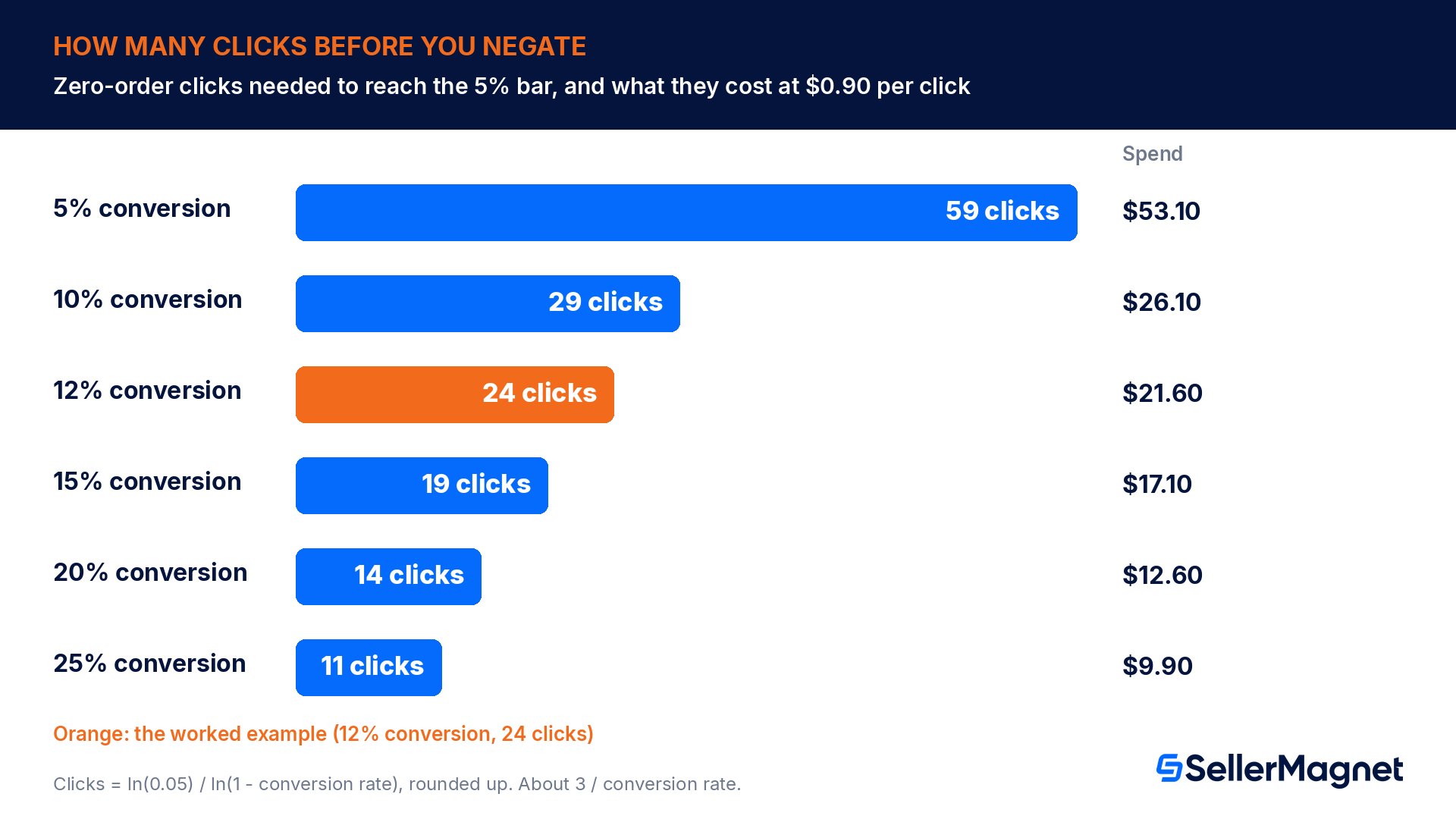
The fix is to keep collecting clicks until bad luck is an unlikely explanation. A common statistical bar is 5%: wait until a term that converts at your average rate would show zero orders less than 5% of the time. The number of clicks for that bar is clicks = ln(0.05) / ln(1 - conversion rate). A quick approximation is 3 divided by your conversion rate; for the rates in the table below, the exact formula lands one or two clicks lower.
Your conversion rate
Clicks with zero orders before you negate
Chance of zero orders by luck at that count
Spend to get there at $0.90 per click
5%
59
4.8%
$53.10
10%
29
4.7%
$26.10
12%
24
4.7%
$21.60
15%
19
4.6%
$17.10
20%
14
4.4%
$12.60
25%
11
4.2%
$9.90
Two things stand out. The lower your conversion rate, the longer you wait and the more each verdict costs: 59 clicks at 5%, 14 at 20%. And the bar itself is a business choice: if you accept a 1-in-5 chance of cutting a term that was fine, 16 clicks are enough at 10% instead of 29. A product where a handful of terms carry the whole campaign should use the strict bar.
Which conversion rate to use
Use the conversion rate of traffic you already trust for that product: orders divided by clicks of its proven exact-match keywords over the report window, excluding the last 7 days. Not the blended rate of the campaign you are cleaning: the very terms you want to judge drag it down, and a lower rate pushes every threshold up. Not the session-based conversion figure from your business reports either: it counts sessions, not ad clicks, so it does not belong in a per-click formula. With no proven keywords yet, start from a cautious 10% (a 29-click threshold) and replace it once you have real data.
Rather not run this math per product? SellerMagnet's PPC Manager (beta) includes search-term harvesting and negation, and its default mode is suggestions only, so it proposes changes and your campaigns stay as they are until you decide.
The money rule: when should spend make you act sooner?
The click rule tells you when you know. The money rule tells you when it starts to hurt. Start with your break-even ACoS: price minus every cost except advertising, divided by price. For a $30.00 product that leaves $9.00 before ads, break-even ACoS is 30%. The same $9.00 is your break-even cost per order: the most you can spend on ads to win one order without losing money on it. If you have not worked out your break-even ACoS yet, our ACoS vs TACoS guide walks through the formula.
Divide the break-even cost per order by your cost per click and you get the clicks one order may cost: $9.00 at $0.90 per click is 10 clicks. A zero-order term at 10 clicks has spent one order's worth of profit, but at a 12% conversion rate the chance of zero orders by luck is still 28%. So the money rule changes the bid, not the term: once spend without an order passes your break-even cost per order, lower the bid one step (we use 25%) so the term keeps collecting evidence at a lower price, and negate only when the click rule is met as well.
Terms that sell, but too expensively, get a different fix: a break-even bid, which is the break-even cost per order times the term's own conversion rate. A term with 4 orders from 58 clicks converts at 6.9%, so with a $9.00 break-even cost per order it breaks even at about $0.62 per click. (Your bid is the most you pay per click unless the campaign uses dynamic bids up and down or placement bid adjustments, which let Amazon raise it for some auctions.) Bidding it down keeps the orders; a negative would throw them away along with the cost. More ways to bring a high ACoS down are in our guide to improving Amazon ACoS.
Situation
Rule
Action
Wrong intent: another product, material or size, an accessory, free or used
Relevance rule
Negate now: negative phrase for the wrong word, negative exact for one query
Zero orders, clicks below the threshold, spend below the break-even cost per order
Keep collecting
No change
Zero orders, spend at or above the break-even cost per order, clicks below the threshold
Money rule
Lower the bid one step (for example 25%) and keep watching
Zero orders, clicks at or above the threshold
Click rule
Negative exact in this campaign
Orders, but ACoS above break-even, with enough clicks
Bid rule
Bid down to break-even cost per order times the term's conversion rate
Orders at or below your target ACoS
Harvest
Add as an exact keyword in a manual campaign, negative exact in the source campaign
Worked example: one search term report, eight decisions
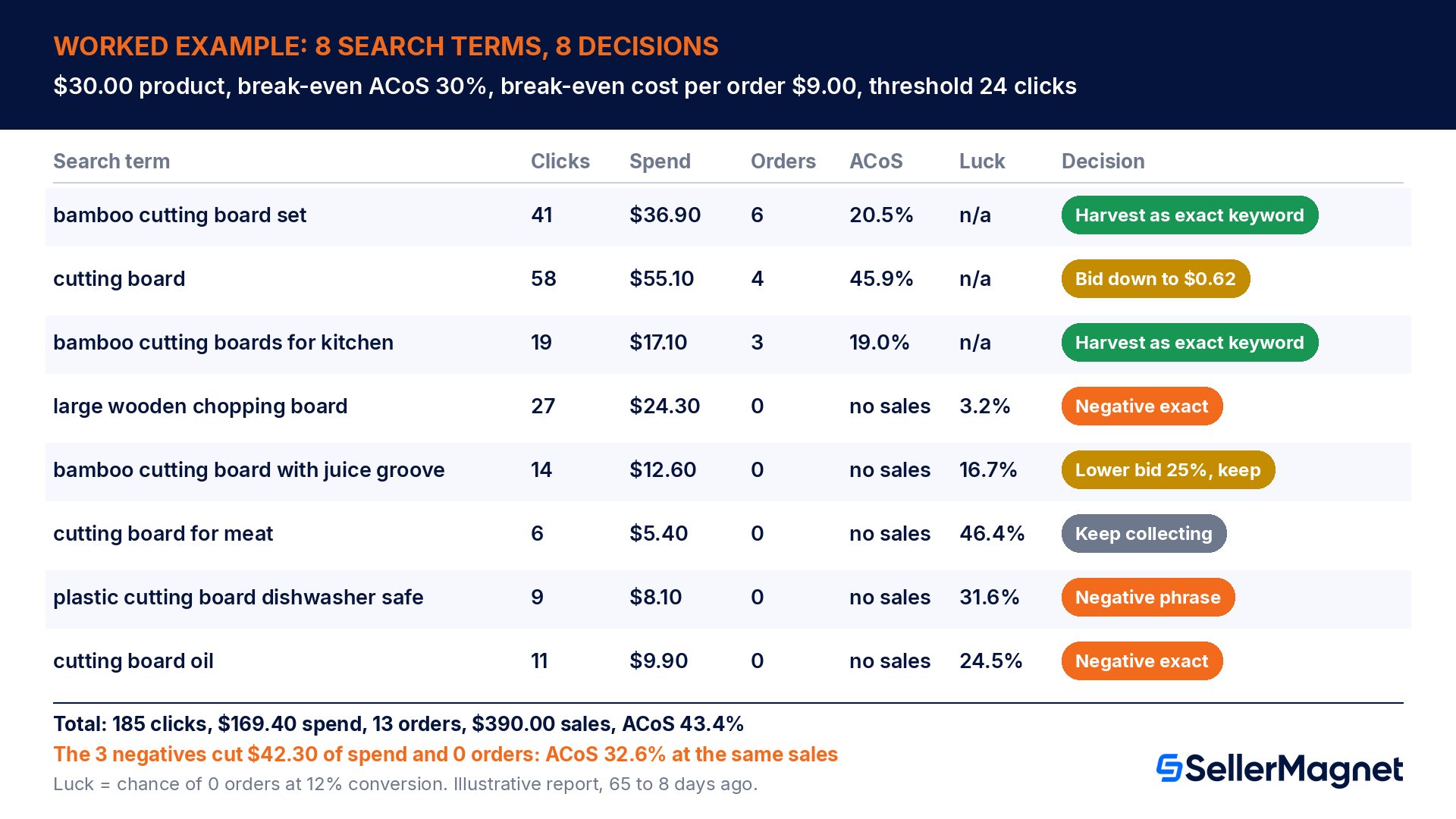
Here is a 58-day search term report (65 to 8 days ago) from an amazon.com automatic campaign for a $30.00 bamboo cutting board set with a juice groove. Profit before ads is $9.00, so break-even ACoS is 30% and the break-even cost per order is $9.00. The product's proven exact keywords convert at 12%, so the click threshold is 24 clicks, where a term that converts like the average would show zero orders only 4.7% of the time.
Search term
Clicks
Spend
Orders
Sales
ACoS
Chance of 0 orders by luck
Decision
bamboo cutting board set
41
$36.90
6
$180.00
20.5%
n/a
Harvest as exact keyword
cutting board
58
$55.10
4
$120.00
45.9%
n/a
Bid down to $0.62
bamboo cutting boards for kitchen
19
$17.10
3
$90.00
19.0%
n/a
Harvest as exact keyword
large wooden chopping board
27
$24.30
0
$0.00
no sales
3.2%
Negative exact
bamboo cutting board with juice groove
14
$12.60
0
$0.00
no sales
16.7%
Lower bid 25%, keep
cutting board for meat
6
$5.40
0
$0.00
no sales
46.4%
Keep collecting
plastic cutting board dishwasher safe
9
$8.10
0
$0.00
no sales
31.6%
Negative phrase: plastic cutting board
cutting board oil
11
$9.90
0
$0.00
no sales
24.5%
Negative exact
Total
185
$169.40
13
$390.00
43.4%
Row by row: bamboo cutting board set and bamboo cutting boards for kitchen sell at 20.5% and 19.0% ACoS, well under break-even, so both get harvested. cutting board sells at 45.9% ACoS; its 4 orders from 58 clicks put its break-even bid at $0.62, so it is bid down, not negated. large wooden chopping board has 27 clicks and no order, past the 24-click threshold, with a 3.2% chance of that by luck: negative exact.
plastic cutting board dishwasher safe and cutting board oil fail the relevance rule (a different material, a shopper who wants oil), so both are negated now at 9 and 11 clicks: no click count makes them relevant. bamboo cutting board with juice groove describes the product exactly but has spent $12.60 with no order, past the $9.00 break-even cost per order, at only 14 clicks: a bid cut, not a negative. cutting board for meat has 6 clicks and $5.40 of spend: keep collecting.
The three negatives remove $42.30 of the $169.40 spend and not a single order. At the same $390.00 of sales, ACoS falls from 43.4% to 32.6% before the two bid cuts do anything. Just as important is what we did not do: the juice groove and meat terms spent $18.00 between them with no order, yet at a 12% conversion rate terms like these show zero orders by luck 16.7% and 46.4% of the time, so cutting them would have been a guess.
Negative exact or negative phrase?
Negative exact is the scalpel. It removes one search term and its close variations and leaves every longer or shorter query alone. Use it for relevant terms that have proven, with enough clicks, that they do not sell for you, and for routing: after you harvest a winner into an exact campaign, a negative exact on the same term in the discovery campaign keeps the query where you set its bid.
Negative phrase is the broom. It removes every query that contains the phrase. Use it for a word or short phrase that is wrong for your product in any combination: a material you do not sell, a size you do not offer, used, free, or an accessory intent like oil or replacement. Keep it to the shortest phrase that is always wrong (4 words at most), because a phrase negative on a word inside your best queries switches off traffic without ever showing up as a loss.
Negative
Type
Blocks
Side effect to check
plastic cutting board
Negative phrase
plastic cutting board dishwasher safe, plastic cutting board set
Also blocks bamboo vs plastic cutting board, a comparison shopper you may want
plastic
Negative phrase
Every query that contains plastic
Also blocks bamboo cutting board no plastic, a shopper who wants exactly your product
cutting board oil
Negative exact
cutting board oil and its close variations
None: bamboo cutting board oil finish can still show your ad
board
Negative phrase
Every query that contains board
Switches off almost every query the campaign exists for: never do this
The harvest-and-negate loop
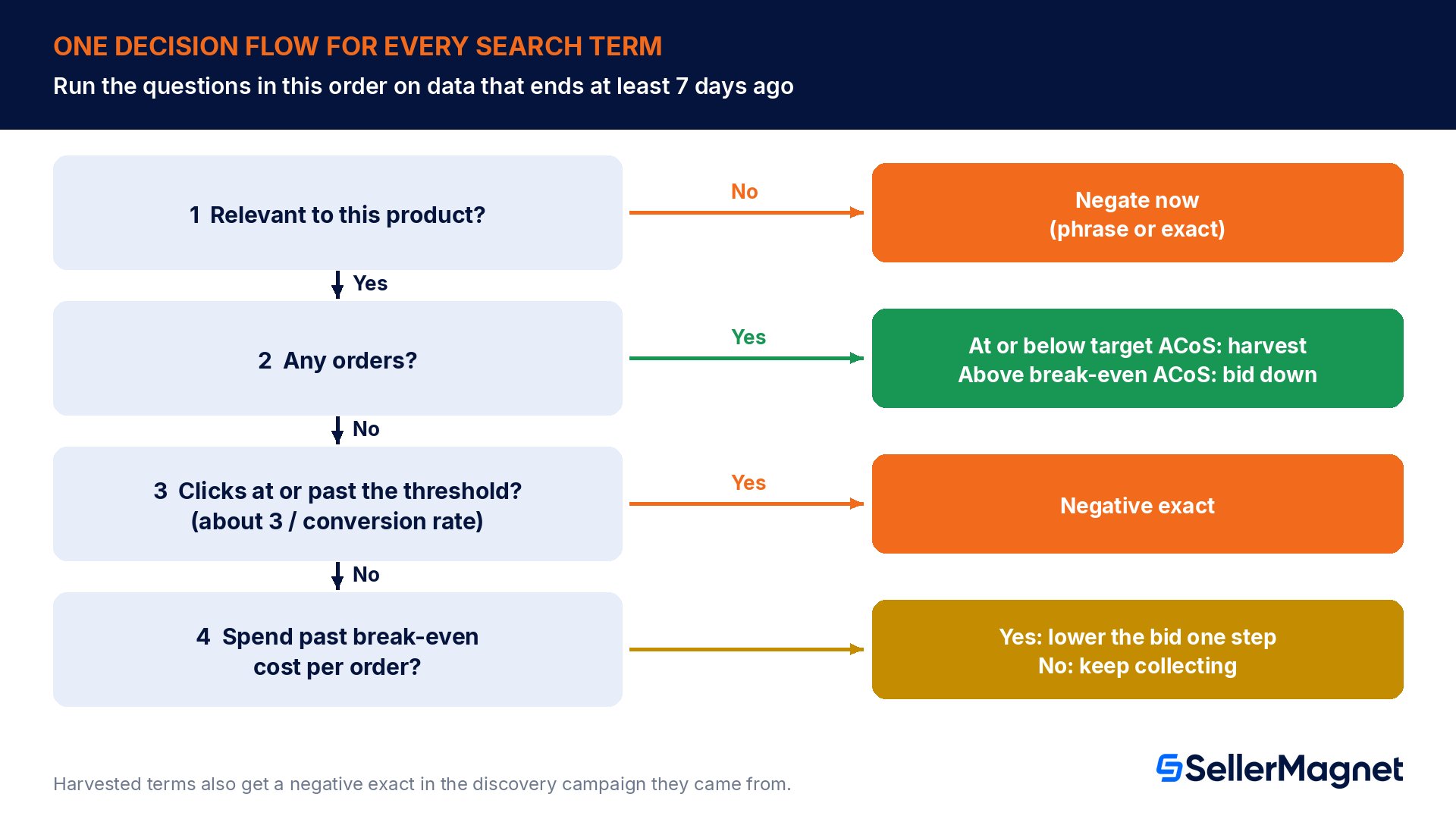
Negatives do two jobs: cleaning (removing terms that waste money) and routing (making sure a proven term is bought in exactly one place). Both happen in the same weekly loop.
Run the weekly harvest-and-negate loop
Pull complete data - Download the search term report for Sponsored Products for 65 to 8 days ago.
Apply the relevance rule first - Negate terms with the wrong intent where they appeared: negative phrase for a word that is always wrong, negative exact for a single query.
Harvest the winners - Add terms with orders at or below your target ACoS as exact keywords in a manual campaign.
Route the harvested terms - Add each harvested term as a negative exact in the discovery campaign it came from, so the query is served where you set its bid.
Apply the money rule - Lower the bid one step on zero-order terms whose spend has passed your break-even cost per order but whose clicks are still below the threshold.
Apply the click rule - Add negative exact for relevant zero-order terms at or past the click threshold for the product's conversion rate.
Log and wait - Write down each change with its date and judge it after the 72-hour buffer plus a full 7-day attribution window.
In automatic campaigns, the loop is also how you steer Amazon's four targeting groups (close match, loose match, substitutes and complements, see Amazon's match type page): bids are set per group, but your negatives decide which queries the campaign serves. For how these manual steps sit next to Amazon's own bidding options, see our guide to Amazon PPC automation and AI bidding.
How often should you review, and how long do negatives take to work?
Weekly is the right rhythm for most catalogs: often enough that a bad term does not run for a month, rarely enough that each review adds a full week of complete data.
After you add a negative, expect a lag. With a 72-hour buffer for negative keywords (96 hours for negative products) and a 7-day attribution window on top, the first fair read of a cleanup is about 10 days after the change.
When does the click rule need adjusting?
Expensive products with low conversion rates
A $120.00 product that converts at 3% needs 99 clicks for the 5% bar, which at $1.20 per click is $118.80 of evidence per search term. With a 25% break-even ACoS, its break-even cost per order is $30.00, reached after 25 clicks. Here the money rule does most of the work: bid down early, keep the relevance rule strict, and negate only at the click threshold.
Your own brand terms
Never negate your own brand name in the campaign that targets it because of a zero-order streak. A shopper searching for your brand is the most relevant traffic you can buy, so a dry spell there points to a listing, price or stock problem, not a keyword problem. Our sales drop checklist covers those checks.
Common negative keyword mistakes
A fixed click count for every product. At a 5% conversion rate, a 15-click rule negates terms that would show zero orders by luck 46% of the time.
Judging the last 7 days. Orders that Amazon credits later turn this week's losers into winners.
The blended campaign conversion rate as your baseline. The bad terms pull it down, which inflates every threshold.
A phrase negative on a word inside your best queries, such as the product type itself.
Negating a term that sells at a high ACoS. Lower it to its break-even bid first; a negative removes the orders along with the cost.
Harvesting without routing. The discovery campaign keeps serving the harvested term at its own bid.
Treating ASIN rows like keywords. Spend on other products' detail pages needs negative product targeting, not negative keywords.
Never revisiting old negatives. A negative for a size or color you did not sell then blocks the variation you launch later.
Negative keyword checklist
Report range ends at least 7 days ago and uses most of the 65-day lookback.
Baseline conversion rate comes from the product's proven exact keywords, not the blended campaign.
Click threshold calculated: ln(0.05) / ln(1 - conversion rate), or about 3 divided by the rate.
Break-even ACoS and break-even cost per order calculated from current costs.
Relevance pass first: wrong product, material, size, accessory, free and used intent negated.
Relevant zero-order terms at or past the click threshold added as negative exact.
Zero-order terms past the break-even cost per order but under the click threshold bid down, not negated.
Selling terms above break-even ACoS bid down to their break-even bid.
Winners harvested to exact keywords, each with a routing negative exact in its source campaign.
Every change logged with its date, judged after the 72-hour buffer plus the 7-day window.
Where SellerMagnet PPC Manager (beta) fits
Done by hand, this is a weekly spreadsheet job per product. SellerMagnet's PPC Manager, currently in beta, brings analytics, search-term harvesting and negation, bid rules, brand defense, keyword research, planning and an AI Optimizer into one workspace. It runs in three automation modes: suggestions only (the default), manual approval, or fully automatic within your limits. New accounts start in sandbox mode, where changes are calculated but not sent to Amazon.
Every change is recorded in an activity log, and a single switch stops all automation at once. Bid, budget, placement and pause or enable changes can be undone within 24 hours; harvested keywords and new campaigns cannot, so start in suggestions-only mode while you check the rules against your own numbers. Bid and keyword automation currently covers Sponsored Products.
Try PPC Manager (beta) on your own search terms. Start in the default suggestions-only mode and compare its harvesting and negation suggestions with the rules above. Paid plans come with a 14-day free trial: see plans and pricing.
What are negative keywords on Amazon?
Negative keywords tell Amazon not to show your ads for shopping queries that match them. Sponsored Products offers two types: negative exact blocks one query and its close variations, negative phrase blocks every query that contains the phrase. You use them to stop paying for clicks from shoppers who want something you do not sell.
How many clicks before negating a keyword on Amazon?
It depends on your conversion rate. Negate a relevant zero-order term once the chance of zero orders by luck falls below 5%: clicks = ln(0.05) / ln(1 - conversion rate), roughly 3 divided by the rate. That is 29 clicks at 10%, 19 at 15% and 14 at 20%, judged on data at least 7 days old.
What is the difference between negative exact and negative phrase?
Negative exact blocks one search term and its close variations, up to 10 words and 80 characters. Negative phrase blocks every query that contains the phrase, up to 4 words and 80 characters. Use exact for a relevant term that has proven it does not sell, and phrase for a word that is always wrong for your product.
Can you add negative keywords to automatic campaigns?
Yes. Amazon allows negative targeting in both automatic and manual Sponsored Products campaigns, for a whole campaign or for a single ad group. Next to bids per targeting group (close match, loose match, substitutes and complements), negatives are the main way to steer which shopping queries an automatic campaign is allowed to serve.
How long do negative keywords take to work?
Amazon lists a buffer period of 72 hours for negative keywords and 96 hours for negative products or ASINs to take effect, so a few clicks on a freshly negated term are expected. Judge the effect of a cleanup after that buffer plus the full 7-day attribution window, which is roughly 10 days after the change.
Should I negate a search term that has sales but a high ACoS?
Usually not, because a negative removes its orders along with its cost. Lower the bid to the term's break-even bid first: break-even cost per order times the term's own conversion rate. A term with 4 orders from 58 clicks and a $9.00 break-even cost per order breaks even at about $0.62 per click.
Where do I find search terms to negate?
In the search term report for Sponsored Products. It lists every search term that received at least one ad click, with clicks, spend, orders and sales, and it looks back 65 days. Sort by spend with zero orders, then apply the relevance rule, the money rule and the click rule to each term in that order.
Stop Juggling Tools. SellerMagnet Combines Everything You Need.