Amazon now runs two separate layers of PPC automation at once, and almost every seller only knows about one of them. The first layer sits inside Amazon Ads itself: dynamic bidding, rule-based bidding and schedule bid rules, which adjust what you pay per click without you touching the campaign. The second layer sits on top of Amazon, inside a seller's own software, and decides what to advertise, which keywords to harvest, and when to override Amazon's own bid logic. This guide works through Amazon's own Sponsored Products bidding documentation, checked on 23 October 2026, to show exactly what each automation layer does, what it cannot promise, a worked example of the bid math with real numbers, and where SellerMagnet's PPC Manager AI Optimizer, currently in beta, adds a second automated layer most sellers are still missing.
Amazon's AI bidding for Sponsored Products comes in 3 forms: dynamic bids that lower your cost on weak clicks, dynamic bids that also raise your cost on strong clicks (up to double, by Amazon's own example), and rule-based bidding, which targets a return-on-ad-spend goal and can lift a bid up to 5 times your base amount for a high-value opportunity. None of these decide what to advertise or guarantee hitting your target; a separate tool such as SellerMagnet's PPC Manager AI Optimizer adds keyword harvesting and ad opportunity discovery on top.
The 3 bidding strategies inside Sponsored Products
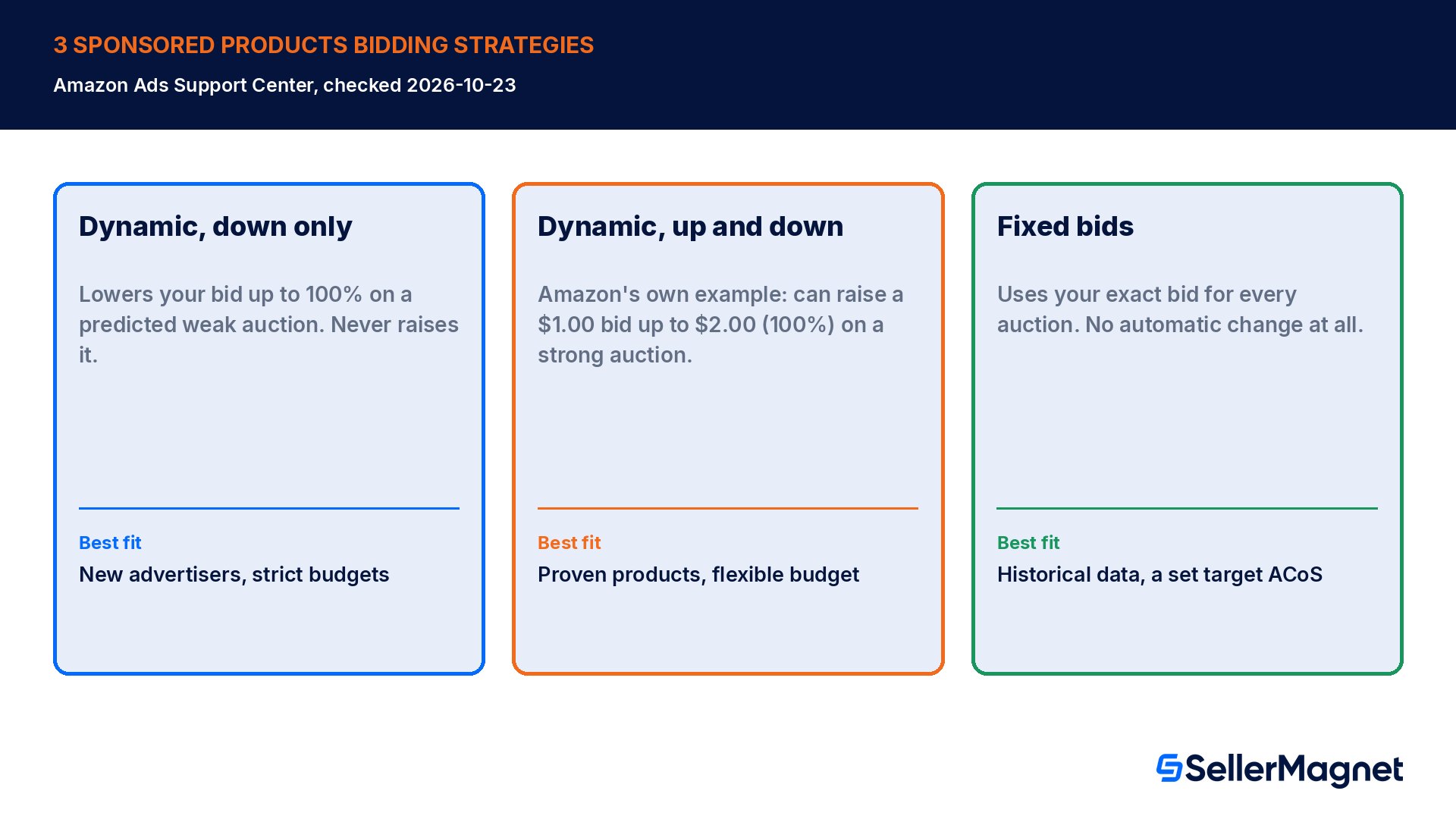
Every Sponsored Products campaign picks one of 3 bidding strategies at setup, and Amazon's Ads Support Center documents the trade-off for each one plainly rather than hiding it behind marketing language. Dynamic bids down only has Amazon reduce your bid, by up to 100%, for an auction it predicts is less likely to convert, for example a weakly relevant search query or a placement that has historically performed poorly for you; Amazon names it ideal for new advertisers and strict budgets because your bid can only ever move down from what you set. Dynamic bids up and down keeps that downward protection but adds the opposite move: Amazon can also raise your bid for an auction it predicts is more likely to convert, and the help page's own worked example states Amazon can adjust a $1.00 bid up to $2.00 for all placements, a full 100% increase, when the signal is strong enough. Fixed bids is the plain option: Amazon uses your exact bid for every auction and never adjusts it automatically, which in Amazon's own wording tends to produce more impressions but fewer conversions per dollar spent than either dynamic strategy, and it suits a seller who already has historical data and a specific target ACoS, or who is deliberately testing a new product's numbers without the AI layer moving the price underneath them.
Strategy
What Amazon does
Best fit
Dynamic bids, down only
Lowers your bid up to 100% on a predicted weak auction; never raises it
New advertisers, strict budgets
Dynamic bids, up and down
Also raises your bid, Amazon's own example shows $1.00 to $2.00 (100%), on a predicted strong auction
Uses your exact bid for every auction, no automatic change
Historical data on hand, a specific target ACoS, testing a new product
A separate, manual layer sits on top of whichever strategy you pick: placement bid adjustments. You can enter a percentage that raises your bid further when the ad is eligible for Top of Search, Rest of Search, product pages, or (in Sponsored Products across retailers campaigns) top of browse and rest of browse. Amazon's own example shows a $1.00 fixed bid with a 50% Top of Search adjustment becoming $1.50, and the same $1.00 dynamic bid with that adjustment reaching $1.50 as the new base before the dynamic logic can still push it higher, up to $3.00 in that specific example. Amazon's best-practices guidance states placement bid adjustments can go up to 900%, and Sponsored Products video ads, currently a US-only placement, get their own adjustment field with the same 900% ceiling.
Rule-based bidding: the newer automated layer with a ROAS target
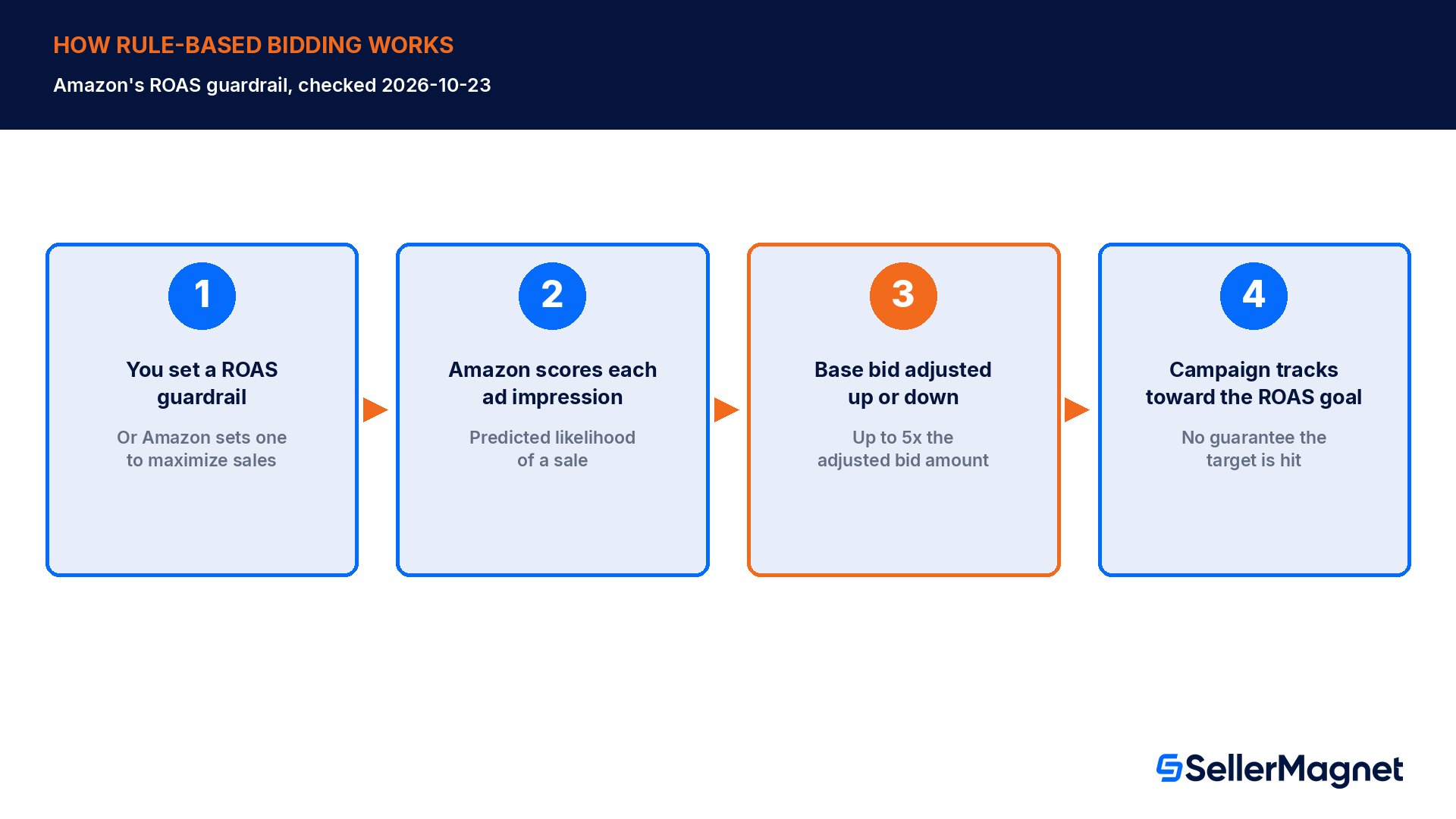
Rule-based bidding is Amazon's most automated Sponsored Products option, and it works differently from the 2 dynamic strategies above: instead of reacting placement by placement, you give Amazon a performance goal, specifically a return on ad spend (ROAS) guardrail, and Amazon continuously adjusts your base bids up and down per ad impression to try to hit it, based on how likely each individual opportunity looks to convert. Amazon's own bidding-rules help page is explicit about the ceiling and the limits: a rule-based bid can rise up to 5 times your adjusted bid amount for a high-value opportunity, which is a materially bigger swing than the up-to-100% range of dynamic bidding, and Amazon states plainly that it does not guarantee the ROAS target you set will actually be hit.
Wait 2 weeks before you set your own ROAS target
Amazon's recommendation is specific: give a campaign at least 2 weeks of real data before you type in your own ROAS target, so the system has enough signal to judge which auctions are actually worth a higher bid. If you turn on rule-based bidding without specifying a target, Amazon automatically determines a ROAS goal for you aimed at maximizing sales, which is a reasonable default for a brand-new campaign but is not the same as a target you have deliberately chosen for your own margins.
Eligibility is narrower than the dynamic strategies. Rule-based bidding is currently available for Sponsored Products only, your campaign must meet the minimum daily budget requirement for its marketplace, and it works with any targeting type, automatic, keyword or product. Amazon also notes that the eligibility criteria may change as the system is enhanced further, which is normal for a feature this new; check the current rollout in your own account rather than assuming last quarter's eligibility list still applies. One mechanical rule trips sellers who already use time-of-day automation: you cannot run schedule bid rules and rule-based bidding on the same campaign at once. Amazon's help page states it directly, schedule bid rules will be put on hold the moment you switch a campaign to rule-based bidding, so a seller who had, for example, a Black Friday bid-increase schedule queued needs to check that schedule is still active after a rule-based switch.
Schedule bid rules themselves are the other automated option and solve a different problem: instead of a performance target, you schedule a bid increase for specific times of day, days of the week, date ranges, or named high-traffic events such as Black Friday, so your bid is deliberately higher during the exact windows you already know convert best, without any ROAS logic involved. The 2 tools are mutually exclusive by design, Amazon's documentation frames rule-based bidding as the goal-driven option and schedule bid rules as the calendar-driven option, and a seller choosing between them should pick whichever matches how they actually think about that specific campaign, a ROAS number or a known seasonal calendar, rather than trying to layer both.
Worked example: following Amazon's own bid math
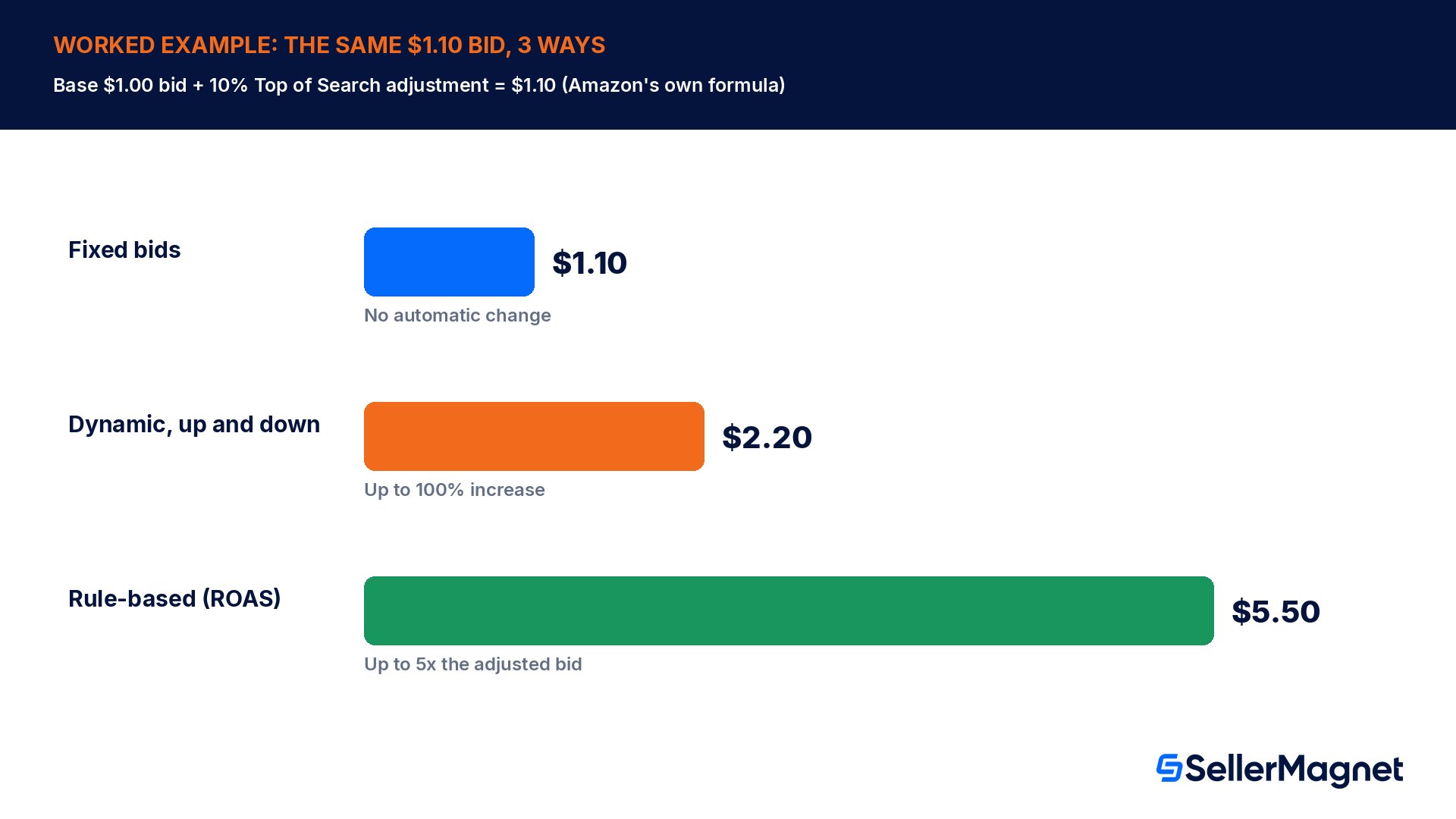
Take a $1.00 base bid with a 10% Top of Search placement adjustment already applied, the exact numbers Amazon uses in its own bidding-rules help page: placement-adjusted bid equals the base bid amount times 1 plus the adjustment percentage, so $1.00 times 1.10 equals $1.10. That $1.10 is the real starting point the AI layer works from, not the $1.00 you originally typed in.
Bidding strategy on top of the $1.10 placement-adjusted bid
Amazon's stated ceiling
Resulting bid on a strong auction
Fixed bids
No automatic change
$1.10, every time
Dynamic bids, up and down
Up to 100% increase (Amazon's own $1.00 to $2.00 example)
Up to $2.20
Rule-based bidding (ROAS guardrail)
Up to 5 times the adjusted bid amount
Up to $5.50
The jump from a 2x ceiling under dynamic bidding to a 5x ceiling under rule-based bidding is the real story behind calling rule-based bidding Amazon's AI bidding feature: it is willing to pay far more for an auction it is confident about, but only because the whole point of the ROAS guardrail is to let the system spend unevenly, overpaying for the best opportunities and underpaying or skipping the weak ones, while the average across the campaign still aims at your target. A seller who only looks at the average bid shown in the dashboard misses this; the ceiling on individual auctions matters just as much as the average, because a handful of 5x auctions during a single busy hour can move a daily budget faster than the same campaign ever would under fixed or dynamic bidding.
What Amazon's own AI bidding still cannot do for you
Every strategy above operates inside one campaign that already exists, on bids that you already set up, for products you already chose to advertise. None of them decide which of your ASINs deserve a campaign in the first place, none of them pull new converting search terms out of your search-term report and add them as keywords, and none of them look across your whole advertised catalog to tell you that campaign A's spend would earn more sitting in campaign B. Amazon's own ROAS guardrail is also a goal, not a promise: the help page states outright that Amazon does not guarantee the target will be met, so a seller relying on rule-based bidding alone to protect an ACoS ceiling still needs to check the real numbers, not just trust the dashboard. Break-even ACoS, the ceiling every seller is really protecting, is itself a number Amazon's bidding tools never calculate for you: it is (price minus every cost except ads) divided by price, a formula our ACoS vs TACoS guide works through in full, and a seller has to bring their own cost data to turn Amazon's ROAS guardrail into a margin-safe decision.
There is also no single account-level dial. Each bidding strategy, dynamic, fixed or rule-based, is set per campaign, so a seller running dozens of Sponsored Products campaigns across a catalog has to pick a strategy for each one individually and revisit that choice as a product's sales history grows, rather than flipping one master switch for the whole account. SellerMagnet's own PPC Manager has the same per-product-type boundary on its automated side: bid and keyword automation currently covers Sponsored Products specifically, while its reporting spans Sponsored Products, Sponsored Brands and Sponsored Display together, which is exactly the gap a workspace that reports across all 3 ad types at once is built to close.
The second automation layer: SellerMagnet's PPC Manager AI Optimizer (beta)
SellerMagnet's PPC Manager, currently in beta, is built as the layer that sits on top of everything above: analytics, search-term harvesting and negation, bid rules, brand defense, keyword research and planning, and an AI Optimizer, in one workspace. Where Amazon's own bidding strategies react auction by auction, the AI Optimizer in PPC Manager works at the decision level, and every recommendation it produces shows its reasoning, a confidence score and an estimated impact, so a seller can judge whether to trust a specific suggestion rather than accepting or rejecting the whole system at once.
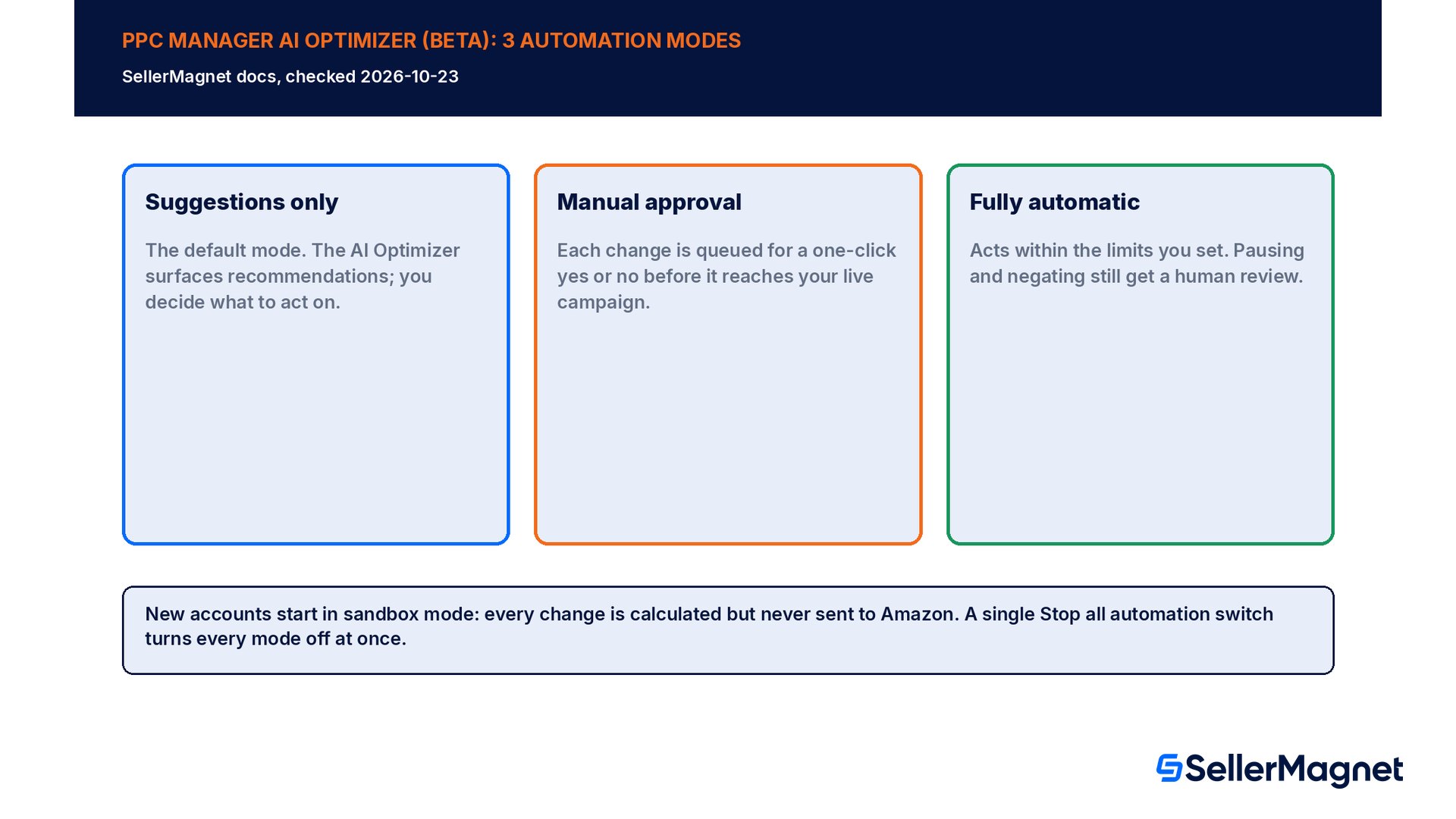
Automation moves in 3 steps. New accounts start in sandbox mode, where every change the AI Optimizer would make is calculated but never actually sent to Amazon, so a seller can watch what it would have done before trusting it with real spend. From there, 3 automation modes are available: suggestions only, the default, which surfaces recommendations for a human to act on; manual approval, which queues each change for a one-click yes or no; and fully automatic, which acts within the limits the seller sets. A single Stop all automation switch turns every mode off at once, and every change the system makes, in any mode, is recorded in an activity log, so a seller can always see exactly what moved and why.
One detail matters for anyone nervous about a mistake: bid, budget, placement and pause or enable changes made by the AI Optimizer can be undone within 24 hours. The exception is harvested keywords and brand-new campaigns, which cannot be undone once created, so a seller running fully automatic mode should still review new keyword and campaign activity in the log even if they trust the bid adjustments completely. Today the AI Optimizer's bid and keyword automation covers Sponsored Products specifically, the same product type as Amazon's own 3 bidding strategies and rule-based bidding described above, while reporting inside PPC Manager covers Sponsored Products, Sponsored Brands and Sponsored Display together.
Two tools inside PPC Manager answer the questions Amazon's own bidding layer cannot. The Scenario Simulator forecasts what a budget, bid or target-ACoS change would have done against your real last-30-day data, without ever touching your live campaigns, so a seller can test a what-if before committing real spend to it. Ad Opportunities does the opposite job: it looks at products that are already selling organically but are not advertised yet, and scores them, which is exactly the account-wide decision Amazon's bidding automation, built to optimize bids inside campaigns that already exist, was never designed to make. PPC Manager is priced from €49 per month for up to €1,000 of monthly ad spend, a flat price per ad-spend bracket rather than a cut of spend, with the AI Optimizer included.
Common mistakes sellers make with Amazon's AI bidding
Setting a ROAS target on day 1. Amazon recommends at least 2 weeks of real campaign data before you specify your own target; without it, let Amazon's automatic default run first and revisit the number once there is signal to judge it against.
Trying to stack rule-based bidding with schedule bid rules. The 2 cannot run together; Amazon's documentation states that switching a campaign to rule-based bidding puts any existing schedule bid rule on hold, so check that a seasonal bid schedule is still active after a rule-based switch.
Treating the ROAS guardrail as a guarantee. Amazon states plainly that it does not guarantee hitting the target you set; a campaign still needs a human checking real ACoS and break-even math, not just trusting the dashboard goal.
Copying a video bid adjustment onto a text placement, or the reverse. Video placement adjustments apply to Sponsored Products video ads in the US only, a narrower scope than the Top of Search, Rest of Search and product-page adjustments most sellers are used to.
Assuming bid automation finds new products to advertise. Every strategy above only optimizes bids inside a campaign you already built; discovering products that sell organically but are not advertised yet is a separate job, the kind an Ad Opportunities tool is built for.
Running a connected AI Optimizer in fully automatic mode without checking the activity log. Bid and budget changes can be undone within 24 hours, but harvested keywords and new campaigns cannot, so new-keyword activity deserves a daily look even in automatic mode.
Which bidding setup fits your account? A quick decision guide
Brand-new campaign, no data yet: start with dynamic bids, down only, or fixed bids with a conservative number; wait for Amazon's own recommended 2 weeks of data before touching rule-based bidding at all.
Proven product, flexible budget, chasing top placements: dynamic bids up and down is built for exactly this, and Amazon's own example shows it can double a bid for the right auction.
Established campaign with a clear margin target: rule-based bidding's ROAS guardrail is the strongest automated option, but set the target only after the 2-week data window and keep checking real ACoS against it.
A seasonal push on known dates, Black Friday or similar: schedule bid rules match this better than rule-based bidding, since you already know the calendar; remember it cannot run alongside rule-based bidding on the same campaign.
Managing bids across many ASINs, or want keyword harvesting, brand defense and unadvertised-product discovery in one place: this is the gap Amazon's own bidding tools do not cover, and the job SellerMagnet's PPC Manager AI Optimizer (beta) is built for, starting in sandbox mode with suggestions only before any automatic change goes live.
What is Amazon's AI bidding for Sponsored Products?
Amazon offers 3 Sponsored Products bidding strategies: dynamic bids down only, dynamic bids up and down, and fixed bids, plus a newer rule-based bidding option that targets a ROAS guardrail. Amazon's own example shows dynamic up-and-down bidding doubling a $1.00 bid, while rule-based bidding can raise a bid up to 5 times the adjusted amount for a high-value opportunity.
Does Amazon guarantee my rule-based bidding ROAS target will be hit?
No. Amazon's bidding-rules help page states directly that it does not guarantee the ROAS target you set will actually be achieved. Rule-based bidding adjusts bids toward that goal using predicted conversion likelihood, but it remains a guardrail, not a promise, so a seller still needs to check real account numbers.
Can I use rule-based bidding and schedule bid rules on the same campaign?
No, the two are mutually exclusive. Amazon's documentation states that switching a campaign to rule-based bidding puts any existing schedule bid rule on hold, so a seasonal or time-of-day bid schedule stops firing the moment rule-based bidding is turned on for that campaign, even if nothing else about the campaign changes.
How long should I wait before setting my own ROAS target?
Amazon recommends waiting at least 2 weeks after a campaign starts before specifying your own ROAS target, so the system has enough real performance data to judge which auctions are worth a higher bid. Until then, Amazon automatically determines a ROAS goal aimed at maximizing sales.
What is the difference between dynamic bidding and rule-based bidding?
Dynamic bidding reacts placement by placement and auction by auction, raising or lowering a bid by up to 100% based on predicted conversion likelihood. Rule-based bidding instead targets a stated ROAS goal across the whole campaign and can lift an individual bid up to 5 times the adjusted amount to chase that goal.
Does Amazon's bidding automation decide which products to advertise?
No. Every Sponsored Products bidding strategy, including rule-based bidding, only optimizes bids inside a campaign that already exists for a product you already chose to advertise. Finding organically selling products that have no campaign yet is a separate, account-wide job, handled outside Amazon's own bidding tools entirely.
Is SellerMagnet's PPC Manager AI Optimizer the same as Amazon's rule-based bidding?
No, they work at different levels. Amazon's rule-based bidding adjusts bids inside one campaign against a ROAS guardrail; SellerMagnet's PPC Manager, currently in beta, adds keyword harvesting, brand defense, a Scenario Simulator and Ad Opportunities discovery around an AI Optimizer that covers Sponsored Products, with 3 automation modes and a sandbox that calculates changes without sending them to Amazon.
What happens if the AI Optimizer makes a bid change I disagree with?
Bid, budget, placement and pause or enable changes made by SellerMagnet's AI Optimizer can be undone within 24 hours. Harvested keywords and brand-new campaigns cannot be undone once created, so review new-keyword activity in the log even when running fully automatic mode.
Stop Juggling Tools. SellerMagnet Combines Everything You Need.