Alexa for Shopping 2026: What Amazon Sellers Must Change
R
RenéFreelance Amazon Editor
|
10 min read
Last updated: Oct 18, 2026
Alexa for Shopping is Amazon's AI shopping assistant, and it is what Rufus became. Amazon merged Rufus, which it says "helped over 300 million customers in 2025 research, compare, and buy the products they want and need", with Alexa+ and put the result in the main search bar. For sellers the practical change is not the name. It is that an assistant now reads your whole listing, including the parts written for decoration, and answers a shopper's intent from it.
Alexa for Shopping is Amazon's AI shopping assistant, the renamed and expanded version of Rufus. It answers shopper questions in the search bar by reading product listings, reviews, customer questions and A plus content. Sellers adapt to it by covering real use cases in plain language rather than by adding more keywords.
What is Alexa for Shopping?
Alexa for Shopping is the assistant Amazon put in front of its catalogue. Amazon describes it as combining "deep product knowledge, in-depth information from across the web, and powerful shopping capabilities with your personal preferences, shopping history, and conversations from across both Amazon.com and Alexa", in its announcement of the assistant.
Alexa for Shopping replaced a name sellers had only just learned. Rufus launched as a standalone conversational shopping experience, and Amazon folded it into Alexa+ to make one assistant. The distinction matters when you research this topic, because a large share of the seller advice published about Rufus predates the merge and describes a narrower product.
What changed when Rufus became Alexa for Shopping?
The reach widened. Amazon lists what a shopper can now do, and the list is longer than the question-and-answer box Rufus started as. Each item is a place your listing can be read, summarised or compared without a shopper ever opening it.
Ask questions directly in the main Amazon search bar, rather than in a separate panel.
Create personalized shopping guides for big purchases.
Get category and product insights inside search results and on product pages.
Generate dynamic product comparisons between candidates.
View up to a full year of price history, which changes how a discount reads.
Automate deal-finding, cart-building and routine purchases based on personalized insights.
Access is the other half of the change. Amazon introduced the assistant "available to U.S. customers on the Amazon Shopping app and website, and Echo Show devices", and states that "all Amazon customers can use Alexa for Shopping for free when signed into their account, no Echo device, Alexa app, or Prime membership required". Inside that market it is not a feature for a subset of shoppers you can write off as a rounding error. Outside it, independent analysis shows that other locales may still show Rufus in the interface, so European sellers are preparing for a rollout rather than reacting to a finished one.
What does the assistant read from your listing?
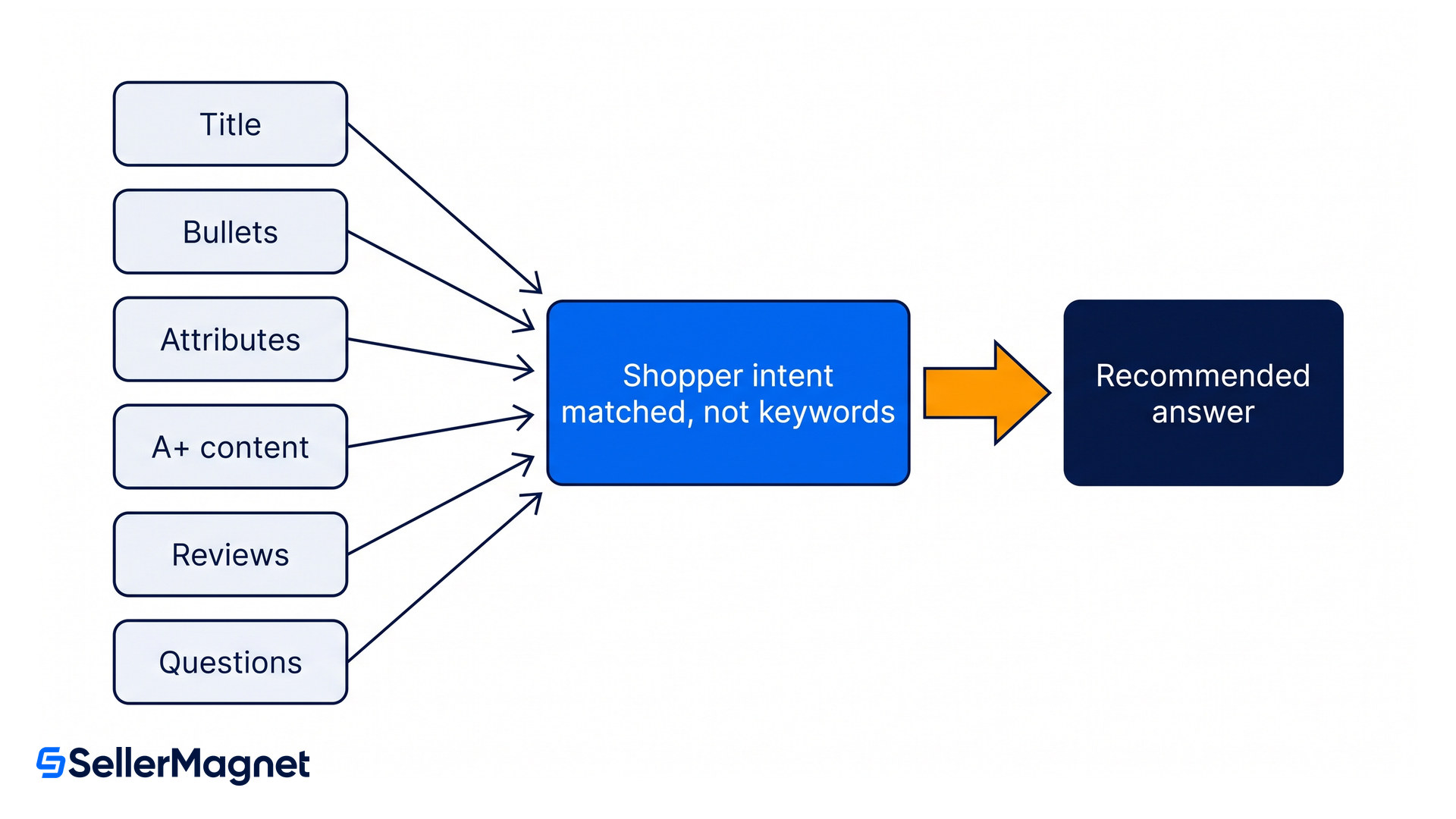
Far more than the fields you optimise for search. Amazon has published no field list, so the best available map comes from independent analysis. One independent analysis lists titles, bullets, descriptions, technical specifications and variants, price and shipping, reviews, customer questions and rating context, and notes that the assistant processes A+ content including Premium A+ and Brand Story as a knowledge source and can extract text overlays from product images.
That list rearranges what is worth your time. A+ content was long treated as a branding surface that search ignored; it is now a text source the assistant can quote from. Customer questions, which most sellers never touch, are read as answers. And reviews stop being only social proof: the assistant mines them to answer questions your copy does not address.
Listing surface
What the assistant takes from it
What to do about it
Title and bullets
The primary claim and the use cases you name explicitly
Name real user types and situations instead of opening with a generic quality claim
Backend attributes
Structured facts such as material, size, compatibility and certifications
Fill them in; a blank field is a question the assistant cannot answer about you
A+ content
Body text, including Premium A+ and Brand Story, as a knowledge source
Write real sentences into it rather than shipping images with text baked in
Product images
Text overlays it can extract
Keep overlay text short, accurate and legible
Reviews
Answers to intent-specific questions your copy skipped
Read them for the use cases customers name, then cover those in the copy
Customer questions
Direct answers, already in question form
Answer the substantive ones properly instead of leaving them to other shoppers
Why did keywords stop being the lever?
Because the assistant is resolving a question, not matching a string. It is built on Amazon's COSMO knowledge graph, which one independent analysis describes (writing about Rufus, before the rename) as reading "titles, bullet points, product descriptions, and Enhanced A+ Content" alongside reviews and community questions, to understand what a product is and who it serves. Another analysis adds the field most sellers leave half-empty: "missing or generic backend attributes (material, use, target audience, dimensions, compatibility) remove you from the candidate set before the shopper's query is even parsed".
In plain terms, the assistant reformulates a request into a research workflow rather than a single query, and identical prompts return different results depending on the shopper's context. You cannot rank for a sentence. You can only make sure that when the assistant assembles an answer, your listing contains the facts that answer it.
The same bullet, rewritten
Here is an example of what changes. Before: "PREMIUM CONSTRUCTION: Made from high-quality 304 stainless steel for maximum durability and lifetime use." After: "Built for daily use: 304 stainless steel construction holds up in dishwasher, outdoor use, and commercial kitchens. Most buyers report 5+ years of use with no rust or warping." Same material, same field. The second answers three questions a shopper might actually ask and then closes with a fact lifted straight out of the reviews. The first answers none.
What fails now that used to work?
The tactics that filled a keyword index are the ones that read as empty to an assistant summarising your page. One analysis names four such tactics, and a fifth comes from the ratings themselves. Each has the same shape: volume where the assistant is looking for specifics.
Keyword stuffing. Repetition adds no fact an answer can use.
Generic openers. A bullet that starts with PREMIUM QUALITY has spent its most valuable position saying nothing.
Thin A+ content. Images with no readable text give the assistant nothing to read.
Single-use-case positioning. A listing written for one buyer loses every question asked by the others.
Low ratings. Independent analysis shows that products below four stars are typically not recommended, which no copywriting fixes.
How do you adapt a listing?
Work one ASIN at a time and start where the evidence already is. Your reviews and questions tell you what shoppers ask; the job is to move those answers into fields the assistant reads first.
Adapting one listing for the assistant
Mine your own reviews and questions - Read the last hundred reviews and every customer question for the use cases, doubts and comparisons that recur. That list is the set of questions the assistant will be asked about your product, written by the people who asked them.
Rewrite bullets around those use cases - Replace each generic opener with a named situation and the fact that settles it. Keep the specification, but attach it to the use it serves rather than to an adjective.
Fill in the backend attributes - Work through the available attribute fields for the category and complete them accurately. Material, dimensions, compatibility and certifications are exactly the structured facts a comparison is built from.
Put sentences into A+ content - Add readable body text that covers the use cases, not just styled images. If your A+ is entirely graphics with text baked into them, keep the design and add the same words as real text.
Answer the substantive customer questions - Answer the questions on the listing yourself, properly, instead of leaving them to other shoppers. Target the questions that recur, and prioritise the ASINs that carry your revenue.
Be careful what you read about this
This topic attracts confident vendor posts with unsourced numbers, and several circulating claims about the assistant's traffic share and conversion lift trace back to blogs rather than to Amazon. Amazon has published the capabilities and the access rules; it has not published how much of its search volume the assistant handles. Treat any precise percentage you meet as an estimate.
Quick win for today
Take your three highest-revenue ASINs and open the customer questions on each. Every question with no seller answer is a gap the assistant will fill from somewhere else, or not at all. Answer them today, then check in the SellerMagnet profit dashboard which products actually carry your margin, so the next hour of listing work goes to the ASINs that pay for it.
Listing work only pays once the unit economics underneath it are right. Our guide to listing optimization covers the conversion fundamentals this sits on top of, the Buy Box guide explains what decides which offer a shopper is even shown, and the FBA storage fee guide covers the costs that decide whether the extra sales are worth having.
Alexa for Shopping FAQ
Is Rufus the same as Alexa for Shopping?
Yes. Amazon merged Rufus with Alexa+ and now calls the combined assistant Alexa for Shopping. Guides still written about Rufus describe the earlier, narrower version.
Do shoppers need Prime or an Echo to use it?
No, but the market matters. Amazon introduced the assistant for US customers and states it is free for all customers when signed into their account, with no Echo device, Alexa app or Prime membership required, on the Amazon Shopping app and website.
Does the assistant read my A+ content?
Yes, including Premium A+ and Brand Story, which it treats as a knowledge source. It can also extract text overlaid on your product images.
Do reviews affect whether my product is recommended?
They do two things. The assistant reads review text to answer questions your copy does not cover, and independent analysis shows that products rated below four stars are typically not recommended.
Should I still do keyword research?
Yes, because classic search has not gone away. What changes is that keyword density stops being the lever inside the listing; coverage of real use cases and complete structured attributes do the work the assistant needs.
Can I see how much traffic the assistant sends me?
Not directly and not reliably. Amazon has not published attribution for assistant-driven traffic, which is why the circulating percentages come from vendors rather than from Seller Central.
Stop Juggling Tools. SellerMagnet Combines Everything You Need.