Does Seller Central Have a Native Repricer?
What is Automate Pricing and how does it actually work?
Where do you find it, and what does it need?
The three rule types
- Competitive rules. Compare your SKU to the Featured Offer price or the lowest price on the same ASIN and condition, then match it, beat it by an amount or percentage, or stay a set amount or percentage above it. You can filter which offers count, for example only FBA offers, or only sellers within 5% of your own seller rating.
- Sales based rules. Lower (or raise) your price by a fixed amount or percentage if your unit sales fall above or below a threshold over a window of 1, 7, 10, 14 or 30 days, re-checked once at the end of every window.
- Business pricing rules. For Amazon Business sellers, automatically update your B2B price and quantity discounts whenever your standard consumer price changes, so the two price books never drift apart.
Setting up your first Automate Pricing rule, step by step
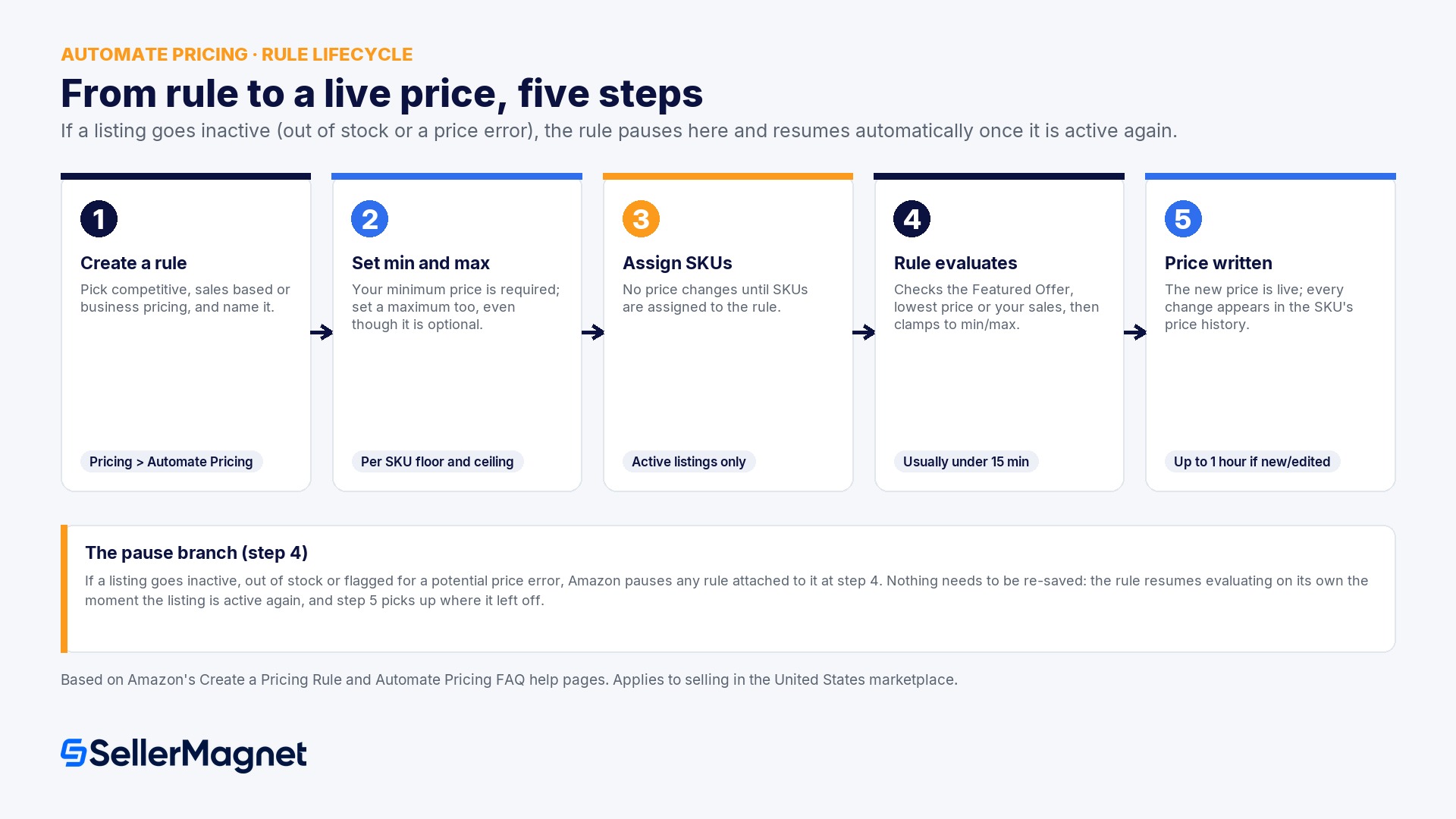
How to create and launch an Automate Pricing rule
- Open Automate Pricing and start a rule - From Pricing > Automate Pricing, click Get Started, or Create a new pricing rule if you already have one, then choose a rule type and a short, memorable name such as 'Match the Featured Offer'.
- Pick the marketplace - Select the checkbox for each marketplace the rule should run in; you repeat the parameter steps separately for every marketplace you add.
- Choose what to compare against - Pick the Featured Offer price or the lowest price for the ASIN, then choose to match it, beat it, or stay above it, by a dollar amount or a percentage (minimum 1% or $0.10, maximum 90%).
- Add filters - Narrow which competing offers count, for example FBA only offers, or sellers within a chosen rating band, then read the Rule Summary sentence to confirm the rule does what you intended.
- Assign SKUs and set the floor and ceiling - Add the SKUs the rule should control and set Your Minimum Price (required) and Your Maximum Price (optional, but set one anyway) for each. Automate Pricing will not touch a price until a SKU is assigned.
- Save and watch the price history - Save the rule. Price changes on an existing rule are usually processed in under 15 minutes; a newly created or edited rule can take up to 1 hour to apply across every assigned SKU, so check the SKU's price history before assuming the rule failed.
What does Automate Pricing do well?
- No extra monthly cost: it ships inside the Professional plan you already need to sell competitively.
- A real safeguard, not just a suggestion: Amazon enforces the minimum and maximum you set at the account level, even if you try to override them manually through a feed or Manage Pricing.
- Business pricing sync is a genuine convenience for Amazon Business sellers with no equivalent on most third party tools.
- Pausing on inactive listings happens automatically, so a SKU that goes out of stock cannot be repriced by mistake.
Where does Automate Pricing fall short?
- No simulator. Automate Pricing has no way to preview a rule's effect before it goes live. You find out what a rule does by turning it on and reading the 30 day price history afterward.
- No brand owned, competitor free strategy. A competitive rule does nothing on a listing with no competing offers, which describes most private label ASINs. Sales based rules help, but they check once per window, not continuously, and offer no equivalent to matching a Buy Box gradually and then holding it.
- One rule logic per SKU at a time, no bulk CSV workflow inside the UI. Managing Automate Pricing across hundreds of SKUs with different floors means the Automate Pricing file (a flat file upload), not a spreadsheet style bulk editor with per row previews.
- Thinner reporting. Price history exists, but there is no single view of why a price changed across your whole catalog, no reason log per change, and no alerting when a competitor undercuts you outside of what the rule itself reacts to.
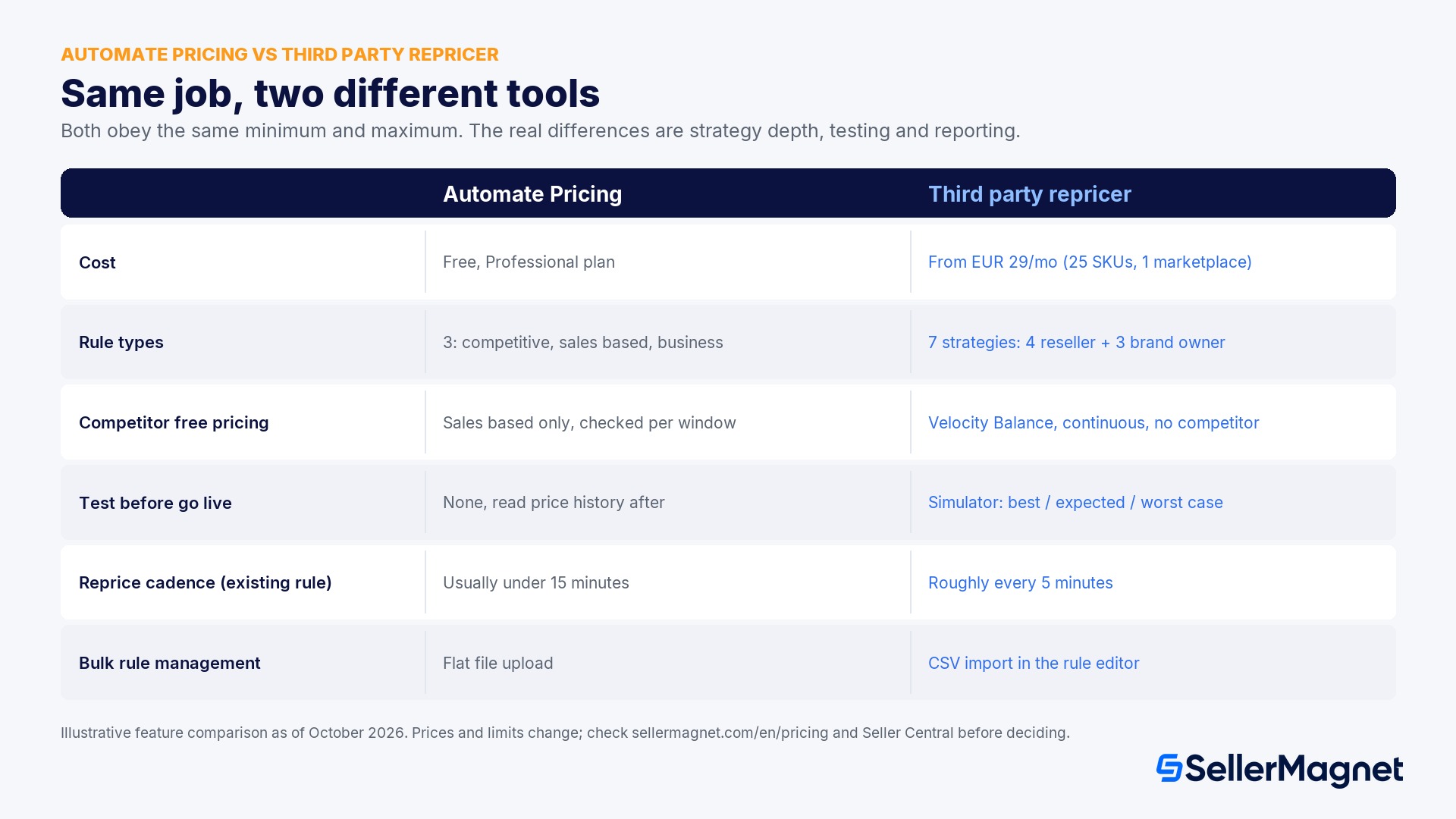
| What you need | Automate Pricing (Seller Central) | A third party repricer (example: SellerMagnet) |
|---|---|---|
| Cost | Free, included in the Professional plan | Paid; SellerMagnet Repricer starts from EUR 29/month excl. VAT for 25 SKUs on one marketplace (as of October 2026) |
| Rule types | 3: competitive (Featured Offer or lowest price), sales based, business pricing | 7 strategies on SellerMagnet: 4 reseller strategies (Lowest Price, Buy Box, Position, Same Price) and 3 brand owner strategies (BrandGuard, Competitor ASIN-BuyBox Sync, Velocity Balance) |
| Competitor free pricing for private label | Sales based rules only, checked once per window (1 to 30 days) | Velocity Balance prices continuously from your own sales rate, with no competitor ASIN needed |
| Test before go live | None; you read the price history after the fact | A simulator runs a rule against best, expected and worst competitor scenarios without touching live prices |
| Reprice cadence (existing rule) | Usually under 15 minutes; up to 1 hour for a new or edited rule | Re-evaluates roughly every 5 minutes (varies by tool) |
| Bulk rule management | Automate Pricing file upload (flat file) | CSV import built into the rule editor |
| FBA and FBM coverage | Yes, both | Yes, both (tool dependent; SellerMagnet covers both) |
| Min/max enforcement | Yes, account level, cannot be bypassed | Also yes; every repricer still obeys Amazon's own floor and ceiling checks |
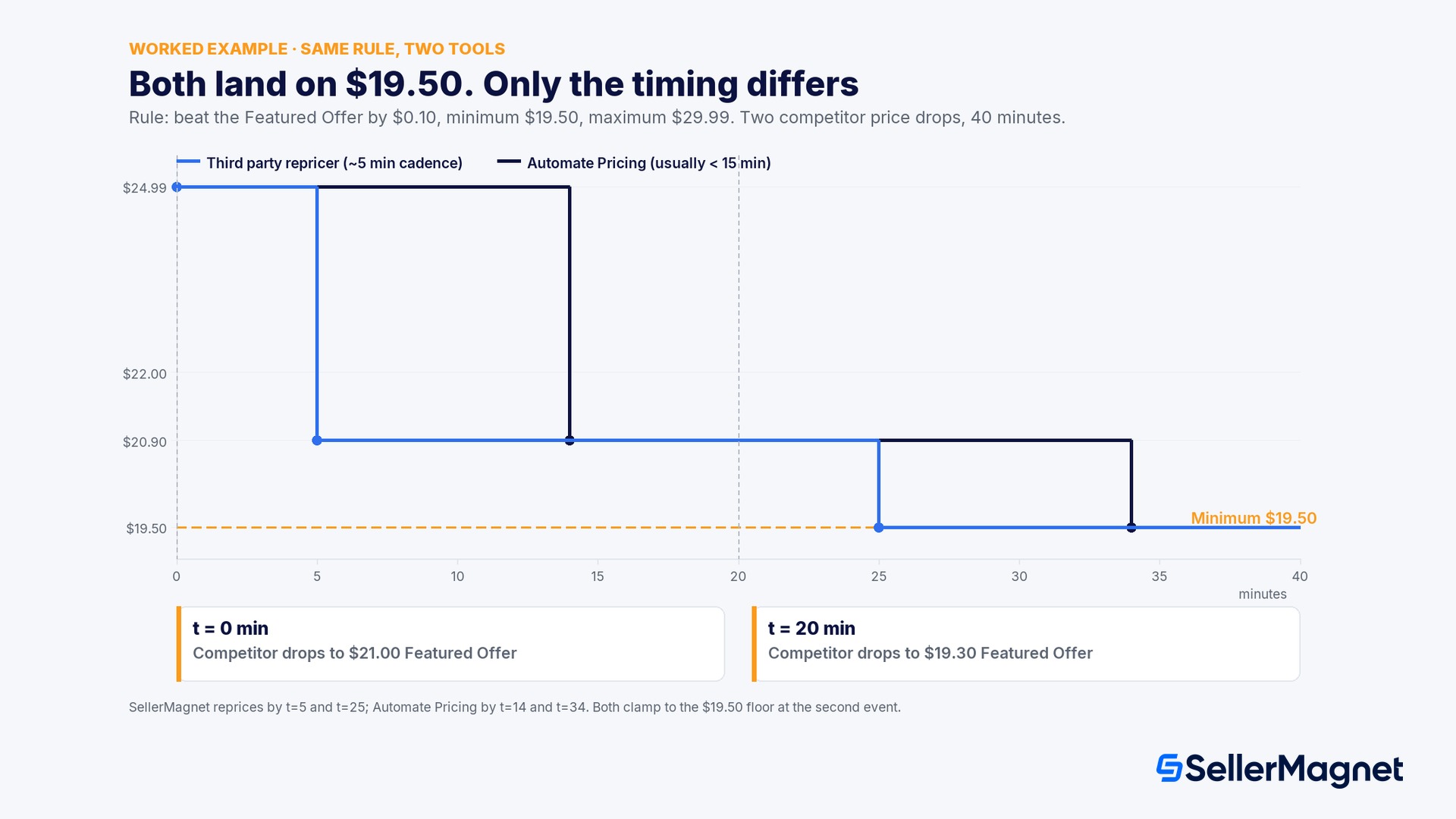
Worked example: the same rule, two tools, one competitor drop
- 2:00 PM (event 1). A competitor relists the ASIN as the Featured Offer at $21.00.
- 2:05 PM. A third party repricer evaluating roughly every 5 minutes catches the change and reprices you to $20.90 (beat by $0.10).
- 2:14 PM. Automate Pricing, usually processing an existing rule's updates in under 15 minutes, catches up and also reprices you to $20.90. For 9 minutes, the Featured Offer rotation most likely sat with the competitor.
- 2:20 PM (event 2). The same competitor drops further to $19.30 Featured Offer. Beating it by $0.10 would call for $19.20, but that is below your $19.50 minimum.
- 2:25 PM. The third party repricer's rule is clamped at the floor and writes $19.50, not $19.20.
- 2:34 PM. Automate Pricing's rule is clamped the same way and also writes $19.50. Both tools land on the identical, correct price; only the timing differs.
Automate Pricing vs a third party repricer: which one should you use?
- Use Automate Pricing alone if you run a small number of SKUs, mostly match or beat the Featured Offer with one or two rules, and you are comfortable checking price history by hand once a week.
- Add a third party repricer if you manage dozens or hundreds of competitive SKUs, need a simulator before trusting a rule, want a Buy Box specific gradual win-and-hold strategy, or are a brand owner who wants to price from your own sales velocity without touching a competitor at all.
- Reconsider either tool, and check Brand Registry instead, if your actual problem is an unauthorized seller or a hijacker on your listing. No repricer, native or third party, removes another seller from your listing; that is a Brand Registry enforcement problem, not a pricing problem.
Common mistakes sellers make with Amazon's native repricer
- Leaving the maximum price empty on purpose, thinking it is safer. Amazon will stop your price from looking significantly higher than recent prices if you skip the maximum, but that protects shoppers' trust in the Featured Offer, not your margin or your judgment about what the product is worth. Set a maximum yourself.
- Assuming a paused rule is a broken rule. Automate Pricing pauses a rule the instant the listing goes inactive (out of stock, or a potential price error). The rule resumes automatically once the listing is active again; nothing needs to be re-saved.
- Expecting a competitive rule to do anything on a listing with no competing offers. This is the single most common support thread about Automate Pricing 'not working'. A rule built around the Featured Offer or the lowest price has nothing to compare against until a second seller appears on the ASIN.
- Editing the rule and expecting an instant price change. A brand new rule, or a changed parameter on an existing one, can take up to 1 hour to apply to every assigned SKU. Give it the hour before troubleshooting further.
- Treating the floor as a one time setup task. The minimum price is a calculation from current costs and fees, covered in the minimum and maximum price guide. A floor set once in January and never revisited is quietly wrong by the next fee change or purchase batch.
- Running Automate Pricing and a third party repricer on the same SKU without checking which one wins. Both obey the same min/max, but only one of them is actually the rule logic you think is running; verify in each tool's own price history, not by assumption.
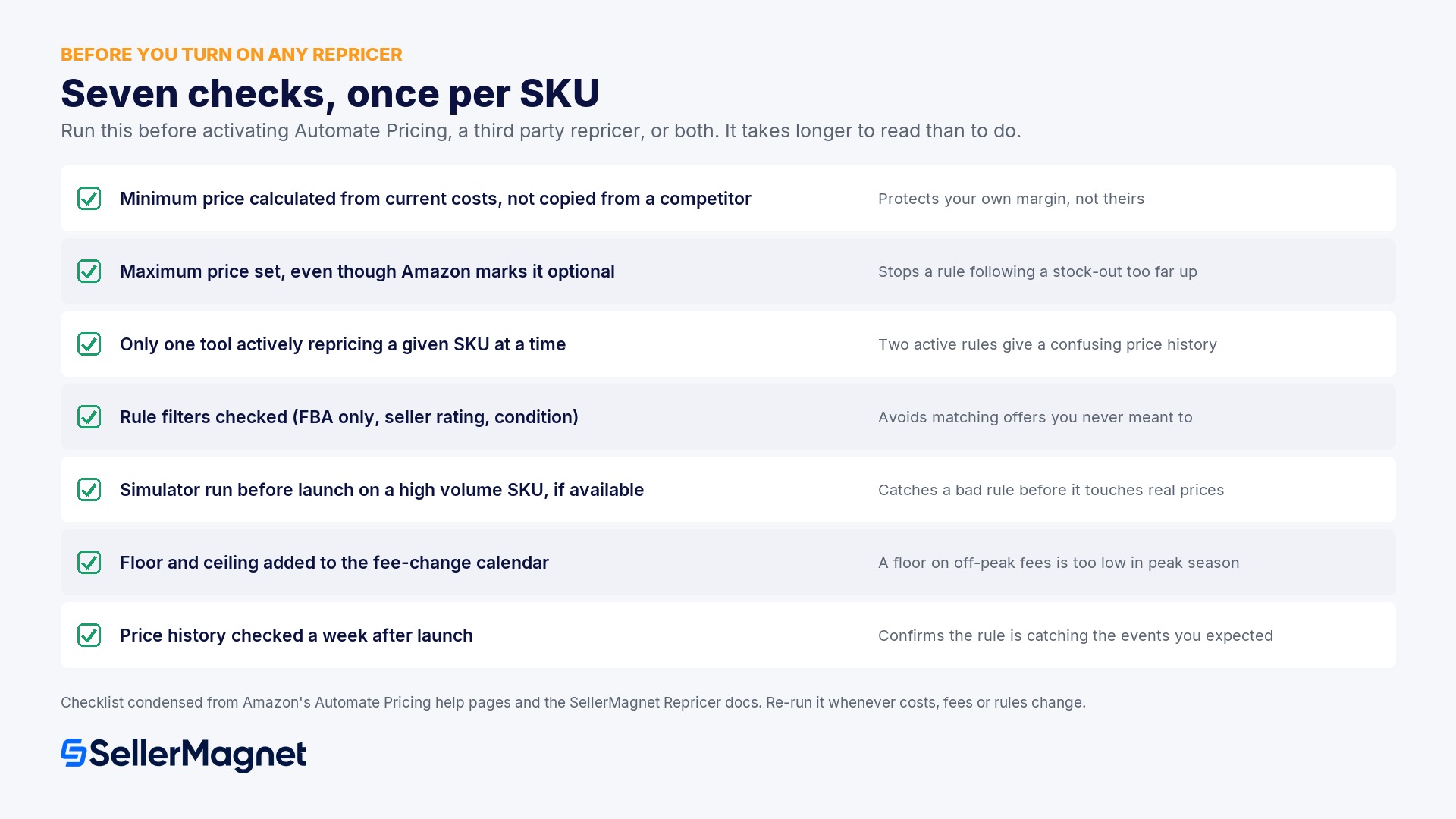
Setup checklist before you turn on any repricer
| Check | Why it matters |
|---|---|
| Minimum price calculated from current landed cost, FBA fee and the profit you need, not copied from a competitor's price | A floor copied from the lowest offer on the listing has nothing to do with your own margin |
| Maximum price set, even though Amazon marks it optional | Without one, a rule can follow a competitor's stock-out to a price your customers will not accept |
| Only one tool actively repricing a given SKU at a time | Two active rules on one SKU write a confusing price history with no added benefit |
| Rule filters checked (FBA only, seller rating band, condition) | An unfiltered rule can match against offers you never intended to compete with |
| A simulator run, if your tool has one, before the rule goes live on a high volume SKU | Automate Pricing has no preview; a third party simulator catches a bad rule before it touches real prices |
| Floor and ceiling added to the recurring fee-change calendar (peak season, annual fee updates) | A floor calculated on off-peak fees is too low the moment peak fulfilment fees apply |
| Price history checked a week after launch, for both the SKU and the rule | Confirms the rule is actually catching the events you expected, on either tool |
Does Amazon Seller Central have a free repricer?
What is Automate Pricing on Amazon?
How long does it take Automate Pricing to change a price?
Can Automate Pricing cause my listing to go inactive?
Is a third party repricer worth it if Automate Pricing is free?
Can I run Automate Pricing and a third party repricer at the same time?
Does Automate Pricing work for FBM sellers?
What is the difference between a competitive rule and a sales based rule?
Stop Juggling Tools. SellerMagnet Combines Everything You Need.
Join a smarter way to manage your Amazon store.

Recommended Articles
Amazon 1099-K Tax Reporting 2026: What Actually Applies
The real 2026 Form 1099-K threshold after the One Big Beautiful Bill Act reverted it to $20,000 and 200 transactions, how Amazon calculates unadjusted gross sales, state exceptions and backup withholding.
Amazon Easy Ship Managed Returns 2026
Amazon now manages customer returns and post-order service for eligible domestic Easy Ship orders on Amazon.nl and Amazon.pl, from 29 Sep 2026. What changed and the unpublished eligibility limit.
Amazon Seller Central User Permissions 2026: Add Your Team Safely
How Seller Central's 3 user types (primary user, employee, authorized partner) work, the 4 roles worth setting up for a small team, and why sharing one login costs more than it saves.

Amazon Business Pallet Delivery 2026: Eligibility and Setup
How Amazon Business Pallet Delivery works for FBM sellers: the exact eligibility rule (quantity, weight OR size, commercial address) and how to enable it in Shipping Settings.
Amazon Listing Suppressed 2026
Why Amazon suppresses a listing from search and browse in 2026, the rules for Amazon.com and the European stores, and the exact fix workflow.

UK Seller Fulfilled Prime 2026: New Tier Rules
What changes for UK Seller Fulfilled Prime on 30 October 2026: tier-level scoring for standard-size, oversize and extra-large, the 2 new metrics, and the grace period until 6 January 2027.
