Amazon Premium A+ Content 2026: What It Actually Takes
R
RenéFreelance Amazon Editor
|
14 min read
A+ Content is the free module system Amazon gives Brand Registry sellers to replace a plain product description with images, text placements, comparison charts, video and interactive hotspots on the detail page, and Amazon's own numbers claim Basic A+ Content can lift sales by up to 8%, with a well-built Premium A+ layout reaching up to 20%. For most of the time Premium A+ has existed, reaching it meant clearing a specific bar: a published Brand Story on every ASIN the brand owns, plus at least 5 Basic A+ projects approved and published in the trailing 12 months. Sellers now report a change inside their own A+ Content Manager: a banner stating Premium A+ is available to every Seller Central Brand Owner, no project history required. This guide separates what Amazon's own A+ Content page states today from what sellers are reporting about the rollout, walks through the module library Premium actually unlocks, and works through the sales-lift math on a real catalog so the 8% versus 20% numbers mean something concrete instead of a marketing line.
Amazon Premium A+ Content is the richer tier of Amazon's free brand content system, adding larger images, video, interactive hotspots, carousels, Q&A modules and shoppable content on top of Basic A+. Amazon's published eligibility route requires a Brand Story on every owned ASIN plus 5 approved A+ projects in the trailing 12 months, though sellers are now reporting broader default access inside A+ Content Manager.
A+ Content's 3 tiers, and what each one actually adds
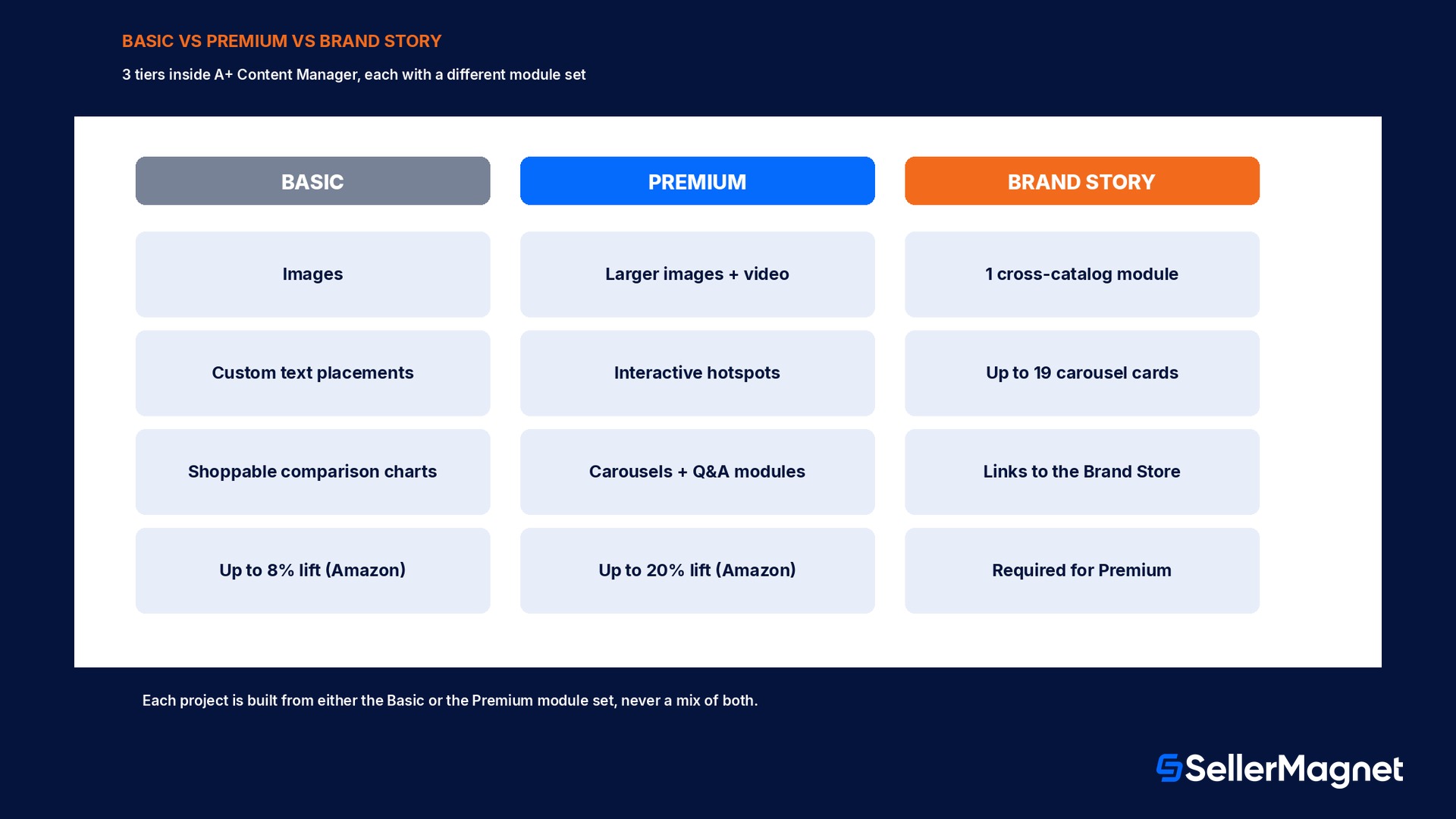
Amazon's own A+ Content page splits the system into 3 distinct tiers rather than one feature with settings. Basic A+ Content elevates a product description with images, customized text placements, and shoppable product-comparison charts, and is the tier every eligible brand can use the moment it meets the base requirement. Premium A+ Content, sometimes called A++ in seller shorthand, builds on top of Basic with larger images, video, interactive hotspots that let a shopper hone in on a specific product feature, clickable image or video carousels, Q&A modules, and shoppable content woven directly into the layout. Brand Story is a separate, third module that sits above the regular A+ block on every product page it is attached to: a single horizontal carousel of up to 19 pre-formatted cards telling the brand's origin, values and catalog story, built once and reused across every ASIN, with the explicit job of driving traffic back to the brand's own Amazon Brand Store. A seller can run Basic and Premium content side by side across different ASINs, but Amazon's documentation is specific that each individual A+ Content project is built using either Basic or Premium modules, never a mix within the same project.
Tier
What it adds
Reported sales lift
Basic A+ Content
Images, custom text placements, shoppable comparison charts
Up to 20% with a well-implemented layout, per Amazon's own A+ Content page
Brand Story
1 cross-catalog carousel module, up to 19 cards, links to the Brand Store
Not separately quantified by Amazon; required input for Premium eligibility
Who can use A+ Content at all, and the extra bar for Premium
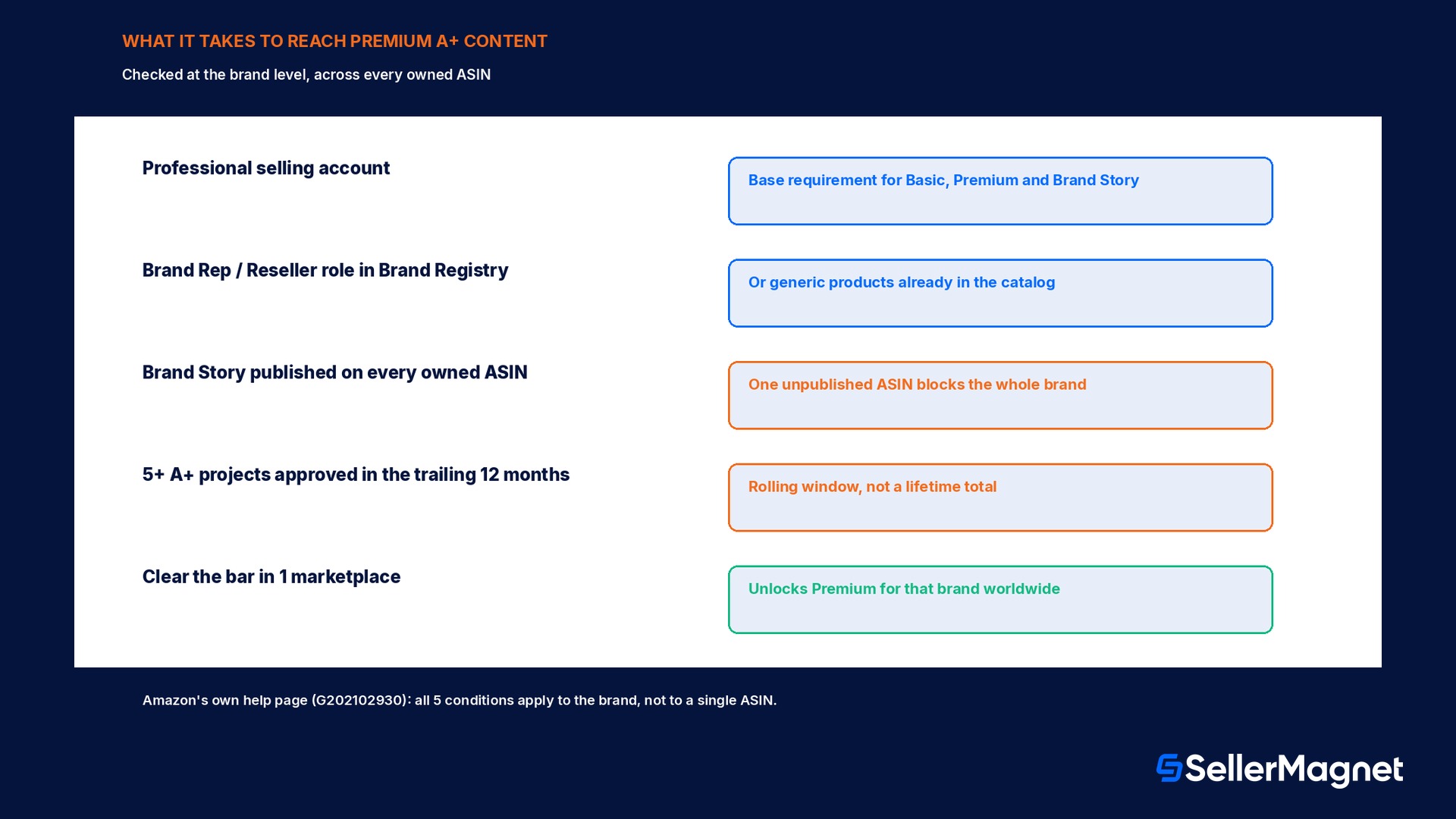
The base requirement to use A+ Content in any tier is narrower than many sellers assume: Amazon's A+ Content page states a seller needs a Professional selling account, and either a Brand Representative or Reseller role assigned to a brand enrolled in Brand Registry, or generic products already in the catalog. That base requirement gets a seller to Basic A+ Content. Reaching Premium specifically has its own published bar, laid out on Amazon's A+ Content help page (G202102930): first, the brand must have already published A+ Brand Story to every ASIN it owns, meaning every ASIN inside that brand's A+ Content Manager carries a published Brand Story, visible on the live detail page under the 'From the Brand' field. Second, the brand needs at least 5 A+ Content project submissions that were approved and published within the past 12 months, a rolling window Amazon checks against the project history inside A+ Content Manager, not a one-time lifetime total. Both conditions are checked at the brand level across every ASIN the brand owns, not per individual ASIN, so a brand with 40 ASINs needs a Brand Story on all 40, not just the handful the seller most wants Premium on. Once both criteria are met in any single marketplace a seller sells and publishes A+ Content in, Premium access extends to that brand worldwide, across every marketplace, without a separate per-country check.
Requirement
Applies to
How it is checked
Professional selling account
Basic, Premium and Brand Story
Account-level selling plan
Brand Representative or Reseller role in Brand Registry (or generic products)
Basic, Premium and Brand Story
Role assignment per brand
Brand Story published on every owned ASIN
Premium only
Checked across the whole brand's A+ Content Manager catalog, not per ASIN
5+ A+ projects approved and published in the trailing 12 months
Premium only
Rolling 12-month project history, brand-level
Meeting both Premium criteria in 1 marketplace
Premium worldwide
Unlocks automatically; a banner confirms it, nothing to submit
What sellers are reporting about a broader rollout, and why it is worth checking rather than assuming
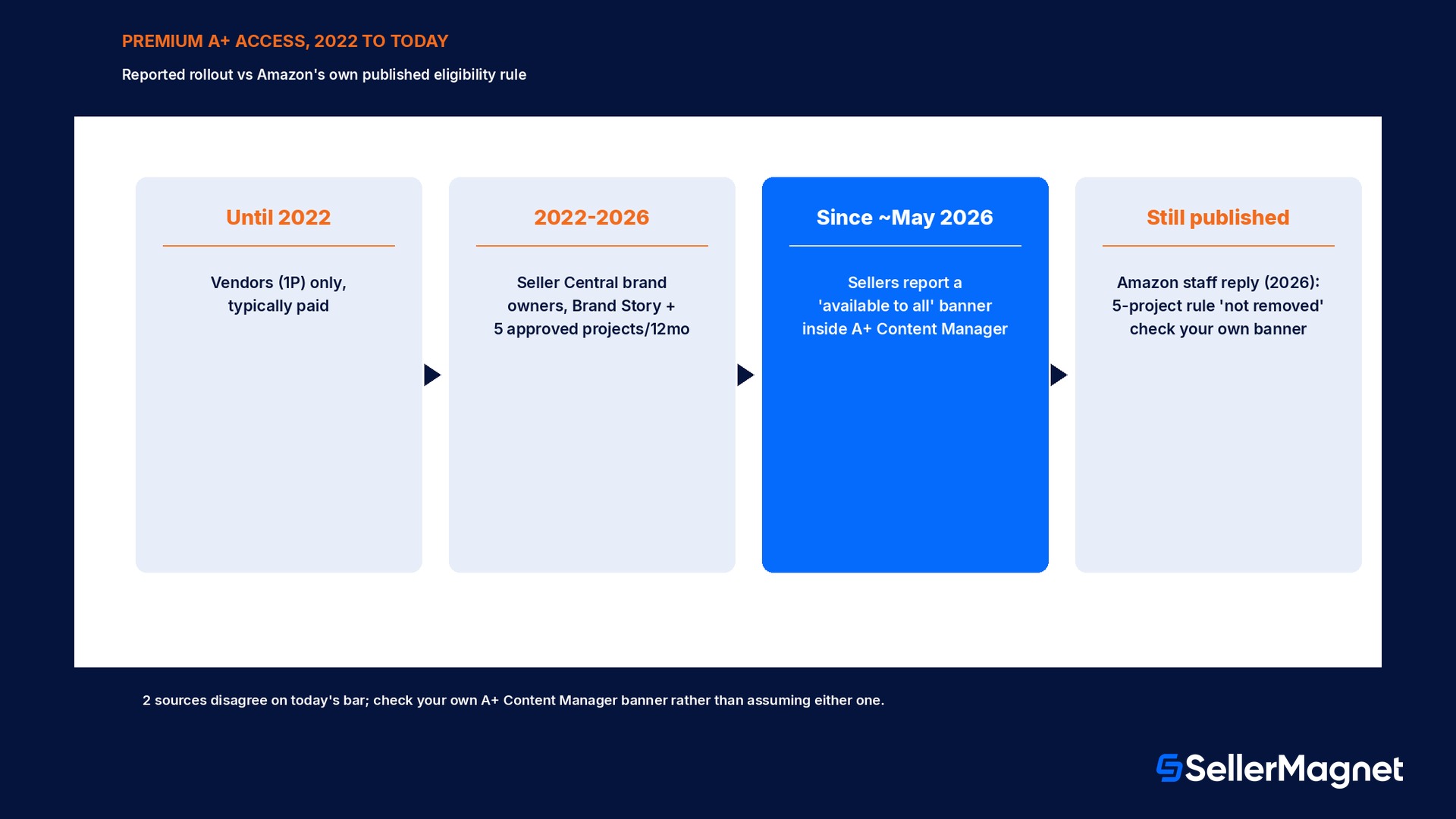
Amazon's own help page for A+ Content eligibility, as summarized by sellers reading a 2026 Seller Forums staff reply, is specific: an Amazon staff account (TaylorR_Amazon) told a seller directly that 'Premium A+ Content is available to brand-registered sellers, but it's not immediate access just from being brand registered,' and confirmed in the same reply that the 5-approved-Basic-A+-submissions requirement 'has not been removed.' Separately, seller-facing agency write-ups report that since May 2026, A+ Content Manager itself has started showing a banner reading 'Premium A+ is now available to all Seller Central Brand Owners' for brands that have not necessarily cleared the published 5-project, all-ASINs-Brand-Story bar. Those 2 accounts do not fully agree, and this guide is not treating either one as the final word: the staff forum reply is the more authoritative source because it quotes Amazon's own written criteria directly, while the broader-access banner is a rollout sellers are reporting inside their own accounts, not a line from Amazon's published help page. The practical read for a seller planning content budget: check your own A+ Content Manager for the banner before assuming either the old 5-project bar or a no-bar default applies to your brand, since Amazon has historically rolled Premium access out gradually and by region rather than switching every account over on the same day.
The module library Premium actually unlocks
What separates Premium from Basic in practice is the module library available inside A+ Content Manager when building a project, not a vague 'more features' label. Premium-tier modules include a Premium Full Image module for a single large hero image, a Premium Background Image with Text module for a benefit statement layered over a lifestyle scene, Premium Hotspots for clickable points placed directly on a product photo that reveal materials, parts or functions on tap, a Premium Navigation Carousel letting a shopper tab through 2 to 5 panels of use cases or variants, a Premium Simple Image Carousel for multiple scenes without added text, a Premium Full Video module and a Premium Video with Text module for product demonstrations, a Premium Video Image Carousel mixing video and image panels, a Premium Q&A module answering 2 to 5 common pre-purchase objections, Premium Comparison Tables for a brand's own product line shown side by side, a Premium Text module for detail copy up to 5,000 characters, and a Premium Technical Specifications module for structured dimension and material rows. None of these modules exist in the Basic tier, which is limited to standard images, text placements and a comparison chart; a seller moving from Basic to Premium is not editing an existing project; they are building a new project from a materially larger module set.
Premium module
What it is for
Premium Full Image / Background Image with Text
Hero image or a benefit claim over a lifestyle scene
Premium Hotspots
Clickable points on the product photo revealing materials, parts or functions
2 to 5 tabbed panels of use cases, variants or scenes
Premium Full Video / Video with Text / Video Image Carousel
Product demonstration video, alone or paired with explanatory text
Premium Q&A
2 to 5 pre-purchase objections answered directly on the page
Premium Comparison Tables
The brand's own product line shown side by side
Premium Text / Technical Specifications
Longer detail copy and structured spec rows
Worked example: what an 8% versus a 20% lift is worth on a real catalog
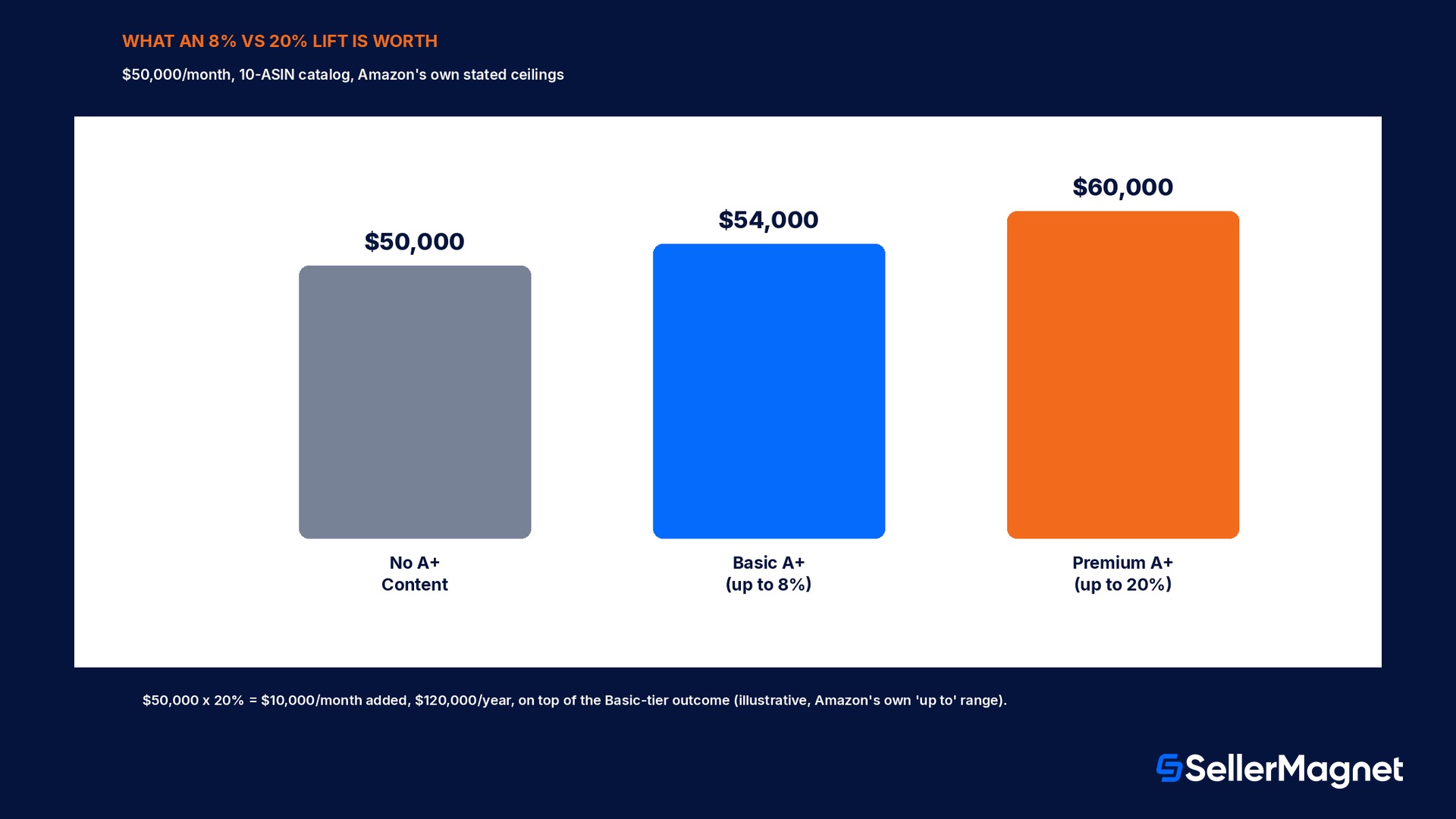
Take a Brand Registry seller with 10 ASINs that together generate $50,000 in monthly Amazon sales before any A+ Content is published, a realistic mid-size catalog. Amazon's own A+ Content page states Basic A+ Content can increase sales by up to 8%: applied to this catalog, that is $50,000 multiplied by 8%, or $4,000 in additional monthly sales once Basic A+ is live across the catalog, assuming the top of Amazon's stated range. A well-implemented Premium A+ layout, per the same Amazon page, can reach up to 20%: $50,000 multiplied by 20% is $10,000 in additional monthly sales, $6,000 a month more than the Basic-tier outcome on the same catalog. Over a full year, that gap is $48,000 in sales uplift (Basic) versus $120,000 (Premium), a $72,000 annual difference that makes clearing the Premium eligibility bar, or confirming the broader-rollout banner, directly worth the content production cost for a catalog this size. These figures are Amazon's own stated ceiling ('up to'), not a guaranteed outcome for every brand or category, and the real lift on any specific catalog depends on how competitive the category is and how well each module is actually built, which is why the worked numbers here use Amazon's own published range rather than inventing a different one.
No A+ Content
Basic A+ (up to 8%)
Premium A+ (up to 20%)
Monthly sales, 10-ASIN catalog
$50,000
$54,000
$60,000
Added monthly sales
$0
$4,000
$10,000
Added annual sales
$0
$48,000
$120,000
These are Amazon's own published ceilings, not a guaranteed result
Amazon's A+ Content page states these figures as 'up to' numbers for Basic and 'well-implemented' Premium respectively. Treat the worked table as what the stated ceiling is worth in dollars on a specific catalog size, not as a forecast for any single brand, and track your own before/after sales after publishing to see the real number.
How to check your own eligibility and start building
Checking Premium eligibility starts inside A+ Content Manager in Seller Central, not on a separate application form, because Amazon's own help page states there is nothing to apply for once the criteria are met: a banner notification confirms access directly inside the tool. A seller unsure of their current status should open A+ Content Manager and look for that banner first, since it is the most direct signal of which rollout state their brand is actually in. A brand still working toward the published bar should first confirm every owned ASIN carries a published Brand Story, visible on the live detail page under the 'From the Brand' section, since a single unpublished ASIN anywhere in the catalog keeps the whole brand below the bar regardless of how many Premium-eligible projects exist elsewhere. From there, the project-count requirement is built by publishing additional Basic A+ projects across different ASINs rather than repeatedly editing one project, since Amazon's criteria count submissions, and a brand that already clears both requirements but has not seen the Premium banner should check again after a few days, since sellers report the unlock is not always instantaneous even once the published bar is met.
Mistakes that waste a Premium A+ content budget
Building a Premium layout before confirming access. Premium modules are simply unavailable inside A+ Content Manager until the brand clears the eligibility bar or the broader-rollout banner appears; check the tool first, not the published rule in isolation.
Treating Brand Story as optional. It is a hard requirement for Premium eligibility on every owned ASIN, not a nice-to-have; one ASIN without a published Brand Story blocks the whole brand.
Counting lifetime project history instead of the trailing 12 months. Amazon's published criterion is a rolling 12-month window; a brand that published 5 strong projects 18 months ago and nothing since no longer meets the bar under that reading.
Assuming a per-ASIN check. Eligibility is checked at the brand level, so a brand cannot selectively qualify a handful of ASINs for Premium while leaving others on Basic because of the eligibility math; a brand either clears the bar or it does not.
Quoting the 8%/20% figures as a guarantee. They are Amazon's own stated ceilings ('up to'), not an average or a promise; measure the actual before/after sales change on your own catalog instead of assuming either number applies.
Mixing Basic and Premium modules in one project. Amazon's documentation builds each project from either the Basic or the Premium module set; a project is one or the other, never a combination.
Ignoring the worldwide-unlock rule. Meeting the bar in one marketplace unlocks Premium for that brand everywhere; a seller rebuilding eligibility separately per marketplace is solving a problem Amazon already solved.
Where SellerMagnet fits around an A+ Content decision
A+ Content itself, its tiers, its eligibility rule and its stated sales-lift figures are run entirely inside Amazon's own Seller Central tools; SellerMagnet builds no part of A+ Content and cannot change a brand's eligibility status. What matters before spending a content budget on Premium is whether the catalog's current listings are even ready for it: Listing Optimizer checks the underlying title, bullet and attribute quality that Premium modules sit on top of, since a strong Premium layout on a listing with weak core attributes still underperforms a listing where both are solid.
After publishing Basic or Premium A+ Content, Analytics Dashboard is the practical way to check the real sales change against the catalog's own pre-publish baseline, rather than assuming Amazon's stated 8% or 20% ceiling applied to a specific brand. A brand already running a Brand Store has a natural next step once Brand Story is published on every ASIN: the Brand Story carousel's whole purpose is routing that same traffic into the Store.
Checklist before building a Premium A+ Content project
How to confirm Premium A+ Content eligibility before building a project
Open A+ Content Manager and look for the Premium banner - This is the most direct signal of your brand's current access, ahead of any published rule.
Confirm every owned ASIN carries a published Brand Story - Check the live detail page 'From the Brand' field on each ASIN; one gap blocks the whole brand.
Count approved, published A+ projects in the trailing 12 months - You need at least 5 within that rolling window, not a lifetime total.
Check access in your home marketplace first - Clearing the bar in one marketplace unlocks Premium worldwide for that brand.
Audit core listing quality before building Premium modules - A strong Premium layout still underperforms on a listing with weak titles, bullets or attributes.
Publish and measure the real sales change against your own baseline - Treat Amazon's 8%/20% figures as stated ceilings, not a guarantee for your specific catalog.
What is the actual sales lift from A+ Content?
Amazon's own A+ Content page states Basic A+ Content can increase sales by up to 8%, and a well-implemented Premium A+ layout by up to 20%. Both are stated ceilings, not guaranteed outcomes, so measure the real change on your own catalog.
What does it take to qualify for Premium A+ Content?
Amazon's published criteria require a Brand Story published on every ASIN the brand owns, plus at least 5 A+ Content projects approved and published within the trailing 12 months, checked at the brand level across the whole catalog.
Is Premium A+ Content now free for every brand owner?
Sellers are reporting a broader-access banner inside A+ Content Manager since around May 2026, but an Amazon staff forum reply in 2026 also confirmed the published 5-project requirement has not been removed. Check your own account's banner rather than assuming either state applies.
Do I need Brand Registry to use any A+ Content?
To use A+ Content at all you need a Professional selling account and either a Brand Representative or Reseller role on a brand enrolled in Brand Registry, or generic products already in your catalog.
Does meeting the Premium bar in one country unlock it everywhere?
Yes. Amazon's eligibility criteria state that meeting the requirements in any one marketplace a seller sells and publishes A+ Content in unlocks Premium access for that brand worldwide.
Can one project mix Basic and Premium modules?
No. Each individual A+ Content project is built using either the Basic or the Premium module set, never a mix of both within the same project.
Stop Juggling Tools. SellerMagnet Combines Everything You Need.