FBA Returnless Resolutions is usually described as a way to stop paying for returns. Amazon's own help page describes something narrower and more interesting. A returnless resolution is still tracked as a customer return, it still counts toward the ASIN's average return rate and toward its high-return-rate threshold, and it forfeits any inventory reimbursement you might otherwise have had. What it removes is the cost of getting the unit back, and the high-return-rate fee on that particular return. It is a trade, not an exit.
FBA Returnless Resolutions is an Amazon programme that refunds a customer and lets them keep the item instead of shipping it back to a fulfilment centre. Sellers in the US store enrol in Seller Central, either by setting a maximum item price between one and seventy-five dollars or by uploading a list of ASINs. The return still counts toward the product's return rate, the seller receives no inventory reimbursement for it, and there are no fees for the programme itself.
What does enrolling actually change?
Where the unit goes, and who pays to move it. Amazon's FBA Returnless Resolutions page sets out the default first: "By default, buyers are required to return your FBA inventory to Amazon's fulfillment centers, where it's evaluated for sellability." Enrolling changes that outcome for qualifying returns. Amazon’s November 2025 announcement puts it this way: "you grant customers a refund and allow them to keep the item, saving you the fees associated with high return rates, customer returns processing, storage, and removals." The refund happens either way. What stops is the journey back.
The return does not disappear from your metrics
Amazon says this twice on the same page, which suggests it expects the opposite assumption. In the body: "Returns that result in a returnless resolution are tracked as a customer return and will count toward the ASIN's average return rate." And in the FAQ, answering the question directly: "Do returns associated with FBA Returnless Resolutions affect my average return rate and high return rate? Yes. A returnless resolution is an outcome of a customer return and will still count toward the ASIN's average return rate and high return rate threshold." If your reason for enrolling is to protect a return-rate number, the programme does not do that.
So what does it actually cost?
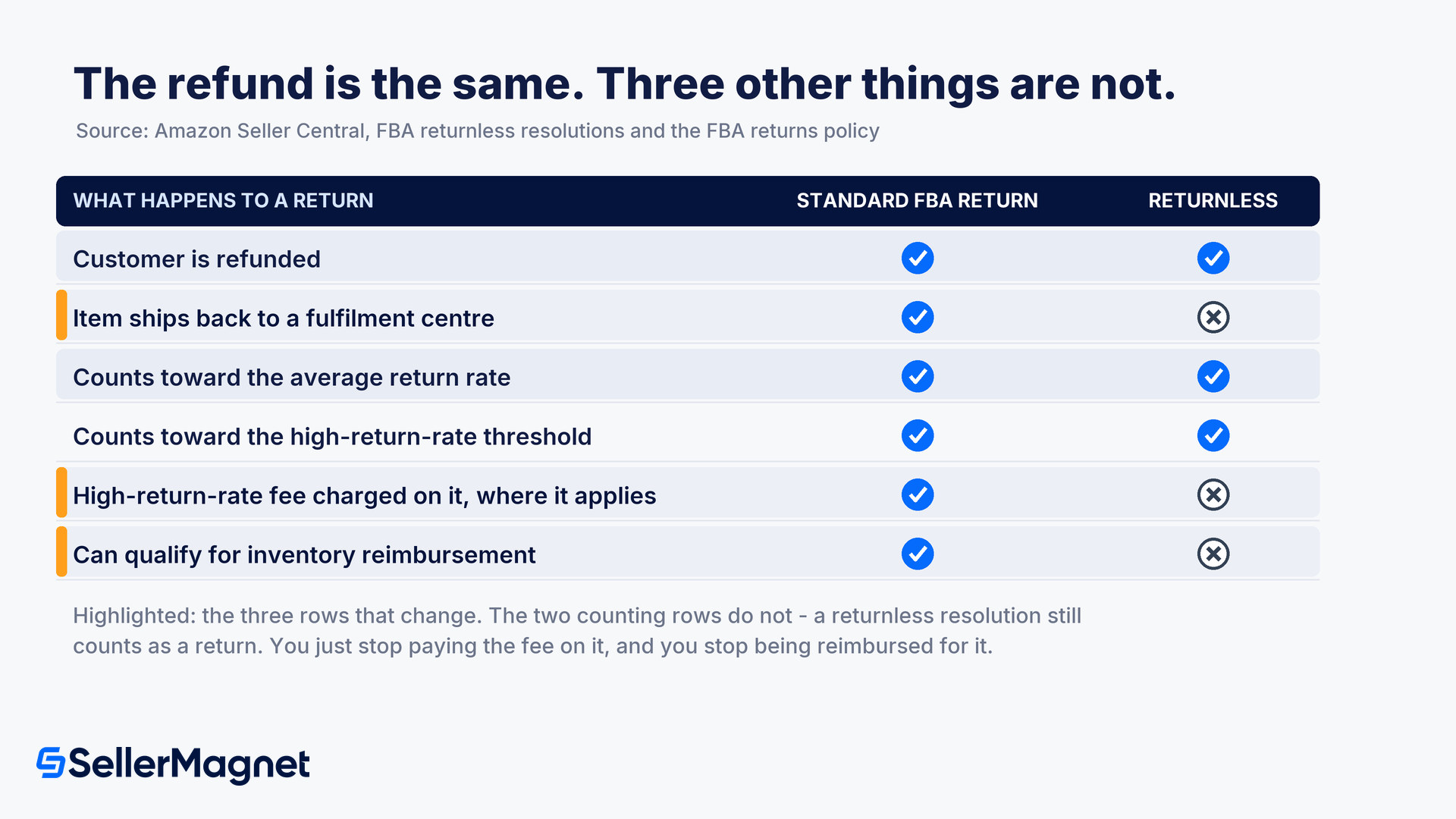
One certain loss and one conditional saving. The certain loss is reimbursement, and Amazon puts it under a heading called key trade-offs: "When a customer keeps an item under a returnless resolution, you do not receive any reimbursement. This differs from standard FBA returns, where you may receive reimbursement if the item is damaged." The FAQ repeats it without hedging: a return offered this way "does not qualify for reimbursement". The conditional saving is the recovery cost you avoid, plus one specific fee. The table below sets the two outcomes side by side. What reimbursement still covers elsewhere is a separate question, and our guide to the 2025 FBA reimbursement changes sets out what moved.
What happens to a return
Standard FBA return
Returnless resolution
Customer is refunded
Yes
Yes
Item ships back to a fulfilment centre
Yes
No
Counts toward the ASIN's average return rate
Yes
Yes
Counts toward the high-return-rate threshold
Yes
Yes
High-return-rate fee charged on it
Yes, where it applies
No
Eligible for inventory reimbursement
Possible, if the item is damaged
No
Referral fee refunded, less administration fee
Yes
Yes
Reading the two threshold rows against the fee row is the part worth slowing down for. The return still pushes the ASIN toward the high-return-rate threshold, which is the threshold the fee is attached to, while the returnless return itself escapes the charge. Amazon states the exemption plainly: "The high return rate fee is not charged for returns that are successfully given to customers through FBA Returnless Resolutions." You are not buying your way out of the metric. You are declining to pay for recovery on a unit you were unlikely to resell.
Enrolling is permission, not a guarantee
Amazon is explicit that the setting does not decide individual cases: "Enrollment does not make every return eligible. Each return is evaluated individually against per-item eligibility criteria. If a return does not meet these criteria, the customer will be required to return the item to Amazon's fulfillment center as normal." The published criteria are an average selling price at or below $75, a customer with "no history of program abuse", a seller "in good standing", and exclusions for "dangerous goods, recalled products, gift cards, heavy/bulky items, or non-returnable items". Amazon adds that it maintains "restrictions on customer participation", so the buyer has to qualify too.
How do you choose which products are in?
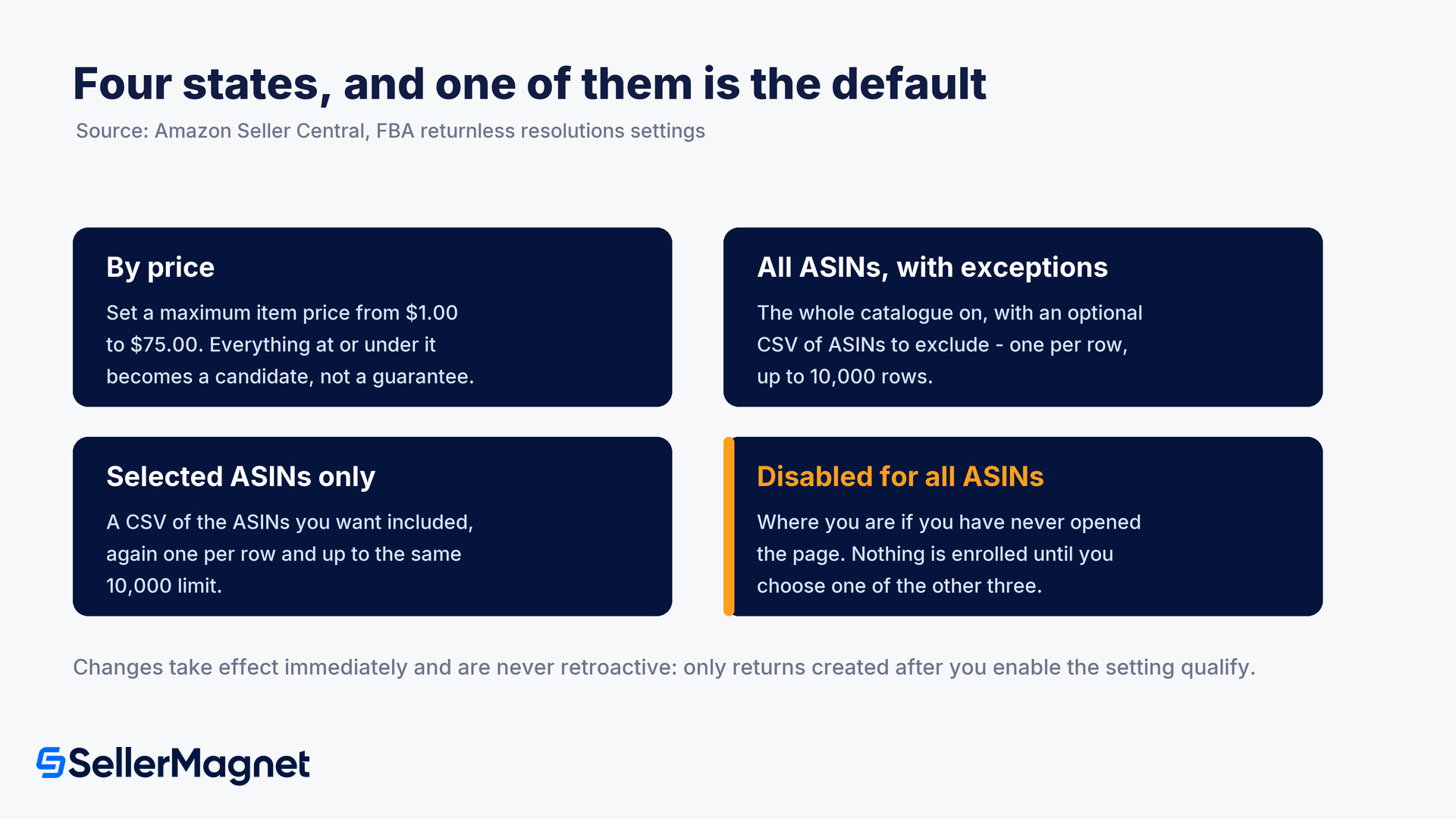
Four settings, and the choice between them is really a choice about how much bookkeeping you want. They sit under Fulfillment by Amazon in the settings menu, in the FBA customer returns settings section, behind an Edit link next to Returnless Resolutions. The price option is the one Amazon added for the US store in a November 2025 announcement, which invited sellers to "set a price between $1.00 and $75.00 to control how customers are offered a returnless option" and to "set different price thresholds based on your return costs".
By price. Enter a maximum item price between $1.00 and $75.00. Everything at or under it becomes eligible, subject to the per-item criteria.
All ASINs, with exceptions. Switch the whole catalogue on and optionally upload a CSV of ASINs to exclude, "one ASIN per row", up to 10,000 rows.
Selected ASINs only. Upload a CSV of the ASINs you want included, again one per row and up to 10,000.
Disable for all ASINs, which is the state you are in if you have never opened the page.
The price route is the cheapest to maintain and the bluntest. It sets one number against a catalogue whose return economics vary by product. What actually matters is the gap between the item's value and the cost of getting it back, and that gap turns on the condition a unit comes back in as much as on its price. A $40 accessory that arrives sealed and resells at full price and a $40 item that arrives opened and unsellable carry the same price and completely different economics. The ASIN routes cost you a CSV and let you draw that line where it belongs, and Amazon warns: "Amazon is not responsible for any errors in CSV files that were uploaded by you." Changes take effect immediately but are never retroactive: "Only those customer returns created after you enable the setting are eligible for returnless resolutions."
What can you actually see afterwards?
Two status strings on one page, and no export. Amazon directs you to the FBA Returns Page and tells you what to look for in the Return status column: "Complete - Return not expected" where a returnless resolution was offered, and "Complete - Customer granted returnless resolution" once the return window has passed and the customer has accepted it. Then it adds the limitation in a note: "There are currently no downloadable reports for FBA Returnless Resolutions. A downloadable report may be available in the future as the program expands."
That reporting gap matters more than it might seem, because the decision you are making is per-SKU economics and the evidence arrives as two labels in a returns list. You cannot pull the data and compare, per ASIN, the units you stopped recovering against the reimbursements you gave up. Amazon is not going to hand you that comparison. The customer side is quieter still: "Customers are not made aware of which items are offered a Returnless Resolution", so the offer appears during the return process and nowhere beforehand.
FBA and seller-fulfilled are two separate switches
Amazon answers this directly: "Both programs allow you to automatically refund the customer while allowing the customer to keep the item. The difference is that you must enroll in these separately. Your enrollment in FBA Returnless Resolutions only applies to your FBA returns, and your enrollment in Returnless Resolutions for Seller-Fulfilled Returns only applies to your Seller-Fulfilled returns." If you run both fulfilment types, switching one on does nothing for the other, and the seller-fulfilled settings live in a different place with their own rules.
How to decide whether to switch it on
Work out your recovery cost per unit, not your price - Amazon frames the programme as most useful "when return shipping and processing costs exceed the item's value". That is a comparison between two numbers you have to supply: what it costs to get a unit back into sellable stock, and what the unit is worth once it is there. Price is a poor stand-in for either, because size and weight drive the first and condition drives the second.
Price the reimbursement you are giving up - Standard FBA returns can be reimbursed where the item comes back damaged. Returnless returns never are. Look at how often your returns on a given ASIN actually end in a reimbursement today, because that rate is the thing you are trading away, and on products that come back intact and resellable it may be worth more than the recovery cost you save.
Decide between the price rule and an ASIN list - A single maximum item price between $1.00 and $75.00 takes a minute and applies one judgement to everything. A CSV of up to 10,000 ASINs takes longer and lets you separate the items that come back resellable from the ones that do not, at the same price. Pick the ASIN route if your catalogue mixes return outcomes, which most do.
Check the exclusions before you count the savings - Dangerous goods, recalled products, gift cards, heavy or bulky items and non-returnable items are excluded, and anything with an average selling price above $75 is out regardless of your setting. Work out what share of your returns is actually eligible before assuming a catalogue-wide saving.
Set a review date, because there is no report - There are no downloadable reports, and the change is not retroactive, so the only clean comparison is before and after. Note the date you switched it on, then compare returns cost and reimbursement income per ASIN across equivalent periods either side of it.
The number that decides it, per ASIN
Take the cost of bringing one returned unit back into sellable stock, including the returns processing fee where it applies, and subtract the value you actually recover from that unit once graded. Then compare it with what you lose by never being reimbursed on the damaged ones. Where the first number is larger, returnless is the cheaper outcome. Where your returns mostly come back clean and resell at close to full price, you are paying for a convenience you did not need.
Because the saving and the loss sit on different lines and neither is exported, this is a decision that only becomes visible in per-product numbers. Returns cost, the returns processing fee where it applies, reimbursements and net margin have to sit against the same ASIN before the trade reads one way or the other. SellerMagnet's profit analytics keep fees, returns and margin per product in one view, which is where a change like this shows up or does not.
Does a returnless refund still count as a return?
Yes. Amazon states that it is tracked as a customer return and counts toward the ASIN's average return rate and its high-return-rate threshold.
Am I reimbursed for an item the customer keeps?
No. Amazon says a return in which a customer is offered a returnless resolution does not qualify for reimbursement, which differs from a standard FBA return where a damaged item may be reimbursed.
What does FBA Returnless Resolutions cost?
There are no programme fees. Your referral fee refund also stays the same, less the administration fee, exactly as on a normal return.
Which items are excluded?
Dangerous goods, recalled products, gift cards, heavy or bulky items and non-returnable items, plus anything with an average selling price above $75.
Will every return of an enrolled ASIN be returnless?
No. Each return is evaluated individually, and the customer must also qualify. Where the criteria are not met the item is returned to a fulfilment centre as normal.
Does enrolling cover my seller-fulfilled orders too?
No. Returnless Resolutions for Seller-Fulfilled Returns is a separate programme with a separate enrolment, and the FBA setting applies only to FBA returns.
Stop Juggling Tools. SellerMagnet Combines Everything You Need.