Amazon FBA Profit Calculator: How to Find True Margin per ASIN
R
RenéFreelance Amazon Editor
|
11 min read
Last updated: Oct 18, 2026
An Amazon FBA profit calculator finds true margin, not gross margin: the share of each sale price you actually keep after Amazon's referral fee, the FBA fulfillment fee, a storage allocation, your per-unit advertising spend, and your landed product cost. Most sellers track only the first and last of those (referral fee and product cost) and call the result "margin." That number is reliably too high, often by double digits of margin, because it skips two real, recurring costs that never show up on the Amazon order page itself: storage and advertising.
This guide builds the full formula line by line, names the US marketplace fee for each line (these numbers do not transfer to EU/UK), and walks one real ASIN through the math from a $24.99 sale price down to a printed, re-checkable profit number.
An Amazon FBA profit calculator finds true margin by subtracting five real costs from the sale price: the referral fee, the FBA fulfillment fee, a storage cost allocated per unit, advertising spend per unit, and landed cost (product, freight and prep). Divide the result by the sale price for true margin as a percentage. US marketplace fee schedules differ from EU/UK, so always confirm the fee schedule for the marketplace you sell on.
What is "true margin" on Amazon FBA, and why does it differ from gross margin?
True margin is net profit per unit divided by sale price, after every real cost of selling that unit on Amazon, not just the cost of making it. Gross margin (sale price minus COGS, or sale price minus COGS and referral fee) ignores the FBA fulfillment fee, the monthly storage charge the unit accrues while it sits in a fulfillment center, and the advertising spend it took to get that sale. Those three costs are real money leaving your bank account every month; a margin number that excludes them will tell you a product is healthy right up until the point it isn't.
What exactly does an Amazon FBA profit calculator need to subtract?
Five cost lines, in order, all stated here for the US marketplace:
Cost line
What it is
US rate used below
Where it comes from
Referral fee
Amazon's percentage cut of the sale price
15% (most categories), $0.30 per-item minimum
Seller Central "Selling on Amazon fee schedule"
FBA fulfillment fee
Pick, pack and ship, set by size tier, weight and price band
Large Standard, 8-12 oz, $10-$50 band: $4.20 base + 3.5% fuel surcharge
Seller Central "2026 US FBA fulfillment fee changes"
Storage cost per unit
Monthly storage fee allocated across units sold that month
$0.78 per cubic foot (Jan-Sep, under 22-week utilization ratio)
Seller Central "Monthly inventory storage fees"
PPC spend per unit
Total ad spend on the ASIN divided by units sold in the same period
Varies by campaign (use your real spend)
Your Advertising Console report
Landed cost
Product cost + inbound freight + prep/labeling, not just the supplier invoice
Varies by product (use your real cost)
Supplier invoice + freight bill
Referral fee: the percentage Amazon takes on every sale
Amazon charges a US referral fee on the total sales price (item price plus any shipping or gift-wrap charge the buyer pays), calculated per category, per Amazon's own fee schedule. Most categories sit at 15%, with a handful lower (around 8% for some low-priced goods) and a handful much higher; each category has its own per-item minimum referral fee, commonly $0.30. Check your exact category percentage on Amazon's fee schedule. Don't assume 15% for categories like Amazon Device Accessories (45%) or anything with a price-tier split (e.g., Baby Products: 8% under $10, 15% above).
FBA fulfillment fee: size tier, weight and price band
Since 15 January 2026, Amazon's US fulfillment fee depends on three things: size tier (small standard, large standard, small bulky, large bulky, extra-large), shipping weight band, and now also the item's price band (under $10, $10-$50, over $50, with a built-in discount for low-priced items). On top of the published rate, Amazon has applied a 3.5% fuel and logistics-related surcharge to US and Canada FBA fulfillment fees since 17 April 2026, calculated on the fulfillment fee itself, not on the sale price.
Storage cost per unit: an often-skipped allocation
Amazon bills monthly storage by cubic foot of space your inventory occupies, not by unit sold. The US base rate for standard-size, non-dangerous items is $0.78 per cubic foot from January through September and $2.40 per cubic foot during the October-December peak period (2026 rates). On top of the base rate, a storage-utilization surcharge kicks in once your inventory-to-sales ratio passes 22 weeks of cover: $0 extra below that line, climbing in steps as old stock piles up. To turn this into a per-unit cost, take your average monthly storage bill for the ASIN and divide by units sold that month. Skip this step and a slow-moving, bulky product can look just as profitable as a fast-moving, small one, until the storage bill arrives.
PPC spend per unit: why ad cost belongs in the unit math, not a separate report
If you run Sponsored Products on an ASIN, divide the ad spend for the period by units sold in that same period (organic plus paid sales), and treat the result as a per-unit cost exactly like the referral fee. Keeping ad spend in a separate "marketing" report and your margin calculation in another is how a seller ends up reporting a profitable SKU that is actually funded by ad spend eating the whole margin.
Landed cost: COGS + inbound freight + prep, not just the supplier invoice
Landed cost is what the unit cost you to get it, inventory-ready, inside an Amazon fulfillment center: the supplier's per-unit price, plus your share of inbound freight or duty, plus prep and labeling fees (yours or a prep center's). A seller who tracks only the supplier invoice is quietly overstating margin by whatever freight and prep actually cost per unit.
The true-margin-per-ASIN formula
True margin per ASIN (%) = (Sale price − Referral fee − FBA fulfillment fee − Storage cost per unit − PPC spend per unit − Landed cost) ÷ Sale price
Each term on the right is a dollar amount per unit. The result is a decimal; multiply by 100 for a percentage. Everything in the numerator must be real, current numbers for your product and marketplace, not a rate memorized from a previous quarter.
Worked example: computing true margin for one real ASIN
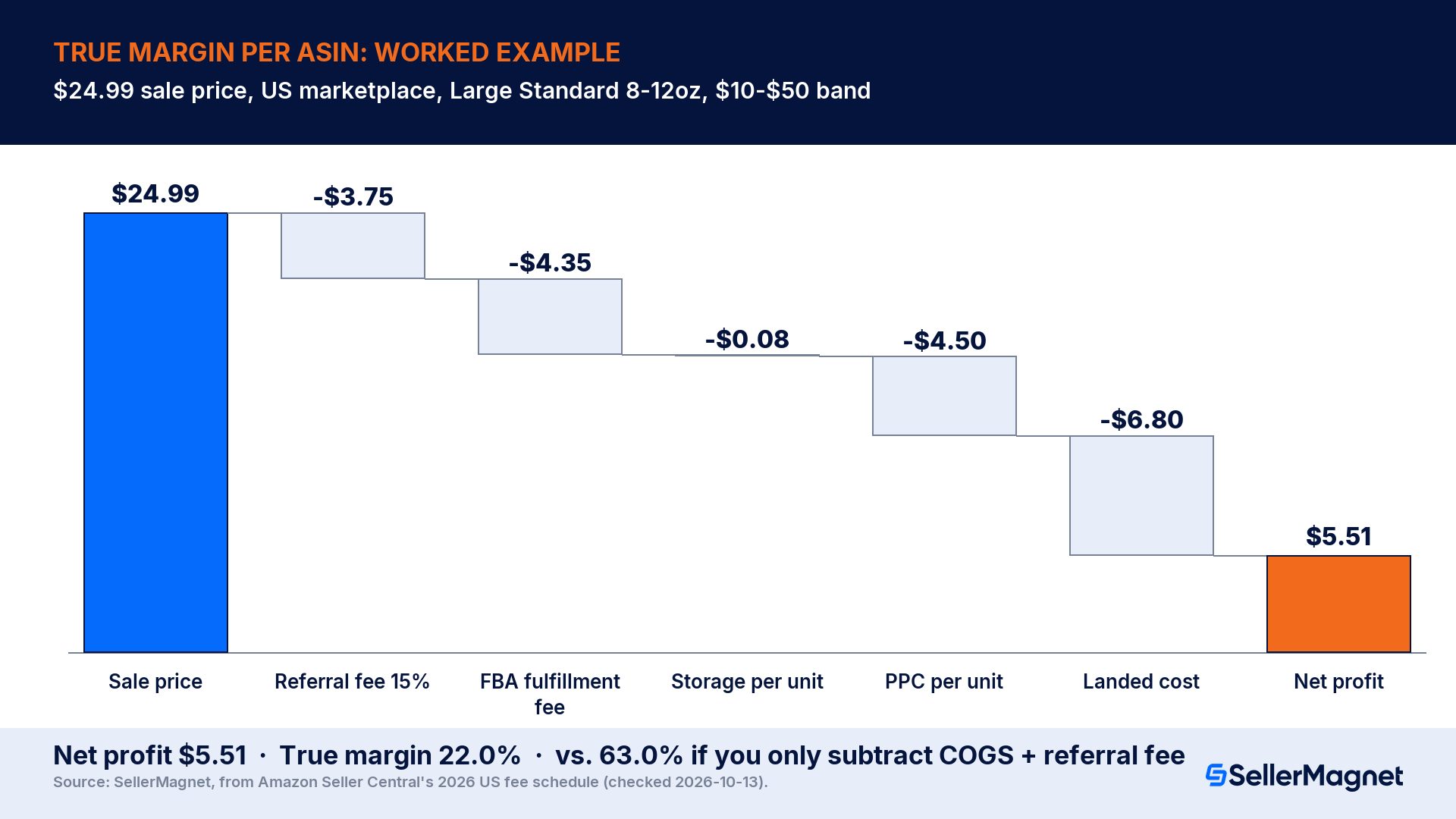
Take a mid-priced kitchen gadget selling on Amazon.com (US marketplace) for $24.99, Home & Kitchen category, Large Standard size tier, 8-12 oz shipping weight, $10-$50 price band, sold in the January-September off-peak storage window.
Line
Calculation
Amount
Referral fee
15% × $24.99 = $3.7485
$3.75
FBA fulfillment fee
$4.20 base + ($4.20 × 3.5% fuel surcharge = $0.147)
$4.35
Storage cost per unit
200 avg. units stored × 0.05 cu ft × $0.78 ÷ 100 units sold that month
$0.08
PPC spend per unit
$450 monthly ad spend ÷ 100 units sold
$4.50
Landed cost
$5.50 COGS + $1.00 inbound freight + $0.30 prep
$6.80
Total costs
3.75 + 4.35 + 0.08 + 4.50 + 6.80
$19.48
Net profit per unit
$24.99 − $19.48
$5.51
True margin
$5.51 ÷ $24.99
22.0%
Check it by working forward from the printed, rounded figures above, not from unrounded intermediate math: $24.99 − $3.75 = $21.24; − $4.35 = $16.89; − $0.08 = $16.81; − $4.50 = $12.31; − $6.80 = $5.51. That matches the net profit line exactly, and $5.51 ÷ $24.99 rounds to 22.0%, confirming the math holds using only the numbers a reader can see on the page.
Gross margin vs. true margin on the same ASIN
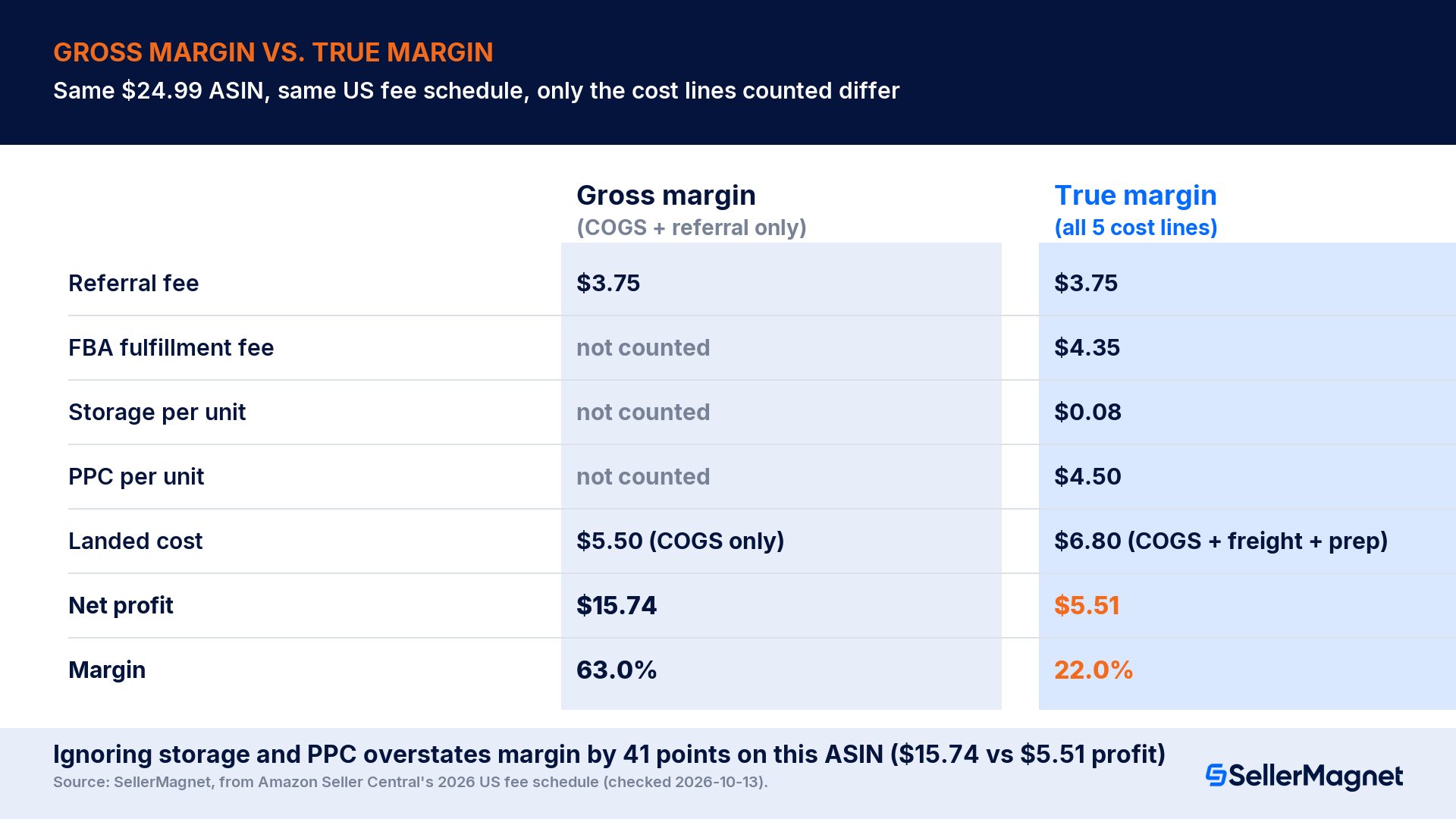
A seller who only subtracts COGS ($5.50) and the referral fee ($3.75) from $24.99 gets $15.74 profit and a 63.0% "margin", 41 points higher than the real number, because it ignores fulfillment, storage, PPC and the freight/prep portion of landed cost entirely. That gap is exactly why gross margin and true margin are different numbers, and the gap only grows for bulkier or more heavily advertised products.
Run your own ASIN's referral and FBA fulfillment fee through the free SellerMagnet Fee Calculator. It applies the current rate schedule to your ASIN so you don't have to look up a size-tier table by hand. Add your own storage, PPC and landed-cost numbers to get the true margin for that specific SKU.
What changes in Q4 (peak season) and why your floor margin shrinks
Holiday peak fulfillment fees apply from 15 October 2026 through 14 January 2027, and peak storage rates apply for October-December regardless of the fulfillment-fee calendar: standard-size storage rises from $0.78 to $2.40 per cubic foot. Using the off-peak $0.78 storage rate and non-peak fulfillment fee for a Q4 margin check will overstate profit for the whole quarter. If you sell through peak season, rerun the worked-example table above with the peak fulfillment fee for your size tier and the $2.40 storage rate before you commit ad budget or inventory for Black Friday and Cyber Monday. The 2026 FBA storage fee guide and the holiday peak fulfillment fee breakdown cover the full peak rate cards by size tier.
EU/UK sellers: don't reuse these numbers
US numbers only
Every dollar figure in this post is from Amazon's US fee schedule. Amazon's EU and UK marketplaces publish separate referral-fee percentages per category, a different FBA fulfillment fee rate card (in EUR or GBP, with different size-tier bands), and a different storage rate card, and VAT is handled separately from any of these fees. If you sell on amazon.de, amazon.co.uk or another EU/UK marketplace, pull the fee schedule for that marketplace specifically. See Amazon's selling fees overview for the fee types that apply everywhere, then check your own marketplace's rate card for the actual numbers.
How to do this for every ASIN without a spreadsheet
The five-line formula above works for one ASIN checked by hand. It gets slow fast across a full catalog, because storage and PPC per unit change every month as sales velocity and ad spend shift.
Profit Analytics pulls this same calculation from your real Amazon settlement data: referral fee, FBA fee, storage and refunds come from your transactions, PPC spend flows in once Sponsored Ads is connected, and COGS is whatever you enter per purchase batch or as a flat per-unit cost. The result is a net-profit-per-order and per-ASIN number, recalculated as your real costs change, instead of a monthly manual recheck. It's included from the Starter tier, €19/month excl. VAT (as of October 2026), with a 14-day free trial. See current pricing. See it in action in the Profit Dashboard walkthrough.
How to use the true-margin-per-ASIN template
Pull your current US fee schedule numbers - Look up your category's referral fee percentage and minimum, and your product's size tier, shipping weight and price band on Seller Central, or run the ASIN through the free Fee Calculator.
Add the fuel and logistics surcharge - Multiply the fulfillment fee by 3.5% and add it, since this applies on top of the published rate card.
Allocate storage per unit - Take your average monthly storage bill for the ASIN (base rate × cubic feet stored, plus any utilization surcharge) and divide by units sold that month. Use peak rates in Q4.
Add PPC spend per unit - Divide total ad spend for the ASIN by total units sold (organic plus paid) in the same period.
Subtract everything from the sale price, then divide by the sale price - Check the result by working forward from the rounded line items, exactly as shown in the worked example above.
How do you calculate true profit on Amazon FBA?
Subtract the referral fee, the FBA fulfillment fee, a per-unit storage allocation, per-unit PPC spend, and landed cost (product, freight and prep) from the sale price. The remainder is true profit per unit; divide by the sale price for true margin.
What is a good profit margin for Amazon FBA sellers?
There's no single Amazon-wide benchmark. It depends heavily on category, fulfillment fee relative to price, and ad intensity. A true margin in the high teens to low 30s percent is common for FBA private-label products once every real cost line is included; anything calculated from COGS and referral fee alone will read much higher than the real number.
Does an Amazon FBA profit calculator include PPC spend?
Only if you add it. Amazon's own fee previews and most simple calculators stop at referral fee and fulfillment fee. True margin per ASIN requires adding your actual ad spend per unit on top of those two Amazon fees.
What counts as landed cost on Amazon?
The supplier's per-unit product cost, plus your share of inbound freight or import duty to get the product to an Amazon fulfillment center, plus any prep or labeling cost, whether you do it yourself or pay a prep center.
Is ROI the same thing as margin?
No. Margin is profit divided by sale price; ROI (return on investment) is profit divided by what you put in to get that sale, typically landed cost, or landed cost plus ad spend. The two numbers move differently as price changes, so track both rather than using one as a stand-in for the other.
How often should I recalculate true margin per ASIN?
Whenever an input changes: a new purchase batch with a different landed cost, an annual Amazon fee change (US referral and fulfillment fees typically update each January, with the fuel surcharge now a separate mid-year event), the move into or out of peak storage season, or a meaningful shift in ad spend or sales velocity for the ASIN.
Stop Juggling Tools. SellerMagnet Combines Everything You Need.